Hard disk:maintenance, partitioning question

arjfca

New member
Member
VIP
Local time
6:48 PM
Messages
363
Hello

2 questions on Har Disk:

Partitioning:

I have a 640 gb hard disk. This one is partitioned in two drives. Windows 7 Disk Management Tool give me these values

Disk 0 : Base 596.17 GB
Not allocated:101 MB
C: 195.31 GB
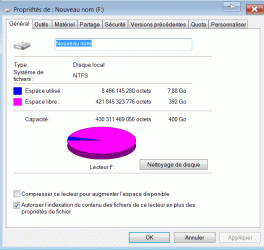
F: 400.76 GB

Question: How could I redistribute disk allocation space. My disk C: as 195.31 GB allocated and it is filled up to82%, while my fisk F: as 400 GB and is filled for less than 2%

What is the "Not allocated space" of 101 MB

My disk as a 640 GB capacity.
If I add the partition for disk Not allocated space & C & F = .1 + 195.31 + 400.76 = 595.17 GB allowed

If my disk is 640 GB - 595.17 = 43.93 GB that is missing somewhere


Disk maintenance:

What is the best tool to verify and maintain disk integrity. I got important file in it and I want to reduce my risk of problems. Actually, my backup is executed via an network external backup hard disk

Martin
 

My Computer

Computer Manufacturer/Model Number
Home made
OS
windows 7 Pro x64
CPU
Intel I5 3450
Motherboard
Gefabye B75M-D3H
Memory
8 GB DDR3 dual chanel
Graphics Card(s)
Asus Radeon 4870 Nevedi Gforce GTX 500Ti
Sound Card
None
Monitor(s) Displays
4 L206W, Synckmaster, Acer X203W, X223W
Screen Resolution
1680 X 1050
Hard Drives
SSD 120G from Intel

640 GB
PSU
Cooler Master 600W
Case
Antec
Cooling
Regular fan
Keyboard
Microsoft Multimedia Bilingual
Mouse
Microsoft Optical 3000
A 640 GB disk has about 595 GB usable, so nothing is missing.

You could enlarge C and make F smaller.

Or, if you have been keeping your personal data on C, you could move your data to F, which would free up some space on C so you might not have to enlarge it. That's probably what I would do. You might then even be able to shrink C and give some more space to F.

What do you use F for now?

Is most or all of your personal data now on C and do you definitely want to keep it on C?

You could also move whatever is on F to C and then delete F. Then enlarge C to take up the space previously used by F. That would give you 1 partition covering the entire disk.

Answer back, along with a screen shot of your Disk Management.

You might be able to resize partitions with Disk Management or you might have to use something like Partition Wizard.

Disk maintenance: S.M.A.R.T., chkdsk, and your hard drive manufacturer's disk utility tools available for download from their site. And occasional defragmentation. You should also have a general idea of what your hard disk temperatures are and use a tool such as HWInfo32 to monitor those temps. It will also monitor other temps and fan speeds.
 

My Computer

Computer type
PC/Desktop
Computer Manufacturer/Model Number
Ignatz Special; 4 speed manual gearbox; factory air conditioning; one of one
OS
Windows 7 Home Premium SP1, 64-bit
CPU
Intel Skylake i5-6600K, not overclocked
Motherboard
AsRock Z170M Extreme 4, micro ATX
Memory
8 GB HyperX DDR4-2666 (2 x 4 GB)
Graphics Card(s)
none; graphics are integrated on CPU
Sound Card
onboard: Realtek ALC1150; external: USB Behringer UF0-202
Monitor(s) Displays
Dell S2340M 23 inch IPS
Screen Resolution
1600 x 900
Hard Drives
System: Crucial MX100 series SSD, 128 GB;
Data: Samsung Spinpoint 103SJ, 1 TB;
Backup: WD Caviar Green WD30EZRX-00D8PB0, 3 TB
PSU
Rosewill SilentNight 500 watt fanless, semi-modular
Case
Antec Solo II
Cooling
Noctua NH-U12S; Noctua F12 intake, Noctua S12A exhaust
Keyboard
Microsoft 200 6JH-00001 USB
Mouse
Dell or Microsoft optical wired; USB
Antivirus
Microsoft Security Essentials and Malwarebytes Premium
Browser
Pale Moon
Other Info
All fans PWM; speeds at idle: CPU circa 500 rpm; intake circa 600 rpm; exhaust circa 600 rpm; CPU temps 27 idle and 47 C load in a warm room (27 C/81 F) when running Intel Extreme Tuning Utility stress test.
A 640 GB disk has about 595 GB usable, so nothing is missing.

You could enlarge C and make F smaller.

Or, if you have been keeping your personal data on C, you could move your data to F, which would free up some space on C so you might not have to enlarge it. That's probably what I would do. You might then even be able to shrink C and give some more space to F.

What do you use F for now?

Is most or all of your personal data now on C and do you definitely want to keep it on C?

You could also move whatever is on F to C and then delete F. Then enlarge C to take up the space previously used by F. That would give you 1 partition covering the entire disk.

Answer back, along with a screen shot of your Disk Management.

You might be able to resize partitions with Disk Management or you might have to use something like Partition Wizard.

Disk maintenance: S.M.A.R.T., chkdsk, and your hard drive manufacturer's disk utility tools available for download from their site. And occasional defragmentation. You should also have a general idea of what your hard disk temperatures are and use a tool such as HWInfo32 to monitor those temps. It will also monitor other temps and fan speeds.

Thank you ignatzatsonic

I did took snapshot of my disk, but I need to get a place to upload them.

Can i directly modify my allocation form each disk?. Is there any danger to do so?
I will try to move some files to F:

Thanks for the info. I will visit my drive manufacturer for it
Drive temp: By touching it, not to hot, but i will see if I could manage it

Martin

P.S. Excuse my English, I'm more fluent in French
 

My Computer

Computer Manufacturer/Model Number
Home made
OS
windows 7 Pro x64
CPU
Intel I5 3450
Motherboard
Gefabye B75M-D3H
Memory
8 GB DDR3 dual chanel
Graphics Card(s)
Asus Radeon 4870 Nevedi Gforce GTX 500Ti
Sound Card
None
Monitor(s) Displays
4 L206W, Synckmaster, Acer X203W, X223W
Screen Resolution
1680 X 1050
Hard Drives
SSD 120G from Intel

640 GB
PSU
Cooler Master 600W
Case
Antec
Cooling
Regular fan
Keyboard
Microsoft Multimedia Bilingual
Mouse
Microsoft Optical 3000
Your English is fine. I don't parlez vous hardly at all. Comprendre?

You can post your picture directly into this thread by using the "go advanced" button at the bottom of your screen and then "manage attachments". Just browse to your picture and then choose "upload".

You can modify the size of any partition. The proper tool for the job depends on what we see from your picture of Disk Management.

There is some minor danger. You should always have your data backed up as a precaution.

Any drive temperature under 40 Celsius is acceptable, assuming you are in a room with ordinary temperatures. Laptop temperatures may be higher.
 

My Computer

Computer type
PC/Desktop
Computer Manufacturer/Model Number
Ignatz Special; 4 speed manual gearbox; factory air conditioning; one of one
OS
Windows 7 Home Premium SP1, 64-bit
CPU
Intel Skylake i5-6600K, not overclocked
Motherboard
AsRock Z170M Extreme 4, micro ATX
Memory
8 GB HyperX DDR4-2666 (2 x 4 GB)
Graphics Card(s)
none; graphics are integrated on CPU
Sound Card
onboard: Realtek ALC1150; external: USB Behringer UF0-202
Monitor(s) Displays
Dell S2340M 23 inch IPS
Screen Resolution
1600 x 900
Hard Drives
System: Crucial MX100 series SSD, 128 GB;
Data: Samsung Spinpoint 103SJ, 1 TB;
Backup: WD Caviar Green WD30EZRX-00D8PB0, 3 TB
PSU
Rosewill SilentNight 500 watt fanless, semi-modular
Case
Antec Solo II
Cooling
Noctua NH-U12S; Noctua F12 intake, Noctua S12A exhaust
Keyboard
Microsoft 200 6JH-00001 USB
Mouse
Dell or Microsoft optical wired; USB
Antivirus
Microsoft Security Essentials and Malwarebytes Premium
Browser
Pale Moon
Other Info
All fans PWM; speeds at idle: CPU circa 500 rpm; intake circa 600 rpm; exhaust circa 600 rpm; CPU temps 27 idle and 47 C load in a warm room (27 C/81 F) when running Intel Extreme Tuning Utility stress test.
Your English is fine. I don't parlez vous hardly at all. Comprendre?
LOL

I learned something about this site... Pictures management :)

Hard drive temp: definitively lower than 40. I would guess around 25 by touching it, but I will look for tool to measure it

Martin
 

Attachments

  • Snap1.gif
    Snap1.gif
    19.9 KB · Views: 5
  • Snap2.gif
    Snap2.gif
    24 KB · Views: 9
  • Snap3.gif
    Snap3.gif
    23.2 KB · Views: 7

My Computer

Computer Manufacturer/Model Number
Home made
OS
windows 7 Pro x64
CPU
Intel I5 3450
Motherboard
Gefabye B75M-D3H
Memory
8 GB DDR3 dual chanel
Graphics Card(s)
Asus Radeon 4870 Nevedi Gforce GTX 500Ti
Sound Card
None
Monitor(s) Displays
4 L206W, Synckmaster, Acer X203W, X223W
Screen Resolution
1680 X 1050
Hard Drives
SSD 120G from Intel

640 GB
PSU
Cooler Master 600W
Case
Antec
Cooling
Regular fan
Keyboard
Microsoft Multimedia Bilingual
Mouse
Microsoft Optical 3000
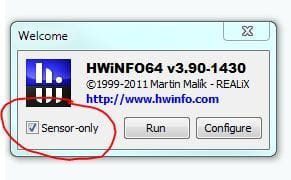
Martin - try HWINFO64 as suggested. When you run it, choose the Sensor-only option at the flash screen.

Regards,
Golden
 

Attachments

  • Capture.JPG
    Capture.JPG
    20.9 KB · Views: 325

My Computer

Computer type
PC/Desktop
Computer Manufacturer/Model Number
Golden Mk. I.4
OS
Windows 10 Pro x64 ; Xubuntu x64
CPU
Intel i7 860 @ 2.80 GHz O/C'ed to 4.0GHz
Motherboard
Gigabyte P55A-UD3R Rev.1. Award BIOS F13
Memory
16GB Corsair Vengance DDR3 @ 661 MHz Dual Channel (9-9-9-24)
Graphics Card(s)
EVGA NVidia GTX 560 1024MB
Sound Card
Realtek Integrated
Monitor(s) Displays
Dual Samsung SyncMaster 2494HS
Screen Resolution
1920*1080 and 1920*1080
Hard Drives
1*Samsung 840 EVO 120GB SSD;
1*OCZ Vertex 2 60GB SSD;
2*Samsung F3 SpinPoint 1TB in RAID0;
1*Samsung F1 SpinPoint 1TB;
2*Western Digital 1TB External USB 3.0
1*Western Digital 500GB External USB 3.0
1*Seagate 500GB External USB 2.0
PSU
Thermaltake ToughPower QFan 750W
Case
Thermaltake Element S VK60001W2Z
Cooling
Corsair H60 Water Cooling, 2*230mm and 2*80mm case fans
Keyboard
Logitech G110
Mouse
Logitech MX518
Martin - try HWINFO64 as suggested. When you run it, choose the Sensor-only option at the flash screen.

Regards,
Golden

Interesting tool

By looking at it, I see that my drive operate at 43C No message from the software that this is a problem, but I will seek info

Martin
 

My Computer

Computer Manufacturer/Model Number
Home made
OS
windows 7 Pro x64
CPU
Intel I5 3450
Motherboard
Gefabye B75M-D3H
Memory
8 GB DDR3 dual chanel
Graphics Card(s)
Asus Radeon 4870 Nevedi Gforce GTX 500Ti
Sound Card
None
Monitor(s) Displays
4 L206W, Synckmaster, Acer X203W, X223W
Screen Resolution
1680 X 1050
Hard Drives
SSD 120G from Intel

640 GB
PSU
Cooler Master 600W
Case
Antec
Cooling
Regular fan
Keyboard
Microsoft Multimedia Bilingual
Mouse
Microsoft Optical 3000
Your C: size is more than enough. Infact 80-100GB is fairly large enough for holding OS and applications.

Looking at your disk usage, it seems you have kept all your user data in C: keeping your F: partition empty. I suggest you move all the data from C: to F:. This will make lot of free space in C:. That is all you have to do and nothing to worry! :)
 

My Computer

Computer Manufacturer/Model Number
Toshiba Satellite P775-S7232
OS
MS Windows 7 Ultimate 64-bit SP1
CPU
i5-2410M 2.3GHz (2.9GHz Turbo-Boost) Sandy Bridge 32nm
Motherboard
Toshiba PHRAA ver. PSBY1U-00F003
Memory
4GB+4GB Samsung DDR3 PC3-10700 (1333 MHz)
Graphics Card(s)
Video Intel(R) HD Graphics Family, 1696MB available memory
Sound Card
Realtek High Definition Audio version=6.0.1.6323
Monitor(s) Displays
17.3 " Trubrite TFT LCD, LED Backlit
Screen Resolution
1600x900 32 bit, Native support for 720P content
Hard Drives
TOSHIBA MK6476GSXN
580.614 [GB] partitioned C: 80GB and D: 500GB with hidden recovery partitons.

Spare bay for 2nd HDD but no SATA connector :-(
PSU
Toshiba AC/DC Adapter
Case
Notebook
Cooling
Built-in Fan
Keyboard
Premium Raised Tile keyboard
Mouse
Logitech M215 wireless mouse
Internet Speed
Not fast enough
Other Info
Built-in Harman Kardon speakers with Dolby Advanced Audio, Waves MaxxAudio® 3. HDMI, 1xUSB3+3xUSB2 ports, WebCam, Battery life 4hrs 11mins, 4GB Readyboost SDHC card, WD My Book Essential Ext HDDs 2 TB, 2x1TB, My Passport SE 1TB and WDTV 1st Gen for Multimedia playing on a Sony Wega 32" LCD.
Recent addition to my toys are Asus Transformer Pad TF300T with 32GB onboard sd card + 32GB microsd card.
Thanks,

OK, I see

I will work on moving my data

I realized that I have an old old ** habit from the DOS time to load everything on C:

* Yes, I have worked with 15 inches, 10k hard disk and 8 inch floppy disk in the past. We where calling them the anchor, they where very heavy... :)
 

My Computer

Computer Manufacturer/Model Number
Home made
OS
windows 7 Pro x64
CPU
Intel I5 3450
Motherboard
Gefabye B75M-D3H
Memory
8 GB DDR3 dual chanel
Graphics Card(s)
Asus Radeon 4870 Nevedi Gforce GTX 500Ti
Sound Card
None
Monitor(s) Displays
4 L206W, Synckmaster, Acer X203W, X223W
Screen Resolution
1680 X 1050
Hard Drives
SSD 120G from Intel

640 GB
PSU
Cooler Master 600W
Case
Antec
Cooling
Regular fan
Keyboard
Microsoft Multimedia Bilingual
Mouse
Microsoft Optical 3000
As suspected, you will have to use Partition Wizard bootable disk if you want to increase the size of C.

The general procedure in Partition Wizard would be to shrink F, which would generate some "unallocated space". You could then add that unallocated space to C.

Personally, I would not do that. Instead, I would move personal data from C to F. And then possibly reduce the size of C. Or you could just leave C the same size and not reduce it.

Here is how to use Partition Wizard:

http://www.sevenforums.com/tutorials/93322-partition-wizard-use-bootable-cd.html?ltr=P

Your hard drive temperature is acceptable.
 

My Computer

Computer type
PC/Desktop
Computer Manufacturer/Model Number
Ignatz Special; 4 speed manual gearbox; factory air conditioning; one of one
OS
Windows 7 Home Premium SP1, 64-bit
CPU
Intel Skylake i5-6600K, not overclocked
Motherboard
AsRock Z170M Extreme 4, micro ATX
Memory
8 GB HyperX DDR4-2666 (2 x 4 GB)
Graphics Card(s)
none; graphics are integrated on CPU
Sound Card
onboard: Realtek ALC1150; external: USB Behringer UF0-202
Monitor(s) Displays
Dell S2340M 23 inch IPS
Screen Resolution
1600 x 900
Hard Drives
System: Crucial MX100 series SSD, 128 GB;
Data: Samsung Spinpoint 103SJ, 1 TB;
Backup: WD Caviar Green WD30EZRX-00D8PB0, 3 TB
PSU
Rosewill SilentNight 500 watt fanless, semi-modular
Case
Antec Solo II
Cooling
Noctua NH-U12S; Noctua F12 intake, Noctua S12A exhaust
Keyboard
Microsoft 200 6JH-00001 USB
Mouse
Dell or Microsoft optical wired; USB
Antivirus
Microsoft Security Essentials and Malwarebytes Premium
Browser
Pale Moon
Other Info
All fans PWM; speeds at idle: CPU circa 500 rpm; intake circa 600 rpm; exhaust circa 600 rpm; CPU temps 27 idle and 47 C load in a warm room (27 C/81 F) when running Intel Extreme Tuning Utility stress test.
Thank you again Ignatzatsonic
 

My Computer

Computer Manufacturer/Model Number
Home made
OS
windows 7 Pro x64
CPU
Intel I5 3450
Motherboard
Gefabye B75M-D3H
Memory
8 GB DDR3 dual chanel
Graphics Card(s)
Asus Radeon 4870 Nevedi Gforce GTX 500Ti
Sound Card
None
Monitor(s) Displays
4 L206W, Synckmaster, Acer X203W, X223W
Screen Resolution
1680 X 1050
Hard Drives
SSD 120G from Intel

640 GB
PSU
Cooler Master 600W
Case
Antec
Cooling
Regular fan
Keyboard
Microsoft Multimedia Bilingual
Mouse
Microsoft Optical 3000
I agree with moving your data files from C: to F:, but if you still want to make C: bigger (and F: smaller) anyway, there's a simple way to do this in Windows without any reboots and without partition management software:

Assuming that F: is actually empty (there's nothing on F: that you want), delete the partition containing F: in Disk Management. You will then have unallocated space to the right of C: and can easily expand it to whatever size you wish.
After you're done resizing C:, simply create a new partition in the remaining unallocated space. Assign the drive letter F: to the new partition and then format it.
 

My Computer

Computer type
PC/Desktop
Computer Manufacturer/Model Number
Custom-built
OS
Windows 7 Professional SP1 32-bit
CPU
Intel Core 2 Duo E6600 2.4GHz
Motherboard
Asus PL5D2
Memory
4GB DDR2-667 (4x1GB in dual-channel config)
Graphics Card(s)
nVidia GeForce 9800 GT
Sound Card
Creative X-Fi XtremeMusic
Monitor(s) Displays
Acer P236H
Screen Resolution
1920x1200 (DVI)
Hard Drives
OCZ SSD Vertex Plus 60GB SATA (Firmware 3.55), 64MB cache
Hitachi HD321KJ SATA, 320GB, 7200rpm, 16MB cache
PSU
Antec TruePower 2.0
Case
Cooler Master Centurion
Cooling
Too many fans
Keyboard
Standard
Mouse
Microsoft wireless optical mouse
Internet Speed
AT&T U-verse (18mbit/sec)
Antivirus
Microsoft Security Essentials
Browser
Firefox
Other Info
Other devices:
Compaq CQ-60 laptop
Google Nexus 7 (2012) tablet
Nvidia SHIELD tablet (US/LTE)
Hardkernel ODROID-XU single-board computer (Samsung Exynos 5420)
Clever! :)
 

My Computer

Computer Manufacturer/Model Number
Home made
OS
windows 7 Pro x64
CPU
Intel I5 3450
Motherboard
Gefabye B75M-D3H
Memory
8 GB DDR3 dual chanel
Graphics Card(s)
Asus Radeon 4870 Nevedi Gforce GTX 500Ti
Sound Card
None
Monitor(s) Displays
4 L206W, Synckmaster, Acer X203W, X223W
Screen Resolution
1680 X 1050
Hard Drives
SSD 120G from Intel

640 GB
PSU
Cooler Master 600W
Case
Antec
Cooling
Regular fan
Keyboard
Microsoft Multimedia Bilingual
Mouse
Microsoft Optical 3000
As suspected, you will have to use Partition Wizard bootable disk if you want to increase the size of C.

The general procedure in Partition Wizard would be to shrink F, which would generate some "unallocated space". You could then add that unallocated space to C.

Personally, I would not do that. Instead, I would move personal data from C to F. And then possibly reduce the size of C. Or you could just leave C the same size and not reduce it.

Here is how to use Partition Wizard:

http://www.sevenforums.com/tutorials/93322-partition-wizard-use-bootable-cd.html?ltr=P

Your hard drive temperature is acceptable.

Hello ignatzatsonic

I did not succeed to transfer data from c: to f: I was looking to transfer the entire Users directory, but for whatever reason, it was not a success

I did load the Partition wizard and reduce the size of my drive f: Now, I got 200GB free, not allocated but I can't add them to drive C:

Is there a magic solution?

Martin :huh:
 

My Computer

Computer Manufacturer/Model Number
Home made
OS
windows 7 Pro x64
CPU
Intel I5 3450
Motherboard
Gefabye B75M-D3H
Memory
8 GB DDR3 dual chanel
Graphics Card(s)
Asus Radeon 4870 Nevedi Gforce GTX 500Ti
Sound Card
None
Monitor(s) Displays
4 L206W, Synckmaster, Acer X203W, X223W
Screen Resolution
1680 X 1050
Hard Drives
SSD 120G from Intel

640 GB
PSU
Cooler Master 600W
Case
Antec
Cooling
Regular fan
Keyboard
Microsoft Multimedia Bilingual
Mouse
Microsoft Optical 3000
I did load the Partition wizard and reduce the size of my drive f: Now, I got 200GB free, not allocated but I can't add them to drive C:

Is there a magic solution?

Using Easus Partition is much easier for increasing decreasing partition size
 

My Computer

Computer Manufacturer/Model Number
Sony VAIO VPCSB25FG/B
OS
Windows 7 Professional x32
CPU
Intel® Core™ i3-2310M Processor 2.10 GHz*1
Motherboard
Asus
Memory
4GB
Graphics Card(s)
AMD Radeon™ HD 6470M (SPEED MODE) / Intel® HD Graphics 3000
Sound Card
Intel® High Definition Audio
Monitor(s) Displays
13.3 (33.8cm) wide (WXGA: 1366x768) TFT colour display (VAIO
Screen Resolution
1366x768
Hard Drives
500 GB*4 (Serial ATA, 5400 rpm)
I did load the Partition wizard and reduce the size of my drive f: Now, I got 200GB free, not allocated but I can't add them to drive C:

Is there a magic solution?

Using Easus Partition is much easier for increasing decreasing partition size

I visited there site. There is many option. Whitch one should I use?

Martin
 

My Computer

Computer Manufacturer/Model Number
Home made
OS
windows 7 Pro x64
CPU
Intel I5 3450
Motherboard
Gefabye B75M-D3H
Memory
8 GB DDR3 dual chanel
Graphics Card(s)
Asus Radeon 4870 Nevedi Gforce GTX 500Ti
Sound Card
None
Monitor(s) Displays
4 L206W, Synckmaster, Acer X203W, X223W
Screen Resolution
1680 X 1050
Hard Drives
SSD 120G from Intel

640 GB
PSU
Cooler Master 600W
Case
Antec
Cooling
Regular fan
Keyboard
Microsoft Multimedia Bilingual
Mouse
Microsoft Optical 3000
I visited there site. There is many option. Whitch one should I use?

Martin

This is direct download link from official website
Download Free version

Product page

Dont forget to backup while using any software which helps to resize disc
 

My Computer

Computer Manufacturer/Model Number
Sony VAIO VPCSB25FG/B
OS
Windows 7 Professional x32
CPU
Intel® Core™ i3-2310M Processor 2.10 GHz*1
Motherboard
Asus
Memory
4GB
Graphics Card(s)
AMD Radeon™ HD 6470M (SPEED MODE) / Intel® HD Graphics 3000
Sound Card
Intel® High Definition Audio
Monitor(s) Displays
13.3 (33.8cm) wide (WXGA: 1366x768) TFT colour display (VAIO
Screen Resolution
1366x768
Hard Drives
500 GB*4 (Serial ATA, 5400 rpm)
Resolve

As suspected, you will have to use Partition Wizard bootable disk if you want to increase the size of C.

The general procedure in Partition Wizard would be to shrink F, which would generate some "unallocated space". You could then add that unallocated space to C.

Personally, I would not do that. Instead, I would move personal data from C to F. And then possibly reduce the size of C. Or you could just leave C the same size and not reduce it.

Here is how to use Partition Wizard:

http://www.sevenforums.com/tutorials/93322-partition-wizard-use-bootable-cd.html?ltr=P

Your hard drive temperature is acceptable.

Hello ignatzatsonic

I did not succeed to transfer data from c: to f: I was looking to transfer the entire Users directory, but for whatever reason, it was not a success

I did load the Partition wizard and reduce the size of my drive f: Now, I got 200GB free, not allocated but I can't add them to drive C:

Is there a magic solution?

Martin :huh:

Free space need to be contiguous with C: drive I had reduced my F: drive from right to left. That caused my free space to be after f: drive.

To resolved, I reduce my F: drive from left to right. This as created free space between c: drive and F: drive. After, I was able to allocate the space to c: drive

Et Voilà

Martin
 

My Computer

Computer Manufacturer/Model Number
Home made
OS
windows 7 Pro x64
CPU
Intel I5 3450
Motherboard
Gefabye B75M-D3H
Memory
8 GB DDR3 dual chanel
Graphics Card(s)
Asus Radeon 4870 Nevedi Gforce GTX 500Ti
Sound Card
None
Monitor(s) Displays
4 L206W, Synckmaster, Acer X203W, X223W
Screen Resolution
1680 X 1050
Hard Drives
SSD 120G from Intel

640 GB
PSU
Cooler Master 600W
Case
Antec
Cooling
Regular fan
Keyboard
Microsoft Multimedia Bilingual
Mouse
Microsoft Optical 3000
Back
Top