When I click an icon or file, I get the expandable selection box.

MarkC0

New member
Member
VIP
Local time
9:22 AM
Messages
153
Hello,
I am having an issue where occasionally, when attempting to click an icon or file in a folder or on the desktop, I instead get stuck with the "expandable selection box". I am referring to the box that comes up that's size you control with your mouse which allows you to select multiple items (anything within the box is selected).

I am using Win 7 x64. This doesn't happen always or even very often, however it pops up frequently enough when I am moving a lot of files around. At first I assumed I must be clicking the space just beside the text/icon, but upon evaluating it today I have noticed it even occurs when I am directly over the icon or file text.

Solutions? Thanks!
 

My Computer My Computer

At a glance

Windows 7 Ultimate x64i7-2600k8GB 1600MHZZotac NVIDIA GTX 580 1.5GB
OS
Windows 7 Ultimate x64
CPU
i7-2600k
Motherboard
ASUS P8Z68 V-PRO
Memory
8GB 1600MHZ
Graphics Card(s)
Zotac NVIDIA GTX 580 1.5GB
Hard Drives
Intel 510 120GB SSD
Samsung Spinpoint HE103SJ HDD
PSU
NZXT HALE90 1000W PSU
Case
HAF-922
Cooling
Hyper 212
No one is familiar with this problem?
 

My Computer My Computer

At a glance

Windows 7 Ultimate x64i7-2600k8GB 1600MHZZotac NVIDIA GTX 580 1.5GB
OS
Windows 7 Ultimate x64
CPU
i7-2600k
Motherboard
ASUS P8Z68 V-PRO
Memory
8GB 1600MHZ
Graphics Card(s)
Zotac NVIDIA GTX 580 1.5GB
Hard Drives
Intel 510 120GB SSD
Samsung Spinpoint HE103SJ HDD
PSU
NZXT HALE90 1000W PSU
Case
HAF-922
Cooling
Hyper 212
Sorry Mark, can't figure out what you're referring to. Why don't you post a screen shot of the "expandable selection box" so that hopefully someone will recognize the problem and have a solution for you.

Also please let us know what it is that you're TRYING to accomplish when you click on the icon that gives you the selection box.

PS You wouldn't, by any chance, be RIGHT-CLICKING on the icon or file, would you? Because right-clicking (instead of left-clicking) will cause a "Context Menu" box to open -- that sounds exactly like what you're describing.
 

My Computer My Computer

At a glance

Vista 64 bit and 32 bit (SP2)Intel(R) Core(TM)2 Duo Processor T9400 (2.53 GHz4GB DDR2 System Memory (2 Dimm)512 MB NVIDIA GeForce 9600M GT
Computer Manufacturer/Model Number
HP Pavillion dv5t (generation 1)
OS
Vista 64 bit and 32 bit (SP2)
CPU
Intel(R) Core(TM)2 Duo Processor T9400 (2.53 GHz
Memory
4GB DDR2 System Memory (2 Dimm)
Graphics Card(s)
512 MB NVIDIA GeForce 9600M GT
Monitor(s) Displays
15.4" diagonal WSXGA+ High-Definition HP BrightView Widescre
Screen Resolution
1680 x 1050
Hard Drives
320GB 5400RPM SATA Hard Drive with HP ProtectSmart Hard Drive Protection
Keyboard
Built-in HP
Mouse
Built in - Synaptics TouchPad V6.5 on PS/2 Port
Internet Speed
Max
Other Info
~ Intel Next-Gen Wireless-N Mini-card w/Bluetooth ~ Blu-Ray ROM DVD+/-R/RW ~ Integ. HDTV Hybrid Tuner ~ 12 Cell Battery ~ MS Office (Home Premium) 2007 ~
Like this one ? (the color may be different due to theme).
Untitled.jpg

If so, try with an alternative mouse and see if it still occurs .
 

My Computer My Computer

At a glance

Microsoft Windows 10 Pro Insider Preview 64-bitIntel(R) Core(TM) i3-4130 CPU @ 3.40GHzCorsair Vengence 4GB x2 (8.00GB Dual-Channel ...2047MB GeForce GTS 450 (ZOTAC International)
Computer type
PC/Desktop
Computer Manufacturer/Model Number
Self Assembled
OS
Microsoft Windows 10 Pro Insider Preview 64-bit
CPU
Intel(R) Core(TM) i3-4130 CPU @ 3.40GHz
Motherboard
Gigabyte Technology Co., Ltd. B85M-D3H
Memory
Corsair Vengence 4GB x2 (8.00GB Dual-Channel DDR3 @ 798MHz)
Graphics Card(s)
2047MB GeForce GTS 450 (ZOTAC International)
Sound Card
Onboard (Realtek High Definition Audio)
Monitor(s) Displays
LG Flatron E2040T
Screen Resolution
1600x900
Hard Drives
Western Digital 1 TB
Seagate 500 GB
PSU
Corsair VS550
Case
Cooler Master K380
Cooling
Cooler Master Seidon 120V Plus
Keyboard
Logitech MK260r
Mouse
Logitech MK260r
Internet Speed
PMPL Broadband
Antivirus
Windows Defender + MBAM
Browser
Firefox
Other Info
Dell Studio 15" Laptop
Hey guys,
Yes, I am referring to the box in the image above. I'm using a different mouse today and still getting the same problem.

I am trying to accomplish 2 things:
1) Disable the box in this situation: After dragging an icon from the desktop/folder A into a folder B, then attempting to drag another icon from the desktop/Folder A while Folder B is the primary window (having to first select the folder/desktop the dragged item is located in is the obvious work-around but not what I'm looking for).
2) When viewing folders by "Details" view, I want it setup so if I click anywhere within a cell under the category "Name" (file name), it selects the file/folder rather than creating the selection boxed discussed. Right now it only selects the file/folder if you are clicking the text itself, it does not apply to the whole cell.

Thanks!
 

My Computer My Computer

At a glance

Windows 7 Ultimate x64i7-2600k8GB 1600MHZZotac NVIDIA GTX 580 1.5GB
OS
Windows 7 Ultimate x64
CPU
i7-2600k
Motherboard
ASUS P8Z68 V-PRO
Memory
8GB 1600MHZ
Graphics Card(s)
Zotac NVIDIA GTX 580 1.5GB
Hard Drives
Intel 510 120GB SSD
Samsung Spinpoint HE103SJ HDD
PSU
NZXT HALE90 1000W PSU
Case
HAF-922
Cooling
Hyper 212
Hmm, any ideas?
 

My Computer My Computer

At a glance

Windows 7 Ultimate x64i7-2600k8GB 1600MHZZotac NVIDIA GTX 580 1.5GB
OS
Windows 7 Ultimate x64
CPU
i7-2600k
Motherboard
ASUS P8Z68 V-PRO
Memory
8GB 1600MHZ
Graphics Card(s)
Zotac NVIDIA GTX 580 1.5GB
Hard Drives
Intel 510 120GB SSD
Samsung Spinpoint HE103SJ HDD
PSU
NZXT HALE90 1000W PSU
Case
HAF-922
Cooling
Hyper 212
To me it is still very confusing what you want/what is happening. If you don't want the selection rectangle in the snip, don't click and drag on the desktop or within a folder.
 

My Computer My Computer

At a glance

Windows 7 Ultimate X64 SP1Intel i5-2550K, Differing ~4.4-4.8GHz No buil...16GB G.Skill Sniper 1866MHz @ 2133MHz 2x8GBASUS GTX650TIB-DC2OC-2GD5, (650TI Boost)
Computer type
PC/Desktop
Computer Manufacturer/Model Number
Home Built Desktop By DataTech
OS
Windows 7 Ultimate X64 SP1
CPU
Intel i5-2550K, Differing ~4.4-4.8GHz No built in GPU
Motherboard
ASUS P8Z68-V PRO/GEN3
Memory
16GB G.Skill Sniper 1866MHz @ 2133MHz 2x8GB
Graphics Card(s)
ASUS GTX650TIB-DC2OC-2GD5, (650TI Boost)
Sound Card
Onboard Realtek 5-1
Monitor(s) Displays
Samsung P2570HD
Screen Resolution
1920x1080
Hard Drives
Samsung 840 Pro 256GB SSD for OS, 500GB Seagate Constellation (Enterprise drive) for Data
PSU
Corsair HX650W
Case
Inwin Dragon Rider
Cooling
Hyper 212 EVO w/two Noctua fans, push-pull, @1300 RPM
Keyboard
E-Z Eyes, bright yellow keys with large characters
Mouse
steelseries SENSEI Laser Pro Gaming
Internet Speed
48-51Mbs Mbs down, 11 Mbs up Xfinity Cable
Antivirus
Norton Internet Security 2013
Browser
IE 10, Opera, Pale Moon if needed
Other Info
4 case fans, LG BluRay-RE, ASUS DVD-RW, Mr. Fusion power supply, 1.21 gigawatts.
To me it is still very confusing what you want/what is happening. If you don't want the selection rectangle in the snip, don't click and drag on the desktop or within a folder.
I'm attempting to drag a file out of a folder and want to place it into a different folder. The problem is that rectangular expandable selection thing keeps coming up when I try to drag things from an INACTIVE window to somewhere else.

So say the ACTIVE window is a folder. If I go to grab an icon from the desktop, without having minimized that folder, instead of selecting the icon, it will do that rectangle thing. THEN, if I try again, it will work.
 

My Computer My Computer

At a glance

Windows 7 Ultimate x64i7-2600k8GB 1600MHZZotac NVIDIA GTX 580 1.5GB
OS
Windows 7 Ultimate x64
CPU
i7-2600k
Motherboard
ASUS P8Z68 V-PRO
Memory
8GB 1600MHZ
Graphics Card(s)
Zotac NVIDIA GTX 580 1.5GB
Hard Drives
Intel 510 120GB SSD
Samsung Spinpoint HE103SJ HDD
PSU
NZXT HALE90 1000W PSU
Case
HAF-922
Cooling
Hyper 212
Gotcha. Try, Control Panel/Folders and see how your selections options are set. Change them around and see if that helps.
 

My Computer My Computer

At a glance

Windows 7 Ultimate X64 SP1Intel i5-2550K, Differing ~4.4-4.8GHz No buil...16GB G.Skill Sniper 1866MHz @ 2133MHz 2x8GBASUS GTX650TIB-DC2OC-2GD5, (650TI Boost)
Computer type
PC/Desktop
Computer Manufacturer/Model Number
Home Built Desktop By DataTech
OS
Windows 7 Ultimate X64 SP1
CPU
Intel i5-2550K, Differing ~4.4-4.8GHz No built in GPU
Motherboard
ASUS P8Z68-V PRO/GEN3
Memory
16GB G.Skill Sniper 1866MHz @ 2133MHz 2x8GB
Graphics Card(s)
ASUS GTX650TIB-DC2OC-2GD5, (650TI Boost)
Sound Card
Onboard Realtek 5-1
Monitor(s) Displays
Samsung P2570HD
Screen Resolution
1920x1080
Hard Drives
Samsung 840 Pro 256GB SSD for OS, 500GB Seagate Constellation (Enterprise drive) for Data
PSU
Corsair HX650W
Case
Inwin Dragon Rider
Cooling
Hyper 212 EVO w/two Noctua fans, push-pull, @1300 RPM
Keyboard
E-Z Eyes, bright yellow keys with large characters
Mouse
steelseries SENSEI Laser Pro Gaming
Internet Speed
48-51Mbs Mbs down, 11 Mbs up Xfinity Cable
Antivirus
Norton Internet Security 2013
Browser
IE 10, Opera, Pale Moon if needed
Other Info
4 case fans, LG BluRay-RE, ASUS DVD-RW, Mr. Fusion power supply, 1.21 gigawatts.
Couldn't find anything in there referring to selections. You are talking about Control Panel --> Folder Options right?
 

My Computer My Computer

At a glance

Windows 7 Ultimate x64i7-2600k8GB 1600MHZZotac NVIDIA GTX 580 1.5GB
OS
Windows 7 Ultimate x64
CPU
i7-2600k
Motherboard
ASUS P8Z68 V-PRO
Memory
8GB 1600MHZ
Graphics Card(s)
Zotac NVIDIA GTX 580 1.5GB
Hard Drives
Intel 510 120GB SSD
Samsung Spinpoint HE103SJ HDD
PSU
NZXT HALE90 1000W PSU
Case
HAF-922
Cooling
Hyper 212
Sorry. I think what you need to do is click wherever the file you want to move is. That is, if it's on the Desktop, click it, if in another folder, click inside the folder somewhere. Wherever the "to be moved" item is has to be active, or the focus, first.
 

My Computer My Computer

At a glance

Windows 7 Ultimate X64 SP1Intel i5-2550K, Differing ~4.4-4.8GHz No buil...16GB G.Skill Sniper 1866MHz @ 2133MHz 2x8GBASUS GTX650TIB-DC2OC-2GD5, (650TI Boost)
Computer type
PC/Desktop
Computer Manufacturer/Model Number
Home Built Desktop By DataTech
OS
Windows 7 Ultimate X64 SP1
CPU
Intel i5-2550K, Differing ~4.4-4.8GHz No built in GPU
Motherboard
ASUS P8Z68-V PRO/GEN3
Memory
16GB G.Skill Sniper 1866MHz @ 2133MHz 2x8GB
Graphics Card(s)
ASUS GTX650TIB-DC2OC-2GD5, (650TI Boost)
Sound Card
Onboard Realtek 5-1
Monitor(s) Displays
Samsung P2570HD
Screen Resolution
1920x1080
Hard Drives
Samsung 840 Pro 256GB SSD for OS, 500GB Seagate Constellation (Enterprise drive) for Data
PSU
Corsair HX650W
Case
Inwin Dragon Rider
Cooling
Hyper 212 EVO w/two Noctua fans, push-pull, @1300 RPM
Keyboard
E-Z Eyes, bright yellow keys with large characters
Mouse
steelseries SENSEI Laser Pro Gaming
Internet Speed
48-51Mbs Mbs down, 11 Mbs up Xfinity Cable
Antivirus
Norton Internet Security 2013
Browser
IE 10, Opera, Pale Moon if needed
Other Info
4 case fans, LG BluRay-RE, ASUS DVD-RW, Mr. Fusion power supply, 1.21 gigawatts.
Sorry. I think what you need to do is click wherever the file you want to move is. That is, if it's on the Desktop, click it, if in another folder, click inside the folder somewhere. Wherever the "to be moved" item is has to be active, or the focus, first.
Boo-urns!!

Is there third party software that changes this by any chance?

Thanks
 

My Computer My Computer

At a glance

Windows 7 Ultimate x64i7-2600k8GB 1600MHZZotac NVIDIA GTX 580 1.5GB
OS
Windows 7 Ultimate x64
CPU
i7-2600k
Motherboard
ASUS P8Z68 V-PRO
Memory
8GB 1600MHZ
Graphics Card(s)
Zotac NVIDIA GTX 580 1.5GB
Hard Drives
Intel 510 120GB SSD
Samsung Spinpoint HE103SJ HDD
PSU
NZXT HALE90 1000W PSU
Case
HAF-922
Cooling
Hyper 212
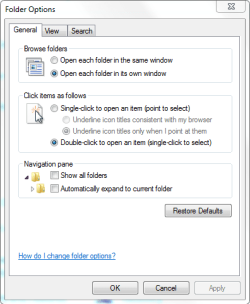
OK, go to Control Panel/Folder Options/General tab under Click items as follows and tick mark the option to Single-click to open an item (point to select), see if that will help some.
Capture.PNG
 

My Computer My Computer

At a glance

Windows 7 Ultimate X64 SP1Intel i5-2550K, Differing ~4.4-4.8GHz No buil...16GB G.Skill Sniper 1866MHz @ 2133MHz 2x8GBASUS GTX650TIB-DC2OC-2GD5, (650TI Boost)
Computer type
PC/Desktop
Computer Manufacturer/Model Number
Home Built Desktop By DataTech
OS
Windows 7 Ultimate X64 SP1
CPU
Intel i5-2550K, Differing ~4.4-4.8GHz No built in GPU
Motherboard
ASUS P8Z68-V PRO/GEN3
Memory
16GB G.Skill Sniper 1866MHz @ 2133MHz 2x8GB
Graphics Card(s)
ASUS GTX650TIB-DC2OC-2GD5, (650TI Boost)
Sound Card
Onboard Realtek 5-1
Monitor(s) Displays
Samsung P2570HD
Screen Resolution
1920x1080
Hard Drives
Samsung 840 Pro 256GB SSD for OS, 500GB Seagate Constellation (Enterprise drive) for Data
PSU
Corsair HX650W
Case
Inwin Dragon Rider
Cooling
Hyper 212 EVO w/two Noctua fans, push-pull, @1300 RPM
Keyboard
E-Z Eyes, bright yellow keys with large characters
Mouse
steelseries SENSEI Laser Pro Gaming
Internet Speed
48-51Mbs Mbs down, 11 Mbs up Xfinity Cable
Antivirus
Norton Internet Security 2013
Browser
IE 10, Opera, Pale Moon if needed
Other Info
4 case fans, LG BluRay-RE, ASUS DVD-RW, Mr. Fusion power supply, 1.21 gigawatts.
Yeah, but I don't want to single-click to execute things :P.

I think I'll have to bare this one out. Doesn't look like there's a solution to it. Thanks though!
 

My Computer My Computer

At a glance

Windows 7 Ultimate x64i7-2600k8GB 1600MHZZotac NVIDIA GTX 580 1.5GB
OS
Windows 7 Ultimate x64
CPU
i7-2600k
Motherboard
ASUS P8Z68 V-PRO
Memory
8GB 1600MHZ
Graphics Card(s)
Zotac NVIDIA GTX 580 1.5GB
Hard Drives
Intel 510 120GB SSD
Samsung Spinpoint HE103SJ HDD
PSU
NZXT HALE90 1000W PSU
Case
HAF-922
Cooling
Hyper 212
Back
Top