Solved Secondary Hard Drive freezes system before Windows launch

tripdip

New member
Local time
2:36 AM
Messages
4
My system runs Windows 7, 64bit OS.
Replaced Socket 775 Mother board and CPU with Socket 1155.
ASUS was manufacturer of both old and new mobos.
Kept all hard drives and reinstalled them.
2 x Seagate 350Gb Sata 3.0 (one is the boot drive with OS)
1 x Western Digital Caviar Green 1.0 Tb Sata 3.0


PROBLEM: System would freeze at post, just before Windows launch.
Isolated to the WD hard drive as problem.
When disconnected, Windows booted normally and all other drives appeared.


I did a “Clean Install” of Windows 7, 64 bit. I reinstalled latest mobo bios and all chipset/device drivers, but problem continued.


Tried to “Hot Plug” the WD drive after windows launched and it worked. It booted and loaded drivers. When Hot Plugged it operated normally and was visible in both My Computer and Disk Management. I could see files and transfer to and from the disk.


HOWEVER, when I shut down and restarted, I was back to square one. Drive caused system to freeze before Windows launch.


The only way to access the drive is via Hot Plug, which is not realistic for an internal drive.


Anyone have a solution? Help Please. Thanks.
 

My Computer My Computer

At a glance

Windows 7 Home Premium 64 bitIntel Core i3 2100Kingston DDR3 1600 - 8GB (2x4GB)EVGA GeForce GTX 460 SE
Computer Manufacturer/Model Number
Home Build
OS
Windows 7 Home Premium 64 bit
CPU
Intel Core i3 2100
Motherboard
ASUS P8Z68-V LX
Memory
Kingston DDR3 1600 - 8GB (2x4GB)
Graphics Card(s)
EVGA GeForce GTX 460 SE
Sound Card
none
Monitor(s) Displays
Sony 19 inch
Hard Drives
Seagate: ST3320620AS 350GB Sata 3.0
Western Digital Caviar Green: WD10EARS 1.0TB Sata 3.0
PSU
650W
Case
Antec Sonata
Does the main drive and the WD drive both have the OS loaded on it? Next question: What SATA port do you have it plug into...it does make a difference? It should be plugged into sata ports 1 - 4. The other ports require either AHCI driver loaded to activate those ports or the RAID driver to use all port at the same time. It's a limation of the mobo do to the controller responseable for the remaining sata ports.
 

My Computer My Computer

At a glance

Windows 7 Ultimate 64 bitAMD Phenom II X4 965 Black EditionGSkill 4 X 2 GB PC 8500XFX Radeon HD 6790 D
Computer Manufacturer/Model Number
Custom built
OS
Windows 7 Ultimate 64 bit
CPU
AMD Phenom II X4 965 Black Edition
Motherboard
Gigabyte GA-MA790X-DS4
Memory
GSkill 4 X 2 GB PC 8500
Graphics Card(s)
XFX Radeon HD 6790 D
Sound Card
On board RealTek HD
Monitor(s) Displays
Dual monitors:Samsung SyncMaster S20B300
Screen Resolution
1600 X 900
Hard Drives
Seagate Barracuda 1TB (primary)
Seagate Barracuda 2 X 320 GB
PSU
Ultra X4 750 watt fully modular
Case
Thermaltake Overseer RX 1 full tower
Cooling
Core-Contact 92 mm CPU Cooler
Keyboard
Logitech G510
Mouse
Razor DeathAdder
Internet Speed
50/5 Mbps UL/DL
Other Info
Optical: Super Muliti DVD burner w/lightscribe, Hauppauge WinTV HVR-1800
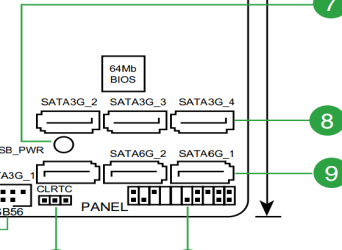
Haveing a look at your mobo manual, I see that is has 6 ports. 1 threw 4 are sata3g and ports 5-6 are sata6g. So make sure your have your hard drives plugged into one of the 3G ports. Here's a cut away of your mobo ports layout.

sata ports.PNG
 

My Computer My Computer

At a glance

Windows 7 Ultimate 64 bitAMD Phenom II X4 965 Black EditionGSkill 4 X 2 GB PC 8500XFX Radeon HD 6790 D
Computer Manufacturer/Model Number
Custom built
OS
Windows 7 Ultimate 64 bit
CPU
AMD Phenom II X4 965 Black Edition
Motherboard
Gigabyte GA-MA790X-DS4
Memory
GSkill 4 X 2 GB PC 8500
Graphics Card(s)
XFX Radeon HD 6790 D
Sound Card
On board RealTek HD
Monitor(s) Displays
Dual monitors:Samsung SyncMaster S20B300
Screen Resolution
1600 X 900
Hard Drives
Seagate Barracuda 1TB (primary)
Seagate Barracuda 2 X 320 GB
PSU
Ultra X4 750 watt fully modular
Case
Thermaltake Overseer RX 1 full tower
Cooling
Core-Contact 92 mm CPU Cooler
Keyboard
Logitech G510
Mouse
Razor DeathAdder
Internet Speed
50/5 Mbps UL/DL
Other Info
Optical: Super Muliti DVD burner w/lightscribe, Hauppauge WinTV HVR-1800
OS only loaded on main drive.
Plugged into Sata Port #2.
AHCI is enabled
 

My Computer My Computer

At a glance

Windows 7 Home Premium 64 bitIntel Core i3 2100Kingston DDR3 1600 - 8GB (2x4GB)EVGA GeForce GTX 460 SE
Computer Manufacturer/Model Number
Home Build
OS
Windows 7 Home Premium 64 bit
CPU
Intel Core i3 2100
Motherboard
ASUS P8Z68-V LX
Memory
Kingston DDR3 1600 - 8GB (2x4GB)
Graphics Card(s)
EVGA GeForce GTX 460 SE
Sound Card
none
Monitor(s) Displays
Sony 19 inch
Hard Drives
Seagate: ST3320620AS 350GB Sata 3.0
Western Digital Caviar Green: WD10EARS 1.0TB Sata 3.0
PSU
650W
Case
Antec Sonata
Plug it into port 5-6 and check it. If not then disable AHCI, plug back into port 2 and see if that doesn't do the trick.

Note: Not sure if a re-install is required to disable AHCI after OS is loaded. A re-install is required to enable it if the OS is all ready installed. I found that out the hard way myself...with an ASUS mobo. Not sure for other brands of mobo's.

Also check your BIOS to check how your HDD's are setup to be used....either IDE, SATA or AHCI/RAID. For SATA, select SATA and they must be in plugged into sata ports 1-4.
 

My Computer My Computer

At a glance

Windows 7 Ultimate 64 bitAMD Phenom II X4 965 Black EditionGSkill 4 X 2 GB PC 8500XFX Radeon HD 6790 D
Computer Manufacturer/Model Number
Custom built
OS
Windows 7 Ultimate 64 bit
CPU
AMD Phenom II X4 965 Black Edition
Motherboard
Gigabyte GA-MA790X-DS4
Memory
GSkill 4 X 2 GB PC 8500
Graphics Card(s)
XFX Radeon HD 6790 D
Sound Card
On board RealTek HD
Monitor(s) Displays
Dual monitors:Samsung SyncMaster S20B300
Screen Resolution
1600 X 900
Hard Drives
Seagate Barracuda 1TB (primary)
Seagate Barracuda 2 X 320 GB
PSU
Ultra X4 750 watt fully modular
Case
Thermaltake Overseer RX 1 full tower
Cooling
Core-Contact 92 mm CPU Cooler
Keyboard
Logitech G510
Mouse
Razor DeathAdder
Internet Speed
50/5 Mbps UL/DL
Other Info
Optical: Super Muliti DVD burner w/lightscribe, Hauppauge WinTV HVR-1800
Let's try a simple solution first - I have a nagging suspicion the WD disk contains weird bootcode in its MBR that's making the BIOS crash once it starts looking for bootable volumes.

Boot into the Windows rescue environment (or boot from your install DVD) and then hotplug your WD drive as you've been doing. Go to the command prompt by pressing Shift + F10 once the setup screen appears.

Now type "bootsect /nt60 /all /force" and press Enter. You should see various status messages indicating a successful bootcode update. At this point you're ready to close the command shell and restart your computer to Windows.

Is it now able to boot with the WD drive connected or does it still freeze up?
 

My Computer My Computer

At a glance

Windows 7 Professional SP1 32-bitIntel Core 2 Duo E6600 2.4GHz4GB DDR2-667 (4x1GB in dual-channel config)nVidia GeForce 9800 GT
Computer type
PC/Desktop
Computer Manufacturer/Model Number
Custom-built
OS
Windows 7 Professional SP1 32-bit
CPU
Intel Core 2 Duo E6600 2.4GHz
Motherboard
Asus PL5D2
Memory
4GB DDR2-667 (4x1GB in dual-channel config)
Graphics Card(s)
nVidia GeForce 9800 GT
Sound Card
Creative X-Fi XtremeMusic
Monitor(s) Displays
Acer P236H
Screen Resolution
1920x1200 (DVI)
Hard Drives
OCZ SSD Vertex Plus 60GB SATA (Firmware 3.55), 64MB cache
Hitachi HD321KJ SATA, 320GB, 7200rpm, 16MB cache
PSU
Antec TruePower 2.0
Case
Cooler Master Centurion
Cooling
Too many fans
Keyboard
Standard
Mouse
Microsoft wireless optical mouse
Internet Speed
AT&T U-verse (18mbit/sec)
Antivirus
Microsoft Security Essentials
Browser
Firefox
Other Info
Other devices:
Compaq CQ-60 laptop
Google Nexus 7 (2012) tablet
Nvidia SHIELD tablet (US/LTE)
Hardkernel ODROID-XU single-board computer (Samsung Exynos 5420)
[FONT=&quot]Solved… the hard way.[/FONT]
[FONT=&quot]After trying everything from the simple ‘replace the sata cable’ to the more complex ‘Windows clean install’, nothing was working. Western Digital ‘support’ simply said the drive must not work with the motherboard I have?! ASUS suggested: Update drive firmware (no updates available); Try a larger power supply (already have 650W) and finally; Our motherboard must be defective – return it to CompUSA for a replacement (wasted my time with that one…).[/FONT]
[FONT=&quot]
[/FONT]
[FONT=&quot]Finally I came across something right here at SevenForums! On 10-16-2011 gregrocker posted a thread titled “Windows 7 – Frozen Bios Boot Screen”. Comments by TVeblen on 10-18 suggest that the hard drive has a controller chip that may get corrupted. Whether this is valid or not, the solution worked for me. Time consuming but painless.[/FONT]
[FONT=&quot]
[/FONT]
[FONT=&quot]I had to transfer all of the data off of the drive. I then ran Diskpart. I used the “Clean” command, which totally wipes the hard drive and apparently resets whatever has been corrupted.[/FONT]
[FONT=&quot]
[/FONT]
[FONT=&quot]When the “Clean” process was complete I had a drive that worked correctly again. I was able to shut down and restart without the system hanging at the Bios boot screen. Windows launched flawlessly.[/FONT]
[FONT=&quot]
[/FONT]
[FONT=&quot]Next I used Windows 7 Disk Management to partition and format the drive, assigning the original drive letters. Then I transferred all of my data back to the drive and everything is back to normal. I am in a happy place now.:party:[/FONT]

[FONT=&quot][/FONT]
[FONT=&quot]Thanks for those who provided suggestions. Ultimately this forum did provide the answer.[/FONT]
 

My Computer My Computer

At a glance

Windows 7 Home Premium 64 bitIntel Core i3 2100Kingston DDR3 1600 - 8GB (2x4GB)EVGA GeForce GTX 460 SE
Computer Manufacturer/Model Number
Home Build
OS
Windows 7 Home Premium 64 bit
CPU
Intel Core i3 2100
Motherboard
ASUS P8Z68-V LX
Memory
Kingston DDR3 1600 - 8GB (2x4GB)
Graphics Card(s)
EVGA GeForce GTX 460 SE
Sound Card
none
Monitor(s) Displays
Sony 19 inch
Hard Drives
Seagate: ST3320620AS 350GB Sata 3.0
Western Digital Caviar Green: WD10EARS 1.0TB Sata 3.0
PSU
650W
Case
Antec Sonata
Sorry Corazon, I missed your comments while I was going through the process I outlined. Seems the theory was correct about the corrupted boot code, but you have a much more direct fix. If it works it would have saved me hours of data transfers. Hopefully if someone else runs into this, they will see your comments and try the short route first.
 

My Computer My Computer

At a glance

Windows 7 Home Premium 64 bitIntel Core i3 2100Kingston DDR3 1600 - 8GB (2x4GB)EVGA GeForce GTX 460 SE
Computer Manufacturer/Model Number
Home Build
OS
Windows 7 Home Premium 64 bit
CPU
Intel Core i3 2100
Motherboard
ASUS P8Z68-V LX
Memory
Kingston DDR3 1600 - 8GB (2x4GB)
Graphics Card(s)
EVGA GeForce GTX 460 SE
Sound Card
none
Monitor(s) Displays
Sony 19 inch
Hard Drives
Seagate: ST3320620AS 350GB Sata 3.0
Western Digital Caviar Green: WD10EARS 1.0TB Sata 3.0
PSU
650W
Case
Antec Sonata
I'm sorry you missed it too, as I was hoping to save you all the reinstallation work you ended up having.

It's still possible my solution wouldn't even have worked, but using diskpart and the clean command pretty much wipes out any MBR and partition table corruption by simply blanking it out completely. In other words, that was the best thing you could've done to make the HD usable.

I'm glad you're back in business now. :)
 

My Computer My Computer

At a glance

Windows 7 Professional SP1 32-bitIntel Core 2 Duo E6600 2.4GHz4GB DDR2-667 (4x1GB in dual-channel config)nVidia GeForce 9800 GT
Computer type
PC/Desktop
Computer Manufacturer/Model Number
Custom-built
OS
Windows 7 Professional SP1 32-bit
CPU
Intel Core 2 Duo E6600 2.4GHz
Motherboard
Asus PL5D2
Memory
4GB DDR2-667 (4x1GB in dual-channel config)
Graphics Card(s)
nVidia GeForce 9800 GT
Sound Card
Creative X-Fi XtremeMusic
Monitor(s) Displays
Acer P236H
Screen Resolution
1920x1200 (DVI)
Hard Drives
OCZ SSD Vertex Plus 60GB SATA (Firmware 3.55), 64MB cache
Hitachi HD321KJ SATA, 320GB, 7200rpm, 16MB cache
PSU
Antec TruePower 2.0
Case
Cooler Master Centurion
Cooling
Too many fans
Keyboard
Standard
Mouse
Microsoft wireless optical mouse
Internet Speed
AT&T U-verse (18mbit/sec)
Antivirus
Microsoft Security Essentials
Browser
Firefox
Other Info
Other devices:
Compaq CQ-60 laptop
Google Nexus 7 (2012) tablet
Nvidia SHIELD tablet (US/LTE)
Hardkernel ODROID-XU single-board computer (Samsung Exynos 5420)
exactly the same problem

Hi there,

I've come across exactly the same problem after purchasing Western Digital WD20EARX Green (2TB internal HDD).

The motherboard is MSI-7176 (945P NEO) with P4 3.2, 3GB DDR2 800 (1gb +0.5gb x 2). 2 IDE slots and 4 SATA ports. 2 external storage HDD as USB.
I'm running win7 ultimate (32bit) with 2 SATA HDDs from Samsung. I mounted the new WD20EARX as slave SATA for storage only. On the first boot the BIOS recognized it properly, the OS loaded and I managed to (quick) format the drive and assign a drive letter to it.
Fie transfer went smooth as a breeze and the same for all read/write functions. Music, video etc... no problems at all. Happily, I called it a day and switched off the computer. The following day as I switched it back on, the computer would display the chipset logo and freeze. BIOS wouldn't load. After disconnecting the new HDD from its port and rebooting, everything would load normally. I've tried switching windows' Power Management off, flashing the BIOS afresh, updating drivers, switching SATA ports, switching power connectors and... nothing worked. I notified the WD desktop help by e-mail a day ago--and I'm still waiting for a response--and searched their troubleshooting archives and forum for a similar case but came up with zero. I was ready to announce the new hard-drive dead and seek replacement when accidentally enough, I came across this thread today which assured me to try hot-plugging the port. Apparently, the driver for the WD20EARX was still active on the system so no new install was necessary. A quick refresh in the Device Manager brought the WD20EARX back to life with all recent data intact. Trying to reboot the system after the hot-plugging has again failed so I had to repeat the above mentioned steps.

I followed Corazon's suggestions and created a boot rescue DVD, went into command prompt and typed "bootsect /nt60 /all /force". The command didn't trigger any checkup or updating; it just listed information about the various commands/functions available with bootsect. I guess, I didn't do it right, but I decided not to risk my system any further. I then followed tripdip's path and so far so good!

Nevertheless, here are some further suggestions:
1. Use "diskpart" (from the command prompt) cautiously. You have to "disk list" your drives and then "select disk", i.e., the malfunctioning disk (an asterisk will appear next to your choice). Only then type "clean".
2. The Hard-drive will appear again only at the: Control Panel-->Administrative Tools->Computer Management->Storage application. You'll need to reallocate it and reassign a drive letter to it.
3. If your HDD is not bigger than 2TB, use the MBR option.
4. Don't quick format it. Use the (slow) full format by unchecking the quick format option.
5. I bought my first HDD ever 15 years ago and it was Western Digital... it sucked even then. From a quick look at many forums, many of the WD hard-drive models have various functional defects. I suggest purchasing from a different manufacturer. My old SAMSUNG Seagates have been working splendidly for some years now with no extra hustle.
 

My Computer My Computer

At a glance

Windows 7 Ultimate x32
OS
Windows 7 Ultimate x32
Many thanks - this enabled me to solve the same problem. (Using Diskpart, and with all other HDDs disconnected for safety's sake.)

One item worth noting - in order to hot swap the HDD, you will need to have the SATA ports in the BIOS set to AHCI and not IDE. In my case I had changed to IDE whilst desperately trying to get the HDD recognized, so had to change to AHCI in order to hot-swap. And then changed back to IDE afterwards before booting back into windows.

If you already have AHCI set, then there's no need to make any changes. But if you did need to change from IDE to AHCI, then it's important to change back again afterwards.
 

My Computer My Computer

At a glance

Windows 7 64 bit
OS
Windows 7 64 bit
Let's try a simple solution first - I have a nagging suspicion the WD disk contains weird bootcode in its MBR that's making the BIOS crash once it starts looking for bootable volumes.

Boot into the Windows rescue environment (or boot from your install DVD) and then hotplug your WD drive as you've been doing. Go to the command prompt by pressing Shift + F10 once the setup screen appears.

Now type "bootsect /nt60 /all /force" and press Enter. You should see various status messages indicating a successful bootcode update. At this point you're ready to close the command shell and restart your computer to Windows.

Is it now able to boot with the WD drive connected or does it still freeze up?

Just to correct your "syntax" it is "bootsect /nt60 all /force" :)
 

My Computer My Computer

At a glance

Windows 7 x64
Computer type
PC/Desktop
Computer Manufacturer/Model Number
Lenovo think centre
OS
Windows 7 x64
Antivirus
Forefront
Browser
Ie10
Back
Top