win7 repair and recovery not accessible after resizing partitions

5ggggg

New member
Member
Local time
5:17 PM
Messages
43
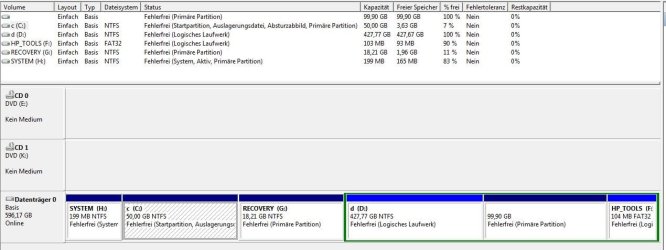
HP.DV7 original partitions (4 primary):
system,c,recovery,HPtools(FAT32,with lba mark)

After using gparted:
system(H:), C(was resized), recovery(G: was moved to be close to resized C), extended[containing: D:(ntfs), noname(ext3 for future linux installation),HPtools(FAT32,with lba mark) ]

Situation:
- Win7 boots as usual/normal
- if I press F8 during Boot and and select "Computer repair" from W7 bootmgr it brings up: boot/bcd Status: 0xc0000225
- If I enter Bios during boot I also cannot reach Recovery (by hitting F11). It also gives boot/bcd Status: 0xc0000225
- If I set C as boot it also brings up the error
- if I set the recovery partition as "boot", it boots into recovery manager as expected

As I made a backup of all partitions with acronis before, I compared the output of bcdedit /store for
system, c, recovery. They still look the same:
Code:
 C:\>bcdedit /enum all
 Windows-Start-Manager
 ---------------------
 Bezeichner              {bootmgr}
 device                  partition=H:
 description             Windows Boot Manager
 locale                  de-DE
 inherit                 {globalsettings}
 extendedinput           Yes
 default                 {current}
 resumeobject            {158181c0-9a00-11db-8a1d-b11d19fd3102}
 displayorder            {current}
 toolsdisplayorder       {memdiag}
 timeout                 30
 customactions           0x1000085000001
                         0x5400000f
 custom:5400000f         {9d8711c8-f4b3-11e0-bdd6-fe10d78c86f8}
 Windows-Startladeprogramm
 -------------------------
 Bezeichner              {current}
 device                  partition=C:
 path                    \Windows\system32\winload.exe
 description             Windows 7
 locale                  de-DE
 inherit                 {bootloadersettings}
 recoverysequence        {9d8711c8-f4b3-11e0-bdd6-fe10d78c86f8}
 recoveryenabled         Yes
 osdevice                partition=C:
 systemroot              \Windows
 resumeobject            {158181c0-9a00-11db-8a1d-b11d19fd3102}
 nx                      OptIn
 Windows-Startladeprogramm
 -------------------------
 Bezeichner              {572bcd60-ffa7-11d9-aae0-0007e994107d}
 device                  ramdisk=[boot]\sources\boot.wim,{ramdiskoptions}
 path                    \windows\system32\boot\winload.exe
 description             Microsoft Windows PE 2.0
 osdevice                ramdisk=[boot]\sources\boot.wim,{ramdiskoptions}
 systemroot              \windows
 detecthal               Yes
 winpe                   Yes
 ems                     Yes
 Windows-Startladeprogramm
 -------------------------
 Bezeichner              {9d8711c8-f4b3-11e0-bdd6-fe10d78c86f8}
 Wiederaufnahme aus dem Ruhezustand
 ----------------------------------
 Bezeichner              {158181c0-9a00-11db-8a1d-b11d19fd3102}
 device                  partition=C:
 path                    \Windows\system32\winresume.exe
 description             Windows Resume Application
 locale                  de-DE
 inherit                 {resumeloadersettings}
 filedevice              partition=C:
 filepath                \hiberfil.sys
 debugoptionenabled      No
 Windows-Speichertestprogramm
 ----------------------------
 Bezeichner              {memdiag}
 device                  partition=H:
 path                    \boot\memtest.exe
 description             Windows Memory Diagnostic
 locale                  de-DE
 inherit                 {globalsettings}
 badmemoryaccess         Yes
 EMS-Einstellungen
 -----------------
 Bezeichner              {emssettings}
 bootems                 Yes
 Debuggereinstellungen
 ---------------------
 Bezeichner              {dbgsettings}
 debugtype               Serial
 debugport               1
 baudrate                115200
 RAM-Defekte
 -----------
 Bezeichner              {badmemory}
 Globale Einstellungen
 ---------------------
 Bezeichner              {globalsettings}
 inherit                 {dbgsettings}
                         {emssettings}
                         {badmemory}
 Startladeprogramm-Einstellungen
 -------------------------------
 Bezeichner              {bootloadersettings}
 inherit                 {globalsettings}
                         {hypervisorsettings}
 Hypervisoreinstellungen
 -------------------
 Bezeichner              {hypervisorsettings}
 hypervisordebugtype     Serial
 hypervisordebugport     1
 hypervisorbaudrate      115200
 Einstellungen zur Ladeprogrammfortsetzung
 -----------------------------------------
 Bezeichner              {resumeloadersettings}
 inherit                 {globalsettings}
 Geräteoptionen
 --------------
 Bezeichner              {9d8711c9-f4b3-11e0-bdd6-fe10d78c86f8}
 description             Ramdisk Options
 ramdisksdidevice        unknown
 ramdisksdipath          \Recovery\WindowsRE\boot.sdi
 Optionen zum RAM-Datenträgersetup
 ---------------------------------
 Bezeichner              {ramdiskoptions}
 description             Ramdisk Options
 ramdisksdidevice        boot
 ramdisksdipath          \boot\boot.sdi
 C:\>bcdedit /store C:\boot\BCD /enum all
 Windows-Start-Manager
 ---------------------
 Bezeichner              {bootmgr}
 description             Windows Boot Manager
 locale                  en-US
 inherit                 {globalsettings}
 default                 {default}
 displayorder            {default}
 toolsdisplayorder       {memdiag}
 timeout                 30
 Windows-Startladeprogramm
 -------------------------
 Bezeichner              {default}
 device                  ramdisk=[boot]\System.sav\2ndCap\boot.wim,{ramdiskoptions}
 path                    \windows\system32\boot\winload.exe
 description             Windows Setup
 locale                  en-US
 inherit                 {bootloadersettings}
 osdevice                ramdisk=[boot]\System.sav\2ndCap\boot.wim,{ramdiskoptions}
 systemroot              \windows
 detecthal               Yes
 winpe                   Yes
 ems                     Yes
 Windows-Speichertestprogramm
 ----------------------------
 Bezeichner              {memdiag}
 device                  boot
 path                    \boot\memtest.exe
 description             Windows Memory Diagnostic
 locale                  en-US
 inherit                 {globalsettings}
 EMS-Einstellungen
 -----------------
 Bezeichner              {emssettings}
 bootems                 Yes
 Debuggereinstellungen
 ---------------------
 Bezeichner              {dbgsettings}
 debugtype               Serial
 debugport               1
 baudrate                115200
 Globale Einstellungen
 ---------------------
 Bezeichner              {globalsettings}
 inherit                 {dbgsettings}
                         {emssettings}
 Startladeprogramm-Einstellungen
 -------------------------------
 Bezeichner              {bootloadersettings}
 inherit                 {globalsettings}
                         {hypervisorsettings}
 Hypervisoreinstellungen
 -------------------
 Bezeichner              {hypervisorsettings}
 description             Hypervisor Settings
 hypervisordebugtype     Serial
 hypervisordebugport     1
 hypervisorbaudrate      115200
 Geräteoptionen
 --------------
 Bezeichner              {7619dcc8-fafe-11d9-b411-000476eba25f}
 ramdisksdidevice        boot
 ramdisksdipath          \boot\boot.sdi
 Optionen zum RAM-Datenträgersetup
 ---------------------------------
 Bezeichner              {ramdiskoptions}
 description             Ramdisk Options
 ramdisksdidevice        boot
 ramdisksdipath          \System.sav\2ndCap\boot.sdi
 C:\>bcdedit /store g:\boot\BCD /enum all
 Windows-Start-Manager
 ---------------------
 Bezeichner              {bootmgr}
 description             Windows Boot Manager
 locale                  en-US
 inherit                 {globalsettings}
 default                 {default}
 displayorder            {default}
 toolsdisplayorder       {memdiag}
 timeout                 30
 Windows-Startladeprogramm
 -------------------------
 Bezeichner              {default}
 device                  ramdisk=[boot]\Recovery\WindowsRE\winre.wim,{7619dcc8-fafe-11d9-b411-000476eba25f}
 path                    \windows\system32\boot\winload.exe
 description             Windows Setup
 locale                  en-US
 inherit                 {bootloadersettings}
 osdevice                ramdisk=[boot]\Recovery\WindowsRE\winre.wim,{7619dcc8-fafe-11d9-b411-000476eba25f}
 systemroot              \windows
 detecthal               Yes
 winpe                   Yes
 ems                     Yes
 Windows-Speichertestprogramm
 ----------------------------
 Bezeichner              {memdiag}
 device                  boot
 path                    \boot\memtest.exe
 description             Windows Memory Diagnostic
 locale                  en-US
 inherit                 {globalsettings}
 EMS-Einstellungen
 -----------------
 Bezeichner              {emssettings}
 bootems                 Yes
 Debuggereinstellungen
 ---------------------
 Bezeichner              {dbgsettings}
 debugtype               Serial
 debugport               1
 baudrate                115200
 Globale Einstellungen
 ---------------------
 Bezeichner              {globalsettings}
 inherit                 {dbgsettings}
                         {emssettings}
 Startladeprogramm-Einstellungen
 -------------------------------
 Bezeichner              {bootloadersettings}
 inherit                 {globalsettings}
                         {hypervisorsettings}
 Hypervisoreinstellungen
 -------------------
 Bezeichner              {hypervisorsettings}
 description             Hypervisor Settings
 hypervisordebugtype     Serial
 hypervisordebugport     1
 hypervisorbaudrate      115200
 Geräteoptionen
 --------------
 Bezeichner              {7619dcc8-fafe-11d9-b411-000476eba25f}
 ramdisksdidevice        boot
 ramdisksdipath          \boot\boot.sdi
1. I think the guid changes if one resizes and or moves a partition and this leads to my prob. If so I dont want do change the bcd files set up from hp with a methode like Repair-DVD.... please be patient with me ;-)
2.Is it possible to just put the new guid into the BCD store e.g. with BCDedit ???
3.How can I read the guid of my partitions ?

Sorry for my english and BR from Austria
Richard
 
Last edited:

My Computer My Computer

At a glance

win7_home_64i56GBHD6770
Computer Manufacturer/Model Number
hp-DV7 Notebook
OS
win7_home_64
CPU
i5
Motherboard
hp
Memory
6GB
Graphics Card(s)
HD6770
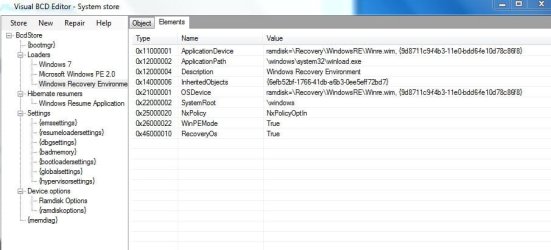
thats how recovery looks like right now ...
 

Attachments

  • snip_system.JPG
    snip_system.JPG
    54.4 KB · Views: 153
  • snip_system_ramdisk.JPG
    snip_system_ramdisk.JPG
    40.4 KB · Views: 143

My Computer My Computer

At a glance

win7_home_64i56GBHD6770
Computer Manufacturer/Model Number
hp-DV7 Notebook
OS
win7_home_64
CPU
i5
Motherboard
hp
Memory
6GB
Graphics Card(s)
HD6770
I would like to contact boyans (dev of VBCD) but my account is not allowed to send any PM .. help would still be very welcome ;-)
 

My Computer My Computer

At a glance

win7_home_64i56GBHD6770
Computer Manufacturer/Model Number
hp-DV7 Notebook
OS
win7_home_64
CPU
i5
Motherboard
hp
Memory
6GB
Graphics Card(s)
HD6770
Hi 5gggg,

Welcome to SevenForums !


Moving, resizing partitions gives problems in BCD. The reason is disk structructure changes are not reflected in the BCD !

----------------------------------------------------------------------------------------
After using gparted:
system(H), C(was resized), recovery(G) was moved to be close to resized C), extended[containing: (D)ntfs), noname(ext3 for future linux installation),HPtools(FAT32,with lba mark) ]
----------------------------------------------------------------------------------------

It is best if you rebuild your BCD from scratch.

Just note this (write it down on paper):
customactions 0x1000085000001 ( this is the code for key F11 )

1. Backup your current BCD (we don't need it, but who knows)

2. Delete all loaders entries except for Windows 7 (one by one)
Delete all resume loaders except for Windows 7
Delete all Device objects.


On elevated command prompt:

ReAgentC /disable
- this removes the connection loader - recovery
the winre.wim file should be now in "\Windows\System32\Recovery" folder.

NOW either run "Dual-boot repair"->"Automatic Repair"
or put in your DVD and do StartUp Repair.
This will ensure BCD is fixed.

Attaching back recovery environment: (on elevated command prompt booted in Windows 7)
ReAgentC /enable


You can create new additional loaders (with recovery attached - on F8 key ) the same way.
1. Create new loader
2. Attach recovery using ReAgentC. (you need winre.wim or boot.wim for this)


Now back to custom actions - this is just a keybord shorcut to a loader.
In Visual BCD Editor you can deal with custom actions very easy.
If a custom action exists - you can edit it.
If a custom action does not exist - you can create it.

I am not sure there is a manual/tutorial in this forum on "custom actions".
Please visit Visual BCD Editor - Windows 7/Vista - my new site to see how to edit/create custom actions.

Just remember that the index for custom actions (the first one) starts at 0x54000001 !
You must make the connection [index - key code - loader] inputting the correct data in the CustomActions Form. (Later it can be edited on hexadecimal basis by editing the elements also - if you want that F11 is the key for direct recovery - see the code you had to write down on paper !)

Do not hesitate to ask if there is anything not very clear for you.

If you have your DVD ready the BCD (and the boot environment) can be rebuild from zero(nil, nichts) !!
 

My Computer My Computer

At a glance

Win 8 RP, Win 7, XPIntel
Computer Manufacturer/Model Number
Acer Notebook
OS
Win 8 RP, Win 7, XP
CPU
Intel
  • Like
Reactions: whs
Thanks for your fast and informative reply !!!!!

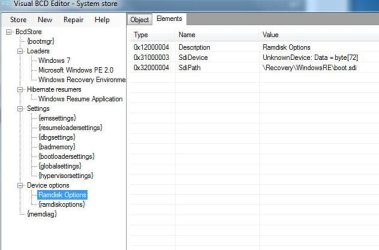
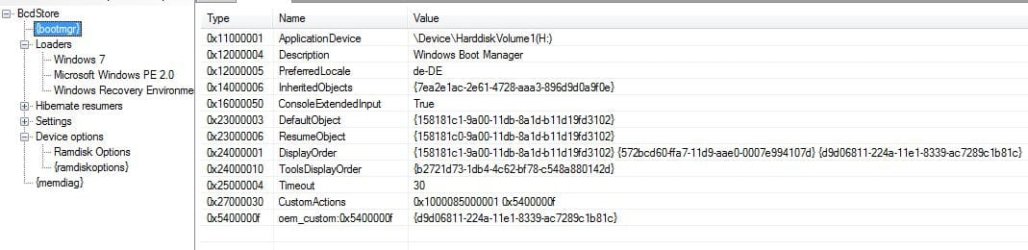
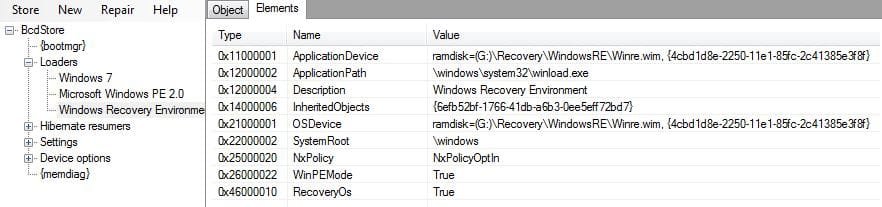
I think I have moved closer to the prob before your post already using Vbcdedit and bcdedit ... so before I do all over again (your procedure) I would like to show you this attachements:
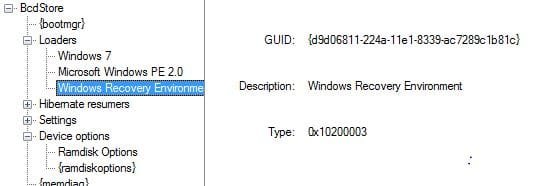
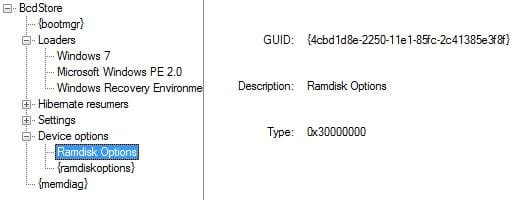
I copied the entrys "window srecovery" and "ramdisk" to get new ids and then I exchanged the ids then I deleted the old ids.
Maybe it is enough to use the reagentc command ... ????

Just to make sure:
The recovery envir of the hp-dv7 resides on partition "recovery" (I mounted it as G:). If I set G to "boot" it works ... (this should come up when hitting F11 in Bios)
But I am not sure which Recvorey environment should start, when hitting F8 during win7 start and selcting "computer repair" then. if I set C: to "boot" it does not work. I think beacuse there is no c:/boot/boot.sid. So maybe it is not intended to be bootable.
Yes there is a winre.wim in system32
 

Attachments

  • new_recover_env1.JPG
    new_recover_env1.JPG
    52.4 KB · Views: 61
  • new_recover_env2.JPG
    new_recover_env2.JPG
    39.8 KB · Views: 57
  • new_recover_env3.JPG
    new_recover_env3.JPG
    25.9 KB · Views: 75
  • new_recover_env4.JPG
    new_recover_env4.JPG
    20 KB · Views: 62
  • new_recover_env5.JPG
    new_recover_env5.JPG
    19.5 KB · Views: 60
Last edited:

My Computer My Computer

At a glance

win7_home_64i56GBHD6770
Computer Manufacturer/Model Number
hp-DV7 Notebook
OS
win7_home_64
CPU
i5
Motherboard
hp
Memory
6GB
Graphics Card(s)
HD6770
If your Windows 7 loader is working.

1. Reagentc /disable

2. Reagentc /enable

reboot, choose advanced boot options - F8 and see if "Repair your computer" is present and can be launched.

Post back outcome to get further help.
 

My Computer My Computer

At a glance

Win 8 RP, Win 7, XPIntel
Computer Manufacturer/Model Number
Acer Notebook
OS
Win 8 RP, Win 7, XP
CPU
Intel
f8 and then computer repair are working ... BCD has been changed:

please also see the updates of my last post ... we have crossed ;-)
Code:
C:\Users\Administrator>bcdedit /enum all
Windows-Start-Manager
---------------------
Bezeichner              {bootmgr}
device                  partition=H:
description             Windows Boot Manager
locale                  de-DE
inherit                 {globalsettings}
extendedinput           Yes
default                 {current}
resumeobject            {158181c0-9a00-11db-8a1d-b11d19fd3102}
displayorder            {current}
                        {572bcd60-ffa7-11d9-aae0-0007e994107d}
                        {14bd1d3d-227a-11e1-bccb-2c41385e3f8f}
toolsdisplayorder       {memdiag}
timeout                 30
customactions           0x1000085000001
                        0x5400000f
custom:5400000f         {14bd1d3d-227a-11e1-bccb-2c41385e3f8f}
Windows-Startladeprogramm
-------------------------
Bezeichner              {14bd1d3d-227a-11e1-bccb-2c41385e3f8f}
device                  ramdisk=[G:]\Recovery\WindowsRE\Winre.wim,{14bd1d3e-227a-11e1-bccb-2c41385e3f8f}
path                    \windows\system32\winload.exe
description             Windows Recovery Environment
inherit                 {bootloadersettings}
osdevice                ramdisk=[G:]\Recovery\WindowsRE\Winre.wim,{14bd1d3e-227a-11e1-bccb-2c41385e3f8f}
systemroot              \windows
nx                      OptIn
winpe                   Yes
Windows-Startladeprogramm
-------------------------
Bezeichner              {current}
device                  partition=C:
path                    \Windows\system32\winload.exe
description             Windows 7
locale                  de-DE
inherit                 {bootloadersettings}
recoverysequence        {14bd1d3d-227a-11e1-bccb-2c41385e3f8f}
recoveryenabled         Yes
osdevice                partition=C:
systemroot              \Windows
resumeobject            {158181c0-9a00-11db-8a1d-b11d19fd3102}
nx                      OptIn
Windows-Startladeprogramm
-------------------------
Bezeichner              {572bcd60-ffa7-11d9-aae0-0007e994107d}
device                  ramdisk=[boot]\sources\boot.wim,{ramdiskoptions}
path                    \windows\system32\boot\winload.exe
description             Microsoft Windows PE 2.0
osdevice                ramdisk=[boot]\sources\boot.wim,{ramdiskoptions}
systemroot              \windows
detecthal               Yes
winpe                   Yes
ems                     Yes
Windows-Startladeprogramm
-------------------------
Bezeichner              {d9d06811-224a-11e1-8339-ac7289c1b81c}
device                  ramdisk=[G:]\Recovery\WindowsRE\Winre.wim,{4cbd1d8e-2250-11e1-85fc-2c41385e3f8f}
path                    \windows\system32\winload.exe
description             Windows Recovery Environment
inherit                 {bootloadersettings}
osdevice                ramdisk=[G:]\Recovery\WindowsRE\Winre.wim,{4cbd1d8e-2250-11e1-85fc-2c41385e3f8f}
systemroot              \windows
nx                      OptIn
winpe                   Yes
Wiederaufnahme aus dem Ruhezustand
----------------------------------
Bezeichner              {158181c0-9a00-11db-8a1d-b11d19fd3102}
device                  partition=C:
path                    \Windows\system32\winresume.exe
description             Windows Resume Application
locale                  de-DE
inherit                 {resumeloadersettings}
filedevice              partition=C:
filepath                \hiberfil.sys
debugoptionenabled      No
Windows-Speichertestprogramm
----------------------------
Bezeichner              {memdiag}
device                  partition=H:
path                    \boot\memtest.exe
description             Windows Memory Diagnostic
locale                  de-DE
inherit                 {globalsettings}
badmemoryaccess         Yes
EMS-Einstellungen
-----------------
Bezeichner              {emssettings}
bootems                 Yes
Debuggereinstellungen
---------------------
Bezeichner              {dbgsettings}
debugtype               Serial
debugport               1
baudrate                115200
RAM-Defekte
-----------
Bezeichner              {badmemory}
Globale Einstellungen
---------------------
Bezeichner              {globalsettings}
inherit                 {dbgsettings}
                        {emssettings}
                        {badmemory}
Startladeprogramm-Einstellungen
-------------------------------
Bezeichner              {bootloadersettings}
inherit                 {globalsettings}
                        {hypervisorsettings}
Hypervisoreinstellungen
-------------------
Bezeichner              {hypervisorsettings}
hypervisordebugtype     Serial
hypervisordebugport     1
hypervisorbaudrate      115200
Einstellungen zur Ladeprogrammfortsetzung
-----------------------------------------
Bezeichner              {resumeloadersettings}
inherit                 {globalsettings}
Geräteoptionen
--------------
Bezeichner              {14bd1d3e-227a-11e1-bccb-2c41385e3f8f}
description             Ramdisk Options
ramdisksdidevice        partition=G:
ramdisksdipath          \Recovery\WindowsRE\boot.sdi
Geräteoptionen
--------------
Bezeichner              {4cbd1d8e-2250-11e1-85fc-2c41385e3f8f}
description             Ramdisk Options
ramdisksdidevice        unknown
ramdisksdipath          \Recovery\WindowsRE\boot.sdi
Optionen zum RAM-Datenträgersetup
---------------------------------
Bezeichner              {ramdiskoptions}
description             Ramdisk Options
ramdisksdidevice        boot
ramdisksdipath          \boot\boot.sdi
 

My Computer My Computer

At a glance

win7_home_64i56GBHD6770
Computer Manufacturer/Model Number
hp-DV7 Notebook
OS
win7_home_64
CPU
i5
Motherboard
hp
Memory
6GB
Graphics Card(s)
HD6770
I changed display order anddeleted old recovery loader: still no F11 in bios
Code:
C:\Users\Administrator>bcdedit  /enum all
Windows-Start-Manager
---------------------
Bezeichner              {bootmgr}
device                  partition=H:
description             Windows Boot Manager
locale                  de-DE
inherit                 {globalsettings}
extendedinput           Yes
default                 {current}
resumeobject            {158181c0-9a00-11db-8a1d-b11d19fd3102}
displayorder            {current}
                        {572bcd60-ffa7-11d9-aae0-0007e994107d}
                        {14bd1d3d-227a-11e1-bccb-2c41385e3f8f}
toolsdisplayorder       {memdiag}
timeout                 30
customactions           0x1000085000001
                        0x5400000f
custom:5400000f         {14bd1d3d-227a-11e1-bccb-2c41385e3f8f}
Windows-Startladeprogramm
-------------------------
Bezeichner              {14bd1d3d-227a-11e1-bccb-2c41385e3f8f}
device                  ramdisk=[G:]\Recovery\WindowsRE\Winre.wim,{14bd1d3e-227a-11e1-bccb-2c41385e3f8f}
path                    \windows\system32\winload.exe
description             Windows Recovery Environment
inherit                 {bootloadersettings}
osdevice                ramdisk=[G:]\Recovery\WindowsRE\Winre.wim,{14bd1d3e-227a-11e1-bccb-2c41385e3f8f}
systemroot              \windows
nx                      OptIn
winpe                   Yes
Windows-Startladeprogramm
-------------------------
Bezeichner              {current}
device                  partition=C:
path                    \Windows\system32\winload.exe
description             Windows 7
locale                  de-DE
inherit                 {bootloadersettings}
recoverysequence        {14bd1d3d-227a-11e1-bccb-2c41385e3f8f}
recoveryenabled         Yes
osdevice                partition=C:
systemroot              \Windows
resumeobject            {158181c0-9a00-11db-8a1d-b11d19fd3102}
nx                      OptIn
Windows-Startladeprogramm
-------------------------
Bezeichner              {572bcd60-ffa7-11d9-aae0-0007e994107d}
device                  ramdisk=[boot]\sources\boot.wim,{ramdiskoptions}
path                    \windows\system32\boot\winload.exe
description             Microsoft Windows PE 2.0
osdevice                ramdisk=[boot]\sources\boot.wim,{ramdiskoptions}
systemroot              \windows
detecthal               Yes
winpe                   Yes
ems                     Yes
Wiederaufnahme aus dem Ruhezustand
----------------------------------
Bezeichner              {158181c0-9a00-11db-8a1d-b11d19fd3102}
device                  partition=C:
path                    \Windows\system32\winresume.exe
description             Windows Resume Application
locale                  de-DE
inherit                 {resumeloadersettings}
filedevice              partition=C:
filepath                \hiberfil.sys
debugoptionenabled      No
Windows-Speichertestprogramm
----------------------------
Bezeichner              {memdiag}
device                  partition=H:
path                    \boot\memtest.exe
description             Windows Memory Diagnostic
locale                  de-DE
inherit                 {globalsettings}
badmemoryaccess         Yes
EMS-Einstellungen
-----------------
Bezeichner              {emssettings}
bootems                 Yes
Debuggereinstellungen
---------------------
Bezeichner              {dbgsettings}
debugtype               Serial
debugport               1
baudrate                115200
RAM-Defekte
-----------
Bezeichner              {badmemory}
Globale Einstellungen
---------------------
Bezeichner              {globalsettings}
inherit                 {dbgsettings}
                        {emssettings}
                        {badmemory}
Startladeprogramm-Einstellungen
-------------------------------
Bezeichner              {bootloadersettings}
inherit                 {globalsettings}
                        {hypervisorsettings}
Hypervisoreinstellungen
-------------------
Bezeichner              {hypervisorsettings}
hypervisordebugtype     Serial
hypervisordebugport     1
hypervisorbaudrate      115200
Einstellungen zur Ladeprogrammfortsetzung
-----------------------------------------
Bezeichner              {resumeloadersettings}
inherit                 {globalsettings}
Geräteoptionen
--------------
Bezeichner              {14bd1d3e-227a-11e1-bccb-2c41385e3f8f}
description             Ramdisk Options
ramdisksdidevice        partition=G:
ramdisksdipath          \Recovery\WindowsRE\boot.sdi
Geräteoptionen
--------------
Bezeichner              {4cbd1d8e-2250-11e1-85fc-2c41385e3f8f}
description             Ramdisk Options
ramdisksdidevice        unknown
ramdisksdipath          \Recovery\WindowsRE\boot.sdi
Optionen zum RAM-Datenträgersetup
---------------------------------
Bezeichner              {ramdiskoptions}
description             Ramdisk Options
ramdisksdidevice        boot
ramdisksdipath          \boot\boot.sdi
 

My Computer My Computer

At a glance

win7_home_64i56GBHD6770
Computer Manufacturer/Model Number
hp-DV7 Notebook
OS
win7_home_64
CPU
i5
Motherboard
hp
Memory
6GB
Graphics Card(s)
HD6770
There are errors in the BCD printouts.

So some more explanations. (theory)

1. There is a Windows 7 loader.
Looking at elements of this loader - if "RecoverySequence" and "RecoveryEnabled" (=yes) present than this loader has advanced boot option - "Repair your computer".
The value of "RecoverySequence" is a {GUID} which points to the "Recovery loader".

2. The "Recovery loader" is a "OS loader" with device elements of type Ramdisk pointing to "winre.wim".
The device element points also to another object of type "Device option".
Recapitulating this device element points to two objects !! (a file and a device object !!)

3. Device object - in this case is a sdi device implemented in file "boot.sdi"

I would not create such a complicated construction by hand when I can use a simple command line.

Correcting such a construction is not simple too. ;)
 

My Computer My Computer

At a glance

Win 8 RP, Win 7, XPIntel
Computer Manufacturer/Model Number
Acer Notebook
OS
Win 8 RP, Win 7, XP
CPU
Intel
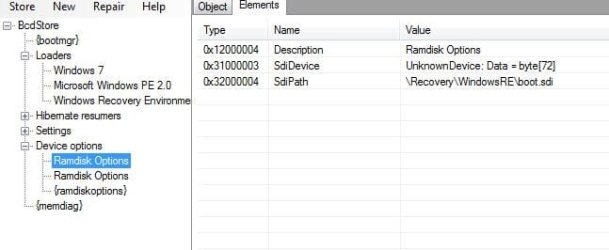
weired: The boot loader options do not corespond to the system BCD store ...
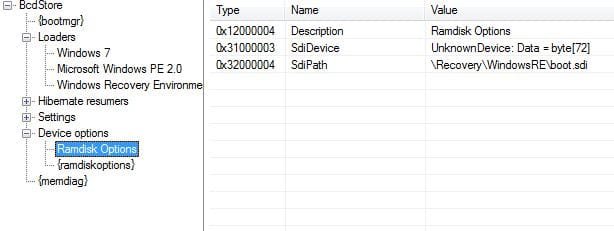
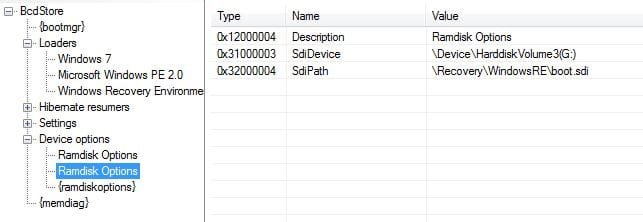
it say Windows7, "Ramdisk Options (EMS active)" which does not work and "Ramdisk Options" which bring up HP environment
But also none of the other stores on H(system)/C/G(HP Recovery) have a description like this.

This description looks like the device description from the devices Ramdisk ....

do I have to Reagentc /disable enable ??

I tried this ... but still the same ... maybe it has something to do with the different ramdisks. look at the ramdisk from hp (first on the left, I left it in the store but it is not used). I looked on a backup I made from the new PC and also there it says unknown device Data = byte[72]. maybe we should copy the old id to a new id and use this ???

BTW: The original BCD did not have any drive letters .. can we delete them (how?), because I would like "unmount recovery and system from explorer" after this is finished
 

Attachments

  • new_ramdisk_used.JPG
    new_ramdisk_used.JPG
    24.8 KB · Views: 49
  • original_ramdisk_hp.JPG
    original_ramdisk_hp.JPG
    27.5 KB · Views: 61

My Computer My Computer

At a glance

win7_home_64i56GBHD6770
Computer Manufacturer/Model Number
hp-DV7 Notebook
OS
win7_home_64
CPU
i5
Motherboard
hp
Memory
6GB
Graphics Card(s)
HD6770
Windows-Startladeprogramm
-------------------------
Bezeichner {572bcd60-ffa7-11d9-aae0-0007e994107d}
device ramdisk=[boot]\sources\boot.wim,{ramdiskoptions}
path \windows\system32\boot\winload.exe
description Microsoft Windows PE 2.0
osdevice ramdisk=[boot]\sources\boot.wim,{ramdiskoptions}
systemroot \windows
detecthal Yes
winpe Yes
ems Yes
-------------------------------------------------------------------------------------------------------------------------

You must check that all paths in lines above exist.

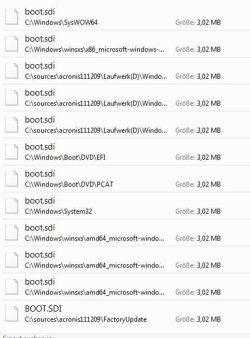
Also check "\boot\boot.sdi" on [boot] device exists.

And all {GUID}'s as in my previous explanation point in right direction starting from "Recovery loader".

I am sorry but I can't see from here whats on your computer hard disk.:)
 

My Computer My Computer

At a glance

Win 8 RP, Win 7, XPIntel
Computer Manufacturer/Model Number
Acer Notebook
OS
Win 8 RP, Win 7, XP
CPU
Intel
where should this be "=[boot]\sources\boot.wim". Does it mean on system partitions h:\sources... or c:\sources.

But there has never been a directory "sources" on the original PC... Wheired because this path also appears in the h:\boot\bcd (system) on the very first acronis backup I made...

Later on I made a dir c:\sources (for copying purposes), but it never had a boot.wim on it ....
 

My Computer My Computer

At a glance

win7_home_64i56GBHD6770
Computer Manufacturer/Model Number
hp-DV7 Notebook
OS
win7_home_64
CPU
i5
Motherboard
hp
Memory
6GB
Graphics Card(s)
HD6770
You do not have to "delete drive letters" in BCD.
There are no drive letters in BCD !

In BCD there is only a "object" for a concrete device element (which is mapped to a drive letter eventually if there is a mapping in Windows NT object space for it).

It is a little more than complicated - if interested go to MSDN and search for "BCD objects".

===================

Have you checked the paths exist for loader for PE2 ?
 

My Computer My Computer

At a glance

Win 8 RP, Win 7, XPIntel
Computer Manufacturer/Model Number
Acer Notebook
OS
Win 8 RP, Win 7, XP
CPU
Intel
[boot] is active partition.
 

My Computer My Computer

At a glance

Win 8 RP, Win 7, XPIntel
Computer Manufacturer/Model Number
Acer Notebook
OS
Win 8 RP, Win 7, XP
CPU
Intel
thx, but is active = boot partition (would be system=H) or active = where \windows resides (c:)

I restored the acronis files once more - it also says "\sources\boot.wim" ... but originally there was only the win7 loader in the "display order":
Code:
C:\Users\Administrator>bcdedit /store C:\sources\acronis111209\Laufwerk(C)\Boot\bcd /enum all
Windows-Start-Manager
---------------------
Bezeichner              {bootmgr}
device                  partition=H:
description             Windows Boot Manager
locale                  de-DE
inherit                 {globalsettings}
extendedinput           Yes
default                 {default}
resumeobject            {158181c0-9a00-11db-8a1d-b11d19fd3102}
displayorder            {default}
toolsdisplayorder       {memdiag}
timeout                 30
customactions           0x1000085000001
                        0x5400000f
custom:5400000f         {9d8711c8-f4b3-11e0-bdd6-fe10d78c86f8}
Windows-Startladeprogramm
-------------------------
Bezeichner              {default}
device                  partition=C:
path                    \Windows\system32\winload.exe
description             Windows 7
locale                  de-DE
inherit                 {bootloadersettings}
recoverysequence        {9d8711c8-f4b3-11e0-bdd6-fe10d78c86f8}
recoveryenabled         Yes
osdevice                partition=C:
systemroot              \Windows
resumeobject            {158181c0-9a00-11db-8a1d-b11d19fd3102}
nx                      OptIn
Windows-Startladeprogramm
-------------------------
Bezeichner              {572bcd60-ffa7-11d9-aae0-0007e994107d}
device                  ramdisk=[boot]\sources\boot.wim,{ramdiskoptions}
path                    \windows\system32\boot\winload.exe
description             Microsoft Windows PE 2.0
osdevice                ramdisk=[boot]\sources\boot.wim,{ramdiskoptions}
systemroot              \windows
detecthal               Yes
winpe                   Yes
ems                     Yes
Windows-Startladeprogramm
-------------------------
Bezeichner              {9d8711c8-f4b3-11e0-bdd6-fe10d78c86f8}
Wiederaufnahme aus dem Ruhezustand
----------------------------------
Bezeichner              {158181c0-9a00-11db-8a1d-b11d19fd3102}
device                  partition=C:
path                    \Windows\system32\winresume.exe
description             Windows Resume Application
locale                  de-DE
inherit                 {resumeloadersettings}
filedevice              partition=C:
filepath                \hiberfil.sys
debugoptionenabled      No
Windows-Speichertestprogramm
----------------------------
Bezeichner              {memdiag}
device                  partition=H:
path                    \boot\memtest.exe
description             Windows Memory Diagnostic
locale                  de-DE
inherit                 {globalsettings}
badmemoryaccess         Yes
EMS-Einstellungen
-----------------
Bezeichner              {emssettings}
bootems                 Yes
Debuggereinstellungen
---------------------
Bezeichner              {dbgsettings}
debugtype               Serial
debugport               1
baudrate                115200
RAM-Defekte
-----------
Bezeichner              {badmemory}
Globale Einstellungen
---------------------
Bezeichner              {globalsettings}
inherit                 {dbgsettings}
                        {emssettings}
                        {badmemory}
Startladeprogramm-Einstellungen
-------------------------------
Bezeichner              {bootloadersettings}
inherit                 {globalsettings}
                        {hypervisorsettings}
Hypervisoreinstellungen
-------------------
Bezeichner              {hypervisorsettings}
hypervisordebugtype     Serial
hypervisordebugport     1
hypervisorbaudrate      115200
Einstellungen zur Ladeprogrammfortsetzung
-----------------------------------------
Bezeichner              {resumeloadersettings}
inherit                 {globalsettings}
Geräteoptionen
--------------
Bezeichner              {9d8711c9-f4b3-11e0-bdd6-fe10d78c86f8}
description             Ramdisk Options
ramdisksdidevice        unknown
ramdisksdipath          \Recovery\WindowsRE\boot.sdi
Optionen zum RAM-Datenträgersetup
---------------------------------
Bezeichner              {ramdiskoptions}
description             Ramdisk Options
ramdisksdidevice        boot
ramdisksdipath          \boot\boot.sdi

can you explain your suggestion what to do now more in detail please .... THX very much
richard

PS:
- I still have no idea why the displayed boot manger entries look different to the system bcd store ...
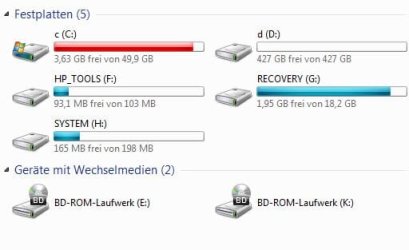
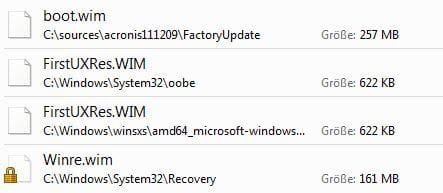
- and the only boot.wim on the computer is in g:\FactotoryUpdate\ on hp recovery partition.
- and even beeing logged in as Administrator I cant access some recovery drectory in explorer (it can be accessed via CMD)
 

Attachments

  • drives.JPG
    drives.JPG
    25.4 KB · Views: 13
  • wim.JPG
    wim.JPG
    19.3 KB · Views: 12
  • sdi.JPG
    sdi.JPG
    46.6 KB · Views: 12
  • hp_protection.JPG
    hp_protection.JPG
    44.3 KB · Views: 12

My Computer My Computer

At a glance

win7_home_64i56GBHD6770
Computer Manufacturer/Model Number
hp-DV7 Notebook
OS
win7_home_64
CPU
i5
Motherboard
hp
Memory
6GB
Graphics Card(s)
HD6770
To be displayed in boot menu the id of the loader has to be in element "DisplayOrder" of bootmgr object.

This PE2 loader is activated only by keyboard shortcut - there is customactions element in bootmgr object for it.

Do you remember which partition was active when "all was functioning OK" ?


ON A SINGLE DISK THERE SHOULD BE ONLY ONE ACTIVE PARTITION !!
And usually is.
If you use Microsoft Software there is no way of marking 2 partitions as active at the same time on a single disk. It has no meaning.

Back to Problem.

You can scan your manifacturer DVD for .wim files.
If you can find some - post name and size.
 

My Computer My Computer

At a glance

Win 8 RP, Win 7, XPIntel
Computer Manufacturer/Model Number
Acer Notebook
OS
Win 8 RP, Win 7, XP
CPU
Intel
I did not touch H(systems), shrinked C to 50GB (there was no D), moved Recovery (G) close to C, deleted HP_tools partition and made an extendende instead. Extended now includes D, an unnamed ext3 (for future linux) and a restored HP_tools.
I did not delete anything on any partition. so boot.wim has never existed !
- System was always the active one
- originally there where no boot options/loaders displayed (booted directly to w7) !! (I only tried the F11 from Bios but not F8 repair ... which is working agein and starting up windows repair)
- if I choose the "Ramdisk Options" (this is the name from the device) boot option it starts HP envir
- cant we just delte the WIN PE from "diplay order" ??? DID NOT HELP
- could this path [boot]/sources/boot.wim be being built by the system somehow ???
 

Attachments

  • volumes.JPG
    volumes.JPG
    72.9 KB · Views: 29
  • Boot.zip
    Boot.zip
    692 bytes · Views: 8
Last edited:

My Computer My Computer

At a glance

win7_home_64i56GBHD6770
Computer Manufacturer/Model Number
hp-DV7 Notebook
OS
win7_home_64
CPU
i5
Motherboard
hp
Memory
6GB
Graphics Card(s)
HD6770
The boot.wim - 257 MB listed in your previous post is non-standard so it must be OEM recovery or whatever OEM supa-dupa.
Usual recovery .wim is about 150-160 MB.

257 MB cannot be placed on 199 MB - size of your System(H:) partition. So OEM whatever was never placed on System(H:)

Have you ever started whatever software system back in time with F11 during boot ?
It seems that this is a leftover from OEM install just pointing to nowhere.

----------------------
You have a starting Windows 7 + access to recovery now. Do you need anything more at the moment ?
If no - just delete the loader entry for PE2 and corresponding device options.


!! C: partition is pretty full - this can very soon lead to problems !! Try to move unnecessary contents away.
It is good practice to have at least 10 GB free on Windows partition or say 20% free.

On next Windows update or if you install new software - aufpassen !
 

My Computer My Computer

At a glance

Win 8 RP, Win 7, XPIntel
Computer Manufacturer/Model Number
Acer Notebook
OS
Win 8 RP, Win 7, XP
CPU
Intel
The PC is brand new ... I started with acronis backup and gparted then ... 3 days ago

C is full because of the acronis file restores sitting under path /sources ... I am about deleting it
Yes Bios F11 was woking ... I still think it could have something to do with this special unkanown device here:
http://www.sevenforums.com/1693485-post10.html

any idea what I can do against this hp viewing protection (screenshot from above)

maybe I restore my acronis backup ... if I do the resizing of C from windows ... would this help to prevent from braking guid ??
Can I move the recovery within win7 ???
But then I still have to add an extended partition and so on ...
 
Last edited:

My Computer My Computer

At a glance

win7_home_64i56GBHD6770
Computer Manufacturer/Model Number
hp-DV7 Notebook
OS
win7_home_64
CPU
i5
Motherboard
hp
Memory
6GB
Graphics Card(s)
HD6770
The PC is brand new ... I started with acronis backup and gparted then ... 3 days ago

C is full because of the acronis file restores sitting under path /sources ... I am about deleting it
Yes Bios F11 was woking ... I still think it could have something to do with this special unkanown device here:
http://www.sevenforums.com/1693485-post10.html

Using gparted or any disk editor is not without risks.
People say - always make backups before serious interventions.

Descriptions of device options seem to have precedence over descriptions of attached loaders. So you see in boot menu corresponding device options description.

1. What did F11 do - start normal Windows Recovery or OEM Recovery ?

2. List same BCD from quote with bcdedit and post output.
 

My Computer My Computer

At a glance

Win 8 RP, Win 7, XPIntel
Computer Manufacturer/Model Number
Acer Notebook
OS
Win 8 RP, Win 7, XP
CPU
Intel
Back
Top