Context Menu Handlers-Can Norton or Win 7 Block them?

win7rust

New member
Local time
5:43 PM
Messages
2
There are several programs that with previous versions of windows would automatically add a context menu handler for their program. I just recently purchased a new hp laptop that has a new build of win7 home premium 64 bit. But a different build would allow the context menu handlers for their programs. I use unlocker HJ-Splitter and QuickPar a lot and to have to go through open with and to search for the actual file folder in Program Files is a major pain in seating muscle. I just downloaded ShellViewMenu hoping it would allow me to add these programs to the right click menu. But to no avail. I feel comfortable with working externally with most applications but fooling around with Windows Registery scares the weebee jeeves out of me. I know that bat.files and VB script files might be an answer but we may have a New US President before I get a good handle on there processes.
 

My Computer My Computer

At a glance

windows 7 home premium 64bitCore I3-2330 2.2ghz4gb
Computer Manufacturer/Model Number
HP Pavilion G7-1260us Notebook PC
OS
windows 7 home premium 64bit
CPU
Core I3-2330 2.2ghz
Motherboard
HP
Memory
4gb
Hard Drives
internal 570
2 external 1TB
My Computer My Computer

At a glance

Win 7 Pro x64 / Win 10 ProIntel(R) Core(TM) i7-3630QM CPU @ 2.40GHz12 GB(1) Intel(R) HD Graphics 4000 (2) NVIDIA GeFo...
Computer type
Laptop
Computer Manufacturer/Model Number
Sager NP9170
OS
Win 7 Pro x64 / Win 10 Pro
CPU
Intel(R) Core(TM) i7-3630QM CPU @ 2.40GHz
Motherboard
CLEVO P170EM
Memory
12 GB
Graphics Card(s)
(1) Intel(R) HD Graphics 4000 (2) NVIDIA GeForce GTX 675M
Sound Card
(1) Realtek High Definition Audio (2) Intel(R) Display Aud
Monitor(s) Displays
17.3
Screen Resolution
1920x1080
Hard Drives
(1) Samsung 860 EVO 500GB(OS) (1) Samsung 860 EVO 500GB(Data)
Keyboard
Backlite
Antivirus
MSE, Malwarebytes Pro
Browser
Firefox
Other Info
DESKTOP: Custom-built.
OS: Win 10 Pro x64.
CASE: Rosewill R5.
CPU: Intel I5 4670K CPU @ 3.40GHz.
CPU COOLER: Cool Master Hyper 212 EVO.
MOTHERBOARD: Asus Z87-A.
MEMORY: Kingston HyperX 2x4 GB.
GPU: Nvidia Geforce 650 TI.
PSU: Corsair TX750.
DRIVES: (1) Samsung 840 120 GB SSD (2) Western Digital blue 500 GB 7200 RPM.
re:Context Menu Handlers Can Norton?

Bongo that would be a blessing. Any help in this matter would be most appreciative.:D
 

My Computer My Computer

At a glance

windows 7 home premium 64bitCore I3-2330 2.2ghz4gb
Computer Manufacturer/Model Number
HP Pavilion G7-1260us Notebook PC
OS
windows 7 home premium 64bit
CPU
Core I3-2330 2.2ghz
Motherboard
HP
Memory
4gb
Hard Drives
internal 570
2 external 1TB
Sorry for the late reply.
#1
Create a restore point http://www.sevenforums.com/tutorials/697-system-restore-point-create.html
I will show you how to backup the registry in a couple more steps.

#2
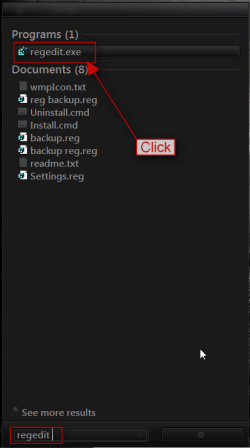
In the start menu search box type regedit and click on it in the search results to open up the registry editor.
search.png

#3
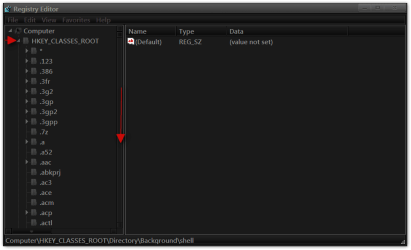
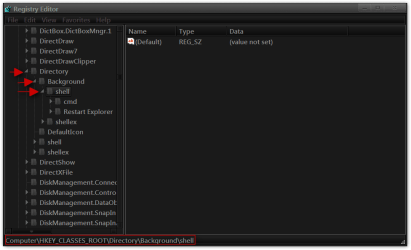
Navigate to HKEY_CLASSES_ROOT\Directory\Background\shell
1.png2.png

#4
Now we will back up the registry http://www.sevenforums.com/tutorials/4230-registry-backup-restore.html
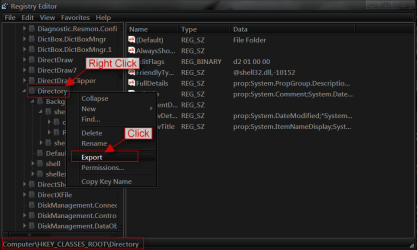
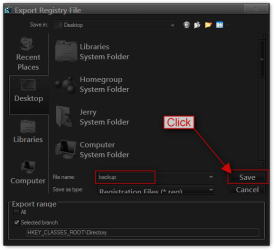
Right click on Directory and click on Export.
3.png

Give it a name and click on Save (I usually save them to the desktop and tell them done and then you can either store it in a folder in your documents folder or delete it).
4.png

#5
Now we will add a program (I am going to use Firefox as an example)
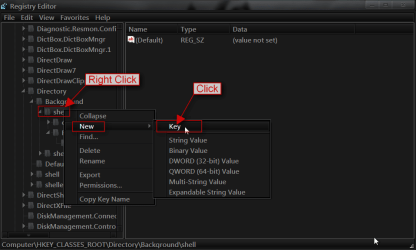
Right-click on shell go to New > Key and click on it.
5.png

#6
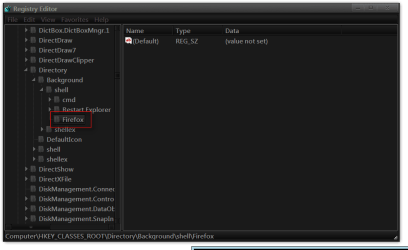
In the New Key #1 Box Add Your Program Name That You Want to See in the Right-Click menu here I put Firefox.
6.png7.png

#7
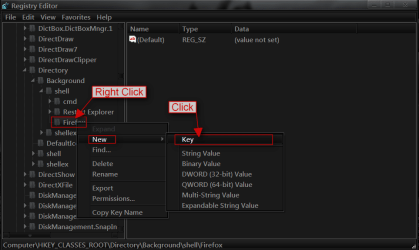
Right-click on Firefox go to New > Key and click on it.
8.png

#8
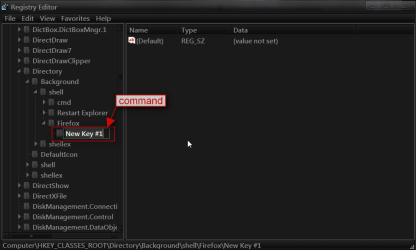
In the New Key #1 Box Add command in lowercase.
9.png10.png

#9
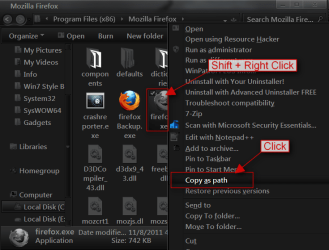
Now you need to navigate to the programs .exe then push and hold Shift + and Right click on the program .exe and click on Copy as Path.
11.png

#10
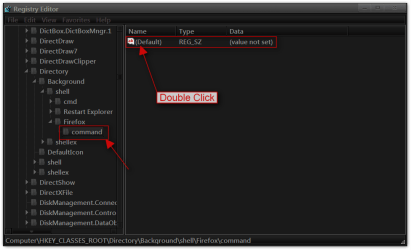
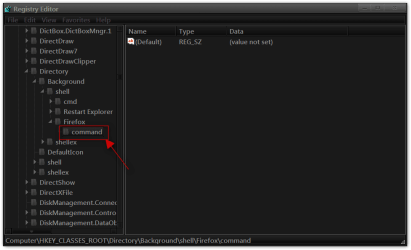
Go back to the registry editor make sure you click on command on the left side and then on the right side Double-click on Default.
12.png

#11
In the Edit String box in the value data Paste or Ctrl + V the path of the program .exe and click on OK.
13.png

You should have your program in the right click menu(you may have to logoff/logon or restart to see it in the menu)
14.png

If you would like add icon to it follow this tutorial http://www.sevenforums.com/tutorials/21878-context-menu-add-shortcuts-icons.html
If something is confusing let me know and I will try to straighten it out for you.
Jerry
 

My Computer My Computer

At a glance

Win 7 Pro x64 / Win 10 ProIntel(R) Core(TM) i7-3630QM CPU @ 2.40GHz12 GB(1) Intel(R) HD Graphics 4000 (2) NVIDIA GeFo...
Computer type
Laptop
Computer Manufacturer/Model Number
Sager NP9170
OS
Win 7 Pro x64 / Win 10 Pro
CPU
Intel(R) Core(TM) i7-3630QM CPU @ 2.40GHz
Motherboard
CLEVO P170EM
Memory
12 GB
Graphics Card(s)
(1) Intel(R) HD Graphics 4000 (2) NVIDIA GeForce GTX 675M
Sound Card
(1) Realtek High Definition Audio (2) Intel(R) Display Aud
Monitor(s) Displays
17.3
Screen Resolution
1920x1080
Hard Drives
(1) Samsung 860 EVO 500GB(OS) (1) Samsung 860 EVO 500GB(Data)
Keyboard
Backlite
Antivirus
MSE, Malwarebytes Pro
Browser
Firefox
Other Info
DESKTOP: Custom-built.
OS: Win 10 Pro x64.
CASE: Rosewill R5.
CPU: Intel I5 4670K CPU @ 3.40GHz.
CPU COOLER: Cool Master Hyper 212 EVO.
MOTHERBOARD: Asus Z87-A.
MEMORY: Kingston HyperX 2x4 GB.
GPU: Nvidia Geforce 650 TI.
PSU: Corsair TX750.
DRIVES: (1) Samsung 840 120 GB SSD (2) Western Digital blue 500 GB 7200 RPM.
topgundcp
There are several programs that with previous versions of windows would automatically add a context menu handler for their program. I just recently purchased a new hp laptop that has a new build of win7 home premium 64 bit. But a different build would allow the context menu handlers for their programs. I use unlocker HJ-Splitter and QuickPar a lot and to have to go through open with and to search for the actual file folder in Program Files is a major pain in seating muscle. I just downloaded ShellViewMenu hoping it would allow me to add these programs to the right click menu. But to no avail. I feel comfortable with working externally with most applications but fooling around with Windows Registery scares the weebee jeeves out of me. I know that bat.files and VB script files might be an answer but we may have a New US President before I get a good handle on there processes.

1 - You don't need to to use "Open With" every time and browse for the program in programs folder. For example, the first file of the HJSplitter would have an extension
of .001, so the first time you use "Open With" and browse for HJSplittter.exe, make sure you put a check mark on: Always use the selected program to open this kind of file. This will register the extension .001 to be used with HJSplitter.exe. The next time you just double click on the file with extension .001 and it will open HJSplitter.exe program.

2 - After you installed Quickpart, Open the option and check on 'Integrate QuickPar into Shell' this will add QuickPar to the context menu. I dont use Quickpart but I google it to their website and this is all you need to do.

3 - The info I gave you in 1 & 2 just for future reference. Since you are uncomfortable to work with regedit, here is an easy way to add an item or a cascading menu in the context menu.
Go to this website: http://win7utilities.com and download Your Menu1.0
and you're all set. This program is self explanatory, just read the first screen and you'll know what to do.

Oops: I forgot, the program will generate 2 .reg files, save it to your desktop and just double click one to add to your registry, the other .reg file is to remove it from registry. Hope this help !!!

Here is a screen shot of my desktop context menu.
Capture.png picture by topgundcp - Photobucket
b%3E:SelectAndCopy%28%27imgurl%27%29
 
Last edited:

My Computer My Computer

At a glance

win 7 ultimate x64Intel(R) Core(TM) i7-4790K @4.7GHZ16.00 GBNVIDIA GeForce GTX 260
Computer type
PC/Desktop
Computer Manufacturer/Model Number
custom build
OS
win 7 ultimate x64
CPU
Intel(R) Core(TM) i7-4790K @4.7GHZ
Motherboard
Z97A GAMING 7
Memory
16.00 GB
Graphics Card(s)
NVIDIA GeForce GTX 260
Sound Card
X-fi titanium
Monitor(s) Displays
24" Dual HP
Hard Drives
(1) ST5000DM000-1FK178 (2) SAMSUNG MZHPV256HDGL-00000 (3) ST2000DM001-1CH164 (4) Samsung SSD 840 EVO 120GB (5) Samsung SSD 850 EVO 500GB
PSU
850W Antec
Case
1200 Antec
Cooling
Water
Keyboard
Logitech
Mouse
Logitech
Internet Speed
35/12
Antivirus
None
Browser
Firefox
Back
Top