SFC /SCANNOW Command - System File Checker

How to Repair Windows 7 System Files with System File Checker


   Information
The sfc /scannow command (System File Checker) scans the integrity of all protected Windows 7 system files and replaces incorrect corrupted, changed/modified, or damaged versions with the correct versions if possible.

   Tip
If you get the Windows Resource Protection Could Not Start the Repair Service error when trying to run SFC, then make sure that the Windows Modules Installer service is enabled, click on Start, and set to Manual.

Services - Start or Disable

OR

Copy and paste the command below in the elevated command prompt, and press Enter. After the Windows Modules Installer service has started, try running the SFC command again

net start trustedinstaller

   Note
The KB3022345, KB3035583, and KB3068708 updates will cause SFC to give you a false mismatch message in SFC for files related to these updates.

You can safely ignore these results in your SFC details since it will not affect SFC from being able to repair other system files.

   Warning
Be aware that if you have modified your system files as in theming explorer/system files, running sfc /scannow will revert the system files such as explorer.exe back to it's default state. Make the appropriate backups of your system files that you have modified for theming if you wish to save them before running sfc /scannow.


:note: For the updated Windows 10 tutorial, please see - SFC Command - Run in Windows 10 - Windows 10 Tutorials

CONTENTS:
  • Option One: To Run the SFC /SCANNOW Command at Boot
  • Option Two: To Run the SFC /SCANNOW Command in Windows 7
  • Option Three: How to See and Read Only the "SFC" Scan Results from the CBS.LOG


OPTION ONE

To Run the SFC /SCANNOW Command at Boot


1. For how, see METHOD TWO at this link: SFC /SCANNOW : Run in Command Prompt at Boot

   Note
Using OPTION TWO below is recommended if able.

If you would like to get help with your SFC issue, then be sure to upload and attach your sfcdetails.txt file from OPTION THREE below in your post.


OPTION TWO

To Run the SFC /SCANNOW Command in Windows 7


1. Open an elevated command prompt or an elevated PowerShell, and do step 2 or 3 below for what type of scan you would like to run.


2. To Scan and Repair System Files
NOTE: Scans the integrity of all protected system files and repairs the system files if needed. Please see red WARNING box at the top of this tutorial.
A) In the elevated command prompt, type sfc /scannow, press Enter, and go to step 4 below. (see screenshot below)
NOTE: This may take a little bit to finish.
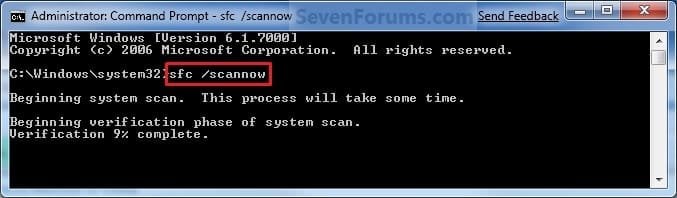
Command-1.jpg
3. To Only Verify if the System Files are Corrupted
NOTE: Scans and only verifies the integrity of all proteced system files only. This command will not change your system files as in the red WARNING box at the top of this tutorial.
A) In the elevated command prompt, type sfc /verifyonly, press Enter, and go to step 4 below.
4. When the scan is complete, hopefully you will see all is ok like the screenshot below.

   Note

  • If SFC could not fix something, then run the command again to see if it may be able to the next time. Sometimes it may take running the sfc /scannow command 3 or more times to completely fix everything that it's able to.
  • If not, then download and run the 32-bit (x86) or 64-bit (x64) System Update Readiness Tool for your same installed 32-bit or 64-bit Windows 7, restart the PC afterwards, and try the sfc /scannow command again.
  • If still not, then try using OPTION ONE above to run the sfc /scannow command at boot.
  • If still not, then you can attempt to run a System Restore using a restore point dated before the bad file occured to fix it. You may need to repeat doing a System Restore until you find a older restore point that may work.
  • If still not, then you can use the steps in the TIP box in the OPTION THREE section below to manually replace the files that SFC could not fix if there are not to many fix.
  • If there are to many files to manually fix, or you prefer not to use OPTION THREE below, then you could do a repair install without losing anything.
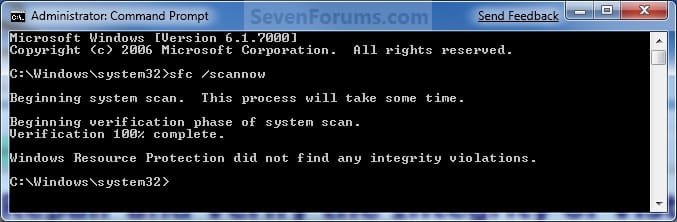
If you would like to get help with your SFC issue, then be sure to upload and attach your sfcdetails.txt file from OPTION THREE below in your post.


Finished.jpg
5. When done, close the elevated command prompt.


OPTION THREE

How to See and Read Only the "SFC" Scan Results from the CBS.LOG


   Note
When SFC runs, it logs it's actions into the C:\Windows\Logs\CBS\CBS.log. The steps in this option will show you how to see only the specific SFC entries with the [SR] tags in this CBS.log. This can be helpful to show you what files SFC could not fix automatically if you wanted to try and manually replace them.

1. Open an "elevated command prompt" (right click -> Run as administrator).

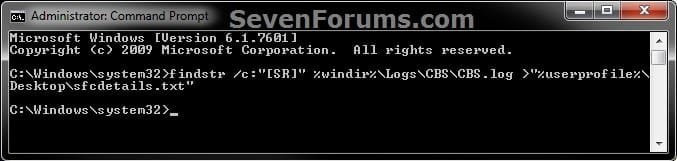
2. In the elevated command prompt, copy and paste the command below, and press Enter. (See screenshot below)
NOTE: This will place a sfcdetails.txt file on your desktop with only the SFC scan result details from the CBS.LOG in it.
Code:
findstr /c:"[SR]" %windir%\Logs\CBS\CBS.log >"%userprofile%\Desktop\sfcdetails.txt"
sfcdetails.jpg
3. Close the elevated command prompt.

4. Open the sfcdetails.txt file on your desktop to see the SFC scan details in the CBS.LOG.

5. You can safely delete the sfcdetails.txt file afterwards if you like.
   Tip
If you need to replace a corrupted system file that SFC cannot fix, then this will show you how to by extracting a new copy directly from your Windows 7 installation DVD.

Extract Files from Windows 7 Installation DVD


That's it,
Shawn


Last edited:
I did create short cut and did a scan. "found corrupted file but not able to fix some of them". What do I need to do now ? Thanks.

Hello Barbarossa, and welcome to Seven Forums.

If you could create the sfcdetails.txt file from OPTION THREE in this tutorial, then upload it here, I'll be happy to take a look at it to see what SFC was not able to fix for you. :)
 
Last edited:

My Computer My Computer

Computer type
PC/Desktop
Computer Manufacturer/Model Number
Self built custom
OS
64-bit Windows 11 Pro for Workstations
CPU
Intel i7-8700K OC'd to 5 GHz
Motherboard
ASUS ROG Maximus XI Formula Z390
Memory
64 GB (4x16GB) G.SKILL TridentZ RGB DDR4 3600 MHz
Graphics Card(s)
ASUS ROG-STRIX-GTX1080TI-O11G-GAMING
Sound Card
Integrated
Monitor(s) Displays
2 x Samsung Odyssey G7 27"
Screen Resolution
2560x1440
Hard Drives
1TB Samsung 990 PRO M.2,
4TB Samsung 990 PRO PRO M.2,
TerraMaster F8 SSD Plus NAS
PSU
Seasonic Prime Titanium 850W
Case
Thermaltake Core P3
Cooling
Corsair Hydro H115i
Keyboard
Logitech wireless K800
Mouse
Logitech MX Master 4
Internet Speed
2 Gb/s Download and 100 Mb/s Upload
Antivirus
Malwarebyte Anti-Malware Premium
Browser
Google Chrome
Other Info
Logitech Z625 speaker system,
Logitech BRIO 4K Pro webcam,
HP Color LaserJet Pro MFP M477fdn,
APC SMART-UPS RT 1000 XL - SURT1000XLI,
Galaxy S23 Plus phone
OK. Let's see if I can find the file report.

Hm, can't find the report
 

My Computer My Computer

Computer Manufacturer/Model Number
Asus N53v-DH 72
OS
windows 7 home premium 64bit
CPU
Intel(R) Core(TM) i7-2670QM CPU @ 2.20GHz
Motherboard
ASUSTeK Computer Inc
Memory
6049 MB
Graphics Card(s)
NVIDIA GeForce GT 540M (1024 MB)
Monitor(s) Displays
15.6
Screen Resolution
1920-1080
Hard Drives
ST9750420AS (698 GB, IDE)

C: (NTFS) 293.0 GB (229.9 GB free)
D: (NTFS) 380.6 GB (380.5 GB free)
Total Size 673.6 GB (610.4 GB free)
Keyboard
Standard
Mouse
Optical
Internet Speed
D-12877kbps U-370kbps
Did you do OPTION THREE in this tutorial on the first page to create the sfcdetails.txt file?
 

My Computer My Computer

Computer type
PC/Desktop
Computer Manufacturer/Model Number
Self built custom
OS
64-bit Windows 11 Pro for Workstations
CPU
Intel i7-8700K OC'd to 5 GHz
Motherboard
ASUS ROG Maximus XI Formula Z390
Memory
64 GB (4x16GB) G.SKILL TridentZ RGB DDR4 3600 MHz
Graphics Card(s)
ASUS ROG-STRIX-GTX1080TI-O11G-GAMING
Sound Card
Integrated
Monitor(s) Displays
2 x Samsung Odyssey G7 27"
Screen Resolution
2560x1440
Hard Drives
1TB Samsung 990 PRO M.2,
4TB Samsung 990 PRO PRO M.2,
TerraMaster F8 SSD Plus NAS
PSU
Seasonic Prime Titanium 850W
Case
Thermaltake Core P3
Cooling
Corsair Hydro H115i
Keyboard
Logitech wireless K800
Mouse
Logitech MX Master 4
Internet Speed
2 Gb/s Download and 100 Mb/s Upload
Antivirus
Malwarebyte Anti-Malware Premium
Browser
Google Chrome
Other Info
Logitech Z625 speaker system,
Logitech BRIO 4K Pro webcam,
HP Color LaserJet Pro MFP M477fdn,
APC SMART-UPS RT 1000 XL - SURT1000XLI,
Galaxy S23 Plus phone
Thank you. I got the report on desktop. I'll try to post it.

File is attached. Hope I did this right.
 

Attachments

My Computer My Computer

Computer Manufacturer/Model Number
Asus N53v-DH 72
OS
windows 7 home premium 64bit
CPU
Intel(R) Core(TM) i7-2670QM CPU @ 2.20GHz
Motherboard
ASUSTeK Computer Inc
Memory
6049 MB
Graphics Card(s)
NVIDIA GeForce GT 540M (1024 MB)
Monitor(s) Displays
15.6
Screen Resolution
1920-1080
Hard Drives
ST9750420AS (698 GB, IDE)

C: (NTFS) 293.0 GB (229.9 GB free)
D: (NTFS) 380.6 GB (380.5 GB free)
Total Size 673.6 GB (610.4 GB free)
Keyboard
Standard
Mouse
Optical
Internet Speed
D-12877kbps U-370kbps
Barbarossa,

The files that SFC was not able to repair appear to be from either a Simplified-Chinese language pack or keyboard input language that you may have added or installed.

If you are not having any issues with it, then I would not worry about it. If you are having issues with it, then you could try uninstalling or removing it, then installing or adding it back.
http://www.sevenforums.com/tutorials/87317-display-language-change.html

http://www.sevenforums.com/tutorials/87313-display-language-packs-install-uninstall.html

or

http://www.sevenforums.com/tutorials/86239-keyboard-layout-change.html

http://www.sevenforums.com/tutorials/86204-keyboard-input-language-add-remove.html


My Computer My Computer

Computer type
PC/Desktop
Computer Manufacturer/Model Number
Self built custom
OS
64-bit Windows 11 Pro for Workstations
CPU
Intel i7-8700K OC'd to 5 GHz
Motherboard
ASUS ROG Maximus XI Formula Z390
Memory
64 GB (4x16GB) G.SKILL TridentZ RGB DDR4 3600 MHz
Graphics Card(s)
ASUS ROG-STRIX-GTX1080TI-O11G-GAMING
Sound Card
Integrated
Monitor(s) Displays
2 x Samsung Odyssey G7 27"
Screen Resolution
2560x1440
Hard Drives
1TB Samsung 990 PRO M.2,
4TB Samsung 990 PRO PRO M.2,
TerraMaster F8 SSD Plus NAS
PSU
Seasonic Prime Titanium 850W
Case
Thermaltake Core P3
Cooling
Corsair Hydro H115i
Keyboard
Logitech wireless K800
Mouse
Logitech MX Master 4
Internet Speed
2 Gb/s Download and 100 Mb/s Upload
Antivirus
Malwarebyte Anti-Malware Premium
Browser
Google Chrome
Other Info
Logitech Z625 speaker system,
Logitech BRIO 4K Pro webcam,
HP Color LaserJet Pro MFP M477fdn,
APC SMART-UPS RT 1000 XL - SURT1000XLI,
Galaxy S23 Plus phone
I know the Chinese files. Thanks a lot Brink. Awesome forum. I am finding out how little I knew about Windows and PC in general. I just bought this new Asus N53SV-DH72 which is way better than the 2 HPs I have.
 

My Computer My Computer

Computer Manufacturer/Model Number
Asus N53v-DH 72
OS
windows 7 home premium 64bit
CPU
Intel(R) Core(TM) i7-2670QM CPU @ 2.20GHz
Motherboard
ASUSTeK Computer Inc
Memory
6049 MB
Graphics Card(s)
NVIDIA GeForce GT 540M (1024 MB)
Monitor(s) Displays
15.6
Screen Resolution
1920-1080
Hard Drives
ST9750420AS (698 GB, IDE)

C: (NTFS) 293.0 GB (229.9 GB free)
D: (NTFS) 380.6 GB (380.5 GB free)
Total Size 673.6 GB (610.4 GB free)
Keyboard
Standard
Mouse
Optical
Internet Speed
D-12877kbps U-370kbps
You're most welcome Barbarossa. Congratulations on your new laptop. :)
 

My Computer My Computer

Computer type
PC/Desktop
Computer Manufacturer/Model Number
Self built custom
OS
64-bit Windows 11 Pro for Workstations
CPU
Intel i7-8700K OC'd to 5 GHz
Motherboard
ASUS ROG Maximus XI Formula Z390
Memory
64 GB (4x16GB) G.SKILL TridentZ RGB DDR4 3600 MHz
Graphics Card(s)
ASUS ROG-STRIX-GTX1080TI-O11G-GAMING
Sound Card
Integrated
Monitor(s) Displays
2 x Samsung Odyssey G7 27"
Screen Resolution
2560x1440
Hard Drives
1TB Samsung 990 PRO M.2,
4TB Samsung 990 PRO PRO M.2,
TerraMaster F8 SSD Plus NAS
PSU
Seasonic Prime Titanium 850W
Case
Thermaltake Core P3
Cooling
Corsair Hydro H115i
Keyboard
Logitech wireless K800
Mouse
Logitech MX Master 4
Internet Speed
2 Gb/s Download and 100 Mb/s Upload
Antivirus
Malwarebyte Anti-Malware Premium
Browser
Google Chrome
Other Info
Logitech Z625 speaker system,
Logitech BRIO 4K Pro webcam,
HP Color LaserJet Pro MFP M477fdn,
APC SMART-UPS RT 1000 XL - SURT1000XLI,
Galaxy S23 Plus phone
Thank you. One more q please: I created a cd for standalone system sweeper but it does not boot from the cd. Went into bios and change the options already. I must be doing something wrong.
 

My Computer My Computer

Computer Manufacturer/Model Number
Asus N53v-DH 72
OS
windows 7 home premium 64bit
CPU
Intel(R) Core(TM) i7-2670QM CPU @ 2.20GHz
Motherboard
ASUSTeK Computer Inc
Memory
6049 MB
Graphics Card(s)
NVIDIA GeForce GT 540M (1024 MB)
Monitor(s) Displays
15.6
Screen Resolution
1920-1080
Hard Drives
ST9750420AS (698 GB, IDE)

C: (NTFS) 293.0 GB (229.9 GB free)
D: (NTFS) 380.6 GB (380.5 GB free)
Total Size 673.6 GB (610.4 GB free)
Keyboard
Standard
Mouse
Optical
Internet Speed
D-12877kbps U-370kbps
That would be a question for a new thread since it's not related to this tutorial. ;)
 

My Computer My Computer

Computer type
PC/Desktop
Computer Manufacturer/Model Number
Self built custom
OS
64-bit Windows 11 Pro for Workstations
CPU
Intel i7-8700K OC'd to 5 GHz
Motherboard
ASUS ROG Maximus XI Formula Z390
Memory
64 GB (4x16GB) G.SKILL TridentZ RGB DDR4 3600 MHz
Graphics Card(s)
ASUS ROG-STRIX-GTX1080TI-O11G-GAMING
Sound Card
Integrated
Monitor(s) Displays
2 x Samsung Odyssey G7 27"
Screen Resolution
2560x1440
Hard Drives
1TB Samsung 990 PRO M.2,
4TB Samsung 990 PRO PRO M.2,
TerraMaster F8 SSD Plus NAS
PSU
Seasonic Prime Titanium 850W
Case
Thermaltake Core P3
Cooling
Corsair Hydro H115i
Keyboard
Logitech wireless K800
Mouse
Logitech MX Master 4
Internet Speed
2 Gb/s Download and 100 Mb/s Upload
Antivirus
Malwarebyte Anti-Malware Premium
Browser
Google Chrome
Other Info
Logitech Z625 speaker system,
Logitech BRIO 4K Pro webcam,
HP Color LaserJet Pro MFP M477fdn,
APC SMART-UPS RT 1000 XL - SURT1000XLI,
Galaxy S23 Plus phone
Right. Thanks Brink.
 

My Computer My Computer

Computer Manufacturer/Model Number
Asus N53v-DH 72
OS
windows 7 home premium 64bit
CPU
Intel(R) Core(TM) i7-2670QM CPU @ 2.20GHz
Motherboard
ASUSTeK Computer Inc
Memory
6049 MB
Graphics Card(s)
NVIDIA GeForce GT 540M (1024 MB)
Monitor(s) Displays
15.6
Screen Resolution
1920-1080
Hard Drives
ST9750420AS (698 GB, IDE)

C: (NTFS) 293.0 GB (229.9 GB free)
D: (NTFS) 380.6 GB (380.5 GB free)
Total Size 673.6 GB (610.4 GB free)
Keyboard
Standard
Mouse
Optical
Internet Speed
D-12877kbps U-370kbps
Any suggestions please.

Windows update error today (Win7 Ultimate).
Suggested run sfc /scannow.
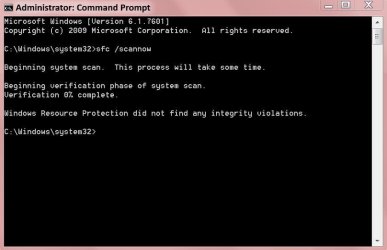
Ran it from elevated command prompt, and it stopped after just a few seconds saying no errors found!
I expected it to run for a few minutes at least.

Anyone had this before?
 

My Computer My Computer

Computer Manufacturer/Model Number
Custom Build
OS
Win7 Ultimate x64, Windows 8 Enterprise x64
CPU
AMD Phenom Quad Core 9865
Motherboard
Foxconn A6VMX
Memory
4GB
Graphics Card(s)
ATI RADEON HD3450
Sound Card
Realtek HD
Monitor(s) Displays
Samsung SyncMaster P2250
Screen Resolution
1920 x 1080
Hard Drives
Seagate ST380815AS (80GB) System Disk
Seagate ST31000528AS (1TB) - 2 Partitions (Programs & Storage)
Samsung HD1035SJ (1TB) - 3 Partitions (Downloads & BackUp)
PSU
450 watt
Case
Generic
Cooling
CPU & Case Fan
Keyboard
Logitech MK700
Mouse
Logitech M705
Internet Speed
20Gbs
Hello Paul,

That is a bit fast for a sfc /scannow run.

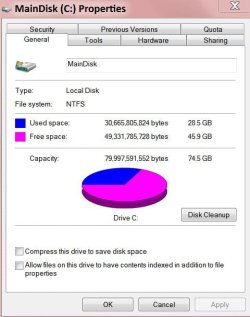
How large is the partition that you have Windows 7 installed on?

Could you post a screenshot of the CMD window showing all of what it said for this in case there may be something else that stands out?

Could you also upload a copy of the sfcdetails report from OPTION THREE to see if anything in the log file may say why?
 

My Computer My Computer

Computer type
PC/Desktop
Computer Manufacturer/Model Number
Self built custom
OS
64-bit Windows 11 Pro for Workstations
CPU
Intel i7-8700K OC'd to 5 GHz
Motherboard
ASUS ROG Maximus XI Formula Z390
Memory
64 GB (4x16GB) G.SKILL TridentZ RGB DDR4 3600 MHz
Graphics Card(s)
ASUS ROG-STRIX-GTX1080TI-O11G-GAMING
Sound Card
Integrated
Monitor(s) Displays
2 x Samsung Odyssey G7 27"
Screen Resolution
2560x1440
Hard Drives
1TB Samsung 990 PRO M.2,
4TB Samsung 990 PRO PRO M.2,
TerraMaster F8 SSD Plus NAS
PSU
Seasonic Prime Titanium 850W
Case
Thermaltake Core P3
Cooling
Corsair Hydro H115i
Keyboard
Logitech wireless K800
Mouse
Logitech MX Master 4
Internet Speed
2 Gb/s Download and 100 Mb/s Upload
Antivirus
Malwarebyte Anti-Malware Premium
Browser
Google Chrome
Other Info
Logitech Z625 speaker system,
Logitech BRIO 4K Pro webcam,
HP Color LaserJet Pro MFP M477fdn,
APC SMART-UPS RT 1000 XL - SURT1000XLI,
Galaxy S23 Plus phone
Hello Paul,

That is a bit fast for a sfc /scannow run.

How large is the partition that you have Windows 7 installed on?

Could you post a screenshot of the CMD window showing all of what it said for this in case there may be something else that stands out?

Could you also upload a copy of the sfcdetails report from OPTION THREE to see if anything in the log file may say why?

Hi Brink,

Hopefully 3 attachments have the details you require.
The partition is the drive, nothing else on it, I only use it for the OS.

TIA,
Paul.
MainDisk.JPG

scannow.JPG

View attachment sfcdetails.txt
 

My Computer My Computer

Computer Manufacturer/Model Number
Custom Build
OS
Win7 Ultimate x64, Windows 8 Enterprise x64
CPU
AMD Phenom Quad Core 9865
Motherboard
Foxconn A6VMX
Memory
4GB
Graphics Card(s)
ATI RADEON HD3450
Sound Card
Realtek HD
Monitor(s) Displays
Samsung SyncMaster P2250
Screen Resolution
1920 x 1080
Hard Drives
Seagate ST380815AS (80GB) System Disk
Seagate ST31000528AS (1TB) - 2 Partitions (Programs & Storage)
Samsung HD1035SJ (1TB) - 3 Partitions (Downloads & BackUp)
PSU
450 watt
Case
Generic
Cooling
CPU & Case Fan
Keyboard
Logitech MK700
Mouse
Logitech M705
Internet Speed
20Gbs
Yeah, that's to fast. It appears to have been interrupted.

I would recommend to run disk check on your C: drive to check it. Afterwards run the sfc scan again to see how it does.

If SFC is still that fast, then you might run the sfc scan at boot instead to see how it does.
SFC /SCANNOW : Run in Command Prompt at Boot
 

My Computer My Computer

Computer type
PC/Desktop
Computer Manufacturer/Model Number
Self built custom
OS
64-bit Windows 11 Pro for Workstations
CPU
Intel i7-8700K OC'd to 5 GHz
Motherboard
ASUS ROG Maximus XI Formula Z390
Memory
64 GB (4x16GB) G.SKILL TridentZ RGB DDR4 3600 MHz
Graphics Card(s)
ASUS ROG-STRIX-GTX1080TI-O11G-GAMING
Sound Card
Integrated
Monitor(s) Displays
2 x Samsung Odyssey G7 27"
Screen Resolution
2560x1440
Hard Drives
1TB Samsung 990 PRO M.2,
4TB Samsung 990 PRO PRO M.2,
TerraMaster F8 SSD Plus NAS
PSU
Seasonic Prime Titanium 850W
Case
Thermaltake Core P3
Cooling
Corsair Hydro H115i
Keyboard
Logitech wireless K800
Mouse
Logitech MX Master 4
Internet Speed
2 Gb/s Download and 100 Mb/s Upload
Antivirus
Malwarebyte Anti-Malware Premium
Browser
Google Chrome
Other Info
Logitech Z625 speaker system,
Logitech BRIO 4K Pro webcam,
HP Color LaserJet Pro MFP M477fdn,
APC SMART-UPS RT 1000 XL - SURT1000XLI,
Galaxy S23 Plus phone
Yeah, that's to fast. It appears to have been interrupted.

I would recommend to run disk check on your C: drive to check it. Afterwards run the sfc scan again to see how it does.

If SFC is still that fast, then you might run the sfc scan at boot instead to see how it does.SFC /SCANNOW : Run in Command Prompt at Boot

Hi again Brink,

Ran disk check nothing found.

Ran 'scannow' at boot, and it come back with the same result as before.

Paul.
 

My Computer My Computer

Computer Manufacturer/Model Number
Custom Build
OS
Win7 Ultimate x64, Windows 8 Enterprise x64
CPU
AMD Phenom Quad Core 9865
Motherboard
Foxconn A6VMX
Memory
4GB
Graphics Card(s)
ATI RADEON HD3450
Sound Card
Realtek HD
Monitor(s) Displays
Samsung SyncMaster P2250
Screen Resolution
1920 x 1080
Hard Drives
Seagate ST380815AS (80GB) System Disk
Seagate ST31000528AS (1TB) - 2 Partitions (Programs & Storage)
Samsung HD1035SJ (1TB) - 3 Partitions (Downloads & BackUp)
PSU
450 watt
Case
Generic
Cooling
CPU & Case Fan
Keyboard
Logitech MK700
Mouse
Logitech M705
Internet Speed
20Gbs
Hmm, have you ran a sfc /scannow scan recently before this? If so, that could be why it finished faster this time. Otherwise, I'm not sure why it would be finishing so quickly.
 

My Computer My Computer

Computer type
PC/Desktop
Computer Manufacturer/Model Number
Self built custom
OS
64-bit Windows 11 Pro for Workstations
CPU
Intel i7-8700K OC'd to 5 GHz
Motherboard
ASUS ROG Maximus XI Formula Z390
Memory
64 GB (4x16GB) G.SKILL TridentZ RGB DDR4 3600 MHz
Graphics Card(s)
ASUS ROG-STRIX-GTX1080TI-O11G-GAMING
Sound Card
Integrated
Monitor(s) Displays
2 x Samsung Odyssey G7 27"
Screen Resolution
2560x1440
Hard Drives
1TB Samsung 990 PRO M.2,
4TB Samsung 990 PRO PRO M.2,
TerraMaster F8 SSD Plus NAS
PSU
Seasonic Prime Titanium 850W
Case
Thermaltake Core P3
Cooling
Corsair Hydro H115i
Keyboard
Logitech wireless K800
Mouse
Logitech MX Master 4
Internet Speed
2 Gb/s Download and 100 Mb/s Upload
Antivirus
Malwarebyte Anti-Malware Premium
Browser
Google Chrome
Other Info
Logitech Z625 speaker system,
Logitech BRIO 4K Pro webcam,
HP Color LaserJet Pro MFP M477fdn,
APC SMART-UPS RT 1000 XL - SURT1000XLI,
Galaxy S23 Plus phone
Hmm, have you ran a sfc /scannow scan recently before this? If so, that could be why it finished faster this time. Otherwise, I'm not sure why it would be finishing so quickly.

No, have not run it for quite some time - can't remember the last time, so not recently.
 

My Computer My Computer

Computer Manufacturer/Model Number
Custom Build
OS
Win7 Ultimate x64, Windows 8 Enterprise x64
CPU
AMD Phenom Quad Core 9865
Motherboard
Foxconn A6VMX
Memory
4GB
Graphics Card(s)
ATI RADEON HD3450
Sound Card
Realtek HD
Monitor(s) Displays
Samsung SyncMaster P2250
Screen Resolution
1920 x 1080
Hard Drives
Seagate ST380815AS (80GB) System Disk
Seagate ST31000528AS (1TB) - 2 Partitions (Programs & Storage)
Samsung HD1035SJ (1TB) - 3 Partitions (Downloads & BackUp)
PSU
450 watt
Case
Generic
Cooling
CPU & Case Fan
Keyboard
Logitech MK700
Mouse
Logitech M705
Internet Speed
20Gbs
Any suggestions please.

Windows update error today (Win7 Ultimate).
Suggested run sfc /scannow.
Ran it from elevated command prompt, and it stopped after just a few seconds saying no errors found!
I expected it to run for a few minutes at least.

Anyone had this before?

Hello!

Yes, I have seen it before. It is not exactly uncommon. In all previous cases that I have dealt with, it has always been in error. Looking over the CBS.log file showed that SFC did in fact scan very few, or no, files. Often the CBS.log actually showed an error which SFC did not graphically report. In my experience, there are certain errors which SFC cannot recover from. In these cases, it stops part way with a 'Windows Resource Protection could not perform the requested operation' error message. When it finishes too fast, despite claiming success, it often has had one of these fatal errors anyway, if I remember correctly.

Now, I could take the CBS.log, and see what seems to be going on, but if you ask me, it isn't worth it unless you have a problem. If your computer has a problem, which is why you ran SFC, then I shall take a look, but if all seems well, then you risk more by fiddling.

Richard
 

My Computer My Computer

Computer Manufacturer/Model Number
Dell XPS 420
OS
Vista Home Premium x86 SP2
CPU
Intel Core 2 Quad Q9300 2.50GHz
Motherboard
Stock Dell 0TP406
Memory
4 gb (DDR2 800) 400MHz
Graphics Card(s)
ATI Radeon HD 3870 (512 MBytes)
Monitor(s) Displays
1 x Dell 2007FP and 1 x (old) Sonic flat screen
Screen Resolution
1600 x 1200 and 1280 x 1204
Hard Drives
1 x 640Gb (SATA 300) Western Digital: WDC WD6400AAKS-75A7B0 1 x 1Tb (SATA 600) Western Digital: Caviar Black, SATA 6GB/S, 64Mb cache, 8ms Western Digital: WDC WD1002FAEX-00Z3A0 ATA Device
Case
Dell XPS 420
Cooling
Stock Fan
Keyboard
Dell Bluetooth
Mouse
Advent Optical ADE-WG01 (colour change light up)
Internet Speed
Varies from 10kb/s to 170kb/s. So unreliable it is not funny
Other Info
ASUS USB 3.0 5Gbps/SATA 6Gbps - PCI-Express Combo Controller Card (U3S6)
So i did this Scan 6 times in total. 3 for the system32 and 3 for the 64.

This is the log and i hope you can help me. Thanks

And yes i have problem with my computer. Often hardlocks when i'm playing games. Especially BF3. I have tried tweaking with the soundcards etc, no luck. Hope this can tell something.
It's no problem with heat. Running at maximum 75 celcius.
I also have the BBC Code 117 all the time when it freezes. I have reinstalled windows TWICE, without luck.

I have tried several Nvidia drivers incl. beta drivers. No luck. All drivers are up to date.

When i installed a fresh win7 and installed my drivers from the MSI cd, i noticed that i got this crash. (i tho updated this to new drivers from msi)
Beskrivning
Felaktig programsökväg: C:\Program Files (x86)\Intel\Intel(R) Management Engine Components\LMS\LMS.exe
Problemsignatur
Händelsenamn: APPCRASH
Programnamn: LMS.exe
Programversion: 7.1.10.1065
Programtidsstämpel: 4d641645
Namn på felmodul: StackHash_0a9e
Modulens version: 0.0.0.0
Tidsstämpel för felmodul: 00000000
Undantagskod: c0000005
Undantagsförskjutning: 74b06c9c
OS-version: 6.1.7601.2.1.0.768.3
Språkvariant-ID: 1053
Ytterligare information 1: 0a9e
Ytterligare information 2: 0a9e372d3b4ad19135b953a78882e789
Ytterligare information 3: 0a9e
Ytterligare information 4: 0a9e372d3b4ad19135b953a78882e789
Filer som bidrar till att beskriva problemet
AppCompat.txt
WERInternalMetadata.xml
memory.hdmp
minidump.mdmp
 

Attachments

My Computer My Computer

Computer Manufacturer/Model Number
MSI Z68A GD65 g3
OS
Windows 7 64 Premium
CPU
I7 2600k 3.4 ghz
Motherboard
z68a gd65 g3
Memory
8gb corsair 1600mhz
Graphics Card(s)
2xgtx 580 1500 mb twin frozr II
Sound Card
Realtek
Monitor(s) Displays
1
Hard Drives
Western digital 2tb
Crucial m4 120 gb
PSU
silent master pro 1000w
Case
corsair 800d
Cooling
5 fans, noctuah dh-14
Hello Moojo,

Looking at your sfcdetails.txt log, there were no issues found with your system files. All is ok with them. :)

Where you having some sort of issue that you needed help with??
 

My Computer My Computer

Computer type
PC/Desktop
Computer Manufacturer/Model Number
Self built custom
OS
64-bit Windows 11 Pro for Workstations
CPU
Intel i7-8700K OC'd to 5 GHz
Motherboard
ASUS ROG Maximus XI Formula Z390
Memory
64 GB (4x16GB) G.SKILL TridentZ RGB DDR4 3600 MHz
Graphics Card(s)
ASUS ROG-STRIX-GTX1080TI-O11G-GAMING
Sound Card
Integrated
Monitor(s) Displays
2 x Samsung Odyssey G7 27"
Screen Resolution
2560x1440
Hard Drives
1TB Samsung 990 PRO M.2,
4TB Samsung 990 PRO PRO M.2,
TerraMaster F8 SSD Plus NAS
PSU
Seasonic Prime Titanium 850W
Case
Thermaltake Core P3
Cooling
Corsair Hydro H115i
Keyboard
Logitech wireless K800
Mouse
Logitech MX Master 4
Internet Speed
2 Gb/s Download and 100 Mb/s Upload
Antivirus
Malwarebyte Anti-Malware Premium
Browser
Google Chrome
Other Info
Logitech Z625 speaker system,
Logitech BRIO 4K Pro webcam,
HP Color LaserJet Pro MFP M477fdn,
APC SMART-UPS RT 1000 XL - SURT1000XLI,
Galaxy S23 Plus phone
Back
Top