Solved approve and disapprove web page

abc sharp

New member
Local time
9:02 AM
Messages
3
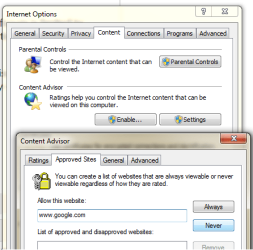
hello ,why when i write a web address in contenet tab in internet options for block like this(the picture):
it doesn't work for me?
thanks in advance.
 

Attachments

  • content.png
    content.png
    18.1 KB · Views: 4

My Computer My Computer

At a glance

Ultimate 64bit
OS
Ultimate 64bit
Close Internet Explorer. Open Internet Settings and that window on screenshot.
Well, you have to type a website, click Never and it will show up in the list with red sign. Then you click APPLY - Ok. It should ask you for a password - you have to setup this password. Then Enable button should turn into Disable, if not - do it manually. Now it should work.

 

My Computer My Computer

At a glance

Windows 8.1 ; Windows 7 x86 (Dec2008-Jan2013)
Computer type
PC/Desktop
OS
Windows 8.1 ; Windows 7 x86 (Dec2008-Jan2013)
Other Info
"The scale icon at the top right of a post or tutorial is how you can give rep to the member."
Close Internet Explorer. Open Internet Settings and that window on screenshot.
Well, you have to type a website, click Never and it will show up in the list with red sign. Then you click APPLY - Ok. It should ask you for a password - you have to setup this password. Then Enable button should turn into Disable, if not - do it manually. Now it should work.

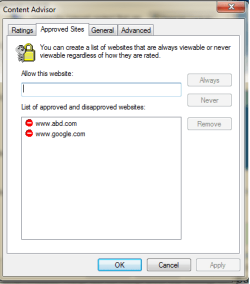
I do all but i can open www.google.com even after restart system.
see this:
 

Attachments

  • c2.png
    c2.png
    11.6 KB · Views: 1
Last edited:

My Computer My Computer

At a glance

Ultimate 64bit
OS
Ultimate 64bit
On the Content tab of Internet Options - Content advisor -Button is Enable or Disable?

Content Advisor, tab General - Do you have a password?

If Content Advisor is turned off and you do not have password IT WONT WORK.
 

My Computer My Computer

At a glance

Windows 8.1 ; Windows 7 x86 (Dec2008-Jan2013)
Computer type
PC/Desktop
OS
Windows 8.1 ; Windows 7 x86 (Dec2008-Jan2013)
Other Info
"The scale icon at the top right of a post or tutorial is how you can give rep to the member."
Excuse me i found it thank you.
can you tell me where is the address of enable button in the registry?
 
Last edited:

My Computer My Computer

At a glance

Ultimate 64bit
OS
Ultimate 64bit
Back
Top