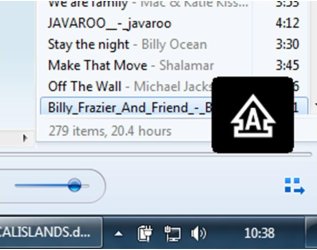
Unknown little black box with arrow and 'A' in it stays on the screen

IJmir

New member
Local time
10:35 AM
Messages
23
For no apparent reason, there is a little black box on my screen with a white open, compacted arrow in it and inside the arrow an 'A' (see screenshot). The screenshot shows Mediaplayer open but it is there constantly, independent of which program I am using. It seems 'dead': clicking on it (either right or left) results in nothing. How can I remove it? Now that I have made the screenshot, suddenly there is an arrow through it.
Thanks for advice! IJmir
 

Attachments

  • Box.jpg
    Box.jpg
    50.3 KB · Views: 3
Last edited:

My Computer My Computer

At a glance

Windows 7
OS
Windows 7
since when is this house appearing?
 

My Computer My Computer

At a glance

Windows 10 Home 64BitIntel Core i5 10400 @ 2.90GHz8.00GB Single-Channel Unknown @ 1329MHz (16-2...
Computer type
PC/Desktop
Computer Manufacturer/Model Number
Self assembled
OS
Windows 10 Home 64Bit
CPU
Intel Core i5 10400 @ 2.90GHz
Motherboard
Intel Corporation DG41WV (PROCESSOR)
Memory
8.00GB Single-Channel Unknown @ 1329MHz (16-20-20-38)
Sound Card
Realtek High Definition Audio
Monitor(s) Displays
DELL E170S
Screen Resolution
1280x1024 pixels
Hard Drives
931GB TOSHIBA DT01ACA100 (SATA)
238GB TEAM TM8PS7256G (SATA SSD)
Case
Nothing Fancy
Cooling
Fans
Keyboard
A4 Tech Co LTD
Mouse
A4 Tech Co Ltd/Logitech
Internet Speed
25 Mbps
@Koolkat: since about a week and a half or so
 

My Computer My Computer

At a glance

Windows 7
OS
Windows 7
did you install any software/make any changes with windows media player by any chance back then?
 

My Computer My Computer

At a glance

Windows 10 Home 64BitIntel Core i5 10400 @ 2.90GHz8.00GB Single-Channel Unknown @ 1329MHz (16-2...
Computer type
PC/Desktop
Computer Manufacturer/Model Number
Self assembled
OS
Windows 10 Home 64Bit
CPU
Intel Core i5 10400 @ 2.90GHz
Motherboard
Intel Corporation DG41WV (PROCESSOR)
Memory
8.00GB Single-Channel Unknown @ 1329MHz (16-20-20-38)
Sound Card
Realtek High Definition Audio
Monitor(s) Displays
DELL E170S
Screen Resolution
1280x1024 pixels
Hard Drives
931GB TOSHIBA DT01ACA100 (SATA)
238GB TEAM TM8PS7256G (SATA SSD)
Case
Nothing Fancy
Cooling
Fans
Keyboard
A4 Tech Co LTD
Mouse
A4 Tech Co Ltd/Logitech
Internet Speed
25 Mbps
I think I installed Wavepad and perhaps also a thumbnail tweaker programme. However, when I did that on my previous laptop I did not get this box. Also Microsoft Office downloaded updates and so did Adobe
 

My Computer My Computer

At a glance

Windows 7
OS
Windows 7
if it appears each time you boot your computer, then it must be in your autostart list.

type msconfig into your start-menu searchbox, goto the startup tab and see which entries are ticked.

you can probably work out the offending start-up entry yourself, but if you need more help, post up a screemshot of your msconfig startup tab.
 

My Computer My Computer

At a glance

ultimate 64 sp1i5 2500K [email protected]8 gigs GSkill Ripjaws 1600amd hd6950
Computer Manufacturer/Model Number
mickey megabyte 1234
OS
ultimate 64 sp1
CPU
i5 2500K [email protected]
Motherboard
MSI P67A-GD53
Memory
8 gigs GSkill Ripjaws 1600
Graphics Card(s)
amd hd6950
Sound Card
creative x-fi gamer
Monitor(s) Displays
samsung 24"
Screen Resolution
1920x1080
Hard Drives
ocz vertex 2e 60 gig, samsung f3 1tb, buffalo 2tb ext
PSU
antec 550
Case
antec three hundred
Cooling
i'm a cooling fan
Keyboard
saitek eclipse ii
Mouse
logitech g3
Internet Speed
about 4 Mbps
Other Info
i love win7
Wavepad is software to edit music files. So I do edit music files that I choose from Mediaplayer playlists that I made before and I use Wavepad for the editing
 

My Computer My Computer

At a glance

Windows 7
OS
Windows 7
It reminds me of the images that appear on some OEM computers when Caps lock or Num lock is turned on and off. What brand computer are you using and did it come with a lot of pre-installed OEM bloatware?
 

My Computer My Computer

At a glance

Windows 7 Professional SP1 64-bitIntel Core i5-2450M @2.5 GHz6 GB DDR3 1333MHzIntel HD 3000
Computer type
Laptop
Computer Manufacturer/Model Number
Toshiba P775-S7100
OS
Windows 7 Professional SP1 64-bit
CPU
Intel Core i5-2450M @2.5 GHz
Memory
6 GB DDR3 1333MHz
Graphics Card(s)
Intel HD 3000
Monitor(s) Displays
Built-in 17.3" LED; 22" Insignia NS-L22Q-10A
Screen Resolution
1600x900; 1360x768
Hard Drives
750 GB Hitachi
1TB Seagate FreeAgent External
Internet Speed
Verizon DSL Speed(Down/Up): 3360 Kbps / 800 Kbps
Antivirus
MSE and MBAM Pro
Browser
IE10
It reminds me of the images that appear on some OEM computers when Caps lock or Num lock is turned on and off. What brand computer are you using and did it come with a lot of pre-installed OEM bloatware?

well done. i reckon it's a thinkpad caps-lock.
 

My Computer My Computer

At a glance

ultimate 64 sp1i5 2500K [email protected]8 gigs GSkill Ripjaws 1600amd hd6950
Computer Manufacturer/Model Number
mickey megabyte 1234
OS
ultimate 64 sp1
CPU
i5 2500K [email protected]
Motherboard
MSI P67A-GD53
Memory
8 gigs GSkill Ripjaws 1600
Graphics Card(s)
amd hd6950
Sound Card
creative x-fi gamer
Monitor(s) Displays
samsung 24"
Screen Resolution
1920x1080
Hard Drives
ocz vertex 2e 60 gig, samsung f3 1tb, buffalo 2tb ext
PSU
antec 550
Case
antec three hundred
Cooling
i'm a cooling fan
Keyboard
saitek eclipse ii
Mouse
logitech g3
Internet Speed
about 4 Mbps
Other Info
i love win7
@Mickey: I found 'Smart Audio Control Panel Application' in the Start Up menu. That may well be the one because I also get a transparent temporary control panel every now and then from the same time as when the box started appearing. And that pop-up panel seems to be an audio control panel. I unticked the above Appl. and restarted the laptop.
OK, and then I read Petey's comment. And yes: it's the Caps lock !! Strange though, that it stayed on the screen and didn't go away. (And by the way: what does an 'A' have to do witch caps ....??). Mickey's assumption triggered by Petey's comment is corrrect: it's a Thinkpad. I am using a Lenovo Edge (and am down to my third hard drive since I bought it 6 months ago !!!!! What a lousy machine !!!).
But it may be that I caught 2 birds in 1 hand now because I may have solved the box problem AND this annoying pop-up control panel. So THANKS!! both for your advice and help!
 

My Computer My Computer

At a glance

Windows 7
OS
Windows 7
I can't say specifically why an "A", but I can say that back when it was decided to include Caps Lock, Num Lock, and Scroll Lock on computer keyboards it was also decided that an indicator of some sort was needed to let people know that those were on, so it was decided to use a row of LEDs and each one needed something unique to tell them apart, and using those symbols underneath the lights was decided upon, although on some older keyboards, the lights are spaced out more with the words Caps/Num/Scroll lock written underneath the light. Now a days laptop manufacturers have decided to leave out the LEDs and include software which indicates when they are on.
 

My Computer My Computer

At a glance

Windows 7 Professional SP1 64-bitIntel Core i5-2450M @2.5 GHz6 GB DDR3 1333MHzIntel HD 3000
Computer type
Laptop
Computer Manufacturer/Model Number
Toshiba P775-S7100
OS
Windows 7 Professional SP1 64-bit
CPU
Intel Core i5-2450M @2.5 GHz
Memory
6 GB DDR3 1333MHz
Graphics Card(s)
Intel HD 3000
Monitor(s) Displays
Built-in 17.3" LED; 22" Insignia NS-L22Q-10A
Screen Resolution
1600x900; 1360x768
Hard Drives
750 GB Hitachi
1TB Seagate FreeAgent External
Internet Speed
Verizon DSL Speed(Down/Up): 3360 Kbps / 800 Kbps
Antivirus
MSE and MBAM Pro
Browser
IE10
it definitely is caps lock, if you press numbers lock you will probably see the housey arrow icon with a number 1 in it,

im using a lenovo laptop atm and it has the caps indicators with led's and the icon.
 

My Computer My Computer

At a glance

Microsoft Windows 7 Home Premium 64-bit 7600IIx4 amd athelon 635 processor2x2gbati radeon HD 5450
Computer Manufacturer/Model Number
Hewlett packard/p6512uk
OS
Microsoft Windows 7 Home Premium 64-bit 7600
CPU
IIx4 amd athelon 635 processor
Motherboard
FOXCONN 2AA9
Memory
2x2gb
Graphics Card(s)
ati radeon HD 5450
Sound Card
(1) Realtek High Definition Audio (2) AMD High Definition
Monitor(s) Displays
samsung lcd tv 32"
Screen Resolution
1360x 768
Hard Drives
(1) WDC WD10 01FAES-60Z2A0 SATA Disk Device (2) Maxtor OneTouch USB Device (3) ST310003 33AS USB Device (4) WD My Book 1111 USB Device
PSU
?
Cooling
air!
Keyboard
wireless hp
Mouse
wireless Hp,optical
Internet Speed
1.10mb/s
Antivirus
MSE
Browser
Firefox
The housy icon with A is gone (was Caps Lock) but the other stuff (that I tought was connected) is still happening: like when I adjust the sound by using the loadspeeaker icon on the toolbar a slide bar pops up that shows the sound level being adjusted - which is not necessary because the loadspeaker facility on the toolbar does that already. It is of the same design as the Caps Lock box: black, blunt and ugly. So I guess an OEM thing. Strange though, that it only apppears now - with my third (!!!!) hard drive put in and not before. But I guess that will have toi be another thread ......
 

My Computer My Computer

At a glance

Windows 7
OS
Windows 7
No, you don't need to make another thread. Probably best to keep it all contained to one actually.

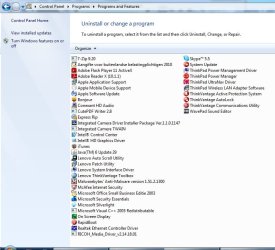
Go to control panel and open Programs and Features. Maximize the window and take a screen shot (instructions in tutorial below). Attach it to your next post so that we can see what OEM software is installed. From there we should be able to help you either disable or uninstall the software.

http://www.sevenforums.com/tutorials/9717-screenshot-paint.html
 

My Computer My Computer

At a glance

Windows 7 Professional SP1 64-bitIntel Core i5-2450M @2.5 GHz6 GB DDR3 1333MHzIntel HD 3000
Computer type
Laptop
Computer Manufacturer/Model Number
Toshiba P775-S7100
OS
Windows 7 Professional SP1 64-bit
CPU
Intel Core i5-2450M @2.5 GHz
Memory
6 GB DDR3 1333MHz
Graphics Card(s)
Intel HD 3000
Monitor(s) Displays
Built-in 17.3" LED; 22" Insignia NS-L22Q-10A
Screen Resolution
1600x900; 1360x768
Hard Drives
750 GB Hitachi
1TB Seagate FreeAgent External
Internet Speed
Verizon DSL Speed(Down/Up): 3360 Kbps / 800 Kbps
Antivirus
MSE and MBAM Pro
Browser
IE10
Great!
Here you go. Thanks
 

Attachments

  • features.jpg
    features.jpg
    69.5 KB · Views: 17

My Computer My Computer

At a glance

Windows 7
OS
Windows 7
it may be easier to look at your msconfig startup list - that way you can simply disable startup apps rather than completely uninstall them while you're looking for the culprit.

in your screenshot above, that 'On Screen Display' program looks like a promising candidate...
 

My Computer My Computer

At a glance

ultimate 64 sp1i5 2500K [email protected]8 gigs GSkill Ripjaws 1600amd hd6950
Computer Manufacturer/Model Number
mickey megabyte 1234
OS
ultimate 64 sp1
CPU
i5 2500K [email protected]
Motherboard
MSI P67A-GD53
Memory
8 gigs GSkill Ripjaws 1600
Graphics Card(s)
amd hd6950
Sound Card
creative x-fi gamer
Monitor(s) Displays
samsung 24"
Screen Resolution
1920x1080
Hard Drives
ocz vertex 2e 60 gig, samsung f3 1tb, buffalo 2tb ext
PSU
antec 550
Case
antec three hundred
Cooling
i'm a cooling fan
Keyboard
saitek eclipse ii
Mouse
logitech g3
Internet Speed
about 4 Mbps
Other Info
i love win7
I believe the On Screen Display software is the culprit based on its name and the discription of the software on Lenovo's website. I would recommend turning off via MSconfig is you can, or if you want to remove it that should be fine.
 

My Computer My Computer

At a glance

Windows 7 Professional SP1 64-bitIntel Core i5-2450M @2.5 GHz6 GB DDR3 1333MHzIntel HD 3000
Computer type
Laptop
Computer Manufacturer/Model Number
Toshiba P775-S7100
OS
Windows 7 Professional SP1 64-bit
CPU
Intel Core i5-2450M @2.5 GHz
Memory
6 GB DDR3 1333MHz
Graphics Card(s)
Intel HD 3000
Monitor(s) Displays
Built-in 17.3" LED; 22" Insignia NS-L22Q-10A
Screen Resolution
1600x900; 1360x768
Hard Drives
750 GB Hitachi
1TB Seagate FreeAgent External
Internet Speed
Verizon DSL Speed(Down/Up): 3360 Kbps / 800 Kbps
Antivirus
MSE and MBAM Pro
Browser
IE10
i have a similar volume level indicator when i use Fn and the left/right arrows but when i use the speaker icon in the systems tray it doesnt show the lenovo volume display.

im not sure how to stop it and if you delete it you may lose other indicators like the trackpad disable /enabled icon and other fn key features.
 

My Computer My Computer

At a glance

Microsoft Windows 7 Home Premium 64-bit 7600IIx4 amd athelon 635 processor2x2gbati radeon HD 5450
Computer Manufacturer/Model Number
Hewlett packard/p6512uk
OS
Microsoft Windows 7 Home Premium 64-bit 7600
CPU
IIx4 amd athelon 635 processor
Motherboard
FOXCONN 2AA9
Memory
2x2gb
Graphics Card(s)
ati radeon HD 5450
Sound Card
(1) Realtek High Definition Audio (2) AMD High Definition
Monitor(s) Displays
samsung lcd tv 32"
Screen Resolution
1360x 768
Hard Drives
(1) WDC WD10 01FAES-60Z2A0 SATA Disk Device (2) Maxtor OneTouch USB Device (3) ST310003 33AS USB Device (4) WD My Book 1111 USB Device
PSU
?
Cooling
air!
Keyboard
wireless hp
Mouse
wireless Hp,optical
Internet Speed
1.10mb/s
Antivirus
MSE
Browser
Firefox

My Computer My Computer

At a glance

Windows 7 Professional SP1 64-bitIntel Core i5-2450M @2.5 GHz6 GB DDR3 1333MHzIntel HD 3000
Computer type
Laptop
Computer Manufacturer/Model Number
Toshiba P775-S7100
OS
Windows 7 Professional SP1 64-bit
CPU
Intel Core i5-2450M @2.5 GHz
Memory
6 GB DDR3 1333MHz
Graphics Card(s)
Intel HD 3000
Monitor(s) Displays
Built-in 17.3" LED; 22" Insignia NS-L22Q-10A
Screen Resolution
1600x900; 1360x768
Hard Drives
750 GB Hitachi
1TB Seagate FreeAgent External
Internet Speed
Verizon DSL Speed(Down/Up): 3360 Kbps / 800 Kbps
Antivirus
MSE and MBAM Pro
Browser
IE10
I created a system restore point just to be sure. I couldn't turn off On Screen Display in Msconfig because I didn't see it there. So I uninstalled it. I now no longer get the sound level indicator - hurray. So far, I am not aware of anything not functioning properly as a result - but then I don't think I ever use the Fn keys.
The less clutter on the screen the better!! THANKS ALL for your help!
 

My Computer My Computer

At a glance

Windows 7
OS
Windows 7
Back
Top