
Hey guys pleas tell me how can I safely change my folder color?? because this yellow is tiring already...
But in the meantime I would still like to keep the "live folder".
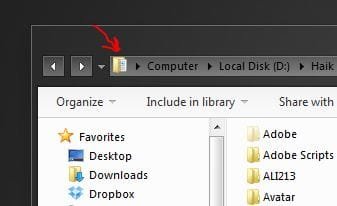
I previously mentioned that I have a not so good experience with folder icon changing (with IconPackager), but the problem was that it didn't change "all" the folders som of them (the small ones), like the ones are showed in the attachment, became Windows generic icons.
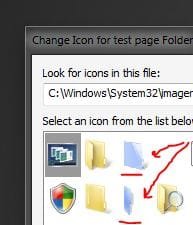
One more thing. I noticed that in "imageres.dll" there is blue live folder parts (screenshot is attached), if this is windows default icons, then it should change all the folders icons I guess (or I am wrong?), so if yes how to apply them for all icons in my Windows.
Thank you for help.. ))
But in the meantime I would still like to keep the "live folder".
I previously mentioned that I have a not so good experience with folder icon changing (with IconPackager), but the problem was that it didn't change "all" the folders som of them (the small ones), like the ones are showed in the attachment, became Windows generic icons.
One more thing. I noticed that in "imageres.dll" there is blue live folder parts (screenshot is attached), if this is windows default icons, then it should change all the folders icons I guess (or I am wrong?), so if yes how to apply them for all icons in my Windows.
Thank you for help.. ))
Attachments
My Computer
At a glance
Windows 7 SP1 Ultimate x64Intel Core i5 M430 2.27 GHz 2.27 GHz3952 MB (DDR3-1066 DDR3 SDRAM)ATI Mobility Radeon HD 5650 (1024 MB)
- Computer Manufacturer/Model Number
- SONY VAIO VPCEB1S1E
- OS
- Windows 7 SP1 Ultimate x64
- CPU
- Intel Core i5 M430 2.27 GHz 2.27 GHz
- Motherboard
- Intel Ibex Peak-M HM55, Intel Arrandale
- Memory
- 3952 MB (DDR3-1066 DDR3 SDRAM)
- Graphics Card(s)
- ATI Mobility Radeon HD 5650 (1024 MB)
- Sound Card
- Realtek ALC269 @ Intel Ibex Peak PCH - High Definition Audio
- Monitor(s) Displays
- Generic PnP Monitor [NoDB]
- Screen Resolution
- 1366x768
- Hard Drives
- Toshiba MK-5055GSX 500 Gb


