x86 versus x64 questions

donnyb

New member
Member
VIP
Local time
5:49 PM
Messages
153
I have tried w7 7100, but it was an x86 version. I read several threads about the x86 vs x64, and would like to maybe try the x64 version of the new RTM, but I have a few questions:

1) How can I find out if my computer is x64 compatible? I have a dual core Opteron 170 processor and my HD's are all SATA (if that makes any difference)

2) I have loads of software, will I have to upgrade any? The one I am concerned about is Adobe Master Collection CS4. Don't want to have to do that one again. Also, I do web design, so have that type of software plus I have a webcam, which I think I read may be a problem.

3) Is there anything else I need to know before going forward?
 

My Computer My Computer

OS
Win 7 x64
CPU
i7 920 @ 4Ghz
Motherboard
Asus P6T Deluxe v2
Memory
6 Gb
Graphics Card(s)
ATI 4770
Hard Drives
1 ea 750 GB
1 ea 1TB
1 ea 750 GB
1 ea 750 GB
No Raid, all SATA
PSU
Corsair TX750
Case
Coolermaster ATCS 840
Cooling
Prolimatech Megahalem
Internet Speed
30
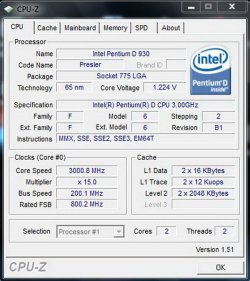
You can download CPU-Z and look for the instruction set of x86-64.

CPUID


Going from x86 to x64, you must do a clean install.. So you will have to reinstall Adobe, sorry.

Just backup your documents and bookmarks and anything else you use regularly, besides programs.
 

My Computer My Computer

Computer Manufacturer/Model Number
Custom Made
OS
Windows 7 Build 7600|16384- 64bit
CPU
AMD Phenom II X4 810 - 2.61ghz Deneb
Motherboard
Asus M4A79T Deluxe
Memory
4GB DDR3 Mushkin (1600 O.C. Rated)
Graphics Card(s)
ATI HD Radeon 4890 1GB
Sound Card
Realtek HD Onboard Audio
Monitor(s) Displays
AOC 912vwa-1
Screen Resolution
1440x900 (Max Monitor)
Hard Drives
10000RPM 150GB Western Digital Velociraptor
PSU
Corsair TSX750W
Case
Antec Nine Hundred
Cooling
Air Cooled
Keyboard
Logitech Elite
Mouse
Logitech MX518
Internet Speed
Comcast High-Speed (+Powerboost)
It depends on your CPU (is OK AFAIK) and how much RAM you have. 2Gbyte RAM or more, and you are fit to go with x64.

If you are using Adobe CS4 then you will love x64 with a lot of RAM as this can really make a difference in speed when rendering big pictures.

It is only a few older webcams that makes problems as I understand it, but you might want to try and ask in the driver-group in this forum.
Write the name and model of your webcam in a post and ask if anybody knows of problems with a driver for your webcam.

3) You can't upgrade to x64, you have to do a clean install, but if you have Windows 7 installed now, try looking in All Programs-> accessories->system tools->Windows easy transfer. Run this utillity and let Windows 7 make a big file with your setups. After installing the new OS, then same path, same program this time telling the program, that this is your new "PC", and all your settings will be restored. Actually, if you have the programs installed on C:\ then it is not so easy, but if your programs is installed in another drive, then go ahead :).
 

My Computer My Computer

OS
Windows 7 Ultimate x64
CPU
Intel E6850 3,0 running 3,6 Ghz
Motherboard
Gigabyte DS4 P35
Memory
2x2 and Gb Corsair PC6400 CAS5 - 4GB total
Graphics Card(s)
Nvidia Geforce 260GTX
Sound Card
Creative X-Fi Fata1ty Gamer Extreme
Monitor(s) Displays
Samsung 2493hm
Screen Resolution
1920*1200
Hard Drives
Intel X25-M SSD for system
2x 1Tb Samsung F1 as seperate discs
PSU
Zahlman 850HP
Case
Shg
Cooling
Evo 120
Keyboard
Logitech G15 (blue backlight)
Mouse
Logitech G5 laser
Internet Speed
25/25 mbit
Other Info
1 Samsung SATA dvd-burner
1 LiteOn SATA dvd-burner
I figured I would have to do a fresh install. What I was worried about regarding the software is not necessarily the re-install (although that usually takes me about a week - all weekend, then 5 week nights), but whether they would work at all. I thought I read somewhere about a Photoshop x64 version. And the reference to the Adobe MC - I don't want to have to buy another piece of the Adobe rock.
 

My Computer My Computer

OS
Win 7 x64
CPU
i7 920 @ 4Ghz
Motherboard
Asus P6T Deluxe v2
Memory
6 Gb
Graphics Card(s)
ATI 4770
Hard Drives
1 ea 750 GB
1 ea 1TB
1 ea 750 GB
1 ea 750 GB
No Raid, all SATA
PSU
Corsair TX750
Case
Coolermaster ATCS 840
Cooling
Prolimatech Megahalem
Internet Speed
30
63 bit vs 32

I have tried w7 7100, but it was an x86 version. I read several threads about the x86 vs x64, and would like to maybe try the x64 version of the new RTM, but I have a few questions:

1) How can I find out if my computer is x64 compatible? I have a dual core Opteron 170 processor and my HD's are all SATA (if that makes any difference)

2) I have loads of software, will I have to upgrade any? The one I am concerned about is Adobe Master Collection CS4. Don't want to have to do that one again. Also, I do web design, so have that type of software plus I have a webcam, which I think I read may be a problem.

3) Is there anything else I need to know before going forward?

hey and welcome
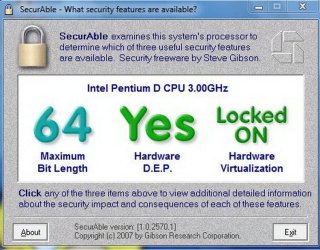
1- to find out if your computer is capible you cana go to grc.com and download a small free program called securable. It looks like this

2-most (if not all) 32 bit will run on 64 bit systems just a tad less efficiently. there may not be a problem with your webcam driver check your models manufacturer.

There is tons more you need to know. Lets just skim the surface. How much memory do you have, what kind of video card and how much memory. How much hard disk space, etc.

It really isn't rocket science. Ask us all the questions you can think of thats why we are here.

Hope this helped

Ken
 
Last edited:

My Computer My Computer

Computer Manufacturer/Model Number
HP Pavillion dv-7 1005 Tx
OS
Win 8 Release candidate 8400
CPU
[email protected]
Memory
4 gigs
Graphics Card(s)
Nvidia 9600M
Sound Card
HD built-in
Monitor(s) Displays
17" Wxga
Screen Resolution
1440x900
Cooling
none
Internet Speed
45Mb down 5Mb up
It looks like I am good to go. CPU-Z reports x86-64 and Securables shows I have 64 also.
My system has 2 gig of ram and my vid card is an ATI All in wonder X800XL with 256 memory.

I have tons of HD space: 3 drives at 750 gig and 2 replaceable drives at 500 gig each. BTW - the win7 is on one of the replaceables. By replaceables, I mean I have a drive bay that has a removeable tray that houses a SATA drive. I have two drive trays for the one bay that I use for backup. One goes off-site. I'm not paranoid, I just have some critical data from a few websites. I will check about the webcam tomorrow.
 

My Computer My Computer

OS
Win 7 x64
CPU
i7 920 @ 4Ghz
Motherboard
Asus P6T Deluxe v2
Memory
6 Gb
Graphics Card(s)
ATI 4770
Hard Drives
1 ea 750 GB
1 ea 1TB
1 ea 750 GB
1 ea 750 GB
No Raid, all SATA
PSU
Corsair TX750
Case
Coolermaster ATCS 840
Cooling
Prolimatech Megahalem
Internet Speed
30
It depends on your CPU (is OK AFAIK) and how much RAM you have. 2Gbyte RAM or more, and you are fit to go with x64.

If you are using Adobe CS4 then you will love x64 with a lot of RAM as this can really make a difference in speed when rendering big pictures.

It is only a few older webcams that makes problems as I understand it, but you might want to try and ask in the driver-group in this forum.
Write the name and model of your webcam in a post and ask if anybody knows of problems with a driver for your webcam.

3) You can't upgrade to x64, you have to do a clean install, but if you have Windows 7 installed now, try looking in All Programs-> accessories->system tools->Windows easy transfer. Run this utillity and let Windows 7 make a big file with your setups. After installing the new OS, then same path, same program this time telling the program, that this is your new "PC", and all your settings will be restored. Actually, if you have the programs installed on C:\ then it is not so easy, but if your programs is installed in another drive, then go ahead :).


You sure you can do that? Cause all the paths change going to 64bit. Program Files (x86) versus Program Files which is 64bit. There is also different areas of the registry for windows 64bit. I would think doing a backup of all that would cause more problems in the long run, since the paths are not even remotely the same. It would be safer just to reinstall everything from scratch, rather then back it up.
 

My Computer My Computer

Computer Manufacturer/Model Number
Custom Made
OS
Windows 7 Build 7600|16384- 64bit
CPU
AMD Phenom II X4 810 - 2.61ghz Deneb
Motherboard
Asus M4A79T Deluxe
Memory
4GB DDR3 Mushkin (1600 O.C. Rated)
Graphics Card(s)
ATI HD Radeon 4890 1GB
Sound Card
Realtek HD Onboard Audio
Monitor(s) Displays
AOC 912vwa-1
Screen Resolution
1440x900 (Max Monitor)
Hard Drives
10000RPM 150GB Western Digital Velociraptor
PSU
Corsair TSX750W
Case
Antec Nine Hundred
Cooling
Air Cooled
Keyboard
Logitech Elite
Mouse
Logitech MX518
Internet Speed
Comcast High-Speed (+Powerboost)
It depends on your CPU (is OK AFAIK) and how much RAM you have. 2Gbyte RAM or more, and you are fit to go with x64.

If you are using Adobe CS4 then you will love x64 with a lot of RAM as this can really make a difference in speed when rendering big pictures.

It is only a few older webcams that makes problems as I understand it, but you might want to try and ask in the driver-group in this forum.
Write the name and model of your webcam in a post and ask if anybody knows of problems with a driver for your webcam.

3) You can't upgrade to x64, you have to do a clean install, but if you have Windows 7 installed now, try looking in All Programs-> accessories->system tools->Windows easy transfer. Run this utillity and let Windows 7 make a big file with your setups. After installing the new OS, then same path, same program this time telling the program, that this is your new "PC", and all your settings will be restored. Actually, if you have the programs installed on C:\ then it is not so easy, but if your programs is installed in another drive, then go ahead :).
Windows Easy Transfer does not work x86 <> x64. Must be same "x".

I also have my drives on hot-swapable trays. It works great. I actually AM paranoid :).

Photoshop CS4 and Lightroom work great in 64-bit, especially Photoshop with extra memory, if you do lots of layers, local corrections and such, plus you can have lots of history to play with. Nero 9 also will use the extra mem and will use the multiple cores.
 

My Computer My Computer

Computer Manufacturer/Model Number
Custom workstation /// Lenovo X61t tablet notebook
OS
Windows 7 RTM x64
CPU
Core i7 980X @ 4.04GHz OC /// Core Duo L7500 @ 1.6GHz
Motherboard
Asus P6T6 WS Revolution ///
Memory
12GB G. Skill @ DDR-1600 OC /// 4GB
Graphics Card(s)
Saphire HD4870 Toxic 1GB /// Intel Mobile GMA X3100
Monitor(s) Displays
Dual Eizo 24" SX2461W /// 12"
Screen Resolution
1920x1200 /// 1400x1050
Hard Drives
Workstation:
5x 750GB Barracuda-11 on Areca ARC-1220;
4x 1.5TB Barracuda-11 on Intel ICH10R;
Volumes:
300GB RAID 0, 2.7TB RAID 10 on Intel;
100GB RAID 0, 1.4TB RAID 10 on Areca ///
Notebook: G.Skill Titan 256GB SSD
PSU
Tagan ITZ 1100
Case
GHS-1500 ///
Cooling
Thermalright IFX-14 + a slew of stealth fans ///
Keyboard
Logitech Edge ///
Mouse
Logitech Wireless Optical Trackball
Internet Speed
5Mbps down / 820Kbps up
Other Info
Main use: photography;
DVD Drive: L.G GGW-H20L Blu-Ray / DVD;
OC: QPI/DRAM @ 1.33v, CPU @ 1.293v, DRAM Bus @ 1.65v, CPU PLL @ 1.88v, CPU mult = 25x, BCLK = 160, DDR3-1604 @ 7-8-7-24
I'll add this. The Creative Labs 64-bit drivers are garbage. Staticy, scratchy sound that is much lower than usual. 32-bit drivers are fine.

They've had how many years to get this right?
 

My Computer My Computer

Computer Manufacturer/Model Number
HP
OS
Windows 7 RC Build 7260
CPU
AMD Athlon 64 x2 4100+
Memory
4GB
Sound Card
X-Fi xtreme Music
I'll add this. The Creative Labs 64-bit drivers are garbage. Staticy, scratchy sound that is much lower than usual. 32-bit drivers are fine.

They've had how many years to get this right?
I hate creative..

anyway you can try shrinking one of your partition, to make space for a new windows 7 64-bit install, and have dual boot, so in case things don't work out too well with x64 you still have your widnows x86 unmodified...
 

My Computer My Computer

Computer Manufacturer/Model Number
home made
OS
Windows 7 7264x64(main), 7260x86(secendary), XP SP3 Triple Boot
CPU
Intel Core 2 Duo E7400 2.8Mhz
Motherboard
Intel G33 express chipset
Memory
2GB DD2 667
Graphics Card(s)
Intel(R) 82G33 Graphics and Memory Controller Hub
Sound Card
Realtek Built into the G31
Monitor(s) Displays
19"
Screen Resolution
1280x1024
Hard Drives
320GB SATA (Main), 160GB IDE (Backup)
Case
Gigabyte SETTO
Keyboard
Genius
Mouse
Logitech
Internet Speed
1MB Download, 128k Upload
Windows Easy Transfer does not work x86 <> x64. Must be same "x".

Well, that did my PC not know. For me it worked from x86 to x64. I have not tried the other way around. It was only the settings I make it store, no programs at all, since (as you wrote) the path is not the same. X64 is aware of "program files" from a x32 should go to "program files(x86)". Remember, this is not done by specific paths, but with systempaths, i.e. /%windows/system32 aso. Of course there are no x64 programs in a x32 system, so all paths leeding to "program files" are swapped, I guess.
 

My Computer My Computer

OS
Windows 7 Ultimate x64
CPU
Intel E6850 3,0 running 3,6 Ghz
Motherboard
Gigabyte DS4 P35
Memory
2x2 and Gb Corsair PC6400 CAS5 - 4GB total
Graphics Card(s)
Nvidia Geforce 260GTX
Sound Card
Creative X-Fi Fata1ty Gamer Extreme
Monitor(s) Displays
Samsung 2493hm
Screen Resolution
1920*1200
Hard Drives
Intel X25-M SSD for system
2x 1Tb Samsung F1 as seperate discs
PSU
Zahlman 850HP
Case
Shg
Cooling
Evo 120
Keyboard
Logitech G15 (blue backlight)
Mouse
Logitech G5 laser
Internet Speed
25/25 mbit
Other Info
1 Samsung SATA dvd-burner
1 LiteOn SATA dvd-burner
I must have gone off on a tangent explaining my hardware. I will probably just use the removable drive to play with Win7 x64. Rather than try to figure it all out before I start, I will just install it fresh and see if it all works. If it does all work, I will think about transferring it all over as my main drive, maybe just starting from scratch again.
 

My Computer My Computer

OS
Win 7 x64
CPU
i7 920 @ 4Ghz
Motherboard
Asus P6T Deluxe v2
Memory
6 Gb
Graphics Card(s)
ATI 4770
Hard Drives
1 ea 750 GB
1 ea 1TB
1 ea 750 GB
1 ea 750 GB
No Raid, all SATA
PSU
Corsair TX750
Case
Coolermaster ATCS 840
Cooling
Prolimatech Megahalem
Internet Speed
30
As mentioned in another post why not go with a dual boot. If you have the capability then that is the best way to go. It will allow you to jump back to the x86 mode if you find something that is not capable with the x64 mode. Also, if you are going to install win 7 x64 it would be an excellent idea to install at least another 2 Gb of ram. You will find that when using Adobe 64 bit products that the extra 2 Gb will help increase your computers performance. In fact if you can a ford it go with 8 to 16 Gb.

Hope this gives you some good ideas. :)
 

My Computer My Computer

Computer Manufacturer/Model Number
HP Pavilion a4302f
OS
Win 7 Pro x64, VM Win XP, Win7 Pro Sandbox, Kubuntu 11
CPU
AMD Athlon(tm) II X4 640 @ 3.0 Gbz
Memory
12GB 1066MHz DDR3 SDRAM - 2x4GB, 2x2GB
Graphics Card(s)
ATI Radeon HD 4350 HD Graphics/Audio with 512MB
Sound Card
Realtek High Definition Audio
Monitor(s) Displays
1. Dell 23" SP2307, 2. Mitsublishi 40" HDTV, Hannspree 25"
Screen Resolution
1. 2048x1152, 2. 1920-1080, 3. 1920x1200
Hard Drives
Int: 1 120 Gig SSD i
1 - 2.5" 500 USB External HDD
1 -1 Tb USB External HDD
Case
Mid Tower
Cooling
Standard Fans - 5 fans (very quiet)
Keyboard
Microsoft Wireless 2000
Mouse
Microsoft Wireless Mouse 5000
Internet Speed
10 Mbit (realistically 500 Kbit - 1.2 Mbit)
Other Info
Speakers - Bose Desktop (Excellent Sound)
1 external CD|DVD\Blue-ray Recorders/Players (Sony)
Here is some info on my computer I take it that my computer is a go with 64bit
Is there anything that would screw with the change over from 32bit ?
The one program I run that I am worried about is a cad/cam program
Surfcam Velocity 4 it makes a passing remark that it is 64bit capable
And I can't seem to find out anymore info as to how capable this particular build is with 64bit the vendor is so tight lipped about it that I'm suspicious it's like 2 builds behind the latest to which they want like 14 grand for the latest and I'm not going through that again
 

Attachments

  • cpu 1.jpg
    cpu 1.jpg
    109.3 KB · Views: 4
  • CPU-Z.jpg
    CPU-Z.jpg
    108.9 KB · Views: 3

My Computer My Computer

OS
Windows 7 Build 7600
Back
Top