Google Search

George1

New member
I hope this is the right area for this problem.

My google search has options of how many search results per page, if i want google instant and a few other options.

I set it how I like and sometimes it's OK for a few days then reverts back to default.
I use CCleaner everyday and have it not erase the google cookies, so that's not it as the problem will appear every few days or a week even.

I'm not sure what resets it but I would like to make that file with the settings permanent and not to be overwritten, the files I have are google.com and www.google.com. Under those files if I look at the properties there's no options to have them as read only.

I hope I made the problem clear, any suggestions?
 

My Computer

Computer Manufacturer/Model Number
Personal Build
OS
Windows 7 Home Premium 64 bit (OEM) SP1
CPU
i7-875K (No Overclock)
Motherboard
GA-P55-USB3 Rev. 2, F9 bios
Memory
4GB G.SKILL Ripjaws Series 1600 7-8-7-24-2t 1.65V
Graphics Card(s)
XFX HD-577X-ZNFC 5770 1GB
Sound Card
Onboard
Monitor(s) Displays
Asus VH222H Black 21.5
Screen Resolution
1920X1080 @60 Hz
Hard Drives
SAMSUNG Spinpoint F3 HD103SJ 1TB
PSU
CORSAIR CMPSU-650TX 650W
Case
COOLER MASTER RC-692-KKN2 CM690 II Advanced
Cooling
COOLER MASTER Hyper 212+
Keyboard
Microsoft Comfort Curve Keyboard 2000
Mouse
Microsoft IntelliMouse Optical 1.1A
Internet Speed
3 Mb/s
Other Info
ASUS DRW-24B1ST/BLK/B/AS

Browser:
IE9
  • Like
Reactions: JMH
I hope this is the right area for this problem.

My google search has options of how many search results per page, if i want google instant and a few other options.

I set it how I like and sometimes it's OK for a few days then reverts back to default.
I use CCleaner everyday and have it not erase the google cookies, so that's not it as the problem will appear every few days or a week even.

I'm not sure what resets it but I would like to make that file with the settings permanent and not to be overwritten, the files I have are google.com and www.google.com. Under those files if I look at the properties there's no options to have them as read only.

I hope I made the problem clear, any suggestions?


I use CCleaner everyday


This is a very bad idea
 
Last edited:

My Computer

Computer Manufacturer/Model Number
HP Pavillion dv-7 1005 Tx
OS
Win 8 Release candidate 8400
CPU
[email protected]
Memory
4 gigs
Graphics Card(s)
Nvidia 9600M
Sound Card
HD built-in
Monitor(s) Displays
17" Wxga
Screen Resolution
1440x900
Cooling
none
Internet Speed
45Mb down 5Mb up
Hello George.

My first suggestion would be to stop the use of CCleaner. Now hear me out, I will tell you more things you can try to solve this problem.

I wouldn't use CCleaner unless you are very familiar with that program and/or the registry. If you don't know exactly what you are doing, registry cleaners can mess up your computer:warn:. Also, Windows 7 was made so that it would work quickly without needing a lot of cleaning. There is never a reason to clean your computer more than once a month, if that. It simply will not benefit it any, and may do more harm than good. Windows 7 has a few well built cleaners that come with it as it is, such as disk cleanup and disk defragmenter. Anything else puts more risk in ruining things than actually cleaning them.

Now, it has been recommended to use a complete uninstaller such as Revo uninstaller because Windows doesn't remove every last bit of software at times, but you will need to be careful on that front as well. :info: Always have system restores and backups just in case something goes wrong. http://www.sevenforums.com/tutorials/697-system-restore-point-create.html

Keep in mind that you are the owner of your computer, so I may suggest things based on my experience, but you are free to choose to do follow it or not.

------------------------------------------------------------------------------------------------------------


Now to try and fix this problem.
  • May I suggest not (at least temporarily) using CCleaner to test if it is removing your settings.
  • What web browser do you use?
  • Are you using google search as a search provider or just the google website?
Try going into the Internet options (Internet Properties) and change some settings:
  • General (tab)>Browsing history: Is "Delete browsing history on exit" checked?
  • General (tab)>Search: Click "Settings" and make sure the google search provider's status is set to "default"
  • Privacy (tab)>Settings: What are the settings set to? Medium?
  • You can change some more settings in the Content (tab) under autocomplete and check what you would like saved, such as your browsing history.
  • Have you ever changed any settings in the Advanced (tab) of the Internet Properties?
When or if you use Disk Cleanup, do you delete the temporary internet files? These are needed if you want to save information on the browser.

*Edit* Zigag got here first. Yes, it is a bad idea to use cleaning software a lot. Think of it in physical terms. If you scrub a plastic plate over and over, every day, eventually it will bear signs of heavy use through scratches, and possibly even holes after a time. This is the same for your harddrive. Constant scrubbing is eventually going to wear it down, and you might scratch off something you needed after a while...
 

My Computer

Computer type
PC/Desktop
Computer Manufacturer/Model Number
Custom Asus Build
OS
Microsoft Windows 8.1 Pro 64-bit
CPU
Intel(R) Core(TM) i3-4130 CPU @ 3.40GHz
Motherboard
B85M-E
Memory
8.00 GB
Graphics Card(s)
None
Sound Card
Realtek High Definition Audio
Monitor(s) Displays
Asus 23.6" Monitor
Screen Resolution
1920 x 1080 x 32 bits (4294967296 colors) @ 60 Hz
Hard Drives
INTEL SSDSC2BW180A4
Samsung SSD 840 PRO Series
PSU
Seasonic S12II-380Bronze
Case
Lian Li
Cooling
Fan, Passive
Keyboard
Logitech K120
Mouse
Microsoft Touch Mouse
Internet Speed
4ms Ping, 19.0 Mbps Download, 19.0 Mbps Upload
Antivirus
Eset Endpoint
Browser
Internet Explorer, Chrome
I use CCleaner everyday ...

More is NOT always best.
What you are doing is overkill & certainly not recommended.

If you ever think your Registry needs to be cleaned, repaired, boosted, tuned-up, cured, tweaked, fixed, or optimized it shouldn't.

Note - IMO - there is no reliable way for a third party program to know whether any particular key is invalid, redundant or neither.
Some registry cleaners may not know for sure whether a key is still being used by Windows or what detrimental effects removing it may have.
This has led to examples of registry cleaners causing loss of functionality and/or system instability.
 

My Computer

Computer Manufacturer/Model Number
LAPTOP. HP Pavilion dv7-4010TX .
OS
Win 7 Ultimate 64-bit. SP1.
CPU
Intel i7 -720QM.[1.6GHz Turbo Boost 2.8GHz. 6MB Cache.]
Memory
8 DDR 3 RAM. 1066MHZ
Graphics Card(s)
ATI 1024 MB. DDR3. Radeon HD5650
Monitor(s) Displays
17.3" High Definition Brightview LCD. LED Backlit.
Screen Resolution
1600 x 900.
Hard Drives
640GB
Case
Laptop / notebook.
Mouse
Logitech Anywhere mouse. MX.
Internet Speed
ADSL [ but too slow ]
Thanks zigzag3143, JMH and DustSailor for the posts, all points have been noted.

I do use CCleaner a lot, maybe 5 times a day and use the registry portion every couple days.
It's not unusual to have a gig or two in the temporary internet files directory daily.

I'll follow the suggestions and also not use the registry cleaner anymore. I thought the registry cleaner was harmless but I probably have been lucky that nothing else was harmed as far as I can tell.


Now to try and fix this problem.
  • May I suggest not (at least temporarily) using CCleaner to test if it is removing your settings.
  • What web browser do you use? IE9
  • Are you using google search as a search provider or just the google website?
Try going into the Internet options (Internet Properties) and change some settings:
  • General (tab)>Browsing history: Is "Delete browsing history on exit" checked? yes
  • General (tab)>Search: Click "Settings" and make sure the google search provider's status is set to "default"
  • Privacy (tab)>Settings: What are the settings set to? Medium? yes
  • You can change some more settings in the Content (tab) under autocomplete and check what you would like saved, such as your browsing history.
  • Have you ever changed any settings in the Advanced (tab) of the Internet Properties? Yes, not sure which ones though but everything works except the google search options.
When or if you use Disk Cleanup, do you delete the temporary internet files? I always clean those, they use over a gig a day.
These are needed if you want to save information on the browser.
 

My Computer

Computer Manufacturer/Model Number
Personal Build
OS
Windows 7 Home Premium 64 bit (OEM) SP1
CPU
i7-875K (No Overclock)
Motherboard
GA-P55-USB3 Rev. 2, F9 bios
Memory
4GB G.SKILL Ripjaws Series 1600 7-8-7-24-2t 1.65V
Graphics Card(s)
XFX HD-577X-ZNFC 5770 1GB
Sound Card
Onboard
Monitor(s) Displays
Asus VH222H Black 21.5
Screen Resolution
1920X1080 @60 Hz
Hard Drives
SAMSUNG Spinpoint F3 HD103SJ 1TB
PSU
CORSAIR CMPSU-650TX 650W
Case
COOLER MASTER RC-692-KKN2 CM690 II Advanced
Cooling
COOLER MASTER Hyper 212+
Keyboard
Microsoft Comfort Curve Keyboard 2000
Mouse
Microsoft IntelliMouse Optical 1.1A
Internet Speed
3 Mb/s
Other Info
ASUS DRW-24B1ST/BLK/B/AS

Browser:
IE9
When or if you use Disk Cleanup, do you delete the temporary internet files? I always clean those, they use over a gig a day.
These are needed if you want to save information on the browser.

1GB a day, I barely get 1MB a week :D, but yes I have Private Browsing on every Browser.
 

My Computer

Computer Manufacturer/Model Number
iRush Pro
OS
Windows 7 Ultimate x64
CPU
Intel Core i5 2500K Processor
Motherboard
Intel H67 Chipset Motherboard (Micro ATX)
Memory
2x4GB DDR3 1333Mhz Memory
Graphics Card(s)
Novatech Radeon 6770 1GB Graphics Card
Hard Drives
1TB
PSU
Novatech 500W
Case
Novatech ATX Gaming Case
Cooling
-
Keyboard
Novatech Wired Keyboard
Mouse
Novatech Wired Mouse
Internet Speed
VirginMedia 10MB/s
Current accepted wisdom with win 7 is to NOT use a cleaner at all. If you have a Gig of temp files a day something is wrong and needs to be fixed.

IMHO there is no way to get a gig of temp files from browsing in a single day.
 

My Computer

Computer Manufacturer/Model Number
HP Pavillion dv-7 1005 Tx
OS
Win 8 Release candidate 8400
CPU
[email protected]
Memory
4 gigs
Graphics Card(s)
Nvidia 9600M
Sound Card
HD built-in
Monitor(s) Displays
17" Wxga
Screen Resolution
1440x900
Cooling
none
Internet Speed
45Mb down 5Mb up
  • Like
Reactions: JMH
Thanks zigzag3143, JMH and DustSailor for the posts, all points have been noted.

I do use CCleaner a lot, maybe 5 times a day and use the registry portion every couple days.
It's not unusual to have a gig or two in the temporary internet files directory daily.

George,
You are welcome indeed.

A reminder.
Make sure you do your computer housework on a regular basis.

If you do everything should be ok.
Eg
Check Disk.
Defragment
Disk Clean Up
etc

FYI...

Increase PC speed: Optimize your computer, help your PC run faster
 

My Computer

Computer Manufacturer/Model Number
LAPTOP. HP Pavilion dv7-4010TX .
OS
Win 7 Ultimate 64-bit. SP1.
CPU
Intel i7 -720QM.[1.6GHz Turbo Boost 2.8GHz. 6MB Cache.]
Memory
8 DDR 3 RAM. 1066MHZ
Graphics Card(s)
ATI 1024 MB. DDR3. Radeon HD5650
Monitor(s) Displays
17.3" High Definition Brightview LCD. LED Backlit.
Screen Resolution
1600 x 900.
Hard Drives
640GB
Case
Laptop / notebook.
Mouse
Logitech Anywhere mouse. MX.
Internet Speed
ADSL [ but too slow ]
Current accepted wisdom with win 7 is to NOT use a cleaner at all. If you have a Gig of temp files a day something is wrong and needs to be fixed.

IMHO there is no way to get a gig of temp files from browsing in a single day.

Some of those are some kind of videos at sports web sites, it's unwanted stuff.
Others are from streaming videos, some of these are saved as I can find them.
Not unusual to have over 200 megs in 2 hours. I check it with CCleaner using the analyze option.

Thanks all for the suggestions!
 

My Computer

Computer Manufacturer/Model Number
Personal Build
OS
Windows 7 Home Premium 64 bit (OEM) SP1
CPU
i7-875K (No Overclock)
Motherboard
GA-P55-USB3 Rev. 2, F9 bios
Memory
4GB G.SKILL Ripjaws Series 1600 7-8-7-24-2t 1.65V
Graphics Card(s)
XFX HD-577X-ZNFC 5770 1GB
Sound Card
Onboard
Monitor(s) Displays
Asus VH222H Black 21.5
Screen Resolution
1920X1080 @60 Hz
Hard Drives
SAMSUNG Spinpoint F3 HD103SJ 1TB
PSU
CORSAIR CMPSU-650TX 650W
Case
COOLER MASTER RC-692-KKN2 CM690 II Advanced
Cooling
COOLER MASTER Hyper 212+
Keyboard
Microsoft Comfort Curve Keyboard 2000
Mouse
Microsoft IntelliMouse Optical 1.1A
Internet Speed
3 Mb/s
Other Info
ASUS DRW-24B1ST/BLK/B/AS

Browser:
IE9
Current accepted wisdom with win 7 is to NOT use a cleaner at all. If you have a Gig of temp files a day something is wrong and needs to be fixed.

IMHO there is no way to get a gig of temp files from browsing in a single day.

Some of those are some kind of videos at sports web sites, it's unwanted stuff.
Others are from streaming videos, some of these are saved as I can find them.
Not unusual to have over 200 megs in 2 hours. I check it with CCleaner using the analyze option.

Thanks all for the suggestions!
Wow. You save the videos to the disk and then delete them? Are they a required download in order to watch them or something? I've never heard of so much space being taken. You aren't able to just watch them and delete them (if you are going to delete them anyway)?

Really haven't heard of something like this before, so this is fairly interesting to me. 2 hour videos every day! Good grief! lol ;)

Keep us posted!
 

My Computer

Computer type
PC/Desktop
Computer Manufacturer/Model Number
Custom Asus Build
OS
Microsoft Windows 8.1 Pro 64-bit
CPU
Intel(R) Core(TM) i3-4130 CPU @ 3.40GHz
Motherboard
B85M-E
Memory
8.00 GB
Graphics Card(s)
None
Sound Card
Realtek High Definition Audio
Monitor(s) Displays
Asus 23.6" Monitor
Screen Resolution
1920 x 1080 x 32 bits (4294967296 colors) @ 60 Hz
Hard Drives
INTEL SSDSC2BW180A4
Samsung SSD 840 PRO Series
PSU
Seasonic S12II-380Bronze
Case
Lian Li
Cooling
Fan, Passive
Keyboard
Logitech K120
Mouse
Microsoft Touch Mouse
Internet Speed
4ms Ping, 19.0 Mbps Download, 19.0 Mbps Upload
Antivirus
Eset Endpoint
Browser
Internet Explorer, Chrome
Current accepted wisdom with win 7 is to NOT use a cleaner at all. If you have a Gig of temp files a day something is wrong and needs to be fixed.

IMHO there is no way to get a gig of temp files from browsing in a single day.

Some of those are some kind of videos at sports web sites, it's unwanted stuff.
Others are from streaming videos, some of these are saved as I can find them.
Not unusual to have over 200 megs in 2 hours. I check it with CCleaner using the analyze option.

Thanks all for the suggestions!
Wow. You save the videos to the disk and then delete them? Are they a required download in order to watch them or something? I've never heard of so much space being taken. You aren't able to just watch them and delete them (if you are going to delete them anyway)?

Really haven't heard of something like this before, so this is fairly interesting to me. 2 hour videos every day! Good grief! lol ;)

Keep us posted!

A lot of videos get saved to the browsers cache when played, that's one way to save videos you've watched, tools like this help too,

Play offline/Save .flv video files from Web browser cache

Back to topic....
 

My Computer

Computer type
PC/Desktop
Computer Manufacturer/Model Number
Self Built
OS
Win 10 Pro x64
CPU
Intel I5-2500K @3.3GHz
Motherboard
Asrock P67 Extreme4
Memory
16GB G.Skill Ripjaws X (4x4GB)
Graphics Card(s)
EVGA GeForce 750 Ti SC 2GB
Sound Card
ASUS Xonar DG 5.1 Channels 24-bit 96KHz PCI Interface Sound
Monitor(s) Displays
auria eq2367
Screen Resolution
1920 x 1080
Hard Drives
250GB Samsung 850 EVO SSD
1TB WD Blue
1TB Hitachi
PSU
SeaSonic X 650W 80 Plus Gold
Case
Corsair Obsidian 750D
Cooling
Corsair H60, Three 140mm case fans
Keyboard
Logitech Wireless Keyboard K520
Mouse
Logitech Wireless Mouse M310
Internet Speed
Wave Broadband ~ 100 dn 5 up
Antivirus
Windows Defender, Malwarebytes Premium
Browser
Edge, IE11, Chrome
Other Info
Laptop specs: HP g7-1365dx /
CPU: AMD A6-3420M APU with Radeon(tm) HD Graphics /
RAM: Crucial 8Gb (2x4Gb) /
SSD: Crucial M4-CT128M4SSD2 ATA Device/ FW 000F /
GFX: AMD Radeon HD 6520G /
OS: Windows 10 Pro x64
What I mean is I'm not sure how it is possible to have that much space sucked up from watching movies. I watch movies all the time, from youtube to hulu, and they don't drain my harddrives one bit. And I don't often clean my temp internet folders or anything else. I am wondering what the OP did that caused this phenomenon of harddrive space consuming.
 

My Computer

Computer type
PC/Desktop
Computer Manufacturer/Model Number
Custom Asus Build
OS
Microsoft Windows 8.1 Pro 64-bit
CPU
Intel(R) Core(TM) i3-4130 CPU @ 3.40GHz
Motherboard
B85M-E
Memory
8.00 GB
Graphics Card(s)
None
Sound Card
Realtek High Definition Audio
Monitor(s) Displays
Asus 23.6" Monitor
Screen Resolution
1920 x 1080 x 32 bits (4294967296 colors) @ 60 Hz
Hard Drives
INTEL SSDSC2BW180A4
Samsung SSD 840 PRO Series
PSU
Seasonic S12II-380Bronze
Case
Lian Li
Cooling
Fan, Passive
Keyboard
Logitech K120
Mouse
Microsoft Touch Mouse
Internet Speed
4ms Ping, 19.0 Mbps Download, 19.0 Mbps Upload
Antivirus
Eset Endpoint
Browser
Internet Explorer, Chrome
For instance, instead of TV I have a site that has every episode HOUSE and I'll watch those or any other series I want. Then the news, sports etc.

Some of these sights save it to disk in the temporary internet file directory. I can find them and move them, rename them and save them. But I want to get rid of them most the time.

The hour shows are about 42 minutes, no commercials.
I finished a few TV series from start to end like this and it's there when I want, on demand I guess.

Some streaming doesn't put it on the Hard Drive though, it depends on the site and how they have it set up I guess.
If I use CCleaner I can just look for a big file with a avi or mp4 etc. extension. If I don't clean it I have to sort by time and look for the recent big file.

I don't save any of these files, they just save themselves depending on the site.

I don't have a TV anymore.
 

My Computer

Computer Manufacturer/Model Number
Personal Build
OS
Windows 7 Home Premium 64 bit (OEM) SP1
CPU
i7-875K (No Overclock)
Motherboard
GA-P55-USB3 Rev. 2, F9 bios
Memory
4GB G.SKILL Ripjaws Series 1600 7-8-7-24-2t 1.65V
Graphics Card(s)
XFX HD-577X-ZNFC 5770 1GB
Sound Card
Onboard
Monitor(s) Displays
Asus VH222H Black 21.5
Screen Resolution
1920X1080 @60 Hz
Hard Drives
SAMSUNG Spinpoint F3 HD103SJ 1TB
PSU
CORSAIR CMPSU-650TX 650W
Case
COOLER MASTER RC-692-KKN2 CM690 II Advanced
Cooling
COOLER MASTER Hyper 212+
Keyboard
Microsoft Comfort Curve Keyboard 2000
Mouse
Microsoft IntelliMouse Optical 1.1A
Internet Speed
3 Mb/s
Other Info
ASUS DRW-24B1ST/BLK/B/AS

Browser:
IE9
George, are you saying you watch these movies, but you will never really watch them again?

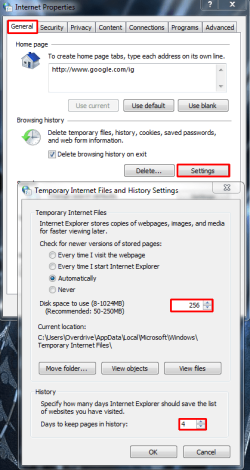
In that case, you can decrease the size of the Temporary Internet Files. My set size is perfect for me, I wouldn't go over that, but up to you. You might even consider reducing the size by a large amount as you seem not to want to use Temporary Internet Files very much. You can delete history and all sorts of other stuff with these options if you prefer to save the space and you don't need them. Reducing the Temporary Internet Files will keep you from having to delete the files all the time with a cleaner.

:note: Set the Temporary Internet Files to automatically check for newer versions of web pages, and it will automatically delete old ones that exceed your disk space limit.

:info: You might consider using derekimo's link if you want to save any of these shows: http://www.nirsoft.net/utils/video_cache_view.html

Here is a pic to help you out:
TIFpng.png

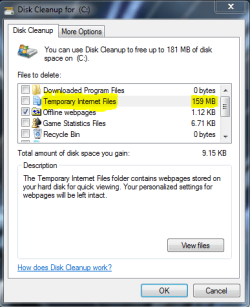
Here is the size of my Temporary Internet Files in Disk Cleanup:
Capture.PNG
 

My Computer

Computer type
PC/Desktop
Computer Manufacturer/Model Number
Custom Asus Build
OS
Microsoft Windows 8.1 Pro 64-bit
CPU
Intel(R) Core(TM) i3-4130 CPU @ 3.40GHz
Motherboard
B85M-E
Memory
8.00 GB
Graphics Card(s)
None
Sound Card
Realtek High Definition Audio
Monitor(s) Displays
Asus 23.6" Monitor
Screen Resolution
1920 x 1080 x 32 bits (4294967296 colors) @ 60 Hz
Hard Drives
INTEL SSDSC2BW180A4
Samsung SSD 840 PRO Series
PSU
Seasonic S12II-380Bronze
Case
Lian Li
Cooling
Fan, Passive
Keyboard
Logitech K120
Mouse
Microsoft Touch Mouse
Internet Speed
4ms Ping, 19.0 Mbps Download, 19.0 Mbps Upload
Antivirus
Eset Endpoint
Browser
Internet Explorer, Chrome
I would recommend staying away from online TV Shows.

Usually it is illegal to watch online anyway unless it is the Official site: for example: South Park would be legal to watch on Comedy Central and would be illegal to watch on All SP or watching Inbetweeners on e4.

Another thing to point out is there are malware and viruses on these sites, often asking to install Programs or Codec packs just to view them, especially since you have IE, if you do chose to continue to watch these video's please upgrade to Firefox or Chrome along with a Anti-Virus and a Firewall, that way you can be safer.
 

My Computer

Computer Manufacturer/Model Number
iRush Pro
OS
Windows 7 Ultimate x64
CPU
Intel Core i5 2500K Processor
Motherboard
Intel H67 Chipset Motherboard (Micro ATX)
Memory
2x4GB DDR3 1333Mhz Memory
Graphics Card(s)
Novatech Radeon 6770 1GB Graphics Card
Hard Drives
1TB
PSU
Novatech 500W
Case
Novatech ATX Gaming Case
Cooling
-
Keyboard
Novatech Wired Keyboard
Mouse
Novatech Wired Mouse
Internet Speed
VirginMedia 10MB/s
  • Like
Reactions: JMH

My Computer

Computer Manufacturer/Model Number
Personal Build
OS
Windows 7 Home Premium 64 bit (OEM) SP1
CPU
i7-875K (No Overclock)
Motherboard
GA-P55-USB3 Rev. 2, F9 bios
Memory
4GB G.SKILL Ripjaws Series 1600 7-8-7-24-2t 1.65V
Graphics Card(s)
XFX HD-577X-ZNFC 5770 1GB
Sound Card
Onboard
Monitor(s) Displays
Asus VH222H Black 21.5
Screen Resolution
1920X1080 @60 Hz
Hard Drives
SAMSUNG Spinpoint F3 HD103SJ 1TB
PSU
CORSAIR CMPSU-650TX 650W
Case
COOLER MASTER RC-692-KKN2 CM690 II Advanced
Cooling
COOLER MASTER Hyper 212+
Keyboard
Microsoft Comfort Curve Keyboard 2000
Mouse
Microsoft IntelliMouse Optical 1.1A
Internet Speed
3 Mb/s
Other Info
ASUS DRW-24B1ST/BLK/B/AS

Browser:
IE9
George, are you saying you watch these movies, but you will never really watch them again?

In that case, you can decrease the size of the Temporary Internet Files. My set size is perfect for me, I wouldn't go over that, but up to you. You might even consider reducing the size by a large amount as you seem not to want to use Temporary Internet Files very much. You can delete history and all sorts of other stuff with these options if you prefer to save the space and you don't need them. Reducing the Temporary Internet Files will keep you from having to delete the files all the time with a cleaner.

:note: Set the Temporary Internet Files to automatically check for newer versions of web pages, and it will automatically delete old ones that exceed your disk space limit.

:info: You might consider using derekimo's link if you want to save any of these shows: Play offline/Save .flv video files from Web browser cache

Here is a pic to help you out:
View attachment 188962

Here is the size of my Temporary Internet Files in Disk Cleanup:
View attachment 188963

I made the changes, thanks for the information.
 

My Computer

Computer Manufacturer/Model Number
Personal Build
OS
Windows 7 Home Premium 64 bit (OEM) SP1
CPU
i7-875K (No Overclock)
Motherboard
GA-P55-USB3 Rev. 2, F9 bios
Memory
4GB G.SKILL Ripjaws Series 1600 7-8-7-24-2t 1.65V
Graphics Card(s)
XFX HD-577X-ZNFC 5770 1GB
Sound Card
Onboard
Monitor(s) Displays
Asus VH222H Black 21.5
Screen Resolution
1920X1080 @60 Hz
Hard Drives
SAMSUNG Spinpoint F3 HD103SJ 1TB
PSU
CORSAIR CMPSU-650TX 650W
Case
COOLER MASTER RC-692-KKN2 CM690 II Advanced
Cooling
COOLER MASTER Hyper 212+
Keyboard
Microsoft Comfort Curve Keyboard 2000
Mouse
Microsoft IntelliMouse Optical 1.1A
Internet Speed
3 Mb/s
Other Info
ASUS DRW-24B1ST/BLK/B/AS

Browser:
IE9
I would recommend staying away from online TV Shows.

Usually it is illegal to watch online anyway unless it is the Official site: for example: South Park would be legal to watch on Comedy Central and would be illegal to watch on All SP or watching Inbetweeners on e4.

Another thing to point out is there are malware and viruses on these sites, often asking to install Programs or Codec packs just to view them, especially since you have IE, if you do chose to continue to watch these video's please upgrade to Firefox or Chrome along with a Anti-Virus and a Firewall, that way you can be safer.

These sites almost always ask to download something but I don't trust them.
 

My Computer

Computer Manufacturer/Model Number
Personal Build
OS
Windows 7 Home Premium 64 bit (OEM) SP1
CPU
i7-875K (No Overclock)
Motherboard
GA-P55-USB3 Rev. 2, F9 bios
Memory
4GB G.SKILL Ripjaws Series 1600 7-8-7-24-2t 1.65V
Graphics Card(s)
XFX HD-577X-ZNFC 5770 1GB
Sound Card
Onboard
Monitor(s) Displays
Asus VH222H Black 21.5
Screen Resolution
1920X1080 @60 Hz
Hard Drives
SAMSUNG Spinpoint F3 HD103SJ 1TB
PSU
CORSAIR CMPSU-650TX 650W
Case
COOLER MASTER RC-692-KKN2 CM690 II Advanced
Cooling
COOLER MASTER Hyper 212+
Keyboard
Microsoft Comfort Curve Keyboard 2000
Mouse
Microsoft IntelliMouse Optical 1.1A
Internet Speed
3 Mb/s
Other Info
ASUS DRW-24B1ST/BLK/B/AS

Browser:
IE9
lol I disagree with the "upgrade to firefox or chrome" speech, as IE9 is perfectly upgraded and one of the best. The browser you use is up to you though. Keep in mind Google's Chrome logs information about your online use :eek:. I'd stay away.
 

My Computer

Computer type
PC/Desktop
Computer Manufacturer/Model Number
Custom Asus Build
OS
Microsoft Windows 8.1 Pro 64-bit
CPU
Intel(R) Core(TM) i3-4130 CPU @ 3.40GHz
Motherboard
B85M-E
Memory
8.00 GB
Graphics Card(s)
None
Sound Card
Realtek High Definition Audio
Monitor(s) Displays
Asus 23.6" Monitor
Screen Resolution
1920 x 1080 x 32 bits (4294967296 colors) @ 60 Hz
Hard Drives
INTEL SSDSC2BW180A4
Samsung SSD 840 PRO Series
PSU
Seasonic S12II-380Bronze
Case
Lian Li
Cooling
Fan, Passive
Keyboard
Logitech K120
Mouse
Microsoft Touch Mouse
Internet Speed
4ms Ping, 19.0 Mbps Download, 19.0 Mbps Upload
Antivirus
Eset Endpoint
Browser
Internet Explorer, Chrome
Just lost my search settings on google again.
The settings were good for a few days but just now are lost.

What I have to do is go into google under options>search settings.
The option: google instant predictions is set to on but should be off, something reset it.

I was just browsing the web and clicked on a few links from this site, when trying to google some related links only 10 results came up but was previously 100.
The whole settings on google have been reset to default.

Any ideas on how to prevent this would be appreciated, thanks!
 

My Computer

Computer Manufacturer/Model Number
Personal Build
OS
Windows 7 Home Premium 64 bit (OEM) SP1
CPU
i7-875K (No Overclock)
Motherboard
GA-P55-USB3 Rev. 2, F9 bios
Memory
4GB G.SKILL Ripjaws Series 1600 7-8-7-24-2t 1.65V
Graphics Card(s)
XFX HD-577X-ZNFC 5770 1GB
Sound Card
Onboard
Monitor(s) Displays
Asus VH222H Black 21.5
Screen Resolution
1920X1080 @60 Hz
Hard Drives
SAMSUNG Spinpoint F3 HD103SJ 1TB
PSU
CORSAIR CMPSU-650TX 650W
Case
COOLER MASTER RC-692-KKN2 CM690 II Advanced
Cooling
COOLER MASTER Hyper 212+
Keyboard
Microsoft Comfort Curve Keyboard 2000
Mouse
Microsoft IntelliMouse Optical 1.1A
Internet Speed
3 Mb/s
Other Info
ASUS DRW-24B1ST/BLK/B/AS

Browser:
IE9
Back
Top