Solved Google Earth Pro for Win11 Desktop - Installed but will not open

NavarreMan

New member
Local time
8:20 PM
Messages
1
I was having issues with Google earth 7.3.6.10201. The file was corrupted and required removal and reinstall. I downloaded the latest and greatest and installed it. Now I can see the install setup file, I can run the install, it is verified as being installed, it shows up in my Program Manager (see screenshot) but I cannot find it on my PC anywhere. I have searched both Programs (see screenshot) and Programs (x86) (see screenshot) and while I do have a Google directory, there is no mention of Google Earth. I have removed and reinstalled several times without success. I repaired Windows without success. I do not know what else to try. I have tried starting the program from a copy of "My Places" I have on my desktop without success. It does not show up under my Task Manager or Installed Apps (see screenshot). Any ideas? I have no idea where it got installed to, if it actually got installed and where to find its .exe file.
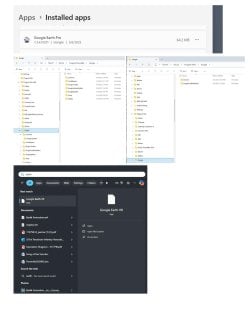
Google Earth Pro.jpg

- - - Updated - - -

There were some registry remnants that caused the problem. Revo Uninstaller found them and saved the day! Thanks Revo Unistaller!!!:party::dinesh::D
 

My Computers My Computers

  • At a glance

    Win11 x64
    OS
    Win11 x64
  • Computer type
    PC/Desktop
Did you install the 32-bit or 64-bit version of Google Earth Pro? Each one installs in a different location.

I found that if I go to this website I can download Google Earth Pro.

Google Earth Pro on desktop
Earth Versions – Google Earth

Filename: GoogleEarthProSetup.exe
Filesize: 10.9 MB (11,457,408 bytes)

Unfortunately, I got the error "GoogleEarthProSetup.exe is not a valid Win32 application" while trying to install it.

Error.jpg

I found another site which has both 32-bit and 64-bit installers for Google Earth Pro. Both of these work in Windows 7 Home (64-bit).

Update Google Earth Pro
Google Earth setup is not working even though Windows 64 Bit is installed in the laptop - Google Earth Community

The 32-bit version
Filename: googleearthprowin-7.3.6.exe
Filesize: 59.5 MB (62,415,968 bytes)
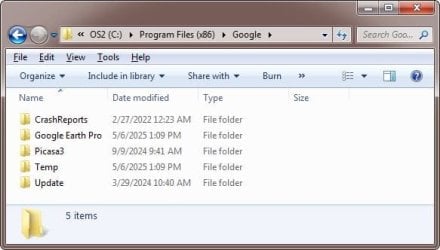
Install in: C:\Program Files (x86)\Google\Google Earth Pro

32-bit.jpg

The 64-bit version
Filename: googleearthprowin-7.3.6-x64.exe
Filesize: 67.5 MB (70,874,720 bytes)
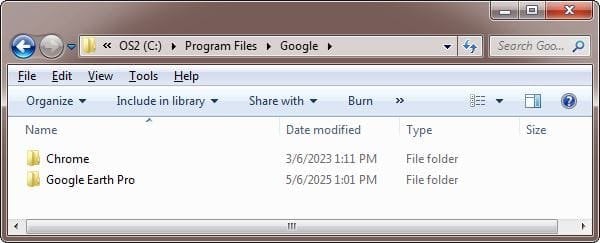
Install in: C:\Program Files\Google\Google Earth Pro

64-bit.jpg

Google Earth Pro

Google Earth Pro.jpg

- - - Updated - - -

I'm confused. My previous post was installing Google Earth Pro on Windows 7. Did you install Google Earth Pro on Windows 7 or Windows 11? After all this is a forum for people with Windows 7. If you have a question about GoogleEarthPro installed on Windows 11 then it would have been better if you asked on ElevenForum. In any case I will answer the question here.

To install Google Earth Pro on Windows 11 then run GoogleEarthProSetup.exe

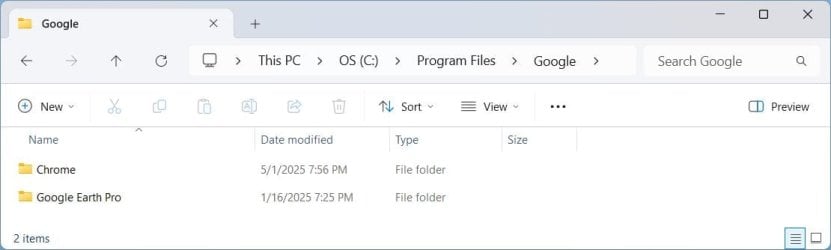
It will be installed in: C:\Program Files\Google\Google Earth Pro

Win11Location.jpg
 

My Computers My Computers

  • At a glance

    Windows 7 Home Premium 64-bitsAMD FX-8350GSKILL Ripjaw-X PC3 12800 8GB (2x4GB)ASUS ROG STRIX GTX 1060 6GB
    Computer type
    PC/Desktop
    Computer Manufacturer/Model Number
    Custom build
    OS
    Windows 7 Home Premium 64-bits
    CPU
    AMD FX-8350
    Motherboard
    Gigabyte GA-990FXA-UD3 (AM3+)
    Memory
    GSKILL Ripjaw-X PC3 12800 8GB (2x4GB)
    Graphics Card(s)
    ASUS ROG STRIX GTX 1060 6GB
    Sound Card
    Integrated
    Monitor(s) Displays
    Asus VE228H (21.5-in)
    Screen Resolution
    1920x1080 60Hz
    Hard Drives
    SAMSUNG 870 EVO 2.5 Inch SATA SSD (1TB)
    SAMSUNG 870 EVO 2.5 Inch SATA SSD (1TB)
    SAMSUNG 870 EVO 2.5 Inch SATA SSD (1TB)
    PSU
    Corsair RM750x (750 watts)
    Case
    Corsair Carbide Series 200R
    Cooling
    Corsair Hydro Series H60 (CWCH60)
    Keyboard
    Logitech Elite
    Mouse
    Logitech M510 Wireless Mouse
    Internet Speed
    Comcast Gigabit Extra (1200Mbps down / 35Mbps up)
    Antivirus
    Malwarebytes
    Browser
    Firefox, Edge, Chrome
    Other Info
    ASUS DRW-24B1ST DVD-RW (24X) optical drive
    Seagate Expansion Desk (5TB) external SATA/USB HDD
    Comcast XB8 Internet Gateway
  • At a glance

    Windows 7 Pro (64-bit)AMD Phenom II 960T X4Corsair XMS2 DDR2-800 8GB (4x2GB)ASUS ENGTX560 DCII OC/2DI/1GD5 1GB
    Computer type
    PC/Desktop
    System Manufacturer/Model Number
    Custom
    OS
    Windows 7 Pro (64-bit)
    CPU
    AMD Phenom II 960T X4
    Motherboard
    ASUS M4N82 Deluxe
    Memory
    Corsair XMS2 DDR2-800 8GB (4x2GB)
    Graphics Card(s)
    ASUS ENGTX560 DCII OC/2DI/1GD5 1GB
    Monitor(s) Displays
    Samsung 930B 19-inch LCD
    Screen Resolution
    1280x1024
    Hard Drives
    Samsung SSD 870 EVO 1000 GB (Windows 10)
    Seagate ST1000DM003 1000 GB (Windows 7)
    PSU
    Antec TruePower (new) TP-650
    Case
    Antec Three Hundred
    Cooling
    AMD stock cooler from FX8350
    Mouse
    Logitech M100
    Internet Speed
    Xfinity Gigabit Extra 1200/35 Mbps
7.3.6.9796 (64-bit) (Feb 2024) works fine for me on Windows 7. It's using OpenGL + NVIDIA graphics-card.
 

My Computers My Computers

  • At a glance

    Windows 7 Ultimate x64 SP3Xeon
    Computer type
    PC/Desktop
    OS
    Windows 7 Ultimate x64 SP3
    CPU
    Xeon
  • Computer type
    PC/Desktop
Back
Top