Solved How to make bottom of the taskbar the screen limit

MarkC0

New member
Member
VIP
Local time
6:17 PM
Messages
153
Hello,
I have my start menu and task bar setup at the top of my screen as opposed to the bottom. MS did not have enough intuition to realize the problems this can cause when windows decide to place themselves under the taskbar. Furthermore I have my taskbar filled with icons, so there is only a 3 pixel or so gap between the clock and voice icon that allows me to drop the taskbar elsewhere.

The idea I've thought of is having the bottom of the taskbar set as some sort of limit. Essentially I want to make it so I cannot physically drag a window of any sort above that point of the screen, no matter what. This way no windows can open or end up underneath the taskbar at any point.

Any solutions out there? Thanks!
 
Last edited:

My Computer My Computer

At a glance

Windows 7 Ultimate x64i7-2600k8GB 1600MHZZotac NVIDIA GTX 580 1.5GB
OS
Windows 7 Ultimate x64
CPU
i7-2600k
Motherboard
ASUS P8Z68 V-PRO
Memory
8GB 1600MHZ
Graphics Card(s)
Zotac NVIDIA GTX 580 1.5GB
Hard Drives
Intel 510 120GB SSD
Samsung Spinpoint HE103SJ HDD
PSU
NZXT HALE90 1000W PSU
Case
HAF-922
Cooling
Hyper 212
You can select the "auto-hide the taskbar" option, that way the taskbar is only visible, either by hovering the mouse at the edge of the screen or by pressing WIN. This will keep it out of the way and still give you use of full screen.

Find this option by right clicking the taskbar and choosing properties.
 

My Computer My Computer

At a glance

Windows 7 Ultimate x64Intel Core2 Quad Q8300 2.5GhzKingston HyperX 4x1GB DDR2 1066MhzAsus/Nvidia 9500GT 1GB
Computer type
PC/Desktop
Computer Manufacturer/Model Number
Self Build
OS
Windows 7 Ultimate x64
CPU
Intel Core2 Quad Q8300 2.5Ghz
Motherboard
Asus P5QD Turbo
Memory
Kingston HyperX 4x1GB DDR2 1066Mhz
Graphics Card(s)
Asus/Nvidia 9500GT 1GB
Sound Card
On-Board HD
Monitor(s) Displays
22" Widescreen TFT
Screen Resolution
1920x1080
Hard Drives
2x 320Gb Seagate SATAII RAID 0
2x 80Gb Seagate SATAII RAID 0
1x 1tb hybrid (8gb ssd)
PSU
650w
Case
ATX
Cooling
140mm front, 120mm Rear, 80mm Chipset + stock CPU and GPU
Keyboard
Plastic one
Mouse
Plastic one
Internet Speed
4Mbps
Other Info
Laptop: HP Elitebook 2560p
i5 @2.7Ghz 4GB DDR3
You can select the "auto-hide the taskbar" option, that way the taskbar is only visible, either by hovering the mouse at the edge of the screen or by pressing WIN. This will keep it out of the way and still give you use of full screen.

Find this option by right clicking the taskbar and choosing properties.
Thanks for the quick reply.

Unfortunately this solution will not work for me. I am not looking to alter other aspects of my main GUI to achieve this.
 

My Computer My Computer

At a glance

Windows 7 Ultimate x64i7-2600k8GB 1600MHZZotac NVIDIA GTX 580 1.5GB
OS
Windows 7 Ultimate x64
CPU
i7-2600k
Motherboard
ASUS P8Z68 V-PRO
Memory
8GB 1600MHZ
Graphics Card(s)
Zotac NVIDIA GTX 580 1.5GB
Hard Drives
Intel 510 120GB SSD
Samsung Spinpoint HE103SJ HDD
PSU
NZXT HALE90 1000W PSU
Case
HAF-922
Cooling
Hyper 212
This seems to me the best way to have the start menu at the top and for it to not interfere with any open windows.

You will have great difficulty getting applications to open within a defined region of the screen, while windows still has access to the full screen.

I have briefly searched for some picture-in-picture software that may allow you to do this, but it came up with a load of rubbish.

Besides, using such software (if it exists) may end up hideing the start menu when clicked.

Sorry I am unable to help you further.
 

My Computer My Computer

At a glance

Windows 7 Ultimate x64Intel Core2 Quad Q8300 2.5GhzKingston HyperX 4x1GB DDR2 1066MhzAsus/Nvidia 9500GT 1GB
Computer type
PC/Desktop
Computer Manufacturer/Model Number
Self Build
OS
Windows 7 Ultimate x64
CPU
Intel Core2 Quad Q8300 2.5Ghz
Motherboard
Asus P5QD Turbo
Memory
Kingston HyperX 4x1GB DDR2 1066Mhz
Graphics Card(s)
Asus/Nvidia 9500GT 1GB
Sound Card
On-Board HD
Monitor(s) Displays
22" Widescreen TFT
Screen Resolution
1920x1080
Hard Drives
2x 320Gb Seagate SATAII RAID 0
2x 80Gb Seagate SATAII RAID 0
1x 1tb hybrid (8gb ssd)
PSU
650w
Case
ATX
Cooling
140mm front, 120mm Rear, 80mm Chipset + stock CPU and GPU
Keyboard
Plastic one
Mouse
Plastic one
Internet Speed
4Mbps
Other Info
Laptop: HP Elitebook 2560p
i5 @2.7Ghz 4GB DDR3
This seems to me the best way to have the start menu at the top and for it to not interfere with any open windows.

You will have great difficulty getting applications to open within a defined region of the screen, while windows still has access to the full screen.

I have briefly searched for some picture-in-picture software that may allow you to do this, but it came up with a load of rubbish.

Besides, using such software (if it exists) may end up hideing the start menu when clicked.

Sorry I am unable to help you further.
I'd be able to use that solution if Windows allowed me to control the amount of time it takes for the start menu to appear. As well as the pixel distance to the top. Unfortunately this is not customizable thus I find the "hide" feature to be unbearable. Maybe I can change this through CMD or REG though?

I can probably do this with a macro program; anytime it detects a window past X pixel on the screen, I can set it to commit certain mouse commands for me at these positions. Now, I can't imagine there isn't some sort of third party software that does this automatically and can execute the "move" feature without actually taking over my mouse movements.

Anyone know where I could find this program?

Thanks for the help.

[rant]
It's sad, this problem has existed for well over 10 years now... since Windows 98 at least. I just don't understand how there isn't some sort of protocol that automatically moves windows below the task bar. I as the user can do this. Why Windows themselves cannot detect something that simple and do it for me is beyond belief. Or give us something as simple as an option to change the preferences for how the taskbar hides and unhides. It's just.... lazy. Puts a smile on my face to read reports like "piracy rates for global use of Windows 7 has climbed to 15%" or whatever the numbers are. How do you blame them? I kick myself daily for spending money on an OS I have to troubleshoot consistently for rather basic operations.
[/rant]
 

My Computer My Computer

At a glance

Windows 7 Ultimate x64i7-2600k8GB 1600MHZZotac NVIDIA GTX 580 1.5GB
OS
Windows 7 Ultimate x64
CPU
i7-2600k
Motherboard
ASUS P8Z68 V-PRO
Memory
8GB 1600MHZ
Graphics Card(s)
Zotac NVIDIA GTX 580 1.5GB
Hard Drives
Intel 510 120GB SSD
Samsung Spinpoint HE103SJ HDD
PSU
NZXT HALE90 1000W PSU
Case
HAF-922
Cooling
Hyper 212
It's sad, this problem has existed for well over 10 years now...

You'd have probably also considered a Model-T Ford flawed, had you been around at the time the automobile was in its infancy - but have you not noticed that such innovations were popular regardless, and look at what grew out of the concept over the course of a century or so - and it's also of note very few people drove 'pirated' Model-T Fords around... ;)

In respect of Windows there are worse annoyances. For example there are bigger bugs involved with direct-x and multiple screens, and glitches in various system components other than regards the GUI as well.

So try something better if you think it's out there... or wait around the same length of time it took the automobile to reach present day technological standards. :p

PS; Windows pirates aren't pirates due to Windows annoyances,
they're pirates because it's simply in their nature to be so - and
my whole reply is 'tongue in cheek' and not a dig of any kind...
 

My Computer My Computer

At a glance

W7 x64Intel Q9300 2.5Ghz Quad LGA775 (Would like Q9...4Gb OCZ Gold 1,333MhzPalit HD4850 O/C Sonic 512Mb DDR3, Dual DViD's
Computer Manufacturer/Model Number
Custom built machine
OS
W7 x64
CPU
Intel Q9300 2.5Ghz Quad LGA775 (Would like Q9650)
Motherboard
Gigabyte GA-EP45T-UD3R (F6 Bios)
Memory
4Gb OCZ Gold 1,333Mhz
Graphics Card(s)
Palit HD4850 O/C Sonic 512Mb DDR3, Dual DViD's
Sound Card
Azalia to twin Samson 50w Studio Monitors
Monitor(s) Displays
Twin Dell (E-IPS) U2311H 23.6" Screens
Screen Resolution
1920 x 1080 @ 60Hz
Hard Drives
Crucial M4 SSD, archives on twin Western Digital Caviar Black WD2002FAEX, 2TB, 7200rpm HDD's, Samsung Ritemaster CD/DVD Burner...
PSU
OCZ 600w
Case
Lian-Li PC8 acoustifoamed' aluminium tower
Cooling
Scythe 140mm Zipang
Keyboard
Cherry PS/2 custom model
Mouse
Lenovo USB laser "Thinkpad" Mouse
Internet Speed
ADSL2+ @14Mbps downstream & Cat6 Gigabit Ethernet
Antivirus
NOD32
Browser
Opera
Other Info
Silicon Dust HD Homerun Dual FTA (Ethernet) TV Tuners, Dray Tek Vigor 2850Vn router and 8x HP Gigabit Switch. Lian-Li CR26 Card Reader, Canon MF4430 iSensys laser printer/scanner.
I read your problem three times and still can't understand why you would be complaining for 10 years and not amend your procedure to cope with the "restrictions" of the OS. And now you want to control the speed that the start menu displays? Where did that come from?

1. Hide the taskbar if it's in the way.
2. Drag an open window to where you want it to appear then click File then Close. (Don't click the X) The window will open in that location the next time you open it. If you don't want it behind the taskbar, don't move it there. Windows OS allows you move a window anywhere for multiple reasons. If the window doesn't fit, resize it.

Don't know what any of this has to do with the display speed of the start menu though. :confused:
 

My Computer My Computer

At a glance

Windows 7 Pro-x64i7-2600 3.4GHz - 3.8GHz Turbo8Gb - 2x4GB, Muskin 991770 PC3-1333Integrated Intel HD 2000
Computer type
PC/Desktop
Computer Manufacturer/Model Number
Built 2/11/2011
OS
Windows 7 Pro-x64
CPU
i7-2600 3.4GHz - 3.8GHz Turbo
Motherboard
Intel DH67BL-B3
Memory
8Gb - 2x4GB, Muskin 991770 PC3-1333
Graphics Card(s)
Integrated Intel HD 2000
Sound Card
Integrated Intel 10.1 HD, RealTek ALC892
Monitor(s) Displays
Asus LCD VH222H, Haier HL24XSL2a
Screen Resolution
1920x1080, 1920x1080
Hard Drives
Crucial SSD C300-128Gb,
Western Digital WD5002AALX - 500Gb,
Western Digital WD7501AALS - 750Gb
PSU
Seasonic 650W 80+ Gold Modular
Case
Rosewill Defender
Cooling
Stock CPU, Four 120mm case fans, PCH fan added
Keyboard
Logitech EX100 Y-RBH94 Wireless
Mouse
Logitech EX100 M-RCE95 Wireless
Internet Speed
3.0/1.5 Mbs
Antivirus
Microsoft Security Essentials
Browser
Microsoft Internet Explorer 11
Other Info
Antec Veris Premier-Multimedia IR Station,
Cyber Accoustics-3602 Speakers,
AFT XM-5U Card Reader,
Hauppauge TV-HVR-2250,
Sony LX300 USB Turntable
I read your problem three times and still can't understand why you would be complaining for 10 years and not amend your procedure to cope with the "restrictions" of the OS. And now you want to control the speed that the start menu displays? Where did that come from?

1. Hide the taskbar if it's in the way.
2. Drag an open window to where you want it to appear then click File then Close. (Don't click the X) The window will open in that location the next time you open it. If you don't want it behind the taskbar, don't move it there. Windows OS allows you move a window anywhere for multiple reasons. If the window doesn't fit, resize it.

Don't know what any of this has to do with the display speed of the start menu though. :confused:
I didn't say I've been complaining about it for 10 years, lol.

I'm not looking to have my taskbar hidden though. I'm referring to the speed in which the taskbar it drops down, but that's only one reason why I don't want that feature.

Some windows open up behind the taskbar (which is on the top for me) even though they were not closed like that. It doesn't happen particularly often either.

I'm displaying at 1080 pixels height. The feature I need would detect when a window appears or is moved above, say, the 1000 pixel mark starting from the bottom. When it detects this it automatically changes the windows position in height down so the top is at the 1000 pixel mark (1000 is a rough number obviously).

Now I understand this might be unreasonable for certain applications, particularly full-screen programs and browsers even. So this would obviously only apply to applications that are in windowed mode.

Does a program that can do this exist or would there be a way for me to emulate this somehow? I'm assuming Win7 itself can't do this...

Thanks!
 

My Computer My Computer

At a glance

Windows 7 Ultimate x64i7-2600k8GB 1600MHZZotac NVIDIA GTX 580 1.5GB
OS
Windows 7 Ultimate x64
CPU
i7-2600k
Motherboard
ASUS P8Z68 V-PRO
Memory
8GB 1600MHZ
Graphics Card(s)
Zotac NVIDIA GTX 580 1.5GB
Hard Drives
Intel 510 120GB SSD
Samsung Spinpoint HE103SJ HDD
PSU
NZXT HALE90 1000W PSU
Case
HAF-922
Cooling
Hyper 212
It's sad, this problem has existed for well over 10 years now...

You'd have probably also considered a Model-T Ford flawed, had you been around at the time the automobile was in its infancy - but have you not noticed that such innovations were popular regardless, and look at what grew out of the concept over the course of a century or so - and it's also of note very few people drove 'pirated' Model-T Fords around... ;)

In respect of Windows there are worse annoyances. For example there are bigger bugs involved with direct-x and multiple screens, and glitches in various system components other than regards the GUI as well.

So try something better if you think it's out there... or wait around the same length of time it took the automobile to reach present day technological standards. :p

PS; Windows pirates aren't pirates due to Windows annoyances,
they're pirates because it's simply in their nature to be so - and
my whole reply is 'tongue in cheek' and not a dig of any kind...
I have those problems too actually. I figured it was Nvidia. My drivers freeze up and restart every so often when I use multi-monitor. Is there a solution for it?
 

My Computer My Computer

At a glance

Windows 7 Ultimate x64i7-2600k8GB 1600MHZZotac NVIDIA GTX 580 1.5GB
OS
Windows 7 Ultimate x64
CPU
i7-2600k
Motherboard
ASUS P8Z68 V-PRO
Memory
8GB 1600MHZ
Graphics Card(s)
Zotac NVIDIA GTX 580 1.5GB
Hard Drives
Intel 510 120GB SSD
Samsung Spinpoint HE103SJ HDD
PSU
NZXT HALE90 1000W PSU
Case
HAF-922
Cooling
Hyper 212
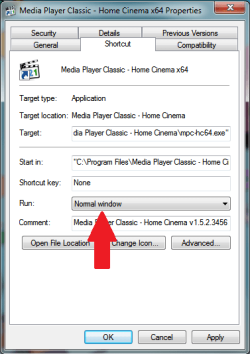
The other option is to set each application (specifically the problem ones) to open "windowed instead of "maximised" from there shortcut properties.
window props.png
 

My Computer My Computer

At a glance

Windows 7 Ultimate x64Intel Core2 Quad Q8300 2.5GhzKingston HyperX 4x1GB DDR2 1066MhzAsus/Nvidia 9500GT 1GB
Computer type
PC/Desktop
Computer Manufacturer/Model Number
Self Build
OS
Windows 7 Ultimate x64
CPU
Intel Core2 Quad Q8300 2.5Ghz
Motherboard
Asus P5QD Turbo
Memory
Kingston HyperX 4x1GB DDR2 1066Mhz
Graphics Card(s)
Asus/Nvidia 9500GT 1GB
Sound Card
On-Board HD
Monitor(s) Displays
22" Widescreen TFT
Screen Resolution
1920x1080
Hard Drives
2x 320Gb Seagate SATAII RAID 0
2x 80Gb Seagate SATAII RAID 0
1x 1tb hybrid (8gb ssd)
PSU
650w
Case
ATX
Cooling
140mm front, 120mm Rear, 80mm Chipset + stock CPU and GPU
Keyboard
Plastic one
Mouse
Plastic one
Internet Speed
4Mbps
Other Info
Laptop: HP Elitebook 2560p
i5 @2.7Ghz 4GB DDR3
The other option is to set each application (specifically the problem ones) to open "windowed instead of "maximised" from there shortcut properties.
View attachment 189591
I don't believe you're understanding the issue I am having, lol.

The windows I am referring to are in windowed mode. It's a non-issue in full-screen mode because I don't expect to have my taskbar accessible with full-screen applications.
 

My Computer My Computer

At a glance

Windows 7 Ultimate x64i7-2600k8GB 1600MHZZotac NVIDIA GTX 580 1.5GB
OS
Windows 7 Ultimate x64
CPU
i7-2600k
Motherboard
ASUS P8Z68 V-PRO
Memory
8GB 1600MHZ
Graphics Card(s)
Zotac NVIDIA GTX 580 1.5GB
Hard Drives
Intel 510 120GB SSD
Samsung Spinpoint HE103SJ HDD
PSU
NZXT HALE90 1000W PSU
Case
HAF-922
Cooling
Hyper 212
This may help as a work-around:

WinSize2 Remembers Window Position & Size with a Hotkey in Windows 7

Many apps just assume the taskbar will be at the bottom and that opening usng 0 0 for Left and Top will be ok. They don't check the Desktop Work Area when positioning themselves.

With Winsize2 you select a window, position and size it how you want. Then hit the hotkey. When Winsize2 sees it open it sizes and moves it. It leaves it alone after that(meaning it doesn't fight you if you size and move the window with the mouse or whatever.)

edit: for windows that have gotten underneath the taskbar and you can't get at the caption bar to drag them, it's easy to move them using my TicClick utility. You click any part of a window to make it the "active window" then hit the hotkey. A number pad pops up where you can position the window in any of 9 positions. It gets the Desktop Work Area every time you hit the hotkey so it takes note of the Taskbar location. Only thing is I have a single monitor setup. So I can't support anything multi-monitor. It's worth a try though. Very simple and low on resource usage.

You can download it from this page:

http://www.favessoft.com/hotkeys.html
 

My Computer My Computer

At a glance

Windows 7 32 bitAMD 5200+ dual core2 GBNVidia GeForce 6150SE 128 MB
Computer Manufacturer/Model Number
HP Media Center
OS
Windows 7 32 bit
CPU
AMD 5200+ dual core
Memory
2 GB
Graphics Card(s)
NVidia GeForce 6150SE 128 MB
Monitor(s) Displays
CRT
Screen Resolution
1280x1024
Hard Drives
500 GB Sata internal :

SIIG USB 3.0 docking stations w/WD Caviar Black 6 Gb/s drives
Keyboard
PS/2
Mouse
PS/2 Wheel Mouse
Other Info
SIIG USB 3.0 PCIexpress card.
I don't believe you're understanding the issue I am having, lol.

The windows I am referring to are in windowed mode. It's a non-issue in full-screen mode because I don't expect to have my taskbar accessible with full-screen applications.
I sure don't understand yet. :confused:

I was hoping you'd post a full screen shot by now. As they say, "a picture is worth...". ;)
 

My Computer My Computer

At a glance

Windows 7 Pro-x64i7-2600 3.4GHz - 3.8GHz Turbo8Gb - 2x4GB, Muskin 991770 PC3-1333Integrated Intel HD 2000
Computer type
PC/Desktop
Computer Manufacturer/Model Number
Built 2/11/2011
OS
Windows 7 Pro-x64
CPU
i7-2600 3.4GHz - 3.8GHz Turbo
Motherboard
Intel DH67BL-B3
Memory
8Gb - 2x4GB, Muskin 991770 PC3-1333
Graphics Card(s)
Integrated Intel HD 2000
Sound Card
Integrated Intel 10.1 HD, RealTek ALC892
Monitor(s) Displays
Asus LCD VH222H, Haier HL24XSL2a
Screen Resolution
1920x1080, 1920x1080
Hard Drives
Crucial SSD C300-128Gb,
Western Digital WD5002AALX - 500Gb,
Western Digital WD7501AALS - 750Gb
PSU
Seasonic 650W 80+ Gold Modular
Case
Rosewill Defender
Cooling
Stock CPU, Four 120mm case fans, PCH fan added
Keyboard
Logitech EX100 Y-RBH94 Wireless
Mouse
Logitech EX100 M-RCE95 Wireless
Internet Speed
3.0/1.5 Mbs
Antivirus
Microsoft Security Essentials
Browser
Microsoft Internet Explorer 11
Other Info
Antec Veris Premier-Multimedia IR Station,
Cyber Accoustics-3602 Speakers,
AFT XM-5U Card Reader,
Hauppauge TV-HVR-2250,
Sony LX300 USB Turntable
This may help as a work-around:

WinSize2 Remembers Window Position & Size with a Hotkey in Windows 7

Many apps just assume the taskbar will be at the bottom and that opening usng 0 0 for Left and Top will be ok. They don't check the Desktop Work Area when positioning themselves.

With Winsize2 you select a window, position and size it how you want. Then hit the hotkey. When Winsize2 sees it open it sizes and moves it. It leaves it alone after that(meaning it doesn't fight you if you size and move the window with the mouse or whatever.)

edit: for windows that have gotten underneath the taskbar and you can't get at the caption bar to drag them, it's easy to move them using my TicClick utility. You click any part of a window to make it the "active window" then hit the hotkey. A number pad pops up where you can position the window in any of 9 positions. It gets the Desktop Work Area every time you hit the hotkey so it takes note of the Taskbar location. Only thing is I have a single monitor setup. So I can't support anything multi-monitor. It's worth a try though. Very simple and low on resource usage.

You can download it from this page:

Hotkeys
The combination of WinSize2 and your utility is a perfect work-around.

=) Thank you! Much appreciated.
 

My Computer My Computer

At a glance

Windows 7 Ultimate x64i7-2600k8GB 1600MHZZotac NVIDIA GTX 580 1.5GB
OS
Windows 7 Ultimate x64
CPU
i7-2600k
Motherboard
ASUS P8Z68 V-PRO
Memory
8GB 1600MHZ
Graphics Card(s)
Zotac NVIDIA GTX 580 1.5GB
Hard Drives
Intel 510 120GB SSD
Samsung Spinpoint HE103SJ HDD
PSU
NZXT HALE90 1000W PSU
Case
HAF-922
Cooling
Hyper 212
Back
Top