Hierarchial Charts for Microsoft Word 2007

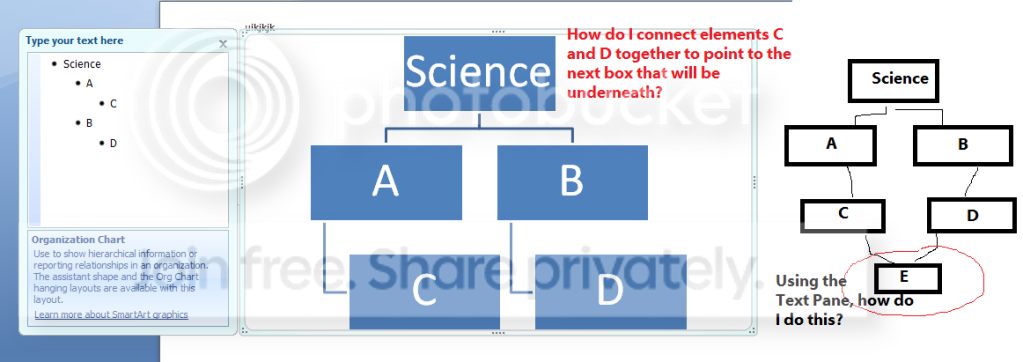
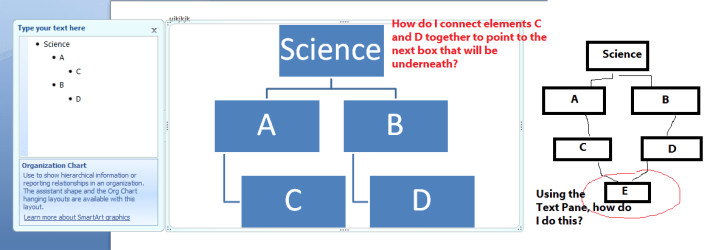
To edit Hierarchial Chart in Microsoft Word 2007 you need to highlight chart first. If no edit Text window on the right of it appeared, click two arrows on the left border of chart. In that left edit window there are all items of your chart, but in one column with different indents.

You can click one item, press ENTER to create a new item, if it's level is to high, press TAB.

Your image is not found.
If you question is not answered please attach your image to the post as attachment.
Staple icon on the far right
 

Attachments

  • 79840d1277004074-sf-diagnostic-tool-using-troubleshooting-capture2.jpg
    79840d1277004074-sf-diagnostic-tool-using-troubleshooting-capture2.jpg
    6 KB · Views: 71

My Computer My Computer

At a glance

Windows 8.1 ; Windows 7 x86 (Dec2008-Jan2013)
Computer type
PC/Desktop
OS
Windows 8.1 ; Windows 7 x86 (Dec2008-Jan2013)
Other Info
"The scale icon at the top right of a post or tutorial is how you can give rep to the member."
Image that was apparently not found

To edit Hierarchial Chart in Microsoft Word 2007 you need to highlight chart first. If no edit Text window on the right of it appeared, click two arrows on the left border of chart. In that left edit window there are all items of your chart, but in one column with different indents.

You can click one item, press ENTER to create a new item, if it's level is to high, press TAB.

Your image is not found.
If you question is not answered please attach your image to the post as attachment.
Staple icon on the far right

Ok this is the image:
http://i1084.photobucket.com/albums/j409/QRAWarrior/Op6/OP6-IMG-001.png
OP6-IMG-001.png


I'll even attach a version of it as well.
 

Attachments

  • OP6-IMG-001.png
    OP6-IMG-001.png
    19.2 KB · Views: 3

My Computer My Computer

At a glance

W7
OS
W7
Back
Top