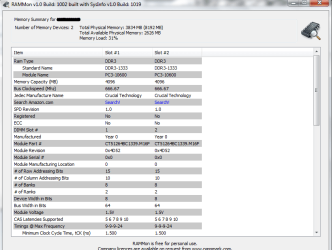
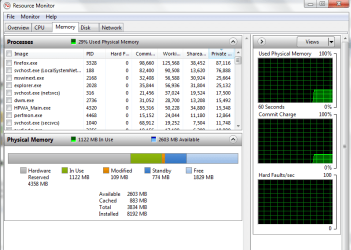
Windows Home Premium x64 only recognizes 3.74 of my 8gigs of RAM

NFJHolmes

New member
Local time
1:28 PM
Messages
3
Windows Home Premium x64 Hardware reserving 4gigs of RAM

Hello, I know you all must get these questions often, and I tried to look at other threads but frankly nothing worked for me...

I am currently running Windows Home Premium 64-bit which, according to the memory limits page, can support up to 16gigs of RAM. My system is only using four, can anyone help me fix this?

I already unchecked the maximum memory option in the advanced BOOT settings.

Sorry for the dumb question.

Thanks
 

Attachments

  • System specs.png
    System specs.png
    55.5 KB · Views: 35
  • RAMMon specs.png
    RAMMon specs.png
    26.2 KB · Views: 26
  • BOOT advanced options.png
    BOOT advanced options.png
    15.2 KB · Views: 17
  • resource tab.png
    resource tab.png
    28.6 KB · Views: 26
Last edited:

My Computer My Computer

At a glance

Windows Home Premium x64
OS
Windows Home Premium x64
Post a screen shot of the memory tab of Resource Monitor.
 

My Computer My Computer

At a glance

Windows 7 Home Premium SP1, 64-bitIntel Skylake i5-6600K, not overclocked8 GB HyperX DDR4-2666 (2 x 4 GB)none; graphics are integrated on CPU
Computer type
PC/Desktop
Computer Manufacturer/Model Number
Ignatz Special; 4 speed manual gearbox; factory air conditioning; one of one
OS
Windows 7 Home Premium SP1, 64-bit
CPU
Intel Skylake i5-6600K, not overclocked
Motherboard
AsRock Z170M Extreme 4, micro ATX
Memory
8 GB HyperX DDR4-2666 (2 x 4 GB)
Graphics Card(s)
none; graphics are integrated on CPU
Sound Card
onboard: Realtek ALC1150; external: USB Behringer UF0-202
Monitor(s) Displays
Dell S2340M 23 inch IPS
Screen Resolution
1600 x 900
Hard Drives
System: Crucial MX100 series SSD, 128 GB;
Data: Samsung Spinpoint 103SJ, 1 TB;
Backup: WD Caviar Green WD30EZRX-00D8PB0, 3 TB
PSU
Rosewill SilentNight 500 watt fanless, semi-modular
Case
Antec Solo II
Cooling
Noctua NH-U12S; Noctua F12 intake, Noctua S12A exhaust
Keyboard
Microsoft 200 6JH-00001 USB
Mouse
Dell or Microsoft optical wired; USB
Antivirus
Microsoft Security Essentials and Malwarebytes Premium
Browser
Pale Moon
Other Info
All fans PWM; speeds at idle: CPU circa 500 rpm; intake circa 600 rpm; exhaust circa 600 rpm; CPU temps 27 idle and 47 C load in a warm room (27 C/81 F) when running Intel Extreme Tuning Utility stress test.

My Computer My Computer

At a glance

Windows 7 Home Premium 64 bitIntel Core i7-4790G.SKILL 8GB (2 x 4GB) DDR3 F3-10666CL9D-8GBNTAMD Radeon R7 250
Computer type
PC/Desktop
Computer Manufacturer/Model Number
Custom Build
OS
Windows 7 Home Premium 64 bit
CPU
Intel Core i7-4790
Motherboard
GA-Z87X-D3H
Memory
G.SKILL 8GB (2 x 4GB) DDR3 F3-10666CL9D-8GBNT
Graphics Card(s)
AMD Radeon R7 250
Sound Card
Realtek ALC892
Monitor(s) Displays
Samsung UN32EH5000, Dell 1703FPT
Screen Resolution
1920 x 1080, 1280 x 1024
Hard Drives
WD5003AZEX
WD10EZEX
Samsung HD103SJ
Samsung 128 GB 840 PRO
PSU
SeaSonic M12II SS-500GM
Case
Fractal Design Define R4
Cooling
Zalman CNPS9900ALED
Keyboard
Logitech K800
Mouse
Logitech M705
Internet Speed
16 Mbps
Antivirus
Avast
Browser
Firefox
Other Info
Bose Companion 2 Multimedia Speakers
Well, over 4 gigs for hardware reserved.

I can't recall hearing of that before and can't directly help you further.

You might want to fill in your system specs as much as possible to further assist anyone else reading this.
 

My Computer My Computer

At a glance

Windows 7 Home Premium SP1, 64-bitIntel Skylake i5-6600K, not overclocked8 GB HyperX DDR4-2666 (2 x 4 GB)none; graphics are integrated on CPU
Computer type
PC/Desktop
Computer Manufacturer/Model Number
Ignatz Special; 4 speed manual gearbox; factory air conditioning; one of one
OS
Windows 7 Home Premium SP1, 64-bit
CPU
Intel Skylake i5-6600K, not overclocked
Motherboard
AsRock Z170M Extreme 4, micro ATX
Memory
8 GB HyperX DDR4-2666 (2 x 4 GB)
Graphics Card(s)
none; graphics are integrated on CPU
Sound Card
onboard: Realtek ALC1150; external: USB Behringer UF0-202
Monitor(s) Displays
Dell S2340M 23 inch IPS
Screen Resolution
1600 x 900
Hard Drives
System: Crucial MX100 series SSD, 128 GB;
Data: Samsung Spinpoint 103SJ, 1 TB;
Backup: WD Caviar Green WD30EZRX-00D8PB0, 3 TB
PSU
Rosewill SilentNight 500 watt fanless, semi-modular
Case
Antec Solo II
Cooling
Noctua NH-U12S; Noctua F12 intake, Noctua S12A exhaust
Keyboard
Microsoft 200 6JH-00001 USB
Mouse
Dell or Microsoft optical wired; USB
Antivirus
Microsoft Security Essentials and Malwarebytes Premium
Browser
Pale Moon
Other Info
All fans PWM; speeds at idle: CPU circa 500 rpm; intake circa 600 rpm; exhaust circa 600 rpm; CPU temps 27 idle and 47 C load in a warm room (27 C/81 F) when running Intel Extreme Tuning Utility stress test.
Well, over 4 gigs for hardware reserved.

I can't recall hearing of that before and can't directly help you further.

You might want to fill in your system specs as much as possible to further assist anyone else reading this.

Could their BIOS be set up to not use any onboard video memory or something?
 

My Computer My Computer

At a glance

Windows 7AMD Phenom II X2 (dual-core)4Gintegrated ATI HD 4200
Computer type
PC/Desktop
Computer Manufacturer/Model Number
Custom
OS
Windows 7
CPU
AMD Phenom II X2 (dual-core)
Motherboard
GA-MA785GM-US2H
Memory
4G
Graphics Card(s)
integrated ATI HD 4200
Sound Card
integrated
Monitor(s) Displays
Samsung 24"
Screen Resolution
1920x1080
Hard Drives
1 SSD - Samsung 840 - 500 GB - OS and DATA partitions
1 SSD - Intel 320 - 120 GB (used for backups) - Misc/BACKUP
1 SATA HD - WD, 500 GB - BACKUP
PSU
Ultra X4 500W
Case
Ultra X-blaster
Keyboard
Microsoft Digital Media Pro
Mouse
Logitech WIRED!
Internet Speed
15 Mbps FIOS
Does Windows POST 8Gb during boot?
 

My Computer My Computer

At a glance

W7 x64Intel Q9300 2.5Ghz Quad LGA775 (Would like Q9...4Gb OCZ Gold 1,333MhzPalit HD4850 O/C Sonic 512Mb DDR3, Dual DViD's
Computer Manufacturer/Model Number
Custom built machine
OS
W7 x64
CPU
Intel Q9300 2.5Ghz Quad LGA775 (Would like Q9650)
Motherboard
Gigabyte GA-EP45T-UD3R (F6 Bios)
Memory
4Gb OCZ Gold 1,333Mhz
Graphics Card(s)
Palit HD4850 O/C Sonic 512Mb DDR3, Dual DViD's
Sound Card
Azalia to twin Samson 50w Studio Monitors
Monitor(s) Displays
Twin Dell (E-IPS) U2311H 23.6" Screens
Screen Resolution
1920 x 1080 @ 60Hz
Hard Drives
Crucial M4 SSD, archives on twin Western Digital Caviar Black WD2002FAEX, 2TB, 7200rpm HDD's, Samsung Ritemaster CD/DVD Burner...
PSU
OCZ 600w
Case
Lian-Li PC8 acoustifoamed' aluminium tower
Cooling
Scythe 140mm Zipang
Keyboard
Cherry PS/2 custom model
Mouse
Lenovo USB laser "Thinkpad" Mouse
Internet Speed
ADSL2+ @14Mbps downstream & Cat6 Gigabit Ethernet
Antivirus
NOD32
Browser
Opera
Other Info
Silicon Dust HD Homerun Dual FTA (Ethernet) TV Tuners, Dray Tek Vigor 2850Vn router and 8x HP Gigabit Switch. Lian-Li CR26 Card Reader, Canon MF4430 iSensys laser printer/scanner.
Does Windows POST 8Gb during boot?

I'm not sure what you mean... Sorry.
I updated the title to what the problem seems to be...

And my system specs are (Terrible I know :huh: ):

CPU: AMD Athlon(tm) II P340 Dual-Core Processor
Motherboard: Hewlett-Packard 1444
BIOS: Default System BIOS
Total Memory: 8.00 GB
Usable Memory: 3.75 GB
HDD: WDC WD32 00BEVT-60A23T0 SATA Disk Device
Sound Card: (1) ATI High Definition Audio Device (2) Realtek High Definition Audio
Graphics Card: AMD M880G with ATI Mobility Radeon HD 4250
OS: Microsoft Windows 7 Home Premium 64-bit 7600 Multiprocessor Free
 

My Computer My Computer

At a glance

Windows Home Premium x64
OS
Windows Home Premium x64
It occasionally happens with 10600 RAM on some boards. You should try RMAing it for 10666 RAM.
 

My Computer My Computer

At a glance

Windows 7 Home Premium 64 bitIntel Core i7-4790G.SKILL 8GB (2 x 4GB) DDR3 F3-10666CL9D-8GBNTAMD Radeon R7 250
Computer type
PC/Desktop
Computer Manufacturer/Model Number
Custom Build
OS
Windows 7 Home Premium 64 bit
CPU
Intel Core i7-4790
Motherboard
GA-Z87X-D3H
Memory
G.SKILL 8GB (2 x 4GB) DDR3 F3-10666CL9D-8GBNT
Graphics Card(s)
AMD Radeon R7 250
Sound Card
Realtek ALC892
Monitor(s) Displays
Samsung UN32EH5000, Dell 1703FPT
Screen Resolution
1920 x 1080, 1280 x 1024
Hard Drives
WD5003AZEX
WD10EZEX
Samsung HD103SJ
Samsung 128 GB 840 PRO
PSU
SeaSonic M12II SS-500GM
Case
Fractal Design Define R4
Cooling
Zalman CNPS9900ALED
Keyboard
Logitech K800
Mouse
Logitech M705
Internet Speed
16 Mbps
Antivirus
Avast
Browser
Firefox
Other Info
Bose Companion 2 Multimedia Speakers
Might have to enable memory remap in the BIOS settings, as mentioned in Sardonicus' link.
 

My Computer My Computer

At a glance

MS Windows 7 Home Premium 64-bit SP1Intel Core 2 Quad Q6600 @ 2.40GHzCorsair PC2-6400 (400 MHz) 4.00 GB DDR2GeForce 9600 GT 1024 MB
OS
MS Windows 7 Home Premium 64-bit SP1
CPU
Intel Core 2 Quad Q6600 @ 2.40GHz
Motherboard
ASUSTeK Computer INC. P5B-VM SE (LGA775)
Memory
Corsair PC2-6400 (400 MHz) 4.00 GB DDR2
Graphics Card(s)
GeForce 9600 GT 1024 MB
Sound Card
SB Audigy
Monitor(s) Displays
LG W2252
Screen Resolution
1680x1050 @ 60Hz
Hard Drives
977GB Seagate ST31000528AS ATA Device (SATA)
488GB Seagate ST3500630AS ATA Device (SATA)
PSU
Corsair HX750W
Case
Antec 900
Cooling
Thermaltake fans
Keyboard
Microsoft Sidewinder X6
Mouse
Microsoft Sidewinder Mouse
Internet Speed
2 Mbps
Other Info
D-Link DIR-655 router
WD My Book 1.0 TB
Buffalo NAS LS-CHL v2 2 TB
I'm not sure what you mean... Sorry.

POST is basically that screen you see when you turn on the computer and it shows your computer specs in plain text before booting to the OS.
 

My Computer My Computer

At a glance

Windows 7 Professional x64 SP1Intel Core i5-2500K8 GB Corsair Vengeance Blue DDR3-1600Sapphire Radeon HD 6870 1 GB GDDR5
OS
Windows 7 Professional x64 SP1
CPU
Intel Core i5-2500K
Motherboard
Gigabyte P67X-UD3-B3
Memory
8 GB Corsair Vengeance Blue DDR3-1600
Graphics Card(s)
Sapphire Radeon HD 6870 1 GB GDDR5
Monitor(s) Displays
Samsung SyncMaster T220HD
Screen Resolution
1680x1050
Hard Drives
120 GB Corsair Force SSD + 320 GB Seagate Barracuda SATA2 + 2 TB My Book Elite
PSU
Corsair 650W
Internet Speed
50 Mbps
Back
Top