
Solved Clean Win 7 install shows conflicting hdd sizes at the same time.

Spendlove

New member
Local time
11:18 AM
Messages
8
Here's a new one for you...

To avoid any risk of deleting any files, I decided to install my new Windows 7 OS on a new hard drive. I unplugged my old hard drive. Unplugged both power and SATA cable.

I installed it on the new drive, and everything seemed to be going well, but I had a look at my computer's properties showing that I had 35.1 GB free of 579 GB on the drive. The drive is a 2TB drive. The 579GB is referencing the OLD hard drive size, which is STILL UNPLUGGED.

A. How would the new OS know of the old OS drive size?
B. Is there a drive size limitation? (however archaic it would seem given the size of new hard drives and current state of the 64bit Windows 7 OS)
C. Why would it report, on the same OS, at the same time, in "computer" and "computer management"... TWO DIFFERENT SIZES OF THE SAME PARTITION?
D. Why would the drive be full after ONE DAY worth of installation of Win7 and Photoshop. There are no movies, photos or other large space consumers on the drive, just the installation. It took nearly two years to fill it that full on Vista with videos, photos, etc...
E. Sorry for the cross-posting. Delete or move where necessary.
 

Attachments
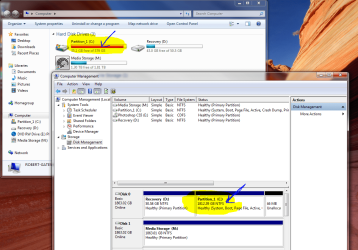
  • WTF.PNG
    WTF.PNG
    132.1 KB · Views: 24

My Computer My Computer

At a glance

Windows 7 Home Premium 64 bitAMD Phenom(tm) 9100e Quad-Core Processor4.00 GBNVIDIA GeForce 9500 GT (Microsoft Corporation...
Computer Manufacturer/Model Number
Gateway 5694
OS
Windows 7 Home Premium 64 bit
CPU
AMD Phenom(tm) 9100e Quad-Core Processor
Motherboard
Gateway RS780
Memory
4.00 GB
Graphics Card(s)
NVIDIA GeForce 9500 GT (Microsoft Corporation - WDDM v1.1)
Sound Card
High Definition Audio Device
Hard Drives
(1) ST2000DL003-9VT166 ATA Device (2) EPSON Stylus Storage USB Device (3) IOI-CFC USB Device (4) IOI-MMC USB Device (5) IOI-MSC USB Device (6) IOI-SMC USB Device
Other Info
American Megatrends Inc.
Default System BIOS
Ver. 7B3P081G
Released 5/5/2008
Hi,

Yep, that doesn't make sense. Is the old hard drive plugged back into the system?

Regards,
Golden
 

My Computer My Computer

At a glance

Windows 10 Pro x64 ; Xubuntu x64Intel i7 860 @ 2.80 GHz O/C'ed to 4.0GHz16GB Corsair Vengance DDR3 @ 661 MHz Dual Cha...EVGA NVidia GTX 560 1024MB
Computer type
PC/Desktop
Computer Manufacturer/Model Number
Golden Mk. I.4
OS
Windows 10 Pro x64 ; Xubuntu x64
CPU
Intel i7 860 @ 2.80 GHz O/C'ed to 4.0GHz
Motherboard
Gigabyte P55A-UD3R Rev.1. Award BIOS F13
Memory
16GB Corsair Vengance DDR3 @ 661 MHz Dual Channel (9-9-9-24)
Graphics Card(s)
EVGA NVidia GTX 560 1024MB
Sound Card
Realtek Integrated
Monitor(s) Displays
Dual Samsung SyncMaster 2494HS
Screen Resolution
1920*1080 and 1920*1080
Hard Drives
1*Samsung 840 EVO 120GB SSD;
1*OCZ Vertex 2 60GB SSD;
2*Samsung F3 SpinPoint 1TB in RAID0;
1*Samsung F1 SpinPoint 1TB;
2*Western Digital 1TB External USB 3.0
1*Western Digital 500GB External USB 3.0
1*Seagate 500GB External USB 2.0
PSU
Thermaltake ToughPower QFan 750W
Case
Thermaltake Element S VK60001W2Z
Cooling
Corsair H60 Water Cooling, 2*230mm and 2*80mm case fans
Keyboard
Logitech G110
Mouse
Logitech MX518
I would run a disk check and see what errors it will find...
 

My Computer My Computer

At a glance

Linux
OS
Linux
After you fitted the new HDD did you reboot the machine, and check it reported correctly in the system BIOS, and allow the BIOS to detect it if not?
 

My Computer My Computer

At a glance

W7 x64Intel Q9300 2.5Ghz Quad LGA775 (Would like Q9...4Gb OCZ Gold 1,333MhzPalit HD4850 O/C Sonic 512Mb DDR3, Dual DViD's
Computer Manufacturer/Model Number
Custom built machine
OS
W7 x64
CPU
Intel Q9300 2.5Ghz Quad LGA775 (Would like Q9650)
Motherboard
Gigabyte GA-EP45T-UD3R (F6 Bios)
Memory
4Gb OCZ Gold 1,333Mhz
Graphics Card(s)
Palit HD4850 O/C Sonic 512Mb DDR3, Dual DViD's
Sound Card
Azalia to twin Samson 50w Studio Monitors
Monitor(s) Displays
Twin Dell (E-IPS) U2311H 23.6" Screens
Screen Resolution
1920 x 1080 @ 60Hz
Hard Drives
Crucial M4 SSD, archives on twin Western Digital Caviar Black WD2002FAEX, 2TB, 7200rpm HDD's, Samsung Ritemaster CD/DVD Burner...
PSU
OCZ 600w
Case
Lian-Li PC8 acoustifoamed' aluminium tower
Cooling
Scythe 140mm Zipang
Keyboard
Cherry PS/2 custom model
Mouse
Lenovo USB laser "Thinkpad" Mouse
Internet Speed
ADSL2+ @14Mbps downstream & Cat6 Gigabit Ethernet
Antivirus
NOD32
Browser
Opera
Other Info
Silicon Dust HD Homerun Dual FTA (Ethernet) TV Tuners, Dray Tek Vigor 2850Vn router and 8x HP Gigabit Switch. Lian-Li CR26 Card Reader, Canon MF4430 iSensys laser printer/scanner.
After you fitted the new HDD did you reboot the machine, and check it reported correctly in the system BIOS, and allow the BIOS to detect it if not?

Oh yeah, I've made the mistake of reformatting the wrong drive before. So even though I unplugged my original C drive, I also verified the drive reported the correct brand/size in BIOS and in windows install.

It also asked me if I wanted to boot to vista or win 7. Again, the old hdd is/was unplugged and IMO the only thing that would have retained any Vista knowledge would have been the MN. I probably should have reset the BIOS at first boot before installation.
 

My Computer My Computer

At a glance

Windows 7 Home Premium 64 bitAMD Phenom(tm) 9100e Quad-Core Processor4.00 GBNVIDIA GeForce 9500 GT (Microsoft Corporation...
Computer Manufacturer/Model Number
Gateway 5694
OS
Windows 7 Home Premium 64 bit
CPU
AMD Phenom(tm) 9100e Quad-Core Processor
Motherboard
Gateway RS780
Memory
4.00 GB
Graphics Card(s)
NVIDIA GeForce 9500 GT (Microsoft Corporation - WDDM v1.1)
Sound Card
High Definition Audio Device
Hard Drives
(1) ST2000DL003-9VT166 ATA Device (2) EPSON Stylus Storage USB Device (3) IOI-CFC USB Device (4) IOI-MMC USB Device (5) IOI-MSC USB Device (6) IOI-SMC USB Device
Other Info
American Megatrends Inc.
Default System BIOS
Ver. 7B3P081G
Released 5/5/2008
Disk check is still going, 3 errors found. "corrupt attribute records"
 

My Computer My Computer

At a glance

Windows 7 Home Premium 64 bitAMD Phenom(tm) 9100e Quad-Core Processor4.00 GBNVIDIA GeForce 9500 GT (Microsoft Corporation...
Computer Manufacturer/Model Number
Gateway 5694
OS
Windows 7 Home Premium 64 bit
CPU
AMD Phenom(tm) 9100e Quad-Core Processor
Motherboard
Gateway RS780
Memory
4.00 GB
Graphics Card(s)
NVIDIA GeForce 9500 GT (Microsoft Corporation - WDDM v1.1)
Sound Card
High Definition Audio Device
Hard Drives
(1) ST2000DL003-9VT166 ATA Device (2) EPSON Stylus Storage USB Device (3) IOI-CFC USB Device (4) IOI-MMC USB Device (5) IOI-MSC USB Device (6) IOI-SMC USB Device
Other Info
American Megatrends Inc.
Default System BIOS
Ver. 7B3P081G
Released 5/5/2008
The hardware configuration is stored in NVRAM. If you change to a different disk, you need to clear CMOS memory or the BIOS will report the old drive to Windows. Clearing will force the BIOS to re-detect your hardware and as such, the new drive.
 

My Computer My Computer

At a glance

Windows 7 Pro-x64i7-2600 3.4GHz - 3.8GHz Turbo8Gb - 2x4GB, Muskin 991770 PC3-1333Integrated Intel HD 2000
Computer type
PC/Desktop
Computer Manufacturer/Model Number
Built 2/11/2011
OS
Windows 7 Pro-x64
CPU
i7-2600 3.4GHz - 3.8GHz Turbo
Motherboard
Intel DH67BL-B3
Memory
8Gb - 2x4GB, Muskin 991770 PC3-1333
Graphics Card(s)
Integrated Intel HD 2000
Sound Card
Integrated Intel 10.1 HD, RealTek ALC892
Monitor(s) Displays
Asus LCD VH222H, Haier HL24XSL2a
Screen Resolution
1920x1080, 1920x1080
Hard Drives
Crucial SSD C300-128Gb,
Western Digital WD5002AALX - 500Gb,
Western Digital WD7501AALS - 750Gb
PSU
Seasonic 650W 80+ Gold Modular
Case
Rosewill Defender
Cooling
Stock CPU, Four 120mm case fans, PCH fan added
Keyboard
Logitech EX100 Y-RBH94 Wireless
Mouse
Logitech EX100 M-RCE95 Wireless
Internet Speed
3.0/1.5 Mbs
Antivirus
Microsoft Security Essentials
Browser
Microsoft Internet Explorer 11
Other Info
Antec Veris Premier-Multimedia IR Station,
Cyber Accoustics-3602 Speakers,
AFT XM-5U Card Reader,
Hauppauge TV-HVR-2250,
Sony LX300 USB Turntable
You should not have run dskchk on the new drive. Windows thinks it's the old drive and you WILL get errors.
 

My Computer My Computer

At a glance

Windows 7 Pro-x64i7-2600 3.4GHz - 3.8GHz Turbo8Gb - 2x4GB, Muskin 991770 PC3-1333Integrated Intel HD 2000
Computer type
PC/Desktop
Computer Manufacturer/Model Number
Built 2/11/2011
OS
Windows 7 Pro-x64
CPU
i7-2600 3.4GHz - 3.8GHz Turbo
Motherboard
Intel DH67BL-B3
Memory
8Gb - 2x4GB, Muskin 991770 PC3-1333
Graphics Card(s)
Integrated Intel HD 2000
Sound Card
Integrated Intel 10.1 HD, RealTek ALC892
Monitor(s) Displays
Asus LCD VH222H, Haier HL24XSL2a
Screen Resolution
1920x1080, 1920x1080
Hard Drives
Crucial SSD C300-128Gb,
Western Digital WD5002AALX - 500Gb,
Western Digital WD7501AALS - 750Gb
PSU
Seasonic 650W 80+ Gold Modular
Case
Rosewill Defender
Cooling
Stock CPU, Four 120mm case fans, PCH fan added
Keyboard
Logitech EX100 Y-RBH94 Wireless
Mouse
Logitech EX100 M-RCE95 Wireless
Internet Speed
3.0/1.5 Mbs
Antivirus
Microsoft Security Essentials
Browser
Microsoft Internet Explorer 11
Other Info
Antec Veris Premier-Multimedia IR Station,
Cyber Accoustics-3602 Speakers,
AFT XM-5U Card Reader,
Hauppauge TV-HVR-2250,
Sony LX300 USB Turntable
I also verified the drive reported the correct brand/size in BIOS and in windows install .... I probably should have reset the BIOS at first boot before installation.

These two statements conflict somewhat.

I'm absolutely certain you cannot have taken the correct steps at BIOS level, but I guess many people wouldn't think of that as a great many more modern mainboards have a BIOS which sniffs out changes and automatically accounts for them without any user intervention.

I second the notion that using chkdsk under these circumstances cannot get you anywhere beneficial.
 

My Computer My Computer

At a glance

W7 x64Intel Q9300 2.5Ghz Quad LGA775 (Would like Q9...4Gb OCZ Gold 1,333MhzPalit HD4850 O/C Sonic 512Mb DDR3, Dual DViD's
Computer Manufacturer/Model Number
Custom built machine
OS
W7 x64
CPU
Intel Q9300 2.5Ghz Quad LGA775 (Would like Q9650)
Motherboard
Gigabyte GA-EP45T-UD3R (F6 Bios)
Memory
4Gb OCZ Gold 1,333Mhz
Graphics Card(s)
Palit HD4850 O/C Sonic 512Mb DDR3, Dual DViD's
Sound Card
Azalia to twin Samson 50w Studio Monitors
Monitor(s) Displays
Twin Dell (E-IPS) U2311H 23.6" Screens
Screen Resolution
1920 x 1080 @ 60Hz
Hard Drives
Crucial M4 SSD, archives on twin Western Digital Caviar Black WD2002FAEX, 2TB, 7200rpm HDD's, Samsung Ritemaster CD/DVD Burner...
PSU
OCZ 600w
Case
Lian-Li PC8 acoustifoamed' aluminium tower
Cooling
Scythe 140mm Zipang
Keyboard
Cherry PS/2 custom model
Mouse
Lenovo USB laser "Thinkpad" Mouse
Internet Speed
ADSL2+ @14Mbps downstream & Cat6 Gigabit Ethernet
Antivirus
NOD32
Browser
Opera
Other Info
Silicon Dust HD Homerun Dual FTA (Ethernet) TV Tuners, Dray Tek Vigor 2850Vn router and 8x HP Gigabit Switch. Lian-Li CR26 Card Reader, Canon MF4430 iSensys laser printer/scanner.
Good points. While it seems to conflict, I am sure I read a capacity of 2TB before doing the install. I think it somehow has both sizes in the BIOS, and I verified one, not knowing there could be two. Since I'm not far into the overall setup I think I'm going to try a reformat again, resetting everything in sight.
 

My Computer My Computer

At a glance

Windows 7 Home Premium 64 bitAMD Phenom(tm) 9100e Quad-Core Processor4.00 GBNVIDIA GeForce 9500 GT (Microsoft Corporation...
Computer Manufacturer/Model Number
Gateway 5694
OS
Windows 7 Home Premium 64 bit
CPU
AMD Phenom(tm) 9100e Quad-Core Processor
Motherboard
Gateway RS780
Memory
4.00 GB
Graphics Card(s)
NVIDIA GeForce 9500 GT (Microsoft Corporation - WDDM v1.1)
Sound Card
High Definition Audio Device
Hard Drives
(1) ST2000DL003-9VT166 ATA Device (2) EPSON Stylus Storage USB Device (3) IOI-CFC USB Device (4) IOI-MMC USB Device (5) IOI-MSC USB Device (6) IOI-SMC USB Device
Other Info
American Megatrends Inc.
Default System BIOS
Ver. 7B3P081G
Released 5/5/2008

My Computer My Computer

At a glance

Windows 10 Pro x64 ; Xubuntu x64Intel i7 860 @ 2.80 GHz O/C'ed to 4.0GHz16GB Corsair Vengance DDR3 @ 661 MHz Dual Cha...EVGA NVidia GTX 560 1024MB
Computer type
PC/Desktop
Computer Manufacturer/Model Number
Golden Mk. I.4
OS
Windows 10 Pro x64 ; Xubuntu x64
CPU
Intel i7 860 @ 2.80 GHz O/C'ed to 4.0GHz
Motherboard
Gigabyte P55A-UD3R Rev.1. Award BIOS F13
Memory
16GB Corsair Vengance DDR3 @ 661 MHz Dual Channel (9-9-9-24)
Graphics Card(s)
EVGA NVidia GTX 560 1024MB
Sound Card
Realtek Integrated
Monitor(s) Displays
Dual Samsung SyncMaster 2494HS
Screen Resolution
1920*1080 and 1920*1080
Hard Drives
1*Samsung 840 EVO 120GB SSD;
1*OCZ Vertex 2 60GB SSD;
2*Samsung F3 SpinPoint 1TB in RAID0;
1*Samsung F1 SpinPoint 1TB;
2*Western Digital 1TB External USB 3.0
1*Western Digital 500GB External USB 3.0
1*Seagate 500GB External USB 2.0
PSU
Thermaltake ToughPower QFan 750W
Case
Thermaltake Element S VK60001W2Z
Cooling
Corsair H60 Water Cooling, 2*230mm and 2*80mm case fans
Keyboard
Logitech G110
Mouse
Logitech MX518
Good point Golden. Some boards require UEFI enabled to use 2T boot drives.
 

My Computer My Computer

At a glance

Windows 7 Pro-x64i7-2600 3.4GHz - 3.8GHz Turbo8Gb - 2x4GB, Muskin 991770 PC3-1333Integrated Intel HD 2000
Computer type
PC/Desktop
Computer Manufacturer/Model Number
Built 2/11/2011
OS
Windows 7 Pro-x64
CPU
i7-2600 3.4GHz - 3.8GHz Turbo
Motherboard
Intel DH67BL-B3
Memory
8Gb - 2x4GB, Muskin 991770 PC3-1333
Graphics Card(s)
Integrated Intel HD 2000
Sound Card
Integrated Intel 10.1 HD, RealTek ALC892
Monitor(s) Displays
Asus LCD VH222H, Haier HL24XSL2a
Screen Resolution
1920x1080, 1920x1080
Hard Drives
Crucial SSD C300-128Gb,
Western Digital WD5002AALX - 500Gb,
Western Digital WD7501AALS - 750Gb
PSU
Seasonic 650W 80+ Gold Modular
Case
Rosewill Defender
Cooling
Stock CPU, Four 120mm case fans, PCH fan added
Keyboard
Logitech EX100 Y-RBH94 Wireless
Mouse
Logitech EX100 M-RCE95 Wireless
Internet Speed
3.0/1.5 Mbs
Antivirus
Microsoft Security Essentials
Browser
Microsoft Internet Explorer 11
Other Info
Antec Veris Premier-Multimedia IR Station,
Cyber Accoustics-3602 Speakers,
AFT XM-5U Card Reader,
Hauppauge TV-HVR-2250,
Sony LX300 USB Turntable
Something that hasn't been considered yet : does your BIOS support 2TB drives?

That was precisely the reason that I raised the BIOS question earlier.
 

My Computer My Computer

At a glance

W7 x64Intel Q9300 2.5Ghz Quad LGA775 (Would like Q9...4Gb OCZ Gold 1,333MhzPalit HD4850 O/C Sonic 512Mb DDR3, Dual DViD's
Computer Manufacturer/Model Number
Custom built machine
OS
W7 x64
CPU
Intel Q9300 2.5Ghz Quad LGA775 (Would like Q9650)
Motherboard
Gigabyte GA-EP45T-UD3R (F6 Bios)
Memory
4Gb OCZ Gold 1,333Mhz
Graphics Card(s)
Palit HD4850 O/C Sonic 512Mb DDR3, Dual DViD's
Sound Card
Azalia to twin Samson 50w Studio Monitors
Monitor(s) Displays
Twin Dell (E-IPS) U2311H 23.6" Screens
Screen Resolution
1920 x 1080 @ 60Hz
Hard Drives
Crucial M4 SSD, archives on twin Western Digital Caviar Black WD2002FAEX, 2TB, 7200rpm HDD's, Samsung Ritemaster CD/DVD Burner...
PSU
OCZ 600w
Case
Lian-Li PC8 acoustifoamed' aluminium tower
Cooling
Scythe 140mm Zipang
Keyboard
Cherry PS/2 custom model
Mouse
Lenovo USB laser "Thinkpad" Mouse
Internet Speed
ADSL2+ @14Mbps downstream & Cat6 Gigabit Ethernet
Antivirus
NOD32
Browser
Opera
Other Info
Silicon Dust HD Homerun Dual FTA (Ethernet) TV Tuners, Dray Tek Vigor 2850Vn router and 8x HP Gigabit Switch. Lian-Li CR26 Card Reader, Canon MF4430 iSensys laser printer/scanner.
I found a switch in the bios settings to reset everything, which I did, and decided to do another install last night. It still reports the same conflicting values. I installed .net 4 and the System Info program, updating my information.

BIOS is AMI default, 7B3P081G dated 5/5/2008.

Looking now for information on the BIOS hdd limitations, and/or an update to it.
 

My Computer My Computer

At a glance

Windows 7 Home Premium 64 bitAMD Phenom(tm) 9100e Quad-Core Processor4.00 GBNVIDIA GeForce 9500 GT (Microsoft Corporation...
Computer Manufacturer/Model Number
Gateway 5694
OS
Windows 7 Home Premium 64 bit
CPU
AMD Phenom(tm) 9100e Quad-Core Processor
Motherboard
Gateway RS780
Memory
4.00 GB
Graphics Card(s)
NVIDIA GeForce 9500 GT (Microsoft Corporation - WDDM v1.1)
Sound Card
High Definition Audio Device
Hard Drives
(1) ST2000DL003-9VT166 ATA Device (2) EPSON Stylus Storage USB Device (3) IOI-CFC USB Device (4) IOI-MMC USB Device (5) IOI-MSC USB Device (6) IOI-SMC USB Device
Other Info
American Megatrends Inc.
Default System BIOS
Ver. 7B3P081G
Released 5/5/2008
I'm not sure there will ever be any further updates to your BIOS. It's apparently a Foxconn manufactured board, and the latest BIOS was written for XP & Vista x86, whilst I note your specs suggest you're running x64 W7.

I guess you could try x86 W7 on there, but failing that supporting 2Tb HDD's then it'd strike me as time to upgrade the mainboard :shock:

Foxconn (Bengal) RS780 Motherboard BIOS Update Version 7B3P081G

Release Date: 8/21/2008

File Size: 1,032 KB

Download Time: 3 min @ 56K

Operating Systems: Windows Vista (32-bit) Windows XP

There is also a mention of a HDD file available on the same page, but typically little history to explain matters.

http://support.gateway.com/support/drivers/search.asp?st=pn&param=4006272R
 

My Computer My Computer

At a glance

W7 x64Intel Q9300 2.5Ghz Quad LGA775 (Would like Q9...4Gb OCZ Gold 1,333MhzPalit HD4850 O/C Sonic 512Mb DDR3, Dual DViD's
Computer Manufacturer/Model Number
Custom built machine
OS
W7 x64
CPU
Intel Q9300 2.5Ghz Quad LGA775 (Would like Q9650)
Motherboard
Gigabyte GA-EP45T-UD3R (F6 Bios)
Memory
4Gb OCZ Gold 1,333Mhz
Graphics Card(s)
Palit HD4850 O/C Sonic 512Mb DDR3, Dual DViD's
Sound Card
Azalia to twin Samson 50w Studio Monitors
Monitor(s) Displays
Twin Dell (E-IPS) U2311H 23.6" Screens
Screen Resolution
1920 x 1080 @ 60Hz
Hard Drives
Crucial M4 SSD, archives on twin Western Digital Caviar Black WD2002FAEX, 2TB, 7200rpm HDD's, Samsung Ritemaster CD/DVD Burner...
PSU
OCZ 600w
Case
Lian-Li PC8 acoustifoamed' aluminium tower
Cooling
Scythe 140mm Zipang
Keyboard
Cherry PS/2 custom model
Mouse
Lenovo USB laser "Thinkpad" Mouse
Internet Speed
ADSL2+ @14Mbps downstream & Cat6 Gigabit Ethernet
Antivirus
NOD32
Browser
Opera
Other Info
Silicon Dust HD Homerun Dual FTA (Ethernet) TV Tuners, Dray Tek Vigor 2850Vn router and 8x HP Gigabit Switch. Lian-Li CR26 Card Reader, Canon MF4430 iSensys laser printer/scanner.
I guess you could try x86 W7 on there, but failing that supporting 2Tb HDD's then it'd strike me as time to upgrade the mainboard :shock:
QUOTE]


It's looking like that is the only solution, as it is running the latest release of the BIOS, or I'm going to partition this hdd in order to access all of it as storage. It will access 2TB in a USB drive.

Since the performance is still adequate, I think I'm going to go the way of using smaller drives, partitioned into separate storage areas until I feel the need to upgrade the MB.

Thanks for your help!
 

My Computer My Computer

At a glance

Windows 7 Home Premium 64 bitAMD Phenom(tm) 9100e Quad-Core Processor4.00 GBNVIDIA GeForce 9500 GT (Microsoft Corporation...
Computer Manufacturer/Model Number
Gateway 5694
OS
Windows 7 Home Premium 64 bit
CPU
AMD Phenom(tm) 9100e Quad-Core Processor
Motherboard
Gateway RS780
Memory
4.00 GB
Graphics Card(s)
NVIDIA GeForce 9500 GT (Microsoft Corporation - WDDM v1.1)
Sound Card
High Definition Audio Device
Hard Drives
(1) ST2000DL003-9VT166 ATA Device (2) EPSON Stylus Storage USB Device (3) IOI-CFC USB Device (4) IOI-MMC USB Device (5) IOI-MSC USB Device (6) IOI-SMC USB Device
Other Info
American Megatrends Inc.
Default System BIOS
Ver. 7B3P081G
Released 5/5/2008
Back
Top