Solved WinRE (G:) Drive suddenly appeared in Windows Explorer?

AndrejSPB

New member
Local time
6:50 AM
Messages
30
Hello dear forumers,

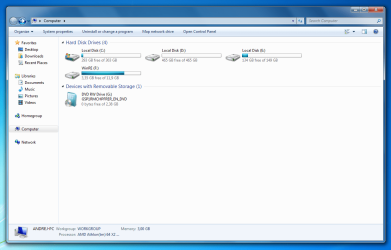
I am worrying about WinRE (G:) drive which suddenly appeared in Computer (Windows Explorer) window since today. It was never displayed there, and I knew its a system drive that is hidden by default.

Under the name and the used space bar, it says "3,35 GB free of 11,9 GB".

Is this somenhow normal? Any possibility for a fix? Because it was never viewable in Computer screen before.. and I think it shouldn't. I also wondering if the drive should have 11,9 GB or it should have less by default?

Thanks ahead of time.

UPDATE:
And now when rebooting, I get a _ that just is blinking... and nothing goes on...

I think this is related to this somenhow...
 
Last edited by a moderator:

My Computer My Computer

At a glance

m
Computer type
PC/Desktop
OS
m
Yes, probably related.

Something has altered your partition table. Unless you've been using diskpart or the disk management console, you likely have been infected with bootkit malware that has corrupted your partition table and/or boot loader.

Reinstalling windows is the safest option, but if you don't want to do that, you'll need to boot from your install media or system repair disk, reset the active partition to your windows installation and rebuild your boot loader. Once this has been done, use Hitman Pro or some similar dedicated anti-bootkit tool to check for any leftover bootkit components.
 

My Computer My Computer

At a glance

Win7Ultimate x64 + x32, Win7Pro x64, XP x32, ...
OS
Win7Ultimate x64 + x32, Win7Pro x64, XP x32, Win 2003, Ubuntu and OpenIndiana
Thank you. I am glad that I have upgraded to Windows 7 only a few weeks ago meaning I have not having much problems by reinstalling Windows. (My files are backuped, that's a bonus)

I will try that and report back in a few hours.
 

My Computer My Computer

At a glance

m
Computer type
PC/Desktop
OS
m
Yes, probably related.

Something has altered your partition table. Unless you've been using diskpart or the disk management console, you likely have been infected with bootkit malware that has corrupted your partition table and/or boot loader.

Reinstalling windows is the safest option, but if you don't want to do that, you'll need to boot from your install media or system repair disk, reset the active partition to your windows installation and rebuild your boot loader. Once this has been done, use Hitman Pro or some similar dedicated anti-bootkit tool to check for any leftover bootkit components.

I have reinstalled windows, but the WinRE is still there in Explorer ... May you elobrate futher on how to rebuild my boot loader using the Windows Install CD?
 

My Computer My Computer

At a glance

m
Computer type
PC/Desktop
OS
m
If Malware is suspected, the first steps are to boot into Safe Mode to run a Malwarebytes full scan or boot Microsoft Standalone System Sweeper to scan the HD: Troubleshooting Win7

How do you know this partition is WinRe? Is it a factory partition labeled System? Where did it come from?

If you are not infected and have no related performance problems, then you can simply remove the drive letter in Disk Management. However I would first check that nothing was written to the partition. We can help you determine this.

Please post back a screenshot of your full Disk management drive map with listings, using Snipping TOol in Start Menu.

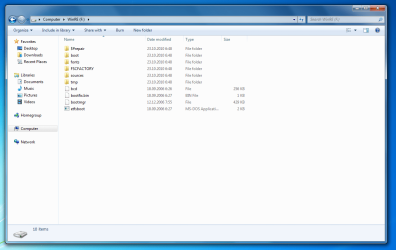
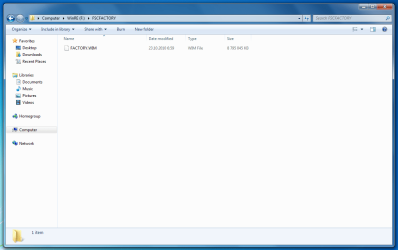
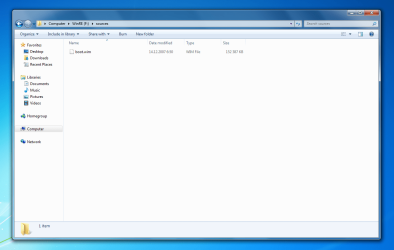
Please also post a screenshot of the folders contained within that partition.
 
If Malware was suspected, the first steps are to boot into Safe Mode to run a Malwarebytes full scan or boot Microsoft Standalone System Sweeper to scan the HD, not reinstall Windows.

How do you know this is WinRe? Is this a factory partition labeled System? Where did it come from?

Please post back a screenshot of your full Disk management drive map with listings, using Snipping TOol in Start Menu.

Please also post a screenshot of the folders contained within that partition.

Hello, thanks for responding.

I have run a full antivirus scan that found no results, just before opening this thread. Per your request, I have used the snipping tool and made some screenshots.
WinRE.PNG

Drive contents:
WinREContents.PNG

Thanks.
 

My Computer My Computer

At a glance

m
Computer type
PC/Desktop
OS
m
EDIT:
If you are not infected and have no related performance problems, then you can simply remove the drive letter in Disk Management. However I would first check that nothing was written to the partition. We can help you determine this.
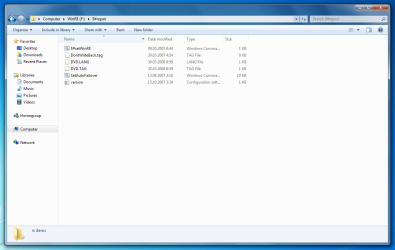
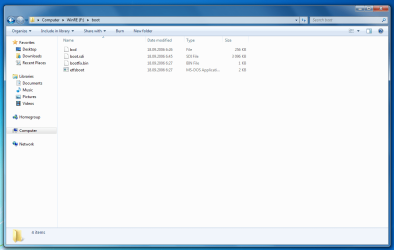
Could you please help with that? I am not sure how I go about this. Also, a few more screenshots..

1.PNG

2.PNG

3.PNG

4.PNG

5.PNG

6.PNG
 

My Computer My Computer

At a glance

m
Computer type
PC/Desktop
OS
m
Where is the Disk Management screenshot? We need to see which is marked System Active. Type DIsk management in Start Search box, maximize window, make a full screen snip.

What was done that might have caused the apparent boot partition and Winre to take a letter?

You can remove it in Disk mgmt by rightclicking on it to Change Drive letter.

But first get a full Malwarebytes scan of all drives.

You'll have to wait til I take my dog to the beach now as I can't wait for the requested Screenshot.
 
Where is the Disk Management screenshot? We need to see which is marked System Active. Type DIsk management in Start Search box, maximize window, make a full screen snip.

What was done that might have caused the apparent boot partition and Winre to take a letter?

You can remove it in Disk mgmt by rightclicking on it to Change Drive letter.

But first get a full Malwarebytes scan of all drives.

You'll have to wait til I take my dog to the beach now as I can't wait for the requested Screenshot.

Hello,

I have attached the Disk Management screenshot to this post, please forgive me for missing that out. And I won't mind you being away from the keyboard for the moment to spend your time with your dog. It's just great that you do that! I am not requesting speedy reply either, so I can wait. I am just wanting to know what this issue is caused by. (Particular the drive suddenly appearing out of nowhere)

dskmanfull.PNG


To add on this, I have done nothing but log inn into the PC. I just came from vacation yesterday. I am very sure there is no malware found, since I am running Bullguard Antivirus and it has never failed for me. But I will do what you have suggested, using the offline Microsoft Defender... I report the results back.
 

My Computer My Computer

At a glance

m
Computer type
PC/Desktop
OS
m
In disk management, right click on your WinRE partition and select "change drive letter and path." In the change drive letter dialog, select "F:" and click on "remove." This will hide the drive letter for your WinRE partition--making it inaccessible while you're running windows--but not delete the partition from the disk.
 

My Computer My Computer

At a glance

Win7Ultimate x64 + x32, Win7Pro x64, XP x32, ...
OS
Win7Ultimate x64 + x32, Win7Pro x64, XP x32, Win 2003, Ubuntu and OpenIndiana
The System Active boot files are contained on C so it's strange they would separate out WinRe - which normally resides in the Windows folder - onto a non-bootable partition. WinRE appears to be a Factory Recovery partition.

Could there have been any partitioning adjustments or repairs run on the computer? How confident are you this is the state it came from factory?

In addition to removing the drive letter from WinRe I'd mark the other HD Inactive as only the OS System drive should be marked Active: Partition - Mark as Inactive - Windows 7 Forums. If this drive has been previously a bootable System drive then I'd wipe it to clean the boot sector so it cannot interfere using Diskpart Clean Command since it appears to be empty.

Under the circumstances you should test WinRe to see if it works:

First make your System Repair Disc - Create.

Next reboot the computer and tap the F8 key repeatedly to enter Advanced Boot Options to see if the Repair console is on the menu. If so boot into it to see if it finds an installation to repair, if it has any issues it wants resolved up front. If not click through to System Recovery Options to run Startup Repair to see if it finds anything which needs fixing.

Once you know WinRe works correctly, see if Factory Recovery will cue up to run. If you tell us the make/model of your computer we can link the steps for this, or you can consult your manual. See that it cues up correctly and what options it offers. If not it may be that the partition is no longer bootable because of changes made to the partitioning. However this does not mean it will not run if it is marked Active when needed then rebooted into it.

Make your Recovery Disks now if you haven't already so you maintain another option of running Factory Recovery. You can also always clean reinstall if needed using a Win7 installer for your version with the Product Key on the COA sticker. Reinstalling Windows 7

Or you can fall back to System Restore points or a Win7 backup image you save externally in place of reinstall if Win7 becomes irreparable: Backup Complete Computer - Create an Image Backup

Make the disks, run these tests, feel free to ask back any questions and/or report what you find.
 
In disk management, right click on your WinRE partition and select "change drive letter and path." In the change drive letter dialog, select "F:" and click on "remove." This will hide the drive letter for your WinRE partition--making it inaccessible while you're running windows--but not delete the partition from the disk.

Thanks! It hidden the partition and the boot sequence works normally. I think my problem is solved, many thanks! But one question, is it normal for that drive/partition to have 12 GB space?
 

My Computer My Computer

At a glance

m
Computer type
PC/Desktop
OS
m
The System Active boot files are contained on C so it's strange they would separate out WinRe - which normally resides in the Windows folder - onto a non-bootable partition. WinRE appears to be a Factory Recovery partition.

Could there have been any partitioning adjustments or repairs run on the computer? How confident are you this is the state it came from factory?
This computer was sent only once to a repair due to Blue Screen of Death. I received it a few months ago, so It's not something that has been altered there I think, since I did not notice that problem before now.

In addition to removing the drive letter from WinRe I'd mark the other HD Inactive as only the OS System drive should be marked Active: Partition - Mark as Inactive - Windows 7 Forums. If this drive has been previously a bootable System drive then I'd wipe it to clean the boot sector so it cannot interfere using Diskpart Clean Command since it appears to be empty.
Under the circumstances you should test WinRe to see if it works:

First make your System Repair Disc - Create.

Next reboot the computer and tap the F8 key repeatedly to enter Advanced Boot Options to see if the Repair console is on the menu. If so boot into it to see if it finds an installation to repair, if it has any issues it wants resolved up front. If not click through to System Recovery Options to run Startup Repair to see if it finds anything which needs fixing.

Once you know WinRe works correctly, see if Factory Recovery will cue up to run. If you tell us the make/model of your computer we can link the steps for this, or you can consult your manual. See that it cues up correctly and what options it offers. If not it may be that the partition is no longer bootable because of changes made to the partitioning. However this does not mean it will not run if it is marked Active when needed then rebooted into it.

Make your Recovery Disks now if you haven't already so you maintain another option of running Factory Recovery. You can also always clean reinstall if needed using a Win7 installer for your version with the Product Key on the COA sticker. Reinstalling Windows 7

Or you can fall back to System Restore points or a Win7 backup image you save externally in place of reinstall if Win7 becomes irreparable: Backup Complete Computer - Create an Image Backup

Make the disks, run these tests, feel free to ask back any questions and/or report what you find
I have a Fujitsu Siemens Scaleo P PC. And thanks for your time to write out this, I will try everything and report back results. :)
 

My Computer My Computer

At a glance

m
Computer type
PC/Desktop
OS
m
That model came with XP so it must have had a clean reinstall of Win7 done at some point.

Look for the F-key given on first boot screen to tap to run Factory Recovery to see if it works, but it's doubtful it will run if it was clean reinstalled. The Manual says those units ship with Recovery Disks. http://uk.ts.fujitsu.com/rl/servicesupport/techsupport/consumer/accessories/Manual_uk.pdf. You can do your own research to find any key combination to press to run Recovery to see if it still has it's hotlink and will cue up to run. But it would be XP being restored unless this is a model of that PC which shipped with Win7.

It's entirely likely that if the Repair console cues up to run it is working from the Win7 partition and not WinRe partition which is sizeable enough it appears to be a Recovery Partition. When you post back the partition contents we can judge it better. There's a chance it isn't functional at all any longer but until you get ready to wipe the HD to clean reinstall Win7 I would just leave it hidden. Reinstalling Windows 7
 
That model came with XP so it must have had a clean reinstall of Win7 done at some point.

Look for the F-key given on first boot screen to tap to run Factory Recovery to see if it works, but it's doubtful it will run if it was clean reinstalled. The Manual says those units ship with Recovery Disks. http://uk.ts.fujitsu.com/rl/servicesupport/techsupport/consumer/accessories/Manual_uk.pdf. You can do your own research to find any key combination to press to run Recovery to see if it still has it's hotlink and will cue up to run. But it would be XP being restored unless this is a model of that PC which shipped with Win7.

It's entirely likely that if the Repair console cues up to run it is working from the Win7 partition and not WinRe partition which is sizeable enough it appears to be a Recovery Partition. When you post back the partition contents we can judge it better. There's a chance it isn't functional at all any longer but until you get ready to wipe the HD to clean reinstall Win7 I would just leave it hidden. Reinstalling Windows 7

A small correction, this computer was shipped with Windows Vista. :)

I have not been able to find the Fujitsu Siemens Recovery option in Repair Computer, so this have disappeared since. I also tried to find out more about any key that would work without any luck...

Answer to the bold part in your quote:
The partition contents are posted at previous posts at this thread, if you have missed them out, check out:
http://www.sevenforums.com/1732937-post7.html
http://www.sevenforums.com/1732925-post6.html

I guess I will wipe out everything and reinstall Windows 7.. but I need to check first if I have all the recovery disks, which I have somenwhere..
 
Last edited:

My Computer My Computer

At a glance

m
Computer type
PC/Desktop
OS
m
Yes, this is correct. The WinRE partition is the recovery partition... and I have the disks for recovery... So I think I can delete the partition (and others) and reinstall Windows 7?
 

My Computer My Computer

At a glance

m
Computer type
PC/Desktop
OS
m
Okay, I have tested the recovery disks and they worked. So as of reading other threads, I just removed it along with all others and now doing a complete reinstall of Windows 7.

Thank all you for your help! This is solved for the moment.
 

My Computer My Computer

At a glance

m
Computer type
PC/Desktop
OS
m
Let us know how it goes.

Once you get your clean reinstall set up as you like using the steps I gave you to get a perfect Clean Reinstall, save a Win7 backup image externally you can use in place of ever having to reinstall again.
 
Sorry for not giving any feedback, I simply forgot about this topic.

Thank you for help everyone. After a fresh re-install there were no problems or issues. I have also created a image of the whole system in-case something goes wrong.

Appreciate the advice and support! Thumbs up!
 

My Computer My Computer

At a glance

m
Computer type
PC/Desktop
OS
m
Back
Top