Solved AVG found trojan SHeur4.MTZ in BatteryLifeExtender?!

suzannec

New member
Local time
1:20 PM
Messages
23
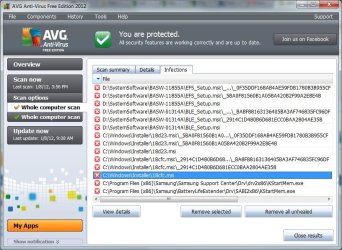
Okay, so while I was watching TV (on the TV), my AVG Resident Shield thing popped up with multiple thread detection. Apparently I have five infections of "Trojan horse SHeur4.MTZ." Googling it did not come up with the specific trojan.

These were all found in the Samsung Support Center and BatteryLife extenders.

The results:

c:\Program Files (x86)\Samsung\BatteryLifeExtender\Drv\SABI2x86\KStartMem.exe
c:\Program Files (x86)\Samsung\Samsung Support Center\Drv\drv2x86\KStartMem.exe

My options are to "Remove selected," "Remove all unhealed," and "Close." If I right click on one, it says "Move to vault" and "Go to file." I clicked "Remove selected" and they were moved to the vault.

What does the virus do? What is KStartMem.exe? Should I take any further action?

Edit: Did a virus scan and the virus came up in some more places. Lovely.

D:\SystemSoftware\BASW-01314A\BLE_Setup.msi\_D1916ABB420E953A1F6ECB8cFDACD69C:\_BA8F88163136405BA3AF746835FC96DF
D:\SystemSoftware\BASW-01314A\BLE_Setup.msi\_D1916ABB420E953A1F6ECB8cFDACD69C
D:\SystemSoftware\BASW-01314A\BLE_Setup.msi
C\Windows\Installer\1191e.msi:\_D1916ABB420E953A1F6ECB8cFDACD69C:\_BA8F88163136405BA3AF746835FC96DF
C\Windows\Installer\1191e.msi:\_D1916ABB420E953A1F6ECB8cFDACD69C
C\Windows\Installer\1191e.msi:

I'm trying to remove these objects, but I'm getting the message:
Moved object is bigger than the archive size limit
Object mentioned below is bigger than maximum size permitted
D:\SystemSoftware\BASW-01314A\BLE_Setup.msi
C\Windows\Installer\1191e.msi:

So . . . what do I do?
 
Last edited:

My Computer My Computer

At a glance

Windows 7 Home 64 bit OEM
OS
Windows 7 Home 64 bit OEM
I AM HAVING THE SAME PROBLEM!!!! I was watching TV and all of a sudden my AVG popped up with the same Trojan! I can't find any information on the Internet on how to remove it, because when I try to remove it with my AVG, it says that removing it may cause my system to become unstable. I also can't remove it to the Virus Vault, due to the same issue of the files being bigger than my archive size.
 

Attachments

  • Trojan SHeur4.mtz .jpg
    Trojan SHeur4.mtz .jpg
    96.7 KB · Views: 49
  • Trojan SHeur4.mtz Part 2.jpg
    Trojan SHeur4.mtz Part 2.jpg
    84.4 KB · Views: 23

My Computer My Computer

At a glance

Windows 7
OS
Windows 7
well i found this article that explains what it does
http://www.eset.eu/encyclopaedia/msil-lemidon-a-w32-sillyim-rootkit-gen?lng=en
about it not removeing im not sure i say wait for someone with more knowledge about this then me ,sorry i cant really help :huh: but don't worry i'm certain somebody here can help you ;)
EDIT:anyways best advice i could give is download malwarebytes and scan your system and try to remove it with that http://www.malwarebytes.org/

also try to scan it with SAS,i took off a couple nasties with this when malwarebytes failed me before http://www.superantispyware.com/
 

My Computer My Computer

At a glance

Windows 10 64bitAMD Phenom II X4 925 (Deneb)(2.8GHz) OC 3.4GHzCorsair Vengeance DDR3 4GBX2 (8192MB)XFX HD 6870 1GB (OC)- 940MHz core, mem 1150MHz
Computer type
PC/Desktop
Computer Manufacturer/Model Number
custom build
OS
Windows 10 64bit
CPU
AMD Phenom II X4 925 (Deneb)(2.8GHz) OC 3.4GHz
Motherboard
M5A78L-MLX Plus
Memory
Corsair Vengeance DDR3 4GBX2 (8192MB)
Graphics Card(s)
XFX HD 6870 1GB (OC)- 940MHz core, mem 1150MHz
Monitor(s) Displays
Vizio 26' 1920x1080 / Acer 1336x768
Screen Resolution
1920x1080 60Hz /1336x768
Hard Drives
Kingston Digital 60GB SSDNow V300/500gb HDD Western Digital 7200rpm (/WD 160GB HDD 7200rpm
PSU
CORSAIR CX600 600w
Case
AZZA Orion 202 EVO
Cooling
cooler master hyper TX3 cpu cooler
Keyboard
Razer DeathStalker
Mouse
Logitech Optical Gaming Mouse G400
Antivirus
Defualt on win 10
Browser
Firefox
Other Info
cpu is overclocked in bios
Trojan SHeur4.MTZ

Hi there,

I also have the virus in 5 locations and 2 of them I have in the virus vault. The other three say that it they are too large to move. I am also trying to find out how to get rid of these. Can someone help?

These are the 3 files that I can not move

C:\Windows\Installer\777c4.msi
\_BA8F8816136405BA3AF7468
\_1A1C8CC4CAF00E54302118F

These are the 2 files I have in the virus vault

C:\Program Files (x86) Samsung\Samsung Support Centre\Drv\drv2x86\KStartMem.exe

C:\Program Files (x86) Samsung\BatteryLifeExtender\Drv\SAB12x86KStartMem.exe


Any help would be greatly appricated.

Thanks
 

My Computer My Computer

At a glance

windows 7 32 bit
Computer Manufacturer/Model Number
Samsung RV 510
OS
windows 7 32 bit
im having the same issue. hopefully figure out how to resolve this....please post if you figure it out first!
 

My Computer My Computer

At a glance

windows 7
OS
windows 7
it seems like a false postive switch the Microsoft sercurity Essentials instead. it's free and better than AVG.
 

My Computer My Computer

At a glance

windows 7 64 bitintel core i5 3.30GHz Quad Core6gbAMD RADEON HD 6450 1GB Dedicated
Computer Manufacturer/Model Number
HP Pavilion p6795a
OS
windows 7 64 bit
CPU
intel core i5 3.30GHz Quad Core
Motherboard
HP
Memory
6gb
Graphics Card(s)
AMD RADEON HD 6450 1GB Dedicated
Sound Card
ATI HIGH DEFINITION SOUND
Monitor(s) Displays
LG
Screen Resolution
16:9 Hd
Hard Drives
1TB
Cooling
Fan
Keyboard
Wireless
Mouse
HP wireless keyboard and mouse
Internet Speed
fast enough
Other Info
Beast Of A Machine!
Welcome to Seven Forums solaris326, powereyeguy and kancerr. Submit the files to Virus Total, and see what 43 AV have to say about them. A Guy
 

My Computer My Computer

At a glance

Windows 10 Home x64INTEL Core i5-750 Quad-Core 3.37GHzHyperX Fury Black Series 8GB (2 x 4GB) 1866MhzEVGA GeForce GTX 750 Superclocked 1GB 128-Bit...
Computer type
PC/Desktop
OS
Windows 10 Home x64
CPU
INTEL Core i5-750 Quad-Core 3.37GHz
Motherboard
ASUS P7P55D
Memory
HyperX Fury Black Series 8GB (2 x 4GB) 1866Mhz
Graphics Card(s)
EVGA GeForce GTX 750 Superclocked 1GB 128-Bit GDDR5
Monitor(s) Displays
LG 32MA68HY 32" IPS
Screen Resolution
1920 x 1080
Hard Drives
Samsung 840 Evo 120GB, SEAGATE 500GB Barracuda® 7200.12, SATA 3 Gb/s, 7200 RPM, 16MB cache
PSU
ANTEC TruePower New TP-550, 80 PLUS, 550W
Case
ANTEC Three Hundred Illusion
Cooling
COOLER MASTER Hyper 212 Plus, 4 x 120mm 1 x 140mm Noctua's
Internet Speed
85 + Mbps
Antivirus
Avast
Browser
Vivaldi
it seems like a false postive switch the Microsoft sercurity Essentials instead. it's free and better than AVG.

Not a very helpful post to people seeking advice /support with a problem.
 

My Computer My Computer

At a glance

Win 7 Ultimate 64-bit. SP1.Intel i7 -720QM.[1.6GHz Turbo Boost 2.8GHz. 6...8 DDR 3 RAM. 1066MHZATI 1024 MB. DDR3. Radeon HD5650
Computer Manufacturer/Model Number
LAPTOP. HP Pavilion dv7-4010TX .
OS
Win 7 Ultimate 64-bit. SP1.
CPU
Intel i7 -720QM.[1.6GHz Turbo Boost 2.8GHz. 6MB Cache.]
Memory
8 DDR 3 RAM. 1066MHZ
Graphics Card(s)
ATI 1024 MB. DDR3. Radeon HD5650
Monitor(s) Displays
17.3" High Definition Brightview LCD. LED Backlit.
Screen Resolution
1600 x 900.
Hard Drives
640GB
Case
Laptop / notebook.
Mouse
Logitech Anywhere mouse. MX.
Internet Speed
ADSL [ but too slow ]
virus total came up with no results ;/
 

My Computer My Computer

At a glance

windows 7
OS
windows 7
i think it is a false positive. everybody who has it has a samsung... only avg is picking it up.
 

My Computer My Computer

At a glance

windows 7
OS
windows 7
hope so that it is a false positive. i'm also using samsung and avg suddenly prompts and have detected 6 infection on samsung files. I've installed and scanned my laptop using malwarebytes anti malware, microsoft security essentials, ad ware and all are unable to detect this virus trojan horse SHeur4.MTZ except avg. my last attempt: now scanning using norton internet security.
 

My Computer My Computer

At a glance

windows 7
OS
windows 7
avg released an update, it was a false positive, issue should be resolved for everybody.
 

My Computer My Computer

At a glance

windows 7
OS
windows 7
jean, did you update your avg today? i scanned last night and had the same issue, updated avg 30 minutes ago, scanned and the issue has been taken care of. was a false positive i was getting.
 

My Computer My Computer

At a glance

windows 7
OS
windows 7
hi kancerr, nope, i've uninstalled it cos to d/l norton i must uninstall avg. norton couldnt detect any virus too. i'll probably use norton for 30 days and install avg again :) at least now i know that its a false positive, i can sleep tonight ..phew
 

My Computer My Computer

At a glance

windows 7
OS
windows 7
Okay, so this is very good news. However, I sent some files that read as infected (the first two in my post) to the virus vault. Should I/do I need to take them out?
 

My Computer My Computer

At a glance

Windows 7 Home 64 bit OEM
OS
Windows 7 Home 64 bit OEM
suzannec, if you've updated avg, scanned again and the issue has been fixed then yes you can move them back but i would recommend doing a quick scan after moving them back from the virus vault just to be safe.
 

My Computer My Computer

At a glance

windows 7
OS
windows 7
the files i moved to the vault are no longer there, avg might have automatically restored them...are yours still in the virus vault?
 

My Computer My Computer

At a glance

windows 7
OS
windows 7
I also have a Samsung with AVG, followed AVG help and deleted the infected installer file to the recycle bin. Having read recent posts should I restore the file after updating AVG ? I assume false positive means the installer file is not infected am I right.

Thanks in advance for any advise on this
 

My Computer My Computer

At a glance

Windows 7 32bit
Computer Manufacturer/Model Number
Samsung R519
OS
Windows 7 32bit
yes, the installer file should be fine. i would restore the file, scan again. just make sure your avg is up to date before the scan.
 

My Computer My Computer

At a glance

windows 7
OS
windows 7
yes, a false positive means there was really no infection and it was just a conflict between avg and samsung users only.
 

My Computer My Computer

At a glance

windows 7
OS
windows 7
Back
Top