Why can't I open pictures DIRECTLY for a camera?

Copying the picture to the hard disk first is no big deal, in fact a smaller deal than removing the memory card and risking wearing out the camera socket.
I only offered that approach as an alternative to doing what you started off "complaining" about, namely copying the pictures folder to your hard disk using Windows Explorer (which is the only program you can use to do that since the camera only supports MTP-mode and no drive letter is assigned, and Windows Explorer is pretty much the only common program that can handle drag-and-drop from an MTP-connected device that does not have a drive letter).

And then I mentioned that once you discovered your camera doesn't support MSC-mode that you were going to have to compromise somewhere. I'd say accepting that you must use Windows Explorer to copy your pictures from camera to hard disk before you can use them in your normal image editing/viewing programs is in fact a compromise of sorts, especially since you now describe it as "no big deal" even though originally you were unhappy.

In fact it's just less of a pain and nuisance than removing the flash card from the camera and putting it into a reader... which means "it's the lesser of two evils", i.e. a compromise. But I agree, that it's really no big deal to have to do this.


Anyway, the bottom line is that the situation is understood, and information about the notion of MSC vs. MTP connection mode for USB has now been explained.

And it's now at least understood why you're forced to do what you've been doing, because your camera doesn't support MSC-mode. I point out that my Nikon camera supports both modes, but obviously not all cameras do.

Note that you are lucky that the USB connectivity of your camera is supported by Win7. My cousin's older Canon Rebel XT is NOT supported, and plugging the USB cable into the PC does not automatically make the camera usable!!! You cannot even do what you do, namely copy the pictures from camera to hard drive with Windows Explorer!!

For my cousin and this older Canon camera the ONLY solution is to remove the card, put it into the card reader present on her Lenovo K330 desktop and see the card as a Windows drive letter, and now she has full access to the card itself... as a drive letter. Newer Canon cameras are supported by Win7 [drivers] for USB connections, but the older Rebel XT is not.

So again... at least you can see the camera and get to it once you plug in the USB cable.
 

My Computer My Computer

At a glance

Windows 7 Pro x64 (1), Win7 Pro X64 (2)i5-3350p 3.1Ghz/6MB-cache (1); E8400 3.0Ghz/6...8GB PC3-12800 DDR3 (1); 4GB PC3-10600 DDR3 (2)ATI HD7750 (1), (see TV cards); ATI R7 250 (2)
Computer type
PC/Desktop
Computer Manufacturer/Model Number
Home-built, two systems (1) and (2)
OS
Windows 7 Pro x64 (1), Win7 Pro X64 (2)
CPU
i5-3350p 3.1Ghz/6MB-cache (1); E8400 3.0Ghz/6MB-cache (2)
Motherboard
ASUS P8Z77-V Pro (1); ASUS P5Q3 (2)
Memory
8GB PC3-12800 DDR3 (1); 4GB PC3-10600 DDR3 (2)
Graphics Card(s)
ATI HD7750 (1), (see TV cards); ATI R7 250 (2)
Sound Card
Realtek ALC892 HD Audio (1); Realtek ALC1200 HD Audio (2)
Monitor(s) Displays
Eizo HD2441W LCD, Eizo S2433W (1); Eizo 24" S2433W (2)
Screen Resolution
1920x1200, 1920x1200 (1); 1920x1200 (2)
Hard Drives
(1) 1TB SATA-II (7200RPM), 2x2TB SATA-III (7200RPM), 250GB SATA-III (10000RPM) for OS; 2x2TB external USB 3.0

(2) 320GB SATA-II (7200RPM), 750GB SATA-II (7200RPM), 150GB SATA-II (10000RPM) for OS; 2TB external USB 3.0
PSU
Nesteq ECS-6001 600W (1); Nesteq ECS-5001 500W (2)
Case
Acousti-Case 360 (1) and (2)
Cooling
Noctua NH-U12P SE2 for CPU, 2x120mm case fans (1) and (2)
Keyboard
IBM PS/2 (1) and (2)
Mouse
Logitech MX Revolution wireless (1); Microsoft wired (2)
Internet Speed
100mbps down / 10mbps up
Antivirus
Microsoft Security Essentials; Malwarebyte Anti-Malware Pro
Browser
Firefox
Other Info
Ceton InfiniTV 4-tuner cablecard-enabled TV card as well as Hauppauge HVR-2250 OTA/ATSC 2-tuner TV card in (1), running under Win7 WMC
Quite so, but a USB socket is more robust than a digital camera's memory card socket. :)

Are you sure? The ones in cameras are very small, especially the ones with built in video.

Also, a new USB card is a lot cheaper than camera repairs.

But it's not the card that breaks.

I meant a PCI USB card you fit to the motherboard, which gets round any USB port that may have a fault.

Anyway, as dsperber points out, at least you have a camera that is seen by Windows 7. :)
 

My Computer My Computer

At a glance

Windows 7 Ultimate SP1 64-BitIntel Core i7 870 @ 2.93GHz8Gb Dual-Channel DDR3 @ 664MHznVidia GeForce GTX 460 1024MB dedicated RAM
Computer Manufacturer/Model Number
HP Pavilion Elite 495UK
OS
Windows 7 Ultimate SP1 64-Bit
CPU
Intel Core i7 870 @ 2.93GHz
Motherboard
MSI 2A9C (CPU1)
Memory
8Gb Dual-Channel DDR3 @ 664MHz
Graphics Card(s)
nVidia GeForce GTX 460 1024MB dedicated RAM
Sound Card
Realtek HD Audio
Monitor(s) Displays
HP2310i
Screen Resolution
1920 x 1080
Hard Drives
1x1954GB Hitachi HDS22020ALA 330 (RAID), 1x1954GB Hitachi External for backup and storage
PSU
460W
Case
HP Elite
Cooling
Air cooled
Keyboard
Logitech K750 solar-powered keyboard
Mouse
Logitech Wireless M180 mouse
Internet Speed
2Mb
Other Info
Pure Avanti Flow Internet Radio with iPod Dock, 64Gb iPod, HP USB Speakers, Sony MDR-V500 Headphones, Sony Vaio F-Series Laptop
And it's now at least understood why you're forced to do what you've been doing, because your camera doesn't support MSC-mode. I point out that my Nikon camera supports both modes, but obviously not all cameras do.

Why couldn't Windows have been designed to create a fake drive letter to use PTP?
 

My Computer My Computer

At a glance

Windows 7 Ultimate x64i7 940 2.9 GHz @ 3.45 GHz24GBRadeon HD 6790
Computer Manufacturer/Model Number
Home made
OS
Windows 7 Ultimate x64
CPU
i7 940 2.9 GHz @ 3.45 GHz
Motherboard
Gigabyte GA-X58A-UD3R
Memory
24GB
Graphics Card(s)
Radeon HD 6790
Sound Card
Realtek HD onboard
Monitor(s) Displays
2 x 20" 4x3 aspect (I hate widescreen)
Hard Drives
2 x 1TB Western Digital Caviar Black (mirrored)
PSU
1 kW
Case
EZCool NA705B
Cooling
Stock CPU fan, plus 3 120mm and 2 80mm case fans
Internet Speed
2 Mbit
I meant a PCI USB card you fit to the motherboard, which gets round any USB port that may have a fault.

Yes, but I'd be more concerned about the tiny socket on the camera than the big socket on the computer (of which most have about 10 anyway).
 

My Computer My Computer

At a glance

Windows 7 Ultimate x64i7 940 2.9 GHz @ 3.45 GHz24GBRadeon HD 6790
Computer Manufacturer/Model Number
Home made
OS
Windows 7 Ultimate x64
CPU
i7 940 2.9 GHz @ 3.45 GHz
Motherboard
Gigabyte GA-X58A-UD3R
Memory
24GB
Graphics Card(s)
Radeon HD 6790
Sound Card
Realtek HD onboard
Monitor(s) Displays
2 x 20" 4x3 aspect (I hate widescreen)
Hard Drives
2 x 1TB Western Digital Caviar Black (mirrored)
PSU
1 kW
Case
EZCool NA705B
Cooling
Stock CPU fan, plus 3 120mm and 2 80mm case fans
Internet Speed
2 Mbit
Why couldn't Windows have been designed to create a fake drive letter to use PTP?
It's just not part of the MTP spec, which describes a "device". It just works differently than MSC, which treats storage as a "drive letter".

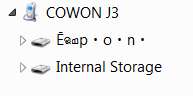
Here's what my Cowon J3 "device" looks like when operating in MTP mode:

mtpdrivesandcowon.jpg


And if I expand the arrow (like "+") next to the "Cowon J3" device, it shows internal and external storage by name (i.e. the storage class names supported by the "Cowon J3" device), rather than with drive letters as would have been nice.

mtpdrivesfine.jpg


Same story with cameras connected in PTP/MTP mode.

Nothing we can do about it, I'm afraid.
 

My Computer My Computer

At a glance

Windows 7 Pro x64 (1), Win7 Pro X64 (2)i5-3350p 3.1Ghz/6MB-cache (1); E8400 3.0Ghz/6...8GB PC3-12800 DDR3 (1); 4GB PC3-10600 DDR3 (2)ATI HD7750 (1), (see TV cards); ATI R7 250 (2)
Computer type
PC/Desktop
Computer Manufacturer/Model Number
Home-built, two systems (1) and (2)
OS
Windows 7 Pro x64 (1), Win7 Pro X64 (2)
CPU
i5-3350p 3.1Ghz/6MB-cache (1); E8400 3.0Ghz/6MB-cache (2)
Motherboard
ASUS P8Z77-V Pro (1); ASUS P5Q3 (2)
Memory
8GB PC3-12800 DDR3 (1); 4GB PC3-10600 DDR3 (2)
Graphics Card(s)
ATI HD7750 (1), (see TV cards); ATI R7 250 (2)
Sound Card
Realtek ALC892 HD Audio (1); Realtek ALC1200 HD Audio (2)
Monitor(s) Displays
Eizo HD2441W LCD, Eizo S2433W (1); Eizo 24" S2433W (2)
Screen Resolution
1920x1200, 1920x1200 (1); 1920x1200 (2)
Hard Drives
(1) 1TB SATA-II (7200RPM), 2x2TB SATA-III (7200RPM), 250GB SATA-III (10000RPM) for OS; 2x2TB external USB 3.0

(2) 320GB SATA-II (7200RPM), 750GB SATA-II (7200RPM), 150GB SATA-II (10000RPM) for OS; 2TB external USB 3.0
PSU
Nesteq ECS-6001 600W (1); Nesteq ECS-5001 500W (2)
Case
Acousti-Case 360 (1) and (2)
Cooling
Noctua NH-U12P SE2 for CPU, 2x120mm case fans (1) and (2)
Keyboard
IBM PS/2 (1) and (2)
Mouse
Logitech MX Revolution wireless (1); Microsoft wired (2)
Internet Speed
100mbps down / 10mbps up
Antivirus
Microsoft Security Essentials; Malwarebyte Anti-Malware Pro
Browser
Firefox
Other Info
Ceton InfiniTV 4-tuner cablecard-enabled TV card as well as Hauppauge HVR-2250 OTA/ATSC 2-tuner TV card in (1), running under Win7 WMC
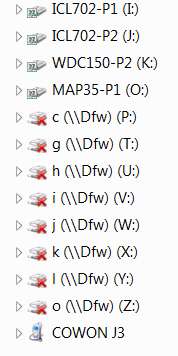
Here's what my Cowon J3 "device" looks like when operating in MTP mode:

mtpdrivesandcowon.jpg


And if I expand the arrow (like "+") next to the "Cowon J3" device, it shows internal and external storage by name (i.e. the storage class names supported by the "Cowon J3" device), rather than with drive letters as would have been nice.

mtpdrivesfine.jpg


Same story with cameras connected in PTP/MTP mode.

Nothing we can do about it, I'm afraid.

Hands up who tried to click the arrow in the picture?

Surely the way it was designed doesn't prevent windows from treating it like a drive letter if it really wanted to? I wonder if there is a third party add on somewhere....
 

My Computer My Computer

At a glance

Windows 7 Ultimate x64i7 940 2.9 GHz @ 3.45 GHz24GBRadeon HD 6790
Computer Manufacturer/Model Number
Home made
OS
Windows 7 Ultimate x64
CPU
i7 940 2.9 GHz @ 3.45 GHz
Motherboard
Gigabyte GA-X58A-UD3R
Memory
24GB
Graphics Card(s)
Radeon HD 6790
Sound Card
Realtek HD onboard
Monitor(s) Displays
2 x 20" 4x3 aspect (I hate widescreen)
Hard Drives
2 x 1TB Western Digital Caviar Black (mirrored)
PSU
1 kW
Case
EZCool NA705B
Cooling
Stock CPU fan, plus 3 120mm and 2 80mm case fans
Internet Speed
2 Mbit
Actually it very much specifically WAS meant to not be treated as a drive letter. It was for situations where transcoding or format changes or DRM or special preview filters/custom programs etc etc etc were to be used when transferring files to and from the device which a simple drive letter does not allow.

The decision to allow one or the other or both is entirely up to how the manufacturer thinks that they want to best present the functionality to the user...

IMHO it's just simpler to take the card out. No need to drain the battery, generally faster and I usually have multiple cards in rotation anyway.
 

My Computer My Computer

At a glance

Windows 7 x64 Ultimatei7 96012 Gig Corsair DominatorNvidia 480
Computer Manufacturer/Model Number
Scratch built
OS
Windows 7 x64 Ultimate
CPU
i7 960
Motherboard
Asus P6X58D
Memory
12 Gig Corsair Dominator
Graphics Card(s)
Nvidia 480
Sound Card
Maudio Delta 44 + breakout box
Monitor(s) Displays
Dell UltraSharp U2410 24in and Samsung 21 dual monitors
Screen Resolution
1920x1200 and 1280x1024
Hard Drives
Primary: Intel X-25M G2 160G SSD
Secondary: Segate baracuda 1.0 TB
HDs in AHCI mode.
PSU
Corasair TX850
Case
Cooler Master HAF
Cooling
Corsair H50
Keyboard
Logitech G15 + N52 game pad
Mouse
Logitech MX518
Internet Speed
15kbs down 4.5kbps up
Other Info
WEI 7.6
CPU & RAM 7.6
Graphics 7.9
Hard disk 7.7
Actually it very much specifically WAS meant to not be treated as a drive letter. It was for situations where transcoding or format changes or DRM or special preview filters/custom programs etc etc etc were to be used when transferring files to and from the device which a simple drive letter does not allow.

The decision to allow one or the other or both is entirely up to how the manufacturer thinks that they want to best present the functionality to the user...

IMHO it's just simpler to take the card out. No need to drain the battery, generally faster and I usually have multiple cards in rotation anyway.

So what you're saying is Fuji are trying to force me to use their program to transfer it? Well Windows have got round that as I can copy them directly anyway. So why not just let me have a drive letter?
 

My Computer My Computer

At a glance

Windows 7 Ultimate x64i7 940 2.9 GHz @ 3.45 GHz24GBRadeon HD 6790
Computer Manufacturer/Model Number
Home made
OS
Windows 7 Ultimate x64
CPU
i7 940 2.9 GHz @ 3.45 GHz
Motherboard
Gigabyte GA-X58A-UD3R
Memory
24GB
Graphics Card(s)
Radeon HD 6790
Sound Card
Realtek HD onboard
Monitor(s) Displays
2 x 20" 4x3 aspect (I hate widescreen)
Hard Drives
2 x 1TB Western Digital Caviar Black (mirrored)
PSU
1 kW
Case
EZCool NA705B
Cooling
Stock CPU fan, plus 3 120mm and 2 80mm case fans
Internet Speed
2 Mbit
Surely the way it was designed doesn't prevent windows from treating it like a drive letter if it really wanted to?
I agree completely.

But making the usefulness and user-friendliness of PTP/MTP even more miniscule, in my experience (and I played with this alot when I first got my J3) again only Windows Explorer seems fully competent to deal with the "device" and its "storage classes".

For example, when I was trying to use Winamp to create M3U playlists on the J3 while the device was connected in MTP mode (before I learned that the J3 doesn't support M3U playlists while it's in MTP mode... it only supports PLA playlists, while are ONLY supported, again, by Windows Explorer) I actually [naively] thought I'd succeeded!

Well, Winamp (like essentially 100% of all Windows programs) assumes the existence of drive letters to access storage. And apparently in attempting to SAVE the created M3U playlist file actually corrupted this Windows Explorer view of the device, because it really had no true understanding that "internal storage" wasn't a Windows drive letter. Fortunately this was just a temporary corruption (cured by disconnecting the J3 from the PC and then reconnecting), but it sure looked strange.

So it started like this:

mtpdrivesfine.jpg


Then I saved one M3U playlist on external storage of the J3 with Winamp, and it actually did go there. Of course the M3U playlist itself was unusable while the J3 was in MTP mode, and Explorer's presentation got corrupted as follows:

mtpexplorerexternalstor.jpg


I was horrified and couldn't believe what just happened, so naturally I tried it again!! This time saving the M3U playlist file onto internal storage... just making matters worse.

mtpdrivecorruption.jpg


Interestingly, once I learned that Winamp could not produce PLA playlists (which is what the J3 understands when in MTP mode), I also learned, again, that only Windows Explorer can deal with PLA playlists and MTP devices.

===>> MTP mode is not your friend, certainly not for portable music players where players/organizers/playlisters crave MSC mode because of the availability of Windows drive letters. It's baffling to me why camera makers would force MTP mode and not just choose MSC mode, if they're only going to support one mode.
 

My Computer My Computer

At a glance

Windows 7 Pro x64 (1), Win7 Pro X64 (2)i5-3350p 3.1Ghz/6MB-cache (1); E8400 3.0Ghz/6...8GB PC3-12800 DDR3 (1); 4GB PC3-10600 DDR3 (2)ATI HD7750 (1), (see TV cards); ATI R7 250 (2)
Computer type
PC/Desktop
Computer Manufacturer/Model Number
Home-built, two systems (1) and (2)
OS
Windows 7 Pro x64 (1), Win7 Pro X64 (2)
CPU
i5-3350p 3.1Ghz/6MB-cache (1); E8400 3.0Ghz/6MB-cache (2)
Motherboard
ASUS P8Z77-V Pro (1); ASUS P5Q3 (2)
Memory
8GB PC3-12800 DDR3 (1); 4GB PC3-10600 DDR3 (2)
Graphics Card(s)
ATI HD7750 (1), (see TV cards); ATI R7 250 (2)
Sound Card
Realtek ALC892 HD Audio (1); Realtek ALC1200 HD Audio (2)
Monitor(s) Displays
Eizo HD2441W LCD, Eizo S2433W (1); Eizo 24" S2433W (2)
Screen Resolution
1920x1200, 1920x1200 (1); 1920x1200 (2)
Hard Drives
(1) 1TB SATA-II (7200RPM), 2x2TB SATA-III (7200RPM), 250GB SATA-III (10000RPM) for OS; 2x2TB external USB 3.0

(2) 320GB SATA-II (7200RPM), 750GB SATA-II (7200RPM), 150GB SATA-II (10000RPM) for OS; 2TB external USB 3.0
PSU
Nesteq ECS-6001 600W (1); Nesteq ECS-5001 500W (2)
Case
Acousti-Case 360 (1) and (2)
Cooling
Noctua NH-U12P SE2 for CPU, 2x120mm case fans (1) and (2)
Keyboard
IBM PS/2 (1) and (2)
Mouse
Logitech MX Revolution wireless (1); Microsoft wired (2)
Internet Speed
100mbps down / 10mbps up
Antivirus
Microsoft Security Essentials; Malwarebyte Anti-Malware Pro
Browser
Firefox
Other Info
Ceton InfiniTV 4-tuner cablecard-enabled TV card as well as Hauppauge HVR-2250 OTA/ATSC 2-tuner TV card in (1), running under Win7 WMC
I got my mp3 player for a couple of quid from china - beats the apple rip off ones! It is just a drive letter. Nice simple device - USB socket, headphone socket, 5 buttons (play/pause, louder, softer, next track, last track), and 2 LEDs (on/playing, transferring/charging). Charging done through USB socket. It is literally the size of a belt buckle, which is more or less where I clip it. 4GB storage, I didn't want to pay another quid for the 8GB!
 

My Computer My Computer

At a glance

Windows 7 Ultimate x64i7 940 2.9 GHz @ 3.45 GHz24GBRadeon HD 6790
Computer Manufacturer/Model Number
Home made
OS
Windows 7 Ultimate x64
CPU
i7 940 2.9 GHz @ 3.45 GHz
Motherboard
Gigabyte GA-X58A-UD3R
Memory
24GB
Graphics Card(s)
Radeon HD 6790
Sound Card
Realtek HD onboard
Monitor(s) Displays
2 x 20" 4x3 aspect (I hate widescreen)
Hard Drives
2 x 1TB Western Digital Caviar Black (mirrored)
PSU
1 kW
Case
EZCool NA705B
Cooling
Stock CPU fan, plus 3 120mm and 2 80mm case fans
Internet Speed
2 Mbit
IMHO it's just simpler to take the card out. No need to drain the battery, generally faster and I usually have multiple cards in rotation anyway.
I agree.

One argument for the other approach, however, namely leaving the card in the camera... and deriving from the aforementioned use of manufacturer-provided application software to handle transfers.

For example Canon provides software (e.g. Zoom Browser) to transfer pictures and folders from camera to computer. As it turns out it also can deal with the card by itself, inserted into a reader. Nikon as well has its own transfer software, named Nikon Transfer, which similarly can deal with the card in the camera (either in MSC or MTP mode) or out of the camera in a reader.

However what the Nikon Transfer program can do, and which depends on the card being in the camera, is auto-rotate (by 90 degrees clockwise or counter-clockwise as appropriate) images where the gravity-sensor in the camera has noted in the EXIF data of the image file how the camera was held when the picture was taken. Apparently the trick is provided by the camera itself in the transfer process, else otherwise that same EXIF data could also be read by Nikon Transfer with the card removed and in a reader so you'd always get the auto-rotate. But you do not get auto-rotate when the card is out of the camera (at least to the best of my recollection, but I may be wrong).
 

My Computer My Computer

At a glance

Windows 7 Pro x64 (1), Win7 Pro X64 (2)i5-3350p 3.1Ghz/6MB-cache (1); E8400 3.0Ghz/6...8GB PC3-12800 DDR3 (1); 4GB PC3-10600 DDR3 (2)ATI HD7750 (1), (see TV cards); ATI R7 250 (2)
Computer type
PC/Desktop
Computer Manufacturer/Model Number
Home-built, two systems (1) and (2)
OS
Windows 7 Pro x64 (1), Win7 Pro X64 (2)
CPU
i5-3350p 3.1Ghz/6MB-cache (1); E8400 3.0Ghz/6MB-cache (2)
Motherboard
ASUS P8Z77-V Pro (1); ASUS P5Q3 (2)
Memory
8GB PC3-12800 DDR3 (1); 4GB PC3-10600 DDR3 (2)
Graphics Card(s)
ATI HD7750 (1), (see TV cards); ATI R7 250 (2)
Sound Card
Realtek ALC892 HD Audio (1); Realtek ALC1200 HD Audio (2)
Monitor(s) Displays
Eizo HD2441W LCD, Eizo S2433W (1); Eizo 24" S2433W (2)
Screen Resolution
1920x1200, 1920x1200 (1); 1920x1200 (2)
Hard Drives
(1) 1TB SATA-II (7200RPM), 2x2TB SATA-III (7200RPM), 250GB SATA-III (10000RPM) for OS; 2x2TB external USB 3.0

(2) 320GB SATA-II (7200RPM), 750GB SATA-II (7200RPM), 150GB SATA-II (10000RPM) for OS; 2TB external USB 3.0
PSU
Nesteq ECS-6001 600W (1); Nesteq ECS-5001 500W (2)
Case
Acousti-Case 360 (1) and (2)
Cooling
Noctua NH-U12P SE2 for CPU, 2x120mm case fans (1) and (2)
Keyboard
IBM PS/2 (1) and (2)
Mouse
Logitech MX Revolution wireless (1); Microsoft wired (2)
Internet Speed
100mbps down / 10mbps up
Antivirus
Microsoft Security Essentials; Malwarebyte Anti-Malware Pro
Browser
Firefox
Other Info
Ceton InfiniTV 4-tuner cablecard-enabled TV card as well as Hauppauge HVR-2250 OTA/ATSC 2-tuner TV card in (1), running under Win7 WMC
I was about to talk about the gravity sensor on my Fuji, but it doesn't seem to have one! I must be thinking of my Canon that I used to have. I'm sure the photos were autorotated when I copied using a drive letter. It must have saved the jpeg the other way up.

As for the battery comment - transferring the files uses not a lot of battery compared with taking the photo. And the batteries (4 x AA NiMH) last ages on this thing.
 

My Computer My Computer

At a glance

Windows 7 Ultimate x64i7 940 2.9 GHz @ 3.45 GHz24GBRadeon HD 6790
Computer Manufacturer/Model Number
Home made
OS
Windows 7 Ultimate x64
CPU
i7 940 2.9 GHz @ 3.45 GHz
Motherboard
Gigabyte GA-X58A-UD3R
Memory
24GB
Graphics Card(s)
Radeon HD 6790
Sound Card
Realtek HD onboard
Monitor(s) Displays
2 x 20" 4x3 aspect (I hate widescreen)
Hard Drives
2 x 1TB Western Digital Caviar Black (mirrored)
PSU
1 kW
Case
EZCool NA705B
Cooling
Stock CPU fan, plus 3 120mm and 2 80mm case fans
Internet Speed
2 Mbit
Back
Top