Solved AFTER REFORMAT MY 320 HDD MEMORY became 98. PLEASE HELP ME!

ianbrylle29

New member
Power User
Local time
11:04 PM
Messages
105
Location
Davao City
My brother was reformatting our laptop (ASPIRE acer 4736z) and change the windows 7 to ultimate the HDD memory of my laptop became lower. from 320GB to 98GB HDD memory. Guys i really need your help. PLEASE HELP me
 

My Computer My Computer

At a glance

windows 10 64bitRyzen 3 2200g8.00 GBVega 8 integrated graphics
OS
windows 10 64bit
CPU
Ryzen 3 2200g
Motherboard
msi a320m pro-vh plus
Memory
8.00 GB
Graphics Card(s)
Vega 8 integrated graphics
  • Like
Reactions: JMH
THIS IS NOT MEMORY ONLY HARD DRIVE CAPACITY.
the hdd capacity would not change unless the partition size was altered and then format in ntfs if a reformat was done then the drive capacity would not change unless the operator did some alteration.
details on how this change took place would be appreciated
 

My Computer My Computer

At a glance

Windows 7 Ultimate 32bit
OS
Windows 7 Ultimate 32bit
Right-click on "My Computer", then left-click on "Manage". Go to Disk Management and post a screenshot. :)
 

My Computer My Computer

At a glance

Main - Windows 7 Pro SP1 64-Bit; 2nd - Window...Main - Core i7 2600K; 2nd - Core i7 920Main - 16GB Corsair Vengeance; 2nd - 12GB Cor...Main - XFX Radeon 6870 1GB; 2nd - XFX Radeon ...
Computer Manufacturer/Model Number
Self
OS
Main - Windows 7 Pro SP1 64-Bit; 2nd - Windows Server 2008 R2
CPU
Main - Core i7 2600K; 2nd - Core i7 920
Motherboard
Main - Asus P8Z68-V Pro/Gen3; 2nd - Gigabyte GA-EX58-UDR3
Memory
Main - 16GB Corsair Vengeance; 2nd - 12GB Corsair Vengeance
Graphics Card(s)
Main - XFX Radeon 6870 1GB; 2nd - XFX Radeon 4870 1GB
Sound Card
Both: Onboard Realtek Azalia
Monitor(s) Displays
Main - Hann 25" + I-INC 25" + Acer 23"; 2nd - Upgrading Soon
Screen Resolution
Main - 1920x1080 (All Three Monitors); 2nd - Upgrading Soon
Hard Drives
Main - (1) Crucial M4 128GB (Boot)
Main - (1) Seagate 2TB 64MB Cache (Data)
Main - (1) Seagate 2TB 64MB Cache (Data Backup)
2nd - (1) Intel X25-M SSD 80GB (Boot)
2nd - (3) Seagate 1TB 32MB Cache (Data Backup)
2nd - (1) Seagate 320GB (Because)
PSU
Main - OCZ 600W Modular; 2nd - OCZ 600W
Case
Main - Thermaltake Element G; 2nd - NZXT something or other
Cooling
Main - Corsair H80; 2nd - Prolimatech Megahalems
Keyboard
Main - Razer Reclusa; 2nd - Old MS Keyboard
Mouse
Main - Logitech MX Revolution; 2nd - Old MS Mouse
Internet Speed
20Mbps Time-Warner Cable
thank you for the reply. . . is there any way that can make my HDD memory become 320 GB again??
 

My Computer My Computer

At a glance

windows 10 64bitRyzen 3 2200g8.00 GBVega 8 integrated graphics
OS
windows 10 64bit
CPU
Ryzen 3 2200g
Motherboard
msi a320m pro-vh plus
Memory
8.00 GB
Graphics Card(s)
Vega 8 integrated graphics
Yes - cooperate with people trying to help you by posting a screenshot of your Disk Management layout. ;)
 

My Computer My Computer

At a glance

Main - Windows 7 Pro SP1 64-Bit; 2nd - Window...Main - Core i7 2600K; 2nd - Core i7 920Main - 16GB Corsair Vengeance; 2nd - 12GB Cor...Main - XFX Radeon 6870 1GB; 2nd - XFX Radeon ...
Computer Manufacturer/Model Number
Self
OS
Main - Windows 7 Pro SP1 64-Bit; 2nd - Windows Server 2008 R2
CPU
Main - Core i7 2600K; 2nd - Core i7 920
Motherboard
Main - Asus P8Z68-V Pro/Gen3; 2nd - Gigabyte GA-EX58-UDR3
Memory
Main - 16GB Corsair Vengeance; 2nd - 12GB Corsair Vengeance
Graphics Card(s)
Main - XFX Radeon 6870 1GB; 2nd - XFX Radeon 4870 1GB
Sound Card
Both: Onboard Realtek Azalia
Monitor(s) Displays
Main - Hann 25" + I-INC 25" + Acer 23"; 2nd - Upgrading Soon
Screen Resolution
Main - 1920x1080 (All Three Monitors); 2nd - Upgrading Soon
Hard Drives
Main - (1) Crucial M4 128GB (Boot)
Main - (1) Seagate 2TB 64MB Cache (Data)
Main - (1) Seagate 2TB 64MB Cache (Data Backup)
2nd - (1) Intel X25-M SSD 80GB (Boot)
2nd - (3) Seagate 1TB 32MB Cache (Data Backup)
2nd - (1) Seagate 320GB (Because)
PSU
Main - OCZ 600W Modular; 2nd - OCZ 600W
Case
Main - Thermaltake Element G; 2nd - NZXT something or other
Cooling
Main - Corsair H80; 2nd - Prolimatech Megahalems
Keyboard
Main - Razer Reclusa; 2nd - Old MS Keyboard
Mouse
Main - Logitech MX Revolution; 2nd - Old MS Mouse
Internet Speed
20Mbps Time-Warner Cable
yes sir . . i will post it right away. sorry i was not online an hour or so because of some business matters. im not totally a good in computers so thats why its a hard for me to talk about the drivers . . thanks a bunch
 

My Computer My Computer

At a glance

windows 10 64bitRyzen 3 2200g8.00 GBVega 8 integrated graphics
OS
windows 10 64bit
CPU
Ryzen 3 2200g
Motherboard
msi a320m pro-vh plus
Memory
8.00 GB
Graphics Card(s)
Vega 8 integrated graphics
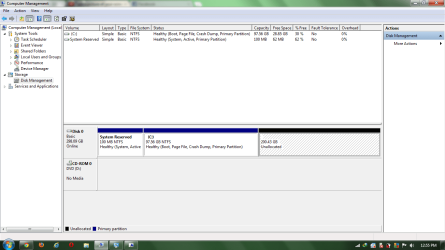
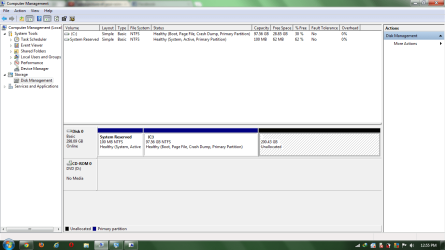
THIS IS MY DEVICE MANAGER from my ASPIRE 4736z

this is what i have in my laptop's device manager disk management
 

Attachments

  • 1.png
    1.png
    41.1 KB · Views: 42
Last edited:

My Computer My Computer

At a glance

windows 10 64bitRyzen 3 2200g8.00 GBVega 8 integrated graphics
OS
windows 10 64bit
CPU
Ryzen 3 2200g
Motherboard
msi a320m pro-vh plus
Memory
8.00 GB
Graphics Card(s)
Vega 8 integrated graphics
THIS IS NOT MEMORY ONLY HARD DRIVE CAPACITY.
the hdd capacity would not change unless the partition size was altered and then format in ntfs if a reformat was done then the drive capacity would not change unless the operator did some alteration.
details on how this change took place would be appreciated

the problem is that my brother forgot how he formatted the laptop. it was last year that he formatted the laptop and because of it i was totally enraged in what he did but to make the problem short i just want to make the memory back to 320GB. i used HDD regenerator this morning but the only thing that it did is to check if there is any problem in the HDD memory but my problem wasn't fixed at all.
 

My Computer My Computer

At a glance

windows 10 64bitRyzen 3 2200g8.00 GBVega 8 integrated graphics
OS
windows 10 64bit
CPU
Ryzen 3 2200g
Motherboard
msi a320m pro-vh plus
Memory
8.00 GB
Graphics Card(s)
Vega 8 integrated graphics
See the Unallocated space? There's your missing section of the Hard Drive.

Look at the 97.56GB partition labeled (C: ). If you right-click on it and then left-click on Extend Volume, then choose the maximum amount allowed you'll be back in business.

(Leave the System Reserved alone - it is fine.)

Please ask if you have any questions. :)
 

My Computer My Computer

At a glance

Main - Windows 7 Pro SP1 64-Bit; 2nd - Window...Main - Core i7 2600K; 2nd - Core i7 920Main - 16GB Corsair Vengeance; 2nd - 12GB Cor...Main - XFX Radeon 6870 1GB; 2nd - XFX Radeon ...
Computer Manufacturer/Model Number
Self
OS
Main - Windows 7 Pro SP1 64-Bit; 2nd - Windows Server 2008 R2
CPU
Main - Core i7 2600K; 2nd - Core i7 920
Motherboard
Main - Asus P8Z68-V Pro/Gen3; 2nd - Gigabyte GA-EX58-UDR3
Memory
Main - 16GB Corsair Vengeance; 2nd - 12GB Corsair Vengeance
Graphics Card(s)
Main - XFX Radeon 6870 1GB; 2nd - XFX Radeon 4870 1GB
Sound Card
Both: Onboard Realtek Azalia
Monitor(s) Displays
Main - Hann 25" + I-INC 25" + Acer 23"; 2nd - Upgrading Soon
Screen Resolution
Main - 1920x1080 (All Three Monitors); 2nd - Upgrading Soon
Hard Drives
Main - (1) Crucial M4 128GB (Boot)
Main - (1) Seagate 2TB 64MB Cache (Data)
Main - (1) Seagate 2TB 64MB Cache (Data Backup)
2nd - (1) Intel X25-M SSD 80GB (Boot)
2nd - (3) Seagate 1TB 32MB Cache (Data Backup)
2nd - (1) Seagate 320GB (Because)
PSU
Main - OCZ 600W Modular; 2nd - OCZ 600W
Case
Main - Thermaltake Element G; 2nd - NZXT something or other
Cooling
Main - Corsair H80; 2nd - Prolimatech Megahalems
Keyboard
Main - Razer Reclusa; 2nd - Old MS Keyboard
Mouse
Main - Logitech MX Revolution; 2nd - Old MS Mouse
Internet Speed
20Mbps Time-Warner Cable
  • Like
Reactions: JMH
See the Unallocated space? There's your missing section of the Hard Drive.

Look at the 97.56GB partition labeled (C: ). If you right-click on it and then left-click on Extend Volume, then choose the maximum amount allowed you'll be back in business.

(Leave the System Reserved alone - it is fine.)

Please ask if you have any questions. :)

Sir thank you very much! i never thought it would be this easy. . .thanks also for the people who helped. .. i'm relieved now. . . this site is the best. . .^_^V
 

My Computer My Computer

At a glance

windows 10 64bitRyzen 3 2200g8.00 GBVega 8 integrated graphics
OS
windows 10 64bit
CPU
Ryzen 3 2200g
Motherboard
msi a320m pro-vh plus
Memory
8.00 GB
Graphics Card(s)
Vega 8 integrated graphics
  • Like
Reactions: JMH
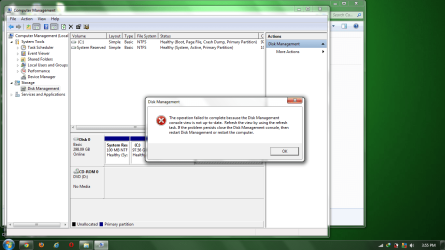
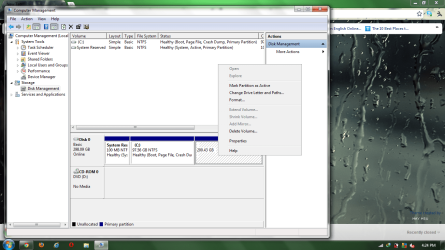
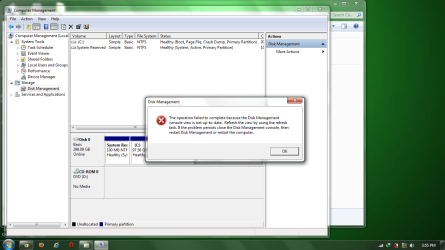
sorry sir . . but this message pops up. . .and there is no extend volume when i click right click . . . sorry again sir for disturbing. . .
 

Attachments

  • 2.png
    2.png
    91.3 KB · Views: 15

My Computer My Computer

At a glance

windows 10 64bitRyzen 3 2200g8.00 GBVega 8 integrated graphics
OS
windows 10 64bit
CPU
Ryzen 3 2200g
Motherboard
msi a320m pro-vh plus
Memory
8.00 GB
Graphics Card(s)
Vega 8 integrated graphics
sir there is another problem when i right click, there is no extend volume and this is the picture that comes out
 

Attachments

  • 2.png
    2.png
    91.3 KB · Views: 6

My Computer My Computer

At a glance

windows 10 64bitRyzen 3 2200g8.00 GBVega 8 integrated graphics
OS
windows 10 64bit
CPU
Ryzen 3 2200g
Motherboard
msi a320m pro-vh plus
Memory
8.00 GB
Graphics Card(s)
Vega 8 integrated graphics
You are not bothering me, except when you call me "sir". :D

Did you click the refresh button like it says? (See picture)

If that doesn't work, try rebooting and giving it another shot.
 

Attachments

  • Refresh.JPG
    Refresh.JPG
    22.4 KB · Views: 5

My Computer My Computer

At a glance

Main - Windows 7 Pro SP1 64-Bit; 2nd - Window...Main - Core i7 2600K; 2nd - Core i7 920Main - 16GB Corsair Vengeance; 2nd - 12GB Cor...Main - XFX Radeon 6870 1GB; 2nd - XFX Radeon ...
Computer Manufacturer/Model Number
Self
OS
Main - Windows 7 Pro SP1 64-Bit; 2nd - Windows Server 2008 R2
CPU
Main - Core i7 2600K; 2nd - Core i7 920
Motherboard
Main - Asus P8Z68-V Pro/Gen3; 2nd - Gigabyte GA-EX58-UDR3
Memory
Main - 16GB Corsair Vengeance; 2nd - 12GB Corsair Vengeance
Graphics Card(s)
Main - XFX Radeon 6870 1GB; 2nd - XFX Radeon 4870 1GB
Sound Card
Both: Onboard Realtek Azalia
Monitor(s) Displays
Main - Hann 25" + I-INC 25" + Acer 23"; 2nd - Upgrading Soon
Screen Resolution
Main - 1920x1080 (All Three Monitors); 2nd - Upgrading Soon
Hard Drives
Main - (1) Crucial M4 128GB (Boot)
Main - (1) Seagate 2TB 64MB Cache (Data)
Main - (1) Seagate 2TB 64MB Cache (Data Backup)
2nd - (1) Intel X25-M SSD 80GB (Boot)
2nd - (3) Seagate 1TB 32MB Cache (Data Backup)
2nd - (1) Seagate 320GB (Because)
PSU
Main - OCZ 600W Modular; 2nd - OCZ 600W
Case
Main - Thermaltake Element G; 2nd - NZXT something or other
Cooling
Main - Corsair H80; 2nd - Prolimatech Megahalems
Keyboard
Main - Razer Reclusa; 2nd - Old MS Keyboard
Mouse
Main - Logitech MX Revolution; 2nd - Old MS Mouse
Internet Speed
20Mbps Time-Warner Cable
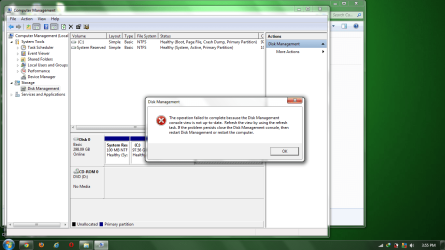
this is the picture is . . . after refreshing and rebooting nothing changed. . .
 

Attachments

  • 3.png
    3.png
    163.8 KB · Views: 12

My Computer My Computer

At a glance

windows 10 64bitRyzen 3 2200g8.00 GBVega 8 integrated graphics
OS
windows 10 64bit
CPU
Ryzen 3 2200g
Motherboard
msi a320m pro-vh plus
Memory
8.00 GB
Graphics Card(s)
Vega 8 integrated graphics
this is the picture is . . . after refreshing and rebooting nothing changed. . .

sir i am defragmenting the disk right now. . . can this action help the disk?
 

My Computer My Computer

At a glance

windows 10 64bitRyzen 3 2200g8.00 GBVega 8 integrated graphics
OS
windows 10 64bit
CPU
Ryzen 3 2200g
Motherboard
msi a320m pro-vh plus
Memory
8.00 GB
Graphics Card(s)
Vega 8 integrated graphics
my laptop is an acer aspire 4736z

i would like to ask all the people here, what should i do to make my 98 HDD memory will be back to normal.

this is killing me so much. I hope someone will help me

and i will really appreciate the help

THANKS IN ADVANCE GUYS ^_^v
 

My Computer My Computer

At a glance

windows 10 64bitRyzen 3 2200g8.00 GBVega 8 integrated graphics
OS
windows 10 64bit
CPU
Ryzen 3 2200g
Motherboard
msi a320m pro-vh plus
Memory
8.00 GB
Graphics Card(s)
Vega 8 integrated graphics

My Computer My Computer

At a glance

Win 7 Pro 64-bitIntel i5 2.4 Ghz8GB DDR3Intel HD 3000
Computer type
Laptop
Computer Manufacturer/Model Number
Sony Vaio VPCEB47GM Laptop
OS
Win 7 Pro 64-bit
CPU
Intel i5 2.4 Ghz
Memory
8GB DDR3
Graphics Card(s)
Intel HD 3000
Sound Card
IDT High Definition
Monitor(s) Displays
15.6 WGXA Anti-Glare LED
Screen Resolution
1280x800
Hard Drives
640Gb 7200rpm
Antivirus
MSE
Browser
Opera (primary) with IE9 backup
what program did you use to format it?
 

My Computer My Computer

At a glance

windows 7 premium 64 bitAMD Athlon IIP360 Dual core 2.3ghz4GB PC3ATI Mobility Radeon HD 4250
Computer Manufacturer/Model Number
dell m5030
OS
windows 7 premium 64 bit
CPU
AMD Athlon IIP360 Dual core 2.3ghz
Memory
4GB PC3
Graphics Card(s)
ATI Mobility Radeon HD 4250
Monitor(s) Displays
15.6 inch
Hard Drives
120gb Patriot PYRO
im sorry about the late reply. . .the problem is my brother was the one who formatted it and i don't know what he did. and i was asking him about the problem he told me that he forgot but i will send a screenshot . . . . .
 

Attachments

  • 1.png
    1.png
    41.1 KB · Views: 23
  • 2.png
    2.png
    91.3 KB · Views: 20
  • 3.png
    3.png
    163.8 KB · Views: 21

My Computer My Computer

At a glance

windows 10 64bitRyzen 3 2200g8.00 GBVega 8 integrated graphics
OS
windows 10 64bit
CPU
Ryzen 3 2200g
Motherboard
msi a320m pro-vh plus
Memory
8.00 GB
Graphics Card(s)
Vega 8 integrated graphics
Couldn't you just format the "Unallocated" section and then just expand C: to use up the space?
 

My Computer My Computer

At a glance

W7 Ultimate SP1, LM19.2 MATE, W10 Home 1703, ...AMD Phenom II x6 1100T, 3.3 GHz12GB DDR3 1333 G-Skill (4GB x 2), G-Skill (2G...NVIDIA GeForce GTX 660
Computer type
PC/Desktop
Computer Manufacturer/Model Number
n/a
OS
W7 Ultimate SP1, LM19.2 MATE, W10 Home 1703, W10 Pro 1703 VM, #All 64 bit
CPU
AMD Phenom II x6 1100T, 3.3 GHz
Motherboard
ASUS M4A88T-M/USB3 (AM3)
Memory
12GB DDR3 1333 G-Skill (4GB x 2), G-Skill (2GB x 2)
Graphics Card(s)
NVIDIA GeForce GTX 660
Sound Card
Realtek?
Monitor(s) Displays
Samsung S23B350
Screen Resolution
1920x1080
Hard Drives
WD Green 2TB (SATA), WD Green 3TB (SATA), WD Blue 4TB (SATA), WD Blue 6TB (SATA)
PSU
Cooler Master
Case
Antec GX300 Tower
Cooling
3x Antec TRICOOL 120mm Fans
Mouse
Wired Optical
Internet Speed
DSL
Antivirus
Avast
Browser
Pale Moon (64 bit)
Other Info
2018-12-27 Upgraded HDDs
2015-12-10 Upgraded case, graphics card, storage
2015-08-15 Upgraded motherboard & RAM
2015-07-15 Upgraded LM17.1 to LM17.2
Back
Top