Solved Best way to Sync Outlook, iPhone, & iPad Emails, Contacts & Calendar?

snortastic

New member
Best way to Sync Outlook, iPhone, & iPad Emails, Contacts & Calendar?

Hi everyone! :D

What is the best way to sync my emails, contacts, and calendar with my Outlook 2010 (win7 pc), iPhone, and iPad2?

Basically, I want to send/receive emails to all devices, and update my calendar and contacts on my Outlook, and then have my iOS devices update automatically be synced with my Outlook contacts and calendar, and vice versa.

I've used Microsoft Exchange in the past to do this, but it seems like over kill... and it's a little overcomplicated for me. I was hoping I could just do all this with Gmail, but it seems that I need MS Exchange to do it that way too.

Any help and advice is very appreciated!!!
I'll be on the forum all day, so let me know if I need to clarify what I'm asking.

Thank you!!
 

My Computer

Computer Manufacturer/Model Number
Me :D
OS
Windows 7 Ultimate x64
CPU
AMD Phenom II Black Edition X4 955 3.2Ghz
Motherboard
990FXA-UD3 Performance MoBo
Memory
GSKILL Sniper 8GB DDR3
Graphics Card(s)
NVIDIA GeForce GTS 450
Sound Card
On Board Realtek ALC889 HD Audio
Monitor(s) Displays
2x Samsung 24" SyncMaster 2493hm
Screen Resolution
1920x1200
Hard Drives
x2 Hitachi 1GB SATA RAID 0
PSU
Antec 1000
Case
Thermaltake V9 Newegg Edition
Cooling
Thermaltake Frio
Keyboard
RAZER BlackWidow Ultimate Battlefield 3 Edition
Mouse
Cyborg R.A.T. 7 Contagion
Internet Speed
30Mbps
Other Info
Your Mac Pro is cute!!.. How much did you pay for that? ;p
I've never bothered to look into syncing the contacts though.

That's the biggest trouble I'm running in to... the contacts part. Gmail is great!.. but, it seems it won't allow me to sync contacts without MS Exchange. :cry:
 

My Computer

Computer Manufacturer/Model Number
Me :D
OS
Windows 7 Ultimate x64
CPU
AMD Phenom II Black Edition X4 955 3.2Ghz
Motherboard
990FXA-UD3 Performance MoBo
Memory
GSKILL Sniper 8GB DDR3
Graphics Card(s)
NVIDIA GeForce GTS 450
Sound Card
On Board Realtek ALC889 HD Audio
Monitor(s) Displays
2x Samsung 24" SyncMaster 2493hm
Screen Resolution
1920x1200
Hard Drives
x2 Hitachi 1GB SATA RAID 0
PSU
Antec 1000
Case
Thermaltake V9 Newegg Edition
Cooling
Thermaltake Frio
Keyboard
RAZER BlackWidow Ultimate Battlefield 3 Edition
Mouse
Cyborg R.A.T. 7 Contagion
Internet Speed
30Mbps
Other Info
Your Mac Pro is cute!!.. How much did you pay for that? ;p
Will Google Apps for Mobile solve my problem?

My goal is to be able to sync emails and calendar with my PC and iOS devices, but also when I update my contacts on my PC, I want them to show up on my iPhone's contacts too.
 

My Computer

Computer Manufacturer/Model Number
Me :D
OS
Windows 7 Ultimate x64
CPU
AMD Phenom II Black Edition X4 955 3.2Ghz
Motherboard
990FXA-UD3 Performance MoBo
Memory
GSKILL Sniper 8GB DDR3
Graphics Card(s)
NVIDIA GeForce GTS 450
Sound Card
On Board Realtek ALC889 HD Audio
Monitor(s) Displays
2x Samsung 24" SyncMaster 2493hm
Screen Resolution
1920x1200
Hard Drives
x2 Hitachi 1GB SATA RAID 0
PSU
Antec 1000
Case
Thermaltake V9 Newegg Edition
Cooling
Thermaltake Frio
Keyboard
RAZER BlackWidow Ultimate Battlefield 3 Edition
Mouse
Cyborg R.A.T. 7 Contagion
Internet Speed
30Mbps
Other Info
Your Mac Pro is cute!!.. How much did you pay for that? ;p
I have that, it you can see the instructions to sync contacts with outlook then I can test it for you (it's late here and I've had too much to drink to find it myself lol)
 

My Computer

Computer type
PC/Desktop
OS
Windows 11 Workstation
Awesome, Dr Evil, sounds like a plan! I appreciate your help!!
 

My Computer

Computer Manufacturer/Model Number
Me :D
OS
Windows 7 Ultimate x64
CPU
AMD Phenom II Black Edition X4 955 3.2Ghz
Motherboard
990FXA-UD3 Performance MoBo
Memory
GSKILL Sniper 8GB DDR3
Graphics Card(s)
NVIDIA GeForce GTS 450
Sound Card
On Board Realtek ALC889 HD Audio
Monitor(s) Displays
2x Samsung 24" SyncMaster 2493hm
Screen Resolution
1920x1200
Hard Drives
x2 Hitachi 1GB SATA RAID 0
PSU
Antec 1000
Case
Thermaltake V9 Newegg Edition
Cooling
Thermaltake Frio
Keyboard
RAZER BlackWidow Ultimate Battlefield 3 Edition
Mouse
Cyborg R.A.T. 7 Contagion
Internet Speed
30Mbps
Other Info
Your Mac Pro is cute!!.. How much did you pay for that? ;p
Thank you!!

Hi. Just wanted to wrap up this thread and thank everyone for their help!

It seems the best alternative to MS Exchange for syncing emails, contacts, and calendars to Windows and iOS software & devices is Google Apps for Business. (That's what I'm going with)

It's cheaper, easier, and needs a lot less maintenance. So far it's been working great!

Thanks for your help everyone! This is an A+ forum!! :party:
 

My Computer

Computer Manufacturer/Model Number
Me :D
OS
Windows 7 Ultimate x64
CPU
AMD Phenom II Black Edition X4 955 3.2Ghz
Motherboard
990FXA-UD3 Performance MoBo
Memory
GSKILL Sniper 8GB DDR3
Graphics Card(s)
NVIDIA GeForce GTS 450
Sound Card
On Board Realtek ALC889 HD Audio
Monitor(s) Displays
2x Samsung 24" SyncMaster 2493hm
Screen Resolution
1920x1200
Hard Drives
x2 Hitachi 1GB SATA RAID 0
PSU
Antec 1000
Case
Thermaltake V9 Newegg Edition
Cooling
Thermaltake Frio
Keyboard
RAZER BlackWidow Ultimate Battlefield 3 Edition
Mouse
Cyborg R.A.T. 7 Contagion
Internet Speed
30Mbps
Other Info
Your Mac Pro is cute!!.. How much did you pay for that? ;p
another option is to setup email using imap.
if your email supports it.it does real-time sync and no extra-cost
 

My Computer

OS
7
CPU
2600k
Motherboard
MSI-z68=g45
Memory
16GB-DDR3
Graphics Card(s)
NVIDIA 550
Sound Card
ASUS XSONAR
Monitor(s) Displays
ASUS-27"
Screen Resolution
1920X1080
Hard Drives
OCZ VERTEX3 120
PSU
KINGWIN-1200
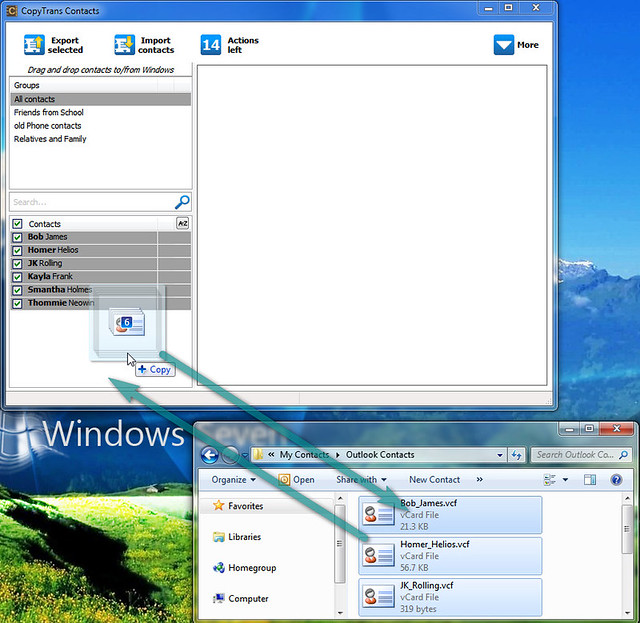
Yet another - oversimplified way is to use something like copytrans contacts - this Windows tool, which is still in beta, allows two-way transfer of contact entries between iOS devices and PC (Outlook, Windows Contacts, etc).

The program allows exchange of contacts via drag-drop from/to the main program window to/from the PC/iPhone:


7268127964_c0da568234_z.jpg


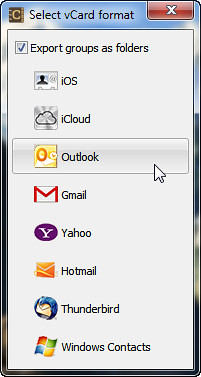
If you are using the program to export contact entries from the iPhone to the PC, you will be asked in what format to export the contacts:

7268127678_34f8d62b81.jpg


The down-side is that it is not a sync, but rather a manual drag/drop - exchange of contact entries. You would need to keep track of new contacts created on your Outlook, so that you can drag/drop the entries the next time you run copytrans contacts and connect your iPhone to your PC.

As a final note, I would say the method above bypasses the complexity of Exchange sync you wish to avoid, for the sake of the simplicity of manual contacts transfer.
 
Last edited:

My Computer

OS
Windows 7
Thank you for pointing out the contacts program. I was able to save my dying iPhone contacts to my computer. Does the program work with android? Also I can see that you have some contact groups 'Friends from School' etc. are they on your iPhone - how did you end up having contact groups?
 

My Computer

OS
Win7
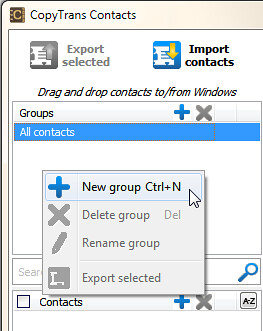
Hi Kina, regarding the iPhone contact groups, yes: I made them with copytrans contacts. If you want to create contact groups on your iPhone, run the program on your computer, connect your iPhone, then right-click within the Contacts pane and select "New group" giving the group a name:

7176652177_934a5dc5ec.jpg


I do not have an Android device but am almost sure copytrans contacts is only designed for Apple iDevices. If you already transferred your old iPhone contacts to your PC, you can transfer the contact entries to your Android phone's SD card and then import them from there after having installed the SD card back on the phone.
 

My Computer

OS
Windows 7
Kina, you are welcome.

Here is a quick YT video of how to group iPhone contacts from your PC. My instructions above basically follow the video:


My Computer

OS
Windows 7
the best way is to use itunes. but you have to make sure you have deleted/changed the trial version of you microsoft office or it will not work!!

Even if you think you have entered your product key and think you have a fully functioning version of Microsoft office, you don't!!
Not until you have manually changed the version on two different places on you pc.

go to control panel and uninstall if your version of microsoft is a student or trial version your iphone will not sync.

in unistall view right click the microsoft office file and select change. follow the steps.

you are not done now open outlook and selct file over on the left hand side when it opens look right and see the microsoft version- if it says trial or student you must select change this to a fully functioning version by following the instructions.

This is NOT an automatic function when you enter your product code when you bought your software , but has to be done manually--stupid.


if you are unsure what to do log onto online support from Microsoft. They can (with your permission) log onto your computer and correct all thier screw ups for free.

All Microsoft requires is for you to provide all your purchasing information , receipt, last 4 of credit card used, and product key.

Took about 20 minutes
Now all my files, emails, and calenders sync and update automatically and remotely.

Just remember with your phone connected to computer select itunes then your phone then hit the info tab in teh middle of the iphone screen. then select the infomation you want shared/synced between your iphone and computer.
 

My Computer

OS
windows 7
Back
Top