
How to restore Win7 computer icons

ratronic

New member
Member
Local time
11:29 AM
Messages
55
Location
Bakersfield,Ca USA
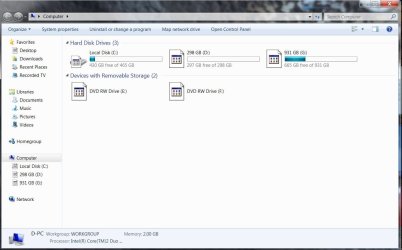
I messed up the other day and installed an icon changing program and then uninstalled it. Now the icons when I click on computer from the start menu look like the attached. I tryed restoring the default icons from the desktop, but that didn't work. Is there any way to get all the default icons back that originally came with Win7(including the ones when you click computer)?
 

Attachments
  • Capture.JPG
    Capture.JPG
    76.6 KB · Views: 391

My Computer

Computer type
PC/Desktop
Computer Manufacturer/Model Number
Built by Dave!
OS
Windows 7 H.P. S.P.-1 32bit , Debian Linux 64bit
CPU
Intel Core i7-2600 3.4Ghz (Second generation)
Motherboard
Asus P8P67 Pro
Memory
Kingston 4GB DDR3 PC3-12800 1600MHZ
Graphics Card(s)
nVidia GeForce GTX 560 1GB
Sound Card
Realtek HD audio on motherboard
Monitor(s) Displays
Samsung 24" & Insignia 32"
Screen Resolution
1920x1080 & 1920x1080
Hard Drives
Samsung 840 EVO 750GB SSD - Windows 7 H.P. 32 bit
Seagate 500GB HDD - Debian Linux 64 bit
OCZ 120GB SSD - Data storage
Seagate 1.5TB HHD - Data storage
PSU
Xion 1000 Watt
Case
Cooler Master nVidia ATX
Cooling
Cooler Master Hyper T4
Keyboard
Hewlet Packard 5219 PS2
Mouse
Logitech M310 2.4Ghz wireless
Internet Speed
30 Mbps-Download, 2 Mbps-Upload
Antivirus
Windows Security Essentials
Browser
I.E.11, Chrome, Safari, Firefox
What app did you use? Usually it has a restore feature.

Or just run a system restore to before you changed them.
 

My Computer

Computer Manufacturer/Model Number
Built Myself
OS
Windows 7 7600.16384 x64
CPU
Intel Core i7 OC'd to 3.20 GHz
Motherboard
Gigabyte
Memory
6GB GSkillz Triple Channel DDR3 OC'd to 1600 MHz
Graphics Card(s)
Nvidia GTX 280
Sound Card
X-Fi Platinum
Monitor(s) Displays
Dual 2001FWP
Screen Resolution
1680x1050 x 2
Hard Drives
System - Dual 150GB Raptors Raid0
Doc Storage - 1TB SATA 32MB cache Samsung
TV Recordings - 1TB SATA 32MB cache Samsung
PSU
Gigawatt Antec
Case
Antec 900
Keyboard
Saitek
Mouse
logitech MX 10000
Internet Speed
30 mb/s
Unfortunatley I was just messing around and uninstalled the icon program before I restored the icons and since then have saved and restored the backup image of Win7. I plan to do a clean install of win7 when it's released, I am just wondering if there was anything I could do in the mean time without having to reinstall the Win7 RC?
 

My Computer

Computer type
PC/Desktop
Computer Manufacturer/Model Number
Built by Dave!
OS
Windows 7 H.P. S.P.-1 32bit , Debian Linux 64bit
CPU
Intel Core i7-2600 3.4Ghz (Second generation)
Motherboard
Asus P8P67 Pro
Memory
Kingston 4GB DDR3 PC3-12800 1600MHZ
Graphics Card(s)
nVidia GeForce GTX 560 1GB
Sound Card
Realtek HD audio on motherboard
Monitor(s) Displays
Samsung 24" & Insignia 32"
Screen Resolution
1920x1080 & 1920x1080
Hard Drives
Samsung 840 EVO 750GB SSD - Windows 7 H.P. 32 bit
Seagate 500GB HDD - Debian Linux 64 bit
OCZ 120GB SSD - Data storage
Seagate 1.5TB HHD - Data storage
PSU
Xion 1000 Watt
Case
Cooler Master nVidia ATX
Cooling
Cooler Master Hyper T4
Keyboard
Hewlet Packard 5219 PS2
Mouse
Logitech M310 2.4Ghz wireless
Internet Speed
30 Mbps-Download, 2 Mbps-Upload
Antivirus
Windows Security Essentials
Browser
I.E.11, Chrome, Safari, Firefox
Unfortunatley I was just messing around and uninstalled the icon program before I restored the icons and since then have saved and restored the backup image of Win7. I plan to do a clean install of win7 when it's released, I am just wondering if there was anything I could do in the mean time without having to reinstall the Win7 RC?


Do a system restore, not a reinstall, roll back the changes to before you installed it.
 

My Computer

Computer Manufacturer/Model Number
Built Myself
OS
Windows 7 7600.16384 x64
CPU
Intel Core i7 OC'd to 3.20 GHz
Motherboard
Gigabyte
Memory
6GB GSkillz Triple Channel DDR3 OC'd to 1600 MHz
Graphics Card(s)
Nvidia GTX 280
Sound Card
X-Fi Platinum
Monitor(s) Displays
Dual 2001FWP
Screen Resolution
1680x1050 x 2
Hard Drives
System - Dual 150GB Raptors Raid0
Doc Storage - 1TB SATA 32MB cache Samsung
TV Recordings - 1TB SATA 32MB cache Samsung
PSU
Gigawatt Antec
Case
Antec 900
Keyboard
Saitek
Mouse
logitech MX 10000
Internet Speed
30 mb/s
Click
Start> type "System"
Choose System Restore
Choose the restore point to before you installed the app.
(next time create one before doing anything crazy like repacking the icon dll ;)
 

My Computer

Computer Manufacturer/Model Number
Built Myself
OS
Windows 7 7600.16384 x64
CPU
Intel Core i7 OC'd to 3.20 GHz
Motherboard
Gigabyte
Memory
6GB GSkillz Triple Channel DDR3 OC'd to 1600 MHz
Graphics Card(s)
Nvidia GTX 280
Sound Card
X-Fi Platinum
Monitor(s) Displays
Dual 2001FWP
Screen Resolution
1680x1050 x 2
Hard Drives
System - Dual 150GB Raptors Raid0
Doc Storage - 1TB SATA 32MB cache Samsung
TV Recordings - 1TB SATA 32MB cache Samsung
PSU
Gigawatt Antec
Case
Antec 900
Keyboard
Saitek
Mouse
logitech MX 10000
Internet Speed
30 mb/s
Hi ratronic, welcome to the forums.

Your could right-click the affected drive & select 'Restore previous version' so see if it has a shadow copy of the previous icons.
 

My Computer

Computer Manufacturer/Model Number
Compaq Desktop
OS
Windows 7 Ultimate x64
CPU
AMD Sempron Dual Core
Memory
3GB
Graphics Card(s)
NVIDIA GeForce 6150SE nForce 430
Screen Resolution
1024x768
Hard Drives
150GB Sata
Hi ratronic, welcome to the forums.

Your could right-click the affected drive & select 'Restore previous version' so see if it has a shadow copy of the previous icons.


aren't the icons located in %SystemRoot%\system32\SHELL32.dll? You are right, he could navigate to that file and see if there is a shadow copy. good call.
 

My Computer

Computer Manufacturer/Model Number
Built Myself
OS
Windows 7 7600.16384 x64
CPU
Intel Core i7 OC'd to 3.20 GHz
Motherboard
Gigabyte
Memory
6GB GSkillz Triple Channel DDR3 OC'd to 1600 MHz
Graphics Card(s)
Nvidia GTX 280
Sound Card
X-Fi Platinum
Monitor(s) Displays
Dual 2001FWP
Screen Resolution
1680x1050 x 2
Hard Drives
System - Dual 150GB Raptors Raid0
Doc Storage - 1TB SATA 32MB cache Samsung
TV Recordings - 1TB SATA 32MB cache Samsung
PSU
Gigawatt Antec
Case
Antec 900
Keyboard
Saitek
Mouse
logitech MX 10000
Internet Speed
30 mb/s
Thanks 7echno7im and Orbital Shark, but I have no previous restore points because I have reinstalled to many previous images from Vista and Win7 back and forth and the Win7 image I made was after my screw up with the icon program. That's what I get for screwing around and not being carefull - thanks
 

My Computer

Computer type
PC/Desktop
Computer Manufacturer/Model Number
Built by Dave!
OS
Windows 7 H.P. S.P.-1 32bit , Debian Linux 64bit
CPU
Intel Core i7-2600 3.4Ghz (Second generation)
Motherboard
Asus P8P67 Pro
Memory
Kingston 4GB DDR3 PC3-12800 1600MHZ
Graphics Card(s)
nVidia GeForce GTX 560 1GB
Sound Card
Realtek HD audio on motherboard
Monitor(s) Displays
Samsung 24" & Insignia 32"
Screen Resolution
1920x1080 & 1920x1080
Hard Drives
Samsung 840 EVO 750GB SSD - Windows 7 H.P. 32 bit
Seagate 500GB HDD - Debian Linux 64 bit
OCZ 120GB SSD - Data storage
Seagate 1.5TB HHD - Data storage
PSU
Xion 1000 Watt
Case
Cooler Master nVidia ATX
Cooling
Cooler Master Hyper T4
Keyboard
Hewlet Packard 5219 PS2
Mouse
Logitech M310 2.4Ghz wireless
Internet Speed
30 Mbps-Download, 2 Mbps-Upload
Antivirus
Windows Security Essentials
Browser
I.E.11, Chrome, Safari, Firefox

My Computers

System One System Two

  • Computer type
    PC/Desktop
    OS
    7 X64
    CPU
    i5 8400
    Motherboard
    gigabyte b365m ds3h
    Memory
    2x8gb 3200mhz
    Hard Drives
    various
    PSU
    pure power 11 400w cm
    Case
    Coolermaster
    Cooling
    cryorig m9i
  • Computer type
    PC/Desktop
    OS
    7x64
    CPU
    g5400
    Motherboard
    ga b365m ds3h
    Memory
    8gb ddr4 2400
    PSU
    xfx pro 450w
Open the start menu and press
CTRL+SHIFT+right mouse button
on an empty space of the menu.

Select EXIT EXPLORER.

CTRL+SHIFT+ESC
opens Task Manager

File, New Task (Run)
type CMD
Press ENTER

type
attrib -h %userprofile%\AppData\Local\IconCache.db
Press ENTER

type
del %userprofile%\AppData\Local\IconCache.db
Press ENTER

Return to Task Manager
CTRL+SHIFT+ESC- opens Task Manager
File, New Task (Run)
type EXPLORER
Press ENTER

This will only correct those icons which the icon program did not alter the registry entry for. A common methodology for icon programs is to insert a call to a new registry section, so this method can be effective. When the app is uninstalled, it does not reset the previous value (does not eliminate the call or "hook" to borrow a term).

Some icon apps are poorly written and actually alter the pre-defined values. In this case, another step is necessary.

You can also try Brink's approach.
 
Open the start menu and press
CTRL+SHIFT+right mouse button
on an empty space of the menu.

Select EXIT EXPLORER.

CTRL+SHIFT+ESC
opens Task Manager

File, New Task (Run)
type CMD
Press ENTER

type
attrib -h %userprofile%\AppData\Local\IconCache.db
Press ENTER

type
del %userprofile%\AppData\Local\IconCache.db
Press ENTER

Return to Task Manager
CTRL+SHIFT+ESC- opens Task Manager
File, New Task (Run)
type EXPLORER
Press ENTER

This will only correct those icons which the icon program did not alter the registry entry for. A common methodology for icon programs is to insert a call to a new registry section, so this method can be effective. When the app is uninstalled, it does not reset the previous value (does not eliminate the call or "hook" to borrow a term).

Some icon apps are poorly written and actually alter the pre-defined values. In this case, another step is necessary.

You can also try Brink's approach.

Me and Mr GRiM figured out yesterday that the Thumbnail Cache also plays a big part of caching the icons in Win7, This can be cleared via running 'Disk Cleanup' and selecting 'Thumbnail Cache'.
 

My Computer

Computer Manufacturer/Model Number
Self Built
OS
XP Pro SP3 x86/Vista SP2 x64/Win7 x64 Triple-boot
CPU
AMD64 X2 AM2 5000+
Motherboard
Asus MSN-X Plus
Memory
Corsair TWX 2Gb (2x1Gb) DDR2 800Mhz
Graphics Card(s)
PCI-X 2.0 Inno3D (NVidia) 9500GT 1Gb DDR2
Sound Card
Onboard Realtec ALC662-GR
Monitor(s) Displays
Relisys 17' CRT (model unknown)
Screen Resolution
1024x768
Hard Drives
750Gb Samsung 7200-3Gb/s 32Mb Cache SATA
PSU
500W
Cooling
Standard AMD CPU Fan, One side, front and rear case fan.
Keyboard
Microsoft Multimedia Keyboard
Mouse
Samsung Optical
Internet Speed
10M
Back
Top