Solved Need help with recovery image reinstall

Delta808

New member
Member
Local time
3:35 AM
Messages
82
I have a issue that I can't figure out. Long story short is that I had a rootkit and removed it with hitman products and when I rebooted the computer wouldn't boot into Windows. The computer comes with a factory reinstall partition so I let that run and rebooted the computer and it still wouldn't work. I ran dr. Web live cd, Sfc scannow in offline mode, bootrec.exe, fixboot.exe allbto no avail.

Anyways I felt it was a bad mbr so I erased the c drive and installed windows professional trial in the system that came with Windows Home premium 7.

Now. I. Can't get to the recovery partition so I want to know how can I run it from Dos.

I don't have the reinstallational cd so this is pretty important.
 

My Computer My Computer

At a glance

Windows 7 pro
OS
Windows 7 pro
There is no trial version of Win7. You had no business installing Professional if you have a Home Premium license.

If Factory Recovery won't run by tapping the hotkey given on first boot screen to run it, then you can order Recovery Disks from the maker or clean reinstall.

If you have the Win7 Professional disk then it contains all versions so you can reinstall your licensed version. Run the eicfg removal tool on the ISO, which can be extracted from DVD using ImgBurn first. Then burn an all-versions DVD using ImgBurn at 4x speed, boot the DVD following these steps to get a perfect clean reinstall: Reinstalling Windows 7
 
II have a dell n7110, it's the OEM so the regular windows won't work, I need the dell oem disk to accept the serial.
 

My Computer My Computer

At a glance

Windows 7 pro
OS
Windows 7 pro

My Computer My Computer

At a glance

Windows 7 Ultimate SP1 64-BitIntel Core i7 870 @ 2.93GHz8Gb Dual-Channel DDR3 @ 664MHznVidia GeForce GTX 460 1024MB dedicated RAM
Computer Manufacturer/Model Number
HP Pavilion Elite 495UK
OS
Windows 7 Ultimate SP1 64-Bit
CPU
Intel Core i7 870 @ 2.93GHz
Motherboard
MSI 2A9C (CPU1)
Memory
8Gb Dual-Channel DDR3 @ 664MHz
Graphics Card(s)
nVidia GeForce GTX 460 1024MB dedicated RAM
Sound Card
Realtek HD Audio
Monitor(s) Displays
HP2310i
Screen Resolution
1920 x 1080
Hard Drives
1x1954GB Hitachi HDS22020ALA 330 (RAID), 1x1954GB Hitachi External for backup and storage
PSU
460W
Case
HP Elite
Cooling
Air cooled
Keyboard
Logitech K750 solar-powered keyboard
Mouse
Logitech Wireless M180 mouse
Internet Speed
2Mb
Other Info
Pure Avanti Flow Internet Radio with iPod Dock, 64Gb iPod, HP USB Speakers, Sony MDR-V500 Headphones, Sony Vaio F-Series Laptop
II have a dell n7110, it's the OEM so the regular windows won't work, I need the dell oem disk to accept the serial.


Excuse me, but we've helped thousands of users here successfully clean reinstall Win7 factory OEM so would not advise you to use a retail installer if it weren't possible since XP.

Use the Product Key on the COA sticker on machine to activate, so all that's missing from the Dell DVD is auto-activation. You may have to make a quick robocall to MS during activation.

If you want to order Dell disks, contact their Tech Support.
 
II have a dell n7110, it's the OEM so the regular windows won't work, I need the dell oem disk to accept the serial.

Excuse me, but we've helped thousands of users here successfully clean reinstall Win7 factory OEM so would not advise you to use a retail installer if it weren't possible since XP.

You'll use the Product Key on the COA sticker on machine to activate, so all that's missing from the Dell DVD is auto-activation.

If you want to order Dell disks, contact their Tech Support.

Sorry sir, I will do this now, you say the e tool is on the CD and needs to be EXTRACTED by using imgburn?
 

My Computer My Computer

At a glance

Windows 7 pro
OS
Windows 7 pro
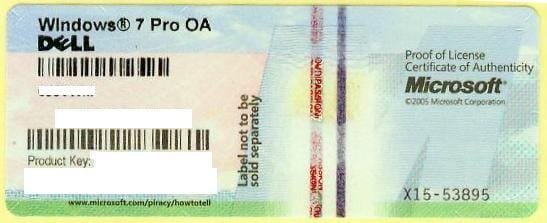
What is the licensed verison on your COA sticker and is it 32- or 64-bit?

1270558000_86224332_1-Pictures-of--Buying-Windows-7-Prof-COA-Sticker-Only-100pcs-up-Needed.jpg

Is the Product Key readable? Back it up now as it is good for the life of the machine.
 
64 bit
 

My Computer My Computer

At a glance

Windows 7 pro
OS
Windows 7 pro
Quick question, if this works does it make sense to keep the recovery partition and the oem partition on the drive? Since I put on Professional the recovery doesn't even work or it won't give me the option to run it. Basically it disappeared since I installed Pro which was a mistake.
 

My Computer My Computer

At a glance

Windows 7 pro
OS
Windows 7 pro
I asked for the Licensed version listed on COA sticker and whether the Product key is readable.

Use the Custom install Drive Options to delete all partitions and create new ones as you wish, or just click Next and the installer will create and format an install partition for you. All of the steps are here: Reinstalling Windows 7
 
Yes it Windows 7 64 bit and the product key is readable on the bottom on the computer.
 

My Computer My Computer

At a glance

Windows 7 pro
OS
Windows 7 pro
Again: What is the licensed version listed on the COA sticker?

If you are unclear what I mean, then type out all of the wording on the sticker.
 
windows 7 home premium oa
 

My Computer My Computer

At a glance

Windows 7 pro
OS
Windows 7 pro
I think I got it, reinstalling then calling dell, I'm a noob so please forgive me.
 

My Computer My Computer

At a glance

Windows 7 pro
OS
Windows 7 pro
You, or someone else mentioned calling Dell to activate... as stated in a earlier post and that's what I was going to do but it activated just fine without calling dell. The only issue I'm having is my USB driver isn't working and I don't see the exact name of it on the support page at dell but I'm going to work it out.
 

My Computer My Computer

At a glance

Windows 7 pro
OS
Windows 7 pro
Make sure to check for drivers delivered by optional Windows Updates in the first few rounds of Updates.

If you don't have all drivers by then, and still need the USB controller, import the chipset from the Dell Support Downloads webpage for your tag number.
 
quick question, what's the sm bus controller and where on the support driver page can I find it? Under network or communication?
 

My Computer My Computer

At a glance

Windows 7 pro
OS
Windows 7 pro
It is a chipset component. Make sure you run several rounds of optional Windows Updates to see what drivers are delivered first.
 
thanks
 

My Computer My Computer

At a glance

Windows 7 pro
OS
Windows 7 pro
Back
Top