Solved Trying to find a Good Replacement Motherboard for under 100 bucks?

Warlockz

Колдун
Power User
Local time
1:12 PM
Messages
122
Trying to find a Good Replacement Motherboard (UPDATE)!!

NEW Update; So I ended up Upgrading to another Motherboard, so I admit It is much better cutting what little loss I took, they had a sale where if I bought an AMD FX 4100 Black Edition 3.6GHz Quad Core Processor for $100 I could get a ASUS M5A78L-M LX PLUS MotherBoard for $10 Bucks, so I was like sweet, I Upgraded to a Cooler Master eXtreme Power Plus 500 Watt PSU, and 8 GB of Kingston HyperX blu DDR3-1333 ram, although I wish I would have put in a little extra for some better ram I guess this is working out good for me though, its still faster then what I had. I should'a just listened to the people who said to upgrade to something better in the first place! Thanks!
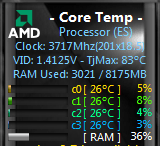
2012-01-30_125516.png

So I Booted My Windows 7 x64 OEM that I already had installed on My Hard drive on my new ASUS Mother Board, and I Installed all of the Drivers, and Let Catalist Install the right Graffix Support Drivers, then Rebooted and I went to System to check My Windows Activation and it said i had 3 days to Activate, so I clicked Activate and my Windows Reactivated its self, so I had no issues with replacing my Motherboard, Windows 7 should reactivate for you when you change your Motherboard, I even had 3 dudes at Microcenter confirm this! ;)


>>>>>>>>>>>>>>>>>>>>>>>>>>>>>>>>>>>>>>>>>>>>>>>>>>>>>>>>>>>>>>
OLD POST
So I have been needing to replace my motherboard it is a Gateway RS780 (AM2) Motherboard with 4 slots for DDR2 SDRAM, I must have 4 slots for my memory.

Does anybody have any suggestions on a replacement? should I replace it with a factory default MB? will other MBs even fit in my Gateway crappy Hot Case? I actually found a -> factory default acer MB<-, which is gateway/acer/emachines for $39.99 HMN??

Also I am using a OEM version of Windows 7 x64, do I need to patch the bios of a new motherboard if it is not a Gateway MB so my windows doesn't say Not Genuine after I get done replacing the MB and boot windows? How do I do this so I do not have any issues? I have replaced Motherboards in the past but I always had a retail version of xp to start fresh with.

I should just sell this thing on Craigslist when I fix it and Build myself a real Machine with a nice case. somthing I can render a 8GB 2hr video in like 10 minutes. would be nice. but what can I sell it for? like 300 bucks if I put a new motherboard in it? or is that too much?
 
Last edited:

My Computer My Computer

At a glance

7 Home Premium x64 SP1FX 4100 Black Edition 3.6GHz Quad-Core Socket...Kingston HyperX blu 8GB DDR3-1333ATI Radeon HD 4650 1GB DDR2 HDMI
Computer Manufacturer/Model Number
Custom Machine.
OS
7 Home Premium x64 SP1
CPU
FX 4100 Black Edition 3.6GHz Quad-Core Socket AM3+
Motherboard
ASUS M5A78L-M LX PLUS (AM3R2)
Memory
Kingston HyperX blu 8GB DDR3-1333
Graphics Card(s)
ATI Radeon HD 4650 1GB DDR2 HDMI
Sound Card
Realtek ALC887 8-channel high definition audio
Monitor(s) Displays
HP 2159m 21.5-inch 1080p HDMI LCD Monitor
Screen Resolution
1920x1080
PSU
Cooler Master eXtreme Power Plus 500 Watt
Case
Thermaltake V3 Black Edition ATX Mid Tower
Cooling
CoolerMaster Hyper 212 Plus
  • Like
Reactions: JMH
Also I am using a OEM version of Windows 7 x64, do I need to patch the bios of a new motherboard if it is not a Gateway MB so my windows doesn't say Not Genuine after I get done replacing the MB and boot windows? How do I do this so I do not have any issues? I have replaced Motherboards in the past but I always had a retail version of xp to start fresh with.

No one on here is going to tell you how to cheat Microsoft. If you replace the MB, your OEM Win 7 license is no good.
 

My Computer My Computer

At a glance

Windows 7 Home Premium 32-Bit - Build 7600 SP1Intel Core i3-2120 3.30GhzKingston 4 GB DDR3 1333 mhzAMD Radeon HD6670
Computer type
PC/Desktop
Computer Manufacturer/Model Number
Custom Build
OS
Windows 7 Home Premium 32-Bit - Build 7600 SP1
CPU
Intel Core i3-2120 3.30Ghz
Motherboard
Asus P8Z68-V LX Intel Z68 Socket H2 ATX
Memory
Kingston 4 GB DDR3 1333 mhz
Graphics Card(s)
AMD Radeon HD6670
Sound Card
Sound Blaster Audigy SE 24-Bit
Monitor(s) Displays
Asus VE228
Screen Resolution
1440 X 900
Hard Drives
OCZ Vertex 3 120 GB Sata 3 SSD ==
Kingston SH103/S3 120 G Hyper X 120 GB SSD ==
Western Digital 500 GB Caviar Green 7200 RPM ==
PSU
Corsair CX600M == 600 Watt
Case
NZXT Apollo - Silver with Clear Side Panel
Cooling
Three 120 mm Fans
Keyboard
Microsoft Natural 4000
Mouse
Microsoft Custom Optical 3000
Internet Speed
AT&T Fiber Optic Wireless Network
Antivirus
Microsoft Security Essentials
Browser
Chrome
Other Info
120 mm Blue LED Fan -- Three Blue LED Lazer Light Sticks
Without knowing more details, I'd guess $300 might be high, even with a new motherboard.

If your current motherboard must be replaced, you may be better off cutting your losses now and getting whatever you can for the existing parts. Or just salvage whatever parts you might use yourself and build a new machine--which would require a new Windows 7 license.
 

My Computer My Computer

At a glance

Windows 7 Home Premium SP1, 64-bitIntel Skylake i5-6600K, not overclocked8 GB HyperX DDR4-2666 (2 x 4 GB)none; graphics are integrated on CPU
Computer type
PC/Desktop
Computer Manufacturer/Model Number
Ignatz Special; 4 speed manual gearbox; factory air conditioning; one of one
OS
Windows 7 Home Premium SP1, 64-bit
CPU
Intel Skylake i5-6600K, not overclocked
Motherboard
AsRock Z170M Extreme 4, micro ATX
Memory
8 GB HyperX DDR4-2666 (2 x 4 GB)
Graphics Card(s)
none; graphics are integrated on CPU
Sound Card
onboard: Realtek ALC1150; external: USB Behringer UF0-202
Monitor(s) Displays
Dell S2340M 23 inch IPS
Screen Resolution
1600 x 900
Hard Drives
System: Crucial MX100 series SSD, 128 GB;
Data: Samsung Spinpoint 103SJ, 1 TB;
Backup: WD Caviar Green WD30EZRX-00D8PB0, 3 TB
PSU
Rosewill SilentNight 500 watt fanless, semi-modular
Case
Antec Solo II
Cooling
Noctua NH-U12S; Noctua F12 intake, Noctua S12A exhaust
Keyboard
Microsoft 200 6JH-00001 USB
Mouse
Dell or Microsoft optical wired; USB
Antivirus
Microsoft Security Essentials and Malwarebytes Premium
Browser
Pale Moon
Other Info
All fans PWM; speeds at idle: CPU circa 500 rpm; intake circa 600 rpm; exhaust circa 600 rpm; CPU temps 27 idle and 47 C load in a warm room (27 C/81 F) when running Intel Extreme Tuning Utility stress test.
No one on here is going to tell you how to cheat Microsoft. If you replace the MB, your OEM Win 7 license is no good.

Cheat Microsoft LMAO, #1 I didnt ask you how to patch my Bios, I already know how to patch it if needed #2 I payed 500 bucks for my machine with the windows included, I should be able to replace a stupid motherboard without being accused of cheating microsoft...

I think Ill just go with the Acer Motherboard so I dont have to go through the hasstle, its only 40 bucks and its basically a replica of my current MB, why cut losses? Gateway Acer and Emachines OEM are the same so I wouldnt have to patch my Bios.
 

My Computer My Computer

At a glance

7 Home Premium x64 SP1FX 4100 Black Edition 3.6GHz Quad-Core Socket...Kingston HyperX blu 8GB DDR3-1333ATI Radeon HD 4650 1GB DDR2 HDMI
Computer Manufacturer/Model Number
Custom Machine.
OS
7 Home Premium x64 SP1
CPU
FX 4100 Black Edition 3.6GHz Quad-Core Socket AM3+
Motherboard
ASUS M5A78L-M LX PLUS (AM3R2)
Memory
Kingston HyperX blu 8GB DDR3-1333
Graphics Card(s)
ATI Radeon HD 4650 1GB DDR2 HDMI
Sound Card
Realtek ALC887 8-channel high definition audio
Monitor(s) Displays
HP 2159m 21.5-inch 1080p HDMI LCD Monitor
Screen Resolution
1920x1080
PSU
Cooler Master eXtreme Power Plus 500 Watt
Case
Thermaltake V3 Black Edition ATX Mid Tower
Cooling
CoolerMaster Hyper 212 Plus
Without knowing more details, I'd guess $300 might be high, even with a new motherboard.

If your current motherboard must be replaced, you may be better off cutting your losses now and getting whatever you can for the existing parts. Or just salvage whatever parts you might use yourself and build a new machine--which would require a new Windows 7 license.

System Manufacturer/Model Number Gateway DX4300 Desktop Series
OS 7 Home Premium x64 SP1
CPU AMD Phenom™ X4, 9750 / 2.4 GHz / 4 x 512 KB L2 Cache 2MB L3
Motherboard Gateway RS780 (AM2)
Memory 8 GB of DDR2 800 MHz SDRAM
Graphics Card ATI Radeon HD 4650 1GB DDR2 HDMI
Sound Card Embedded high-definition audio with 7.1-channel

I guess Its a good setup for now, I could probably get some more years out of it once I replace the MB, it's not the slowest compared to the Machines the majority of the people I know use. and Its very great to use for Multi-Tasking. I can have 2 browsers, windows media player 12, Photoshop, + more running at the same time and not experience any lag or slow downs wile I'm networking or whatever on my machine...

My current Motherboard is shutting down the sound and video, so then my Monitor goes to sleep, and I cant Hard Boot my Machine when I hold the Button down, It does not do this all the time just once in awhile it just happens sometimes like 3 times in a row then it wont do it for days then poof it does it again, but i have narrowed the problem down to my Motherboard after reading about similar issues for hours on end and talking to a pro at a computer shop.....I can always get another Case Fan and a 500W Power Supply instead of the 350w factory default, and a Better CPU HeatSink and maybe a HardDrive Cooler.
 

My Computer My Computer

At a glance

7 Home Premium x64 SP1FX 4100 Black Edition 3.6GHz Quad-Core Socket...Kingston HyperX blu 8GB DDR3-1333ATI Radeon HD 4650 1GB DDR2 HDMI
Computer Manufacturer/Model Number
Custom Machine.
OS
7 Home Premium x64 SP1
CPU
FX 4100 Black Edition 3.6GHz Quad-Core Socket AM3+
Motherboard
ASUS M5A78L-M LX PLUS (AM3R2)
Memory
Kingston HyperX blu 8GB DDR3-1333
Graphics Card(s)
ATI Radeon HD 4650 1GB DDR2 HDMI
Sound Card
Realtek ALC887 8-channel high definition audio
Monitor(s) Displays
HP 2159m 21.5-inch 1080p HDMI LCD Monitor
Screen Resolution
1920x1080
PSU
Cooler Master eXtreme Power Plus 500 Watt
Case
Thermaltake V3 Black Edition ATX Mid Tower
Cooling
CoolerMaster Hyper 212 Plus
Many people have been able to easily activate an OEM license on another system, although I would never suggest that you try...that has to be your own decision. I have my own opinions, but since they are only my opinions and interpretations, I'll keep them out of this thread.

You could easily get another case, PSU, and motherboard, then reuse the rest of your parts. Now you'll see why most of us wouldn't ever buy a pre-built tower, as you give up control over many of the components and limit your upgrading power.
 

My Computer My Computer

At a glance

Windows 7 Ultimate x64 SP1Intel Core i7-260012 GB Patriot Extreme DDR3-1333Nvidia GTX 470
OS
Windows 7 Ultimate x64 SP1
CPU
Intel Core i7-2600
Motherboard
Gigabyte GA-P67A-UD3P-B3
Memory
12 GB Patriot Extreme DDR3-1333
Graphics Card(s)
Nvidia GTX 470
Monitor(s) Displays
Dell UltraSharp 2209WA
Hard Drives
OCZ Agility3 240 GB, WD5001AALS, WD7501AALS
PSU
OCZ ModStream 700W
Case
CoolerMaster HAF 912 Advanced
Cooling
CoolerMaster Hyper 212 Plus
I totally agree with you and i will never Buy a Rebuilt tower again, this thing was refurbished, and I payed like $500 with the taxes they took like 50 bucks in tax lol so it was $450 without tax.
 

Attachments

  • 2012-01-24_103413.png
    2012-01-24_103413.png
    363.4 KB · Views: 17
  • 2012-01-24_104948.jpg
    2012-01-24_104948.jpg
    209 KB · Views: 14

My Computer My Computer

At a glance

7 Home Premium x64 SP1FX 4100 Black Edition 3.6GHz Quad-Core Socket...Kingston HyperX blu 8GB DDR3-1333ATI Radeon HD 4650 1GB DDR2 HDMI
Computer Manufacturer/Model Number
Custom Machine.
OS
7 Home Premium x64 SP1
CPU
FX 4100 Black Edition 3.6GHz Quad-Core Socket AM3+
Motherboard
ASUS M5A78L-M LX PLUS (AM3R2)
Memory
Kingston HyperX blu 8GB DDR3-1333
Graphics Card(s)
ATI Radeon HD 4650 1GB DDR2 HDMI
Sound Card
Realtek ALC887 8-channel high definition audio
Monitor(s) Displays
HP 2159m 21.5-inch 1080p HDMI LCD Monitor
Screen Resolution
1920x1080
PSU
Cooler Master eXtreme Power Plus 500 Watt
Case
Thermaltake V3 Black Edition ATX Mid Tower
Cooling
CoolerMaster Hyper 212 Plus
Updated Post with New info, see the Top! ;)
 

My Computer My Computer

At a glance

7 Home Premium x64 SP1FX 4100 Black Edition 3.6GHz Quad-Core Socket...Kingston HyperX blu 8GB DDR3-1333ATI Radeon HD 4650 1GB DDR2 HDMI
Computer Manufacturer/Model Number
Custom Machine.
OS
7 Home Premium x64 SP1
CPU
FX 4100 Black Edition 3.6GHz Quad-Core Socket AM3+
Motherboard
ASUS M5A78L-M LX PLUS (AM3R2)
Memory
Kingston HyperX blu 8GB DDR3-1333
Graphics Card(s)
ATI Radeon HD 4650 1GB DDR2 HDMI
Sound Card
Realtek ALC887 8-channel high definition audio
Monitor(s) Displays
HP 2159m 21.5-inch 1080p HDMI LCD Monitor
Screen Resolution
1920x1080
PSU
Cooler Master eXtreme Power Plus 500 Watt
Case
Thermaltake V3 Black Edition ATX Mid Tower
Cooling
CoolerMaster Hyper 212 Plus
Back
Top