
Solved One Microsoft game works, but none of the others

debodun

Member
Member
VIP
Local time
9:27 AM
Messages
295
Location
upstate NY
I bought a CPU (already custom built - attached are the system specs, if you need to see them) from a local computer repair shop. It came with several Microsoft games (Chess Titans, Minesweeper, Mahjong, Solitaire, Hearts, etc). The Chess Titans works perfectly, but when I click on any of the other games, it looks like the game is starting, but the this message pops up "Executable has stopped working. A problem caused the program to stop working correctly." I went in search of troubleshooting suggestions. So far I have tried turning off the games processes, rebooting, then turning them on again and rebooting. I also ran an sfc /scannow. None of these procedures fixed the problem. What could be the problem and is it fixable (assume I am not too computer savvy). Thanks.
 

Attachments
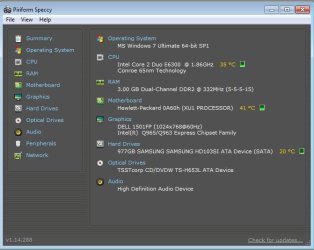
  • speccy.jpg
    speccy.jpg
    38.4 KB · Views: 18

My Computer My Computer

At a glance

Windows 7 Ultimate x641.86 GHz Intrel Core 23 GB Dual Channel DDR2 @ 3.32 MHzIntel Q965/Q963 Express chipset
Computer type
PC/Desktop
Computer Manufacturer/Model Number
refurb in an HP/Compaq case
OS
Windows 7 Ultimate x64
CPU
1.86 GHz Intrel Core 2
Motherboard
HP 0A60h XU1
Memory
3 GB Dual Channel DDR2 @ 3.32 MHz
Graphics Card(s)
Intel Q965/Q963 Express chipset
Monitor(s) Displays
Dell CRT
Hard Drives
977GB Samsung HD 103 SI ATA
Case
HP Compaq DC5800
Mouse
wired optical
Antivirus
Microsoft Security Essentials, MalwareBytes, Spyware Blaster
Browser
Firefox 32-bit

My Computer My Computer

At a glance

Windows 7 Home Premium x64Intel Core i5 2500K8GB DDR3nVidia GeForce GTX650 Ti BOOST
Computer type
Laptop
Computer Manufacturer/Model Number
Custom
OS
Windows 7 Home Premium x64
CPU
Intel Core i5 2500K
Motherboard
MSI MS-7750
Memory
8GB DDR3
Graphics Card(s)
nVidia GeForce GTX650 Ti BOOST
Sound Card
Realtek
Monitor(s) Displays
21' Philips
Screen Resolution
Full HD
Hard Drives
1TB
PSU
500W
Nope, no go on the games. Same pop-up message.
 

My Computer My Computer

At a glance

Windows 7 Ultimate x641.86 GHz Intrel Core 23 GB Dual Channel DDR2 @ 3.32 MHzIntel Q965/Q963 Express chipset
Computer type
PC/Desktop
Computer Manufacturer/Model Number
refurb in an HP/Compaq case
OS
Windows 7 Ultimate x64
CPU
1.86 GHz Intrel Core 2
Motherboard
HP 0A60h XU1
Memory
3 GB Dual Channel DDR2 @ 3.32 MHz
Graphics Card(s)
Intel Q965/Q963 Express chipset
Monitor(s) Displays
Dell CRT
Hard Drives
977GB Samsung HD 103 SI ATA
Case
HP Compaq DC5800
Mouse
wired optical
Antivirus
Microsoft Security Essentials, MalwareBytes, Spyware Blaster
Browser
Firefox 32-bit
I found a solution - I had to copy the games folder from Program Files into Program Files(x86) folder, then change the compatibility settings. They were set to run in Vista and I changed it to Windows 7 and they worked.
 

My Computer My Computer

At a glance

Windows 7 Ultimate x641.86 GHz Intrel Core 23 GB Dual Channel DDR2 @ 3.32 MHzIntel Q965/Q963 Express chipset
Computer type
PC/Desktop
Computer Manufacturer/Model Number
refurb in an HP/Compaq case
OS
Windows 7 Ultimate x64
CPU
1.86 GHz Intrel Core 2
Motherboard
HP 0A60h XU1
Memory
3 GB Dual Channel DDR2 @ 3.32 MHz
Graphics Card(s)
Intel Q965/Q963 Express chipset
Monitor(s) Displays
Dell CRT
Hard Drives
977GB Samsung HD 103 SI ATA
Case
HP Compaq DC5800
Mouse
wired optical
Antivirus
Microsoft Security Essentials, MalwareBytes, Spyware Blaster
Browser
Firefox 32-bit
Ah, well, glad you sorted it out then :D
 

My Computer My Computer

At a glance

Windows 7 Home Premium x64Intel Core i5 2500K8GB DDR3nVidia GeForce GTX650 Ti BOOST
Computer type
Laptop
Computer Manufacturer/Model Number
Custom
OS
Windows 7 Home Premium x64
CPU
Intel Core i5 2500K
Motherboard
MSI MS-7750
Memory
8GB DDR3
Graphics Card(s)
nVidia GeForce GTX650 Ti BOOST
Sound Card
Realtek
Monitor(s) Displays
21' Philips
Screen Resolution
Full HD
Hard Drives
1TB
PSU
500W
I found a solution - I had to copy the games folder from Program Files into Program Files(x86) folder, then change the compatibility settings. They were set to run in Vista and I changed it to Windows 7 and they worked.


thanks for this. Known windows 7 64 bit problem solved by this man right here.

No fix posted anywhere for this, except here. Had to refine my search over and over to finally find this.

thanks again debodun. simple yet effective.
 

My Computer My Computer

At a glance

Windows 7 Pro 64
OS
Windows 7 Pro 64
You are smarter than microsoft crews

after trying to use my dell optiplex 745 refurbished out of the box, then adding my dead emachine hdd, windows games did not work. went to intel update, went to micro for help and went through many fors of 'help'. nothing i tried helped. this was embarassing because i spent almost 25 years suppoprting hundreds of computers at work, many customised to run factory machinery. i used your method. success! thank youi.
 

My Computer My Computer

At a glance

Windows 7 Home Premium 64bitintel core 2 cpu 6400 @ 2.134 X 512 DDR2intel q965/963 express chipset family
Computer type
PC/Desktop
Computer Manufacturer/Model Number
dell optiplex 745 from micro center plus my emachine 500g HDD from dead emachine
OS
Windows 7 Home Premium 64bit
CPU
intel core 2 cpu 6400 @ 2.13
Memory
4 X 512 DDR2
Graphics Card(s)
intel q965/963 express chipset family
Hard Drives
160G OEM + 500G st3500418as ata
Browser
firefox 35.0.1
Back
Top