Solved How can I remove a program from the D drive?

dlindah

New member
Local time
6:28 AM
Messages
3
Hi everybody,

I tried to find the answer by searching and more than one said this to other members: Uninstall anything you have installed to the D drive then re-install it to your C drive. Can someone tell me how to uninstall program on the D drive? I installed a new program and somehow it got on both the C and D drives, and now the D drive is almost full and not only that, the icon for the program I installed is in front of the D drive in the My Computer screen! That makes me think I have a really big problem. I uninstalled the program from the C drive hoping that would get it off both drives, but it didn't. So how can I get it off the D drive? I need to tell you that I am not a computer expert....obviously :o, so I hope there is an easy solution. I have no idea how this happened.

Thank you so much!
 

My Computer

OS
Windows 7 64 bit
I installed a new program and somehow it got on both the C and D drives

When did you install this program to the D drive?

My first inclination would be to do a System Restore to a date prior to the unintended installation.

With any luck, you should have restore points dating back several weeks.
 

My Computer

Computer type
PC/Desktop
Computer Manufacturer/Model Number
Ignatz Special; 4 speed manual gearbox; factory air conditioning; one of one
OS
Windows 7 Home Premium SP1, 64-bit
CPU
Intel Skylake i5-6600K, not overclocked
Motherboard
AsRock Z170M Extreme 4, micro ATX
Memory
8 GB HyperX DDR4-2666 (2 x 4 GB)
Graphics Card(s)
none; graphics are integrated on CPU
Sound Card
onboard: Realtek ALC1150; external: USB Behringer UF0-202
Monitor(s) Displays
Dell S2340M 23 inch IPS
Screen Resolution
1600 x 900
Hard Drives
System: Crucial MX100 series SSD, 128 GB;
Data: Samsung Spinpoint 103SJ, 1 TB;
Backup: WD Caviar Green WD30EZRX-00D8PB0, 3 TB
PSU
Rosewill SilentNight 500 watt fanless, semi-modular
Case
Antec Solo II
Cooling
Noctua NH-U12S; Noctua F12 intake, Noctua S12A exhaust
Keyboard
Microsoft 200 6JH-00001 USB
Mouse
Dell or Microsoft optical wired; USB
Antivirus
Microsoft Security Essentials and Malwarebytes Premium
Browser
Pale Moon
Other Info
All fans PWM; speeds at idle: CPU circa 500 rpm; intake circa 600 rpm; exhaust circa 600 rpm; CPU temps 27 idle and 47 C load in a warm room (27 C/81 F) when running Intel Extreme Tuning Utility stress test.
Thank you for responding. I installed it on Jan 7th. Would doing a system restore with that D drive having that program icon in front of it be risky? I've never done a system restore. So from your response I'm assuming there is no way to simply uninstall a program from the D drive?
 

My Computer

OS
Windows 7 64 bit
Hello dlindah, welcome to you to Sevenforums!

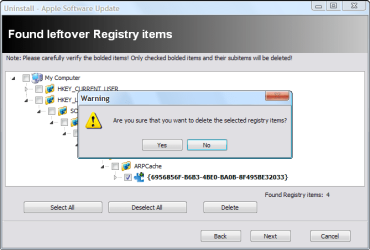
If I understand correctly, the 'C' drive has more space on it than the 'D' drive, and the 'D' drive is running out of room. If so, you might be interested in Revo Uninstaller free (found here: Download Revo Uninstaller Freeware - Free and Full Download - Uninstall software, remove programs, solve uninstall problems). Use this program to uninstall every part of the program. After you click 'uninstall', it will ask if you want to go 'moderate' or 'advanced'. click 'advanced', and next. When you get to the place where you see blueish green box-looking registry items, click only the registry items to delete much like this:
11282009103326AM.png
And delete all the files on the next page that pops up as well, if it does. Then you can install the program (if it is free online or on a disk at home) on the 'C' drive. Do this for however many programs you need.

The reason you use Revo is it will remove more of the program than you could with Windows uninstaller.

Let me know if the problem persists, or if you need help with anything further.

*Edit - Ignant posted before I did. You might try his method first. And no, the restore is fine, so long as you don't need anything you've installed after the restore point's date.
 

My Computer

Computer type
PC/Desktop
Computer Manufacturer/Model Number
Custom Asus Build
OS
Microsoft Windows 8.1 Pro 64-bit
CPU
Intel(R) Core(TM) i3-4130 CPU @ 3.40GHz
Motherboard
B85M-E
Memory
8.00 GB
Graphics Card(s)
None
Sound Card
Realtek High Definition Audio
Monitor(s) Displays
Asus 23.6" Monitor
Screen Resolution
1920 x 1080 x 32 bits (4294967296 colors) @ 60 Hz
Hard Drives
INTEL SSDSC2BW180A4
Samsung SSD 840 PRO Series
PSU
Seasonic S12II-380Bronze
Case
Lian Li
Cooling
Fan, Passive
Keyboard
Logitech K120
Mouse
Microsoft Touch Mouse
Internet Speed
4ms Ping, 19.0 Mbps Download, 19.0 Mbps Upload
Antivirus
Eset Endpoint
Browser
Internet Explorer, Chrome
Thank you for responding. I installed it on Jan 7th. Would doing a system restore with that D drive having that program icon in front of it be risky? I've never done a system restore. So from your response I'm assuming there is no way to simply uninstall a program from the D drive?

I'm not sure what you mean by the D drive having a program icon in front of it.


At any rate----System Restore works correctly at least 95% of the time in my experience and is harmless if it fails.

You can investigate your available System Restore points in a matter of seconds. It takes a few minutes to run if successful.

As far as I know, uninstalling from a D drive is no different than uninstalling from the C drive---you march through the available steps. But I have never installed anything to D.

I assume you already tried to uninstall from C?

I'd think System Restore is the slickest choice, but do you have Restore Points dating back to Jan 6?
 

My Computer

Computer type
PC/Desktop
Computer Manufacturer/Model Number
Ignatz Special; 4 speed manual gearbox; factory air conditioning; one of one
OS
Windows 7 Home Premium SP1, 64-bit
CPU
Intel Skylake i5-6600K, not overclocked
Motherboard
AsRock Z170M Extreme 4, micro ATX
Memory
8 GB HyperX DDR4-2666 (2 x 4 GB)
Graphics Card(s)
none; graphics are integrated on CPU
Sound Card
onboard: Realtek ALC1150; external: USB Behringer UF0-202
Monitor(s) Displays
Dell S2340M 23 inch IPS
Screen Resolution
1600 x 900
Hard Drives
System: Crucial MX100 series SSD, 128 GB;
Data: Samsung Spinpoint 103SJ, 1 TB;
Backup: WD Caviar Green WD30EZRX-00D8PB0, 3 TB
PSU
Rosewill SilentNight 500 watt fanless, semi-modular
Case
Antec Solo II
Cooling
Noctua NH-U12S; Noctua F12 intake, Noctua S12A exhaust
Keyboard
Microsoft 200 6JH-00001 USB
Mouse
Dell or Microsoft optical wired; USB
Antivirus
Microsoft Security Essentials and Malwarebytes Premium
Browser
Pale Moon
Other Info
All fans PWM; speeds at idle: CPU circa 500 rpm; intake circa 600 rpm; exhaust circa 600 rpm; CPU temps 27 idle and 47 C load in a warm room (27 C/81 F) when running Intel Extreme Tuning Utility stress test.
Space sniffer is free and small, and will show you a picture of your D drive so you can see what files or programs are taking up the most space. Step 1 here is to get your D drive down to below 90% full. Don't forget to empty the recycle bin after you've uninstalled whatever programs or files you don't need.

SpaceSniffer download

Step 2 is to figure out what is happening with the program icon that's showing on the D drive that you mentioned. Would you be able to post a screenshot of that?
 

My Computer

Computer type
PC/Desktop
Computer Manufacturer/Model Number
diy
OS
Win7 pro x64
CPU
stock i7 7700k
Motherboard
Gigabyte Z270N-WIFI mini-ITX
Memory
Corsair Vengeance LPX 16GB (2x8GB) DDR4 @ 3200MHz
Graphics Card(s)
integrated Intel HD 630
Sound Card
onboard Realtek ALC1220
Monitor(s) Displays
two vertically mounted samsung 55" 4k un55mu8000
Screen Resolution
1920x1280
Hard Drives
256GB Samsung EVO 960 M.2 pci-e NVMe SSD
PSU
SilverStone Nightjar ST45NF 450Watt Fanless
Case
No case. Motherboard is mounted directly onto power supply
Cooling
Evercool low profile 815EP with Panaflow 12L fan at 7v
Keyboard
Ortek MCK-86 mini
Mouse
Belkin 5-button USB
Internet Speed
spectrum 400mbps
You all are great! I'm overwhelmed with all the help. Thank you! I'm so nervous about doing more damage.

I tried to copy and paste the icon, but that didn't work. Not sure how to do a screenshot. Like I said, I'm not real a computer whiz. But when I click on "My Computer" the screen comes up showing the drives that are there. In front of the C drive is a picture of something that looks like a thin box with a windows symbol on top of it. In front of the Cd/DVD drive is a picture of the same kind of thin box with a picture of a CD or DVD on top of it. In front of the "Factory_Image D" drive is the same icon for the program I installed on the 7th and uninstalled from the C drive this morning. It's a genealogy program and it's a yellow tree in a green box.

I looked at the Revo Uninstaller online. I also looked at the list of restore points in system restore and the oldest one is Jan 6th! WHEW! But I stopped short of clicking finish, because in the box that says drives, which I assumes it means the drives it's going to restore to that point, it only says this: HP (C:) (System). D isn't in there. Is this going to even work? Should I hurry and do it before I lose that oldest date -- the only one that would be any good?
Thank you!!!
 

My Computer

OS
Windows 7 64 bit
I can't be sure it would work. I install only to C and only use it to restore C.

However, even though your prog is installed to D, the Windows registry is still on C and I would think the registry would still contain the references to the installation on D.

So my guess is it would work--and wouldn't hurt if it failed.

Revo may or may not help. If you already uninstalled the prog from C, Revo may not find it on D?

That Jan 6 date won't stay around long.

It could be that your uninstall from C did the necessary and all you really have to do is delete the offending program folders from D---but that is a guess also.

I would not be concerned with the icon thing.
 

My Computer

Computer type
PC/Desktop
Computer Manufacturer/Model Number
Ignatz Special; 4 speed manual gearbox; factory air conditioning; one of one
OS
Windows 7 Home Premium SP1, 64-bit
CPU
Intel Skylake i5-6600K, not overclocked
Motherboard
AsRock Z170M Extreme 4, micro ATX
Memory
8 GB HyperX DDR4-2666 (2 x 4 GB)
Graphics Card(s)
none; graphics are integrated on CPU
Sound Card
onboard: Realtek ALC1150; external: USB Behringer UF0-202
Monitor(s) Displays
Dell S2340M 23 inch IPS
Screen Resolution
1600 x 900
Hard Drives
System: Crucial MX100 series SSD, 128 GB;
Data: Samsung Spinpoint 103SJ, 1 TB;
Backup: WD Caviar Green WD30EZRX-00D8PB0, 3 TB
PSU
Rosewill SilentNight 500 watt fanless, semi-modular
Case
Antec Solo II
Cooling
Noctua NH-U12S; Noctua F12 intake, Noctua S12A exhaust
Keyboard
Microsoft 200 6JH-00001 USB
Mouse
Dell or Microsoft optical wired; USB
Antivirus
Microsoft Security Essentials and Malwarebytes Premium
Browser
Pale Moon
Other Info
All fans PWM; speeds at idle: CPU circa 500 rpm; intake circa 600 rpm; exhaust circa 600 rpm; CPU temps 27 idle and 47 C load in a warm room (27 C/81 F) when running Intel Extreme Tuning Utility stress test.
dlindah,


If you haven't uninstalled it yet, Revo will work even if it is located on another drive. However, restore will not work if it is on another drive (and you don't have restore for that drive) as the drive will simply keep its contents, including the program you are trying to be rid of. You can set up restore on different drives, but it seems a little late for that right now. Believe me, Revo will get it (if it is still installed). If you can find it in control panel, most likely you can find it in Revo.

See this for info on system restore: http://www.sevenforums.com/tutorials/697-system-restore-point-create.html
 

My Computer

Computer type
PC/Desktop
Computer Manufacturer/Model Number
Custom Asus Build
OS
Microsoft Windows 8.1 Pro 64-bit
CPU
Intel(R) Core(TM) i3-4130 CPU @ 3.40GHz
Motherboard
B85M-E
Memory
8.00 GB
Graphics Card(s)
None
Sound Card
Realtek High Definition Audio
Monitor(s) Displays
Asus 23.6" Monitor
Screen Resolution
1920 x 1080 x 32 bits (4294967296 colors) @ 60 Hz
Hard Drives
INTEL SSDSC2BW180A4
Samsung SSD 840 PRO Series
PSU
Seasonic S12II-380Bronze
Case
Lian Li
Cooling
Fan, Passive
Keyboard
Logitech K120
Mouse
Microsoft Touch Mouse
Internet Speed
4ms Ping, 19.0 Mbps Download, 19.0 Mbps Upload
Antivirus
Eset Endpoint
Browser
Internet Explorer, Chrome
when you install a program, windows will associate that program with certain files. For instance if you install the freeware program irfanview, all your .jpg and .bmp files will now have an icon of a red cat next to them, telling you that if you click on them, irfanview will be used to open them. It could be that when you installed your geneology program, windows has associated your D drive with it. So if you uninstall that program (you can always re-install it later), the icon on the D drive will probably go away. You could also try rebuilding your icon cache

http://www.sevenforums.com/tutorials/49819-icon-cache-rebuild.html
 

My Computer

Computer type
PC/Desktop
Computer Manufacturer/Model Number
diy
OS
Win7 pro x64
CPU
stock i7 7700k
Motherboard
Gigabyte Z270N-WIFI mini-ITX
Memory
Corsair Vengeance LPX 16GB (2x8GB) DDR4 @ 3200MHz
Graphics Card(s)
integrated Intel HD 630
Sound Card
onboard Realtek ALC1220
Monitor(s) Displays
two vertically mounted samsung 55" 4k un55mu8000
Screen Resolution
1920x1280
Hard Drives
256GB Samsung EVO 960 M.2 pci-e NVMe SSD
PSU
SilverStone Nightjar ST45NF 450Watt Fanless
Case
No case. Motherboard is mounted directly onto power supply
Cooling
Evercool low profile 815EP with Panaflow 12L fan at 7v
Keyboard
Ortek MCK-86 mini
Mouse
Belkin 5-button USB
Internet Speed
spectrum 400mbps
Yes, yes, no, yes, no, yes, yes!

All kinds of "answers" were provided in this thread......but not to the QUESTION that the original poster asked (to which I, too, would like to see the answer):

Can Revo Uninstaller UNINSTALL from the D drive?

If so, how is it done?

When I launch Revo, it brings up a list of all the installed programs........but they are ALL on my C drive.

How do I (CAN I) use Revo to uninstall programs from my secondary drive..........D?

Thanks!
 
Last edited:

My Computer

Computer Manufacturer/Model Number
Hybrid
OS
Win 7 Enterprise 64bit
CPU
Intel Core 2 Quad 2.4 GHz
Motherboard
ATX, Micro-ATX
Memory
6GB
Graphics Card(s)
2 x Nvidia G-Force 7300 Dual DVI
Sound Card
Intel HD /AC’ 97 Audio
Monitor(s) Displays
3 x Samsung Syncmaster 226BW
Hard Drives
300 GB Hard Drive ATA 10k RPM
DVD/ CD Writer W LightScribe
PSU
800W
Case
Cool Master Case Black
Cooling
System Front :120 mm green LED fan x 1, 1200 rpm, 21 dBA
Can Revo Uninstaller UNINSTALL from the D drive? Yes it possibly can, one can aim revo at the program directory on D and do a forced uninstall, followed by Safe or Moderate scan. If revo barks back with no uninstall possible because earlier "...uninstalled the program from the C...", you simply doggedly delete the un-needed program directory, and just this once use auslogics or wise registry cleaner to remove only the entries related to the former program on D.
 
Last edited:

My Computer

Computer type
PC/Desktop
Computer Manufacturer/Model Number
Antec desktop; Acer Aspire laptops
OS
Windows 7 Professional 64-bit
CPU
Desktop i5; Acers i5 & i7
Memory
desktop 16GB; 1 Acer 8GB & 1 Acer 16GB
Hard Drives
1TB split into 2 equal partitions [OS and data] usable by RJS
Internet Speed
AT&T DSL
Browser
FF, GChrome, msIE
Other Info
Windows 7 Firewall, Emsisoft AM/AV, MSE [scan-only], SpywareBlaster, Ruiware/BillP combine
Can Revo Uninstaller UNINSTALL from the D drive? Yes it possibly ???can, one can aim revo at the program directory on D and do a forced uninstall,

Thanks for your response, Roland.

You're the second person I've heard say "aim Revo at drive D".

Exactly how does one DO that?

I THINK I've toured the task bar/menu listings fairly thoroughly and I'm not seeing where I would "choose" or "aim at" any particular drive letter.

Can you tell me where that setting would be located?

Thanks!
 

My Computer

Computer Manufacturer/Model Number
Hybrid
OS
Win 7 Enterprise 64bit
CPU
Intel Core 2 Quad 2.4 GHz
Motherboard
ATX, Micro-ATX
Memory
6GB
Graphics Card(s)
2 x Nvidia G-Force 7300 Dual DVI
Sound Card
Intel HD /AC’ 97 Audio
Monitor(s) Displays
3 x Samsung Syncmaster 226BW
Hard Drives
300 GB Hard Drive ATA 10k RPM
DVD/ CD Writer W LightScribe
PSU
800W
Case
Cool Master Case Black
Cooling
System Front :120 mm green LED fan x 1, 1200 rpm, 21 dBA
I'm at school on my chromebook, cannot see my Revo at home, I think there is a field that indicates where any particular program's uninstall is located -- based on Revo's educated guess, I think that is also why Revo gets updated periodically, to make its guess data base more uptodate.
 

My Computer

Computer type
PC/Desktop
Computer Manufacturer/Model Number
Antec desktop; Acer Aspire laptops
OS
Windows 7 Professional 64-bit
CPU
Desktop i5; Acers i5 & i7
Memory
desktop 16GB; 1 Acer 8GB & 1 Acer 16GB
Hard Drives
1TB split into 2 equal partitions [OS and data] usable by RJS
Internet Speed
AT&T DSL
Browser
FF, GChrome, msIE
Other Info
Windows 7 Firewall, Emsisoft AM/AV, MSE [scan-only], SpywareBlaster, Ruiware/BillP combine
I think there is a field that indicates where any particular program's uninstall is located --

I appreciate your "sticking with me" on this.....but, I think you may be thinking of the context menu for the list of applications that appear when you launch Revo.

When you right-click on the name of an application....in Revo's main screen...the dropdown menu has a tab called "Install Location". When you left click on that, it opens a File Explorer window showing where the application is located on the drive.

BUT, it's only applications on the C drive that are listed. There is no reference to an "uninstall" utility.
 

My Computer

Computer Manufacturer/Model Number
Hybrid
OS
Win 7 Enterprise 64bit
CPU
Intel Core 2 Quad 2.4 GHz
Motherboard
ATX, Micro-ATX
Memory
6GB
Graphics Card(s)
2 x Nvidia G-Force 7300 Dual DVI
Sound Card
Intel HD /AC’ 97 Audio
Monitor(s) Displays
3 x Samsung Syncmaster 226BW
Hard Drives
300 GB Hard Drive ATA 10k RPM
DVD/ CD Writer W LightScribe
PSU
800W
Case
Cool Master Case Black
Cooling
System Front :120 mm green LED fan x 1, 1200 rpm, 21 dBA
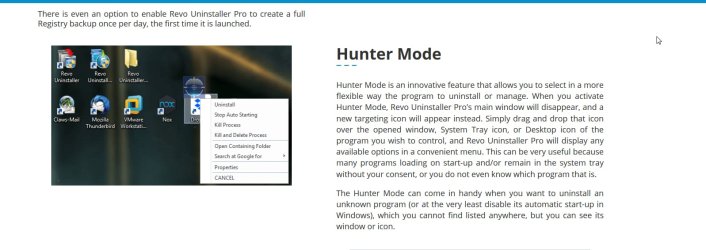
Not familiar with REvo. I use a program called YourUninstaller - under tools is hunter mode which brings up a little crosshair thing that can be dragged to the offending item.

Download Trial Version

your-uninstaller.jpg

Maybe see if revo has something like like that
 

My Computers

System One System Two

  • Computer type
    PC/Desktop
    OS
    7 X64
    CPU
    i5 8400
    Motherboard
    gigabyte b365m ds3h
    Memory
    2x8gb 3200mhz
    Hard Drives
    various
    PSU
    pure power 11 400w cm
    Case
    Coolermaster
    Cooling
    cryorig m9i
  • Computer type
    PC/Desktop
    OS
    7x64
    CPU
    g5400
    Motherboard
    ga b365m ds3h
    Memory
    8gb ddr4 2400
    PSU
    xfx pro 450w
SIW2, don't know if Revo has something similar...will hunt around within Revo, report back later.
Which plan do you have? I saw several purchase plans for Your Uninstaller Pro.
 

My Computer

Computer type
PC/Desktop
Computer Manufacturer/Model Number
Antec desktop; Acer Aspire laptops
OS
Windows 7 Professional 64-bit
CPU
Desktop i5; Acers i5 & i7
Memory
desktop 16GB; 1 Acer 8GB & 1 Acer 16GB
Hard Drives
1TB split into 2 equal partitions [OS and data] usable by RJS
Internet Speed
AT&T DSL
Browser
FF, GChrome, msIE
Other Info
Windows 7 Firewall, Emsisoft AM/AV, MSE [scan-only], SpywareBlaster, Ruiware/BillP combine
A few years back they gave me a copy if memory serves. youruninstaller is very good - permanent license - not the one year nonsense that some software does - I always avoid those.

Looks like revo has similar- from their webpage. Might only be with th Pro version -not sure
Revo Uninstaller Pro

revo-huntermode.jpg
 

My Computers

System One System Two

  • Computer type
    PC/Desktop
    OS
    7 X64
    CPU
    i5 8400
    Motherboard
    gigabyte b365m ds3h
    Memory
    2x8gb 3200mhz
    Hard Drives
    various
    PSU
    pure power 11 400w cm
    Case
    Coolermaster
    Cooling
    cryorig m9i
  • Computer type
    PC/Desktop
    OS
    7x64
    CPU
    g5400
    Motherboard
    ga b365m ds3h
    Memory
    8gb ddr4 2400
    PSU
    xfx pro 450w
SIW2, don't know if Revo has something similar...will hunt around within Revo, report back later.
Which plan do you have? I saw several purchase plans for Your Uninstaller Pro.

I'm the ultimate cheap bugger........only using the FREE version. :-)
 

My Computer

Computer Manufacturer/Model Number
Hybrid
OS
Win 7 Enterprise 64bit
CPU
Intel Core 2 Quad 2.4 GHz
Motherboard
ATX, Micro-ATX
Memory
6GB
Graphics Card(s)
2 x Nvidia G-Force 7300 Dual DVI
Sound Card
Intel HD /AC’ 97 Audio
Monitor(s) Displays
3 x Samsung Syncmaster 226BW
Hard Drives
300 GB Hard Drive ATA 10k RPM
DVD/ CD Writer W LightScribe
PSU
800W
Case
Cool Master Case Black
Cooling
System Front :120 mm green LED fan x 1, 1200 rpm, 21 dBA
Back
Top