Solved Installed Win 7 Home Premium OEM on wrong HD

Hawker22

New member
Local time
12:10 PM
Messages
18
I got my copy and a new HD. Went to install and did not unplug the old smaller drive and ---you guessed it---put the install onto the wrong drive. I entered the KEY but have not yet activated. It works OK on the second drive but I want it on the new, larger drive. What is the best way to do this? No files to worry about on the new HD. Can I simply reinstall win 7 on the new drive and then can I simply delete the copy on the other drive?
The answer may be somewhere if I did a big search, but it is late and I am heading to bed and hoping for some advice by morning.
Thanks
 

My Computer My Computer

At a glance

windows 7 Home Premium(SP1) X64Intel4 GBRadeon HD 4800
Computer Manufacturer/Model Number
Custom built
OS
windows 7 Home Premium(SP1) X64
CPU
Intel
Motherboard
Gygabyte GA-EX38-DQ6
Memory
4 GB
Graphics Card(s)
Radeon HD 4800
Sound Card
Realtek
Monitor(s) Displays
LG Flatron 22"
Hard Drives
WD 1.5 TB
WD 500 GB
PSU
Zephyr 750
Case
Cool Master
Cooling
Heatsink/fan
I think the best thing to do would be to delete the OS from the old Drive by boot time reformatting and clean installing it on the new HDD.

I think there would have been no problem doing this even if you had activated the OS by explaining the position by phone to Microsoft if Internet activation did not work and there is even less hassle now with the OS not yet activated..
 

My Computer My Computer

At a glance

Windows 7 Pro with SP1 32bit2 gigs of RAMIntel(R) 82845G/GL/GE/PE/GV Graphics Controller
Computer Manufacturer/Model Number
Custom Built
OS
Windows 7 Pro with SP1 32bit
Motherboard
Intel D845GVS1 X86-based PC
Memory
2 gigs of RAM
Graphics Card(s)
Intel(R) 82845G/GL/GE/PE/GV Graphics Controller
Sound Card
Realtek AC'97 Audio
Monitor(s) Displays
Samsung SyncMaster 931BF Black 19" LCD Monitor
Screen Resolution
1280X960
Hard Drives
1. SAMSUNG SP0822N ATA Device ~ 80 GigaBytes

2. Seagate FreeAgent Go USB Device ~ 500 GigaBytes
Keyboard
COMPAQ Standard PS/2 Keyboard
Mouse
iBall Laser Precise Speedster
Internet Speed
4 mb/sec
As long as the current OS is still on the other drive, chances are that your bootmgr will also end up there. And even without the OS there, it can happen if the smaller drive has the lower port number.

You can avoid that if you unplug the smaller drive when you install again. Or, if you do not like the gymnastics, you can fix it later with EasyBCD. http://www.sevenforums.com/tutorials/209885-bootmgr-move-c-easybcd.html

A completely different approach would be to make an image of your current installation and restore that to the bigger drive. That may be worthwhile if you have already done a lot of updates and installed programs.
 

My Computer My Computer

At a glance

Vista, Windows7, Mint Mate, Zorin, Windows 8from 1.6GHz Duo to i7
Computer Manufacturer/Model Number
HP, Dell, Gateway, Toshiba - 4 laptops and 2 desktops
OS
Vista, Windows7, Mint Mate, Zorin, Windows 8
CPU
from 1.6GHz Duo to i7
Monitor(s) Displays
2x HP w2207
Hard Drives
5x HDD, 7x SSD, 12x Externals
Keyboard
with trackball - no mices
Mouse
Trackball mice
Internet Speed
DSL 6000
  • Like
Reactions: 2xg
Thanks guys. I took the suggestion of unplugging my old-smaller- HD and did another win 7 install onto my new HD. That worked OK(at least so far).
NOW, what is the best way to get the first install off of my old HD? Can I simply delete the win 7 folder, or does it involve something more sinister?
Not quite sure about the boot format thingy--I have other files on the smaller drive that I need to preserve, so will it format just the Win 7 partition, and if so, can I then access that partition.
Thanks
 

My Computer My Computer

At a glance

windows 7 Home Premium(SP1) X64Intel4 GBRadeon HD 4800
Computer Manufacturer/Model Number
Custom built
OS
windows 7 Home Premium(SP1) X64
CPU
Intel
Motherboard
Gygabyte GA-EX38-DQ6
Memory
4 GB
Graphics Card(s)
Radeon HD 4800
Sound Card
Realtek
Monitor(s) Displays
LG Flatron 22"
Hard Drives
WD 1.5 TB
WD 500 GB
PSU
Zephyr 750
Case
Cool Master
Cooling
Heatsink/fan
1. Look at your bigger disk (in Disk Management) with the new installation. There should be a C: partition and a 100MB active system partition. Alternatively C: may be the active partition. If that is the case

2. Delete the whole old OS partition from the smaller disk - with Disk Management. And if there is also a small 100MB partition, delete that too. The gained freespace you can use for the creation of a new partition or add it to one of the existing partitions there. But that may be a bit tricky if that freespace is to the left of the existing partitions.. You better post a picture of your disk management first so that we can have a look.
 

My Computer My Computer

At a glance

Vista, Windows7, Mint Mate, Zorin, Windows 8from 1.6GHz Duo to i7
Computer Manufacturer/Model Number
HP, Dell, Gateway, Toshiba - 4 laptops and 2 desktops
OS
Vista, Windows7, Mint Mate, Zorin, Windows 8
CPU
from 1.6GHz Duo to i7
Monitor(s) Displays
2x HP w2207
Hard Drives
5x HDD, 7x SSD, 12x Externals
Keyboard
with trackball - no mices
Mouse
Trackball mice
Internet Speed
DSL 6000
When you plug back in the smaller HD make sure the larger one is set first to boot in BIOS setup, and you are booted into the one you want to keep which will be listed as Boot in Disk management.

Open an Elevated Command Prompt to use Diskpart Clean Command to wipe the smaller HD. Again confirm it's the right one by size.
 
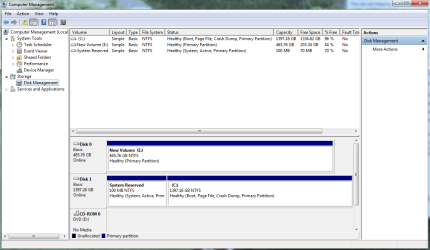
Hopefully, I have been able to post a screenshot of my disk management data.
Looks like there is no system partition on my smaller HD.
What now?
 

Attachments

  • Capture.PNG
    Capture.PNG
    37.9 KB · Views: 25

My Computer My Computer

At a glance

windows 7 Home Premium(SP1) X64Intel4 GBRadeon HD 4800
Computer Manufacturer/Model Number
Custom built
OS
windows 7 Home Premium(SP1) X64
CPU
Intel
Motherboard
Gygabyte GA-EX38-DQ6
Memory
4 GB
Graphics Card(s)
Radeon HD 4800
Sound Card
Realtek
Monitor(s) Displays
LG Flatron 22"
Hard Drives
WD 1.5 TB
WD 500 GB
PSU
Zephyr 750
Case
Cool Master
Cooling
Heatsink/fan
But that screenshot looks like everything is OK. Your system is on the larger HDD as you wanted it and if it works, you are fine.
 

My Computer My Computer

At a glance

Vista, Windows7, Mint Mate, Zorin, Windows 8from 1.6GHz Duo to i7
Computer Manufacturer/Model Number
HP, Dell, Gateway, Toshiba - 4 laptops and 2 desktops
OS
Vista, Windows7, Mint Mate, Zorin, Windows 8
CPU
from 1.6GHz Duo to i7
Monitor(s) Displays
2x HP w2207
Hard Drives
5x HDD, 7x SSD, 12x Externals
Keyboard
with trackball - no mices
Mouse
Trackball mice
Internet Speed
DSL 6000
Except that I still have two OS's on my smaller drive that I want gone. One is win 7 and the other is win 7 old. Can I simply now just delete those. They are taking up at least 24 GB of space.
 

My Computer My Computer

At a glance

windows 7 Home Premium(SP1) X64Intel4 GBRadeon HD 4800
Computer Manufacturer/Model Number
Custom built
OS
windows 7 Home Premium(SP1) X64
CPU
Intel
Motherboard
Gygabyte GA-EX38-DQ6
Memory
4 GB
Graphics Card(s)
Radeon HD 4800
Sound Card
Realtek
Monitor(s) Displays
LG Flatron 22"
Hard Drives
WD 1.5 TB
WD 500 GB
PSU
Zephyr 750
Case
Cool Master
Cooling
Heatsink/fan
I don't see an OS on the smaller drive. But maybe the whole drive is an OS with accompanying data.

The Windows.old is probably a folder that you could delete. But no need to do that if you do the next step.

For the OS in that single partition, that is a bit trickier. I would backup all data in that partition that you care to keep. Then I would delete the whole partition (with Disk Management) and make a new partition from the unallocated space to where you can restore the saved data.

If you do not have an external drive for the temporary backup, shrink the C: partition on the big drive and make a temporary partition to hold the backup data. Make it big enough that all data that you will backup will fit.
 

My Computer My Computer

At a glance

Vista, Windows7, Mint Mate, Zorin, Windows 8from 1.6GHz Duo to i7
Computer Manufacturer/Model Number
HP, Dell, Gateway, Toshiba - 4 laptops and 2 desktops
OS
Vista, Windows7, Mint Mate, Zorin, Windows 8
CPU
from 1.6GHz Duo to i7
Monitor(s) Displays
2x HP w2207
Hard Drives
5x HDD, 7x SSD, 12x Externals
Keyboard
with trackball - no mices
Mouse
Trackball mice
Internet Speed
DSL 6000
After saving the data on the smaller drive that you want to keep, I think even formatting it with Disk Management should suffice.


I don't see an OS on the smaller drive. But maybe the whole drive is an OS with accompanying data.

The Windows.old is probably a folder that you could delete. But no need to do that if you do the next step.

For the OS in that single partition, that is a bit trickier. I would backup all data in that partition that you care to keep. Then I would delete the whole partition (with Disk Management) and make a new partition from the unallocated space to where you can restore the saved data.

If you do not have an external drive for the temporary backup, shrink the C: partition on the big drive and make a temporary partition to hold the backup data. Make it big enough that all data that you will backup will fit.
 

My Computer My Computer

At a glance

Windows 7 Pro with SP1 32bit2 gigs of RAMIntel(R) 82845G/GL/GE/PE/GV Graphics Controller
Computer Manufacturer/Model Number
Custom Built
OS
Windows 7 Pro with SP1 32bit
Motherboard
Intel D845GVS1 X86-based PC
Memory
2 gigs of RAM
Graphics Card(s)
Intel(R) 82845G/GL/GE/PE/GV Graphics Controller
Sound Card
Realtek AC'97 Audio
Monitor(s) Displays
Samsung SyncMaster 931BF Black 19" LCD Monitor
Screen Resolution
1280X960
Hard Drives
1. SAMSUNG SP0822N ATA Device ~ 80 GigaBytes

2. Seagate FreeAgent Go USB Device ~ 500 GigaBytes
Keyboard
COMPAQ Standard PS/2 Keyboard
Mouse
iBall Laser Precise Speedster
Internet Speed
4 mb/sec
OK, I think that I got it done. I did as you said and moved all files that I wished to keep over to C drive--then I did a quick format of E drive---after which I moved all the files/folders back to the clean E drive.
I also deleted the old win 7 on the C drive. Now, I appear to have a good OS with most of the garbage removed. Now to start adding all my programs again.

All this because of a HD failure that contained a copy of Win 7 Ultimate that refused to activate---not genuine. The guy who sold me the computer(already loaded) swore to me that the copy was legit---and it DID work well for 2 years.
Now, I read where there may be a workaround for that bothersome "not genuine" nonsense. Oh well, I am now running Home premium 64. which I will activate tomorrow. Will post the results.

Thanks for all the help
 

My Computer My Computer

At a glance

windows 7 Home Premium(SP1) X64Intel4 GBRadeon HD 4800
Computer Manufacturer/Model Number
Custom built
OS
windows 7 Home Premium(SP1) X64
CPU
Intel
Motherboard
Gygabyte GA-EX38-DQ6
Memory
4 GB
Graphics Card(s)
Radeon HD 4800
Sound Card
Realtek
Monitor(s) Displays
LG Flatron 22"
Hard Drives
WD 1.5 TB
WD 500 GB
PSU
Zephyr 750
Case
Cool Master
Cooling
Heatsink/fan
Good deal. Thanks for reporting back.
 

My Computer My Computer

At a glance

Vista, Windows7, Mint Mate, Zorin, Windows 8from 1.6GHz Duo to i7
Computer Manufacturer/Model Number
HP, Dell, Gateway, Toshiba - 4 laptops and 2 desktops
OS
Vista, Windows7, Mint Mate, Zorin, Windows 8
CPU
from 1.6GHz Duo to i7
Monitor(s) Displays
2x HP w2207
Hard Drives
5x HDD, 7x SSD, 12x Externals
Keyboard
with trackball - no mices
Mouse
Trackball mice
Internet Speed
DSL 6000
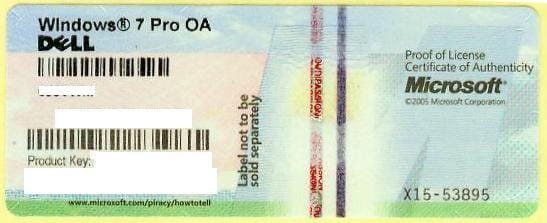
Were you provided with a COA sticker for the preinstalled Win7 as is required to sell it?

1270558000_86224332_1-Pictures-of--Buying-Windows-7-Prof-COA-Sticker-Only-100pcs-up-Needed.jpg

If so you can try the Product Key to see if it will activate as it may in fact be genuine. The procedure if it won't is to call MS Customer Service to validate the key. If it is valid they should open a case to get it installed one way or another.

If not you can use a new key. If it won't activate you may need to make the robocall to trade a series of numbers to record the hardware signature in MS Activation Servers.

I make this suggestion so you will know you did everything you can to use the preinstalled Win7 license you paid for, and if it works you can use the new license elsewhere.
 
This problem is now solved for good. The thread perhaps needs to be closed.
 

My Computer My Computer

At a glance

Windows 7 Pro with SP1 32bit2 gigs of RAMIntel(R) 82845G/GL/GE/PE/GV Graphics Controller
Computer Manufacturer/Model Number
Custom Built
OS
Windows 7 Pro with SP1 32bit
Motherboard
Intel D845GVS1 X86-based PC
Memory
2 gigs of RAM
Graphics Card(s)
Intel(R) 82845G/GL/GE/PE/GV Graphics Controller
Sound Card
Realtek AC'97 Audio
Monitor(s) Displays
Samsung SyncMaster 931BF Black 19" LCD Monitor
Screen Resolution
1280X960
Hard Drives
1. SAMSUNG SP0822N ATA Device ~ 80 GigaBytes

2. Seagate FreeAgent Go USB Device ~ 500 GigaBytes
Keyboard
COMPAQ Standard PS/2 Keyboard
Mouse
iBall Laser Precise Speedster
Internet Speed
4 mb/sec
We do not close our threads even if the OP marks it Solved. This is because detail might need to be added for the potentially thousands who will find it in Google searches.

In this case the OP had failed to mention until the end he was reinstalling against non-Genuine without addressing that issue. Having reinstalled he has the option to try his old key as a last resort before writing off a $100+ preinstalled OS. If it activates he can use any new key elsewhere. If not he and all others will at least know all was done that could have been.
 
Thank you for the clarification which is noted for the future. I misstated for which I express sincere regrets. What I meant was that it should perhaps be marked as solved.
 

My Computer My Computer

At a glance

Windows 7 Pro with SP1 32bit2 gigs of RAMIntel(R) 82845G/GL/GE/PE/GV Graphics Controller
Computer Manufacturer/Model Number
Custom Built
OS
Windows 7 Pro with SP1 32bit
Motherboard
Intel D845GVS1 X86-based PC
Memory
2 gigs of RAM
Graphics Card(s)
Intel(R) 82845G/GL/GE/PE/GV Graphics Controller
Sound Card
Realtek AC'97 Audio
Monitor(s) Displays
Samsung SyncMaster 931BF Black 19" LCD Monitor
Screen Resolution
1280X960
Hard Drives
1. SAMSUNG SP0822N ATA Device ~ 80 GigaBytes

2. Seagate FreeAgent Go USB Device ~ 500 GigaBytes
Keyboard
COMPAQ Standard PS/2 Keyboard
Mouse
iBall Laser Precise Speedster
Internet Speed
4 mb/sec
No prob. Just wanted you and others to know why it's OK to comment in a thread which appears resolved. Some threads are visited by Google searchers countless times and need to be as complete as possible.

OP can mark the thread Solved at top.

You can also report a thread which clearly appears to be solved and the Mods will mark it.
 
In fact I have myself commented on threads that have been marked as solved. Thanks again.
 

My Computer My Computer

At a glance

Windows 7 Pro with SP1 32bit2 gigs of RAMIntel(R) 82845G/GL/GE/PE/GV Graphics Controller
Computer Manufacturer/Model Number
Custom Built
OS
Windows 7 Pro with SP1 32bit
Motherboard
Intel D845GVS1 X86-based PC
Memory
2 gigs of RAM
Graphics Card(s)
Intel(R) 82845G/GL/GE/PE/GV Graphics Controller
Sound Card
Realtek AC'97 Audio
Monitor(s) Displays
Samsung SyncMaster 931BF Black 19" LCD Monitor
Screen Resolution
1280X960
Hard Drives
1. SAMSUNG SP0822N ATA Device ~ 80 GigaBytes

2. Seagate FreeAgent Go USB Device ~ 500 GigaBytes
Keyboard
COMPAQ Standard PS/2 Keyboard
Mouse
iBall Laser Precise Speedster
Internet Speed
4 mb/sec
OK, I think that I got it done. I did as you said and moved all files that I wished to keep over to C drive--then I did a quick format of E drive---after which I moved all the files/folders back to the clean E drive.
I also deleted the old win 7 on the C drive. Now, I appear to have a good OS with most of the garbage removed. Now to start adding all my programs again.

All this because of a HD failure that contained a copy of Win 7 Ultimate that refused to activate---not genuine. The guy who sold me the computer(already loaded) swore to me that the copy was legit---and it DID work well for 2 years.
Now, I read where there may be a workaround for that bothersome "not genuine" nonsense. Oh well, I am now running Home premium 64. which I will activate tomorrow. Will post the results.

Thanks for all the help

This copy of Win 7 activated with no problem. I now consider my problem solved and will indicate so. Thanks for all the help.
 

My Computer My Computer

At a glance

windows 7 Home Premium(SP1) X64Intel4 GBRadeon HD 4800
Computer Manufacturer/Model Number
Custom built
OS
windows 7 Home Premium(SP1) X64
CPU
Intel
Motherboard
Gygabyte GA-EX38-DQ6
Memory
4 GB
Graphics Card(s)
Radeon HD 4800
Sound Card
Realtek
Monitor(s) Displays
LG Flatron 22"
Hard Drives
WD 1.5 TB
WD 500 GB
PSU
Zephyr 750
Case
Cool Master
Cooling
Heatsink/fan
Back
Top