How do I change the Aero glass look?

Welcome to the Seven Forums
You will need a image editor like gimp, paint.net, Photoshop.
You would need a resource hacker to edit a copy of the aero.msstyles in C:\Windows\Resources\Themes look at post #38 of this thread will show you how to start a new theme http://www.sevenforums.com/customization/135985-start-menu-color-change-4.html#post1358071
This will work for the taskbar I can provide that image numbers for you if you would like.
If you want to change the Aero peek window you will need to purchase (about $23 US) Ave's Windows7 Style Builder I can provide that image locations for you if you would like.
You will need to do 1 of these 2 ways of Enabling custom themes for it to work.
http://www.sevenforums.com/tutorials/34579-enabling-custom-themes-windows-7-a.html
Or
http://www.sevenforums.com/tutorials/28377-theme-how-apply-custom-themes.html?filter
Let me know if I can be of more help to you.
Jerry
 

My Computer My Computer

At a glance

Win 7 Pro x64 / Win 10 ProIntel(R) Core(TM) i7-3630QM CPU @ 2.40GHz12 GB(1) Intel(R) HD Graphics 4000 (2) NVIDIA GeFo...
Computer type
Laptop
Computer Manufacturer/Model Number
Sager NP9170
OS
Win 7 Pro x64 / Win 10 Pro
CPU
Intel(R) Core(TM) i7-3630QM CPU @ 2.40GHz
Motherboard
CLEVO P170EM
Memory
12 GB
Graphics Card(s)
(1) Intel(R) HD Graphics 4000 (2) NVIDIA GeForce GTX 675M
Sound Card
(1) Realtek High Definition Audio (2) Intel(R) Display Aud
Monitor(s) Displays
17.3
Screen Resolution
1920x1080
Hard Drives
(1) Samsung 860 EVO 500GB(OS) (1) Samsung 860 EVO 500GB(Data)
Keyboard
Backlite
Antivirus
MSE, Malwarebytes Pro
Browser
Firefox
Other Info
DESKTOP: Custom-built.
OS: Win 10 Pro x64.
CASE: Rosewill R5.
CPU: Intel I5 4670K CPU @ 3.40GHz.
CPU COOLER: Cool Master Hyper 212 EVO.
MOTHERBOARD: Asus Z87-A.
MEMORY: Kingston HyperX 2x4 GB.
GPU: Nvidia Geforce 650 TI.
PSU: Corsair TX750.
DRIVES: (1) Samsung 840 120 GB SSD (2) Western Digital blue 500 GB 7200 RPM.
You need to patch the uxtheme.dll file before you can use custom themes like that. See the following link for details:

Patch uxtheme.dll in Windows 7 to install Custom / MSStyles Themes - Customize Desktop

Also, in order to get a different start button, you'll probably need to replace explorer.exe with a custom version, which you may or may not feel comfortable doing.

I personally have a custom theme and start button, no issues so far with either. I can post a screenshot in a couple hours when I get home from work.

Best of luck!
 

My Computer My Computer

At a glance

Windows 7 Ultimate x64Intel Core i7 740QMG. Skill 8GB (2x4GB) DDR3 @ 1333MHznVidia GeForce GTX 460M
Computer Manufacturer/Model Number
Alienware m15x (my main PC)
OS
Windows 7 Ultimate x64
CPU
Intel Core i7 740QM
Memory
G. Skill 8GB (2x4GB) DDR3 @ 1333MHz
Graphics Card(s)
nVidia GeForce GTX 460M
Sound Card
IDT Integrated HD Audio
Monitor(s) Displays
15.6HDF+ WLED
Screen Resolution
1600 x 900
Hard Drives
240GB OCZ Agility 3 SSD
Mouse
Razer Orochi
Internet Speed
50Mb/s
Other Info
Intel Ultimate N Wi-Fi Link 5300, Bluetooth 2.0
Welcome to the Seven Forums
You will need a image editor like gimp, paint.net, Photoshop.
You would need a resource hacker to edit a copy of the aero.msstyles in C:\Windows\Resources\Themes look at post #38 of this thread will show you how to start a new theme http://www.sevenforums.com/customization/135985-start-menu-color-change-4.html#post1358071
This will work for the taskbar I can provide that image numbers for you if you would like.
If you want to change the Aero peek window you will need to purchase (about $23 US) Ave's Windows7 Style Builder I can provide that image locations for you if you would like.
You will need to do 1 of these 2 ways of Enabling custom themes for it to work.
http://www.sevenforums.com/tutorials/34579-enabling-custom-themes-windows-7-a.html
Or
http://www.sevenforums.com/tutorials/28377-theme-how-apply-custom-themes.html?filter
Let me know if I can be of more help to you.
Jerry

Thanks! :D
Okay, so once I've allowed my system to apply custom themes, how do customize my taskbar? I want to remove the glassy look and make it fully transparent. I have resource hacker and a trial version of restorator. What do I edit in aero.mmstyles?

You need to patch the uxtheme.dll file before you can use custom themes like that. See the following link for details:

Patch uxtheme.dll in Windows 7 to install Custom / MSStyles Themes - Customize Desktop

Also, in order to get a different start button, you'll probably need to replace explorer.exe with a custom version, which you may or may not feel comfortable doing.

I personally have a custom theme and start button, no issues so far with either. I can post a screenshot in a couple hours when I get home from work.

Best of luck!

Thanks! Maybe you could help me with how you did your theme.
 

My Computer My Computer

At a glance

Windows 7 Ultimate x32
OS
Windows 7 Ultimate x32
Hi acer3. If I am correct, this is the theme you are trying to apply?

Download a Theme Patcher (Universal Theme Patcher, UXStyle or VistaGlazz).

Personally I use Universal Theme Patcher. So if you did it through Universal Theme Patcher, Download it, and open the .zip. Then open the "UniversalThemePatcher_20090409" folder, and click the x64 or x86 depending on if your running 32 Bit or 64 Bit. To find out which your running. Go to Control Panel and select System.

I4Epr.png


I am running 32 Bit so I open the x86. Select your default language and click OK. On the popup that opens click Yes. Click Patch for all 3 and Restart.

Congratulations now you can install custom themes.

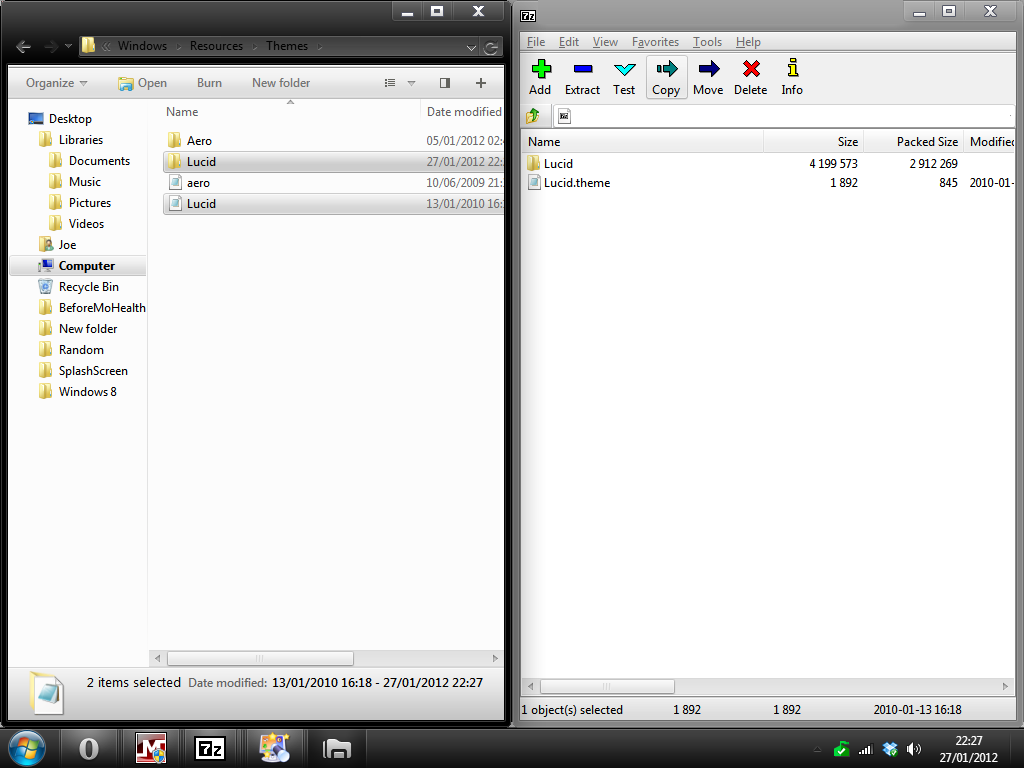
Go to DeviantArt and click download file. Open the .zip. Keep this open but open another Window to C:\Windows\Resources\Themes

Now drag both files from Lucid Msstyles zip window into the Themes Window.

1fuir.png


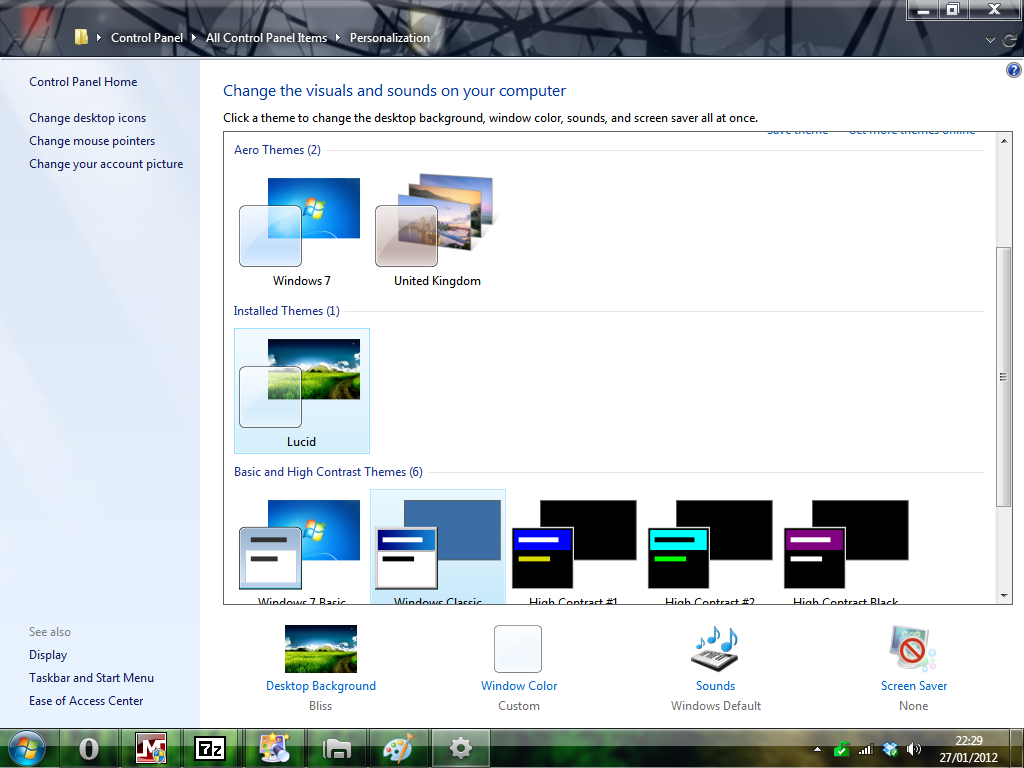
Now Right Click on the Desktop, hit Personalise and chose the new theme.

gEarz.png
 

Attachments

  • Aero Snapshot.png
    Aero Snapshot.png
    88.4 KB · Views: 24

My Computer My Computer

At a glance

Windows 7 Ultimate SP1 - 64 BitIntel Core i5 2500k2x4GB DDR3 1333HzAti Radeon 6770
Computer type
PC/Desktop
Computer Manufacturer/Model Number
Novatech iRush Pro
OS
Windows 7 Ultimate SP1 - 64 Bit
CPU
Intel Core i5 2500k
Motherboard
Foxconn H67M-S/H67M-V/H67
Memory
2x4GB DDR3 1333Hz
Graphics Card(s)
Ati Radeon 6770
Sound Card
None
Monitor(s) Displays
Samsung S22B150
Screen Resolution
1920x1080
Hard Drives
2x500GB
PSU
500W
Cooling
Fan
Keyboard
HP KU0316
Mouse
Wireless Logitech M185
Internet Speed
20MB/s
Antivirus
Avast Free
Browser
Google Chrome
Other Info
Logitech M185 Mouse
KU-M316 Keyboard
Thanks! :D
Okay, so once I've allowed my system to apply custom themes, how do customize my taskbar? I want to remove the glassy look and make it fully transparent. I have resource hacker and a trial version of restorator. What do I edit in aero.mmstyles?
Be sure to use a copy to work on make a new theme like I posted about.
Here are the image #s for the taskbar open them up in a image editor and clear the image
Aero
Bottom #845 #1028
Right #847 #1031
Top #848 #1029
Left #846 #10

Show Desktop Button
#1107
Vertical #1108

Jerry
 

My Computer My Computer

At a glance

Win 7 Pro x64 / Win 10 ProIntel(R) Core(TM) i7-3630QM CPU @ 2.40GHz12 GB(1) Intel(R) HD Graphics 4000 (2) NVIDIA GeFo...
Computer type
Laptop
Computer Manufacturer/Model Number
Sager NP9170
OS
Win 7 Pro x64 / Win 10 Pro
CPU
Intel(R) Core(TM) i7-3630QM CPU @ 2.40GHz
Motherboard
CLEVO P170EM
Memory
12 GB
Graphics Card(s)
(1) Intel(R) HD Graphics 4000 (2) NVIDIA GeForce GTX 675M
Sound Card
(1) Realtek High Definition Audio (2) Intel(R) Display Aud
Monitor(s) Displays
17.3
Screen Resolution
1920x1080
Hard Drives
(1) Samsung 860 EVO 500GB(OS) (1) Samsung 860 EVO 500GB(Data)
Keyboard
Backlite
Antivirus
MSE, Malwarebytes Pro
Browser
Firefox
Other Info
DESKTOP: Custom-built.
OS: Win 10 Pro x64.
CASE: Rosewill R5.
CPU: Intel I5 4670K CPU @ 3.40GHz.
CPU COOLER: Cool Master Hyper 212 EVO.
MOTHERBOARD: Asus Z87-A.
MEMORY: Kingston HyperX 2x4 GB.
GPU: Nvidia Geforce 650 TI.
PSU: Corsair TX750.
DRIVES: (1) Samsung 840 120 GB SSD (2) Western Digital blue 500 GB 7200 RPM.
Hi acer3. If I am correct, this is the theme you are trying to apply?

Download a Theme Patcher (Universal Theme Patcher, UXStyle or VistaGlazz).

Personally I use Universal Theme Patcher. So if you did it through Universal Theme Patcher, Download it, and open the .zip. Then open the "UniversalThemePatcher_20090409" folder, and click the x64 or x86 depending on if your running 32 Bit or 64 Bit.

I am running 32 Bit so I open the x86. Select your default language and click OK. On the popup that opens click Yes. Click Patch for all 3 and Restart.

Congratulations now you can install custom themes.

Go to DeviantArt and click download file. Open the .zip. Keep this open but open another Window to C:\Windows\Resources\Themes

Now drag both files from Lucid Msstyles zip window into the Themes Window.

Now Right Click on the Desktop, hit Personalise and chose the new theme.

Yes, but I also want to know how he did it, so maybe I could make a custom theme of my own with a different taskbar design.
 

My Computer My Computer

At a glance

Windows 7 Ultimate x32
OS
Windows 7 Ultimate x32
Thanks! :D
Okay, so once I've allowed my system to apply custom themes, how do customize my taskbar? I want to remove the glassy look and make it fully transparent. I have resource hacker and a trial version of restorator. What do I edit in aero.mmstyles?
Be sure to use a copy to work on make a new theme like I posted about.
Here are the image #s for the taskbar open them up in a image editor and clear the image
Aero
Bottom #845 #1028
Right #847 #1031
Top #848 #1029
Left #846 #10

Show Desktop Button
#1107
Vertical #1108

Jerry

What about the image number for the glass effect? :D I think I get it now. I'll try it out later. Thanks!
 

My Computer My Computer

At a glance

Windows 7 Ultimate x32
OS
Windows 7 Ultimate x32
Oh, you want to make your own theme? I thought you were simply looking to apply a custom theme. Unfortunately I don't have the time or patience to make one of my own but the one I use is called Clearscreen Sharp. I got it off of DeviantArt about a year ago.

There are a lot of custom themes out there that you can apply once you patch the appropriate files. Here's a screenshot of my setup:

desktop.jpg


desktop%202.jpg


desktop%203.jpg


desktop%204.jpg
 

My Computer My Computer

At a glance

Windows 7 Ultimate x64Intel Core i7 740QMG. Skill 8GB (2x4GB) DDR3 @ 1333MHznVidia GeForce GTX 460M
Computer Manufacturer/Model Number
Alienware m15x (my main PC)
OS
Windows 7 Ultimate x64
CPU
Intel Core i7 740QM
Memory
G. Skill 8GB (2x4GB) DDR3 @ 1333MHz
Graphics Card(s)
nVidia GeForce GTX 460M
Sound Card
IDT Integrated HD Audio
Monitor(s) Displays
15.6HDF+ WLED
Screen Resolution
1600 x 900
Hard Drives
240GB OCZ Agility 3 SSD
Mouse
Razer Orochi
Internet Speed
50Mb/s
Other Info
Intel Ultimate N Wi-Fi Link 5300, Bluetooth 2.0
Thanks! :D
Okay, so once I've allowed my system to apply custom themes, how do customize my taskbar? I want to remove the glassy look and make it fully transparent. I have resource hacker and a trial version of restorator. What do I edit in aero.mmstyles?
Be sure to use a copy to work on make a new theme like I posted about.
Here are the image #s for the taskbar open them up in a image editor and clear the image
Aero
Bottom #845 #1028
Right #847 #1031
Top #848 #1029
Left #846 #10

Show Desktop Button
#1107
Vertical #1108

Jerry

What about the image number for the glass effect? :D I think I get it now. I'll try it out later. Thanks!

What glass effect? Post a screenshot of it.
These numbers are for the default aero.msstyles
If you try to edit a custom theme from DeviantArt built with Windows Style Builder the numbers have changed.
Jerry
 

My Computer My Computer

At a glance

Win 7 Pro x64 / Win 10 ProIntel(R) Core(TM) i7-3630QM CPU @ 2.40GHz12 GB(1) Intel(R) HD Graphics 4000 (2) NVIDIA GeFo...
Computer type
Laptop
Computer Manufacturer/Model Number
Sager NP9170
OS
Win 7 Pro x64 / Win 10 Pro
CPU
Intel(R) Core(TM) i7-3630QM CPU @ 2.40GHz
Motherboard
CLEVO P170EM
Memory
12 GB
Graphics Card(s)
(1) Intel(R) HD Graphics 4000 (2) NVIDIA GeForce GTX 675M
Sound Card
(1) Realtek High Definition Audio (2) Intel(R) Display Aud
Monitor(s) Displays
17.3
Screen Resolution
1920x1080
Hard Drives
(1) Samsung 860 EVO 500GB(OS) (1) Samsung 860 EVO 500GB(Data)
Keyboard
Backlite
Antivirus
MSE, Malwarebytes Pro
Browser
Firefox
Other Info
DESKTOP: Custom-built.
OS: Win 10 Pro x64.
CASE: Rosewill R5.
CPU: Intel I5 4670K CPU @ 3.40GHz.
CPU COOLER: Cool Master Hyper 212 EVO.
MOTHERBOARD: Asus Z87-A.
MEMORY: Kingston HyperX 2x4 GB.
GPU: Nvidia Geforce 650 TI.
PSU: Corsair TX750.
DRIVES: (1) Samsung 840 120 GB SSD (2) Western Digital blue 500 GB 7200 RPM.
Be sure to use a copy to work on make a new theme like I posted about.
Here are the image #s for the taskbar open them up in a image editor and clear the image
Aero
Bottom #845 #1028
Right #847 #1031
Top #848 #1029
Left #846 #10

Show Desktop Button
#1107
Vertical #1108

Jerry

What about the image number for the glass effect? :D I think I get it now. I'll try it out later. Thanks!

What glass effect? Post a screenshot of it.
These numbers are for the default aero.msstyles
If you try to edit a custom theme from DeviantArt built with Windows Style Builder the numbers have changed.
Jerry

The blurry glassy effect on the taskbar and on the windows when you use aero peek. Okay, I think I've managed to change the look of the windows during aero peek by editing #971 and the taskbar by editing #900. Thanks for all the help! :D
 

My Computer My Computer

At a glance

Windows 7 Ultimate x32
OS
Windows 7 Ultimate x32
That blurry glassy effect on the taskbar will be there no way to get rid of it the best you can do is transparent images there. Are you editing a custom theme them 2 numbers 971 is not in the default aero, 900 is not for the taskbar in the default aero?
Jerry
 

My Computer My Computer

At a glance

Win 7 Pro x64 / Win 10 ProIntel(R) Core(TM) i7-3630QM CPU @ 2.40GHz12 GB(1) Intel(R) HD Graphics 4000 (2) NVIDIA GeFo...
Computer type
Laptop
Computer Manufacturer/Model Number
Sager NP9170
OS
Win 7 Pro x64 / Win 10 Pro
CPU
Intel(R) Core(TM) i7-3630QM CPU @ 2.40GHz
Motherboard
CLEVO P170EM
Memory
12 GB
Graphics Card(s)
(1) Intel(R) HD Graphics 4000 (2) NVIDIA GeForce GTX 675M
Sound Card
(1) Realtek High Definition Audio (2) Intel(R) Display Aud
Monitor(s) Displays
17.3
Screen Resolution
1920x1080
Hard Drives
(1) Samsung 860 EVO 500GB(OS) (1) Samsung 860 EVO 500GB(Data)
Keyboard
Backlite
Antivirus
MSE, Malwarebytes Pro
Browser
Firefox
Other Info
DESKTOP: Custom-built.
OS: Win 10 Pro x64.
CASE: Rosewill R5.
CPU: Intel I5 4670K CPU @ 3.40GHz.
CPU COOLER: Cool Master Hyper 212 EVO.
MOTHERBOARD: Asus Z87-A.
MEMORY: Kingston HyperX 2x4 GB.
GPU: Nvidia Geforce 650 TI.
PSU: Corsair TX750.
DRIVES: (1) Samsung 840 120 GB SSD (2) Western Digital blue 500 GB 7200 RPM.
That blurry glassy effect on the taskbar will be there no way to get rid of it the best you can do is transparent images there. Are you editing a custom theme them 2 numbers 971 is not in the default aero, 900 is not for the taskbar in the default aero?
Jerry

I'm editing a copy of the original aero.msstyles that i found in C:\Windows\Resources\Themes. I found 971 in the stream and I managed to remove the shiny/glossy look (I think that's the thing I want removed, not the blurry glass effect) on the taskbar by replacing the image #900 with a transparent one, the only problem I've encountered so far is that I couldn't change the taskbar effect to anything but transparent, I tried replacing #900 back to the original image but it's still transparent even after I restarted my PC.
 

My Computer My Computer

At a glance

Windows 7 Ultimate x32
OS
Windows 7 Ultimate x32
I forgot about that steam image 971 and that is the correct place to edit the stripes out that's what's nice about Windows Style Builder it breaks down that steam image into individual parts.
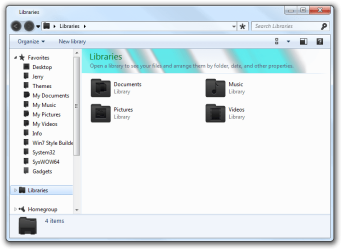
Anyway that 900 image is an overlay for the header in libraries folder, I have colorized it and posted a screenshot so you can see what it does.
As a test colorize #845 #1028 for the bottom taskbar and see what happens.
Let me know if I can be of more help.
Jerry
Libraries.png
 

My Computer My Computer

At a glance

Win 7 Pro x64 / Win 10 ProIntel(R) Core(TM) i7-3630QM CPU @ 2.40GHz12 GB(1) Intel(R) HD Graphics 4000 (2) NVIDIA GeFo...
Computer type
Laptop
Computer Manufacturer/Model Number
Sager NP9170
OS
Win 7 Pro x64 / Win 10 Pro
CPU
Intel(R) Core(TM) i7-3630QM CPU @ 2.40GHz
Motherboard
CLEVO P170EM
Memory
12 GB
Graphics Card(s)
(1) Intel(R) HD Graphics 4000 (2) NVIDIA GeForce GTX 675M
Sound Card
(1) Realtek High Definition Audio (2) Intel(R) Display Aud
Monitor(s) Displays
17.3
Screen Resolution
1920x1080
Hard Drives
(1) Samsung 860 EVO 500GB(OS) (1) Samsung 860 EVO 500GB(Data)
Keyboard
Backlite
Antivirus
MSE, Malwarebytes Pro
Browser
Firefox
Other Info
DESKTOP: Custom-built.
OS: Win 10 Pro x64.
CASE: Rosewill R5.
CPU: Intel I5 4670K CPU @ 3.40GHz.
CPU COOLER: Cool Master Hyper 212 EVO.
MOTHERBOARD: Asus Z87-A.
MEMORY: Kingston HyperX 2x4 GB.
GPU: Nvidia Geforce 650 TI.
PSU: Corsair TX750.
DRIVES: (1) Samsung 840 120 GB SSD (2) Western Digital blue 500 GB 7200 RPM.
I forgot about that steam image 971 and that is the correct place to edit the stripes out that's what's nice about Windows Style Builder it breaks down that steam image into individual parts.
Anyway that 900 image is an overlay for the header in libraries folder, I have colorized it and posted a screenshot so you can see what it does.
As a test colorize #845 #1028 for the bottom taskbar and see what happens.
Let me know if I can be of more help.
Jerry
View attachment 195516

Oh, okay so I checked and it was the header for the libraries folder. But somehow changing it removed the glossy effect on the taskbar. Any ideas?
 

My Computer My Computer

At a glance

Windows 7 Ultimate x32
OS
Windows 7 Ultimate x32
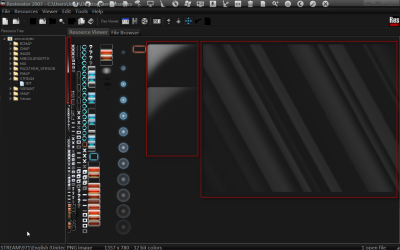
Here are the areas of the shine
Restorator 2007 - CUsersJerryDesktopaero.msstyles.png

Can you post a screenshot of the before and after on the taskbar.
Jerry
 

My Computer My Computer

At a glance

Win 7 Pro x64 / Win 10 ProIntel(R) Core(TM) i7-3630QM CPU @ 2.40GHz12 GB(1) Intel(R) HD Graphics 4000 (2) NVIDIA GeFo...
Computer type
Laptop
Computer Manufacturer/Model Number
Sager NP9170
OS
Win 7 Pro x64 / Win 10 Pro
CPU
Intel(R) Core(TM) i7-3630QM CPU @ 2.40GHz
Motherboard
CLEVO P170EM
Memory
12 GB
Graphics Card(s)
(1) Intel(R) HD Graphics 4000 (2) NVIDIA GeForce GTX 675M
Sound Card
(1) Realtek High Definition Audio (2) Intel(R) Display Aud
Monitor(s) Displays
17.3
Screen Resolution
1920x1080
Hard Drives
(1) Samsung 860 EVO 500GB(OS) (1) Samsung 860 EVO 500GB(Data)
Keyboard
Backlite
Antivirus
MSE, Malwarebytes Pro
Browser
Firefox
Other Info
DESKTOP: Custom-built.
OS: Win 10 Pro x64.
CASE: Rosewill R5.
CPU: Intel I5 4670K CPU @ 3.40GHz.
CPU COOLER: Cool Master Hyper 212 EVO.
MOTHERBOARD: Asus Z87-A.
MEMORY: Kingston HyperX 2x4 GB.
GPU: Nvidia Geforce 650 TI.
PSU: Corsair TX750.
DRIVES: (1) Samsung 840 120 GB SSD (2) Western Digital blue 500 GB 7200 RPM.
Your complete theme looks really good, is it up for download?
 

My Computer My Computer

At a glance

Windows 7 Ultimate SP1 - 64 BitIntel Core i5 2500k2x4GB DDR3 1333HzAti Radeon 6770
Computer type
PC/Desktop
Computer Manufacturer/Model Number
Novatech iRush Pro
OS
Windows 7 Ultimate SP1 - 64 Bit
CPU
Intel Core i5 2500k
Motherboard
Foxconn H67M-S/H67M-V/H67
Memory
2x4GB DDR3 1333Hz
Graphics Card(s)
Ati Radeon 6770
Sound Card
None
Monitor(s) Displays
Samsung S22B150
Screen Resolution
1920x1080
Hard Drives
2x500GB
PSU
500W
Cooling
Fan
Keyboard
HP KU0316
Mouse
Wireless Logitech M185
Internet Speed
20MB/s
Antivirus
Avast Free
Browser
Google Chrome
Other Info
Logitech M185 Mouse
KU-M316 Keyboard

My Computer My Computer

At a glance

Win 7 Pro x64 / Win 10 ProIntel(R) Core(TM) i7-3630QM CPU @ 2.40GHz12 GB(1) Intel(R) HD Graphics 4000 (2) NVIDIA GeFo...
Computer type
Laptop
Computer Manufacturer/Model Number
Sager NP9170
OS
Win 7 Pro x64 / Win 10 Pro
CPU
Intel(R) Core(TM) i7-3630QM CPU @ 2.40GHz
Motherboard
CLEVO P170EM
Memory
12 GB
Graphics Card(s)
(1) Intel(R) HD Graphics 4000 (2) NVIDIA GeForce GTX 675M
Sound Card
(1) Realtek High Definition Audio (2) Intel(R) Display Aud
Monitor(s) Displays
17.3
Screen Resolution
1920x1080
Hard Drives
(1) Samsung 860 EVO 500GB(OS) (1) Samsung 860 EVO 500GB(Data)
Keyboard
Backlite
Antivirus
MSE, Malwarebytes Pro
Browser
Firefox
Other Info
DESKTOP: Custom-built.
OS: Win 10 Pro x64.
CASE: Rosewill R5.
CPU: Intel I5 4670K CPU @ 3.40GHz.
CPU COOLER: Cool Master Hyper 212 EVO.
MOTHERBOARD: Asus Z87-A.
MEMORY: Kingston HyperX 2x4 GB.
GPU: Nvidia Geforce 650 TI.
PSU: Corsair TX750.
DRIVES: (1) Samsung 840 120 GB SSD (2) Western Digital blue 500 GB 7200 RPM.
Oh, you want to make your own theme? I thought you were simply looking to apply a custom theme. Unfortunately I don't have the time or patience to make one of my own but the one I use is called Clearscreen Sharp. I got it off of DeviantArt about a year ago.

There are a lot of custom themes out there that you can apply once you patch the appropriate files. Here's a screenshot of my setup:

desktop.jpg


desktop%202.jpg


desktop%203.jpg


desktop%204.jpg

love your desktop mate. :D
 

My Computer My Computer

At a glance

windows 7 32 bit build 7600NVIDIA GEforce 8400GS super
OS
windows 7 32 bit build 7600
Motherboard
emx mcp61m2 icafe
Graphics Card(s)
NVIDIA GEforce 8400GS super
Monitor(s) Displays
Samsung LD190
Back
Top