which hard drive do i image.

bayflyer

New member
Local time
2:45 PM
Messages
15
I have an unusual dilema, at least for me with trying to image a hard drive.
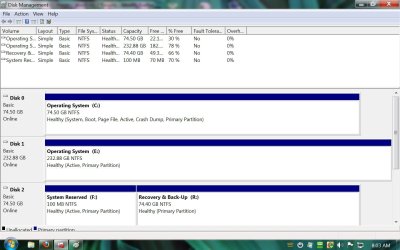
I have a Dell Prec. 380 with 2 - 80 gig hard drives and 1 250 GB drive.
I am including a screen shot
of the disk mgmt. screen showing the drive layout. I tried imaging what I thought
was the right drive to have a back up that I could just plug in and go in the event
of a drive failure. After multiple error's from windows trying to place the image from my external hd onto the 250 GB drive, I gave up and decided to have a comp. shop do it.
I took the drive labeled "C" in and after looking at the contents the guy could not find an OS on it, so I then brought in the "R" drive and he imaged it.
I installed it, but my machine will not boot up no matter what config. that I put the
hard drives in. The comp. guy, after seeing the screen shot can't figure it out.
It seems that the computer needs both drives to boot based on the "boot, page file etc. listed on drive "C" and the 100 mb partition that windows 7 includes upon initial install shown on disk "R" which is necessary to boot.
My goal was to place the new image on the 250 GB drive and store which ever 80 Gb drive for emergency backup.


Thanks,
 

Attachments
  • screen shot disk mgmt..png
    screen shot disk mgmt..png
    63.9 KB · Views: 35

My Computer My Computer

At a glance

windows 7 pro 64 bit
Computer Manufacturer/Model Number
dell precision 380
OS
windows 7 pro 64 bit
1. the bootmgr for your OS on disk1 is in the active partition of disk0. So the OS on disk1 will never boot without disk0. Move that bootmgr to C and you will not need disk0 to boot. Here is how: http://www.sevenforums.com/tutorials/209885-bootmgr-move-c-easybcd.html

2. R is not required to boot. That is just a data partition.

3. What is on disk2. There is an active partition which must be an OS. Tell me.

4. What do you use for imaging ??
 

My Computer My Computer

At a glance

Vista, Windows7, Mint Mate, Zorin, Windows 8from 1.6GHz Duo to i7
Computer Manufacturer/Model Number
HP, Dell, Gateway, Toshiba - 4 laptops and 2 desktops
OS
Vista, Windows7, Mint Mate, Zorin, Windows 8
CPU
from 1.6GHz Duo to i7
Monitor(s) Displays
2x HP w2207
Hard Drives
5x HDD, 7x SSD, 12x Externals
Keyboard
with trackball - no mices
Mouse
Trackball mice
Internet Speed
DSL 6000
It looks to me like you have to image System Reserved partition on Disc 0 and C partition on Disk 1.

Is that what you think you did---and later restored?

Normally, you wouldn't restore to some other drive in anticipation of a failure of the existing C.
 

My Computer My Computer

At a glance

Windows 7 Home Premium SP1, 64-bitIntel Skylake i5-6600K, not overclocked8 GB HyperX DDR4-2666 (2 x 4 GB)none; graphics are integrated on CPU
Computer type
PC/Desktop
Computer Manufacturer/Model Number
Ignatz Special; 4 speed manual gearbox; factory air conditioning; one of one
OS
Windows 7 Home Premium SP1, 64-bit
CPU
Intel Skylake i5-6600K, not overclocked
Motherboard
AsRock Z170M Extreme 4, micro ATX
Memory
8 GB HyperX DDR4-2666 (2 x 4 GB)
Graphics Card(s)
none; graphics are integrated on CPU
Sound Card
onboard: Realtek ALC1150; external: USB Behringer UF0-202
Monitor(s) Displays
Dell S2340M 23 inch IPS
Screen Resolution
1600 x 900
Hard Drives
System: Crucial MX100 series SSD, 128 GB;
Data: Samsung Spinpoint 103SJ, 1 TB;
Backup: WD Caviar Green WD30EZRX-00D8PB0, 3 TB
PSU
Rosewill SilentNight 500 watt fanless, semi-modular
Case
Antec Solo II
Cooling
Noctua NH-U12S; Noctua F12 intake, Noctua S12A exhaust
Keyboard
Microsoft 200 6JH-00001 USB
Mouse
Dell or Microsoft optical wired; USB
Antivirus
Microsoft Security Essentials and Malwarebytes Premium
Browser
Pale Moon
Other Info
All fans PWM; speeds at idle: CPU circa 500 rpm; intake circa 600 rpm; exhaust circa 600 rpm; CPU temps 27 idle and 47 C load in a warm room (27 C/81 F) when running Intel Extreme Tuning Utility stress test.
WHS, disk 2 contains nothing, it is just waiting for the image to be placed on it.
It is in a hot swappable tray right now. I tried using the program within windows to image. I think the comp. guy
used Acronis.
 

My Computer My Computer

At a glance

windows 7 pro 64 bit
Computer Manufacturer/Model Number
dell precision 380
OS
windows 7 pro 64 bit
WHS, I have the program installed, thank you by the way. I am reading the help section, but I am wondering
if you could walk me through it. I am a little nervous that I will make a mistake and render my computer useless.

Thanks
 

My Computer My Computer

At a glance

windows 7 pro 64 bit
Computer Manufacturer/Model Number
dell precision 380
OS
windows 7 pro 64 bit
Did you see my tutorial - the picture. It is just 4 clicks. Follow my numbers and you cannot do anything wrong.

And please post back when you are done and tried a reboot.
 

My Computer My Computer

At a glance

Vista, Windows7, Mint Mate, Zorin, Windows 8from 1.6GHz Duo to i7
Computer Manufacturer/Model Number
HP, Dell, Gateway, Toshiba - 4 laptops and 2 desktops
OS
Vista, Windows7, Mint Mate, Zorin, Windows 8
CPU
from 1.6GHz Duo to i7
Monitor(s) Displays
2x HP w2207
Hard Drives
5x HDD, 7x SSD, 12x Externals
Keyboard
with trackball - no mices
Mouse
Trackball mice
Internet Speed
DSL 6000
WHS, disk 2 contains nothing, it is just waiting for the image to be placed on it.
It is in a hot swappable tray right now. I tried using the program within windows to image. I think the comp. guy
used Acronis.

Your picture says disk 2 is only 78 percent free. Something is on it.
 

My Computer My Computer

At a glance

Windows 7 Home Premium SP1, 64-bitIntel Skylake i5-6600K, not overclocked8 GB HyperX DDR4-2666 (2 x 4 GB)none; graphics are integrated on CPU
Computer type
PC/Desktop
Computer Manufacturer/Model Number
Ignatz Special; 4 speed manual gearbox; factory air conditioning; one of one
OS
Windows 7 Home Premium SP1, 64-bit
CPU
Intel Skylake i5-6600K, not overclocked
Motherboard
AsRock Z170M Extreme 4, micro ATX
Memory
8 GB HyperX DDR4-2666 (2 x 4 GB)
Graphics Card(s)
none; graphics are integrated on CPU
Sound Card
onboard: Realtek ALC1150; external: USB Behringer UF0-202
Monitor(s) Displays
Dell S2340M 23 inch IPS
Screen Resolution
1600 x 900
Hard Drives
System: Crucial MX100 series SSD, 128 GB;
Data: Samsung Spinpoint 103SJ, 1 TB;
Backup: WD Caviar Green WD30EZRX-00D8PB0, 3 TB
PSU
Rosewill SilentNight 500 watt fanless, semi-modular
Case
Antec Solo II
Cooling
Noctua NH-U12S; Noctua F12 intake, Noctua S12A exhaust
Keyboard
Microsoft 200 6JH-00001 USB
Mouse
Dell or Microsoft optical wired; USB
Antivirus
Microsoft Security Essentials and Malwarebytes Premium
Browser
Pale Moon
Other Info
All fans PWM; speeds at idle: CPU circa 500 rpm; intake circa 600 rpm; exhaust circa 600 rpm; CPU temps 27 idle and 47 C load in a warm room (27 C/81 F) when running Intel Extreme Tuning Utility stress test.
WHS, yes i know it is only a few clicks and simple. I went ahead and ran the utility and then went back to
check disk management. It appears that it changed the boot order and because I did not take disk 2 out of the
tray it made that the main disk.
I took that disk out and ran the program again and nothing has changed but there is now no disk 0, which means
the computer will not boot, unless i change the boot order, correct?
 

My Computer My Computer

At a glance

windows 7 pro 64 bit
Computer Manufacturer/Model Number
dell precision 380
OS
windows 7 pro 64 bit
Correct. I assume C is active now. Right ??
 

My Computer My Computer

At a glance

Vista, Windows7, Mint Mate, Zorin, Windows 8from 1.6GHz Duo to i7
Computer Manufacturer/Model Number
HP, Dell, Gateway, Toshiba - 4 laptops and 2 desktops
OS
Vista, Windows7, Mint Mate, Zorin, Windows 8
CPU
from 1.6GHz Duo to i7
Monitor(s) Displays
2x HP w2207
Hard Drives
5x HDD, 7x SSD, 12x Externals
Keyboard
with trackball - no mices
Mouse
Trackball mice
Internet Speed
DSL 6000
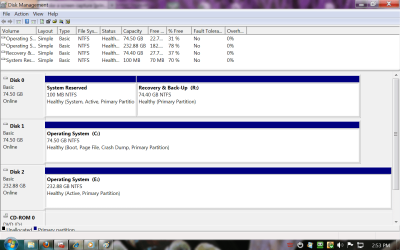
I believe so, but I am sending a current screen shot. The computer will not boot unless I have all 3 drives connected.
I would not boot without having the current setup shown, the 100 mb partition is now called "F" and is on the drive shown at bottom which has always been "R".
I also had to change the boot sequence to start with drive /sata 2
I was very happy to see it boot up but I have not solved the problem.
Keep in mind, i am just learning. Not all things are obvious to me and I appreciate all the help being given.
 

My Computer My Computer

At a glance

windows 7 pro 64 bit
Computer Manufacturer/Model Number
dell precision 380
OS
windows 7 pro 64 bit
Sorry, it is "It would not boot without..." and here is the attachment.
 

Attachments

  • updated disk mgmt. shot.jpg
    updated disk mgmt. shot.jpg
    115.1 KB · Views: 12

My Computer My Computer

At a glance

windows 7 pro 64 bit
Computer Manufacturer/Model Number
dell precision 380
OS
windows 7 pro 64 bit
Where is the screenshot of disk management
 

My Computer My Computer

At a glance

Vista, Windows7, Mint Mate, Zorin, Windows 8from 1.6GHz Duo to i7
Computer Manufacturer/Model Number
HP, Dell, Gateway, Toshiba - 4 laptops and 2 desktops
OS
Vista, Windows7, Mint Mate, Zorin, Windows 8
CPU
from 1.6GHz Duo to i7
Monitor(s) Displays
2x HP w2207
Hard Drives
5x HDD, 7x SSD, 12x Externals
Keyboard
with trackball - no mices
Mouse
Trackball mice
Internet Speed
DSL 6000
wgsm are you able to see the new configuration?
 

My Computer My Computer

At a glance

windows 7 pro 64 bit
Computer Manufacturer/Model Number
dell precision 380
OS
windows 7 pro 64 bit
whs, are you able to see the new configuration?
 

My Computer My Computer

At a glance

windows 7 pro 64 bit
Computer Manufacturer/Model Number
dell precision 380
OS
windows 7 pro 64 bit
This is a little strange because 'F' is still active. Try to deactivate it in Disk Management and then reboot from Disk1 (set the BIOS boot priority order accordingly). If that does not work, disconnect Disk2 and try to reboot.

I would like to see whether 'F' still serves a function. If not, we can delete it.
 

My Computer My Computer

At a glance

Vista, Windows7, Mint Mate, Zorin, Windows 8from 1.6GHz Duo to i7
Computer Manufacturer/Model Number
HP, Dell, Gateway, Toshiba - 4 laptops and 2 desktops
OS
Vista, Windows7, Mint Mate, Zorin, Windows 8
CPU
from 1.6GHz Duo to i7
Monitor(s) Displays
2x HP w2207
Hard Drives
5x HDD, 7x SSD, 12x Externals
Keyboard
with trackball - no mices
Mouse
Trackball mice
Internet Speed
DSL 6000
what if "F" is needed, if it is deactivated, how do boot up if this does not work?
 

My Computer My Computer

At a glance

windows 7 pro 64 bit
Computer Manufacturer/Model Number
dell precision 380
OS
windows 7 pro 64 bit
As far as I can see, your C is marked 'active' - that means it has a bootmgr. Deactivate 'F' and reboot. If it does not work, you can always reactivate it. If Disk Management does not do it, post back. There are other means.
 

My Computer My Computer

At a glance

Vista, Windows7, Mint Mate, Zorin, Windows 8from 1.6GHz Duo to i7
Computer Manufacturer/Model Number
HP, Dell, Gateway, Toshiba - 4 laptops and 2 desktops
OS
Vista, Windows7, Mint Mate, Zorin, Windows 8
CPU
from 1.6GHz Duo to i7
Monitor(s) Displays
2x HP w2207
Hard Drives
5x HDD, 7x SSD, 12x Externals
Keyboard
with trackball - no mices
Mouse
Trackball mice
Internet Speed
DSL 6000
Shouldn't the creation of an image of C Drive automatically include an image of the System Reserved Partition? I wonder if there are any Imaging Managers that do just that.


It looks to me like you have to image System Reserved partition on Disc 0 and C partition on Disk 1.

Is that what you think you did---and later restored?

Normally, you wouldn't restore to some other drive in anticipation of a failure of the existing C.
 

My Computer My Computer

At a glance

Windows 7 Pro with SP1 32bit2 gigs of RAMIntel(R) 82845G/GL/GE/PE/GV Graphics Controller
Computer Manufacturer/Model Number
Custom Built
OS
Windows 7 Pro with SP1 32bit
Motherboard
Intel D845GVS1 X86-based PC
Memory
2 gigs of RAM
Graphics Card(s)
Intel(R) 82845G/GL/GE/PE/GV Graphics Controller
Sound Card
Realtek AC'97 Audio
Monitor(s) Displays
Samsung SyncMaster 931BF Black 19" LCD Monitor
Screen Resolution
1280X960
Hard Drives
1. SAMSUNG SP0822N ATA Device ~ 80 GigaBytes

2. Seagate FreeAgent Go USB Device ~ 500 GigaBytes
Keyboard
COMPAQ Standard PS/2 Keyboard
Mouse
iBall Laser Precise Speedster
Internet Speed
4 mb/sec
Shouldn't the creation of an image of C Drive automatically include an image of the System Reserved Partition? I wonder if there are any Imaging Managers that do just that.


It looks to me like you have to image System Reserved partition on Disc 0 and C partition on Disk 1.

Is that what you think you did---and later restored?

Normally, you wouldn't restore to some other drive in anticipation of a failure of the existing C.
Windows7 imaging does that and Macrium V5 in some sorts too because by default it checks all partitions on a disk to be imaged.

But the 100MB system partition is just in the way as far as I am concerned. I think it is cleaner to keep the bootmgr on C. There may be exceptions - e.g. with double booting.
 

My Computer My Computer

At a glance

Vista, Windows7, Mint Mate, Zorin, Windows 8from 1.6GHz Duo to i7
Computer Manufacturer/Model Number
HP, Dell, Gateway, Toshiba - 4 laptops and 2 desktops
OS
Vista, Windows7, Mint Mate, Zorin, Windows 8
CPU
from 1.6GHz Duo to i7
Monitor(s) Displays
2x HP w2207
Hard Drives
5x HDD, 7x SSD, 12x Externals
Keyboard
with trackball - no mices
Mouse
Trackball mice
Internet Speed
DSL 6000
i agree with you logic but if I can't boot up I will no longer be able to communicate with you guys for assistance.
I initially said there was nothing on the 250 gb drive which was stupid because that is the drive that I had the
"computer guy" image a copy of the "R" drive onto. When I got it home I expected to just plug it into the place where
"R" was and boot up but it would not work.
One more note, at the beginning of this saga i took the disk which is now labeled "C" to the comp. guy and he stated that there
was no OS on the Disk, so then i took the "R" to him and he imaged that to the 250 gb drive.
during the last couple of days I have downloaded the program suggested by whs and the various drive letters have changed as the screen shots show.
Thanks for hanging with me on this folks,
 

My Computer My Computer

At a glance

windows 7 pro 64 bit
Computer Manufacturer/Model Number
dell precision 380
OS
windows 7 pro 64 bit
Back
Top