Just used Reg Organizer and then rebooted. Aero is gone.

SamuelGE

New member
Local time
5:10 AM
Messages
43
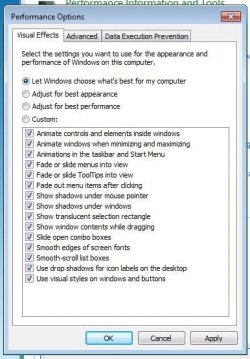
I just bought Reg Organizer and ran the registry optimisation, reg cleanup and disk cleaner. It then asked me to reboot, so I did. As soon as I logged in, The aero theme has gone and this is the list where I used to be able to select it.
 

Attachments

  • pic.jpg
    pic.jpg
    44.8 KB · Views: 8

My Computer My Computer

At a glance

Windows 7 Ultimate 64bitAMD Phenom II P840 Triple-Core6GB RAM
Computer Manufacturer/Model Number
Sony VAIO VPCEE3Z0E
OS
Windows 7 Ultimate 64bit
CPU
AMD Phenom II P840 Triple-Core
Memory
6GB RAM
Screen Resolution
1366x768
I'd do this:

Use System Restore to go back to a point in time before you installed Reg Organizer.

Then try to forget you ever heard of that application--or similar applications.
 

My Computer My Computer

At a glance

Windows 7 Home Premium SP1, 64-bitIntel Skylake i5-6600K, not overclocked8 GB HyperX DDR4-2666 (2 x 4 GB)none; graphics are integrated on CPU
Computer type
PC/Desktop
Computer Manufacturer/Model Number
Ignatz Special; 4 speed manual gearbox; factory air conditioning; one of one
OS
Windows 7 Home Premium SP1, 64-bit
CPU
Intel Skylake i5-6600K, not overclocked
Motherboard
AsRock Z170M Extreme 4, micro ATX
Memory
8 GB HyperX DDR4-2666 (2 x 4 GB)
Graphics Card(s)
none; graphics are integrated on CPU
Sound Card
onboard: Realtek ALC1150; external: USB Behringer UF0-202
Monitor(s) Displays
Dell S2340M 23 inch IPS
Screen Resolution
1600 x 900
Hard Drives
System: Crucial MX100 series SSD, 128 GB;
Data: Samsung Spinpoint 103SJ, 1 TB;
Backup: WD Caviar Green WD30EZRX-00D8PB0, 3 TB
PSU
Rosewill SilentNight 500 watt fanless, semi-modular
Case
Antec Solo II
Cooling
Noctua NH-U12S; Noctua F12 intake, Noctua S12A exhaust
Keyboard
Microsoft 200 6JH-00001 USB
Mouse
Dell or Microsoft optical wired; USB
Antivirus
Microsoft Security Essentials and Malwarebytes Premium
Browser
Pale Moon
Other Info
All fans PWM; speeds at idle: CPU circa 500 rpm; intake circa 600 rpm; exhaust circa 600 rpm; CPU temps 27 idle and 47 C load in a warm room (27 C/81 F) when running Intel Extreme Tuning Utility stress test.
But my PC boots so slowly. Is there a way to speed up boot time that's easy?


Sent from my iPhone using SevenForums app
 

My Computer My Computer

At a glance

Windows 7 Ultimate 64bitAMD Phenom II P840 Triple-Core6GB RAM
Computer Manufacturer/Model Number
Sony VAIO VPCEE3Z0E
OS
Windows 7 Ultimate 64bit
CPU
AMD Phenom II P840 Triple-Core
Memory
6GB RAM
Screen Resolution
1366x768
But my PC boots so slowly. Is there a way to speed up boot time that's easy?

Possibly. Relatively easily.

But you carefully avoided any mention of that Registry app you just installed.

Do you insist on keeping it and using it?

If so, you will likely have continued mysterious issues, regardless of your boot speed.

And you have told us absolutely nothing about your PC. For all I know it is 15 years old and deathly slow even if in perfect condition.
 

My Computer My Computer

At a glance

Windows 7 Home Premium SP1, 64-bitIntel Skylake i5-6600K, not overclocked8 GB HyperX DDR4-2666 (2 x 4 GB)none; graphics are integrated on CPU
Computer type
PC/Desktop
Computer Manufacturer/Model Number
Ignatz Special; 4 speed manual gearbox; factory air conditioning; one of one
OS
Windows 7 Home Premium SP1, 64-bit
CPU
Intel Skylake i5-6600K, not overclocked
Motherboard
AsRock Z170M Extreme 4, micro ATX
Memory
8 GB HyperX DDR4-2666 (2 x 4 GB)
Graphics Card(s)
none; graphics are integrated on CPU
Sound Card
onboard: Realtek ALC1150; external: USB Behringer UF0-202
Monitor(s) Displays
Dell S2340M 23 inch IPS
Screen Resolution
1600 x 900
Hard Drives
System: Crucial MX100 series SSD, 128 GB;
Data: Samsung Spinpoint 103SJ, 1 TB;
Backup: WD Caviar Green WD30EZRX-00D8PB0, 3 TB
PSU
Rosewill SilentNight 500 watt fanless, semi-modular
Case
Antec Solo II
Cooling
Noctua NH-U12S; Noctua F12 intake, Noctua S12A exhaust
Keyboard
Microsoft 200 6JH-00001 USB
Mouse
Dell or Microsoft optical wired; USB
Antivirus
Microsoft Security Essentials and Malwarebytes Premium
Browser
Pale Moon
Other Info
All fans PWM; speeds at idle: CPU circa 500 rpm; intake circa 600 rpm; exhaust circa 600 rpm; CPU temps 27 idle and 47 C load in a warm room (27 C/81 F) when running Intel Extreme Tuning Utility stress test.

I don't mind a restore and delete of the software, even if it will annoy me that I spent £32 on it.

What options do I have to speed up boot time?

Thank you.


Sent from my iPhone using SevenForums app
 

My Computer My Computer

At a glance

Windows 7 Ultimate 64bitAMD Phenom II P840 Triple-Core6GB RAM
Computer Manufacturer/Model Number
Sony VAIO VPCEE3Z0E
OS
Windows 7 Ultimate 64bit
CPU
AMD Phenom II P840 Triple-Core
Memory
6GB RAM
Screen Resolution
1366x768
And my PC is a nine month old Sony VAIO, running Windows 7 Ultimate 64bit. 6GB RAM, 500GB HDD with a 1.9 GHz AMD Phenom II P840 Triple-core processor.


Sent from my iPhone using SevenForums app
 

My Computer My Computer

At a glance

Windows 7 Ultimate 64bitAMD Phenom II P840 Triple-Core6GB RAM
Computer Manufacturer/Model Number
Sony VAIO VPCEE3Z0E
OS
Windows 7 Ultimate 64bit
CPU
AMD Phenom II P840 Triple-Core
Memory
6GB RAM
Screen Resolution
1366x768
You can fill out your system specs via the user control panel at the top of your screen.

First, I would do the system restore to see if you get your aero theme back.

If you cannot do a system restore for whatever reason, I would still get rid of that app.

For specific help on boot speed, I'd start a new thread in the Performance and Maintenance section.

Slow booting issues are typically related to too much crap running on startup--which is common with store-bought PCs. Sony thinks you just have to have all that stuff running all the time.

You should be able to get boot times down to 60 or 80 seconds.
 

My Computer My Computer

At a glance

Windows 7 Home Premium SP1, 64-bitIntel Skylake i5-6600K, not overclocked8 GB HyperX DDR4-2666 (2 x 4 GB)none; graphics are integrated on CPU
Computer type
PC/Desktop
Computer Manufacturer/Model Number
Ignatz Special; 4 speed manual gearbox; factory air conditioning; one of one
OS
Windows 7 Home Premium SP1, 64-bit
CPU
Intel Skylake i5-6600K, not overclocked
Motherboard
AsRock Z170M Extreme 4, micro ATX
Memory
8 GB HyperX DDR4-2666 (2 x 4 GB)
Graphics Card(s)
none; graphics are integrated on CPU
Sound Card
onboard: Realtek ALC1150; external: USB Behringer UF0-202
Monitor(s) Displays
Dell S2340M 23 inch IPS
Screen Resolution
1600 x 900
Hard Drives
System: Crucial MX100 series SSD, 128 GB;
Data: Samsung Spinpoint 103SJ, 1 TB;
Backup: WD Caviar Green WD30EZRX-00D8PB0, 3 TB
PSU
Rosewill SilentNight 500 watt fanless, semi-modular
Case
Antec Solo II
Cooling
Noctua NH-U12S; Noctua F12 intake, Noctua S12A exhaust
Keyboard
Microsoft 200 6JH-00001 USB
Mouse
Dell or Microsoft optical wired; USB
Antivirus
Microsoft Security Essentials and Malwarebytes Premium
Browser
Pale Moon
Other Info
All fans PWM; speeds at idle: CPU circa 500 rpm; intake circa 600 rpm; exhaust circa 600 rpm; CPU temps 27 idle and 47 C load in a warm room (27 C/81 F) when running Intel Extreme Tuning Utility stress test.
Thank you for your help.


Sent from my iPhone using SevenForums app
 

My Computer My Computer

At a glance

Windows 7 Ultimate 64bitAMD Phenom II P840 Triple-Core6GB RAM
Computer Manufacturer/Model Number
Sony VAIO VPCEE3Z0E
OS
Windows 7 Ultimate 64bit
CPU
AMD Phenom II P840 Triple-Core
Memory
6GB RAM
Screen Resolution
1366x768
Back
Top