Registry - Backup and Restore

How to Backup and Restore the Registry in Windows 7 and Vista

   Information
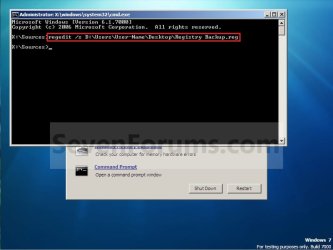
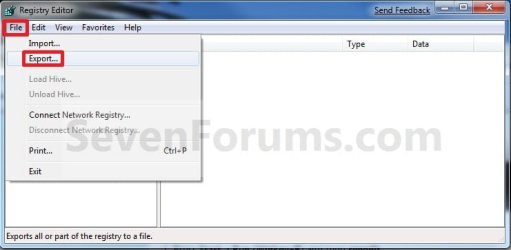
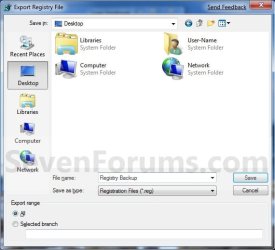
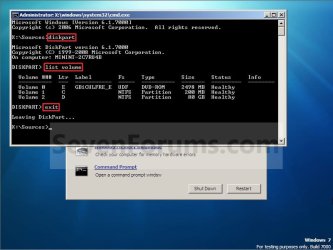
This will show you a few options on how to export the registry as a .reg file backup, and how to import the .reg file to restore to the registry in Windows 7 and Vista.
   Warning
Importing or merging a .reg file backup will only restore the keys and values that were included in the exported backup. If you have added new keys and values since the .reg file backup was created, then these items will not be affected or restored when you import or merge the older exported .reg file backup to the registry. If you wanted to replace the registry completely with a backup, then System Restore (see Method One in OPTION ONE & TWO below) will allow you to do this instead.


OPTION ONE

Backup Registry


METHOD ONE

Using System Restore


NOTE: This is the best method to use since it will replace the current registry with the contents of the registry as it was on the date the restore point was created. These restore points contain information about registry settings and other system information that Windows 7 uses. System Restore points do not include the personal user files.
1. Create a restore point.
NOTE: See information at that link for more details on this.
   Tip
Creating a restore point before making any changes to Windows 7 is the recommended method to use to have the registry backed up.


METHOD TWO

Export Only Part of the Registry as a Backup


NOTE: This will allow you to only export a HKEY or key branch in the registry to a .reg file as a backup.
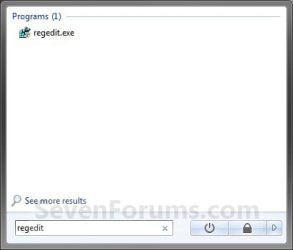
1. Open the Start menu and type regedit in the search line, then press Enter. (See screenshot below)
Search_Box.jpg
2. If prompted by UAC, click on Yes to approve.

3. To Export a Registry HKEY Branch
NOTE: This will allow you to backup the entire selected HKEY branch with all of it's subkeys and key values to a .reg file as a backup.
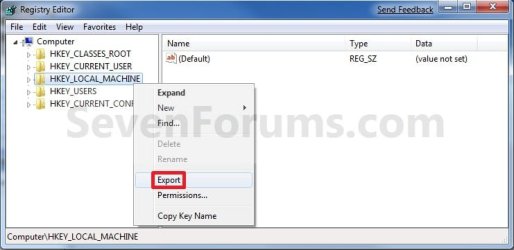
A) Right click on a HKEY branch that you want to backup, and click on Export. (See screenshot below)
Export-2.jpg
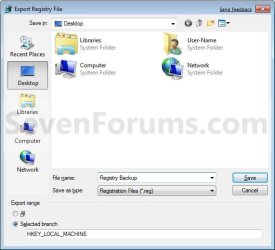
B) Select where you want to save the exported .reg file to, type in a name for the .reg file, and click on the Save button. (See screenshot below)
HKEY_Export_Location.jpg
4. To Export a Registry KEY Branch
NOTE: This will allow you to backup the entire selected KEY branch under a HKEY with all of it's subkeys and key values to a .reg file as a backup.
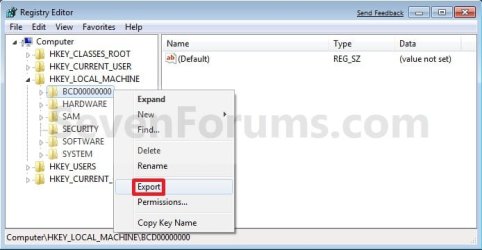
A) Right click on a KEY branch under the HKEY that you want to backup, and click on Export. (See screenshot below)
Export_Key.jpg
B) Select where you want to save the exported .reg file to, type in a name for the .reg file, and click on the Save button. (See screenshot below step 3B)


OPTION TWO

Restore Registry


METHOD ONE

From a System Restore Point


NOTE: This will replace your current registry and system files in Windows by restoring the registry and system files in Windows back to how they were on the date the restore point (Option One, Method One) was created.
1. Do a System Restore using a restore point with the date you want to restore you Windows 7 registry and system files back to.
NOTE: See information at link for more details on this.
   Tip
Doing a system restore is the recommended method to use to undo any changes made to Windows with a restore point dated before you made the changes.


METHOD TWO

Restore a REG File to the Registry in Windows


NOTE: Any new keys and values added to the registry not included in the .reg file at the date it was created will not be affected.
1. Merge from the REG File
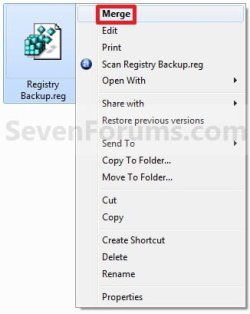
A) Right click on the backup .reg file and click on Merge. (See screenshot below)
Import-2.jpg
B) Click on Yes and Yes to approve the merge.

C) Go to step 3.
OR

2. Import from Regedit
A) Open the Start menu and type regedit in the search line, then press Enter. (See screenshot below)
Search_Box.jpg
B) If prompted by UAC, click on Yes to approve.

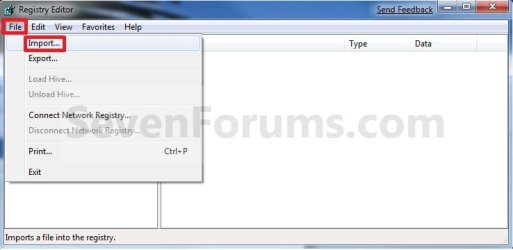
C) Click on File on the menu bar, then click on Import. (See screenshot below)
Import.jpg
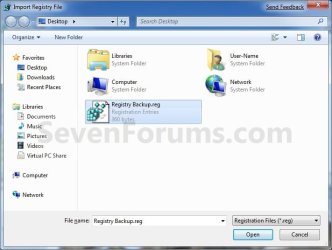
D) Navigate to where you saved the backup .reg file and select it, then click on the Save button. (See screenshot below)
Import_Location.jpg
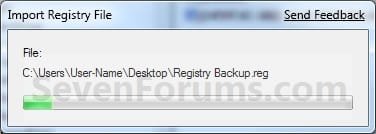
E) You will now see the import progress window. (See screenshot below)
Import_Progress.jpg
3. Click on OK.

   Tip
If you get the error below, then you will need to do a system restore instead since the keys are in use.

Error.jpg

That's it,
Shawn


Attachments

  • Command.jpg
    Command.jpg
    153.1 KB · Views: 1,684
  • Export.jpg
    Export.jpg
    91 KB · Views: 482
  • Export_Location.jpg
    Export_Location.jpg
    116.1 KB · Views: 581
  • Command-1.jpg
    Command-1.jpg
    198.5 KB · Views: 2,553
Last edited:
The Registry worked perfectly.
 
Last edited by a moderator:

My Computer

Computer type
PC/Desktop
Computer Manufacturer/Model Number
Novatech iRush Pro
OS
Windows 7 Ultimate SP1 - 64 Bit
CPU
Intel Core i5 2500k
Motherboard
Foxconn H67M-S/H67M-V/H67
Memory
2x4GB DDR3 1333Hz
Graphics Card(s)
Ati Radeon 6770
Sound Card
None
Monitor(s) Displays
Samsung S22B150
Screen Resolution
1920x1080
Hard Drives
2x500GB
PSU
500W
Cooling
Fan
Keyboard
HP KU0316
Mouse
Wireless Logitech M185
Internet Speed
20MB/s
Antivirus
Avast Free
Browser
Google Chrome
Other Info
Logitech M185 Mouse
KU-M316 Keyboard
You're welcome. :)
 
Last edited:

My Computer

Computer type
PC/Desktop
Computer Manufacturer/Model Number
Self built custom
OS
64-bit Windows 11 Pro for Workstations
CPU
Intel i7-8700K OC'd to 5 GHz
Motherboard
ASUS ROG Maximus XI Formula Z390
Memory
64 GB (4x16GB) G.SKILL TridentZ RGB DDR4 3600 MHz
Graphics Card(s)
ASUS ROG-STRIX-GTX1080TI-O11G-GAMING
Sound Card
Integrated
Monitor(s) Displays
2 x Samsung Odyssey G7 27"
Screen Resolution
2560x1440
Hard Drives
1TB Samsung 990 PRO M.2,
4TB Samsung 990 PRO PRO M.2,
TerraMaster F8 SSD Plus NAS
PSU
Seasonic Prime Titanium 850W
Case
Thermaltake Core P3
Cooling
Corsair Hydro H115i
Keyboard
Logitech wireless K800
Mouse
Logitech MX Master 4
Internet Speed
2 Gb/s Download and 100 Mb/s Upload
Antivirus
Malwarebyte Anti-Malware Premium
Browser
Google Chrome
Other Info
Logitech Z625 speaker system,
Logitech BRIO 4K Pro webcam,
HP Color LaserJet Pro MFP M477fdn,
APC SMART-UPS RT 1000 XL - SURT1000XLI,
Galaxy S23 Plus phone
Something the ERUNT readme file says:
"Note: The "Export registry" function in Regedit is USELESS (!) for making a complete backup of the registry. Neither does it export the whole registry (for example, no information from the "SECURITY" hive is saved), nor can the exported file be used later to replace the current registry with the old one. Instead, if you re-import the file, it is merged with the current registry without deleting anything that has been added since the export, leaving you with an absolute mess of old and new entries."
 

My Computer

OS
N/A
Something the ERUNT readme file says:
"Note: The "Export registry" function in Regedit is USELESS (!) for making a complete backup of the registry. Neither does it export the whole registry (for example, no information from the "SECURITY" hive is saved), nor can the exported file be used later to replace the current registry with the old one. Instead, if you re-import the file, it is merged with the current registry without deleting anything that has been added since the export, leaving you with an absolute mess of old and new entries."

Hello Injust,

I agree with that for the complete registry. That's one of the main reasons why I recommended using System Restore for the complete registry instead.

Of course, nothing can beat creating a system image. :)
 

My Computer

Computer type
PC/Desktop
Computer Manufacturer/Model Number
Self built custom
OS
64-bit Windows 11 Pro for Workstations
CPU
Intel i7-8700K OC'd to 5 GHz
Motherboard
ASUS ROG Maximus XI Formula Z390
Memory
64 GB (4x16GB) G.SKILL TridentZ RGB DDR4 3600 MHz
Graphics Card(s)
ASUS ROG-STRIX-GTX1080TI-O11G-GAMING
Sound Card
Integrated
Monitor(s) Displays
2 x Samsung Odyssey G7 27"
Screen Resolution
2560x1440
Hard Drives
1TB Samsung 990 PRO M.2,
4TB Samsung 990 PRO PRO M.2,
TerraMaster F8 SSD Plus NAS
PSU
Seasonic Prime Titanium 850W
Case
Thermaltake Core P3
Cooling
Corsair Hydro H115i
Keyboard
Logitech wireless K800
Mouse
Logitech MX Master 4
Internet Speed
2 Gb/s Download and 100 Mb/s Upload
Antivirus
Malwarebyte Anti-Malware Premium
Browser
Google Chrome
Other Info
Logitech Z625 speaker system,
Logitech BRIO 4K Pro webcam,
HP Color LaserJet Pro MFP M477fdn,
APC SMART-UPS RT 1000 XL - SURT1000XLI,
Galaxy S23 Plus phone
Yup, but many members here have recommended me to export the registry instead of creating an image or using a third-part tool like ERUNT :D
 

My Computer

OS
N/A
Ooof, that's not good. Exporting parts of the registry is fine, but not the whole thing. :shock:
 

My Computer

Computer type
PC/Desktop
Computer Manufacturer/Model Number
Self built custom
OS
64-bit Windows 11 Pro for Workstations
CPU
Intel i7-8700K OC'd to 5 GHz
Motherboard
ASUS ROG Maximus XI Formula Z390
Memory
64 GB (4x16GB) G.SKILL TridentZ RGB DDR4 3600 MHz
Graphics Card(s)
ASUS ROG-STRIX-GTX1080TI-O11G-GAMING
Sound Card
Integrated
Monitor(s) Displays
2 x Samsung Odyssey G7 27"
Screen Resolution
2560x1440
Hard Drives
1TB Samsung 990 PRO M.2,
4TB Samsung 990 PRO PRO M.2,
TerraMaster F8 SSD Plus NAS
PSU
Seasonic Prime Titanium 850W
Case
Thermaltake Core P3
Cooling
Corsair Hydro H115i
Keyboard
Logitech wireless K800
Mouse
Logitech MX Master 4
Internet Speed
2 Gb/s Download and 100 Mb/s Upload
Antivirus
Malwarebyte Anti-Malware Premium
Browser
Google Chrome
Other Info
Logitech Z625 speaker system,
Logitech BRIO 4K Pro webcam,
HP Color LaserJet Pro MFP M477fdn,
APC SMART-UPS RT 1000 XL - SURT1000XLI,
Galaxy S23 Plus phone
Hello,
How would be the command to backup a sub-key like at command prompt to use in a batch file or other simple script, please?
 

My Computer

Computer type
PC/Desktop
Computer Manufacturer/Model Number
Home assembled
OS
Windows 7 Ultimate 64-bit SP1
CPU
AMD Athlon 64 II X3 440
Motherboard
M4A785TD-V EVO
Memory
Kingston kit 4GB DDR3 1333MHz (KVR1333D3N9K2/4)
Monitor(s) Displays
ASUS AS VH198S
Screen Resolution
1440x900
Hard Drives
Crucial MX300 2.5" SSD SATA,
Western Digital Caviar Black WD1002FAEX SATA-III,
Samsung HD161HJ SATA-II,
Seagate Barracuda ST3120022A ATA,
Western Digital WD800BB ATA.
Case
Standard
Cooling
Standard
Keyboard
Safeway SW-20
Mouse
Logitech Anywhere, Logitech MX Anywhere 2S, Technet M006
Internet Speed
130 Mbs fiber
Antivirus
Avast Premier
Browser
Firefox, Ice Dragon and Opera
Other Info
PCI ATA-133 Adapter,
Parallel Port Card PCI - PU005V2.
Hello Neophile,

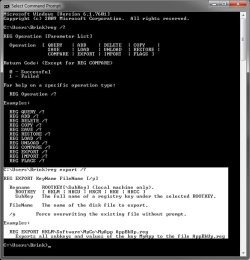
You can type reg export /? in a command prompt and press Enter to get more details about it like below.


For example, if you want to export the Software registry key below, ....
HKEY_CURRENT_USER\Software
.... you would type this into the command prompt below to export it with any filename.reg you like. The Y switch is to copy over if that filename already exists.
REG Export "HKCU\Software" filename.reg /Y
It will export the filename.reg file to wherever you have the command prompt open to. In my screenshot below, this would into the C:\Users\Brink folder.

reg.jpg

Hope this helps, :)
Shawn
 
Last edited:

My Computer

Computer type
PC/Desktop
Computer Manufacturer/Model Number
Self built custom
OS
64-bit Windows 11 Pro for Workstations
CPU
Intel i7-8700K OC'd to 5 GHz
Motherboard
ASUS ROG Maximus XI Formula Z390
Memory
64 GB (4x16GB) G.SKILL TridentZ RGB DDR4 3600 MHz
Graphics Card(s)
ASUS ROG-STRIX-GTX1080TI-O11G-GAMING
Sound Card
Integrated
Monitor(s) Displays
2 x Samsung Odyssey G7 27"
Screen Resolution
2560x1440
Hard Drives
1TB Samsung 990 PRO M.2,
4TB Samsung 990 PRO PRO M.2,
TerraMaster F8 SSD Plus NAS
PSU
Seasonic Prime Titanium 850W
Case
Thermaltake Core P3
Cooling
Corsair Hydro H115i
Keyboard
Logitech wireless K800
Mouse
Logitech MX Master 4
Internet Speed
2 Gb/s Download and 100 Mb/s Upload
Antivirus
Malwarebyte Anti-Malware Premium
Browser
Google Chrome
Other Info
Logitech Z625 speaker system,
Logitech BRIO 4K Pro webcam,
HP Color LaserJet Pro MFP M477fdn,
APC SMART-UPS RT 1000 XL - SURT1000XLI,
Galaxy S23 Plus phone
Thank you Brink. I had already tried regedit /?, but this was wrong and just opened the registry editor. I had not found the correct help command. Now I tried, but it does not always work :cry:. It works when I export a full key, like reg export HKEY_CURRENT_USER trial.reg
The operation completed successfully.
But not when I try to export a deeper subkey, and get an error asreg export HKEY_CURRENT_USER\Software\Microsoft\Windows NT\CurrentVersion trial.reg
ERROR: Invalid syntax.
Type "REG EXPORT /?" for usage.
I wonder what I am missing or if it does not actually export subkeys as I understand from the results of "reg export /?".

It would be very useful for many usages. An example is the Outlook profile for e-mail accounts settings, because it saves all accounts, passwords, etc. The usage is not limited to this, but with this I could make periodic auto-savings.
 

My Computer

Computer type
PC/Desktop
Computer Manufacturer/Model Number
Home assembled
OS
Windows 7 Ultimate 64-bit SP1
CPU
AMD Athlon 64 II X3 440
Motherboard
M4A785TD-V EVO
Memory
Kingston kit 4GB DDR3 1333MHz (KVR1333D3N9K2/4)
Monitor(s) Displays
ASUS AS VH198S
Screen Resolution
1440x900
Hard Drives
Crucial MX300 2.5" SSD SATA,
Western Digital Caviar Black WD1002FAEX SATA-III,
Samsung HD161HJ SATA-II,
Seagate Barracuda ST3120022A ATA,
Western Digital WD800BB ATA.
Case
Standard
Cooling
Standard
Keyboard
Safeway SW-20
Mouse
Logitech Anywhere, Logitech MX Anywhere 2S, Technet M006
Internet Speed
130 Mbs fiber
Antivirus
Avast Premier
Browser
Firefox, Ice Dragon and Opera
Other Info
PCI ATA-133 Adapter,
Parallel Port Card PCI - PU005V2.
Since the key path has a space in it, you'll just need to have it wrapped in quotes like below instead. :)

reg export "HKEY_CURRENT_USER\Software\Microsoft\Windows NT\CurrentVersion" trial.reg
 

My Computer

Computer type
PC/Desktop
Computer Manufacturer/Model Number
Self built custom
OS
64-bit Windows 11 Pro for Workstations
CPU
Intel i7-8700K OC'd to 5 GHz
Motherboard
ASUS ROG Maximus XI Formula Z390
Memory
64 GB (4x16GB) G.SKILL TridentZ RGB DDR4 3600 MHz
Graphics Card(s)
ASUS ROG-STRIX-GTX1080TI-O11G-GAMING
Sound Card
Integrated
Monitor(s) Displays
2 x Samsung Odyssey G7 27"
Screen Resolution
2560x1440
Hard Drives
1TB Samsung 990 PRO M.2,
4TB Samsung 990 PRO PRO M.2,
TerraMaster F8 SSD Plus NAS
PSU
Seasonic Prime Titanium 850W
Case
Thermaltake Core P3
Cooling
Corsair Hydro H115i
Keyboard
Logitech wireless K800
Mouse
Logitech MX Master 4
Internet Speed
2 Gb/s Download and 100 Mb/s Upload
Antivirus
Malwarebyte Anti-Malware Premium
Browser
Google Chrome
Other Info
Logitech Z625 speaker system,
Logitech BRIO 4K Pro webcam,
HP Color LaserJet Pro MFP M477fdn,
APC SMART-UPS RT 1000 XL - SURT1000XLI,
Galaxy S23 Plus phone
Since the key path has a space in it, you'll just need to have it wrapped in quotes like below instead. :)

reg export "HKEY_CURRENT_USER\Software\Microsoft\Windows NT\CurrentVersion" trial.reg

Thank you Brink and sorry for being so silly. I have got confused because if since both long names (over 8.3) and names with spaces appeared we had to place them wrapped in quotes, for some time now the command line accepts them, so I didn't realize it does accept directories and files paths but not registry paths/key names. I didn't know where my error was :(.

Now I got it working thanks to your patience :D.
 
Last edited by a moderator:

My Computer

Computer type
PC/Desktop
Computer Manufacturer/Model Number
Home assembled
OS
Windows 7 Ultimate 64-bit SP1
CPU
AMD Athlon 64 II X3 440
Motherboard
M4A785TD-V EVO
Memory
Kingston kit 4GB DDR3 1333MHz (KVR1333D3N9K2/4)
Monitor(s) Displays
ASUS AS VH198S
Screen Resolution
1440x900
Hard Drives
Crucial MX300 2.5" SSD SATA,
Western Digital Caviar Black WD1002FAEX SATA-III,
Samsung HD161HJ SATA-II,
Seagate Barracuda ST3120022A ATA,
Western Digital WD800BB ATA.
Case
Standard
Cooling
Standard
Keyboard
Safeway SW-20
Mouse
Logitech Anywhere, Logitech MX Anywhere 2S, Technet M006
Internet Speed
130 Mbs fiber
Antivirus
Avast Premier
Browser
Firefox, Ice Dragon and Opera
Other Info
PCI ATA-133 Adapter,
Parallel Port Card PCI - PU005V2.
You're most welcome. :)
 

My Computer

Computer type
PC/Desktop
Computer Manufacturer/Model Number
Self built custom
OS
64-bit Windows 11 Pro for Workstations
CPU
Intel i7-8700K OC'd to 5 GHz
Motherboard
ASUS ROG Maximus XI Formula Z390
Memory
64 GB (4x16GB) G.SKILL TridentZ RGB DDR4 3600 MHz
Graphics Card(s)
ASUS ROG-STRIX-GTX1080TI-O11G-GAMING
Sound Card
Integrated
Monitor(s) Displays
2 x Samsung Odyssey G7 27"
Screen Resolution
2560x1440
Hard Drives
1TB Samsung 990 PRO M.2,
4TB Samsung 990 PRO PRO M.2,
TerraMaster F8 SSD Plus NAS
PSU
Seasonic Prime Titanium 850W
Case
Thermaltake Core P3
Cooling
Corsair Hydro H115i
Keyboard
Logitech wireless K800
Mouse
Logitech MX Master 4
Internet Speed
2 Gb/s Download and 100 Mb/s Upload
Antivirus
Malwarebyte Anti-Malware Premium
Browser
Google Chrome
Other Info
Logitech Z625 speaker system,
Logitech BRIO 4K Pro webcam,
HP Color LaserJet Pro MFP M477fdn,
APC SMART-UPS RT 1000 XL - SURT1000XLI,
Galaxy S23 Plus phone
restore backedup registry

Restore points are not something I trust
to do the right thing when I need it. They usually fail on me.
I've tried importing the registry while windows was running that will not work.

I've done some reading. Tell me any Pros/Cons from doing it this way.
http://technet.microsoft.com/en-us/library/cc742021%28v=ws.10%29.aspx

c:\reg import

In Safe mode:
Type or use batch file
c:\reg import E:\MyDocuments\2013.08.07-FullReg.reg
the Command location of my backed up registry

I have 64bitreg and 32bitreg backups, but I only need the 64bit, Right.

I have repair disks and WindowsImageBackup File.
So, if anything bad happens I'm not S.O.L..

Joe
 

My Computer

Computer Manufacturer/Model Number
HP
OS
Windows 7 Home Premium 64bit
CPU
AMD A8-3800
Motherboard
?
Memory
8 GB
Graphics Card(s)
Radeon HD Graphics 2.40 Ghz
Monitor(s) Displays
Samsung Digial, NEC analog
Hard Drives
1 x 2TB
Hello Joe,

It will not work in Safe Mode either since Windows is still running.

Importing the complete registry like that is not advised, and will usually cause issues. It would be best to stick with updated system images for that instead.
 

My Computer

Computer type
PC/Desktop
Computer Manufacturer/Model Number
Self built custom
OS
64-bit Windows 11 Pro for Workstations
CPU
Intel i7-8700K OC'd to 5 GHz
Motherboard
ASUS ROG Maximus XI Formula Z390
Memory
64 GB (4x16GB) G.SKILL TridentZ RGB DDR4 3600 MHz
Graphics Card(s)
ASUS ROG-STRIX-GTX1080TI-O11G-GAMING
Sound Card
Integrated
Monitor(s) Displays
2 x Samsung Odyssey G7 27"
Screen Resolution
2560x1440
Hard Drives
1TB Samsung 990 PRO M.2,
4TB Samsung 990 PRO PRO M.2,
TerraMaster F8 SSD Plus NAS
PSU
Seasonic Prime Titanium 850W
Case
Thermaltake Core P3
Cooling
Corsair Hydro H115i
Keyboard
Logitech wireless K800
Mouse
Logitech MX Master 4
Internet Speed
2 Gb/s Download and 100 Mb/s Upload
Antivirus
Malwarebyte Anti-Malware Premium
Browser
Google Chrome
Other Info
Logitech Z625 speaker system,
Logitech BRIO 4K Pro webcam,
HP Color LaserJet Pro MFP M477fdn,
APC SMART-UPS RT 1000 XL - SURT1000XLI,
Galaxy S23 Plus phone
hmm ok I feel like i'm beat thanks
 

My Computer

Computer Manufacturer/Model Number
HP
OS
Windows 7 Home Premium 64bit
CPU
AMD A8-3800
Motherboard
?
Memory
8 GB
Graphics Card(s)
Radeon HD Graphics 2.40 Ghz
Monitor(s) Displays
Samsung Digial, NEC analog
Hard Drives
1 x 2TB
Well, don't think of it as beaten, but a better more reliable option instead. :)
 

My Computer

Computer type
PC/Desktop
Computer Manufacturer/Model Number
Self built custom
OS
64-bit Windows 11 Pro for Workstations
CPU
Intel i7-8700K OC'd to 5 GHz
Motherboard
ASUS ROG Maximus XI Formula Z390
Memory
64 GB (4x16GB) G.SKILL TridentZ RGB DDR4 3600 MHz
Graphics Card(s)
ASUS ROG-STRIX-GTX1080TI-O11G-GAMING
Sound Card
Integrated
Monitor(s) Displays
2 x Samsung Odyssey G7 27"
Screen Resolution
2560x1440
Hard Drives
1TB Samsung 990 PRO M.2,
4TB Samsung 990 PRO PRO M.2,
TerraMaster F8 SSD Plus NAS
PSU
Seasonic Prime Titanium 850W
Case
Thermaltake Core P3
Cooling
Corsair Hydro H115i
Keyboard
Logitech wireless K800
Mouse
Logitech MX Master 4
Internet Speed
2 Gb/s Download and 100 Mb/s Upload
Antivirus
Malwarebyte Anti-Malware Premium
Browser
Google Chrome
Other Info
Logitech Z625 speaker system,
Logitech BRIO 4K Pro webcam,
HP Color LaserJet Pro MFP M477fdn,
APC SMART-UPS RT 1000 XL - SURT1000XLI,
Galaxy S23 Plus phone
Am I mis-reading this tut or am I really that thick skulled? Seems like I've read many posts where the helper suggested "registry backup" at which point I quit reading because I assumed a long drawn out process with a back up program, thumb or external drive were needed & I don't have any of that. This tut sounds to me like System Restore & Reg. Back up are the same thing??
 

My Computer

Computer type
PC/Desktop
Computer Manufacturer/Model Number
emachines
OS
Microsoft Windows 7 Home Premium 64-bit 7601 Multiprocessor Free Service Pack 1
CPU
AMD Athlon(tm) II X2 220 Processor
Motherboard
eMachines EL1358G
Memory
3.00 GB
Graphics Card(s)
NVIDIA GeForce 6150SE nForce 430
Sound Card
Realtek High Definition Audio
Screen Resolution
1280 x 1024 x 32 bits (4294967296 colors) @ 60 Hz
Hard Drives
(1) WDC WD10 EADX-22TDHB0 SCSI Disk Device (2) Generic- Multi-Card USB Device
Keyboard
came with PC
Mouse
came with PC
Antivirus
Avast
Browser
IE 9
Other Info
don't know how to get info for the other 5 areas
Hey grits,

A restore point includes the registry, but it's not the same thing. Doing a system restore using a restore point is an easy way to restore the registry to how it was when the restore point was created.

Hope this helps. :)
 

My Computer

Computer type
PC/Desktop
Computer Manufacturer/Model Number
Self built custom
OS
64-bit Windows 11 Pro for Workstations
CPU
Intel i7-8700K OC'd to 5 GHz
Motherboard
ASUS ROG Maximus XI Formula Z390
Memory
64 GB (4x16GB) G.SKILL TridentZ RGB DDR4 3600 MHz
Graphics Card(s)
ASUS ROG-STRIX-GTX1080TI-O11G-GAMING
Sound Card
Integrated
Monitor(s) Displays
2 x Samsung Odyssey G7 27"
Screen Resolution
2560x1440
Hard Drives
1TB Samsung 990 PRO M.2,
4TB Samsung 990 PRO PRO M.2,
TerraMaster F8 SSD Plus NAS
PSU
Seasonic Prime Titanium 850W
Case
Thermaltake Core P3
Cooling
Corsair Hydro H115i
Keyboard
Logitech wireless K800
Mouse
Logitech MX Master 4
Internet Speed
2 Gb/s Download and 100 Mb/s Upload
Antivirus
Malwarebyte Anti-Malware Premium
Browser
Google Chrome
Other Info
Logitech Z625 speaker system,
Logitech BRIO 4K Pro webcam,
HP Color LaserJet Pro MFP M477fdn,
APC SMART-UPS RT 1000 XL - SURT1000XLI,
Galaxy S23 Plus phone
Shawn as a matter of habit now I always back up the entire registry on an install I take it I can do this by File > Export without just backing up those separate HKEYS? Is there any benefit from doing that?

Or should I just export the separate keys or sub entries?
 

My Computer

Computer type
PC/Desktop
Computer Manufacturer/Model Number
Own build (new) Desk1 / Asus ROG Win 7 / Desk2 1st build
OS
Desk1 7 Home Prem / Desk2 10 Pro / Main lap Asus ROG 10 Pro 2 laptop Toshiba 7 Pro Asus P2520 7 & 10
CPU
Desk1 i5 3750K / Laptop i7 GTX 860M / Desk2 i5 2500
Motherboard
Desk1 Asus P877-V / Desk2 Gigabyte H67 UD3H / Laptop ?
Memory
Desk1 8GB (1866) / Desk2 16GB (1333) / Laptop 8Gb DDR3
Graphics Card(s)
Desk 1& 2NVidia GTX 650 & Laptops on board Intel
Sound Card
Desk 1 & 2 -XONAR DG Realtek High Def audio Laptop
Monitor(s) Displays
Desk 1 Benq HD 2450 / Desk2 Philips 24" / Laptop 17.5"
Screen Resolution
1920x1080 D1 & D2 & Laptop 1
Hard Drives
Desk1 Samsung 120GB 830 SSD
Asus ROG 256GB 850 Pro SSD
Desk2 Samsung 840 256 SSD
Toshiba 120GB EVO
PSU
Desk 1 Corsair HX 1050/ Laptop ? / Desk 2 Corsair HX 650
Case
Desk 1 Cooler HAF XM ? Toshiba laptop / Desk2 Coolermaster
Cooling
Fans on all Desk1 -2 Desk2 - all Coolermasters 5 Laptop ?
Keyboard
Desk 1 MS Sidewinder X6 Desk 2 MS Sidewinder X 4
Mouse
Desk 1&2 - Gigabyte MS 900 gamer - laptop - Logitec wireless
Internet Speed
ADSL2+
Other Info
One other Desktop (tester) and spare Toshba laptop both with SSD's
Running Kaspersky 2016 ISS on all machines config'd identically
Logitec audio stereo systems on each machine (x3)
Canon MG5250MFC
Router/modem TP-Link running WPA2SK
Back
Top