Registry - Backup and Restore

How to Backup and Restore the Registry in Windows 7 and Vista

   Information
This will show you a few options on how to export the registry as a .reg file backup, and how to import the .reg file to restore to the registry in Windows 7 and Vista.
   Warning
Importing or merging a .reg file backup will only restore the keys and values that were included in the exported backup. If you have added new keys and values since the .reg file backup was created, then these items will not be affected or restored when you import or merge the older exported .reg file backup to the registry. If you wanted to replace the registry completely with a backup, then System Restore (see Method One in OPTION ONE & TWO below) will allow you to do this instead.


OPTION ONE

Backup Registry


METHOD ONE

Using System Restore


NOTE: This is the best method to use since it will replace the current registry with the contents of the registry as it was on the date the restore point was created. These restore points contain information about registry settings and other system information that Windows 7 uses. System Restore points do not include the personal user files.
1. Create a restore point.
NOTE: See information at that link for more details on this.
   Tip
Creating a restore point before making any changes to Windows 7 is the recommended method to use to have the registry backed up.


METHOD TWO

Export Only Part of the Registry as a Backup


NOTE: This will allow you to only export a HKEY or key branch in the registry to a .reg file as a backup.
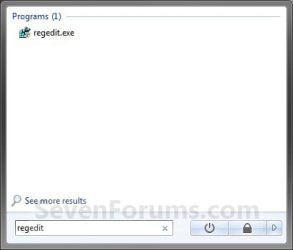
1. Open the Start menu and type regedit in the search line, then press Enter. (See screenshot below)
Search_Box.jpg
2. If prompted by UAC, click on Yes to approve.

3. To Export a Registry HKEY Branch
NOTE: This will allow you to backup the entire selected HKEY branch with all of it's subkeys and key values to a .reg file as a backup.
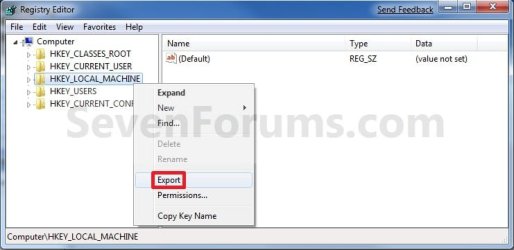
A) Right click on a HKEY branch that you want to backup, and click on Export. (See screenshot below)
Export-2.jpg
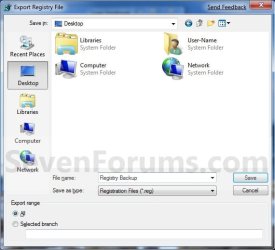
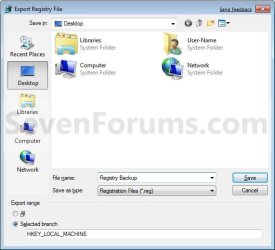
B) Select where you want to save the exported .reg file to, type in a name for the .reg file, and click on the Save button. (See screenshot below)
HKEY_Export_Location.jpg
4. To Export a Registry KEY Branch
NOTE: This will allow you to backup the entire selected KEY branch under a HKEY with all of it's subkeys and key values to a .reg file as a backup.
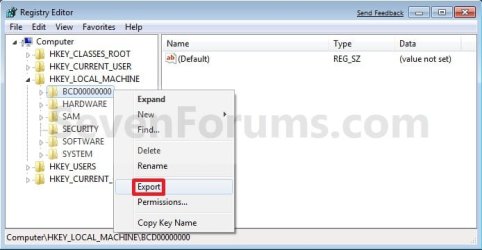
A) Right click on a KEY branch under the HKEY that you want to backup, and click on Export. (See screenshot below)
Export_Key.jpg
B) Select where you want to save the exported .reg file to, type in a name for the .reg file, and click on the Save button. (See screenshot below step 3B)


OPTION TWO

Restore Registry


METHOD ONE

From a System Restore Point


NOTE: This will replace your current registry and system files in Windows by restoring the registry and system files in Windows back to how they were on the date the restore point (Option One, Method One) was created.
1. Do a System Restore using a restore point with the date you want to restore you Windows 7 registry and system files back to.
NOTE: See information at link for more details on this.
   Tip
Doing a system restore is the recommended method to use to undo any changes made to Windows with a restore point dated before you made the changes.


METHOD TWO

Restore a REG File to the Registry in Windows


NOTE: Any new keys and values added to the registry not included in the .reg file at the date it was created will not be affected.
1. Merge from the REG File
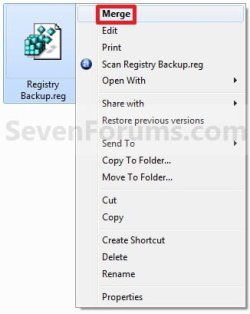
A) Right click on the backup .reg file and click on Merge. (See screenshot below)
Import-2.jpg
B) Click on Yes and Yes to approve the merge.

C) Go to step 3.
OR

2. Import from Regedit
A) Open the Start menu and type regedit in the search line, then press Enter. (See screenshot below)
Search_Box.jpg
B) If prompted by UAC, click on Yes to approve.

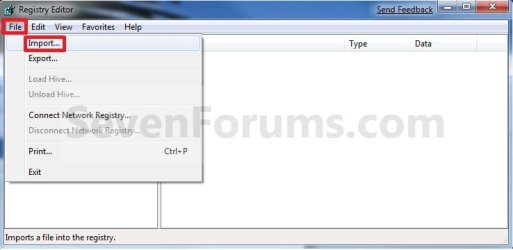
C) Click on File on the menu bar, then click on Import. (See screenshot below)
Import.jpg
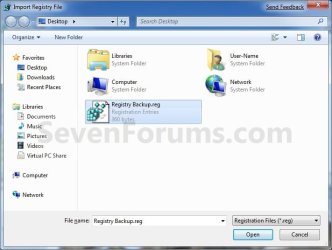
D) Navigate to where you saved the backup .reg file and select it, then click on the Save button. (See screenshot below)
Import_Location.jpg
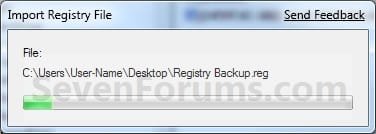
E) You will now see the import progress window. (See screenshot below)
Import_Progress.jpg
3. Click on OK.

   Tip
If you get the error below, then you will need to do a system restore instead since the keys are in use.

Error.jpg

That's it,
Shawn


Attachments

  • Command.jpg
    Command.jpg
    153.1 KB · Views: 1,684
  • Export.jpg
    Export.jpg
    91 KB · Views: 482
  • Export_Location.jpg
    Export_Location.jpg
    116.1 KB · Views: 581
  • Command-1.jpg
    Command-1.jpg
    198.5 KB · Views: 2,553
Last edited:
Thank you, very good to know. (Now to start actually backing up my computer!)

~Lordbob
 

My Computer

Computer Manufacturer/Model Number
Hera
OS
Windows 7 Ultimate x64, Mint 9
CPU
Intel i5-2500k
Motherboard
ASUS P8P67 Pro
Memory
2x 4Gb Corsair VENGEANCE DDR3-1600
Graphics Card(s)
NVidia GeForce N260GTX Twin Frozr
Sound Card
Realtek HD OnBoard Audio
Monitor(s) Displays
ASUS 24" Monitor
Screen Resolution
1920x1080
Hard Drives
G.SKILL Phoenix Series 60GB SATA II MLC Internal Solid State Drive (SSD)
SAMSUNG Spinpoint F3R 1TB 7200 RPM 32MB Cache SATA II
PSU
Cooler Master Real Power Pro 750W
Case
Cooler Master Haf 932
Cooling
Fans
Keyboard
Razer Tarantula
Mouse
Razer Lachesis
Internet Speed
not fast enough
LOL, you're welcome Lordbob. :)
 

My Computer

Computer type
PC/Desktop
Computer Manufacturer/Model Number
Self built custom
OS
64-bit Windows 11 Pro for Workstations
CPU
Intel i7-8700K OC'd to 5 GHz
Motherboard
ASUS ROG Maximus XI Formula Z390
Memory
64 GB (4x16GB) G.SKILL TridentZ RGB DDR4 3600 MHz
Graphics Card(s)
ASUS ROG-STRIX-GTX1080TI-O11G-GAMING
Sound Card
Integrated
Monitor(s) Displays
2 x Samsung Odyssey G7 27"
Screen Resolution
2560x1440
Hard Drives
1TB Samsung 990 PRO M.2,
4TB Samsung 990 PRO PRO M.2,
TerraMaster F8 SSD Plus NAS
PSU
Seasonic Prime Titanium 850W
Case
Thermaltake Core P3
Cooling
Corsair Hydro H115i
Keyboard
Logitech wireless K800
Mouse
Logitech MX Master 4
Internet Speed
2 Gb/s Download and 100 Mb/s Upload
Antivirus
Malwarebyte Anti-Malware Premium
Browser
Google Chrome
Other Info
Logitech Z625 speaker system,
Logitech BRIO 4K Pro webcam,
HP Color LaserJet Pro MFP M477fdn,
APC SMART-UPS RT 1000 XL - SURT1000XLI,
Galaxy S23 Plus phone
Good for new Users... good job
 

My Computer

Computer Manufacturer/Model Number
Microsoft
OS
Windows 7 and MAC
Graphics Card(s)
NVIDIA 9200 GT
Sound Card
NvIdiA
Hey Shawn ,

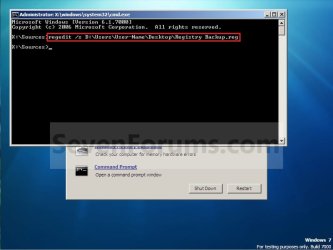
I found out another way - Not sure if you have a tutorial on it but you can Restore the registry using a System Repair Disk

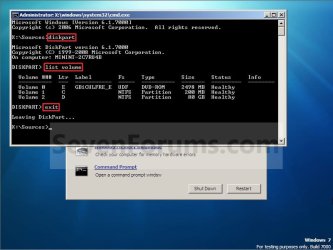
Open Command Prompt from System Repair options and then enter the following

Code:
regedit /s c:\Users\*User_Name*\Desktop\registrybackup.reg

Of course C:\ Being the Install Drive Letter and Desktop being the Folder Location of the backup ;)

This might be handy if system restore couldn't restore the registry
 

My Computer

Computer type
PC/Desktop
Computer Manufacturer/Model Number
Custom Built
OS
Windows 7 Professional x64 SP1 ; Windows Server 2012 R2 Standard
CPU
Intel Core i5 2400 @ 3.10GHz
Motherboard
Foxconn H67MP-S/-V/H67MP
Memory
8.0GB DDR3 @ 665MHz (2GBx4)
Graphics Card(s)
AMD Radeon HD 6870
Sound Card
Realtek High Definition Audio
Monitor(s) Displays
AOC 2243W & SMB1930NW
Screen Resolution
1440x900 & 1920x1080
Hard Drives
977GB Seagate ST31000524AS ATA Drive (SATA)
250GB WD iSCSI attached Drive
PSU
750W Gaming PSU
Case
Novatech Night
Cooling
Fan
Keyboard
Dell Standard PS/2 Keyboard
Mouse
R.A.T 07 Gaming Mouse
Internet Speed
Download: 10 Mbps Ping: 30ms Upload: 0.81 Mbps
Browser
Google Chrome
Other Info
Optiarc DVD RW AD-5260S ATA Device
Thank you Josh.

That's another good option. A system restore (at boot if needed) would be safer and more thorough though.
 

My Computer

Computer type
PC/Desktop
Computer Manufacturer/Model Number
Self built custom
OS
64-bit Windows 11 Pro for Workstations
CPU
Intel i7-8700K OC'd to 5 GHz
Motherboard
ASUS ROG Maximus XI Formula Z390
Memory
64 GB (4x16GB) G.SKILL TridentZ RGB DDR4 3600 MHz
Graphics Card(s)
ASUS ROG-STRIX-GTX1080TI-O11G-GAMING
Sound Card
Integrated
Monitor(s) Displays
2 x Samsung Odyssey G7 27"
Screen Resolution
2560x1440
Hard Drives
1TB Samsung 990 PRO M.2,
4TB Samsung 990 PRO PRO M.2,
TerraMaster F8 SSD Plus NAS
PSU
Seasonic Prime Titanium 850W
Case
Thermaltake Core P3
Cooling
Corsair Hydro H115i
Keyboard
Logitech wireless K800
Mouse
Logitech MX Master 4
Internet Speed
2 Gb/s Download and 100 Mb/s Upload
Antivirus
Malwarebyte Anti-Malware Premium
Browser
Google Chrome
Other Info
Logitech Z625 speaker system,
Logitech BRIO 4K Pro webcam,
HP Color LaserJet Pro MFP M477fdn,
APC SMART-UPS RT 1000 XL - SURT1000XLI,
Galaxy S23 Plus phone
You're welcome Mustafa, and welcome to Seven Forums. :)
 

My Computer

Computer type
PC/Desktop
Computer Manufacturer/Model Number
Self built custom
OS
64-bit Windows 11 Pro for Workstations
CPU
Intel i7-8700K OC'd to 5 GHz
Motherboard
ASUS ROG Maximus XI Formula Z390
Memory
64 GB (4x16GB) G.SKILL TridentZ RGB DDR4 3600 MHz
Graphics Card(s)
ASUS ROG-STRIX-GTX1080TI-O11G-GAMING
Sound Card
Integrated
Monitor(s) Displays
2 x Samsung Odyssey G7 27"
Screen Resolution
2560x1440
Hard Drives
1TB Samsung 990 PRO M.2,
4TB Samsung 990 PRO PRO M.2,
TerraMaster F8 SSD Plus NAS
PSU
Seasonic Prime Titanium 850W
Case
Thermaltake Core P3
Cooling
Corsair Hydro H115i
Keyboard
Logitech wireless K800
Mouse
Logitech MX Master 4
Internet Speed
2 Gb/s Download and 100 Mb/s Upload
Antivirus
Malwarebyte Anti-Malware Premium
Browser
Google Chrome
Other Info
Logitech Z625 speaker system,
Logitech BRIO 4K Pro webcam,
HP Color LaserJet Pro MFP M477fdn,
APC SMART-UPS RT 1000 XL - SURT1000XLI,
Galaxy S23 Plus phone
I deleted the registry and do not have a back up. What is your suggestion to reinstall?
 

My Computer

Computer Manufacturer/Model Number
hp
OS
Windows 7
specify the registry you deleted?
 

My Computer

Computer type
PC/Desktop
Computer Manufacturer/Model Number
Self assembled
OS
Windows 10 Home 64Bit
CPU
Intel Core i5 10400 @ 2.90GHz
Motherboard
Intel Corporation DG41WV (PROCESSOR)
Memory
8.00GB Single-Channel Unknown @ 1329MHz (16-20-20-38)
Sound Card
Realtek High Definition Audio
Monitor(s) Displays
DELL E170S
Screen Resolution
1280x1024 pixels
Hard Drives
931GB TOSHIBA DT01ACA100 (SATA)
238GB TEAM TM8PS7256G (SATA SSD)
Case
Nothing Fancy
Cooling
Fans
Keyboard
A4 Tech Co LTD
Mouse
A4 Tech Co Ltd/Logitech
Internet Speed
25 Mbps
Had Comodo clean registry and it wiped my fonts out and all I have know is wingdings. Doe that help?
 

My Computer

Computer Manufacturer/Model Number
hp
OS
Windows 7

My Computer

Computer type
PC/Desktop
Computer Manufacturer/Model Number
Self assembled
OS
Windows 10 Home 64Bit
CPU
Intel Core i5 10400 @ 2.90GHz
Motherboard
Intel Corporation DG41WV (PROCESSOR)
Memory
8.00GB Single-Channel Unknown @ 1329MHz (16-20-20-38)
Sound Card
Realtek High Definition Audio
Monitor(s) Displays
DELL E170S
Screen Resolution
1280x1024 pixels
Hard Drives
931GB TOSHIBA DT01ACA100 (SATA)
238GB TEAM TM8PS7256G (SATA SSD)
Case
Nothing Fancy
Cooling
Fans
Keyboard
A4 Tech Co LTD
Mouse
A4 Tech Co Ltd/Logitech
Internet Speed
25 Mbps
No, I will give it a try. Thought you needed a restore point to grab the backed up information to restore.

Working on it. Little more difficult when all text is in symbols.


Had Comodo clean registry and it wiped my fonts out and all I have know is wingdings. Doe that help?
 
Last edited by a moderator:

My Computer

Computer Manufacturer/Model Number
hp
OS
Windows 7
alright. first check if you have any restore point and the date before you used the registry cleaner.
 

My Computer

Computer type
PC/Desktop
Computer Manufacturer/Model Number
Self assembled
OS
Windows 10 Home 64Bit
CPU
Intel Core i5 10400 @ 2.90GHz
Motherboard
Intel Corporation DG41WV (PROCESSOR)
Memory
8.00GB Single-Channel Unknown @ 1329MHz (16-20-20-38)
Sound Card
Realtek High Definition Audio
Monitor(s) Displays
DELL E170S
Screen Resolution
1280x1024 pixels
Hard Drives
931GB TOSHIBA DT01ACA100 (SATA)
238GB TEAM TM8PS7256G (SATA SSD)
Case
Nothing Fancy
Cooling
Fans
Keyboard
A4 Tech Co LTD
Mouse
A4 Tech Co Ltd/Logitech
Internet Speed
25 Mbps
thanks for your help!!!! up and running!!!! Yah!!!!

Merry Christmas
 

My Computer

Computer Manufacturer/Model Number
hp
OS
Windows 7
did you get all your fonts back? & you're welcome :)
 

My Computer

Computer type
PC/Desktop
Computer Manufacturer/Model Number
Self assembled
OS
Windows 10 Home 64Bit
CPU
Intel Core i5 10400 @ 2.90GHz
Motherboard
Intel Corporation DG41WV (PROCESSOR)
Memory
8.00GB Single-Channel Unknown @ 1329MHz (16-20-20-38)
Sound Card
Realtek High Definition Audio
Monitor(s) Displays
DELL E170S
Screen Resolution
1280x1024 pixels
Hard Drives
931GB TOSHIBA DT01ACA100 (SATA)
238GB TEAM TM8PS7256G (SATA SSD)
Case
Nothing Fancy
Cooling
Fans
Keyboard
A4 Tech Co LTD
Mouse
A4 Tech Co Ltd/Logitech
Internet Speed
25 Mbps
As far as I can tell all of my fonts came back.:D
Thanks again!!!
 

My Computer

Computer Manufacturer/Model Number
hp
OS
Windows 7
Thanks for the confirmation :D

happy holidays xD
 

My Computer

Computer type
PC/Desktop
Computer Manufacturer/Model Number
Self assembled
OS
Windows 10 Home 64Bit
CPU
Intel Core i5 10400 @ 2.90GHz
Motherboard
Intel Corporation DG41WV (PROCESSOR)
Memory
8.00GB Single-Channel Unknown @ 1329MHz (16-20-20-38)
Sound Card
Realtek High Definition Audio
Monitor(s) Displays
DELL E170S
Screen Resolution
1280x1024 pixels
Hard Drives
931GB TOSHIBA DT01ACA100 (SATA)
238GB TEAM TM8PS7256G (SATA SSD)
Case
Nothing Fancy
Cooling
Fans
Keyboard
A4 Tech Co LTD
Mouse
A4 Tech Co Ltd/Logitech
Internet Speed
25 Mbps
Hi Brink, I am planning to backup the complete registry from a clean install: (Install Windows 7 on another Partition, backup to Data Partition. Delete the fresh Windows 7 Partition. Use Old Windows 7 Partition and access Registry via Data Partition, so I always have access to the fresh registry.

I want a folder with everything inside for example. Folder inside a Folder and then inside that is the Key. This way I can navigate through folders and get to the keys I want when needed. Is this in any way possible?

Or would I need to manually backup one by one?
 
Last edited by a moderator:

My Computer

Computer type
PC/Desktop
Computer Manufacturer/Model Number
Novatech iRush Pro
OS
Windows 7 Ultimate SP1 - 64 Bit
CPU
Intel Core i5 2500k
Motherboard
Foxconn H67M-S/H67M-V/H67
Memory
2x4GB DDR3 1333Hz
Graphics Card(s)
Ati Radeon 6770
Sound Card
None
Monitor(s) Displays
Samsung S22B150
Screen Resolution
1920x1080
Hard Drives
2x500GB
PSU
500W
Cooling
Fan
Keyboard
HP KU0316
Mouse
Wireless Logitech M185
Internet Speed
20MB/s
Antivirus
Avast Free
Browser
Google Chrome
Other Info
Logitech M185 Mouse
KU-M316 Keyboard
Hello Infinite,

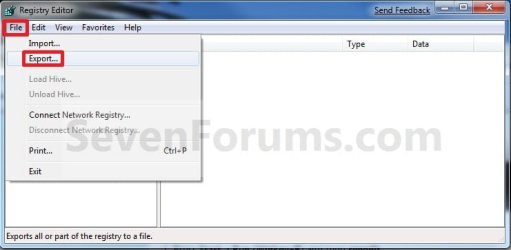
You could export the complete registry by having Computer selected at the top in regedit, click on File and Export, then select where you would like to export the complete registry to as one large REG file.

Hope this helps. :)
 
Last edited:

My Computer

Computer type
PC/Desktop
Computer Manufacturer/Model Number
Self built custom
OS
64-bit Windows 11 Pro for Workstations
CPU
Intel i7-8700K OC'd to 5 GHz
Motherboard
ASUS ROG Maximus XI Formula Z390
Memory
64 GB (4x16GB) G.SKILL TridentZ RGB DDR4 3600 MHz
Graphics Card(s)
ASUS ROG-STRIX-GTX1080TI-O11G-GAMING
Sound Card
Integrated
Monitor(s) Displays
2 x Samsung Odyssey G7 27"
Screen Resolution
2560x1440
Hard Drives
1TB Samsung 990 PRO M.2,
4TB Samsung 990 PRO PRO M.2,
TerraMaster F8 SSD Plus NAS
PSU
Seasonic Prime Titanium 850W
Case
Thermaltake Core P3
Cooling
Corsair Hydro H115i
Keyboard
Logitech wireless K800
Mouse
Logitech MX Master 4
Internet Speed
2 Gb/s Download and 100 Mb/s Upload
Antivirus
Malwarebyte Anti-Malware Premium
Browser
Google Chrome
Other Info
Logitech Z625 speaker system,
Logitech BRIO 4K Pro webcam,
HP Color LaserJet Pro MFP M477fdn,
APC SMART-UPS RT 1000 XL - SURT1000XLI,
Galaxy S23 Plus phone
Back
Top