Icons disappearing with error messages and being sent to Recycle Bin

I thought I remembered something about that, but didn't see it sifting back through everything.

To me, this is just sounding like a process constantly running and checking for the mouse over items, upon which it just deletes them. If it were more widespread (suppose every time the user passed his mouse over a link it opened it) then we could probably narrow it down further but it just seems to be a haywire process or service that is going to be incredibly difficult to track down.
 

My Computer My Computer

At a glance

XP / Win7 x64 ProIntel Quad-Core Q9450 @ 3.2GHz2x2GB GSkill DDR2NVIDIA GeForce 8600 GTS (EVGA)
OS
XP / Win7 x64 Pro
CPU
Intel Quad-Core Q9450 @ 3.2GHz
Motherboard
Asus P5-E
Memory
2x2GB GSkill DDR2
Graphics Card(s)
NVIDIA GeForce 8600 GTS (EVGA)
Monitor(s) Displays
Dell 2408WFP
Screen Resolution
1920x1200
Yes, the icons/folders/programs disappear when clicked on in a Clean Boot and in Safe Mode.

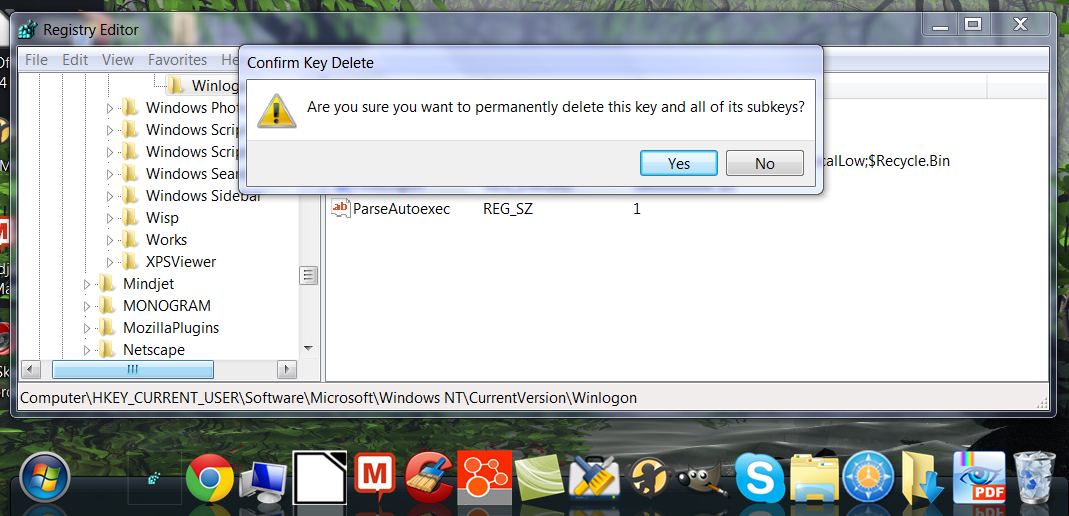
Okay, I tried the suggestion Kaktussoft suggested checking out the registry keys. I can access Regedit from Stardock, but when I click on a key, I got this message:

"Are you sure you want to permanently delete this key and all of its subkeys?"

Here's another screenshot:

5Eb3o.png

I did check Regedit when the computer was running normally. There weren't any subkeys named "shell" in HKEY_CURRENT_USER\Software\Microsoft\Windows NT\CurrentVersion\Winlogon or in HKEY_LOCAL_MACHINE\SOFTWARE\Microsoft\Windows NT\CurrentVersion\Winlogon
Very strange!! Looks like you select routine is corrupt.
Try another keyboard and another mouse. Just to be very sure that isn't the problem.

It looks like someone presses your DEL-button ...
 

My Computer My Computer

At a glance

Microsoft Windows 7 Home Premium 64-bits 7601...Intel(R) Core(TM) i3 CPU M 370 @ 2.40GHz4,00 GBATI Mobility Radeon HD 5400 Series
Computer type
Laptop
Computer Manufacturer/Model Number
ACER ASPIRE 5742G
OS
Microsoft Windows 7 Home Premium 64-bits 7601 Multiprocessor Free Service Pack 1
CPU
Intel(R) Core(TM) i3 CPU M 370 @ 2.40GHz
Motherboard
Acer Aspire 5742G
Memory
4,00 GB
Graphics Card(s)
ATI Mobility Radeon HD 5400 Series
Sound Card
(1) AMD High Definition Audio Device (2) Realtek High Defi
Screen Resolution
1366 x 768 x 32 bits (4294967296 colors) @ 60 Hz
Hard Drives
WDC WD5000BEVT-22ZAT0
already done this in elevated command prompt?
SFC /scannow
 

My Computer My Computer

At a glance

Microsoft Windows 7 Home Premium 64-bits 7601...Intel(R) Core(TM) i3 CPU M 370 @ 2.40GHz4,00 GBATI Mobility Radeon HD 5400 Series
Computer type
Laptop
Computer Manufacturer/Model Number
ACER ASPIRE 5742G
OS
Microsoft Windows 7 Home Premium 64-bits 7601 Multiprocessor Free Service Pack 1
CPU
Intel(R) Core(TM) i3 CPU M 370 @ 2.40GHz
Motherboard
Acer Aspire 5742G
Memory
4,00 GB
Graphics Card(s)
ATI Mobility Radeon HD 5400 Series
Sound Card
(1) AMD High Definition Audio Device (2) Realtek High Defi
Screen Resolution
1366 x 768 x 32 bits (4294967296 colors) @ 60 Hz
Hard Drives
WDC WD5000BEVT-22ZAT0
Yes, I ran it as a user/default and elevated. It didn't find anything ("Window Resource Protection did not find any integrity violation.") Although I only did it one pass in each case. Would that make a difference? After a SFC /scannow the problem would come back even after the computer had been on for a while. In other words, the problem would reoccur immediately after a scan (just like on start-up).
 

My Computer My Computer

At a glance

Windows 7 64bit Home Premium
OS
Windows 7 64bit Home Premium
Normally the problem disappears after 5 minutes and then NEVER comes back until you reboot.

Try SFC/scannow again... are you sure it triggers something so you have the nasty problem? Test a few times from a good working situation

SFC/scannow is only needed once (if it didn't find any integrity violations)
 

My Computer My Computer

At a glance

Microsoft Windows 7 Home Premium 64-bits 7601...Intel(R) Core(TM) i3 CPU M 370 @ 2.40GHz4,00 GBATI Mobility Radeon HD 5400 Series
Computer type
Laptop
Computer Manufacturer/Model Number
ACER ASPIRE 5742G
OS
Microsoft Windows 7 Home Premium 64-bits 7601 Multiprocessor Free Service Pack 1
CPU
Intel(R) Core(TM) i3 CPU M 370 @ 2.40GHz
Motherboard
Acer Aspire 5742G
Memory
4,00 GB
Graphics Card(s)
ATI Mobility Radeon HD 5400 Series
Sound Card
(1) AMD High Definition Audio Device (2) Realtek High Defi
Screen Resolution
1366 x 768 x 32 bits (4294967296 colors) @ 60 Hz
Hard Drives
WDC WD5000BEVT-22ZAT0
Just ran several elevated passes. The problem didn't come back like the last time. And it didn't find anything wrong. But I still have the problem at start up.
 

My Computer My Computer

At a glance

Windows 7 64bit Home Premium
OS
Windows 7 64bit Home Premium
Still having this problem. But I just tried doing something Kaktussoft suggested: right clicking on an empty space of the desktop right after start up. I right clicked, chose New Text Document. It created an icon on the desktop, it let me name the document, and it also let me open the empty document. And then when I clicked on the other desktop icons, everything was back to normal.

I haven't mentioned this before, and I don't know if it would make a difference. But the Windows Boot Manager keeps showing up when I turn on the computer asking me to choose an operating system. There has only been one operating system on this computer and it only shows Windows 7 as the choice. There is no countdown timer so I have to press Enter every time. I did go to Control Panel > System > Advanced > Start up and Recovery > Settings and then set the timer to zero. Didn't help. I still get the Boot Manager. Do you think this would have anything to do with my disappearing icons?
 

My Computer My Computer

At a glance

Windows 7 64bit Home Premium
OS
Windows 7 64bit Home Premium
Code:
bcdedit /set {bootmgr} default {current}
Do that from "elevated command prompt"
That makes your current started OS the default one. Has nothing to do with icons problem
 

My Computer My Computer

At a glance

Microsoft Windows 7 Home Premium 64-bits 7601...Intel(R) Core(TM) i3 CPU M 370 @ 2.40GHz4,00 GBATI Mobility Radeon HD 5400 Series
Computer type
Laptop
Computer Manufacturer/Model Number
ACER ASPIRE 5742G
OS
Microsoft Windows 7 Home Premium 64-bits 7601 Multiprocessor Free Service Pack 1
CPU
Intel(R) Core(TM) i3 CPU M 370 @ 2.40GHz
Motherboard
Acer Aspire 5742G
Memory
4,00 GB
Graphics Card(s)
ATI Mobility Radeon HD 5400 Series
Sound Card
(1) AMD High Definition Audio Device (2) Realtek High Defi
Screen Resolution
1366 x 768 x 32 bits (4294967296 colors) @ 60 Hz
Hard Drives
WDC WD5000BEVT-22ZAT0
Still having this problem. But I just tried doing something Kaktussoft suggested: right clicking on an empty space of the desktop right after start up. I right clicked, chose New Text Document. It created an icon on the desktop, it let me name the document, and it also let me open the empty document. And then when I clicked on the other desktop icons, everything was back to normal.

Are you very very sure that fixes the problem? Very strange
 

My Computer My Computer

At a glance

Microsoft Windows 7 Home Premium 64-bits 7601...Intel(R) Core(TM) i3 CPU M 370 @ 2.40GHz4,00 GBATI Mobility Radeon HD 5400 Series
Computer type
Laptop
Computer Manufacturer/Model Number
ACER ASPIRE 5742G
OS
Microsoft Windows 7 Home Premium 64-bits 7601 Multiprocessor Free Service Pack 1
CPU
Intel(R) Core(TM) i3 CPU M 370 @ 2.40GHz
Motherboard
Acer Aspire 5742G
Memory
4,00 GB
Graphics Card(s)
ATI Mobility Radeon HD 5400 Series
Sound Card
(1) AMD High Definition Audio Device (2) Realtek High Defi
Screen Resolution
1366 x 768 x 32 bits (4294967296 colors) @ 60 Hz
Hard Drives
WDC WD5000BEVT-22ZAT0
Yes, I'm sure. Just tested it:

● Turn on computer > Right click on empty space on desktop > Choose New Text Document > Name it > Click on the new document icon > it opens. (and so do other icons after I do this operation)

● Turn on computer > Click an icon > It disappears and goes to the Recycle Bin with "Can't find..." message.

I just tried setting the current OS as the default through an elevated command prompt. That didn't work. I'm not too concerned about that right now as I'd like to get this icon problem sorted out. Thanks.
 

My Computer My Computer

At a glance

Windows 7 64bit Home Premium
OS
Windows 7 64bit Home Premium
Yes, I'm sure. Just tested it:

● Turn on computer > Right click on empty space on desktop > Choose New Text Document > Name it > Click on the new document icon > it opens. (and so do other icons after I do this operation)

● Turn on computer > Click an icon > It disappears and goes to the Recycle Bin with "Can't find..." message.
This is close to impossible!!
 

My Computer My Computer

At a glance

Microsoft Windows 7 Home Premium 64-bits 7601...Intel(R) Core(TM) i3 CPU M 370 @ 2.40GHz4,00 GBATI Mobility Radeon HD 5400 Series
Computer type
Laptop
Computer Manufacturer/Model Number
ACER ASPIRE 5742G
OS
Microsoft Windows 7 Home Premium 64-bits 7601 Multiprocessor Free Service Pack 1
CPU
Intel(R) Core(TM) i3 CPU M 370 @ 2.40GHz
Motherboard
Acer Aspire 5742G
Memory
4,00 GB
Graphics Card(s)
ATI Mobility Radeon HD 5400 Series
Sound Card
(1) AMD High Definition Audio Device (2) Realtek High Defi
Screen Resolution
1366 x 768 x 32 bits (4294967296 colors) @ 60 Hz
Hard Drives
WDC WD5000BEVT-22ZAT0
If you found a solution to this issue, my apologies for the highly delayed post. I expereinced this on a new system - straight out of the box. After checking all possible sources, I happened to look closely at the keyboard and noticed the "delete" key was slightly off kilter and low on one corner. I removed the key then replaced and the problem was solved. An earlier poster touched on it, suggesting you replace your keyboard and mouse to see if it corrects the problem.

As always, other things being equal, the simpler explanation is usually the right one.

Good luck.
 

My Computer My Computer

At a glance

Windows 7 x64
OS
Windows 7 x64
Back
Top