Solved Win7 SSD shows up in Defrag?

the7thcolumn

New member
Member
Local time
5:15 AM
Messages
26
I just isntalled Win7 Pro on a new PC with a new SSD.

I noticed it shows up under the list of disks that can be defragged. However my pals their PC's don't show that.

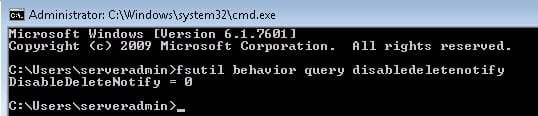
I have AHCI on, and TRIM shows as its on. Any ideas?
SSD.jpg
SSD2.jpg

Mobo: ASUS E35M1-I
Drive: Corsair Force GT 60GB
RAM: Kingston Value Ram 4GB

OS and R-W- speeds are stable everything is stock clocked.
 

My Computer My Computer

At a glance

Win 7 Pro 64bit
OS
Win 7 Pro 64bit
My SSD also show up. The big and important thing is it states, (Never Run) as it should.
 

My Computer My Computer

At a glance

Windows 10 Pro. 64/ version 1709 Windows 7 Pr...Intel i7-6800K @ 4.3Corsair Platinum 16 gig @2400EVGA GTX 1070 OC
Computer type
PC/Desktop
Computer Manufacturer/Model Number
Home made Desktop
OS
Windows 10 Pro. 64/ version 1709 Windows 7 Pro/64
CPU
Intel i7-6800K @ 4.3
Motherboard
ASUS X-99 Deluxe II
Memory
Corsair Platinum 16 gig @2400
Graphics Card(s)
EVGA GTX 1070 OC
Monitor(s) Displays
Asus 27" LED LCD/VE278Q
Screen Resolution
1920-1080 or 1280-720 HDMI
Hard Drives
INTEL SSD 730-240 Gb Sata 3.0/
PSU
EVGA Platium 1200W
Case
Phanteks Luxe Tempered Glass 8 fans/ one radiator
Cooling
XSPC/ Water Cooled CPU
Keyboard
Das 4 Professional
Mouse
Logitech M705/MX Anywhere 2-S
Internet Speed
100 mbits
Antivirus
Microsoft Security Essentials/ Malwarebytes Premium 3.0/ SAS
Browser
I.E. 11 default/Firefox/ ISP Time Warner Cable/Spectrum
Other Info
LG BluRay Burner/
Sound system-KLipsch-THX/
Icy Dock ssd Hot Swap bays.
My SSD also show up. The big and important thing is it states, (Never Run) as it should.

Never run also shows up when you do a fresh install (on a normal HDD) and it has Never Run (yet). That's why I was asking.
 

My Computer My Computer

At a glance

Win 7 Pro 64bit
OS
Win 7 Pro 64bit
I have three systems with SSDs, and they show in all three systems. As long as it is set to never run, I wouldn't worry about it.
 

My Computer My Computer

At a glance

Windows 7 Ultimate x64 SP1Intel Core i7-260012 GB Patriot Extreme DDR3-1333Nvidia GTX 470
OS
Windows 7 Ultimate x64 SP1
CPU
Intel Core i7-2600
Motherboard
Gigabyte GA-P67A-UD3P-B3
Memory
12 GB Patriot Extreme DDR3-1333
Graphics Card(s)
Nvidia GTX 470
Monitor(s) Displays
Dell UltraSharp 2209WA
Hard Drives
OCZ Agility3 240 GB, WD5001AALS, WD7501AALS
PSU
OCZ ModStream 700W
Case
CoolerMaster HAF 912 Advanced
Cooling
CoolerMaster Hyper 212 Plus
I have three systems with SSDs, and they show in all three systems. As long as it is set to never run, I wouldn't worry about it.

Allite cool rock on. I was just surprised that it shows as the PC's at work don't show and neither do my pals.

Thanks! Mind at rest!

Oh one last question.

AHCI drivers, I let Microsoft use its for a few hours and then used the one from my driver disk. I was reading on the forums I can use AMD's AHCI driver for it? Is that true? It would be more up to date.
 

My Computer My Computer

At a glance

Win 7 Pro 64bit
OS
Win 7 Pro 64bit
More than likely, if you look in the schedule, you will not see it listed. If you want to do defrag on your other drives manually, you can turn of scheduling. Unless AMD have come out with newer AHCI drivers in the past 2 years, you will get better performance with Microsoft's MSAHCI drivers. At least that has been my experience.
 

My Computers My Computers

  • At a glance

    Windows 11 ProRyzen 9 5900X32GB G Skill DDR4-3600EVGA RTX 3080 FTW 3 Ultra
    Computer type
    PC/Desktop
    Computer Manufacturer/Model Number
    ALWAYS UNDER CONSTRUCTION
    OS
    Windows 11 Pro
    CPU
    Ryzen 9 5900X
    Motherboard
    Asus X570 Crosshair Viii Hero
    Memory
    32GB G Skill DDR4-3600
    Graphics Card(s)
    EVGA RTX 3080 FTW 3 Ultra
    Sound Card
    On Board/Sennheiser PC37X Headset
    Monitor(s) Displays
    3 X Asus 27"
    Screen Resolution
    2560x1440
    Hard Drives
    2 X 1 TB NVME drives
    PSU
    EVGA 850
    Case
    Phanteks Eclipse P400A
    Cooling
    EVGA 280 AIO
    Keyboard
    Logitech G510s/ Logitech G13
    Mouse
    Logitech G502
    Internet Speed
    24/1
    Antivirus
    ESET/MBAM Pro/SAS Pro
    Browser
    Chrome/ Firefox/ Edge
  • At a glance

    Windows 11 ProIntel Ultra 9 288V32 GB LPDDR5X 8533
    Computer type
    Laptop
    System Manufacturer/Model Number
    Dell 16 Plus
    OS
    Windows 11 Pro
    CPU
    Intel Ultra 9 288V
    Memory
    32 GB LPDDR5X 8533
    Monitor(s) Displays
    16" Mini-LED HDR600 Touch 90 Hz
    Screen Resolution
    2560X1600
    Hard Drives
    1 TB NVME
Right on thanks!
 

My Computer My Computer

At a glance

Win 7 Pro 64bit
OS
Win 7 Pro 64bit
Back
Top