
Front panel to motherboard connection

Bursal

New member
Local time
1:04 AM
Messages
4
I want to connect a front panel HD audio to my computers but not sure what goes where on the motherboard headers. Just to clarify two completely different systems no connection apart from network.


The front panel lines are Bass, Centre, Gnd, Rear-R, Rear-L, Front-R, Front-L, Mic –L & Mic-R. No problems with Gnd, but that leaves the other lines.


The motherboard headers are:
On the Gigabyte motherboard the 2 mic and gnd are obvious but what lines do the ACZ_Det , FAudio_JD & Line2 L & R go to.
On the ASUS motherboard Port1 L & R, Port2 L & R, Sense_Send, Presence#, Sense1_Retur and Sense2_Retur.


Oh where is the naming convention for these things :banghead:
 

My Computer My Computer

At a glance

Windows 7 Ulimate x64, Windows 7 Pro x64
OS
Windows 7 Ulimate x64, Windows 7 Pro x64
Hi Bursal, welcome to 7F! :)

Since you failed to fill out your System Specs, except that you are working with Gigabyte, and Asus MB's it took me a while to at least get you to where you need to go to find the information you are looking for.

For Gigabyte go to: GIGABYTE - Support & Downloads - Downloads - Motherboard
You will see that there are already a list of MB's, and you can download their manuals there, but if you don't want to go through at least 6pages I suggest you do the search.

To give you a look at what I found, and make no mistake. I have no idea if this is your board.
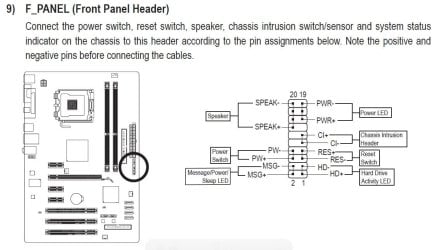
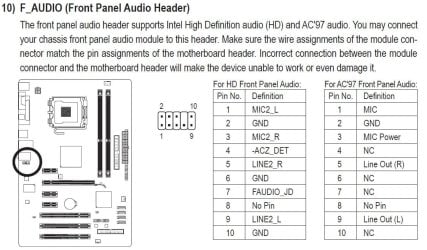
These pixs are from a GA-P41T-D3P User's Manual:
GBMB.JPGGBMB1.JPG

Descriptions to all the connections are below each diagram.


For the Asus it is a little different.
Go to: ASUSTeK Computer Inc. -Support- Drivers and Download
From there you can either automatically detect your MB or manually drill down for the manual of your board.

You already have the information you seek if you have the manuals to these boards
 

My Computer My Computer

At a glance

Originally Win 7 Hm Prem x64 Ver 6.1.7600 Bui...Intel i3 530 2.93GHz, 2933MHz 2 Cores 4 Logic...6GB of 1,333MHz DDR3 SDRAM32MB Intel Graphics Media Accelerator HD IGChip
Computer type
PC/Desktop
Computer Manufacturer/Model Number
Gateway DX4831-01e (Mid-Tower Desktop)
OS
Originally Win 7 Hm Prem x64 Ver 6.1.7600 Build 7601-SP1 | Upgraded to Windows 10 December 14, 2019
CPU
Intel i3 530 2.93GHz, 2933MHz 2 Cores 4 Logical Processors
Motherboard
Gateway H57M01 133 megahertz
Memory
6GB of 1,333MHz DDR3 SDRAM
Graphics Card(s)
32MB Intel Graphics Media Accelerator HD IGChip
Sound Card
Realtek High Definition Audio
Monitor(s) Displays
Gateway HX2000 20inch TFT active matrix TN
Screen Resolution
1600 x 900 x 59 hertz
Hard Drives
WDC WD10EADS-00M2B0 [HDD] (1000.20 GB) -- drive 0,
HL-DT-ST DVDRAM GH41N [CD-ROM dr]
Four card readers, and Four USB 2.0
PSU
300watts.
Case
Mid-Tower Desktop
Cooling
Stock from Gateway
Keyboard
Natural Ergonomic Keyboard 4000, see Other Info
Mouse
Orig. Gateway wore out now using Insignia USB wired optical
Internet Speed
Vz FIOS 10ms png 57.64Mbps down 65.53Mbps up Speedtest.org
Antivirus
Zamana Anti-logger with Anti-malware, MSE, Windows Firewall,
Browser
IE11.0.9600.19399-Upd ver11.0.135, Firefox 68.0.1 x64
Other Info
System Specs by Belarc.

BIOS: American Megatrends Inc. P01-A0 11/17/2009

Replaced the MS 'Natural' Standard PS/2 Enhanced 101-102 Keyboard with a new Natural Ergonomic Keyboard 4000 on August 1st 2014.

Canon Pixma MG3222 Printer.

Updated to IE11 on 12102015 | Fios Quantum Router g1100

Additional AV: SpywareBlaster, manual Mbam, SAS
Hi Anak

Thanks for the reply. I have both of the motherboard manuals but the problem is I don't understand the different terminology, ie is the which pin matches which line as there is nothing similar in the names. Even the two motherboards use different terms.
 

My Computer My Computer

At a glance

Windows 7 Ulimate x64, Windows 7 Pro x64
OS
Windows 7 Ulimate x64, Windows 7 Pro x64
The standard "HD Audio" front panel connection does not have surround sound options, on all that I've seen. Also, there should be a missing (no) pin that lines up with the HD Audio connector for the case front panel.
 

My Computer My Computer

At a glance

Windows 10 64 bitIntel i7 6700K16GB Corsair DominatorIntel CPU Graphics
Computer type
PC/Desktop
Computer Manufacturer/Model Number
My Own Build
OS
Windows 10 64 bit
CPU
Intel i7 6700K
Motherboard
ASUS ROG Maximus VIII Hero
Memory
16GB Corsair Dominator
Graphics Card(s)
Intel CPU Graphics
Sound Card
RealTek
Monitor(s) Displays
27" Dell S2719dgf
Screen Resolution
2560X1440
Hard Drives
1 TB Samsung 850 EVO SSD for Win 10 Pro
500GB Samsung 850 EVO SSD for Win 10 Insider
2 TB drive for backup
PSU
EVGA Supernova 750G2
Case
BeQuiet Silent Base 600
Cooling
Deepcool Captain 120EX
Keyboard
Microsoft Wireless 2000
Mouse
Microsoft wireless
Internet Speed
100 MB/sec (Cable)
Antivirus
Microsoft Defender and Malwarebytes
Browser
Edge/Firefox
Other Info
Cakewalk (Sonar) by BandLab and Studio One 4.1 Pro recording studio software. MOTU 896Mk3 Hybrid recording interface, Frontier Tranzport wireless control unit, Behringer X-Touch Control Surface.
Five USB connected optical drives for CD Audio production using Nero BurningROM

My Computer My Computer

At a glance

Originally Win 7 Hm Prem x64 Ver 6.1.7600 Bui...Intel i3 530 2.93GHz, 2933MHz 2 Cores 4 Logic...6GB of 1,333MHz DDR3 SDRAM32MB Intel Graphics Media Accelerator HD IGChip
Computer type
PC/Desktop
Computer Manufacturer/Model Number
Gateway DX4831-01e (Mid-Tower Desktop)
OS
Originally Win 7 Hm Prem x64 Ver 6.1.7600 Build 7601-SP1 | Upgraded to Windows 10 December 14, 2019
CPU
Intel i3 530 2.93GHz, 2933MHz 2 Cores 4 Logical Processors
Motherboard
Gateway H57M01 133 megahertz
Memory
6GB of 1,333MHz DDR3 SDRAM
Graphics Card(s)
32MB Intel Graphics Media Accelerator HD IGChip
Sound Card
Realtek High Definition Audio
Monitor(s) Displays
Gateway HX2000 20inch TFT active matrix TN
Screen Resolution
1600 x 900 x 59 hertz
Hard Drives
WDC WD10EADS-00M2B0 [HDD] (1000.20 GB) -- drive 0,
HL-DT-ST DVDRAM GH41N [CD-ROM dr]
Four card readers, and Four USB 2.0
PSU
300watts.
Case
Mid-Tower Desktop
Cooling
Stock from Gateway
Keyboard
Natural Ergonomic Keyboard 4000, see Other Info
Mouse
Orig. Gateway wore out now using Insignia USB wired optical
Internet Speed
Vz FIOS 10ms png 57.64Mbps down 65.53Mbps up Speedtest.org
Antivirus
Zamana Anti-logger with Anti-malware, MSE, Windows Firewall,
Browser
IE11.0.9600.19399-Upd ver11.0.135, Firefox 68.0.1 x64
Other Info
System Specs by Belarc.

BIOS: American Megatrends Inc. P01-A0 11/17/2009

Replaced the MS 'Natural' Standard PS/2 Enhanced 101-102 Keyboard with a new Natural Ergonomic Keyboard 4000 on August 1st 2014.

Canon Pixma MG3222 Printer.

Updated to IE11 on 12102015 | Fios Quantum Router g1100

Additional AV: SpywareBlaster, manual Mbam, SAS
Thanks for the replies and yes I am getting closer to solving the problem.

Both motherboards have HD audio, the ASUS has a VIA VT1818 8 channel HD Audio Codec which supports Jack-Detection, Multistreaming and Front Panel Jack-Retasking. The Gigabyte has a Realtek ALC889 codec which supports 2, 4, 5.1 & 7.1 channels and Dolby Home Threatre.

The front panel has four ports, Mic-in, Front_out, Rear_out and Cen/Bass, with a 9 line ribbon cable and individual connectors Centre, Bass, Front-R, Front-L, Rear-R, Rear-L, Mic-R, Mic-L and Gnd.

This is the info I have:
ASUS Header -Pin 1 - Port 1L, Pin 2 - Gnd, Pin 3 - Micpwr, Pin 4 - Presence#, Pin 5 - Port2R, Pin 6 - Sense1_Retur, Pin 7 - Sense_Send, Pin 8 - NC, Pin 9 - Port2L, Pin 10 - Sense2_Retur.

Gigabyte Header - Pin 1 - Mic2L, Pin 2 - Gnd, Pin 3 – Mic2_R, -AC_Det, Pin 5 - Line2_R, Pin 6 - Gnd, Pin 7 - Faudio_JD, Pin 8 - No Pin, Pin 9 - Line2_L, Pin 10 - Gnd.

From all of the reading I have done I assume that both headers have the same pin outs and that:
Pin 1 is Mic-L, Pin 2 is Gnd, Pin 3 is Mic-R, Pin 4 unknown (either Presence# or -AC_Det), Pin 5 is Front-R, Pin 6 is probablly Rear-R, Pin 7 is unknown (either Presence# or -AC_Det), Pin 8 is NC, Pin 9 is Front-L and Pin 10 is probablly Rear-L.

So I am left with front panel lines Centre, Bass, Rear left & right. I would assume that Sense1_Retur is Rear-R and Sense2_Retur is Rear-L, so now I am left with Bass and Centre.


Thanks again for your help.
 
Last edited:

My Computer My Computer

At a glance

Windows 7 Ulimate x64, Windows 7 Pro x64
OS
Windows 7 Ulimate x64, Windows 7 Pro x64

My Computer My Computer

At a glance

Windows 7 Ultimate x64Intel Pentium Dual Core E5200 2.5GHz (3.77GHz...Corsair 4GB DDR2 (4x1GB CM2X1024-6400C4)Palit GeForce GTS 250 (1024MB)
Computer Manufacturer/Model Number
Self built
OS
Windows 7 Ultimate x64
CPU
Intel Pentium Dual Core E5200 2.5GHz (3.77GHz OC)
Motherboard
Asus P5Q-E
Memory
Corsair 4GB DDR2 (4x1GB CM2X1024-6400C4)
Graphics Card(s)
Palit GeForce GTS 250 (1024MB)
Sound Card
On Board (ADI AD2000B 8ch HD)
Monitor(s) Displays
Samsung 32in LCD TV
Screen Resolution
1360x768
Hard Drives
2 x 1TB Samsung 103SJ (Raid0)
2 x External 500GB Samsung 502IJ (NexStar 3 HD Enclosures)
PSU
550W Antec Neo HE 550
Case
Antec P180
Cooling
Xigmatex Red Scorpion CPU Cooler. 3x120mm Fans
Keyboard
Logitech MX5000 Laser (Combo)
Mouse
Logitech MX5000 Laser (Combo)
Internet Speed
ADSL2+ (avg 10 Mbps Down, 0.80 Mbps up)
Other Info
Gigabyte GN-WP01GS 54g Wireless Lan Card
Looking at it again, if you compare the two pages you will find the pins for Line Out/Headphones, Mic and GND do match.

So at your own risk you could try the arrangement given in the second link for the ASUS board, although it does say
In most cases, you do not have to shift the wires in the header connector, as these wires have been arranged to match perfectly with the IFPA / AC97 pinouts.
 

My Computer My Computer

At a glance

Windows 7 Ultimate x64Intel Pentium Dual Core E5200 2.5GHz (3.77GHz...Corsair 4GB DDR2 (4x1GB CM2X1024-6400C4)Palit GeForce GTS 250 (1024MB)
Computer Manufacturer/Model Number
Self built
OS
Windows 7 Ultimate x64
CPU
Intel Pentium Dual Core E5200 2.5GHz (3.77GHz OC)
Motherboard
Asus P5Q-E
Memory
Corsair 4GB DDR2 (4x1GB CM2X1024-6400C4)
Graphics Card(s)
Palit GeForce GTS 250 (1024MB)
Sound Card
On Board (ADI AD2000B 8ch HD)
Monitor(s) Displays
Samsung 32in LCD TV
Screen Resolution
1360x768
Hard Drives
2 x 1TB Samsung 103SJ (Raid0)
2 x External 500GB Samsung 502IJ (NexStar 3 HD Enclosures)
PSU
550W Antec Neo HE 550
Case
Antec P180
Cooling
Xigmatex Red Scorpion CPU Cooler. 3x120mm Fans
Keyboard
Logitech MX5000 Laser (Combo)
Mouse
Logitech MX5000 Laser (Combo)
Internet Speed
ADSL2+ (avg 10 Mbps Down, 0.80 Mbps up)
Other Info
Gigabyte GN-WP01GS 54g Wireless Lan Card
I want to connect a front panel HD audio to my computers but not sure what goes where on the motherboard headers. Just to clarify two completely different systems no connection apart from network.


The front panel lines are Bass, Centre, Gnd, Rear-R, Rear-L, Front-R, Front-L, Mic –L & Mic-R. No problems with Gnd, but that leaves the other lines.


The motherboard headers are:
On the Gigabyte motherboard the 2 mic and gnd are obvious but what lines do the ACZ_Det , FAudio_JD & Line2 L & R go to.
On the ASUS motherboard Port1 L & R, Port2 L & R, Sense_Send, Presence#, Sense1_Retur and Sense2_Retur.


Oh where is the naming convention for these things :banghead:

It would be helpful to us (and you) if you supplied the model numbers of the motherboards, and the model of your case.

I take it from what you write that the case's front panel cable uses discrete pins rather than HD Audio or AC97 block connectors. Is that correct? (Some of the younger posters here may never have seen such a case, but I have one on hand like that. It's from 1997.)
 

My Computer My Computer

At a glance

Windows 7 Pro X64 SP1Intel Core I7-3930k16 GB Gskill DDR3-2133eVGA GTX680
Computer Manufacturer/Model Number
homegrown
OS
Windows 7 Pro X64 SP1
CPU
Intel Core I7-3930k
Motherboard
Asus P9X79 Pro
Memory
16 GB Gskill DDR3-2133
Graphics Card(s)
eVGA GTX680
Sound Card
Creative X-Fi Titanium
Monitor(s) Displays
As PA246Q
Screen Resolution
1920 X 1200
Hard Drives
Corsair Force GT, 120 GB
WDC 1.5TB Caviar Black
PSU
PCP&C Silencer 750 Crossfire
Case
Silverstone FT02
Cooling
Noctua NH-D14
Keyboard
cheap Logitech USB
Mouse
Microsoft Intellimouse Explorer (old optical) USB
Internet Speed
6Mb cable
Other Info
Pioneer BDR-205
Samsung SH-203B
Monsoon 5.1 speakers
Thanks for erveryone who has replied, your time is much appreciated. I am beginning to think this will be one of those unsolved mysteries and will just use the USB ports.

The motherboards are Gigabyte - GA-880GM-USB3 and ASUS M4A87TD-EVO. The panel I would like to use is a 5.25" drive that I was given, no brand.
 

My Computer My Computer

At a glance

Windows 7 Ulimate x64, Windows 7 Pro x64
OS
Windows 7 Ulimate x64, Windows 7 Pro x64
step 1 open the panel
step 2 unscrew the screws
step 3 remove the tray
step 4 remove the connector plate
step 5 ensure proper joining of wires and connectors
www.howtoinstallmotherboard.info
 

My Computer My Computer

At a glance

windows XP 2
OS
windows XP 2
I am also having the same front dongle purchased from eBay from china. Even the supplier is not aware to which motherboard this dongle suits. So far I could not get any solution for this. It is a research project. This item is still sold on eBay. People are buying it due to ignorance.
 

My Computer My Computer

At a glance

windows 73.4 Ghz Pentium D1126
OS
windows 7
CPU
3.4 Ghz Pentium D
Motherboard
Asus P5P800 VM
Memory
1126
Back
Top