Solved Attempting to crossfire 6950s...warning led?

V43L1N

Addicted to Aggrotech
Power User
Local time
1:10 PM
Messages
130
Location
Maryland, USA
After seeing the frame rate boost my brother has with his single 6950, I decided to order myself two XFX DD 6950 2GB. The issue I've come across is that my motherboard seems to only recognize one of the cards. The power supply in my rig should be more than sufficient to handle two of these cards.

Enermax Galaxy 1050w 80+ Platinum Certified. To rule out some of the usual issues.

Before installing the new card:
-removed the old card drivers, used driver sweeper after the uninstall
-disabled integrated graphics
-removed the overclock on my i7

After installing the new card:
-checked that all power cables were connected properly. (Each card has two six pin pci-e connections)
-Checked that the cards were in the proper pci-e x16 slots. (running at 8x confirmed in bios)
-Both cards work if installed seperately (one at a time) and the rig will boot when both cards are inserted. (Fans spin on card that is red lighting)

Now, one of the cards is showing an LED error code (red light). I've tried switching the power cables to each card, and it seems the card with two specific cables cause the error led to present itself. Is this a power supply issue?

One more question: my MOBO has an 8-pin e-atx power connector at the top right corner,(the other four pins were covered with a cap of sorts) however this has been running with the standard 4-pin without issues. Could this cause the issue? Unfortunately I can not seem to find my 8-pin cable that came with my PSU, and will order one if need be.

Any insight would be greatly appreciated.

I've spent quite a few hours over the last couple of days searching for answers as to what this warning LED indicates, however I can find no documentation, even through the XFX support site.
 

My Computer My Computer

At a glance

Windows 7 Ultimate 64-Bit SP1Intel Core i7-2600k OC'd @ 5.0Ghz16 GB Corsair Vengeance PC3-12800 (4x4GB)XFX 695X DD (x2) in Crossfire
Computer Manufacturer/Model Number
Custom Rig
OS
Windows 7 Ultimate 64-Bit SP1
CPU
Intel Core i7-2600k OC'd @ 5.0Ghz
Motherboard
ASUS Maximus IV Extreme-Z
Memory
16 GB Corsair Vengeance PC3-12800 (4x4GB)
Graphics Card(s)
XFX 695X DD (x2) in Crossfire
Sound Card
Realtek ALC889 (Integrated)
Monitor(s) Displays
XFX Triple Monitor Display w/ 3 ASUS 23.6" LCD
Screen Resolution
5760x1080 (AMD Eyefinity)
Hard Drives
OCZ Vertex 3 SATA III (120GB)
WD Caviar Black 1.5 TB x2
PSU
XFX ProSeries Black Edition 1000w 80+ Platinum Certified
Case
Cooler Master HAF X Blue Edition
Cooling
Corsair H100 w/ Noctua NF-S12B FLX (x4) Push/Pull
Keyboard
Razer Lycosa
Mouse
Razer Naga & Razer Nostromo
Other Info
ASUS ROG G74SX
-240GB OCZ Vertex II x2 (Raid 0)
First things first. Are all motherboard switches set to their default positions, as per the motherboard manual?
Now, one of the cards is showing an LED error code (red light). I've tried switching the power cables to each card, and it seems the card with two specific cables cause the error led to present itself. Is this a power supply issue?
Could be. Have you tried different combinations of the cables? What if only one card is installed. Does it work correctly with any combination of these cables?
One more question: my MOBO has an 8-pin e-atx power connector at the top right corner,(the other four pins were covered with a cap of sorts) however this has been running with the standard 4-pin without issues. Could this cause the issue? Unfortunately I can not seem to find my 8-pin cable that came with my PSU, and will order one if need be.
This connector is for supplying power to the voltage regulator which in turn supplies power to the CPU. It is perfectly fine to us a 4-pin cable here, although an 8-pin one would be better. If you're concerned, it is possible to buy an adapter that converts the 4-pin to an 8-pin connector (in much the same way as 20-24 pin adapters are available for the main ATX power connection).
I've spent quite a few hours over the last couple of days searching for answers as to what this warning LED indicates, however I can find no documentation, even through the XFX support site.
Is this LED on the card itself?
 

My Computer My Computer

At a glance

Windows 8.1 Pro RTM x64Intel Core-i5-3570K 4-core @ 3.4GHz (Ivy Brid...4 x 4GB DDR3-1600 Corsair Vengeance CMZ8GX3M2...MSI GeForce GTX770 Gaming OC 2GB
Computer type
PC/Desktop
Computer Manufacturer/Model Number
Dwarf Dwf/11/2012 r09/2013
OS
Windows 8.1 Pro RTM x64
CPU
Intel Core-i5-3570K 4-core @ 3.4GHz (Ivy Bridge) (OC 4.4GHz)
Motherboard
ASRock Z77 Extreme4-M
Memory
4 x 4GB DDR3-1600 Corsair Vengeance CMZ8GX3M2A1600C9B (16GB)
Graphics Card(s)
MSI GeForce GTX770 Gaming OC 2GB
Sound Card
Realtek High Definition on board solution (ALC 898)
Monitor(s) Displays
ViewSonic VA1912w Widescreen (VGA)
Screen Resolution
1440x900
Hard Drives
OCZ Agility 3 SSD 120GB SATA III x2 (RAID 0)
Samsung HD501LJ 500GB SATA II x2
Hitachi HDS721010CLA332 1TB SATA II
Iomega 1.5TB Ext USB 2.0
WD 2.0TB Ext USB 3.0
PSU
XFX Pro Series 850W Semi-Modular
Case
Gigabyte IF233
Cooling
1 x 120mm Front Inlet 1 x 120mm Rear Exhaust
Keyboard
Microsoft Comfort Curve Keyboard 3000 (USB)
Mouse
Microsoft Comfort Mouse 3000 for Business (USB)
Internet Speed
NetGear DG834Gv3 ADSL Modem/Router (Ethernet) ~4.0 Mb/s (O2)
Antivirus
Avast! 8.0.1497
Browser
IE 11
Other Info
Optical Drive: HL-DT-ST BD-RE BH10LS30 SATA Bluray
Lexmark S305 Printer/Scanner/Copier (USB)
WEI Score: 8.1/8.1/8.5/8.5/8.25
Asus Eee PC 1011PX Netbook (Windows 7 x86 Starter)
  • Like
Reactions: JMH
Could be. Have you tried different combinations of the cables? What if only one card is installed. Does it work correctly with any combination of these cables?

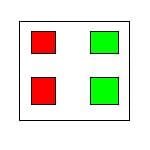
When i ordered the cards, i also ordered four new six pin cables directly from my PSU manufacturer. I tested all four cables in each slot on the psu. The result is: any of the four cables that are connected to the second set of 6-pin connectors on the PSU result in a red light on the card they are supplying power to. It seems as if the issue is with two of the "plugs" on the PSU not supplying enough power.

I've included a rough drawing below to try to show what I mean: I have tested all four cables, they function properly when attached to the green 6-pin connectors.

-any cables plugged into the red 6-pins cause a red light on the card they are plugged into.
-cables plugged into the green 6-pins function normally.

- This seems to confirm that my PSU is indeed defective, would appreciate your thoughts.

This connector is for supplying power to the voltage regulator which in turn supplies power to the CPU. It is perfectly fine to us a 4-pin cable here, although an 8-pin one would be better. If you're concerned, it is possible to buy an adapter that converts the 4-pin to an 8-pin connector (in much the same way as 20-24 pin adapters are available for the main ATX power connection).

Thank you for explaining that to me :), I will make sure the replacement I purchase has the dedicated 8 pin connector.

Is this LED on the card itself?

Yes, the led is on the back side of the card. There are no (lit) warning lights next to the pci-e slots on my MOBO.

I am going to purchase a new PSU this evening at the local best buy to test. If I dont receive a red light, Then I will order a new platinum certified PSU online, and use the spare until it arrives.

Thank you for the time/effort you are putting into this, it really is appreciated!
 

Attachments

  • psu.JPG
    psu.JPG
    2.5 KB · Views: 324
Last edited:

My Computer My Computer

At a glance

Windows 7 Ultimate 64-Bit SP1Intel Core i7-2600k OC'd @ 5.0Ghz16 GB Corsair Vengeance PC3-12800 (4x4GB)XFX 695X DD (x2) in Crossfire
Computer Manufacturer/Model Number
Custom Rig
OS
Windows 7 Ultimate 64-Bit SP1
CPU
Intel Core i7-2600k OC'd @ 5.0Ghz
Motherboard
ASUS Maximus IV Extreme-Z
Memory
16 GB Corsair Vengeance PC3-12800 (4x4GB)
Graphics Card(s)
XFX 695X DD (x2) in Crossfire
Sound Card
Realtek ALC889 (Integrated)
Monitor(s) Displays
XFX Triple Monitor Display w/ 3 ASUS 23.6" LCD
Screen Resolution
5760x1080 (AMD Eyefinity)
Hard Drives
OCZ Vertex 3 SATA III (120GB)
WD Caviar Black 1.5 TB x2
PSU
XFX ProSeries Black Edition 1000w 80+ Platinum Certified
Case
Cooler Master HAF X Blue Edition
Cooling
Corsair H100 w/ Noctua NF-S12B FLX (x4) Push/Pull
Keyboard
Razer Lycosa
Mouse
Razer Naga & Razer Nostromo
Other Info
ASUS ROG G74SX
-240GB OCZ Vertex II x2 (Raid 0)
From what you say, it does indeed seem like a PSU issue. If you have a digital multimeter and are confident with its use, can you backprobe the connectors whilst in use and report back what voltages you have? I rather suspect that the set connected to the suspected faulty port on the PSU will be out of spec.

If you are going to replace it, I would consider a quality make such as PC Power & Cooling (recommended and used by Scott Mueller).

This should fit the bill: Turbo-Cool 1200 Power Supply (1200w PSU) - PC Power & Cooling

Newegg.com - PC Power and Cooling Turbo-Cool 1200W Server-grade High Performance SLI CrossFire ready Power Supply

Unfortunately, it is on the expensive side, so I suggest this as an alternative: Silencer Mk II 950W

Newegg.com - PC Power and Cooling Silencer Mk II 950W High Performance 80PLUS Silver SLI CrossFire ready Power Supply
 

My Computer My Computer

At a glance

Windows 8.1 Pro RTM x64Intel Core-i5-3570K 4-core @ 3.4GHz (Ivy Brid...4 x 4GB DDR3-1600 Corsair Vengeance CMZ8GX3M2...MSI GeForce GTX770 Gaming OC 2GB
Computer type
PC/Desktop
Computer Manufacturer/Model Number
Dwarf Dwf/11/2012 r09/2013
OS
Windows 8.1 Pro RTM x64
CPU
Intel Core-i5-3570K 4-core @ 3.4GHz (Ivy Bridge) (OC 4.4GHz)
Motherboard
ASRock Z77 Extreme4-M
Memory
4 x 4GB DDR3-1600 Corsair Vengeance CMZ8GX3M2A1600C9B (16GB)
Graphics Card(s)
MSI GeForce GTX770 Gaming OC 2GB
Sound Card
Realtek High Definition on board solution (ALC 898)
Monitor(s) Displays
ViewSonic VA1912w Widescreen (VGA)
Screen Resolution
1440x900
Hard Drives
OCZ Agility 3 SSD 120GB SATA III x2 (RAID 0)
Samsung HD501LJ 500GB SATA II x2
Hitachi HDS721010CLA332 1TB SATA II
Iomega 1.5TB Ext USB 2.0
WD 2.0TB Ext USB 3.0
PSU
XFX Pro Series 850W Semi-Modular
Case
Gigabyte IF233
Cooling
1 x 120mm Front Inlet 1 x 120mm Rear Exhaust
Keyboard
Microsoft Comfort Curve Keyboard 3000 (USB)
Mouse
Microsoft Comfort Mouse 3000 for Business (USB)
Internet Speed
NetGear DG834Gv3 ADSL Modem/Router (Ethernet) ~4.0 Mb/s (O2)
Antivirus
Avast! 8.0.1497
Browser
IE 11
Other Info
Optical Drive: HL-DT-ST BD-RE BH10LS30 SATA Bluray
Lexmark S305 Printer/Scanner/Copier (USB)
WEI Score: 8.1/8.1/8.5/8.5/8.25
Asus Eee PC 1011PX Netbook (Windows 7 x86 Starter)
Thanks for your time Dwarf! I'll look into the two power supplies you suggested.

~V
 

My Computer My Computer

At a glance

Windows 7 Ultimate 64-Bit SP1Intel Core i7-2600k OC'd @ 5.0Ghz16 GB Corsair Vengeance PC3-12800 (4x4GB)XFX 695X DD (x2) in Crossfire
Computer Manufacturer/Model Number
Custom Rig
OS
Windows 7 Ultimate 64-Bit SP1
CPU
Intel Core i7-2600k OC'd @ 5.0Ghz
Motherboard
ASUS Maximus IV Extreme-Z
Memory
16 GB Corsair Vengeance PC3-12800 (4x4GB)
Graphics Card(s)
XFX 695X DD (x2) in Crossfire
Sound Card
Realtek ALC889 (Integrated)
Monitor(s) Displays
XFX Triple Monitor Display w/ 3 ASUS 23.6" LCD
Screen Resolution
5760x1080 (AMD Eyefinity)
Hard Drives
OCZ Vertex 3 SATA III (120GB)
WD Caviar Black 1.5 TB x2
PSU
XFX ProSeries Black Edition 1000w 80+ Platinum Certified
Case
Cooler Master HAF X Blue Edition
Cooling
Corsair H100 w/ Noctua NF-S12B FLX (x4) Push/Pull
Keyboard
Razer Lycosa
Mouse
Razer Naga & Razer Nostromo
Other Info
ASUS ROG G74SX
-240GB OCZ Vertex II x2 (Raid 0)
So the new PSU fried my H100.

New PSU arrived last night, tested it all before getting it installed in my rig.
http://www.corsair.com/power-supply...old-certified-fully-modular-power-supply.html
Got all the cable management done. Turned it on, heard the electrical arc, watched the smoke waft up from my H100. Yanked the plug and killed the power switch. I know I did not make a mistake installing it, as it only takes two pins from a 4 pin molex, and the connections only fit one way.

Has anyone else had similar issues with H100s? (The PSU appeared to be in perfect working order when I tested it)

I'm now praying it only got the H100, and didn't take my i7 and MOBO with it.

Is it too much to ask for man to be able to play his games?!?!
 
Last edited:

My Computer My Computer

At a glance

Windows 7 Ultimate 64-Bit SP1Intel Core i7-2600k OC'd @ 5.0Ghz16 GB Corsair Vengeance PC3-12800 (4x4GB)XFX 695X DD (x2) in Crossfire
Computer Manufacturer/Model Number
Custom Rig
OS
Windows 7 Ultimate 64-Bit SP1
CPU
Intel Core i7-2600k OC'd @ 5.0Ghz
Motherboard
ASUS Maximus IV Extreme-Z
Memory
16 GB Corsair Vengeance PC3-12800 (4x4GB)
Graphics Card(s)
XFX 695X DD (x2) in Crossfire
Sound Card
Realtek ALC889 (Integrated)
Monitor(s) Displays
XFX Triple Monitor Display w/ 3 ASUS 23.6" LCD
Screen Resolution
5760x1080 (AMD Eyefinity)
Hard Drives
OCZ Vertex 3 SATA III (120GB)
WD Caviar Black 1.5 TB x2
PSU
XFX ProSeries Black Edition 1000w 80+ Platinum Certified
Case
Cooler Master HAF X Blue Edition
Cooling
Corsair H100 w/ Noctua NF-S12B FLX (x4) Push/Pull
Keyboard
Razer Lycosa
Mouse
Razer Naga & Razer Nostromo
Other Info
ASUS ROG G74SX
-240GB OCZ Vertex II x2 (Raid 0)
lol what you have to ask yourself is why do you need 2 6950 2gbs when one is more than powerful enough to play the latest games on ultra settings! so its a warning to not be greedy lol!

back to your original PSU issue, were you powering both cards of the one 12v rail using a splitter? as that will cause under powering. if you powered them both of separate 12v rails then ignore me :)
 

My Computer My Computer

At a glance

Windows 7 Ultimate x64, & Mac OS X 10.9.2Intel Core i5 2500kCorsair Vengence 8gb 1866mhzNvidia GTX 770 OC
Computer type
PC/Desktop
Computer Manufacturer/Model Number
Built by badgers!!!
OS
Windows 7 Ultimate x64, & Mac OS X 10.9.2
CPU
Intel Core i5 2500k
Motherboard
Asus P8z68 LE
Memory
Corsair Vengence 8gb 1866mhz
Graphics Card(s)
Nvidia GTX 770 OC
Monitor(s) Displays
2x ASUS LED 22" IPS
Screen Resolution
3840x1080
Hard Drives
240GB Crucial M500 SSD
120gb Corsair Force 3 SSD
1TB Western Digital
PSU
Corsair HX650w Modular
Case
Corsair Air 540
Cooling
Corsair H60 Push/Pull
Keyboard
Corsair K70/ Logitech G27 wheel
Mouse
Saitek R.A.T 9
Internet Speed
Too slow!
Other Info
AMD fusion E350N Home server-Windows Home Server 2011 (also made by badgers!)
2011 Macbook 2.4ghz Core2Duo, 4gb ddr3, 120gb Ocz Vertex SSD
lol what you have to ask yourself is why do you need 2 6950 2gbs when one is more than powerful enough to play the latest games on ultra settings! so its a warning to not be greedy lol!

back to your original PSU issue, were you powering both cards of the one 12v rail using a splitter? as that will cause under powering. if you powered them both of separate 12v rails then ignore me :)

Only reason I purchased a second was I had leftover funds in my budget, and had store credit from previous returns. Basically, because I can! :geek:

My previous PSU was a single rail, as is the current PSU. I don't quite understand what you mean when you ask if i was using a splitter? As in splitting one 6-pin into two using an adapter? Each card had two dedicated cables run to it, no adapters were used.

I spoke to corsair concerning a replacement for the H100,as it is less than a month old. Was told I needed the original packaging, with minimal damage. Including the UPC, which I had to cut out and send in for a rebate. (Funny how that works, apparently it's one or the other...)

I've ordered a couple replacements parts, hopefully my second H100 will be here tomorrow and I can see if any damage was done to my baby :huh:. None of the other aftermarket coolers I have laying around will clear the heat sinks on my RAM.
 

My Computer My Computer

At a glance

Windows 7 Ultimate 64-Bit SP1Intel Core i7-2600k OC'd @ 5.0Ghz16 GB Corsair Vengeance PC3-12800 (4x4GB)XFX 695X DD (x2) in Crossfire
Computer Manufacturer/Model Number
Custom Rig
OS
Windows 7 Ultimate 64-Bit SP1
CPU
Intel Core i7-2600k OC'd @ 5.0Ghz
Motherboard
ASUS Maximus IV Extreme-Z
Memory
16 GB Corsair Vengeance PC3-12800 (4x4GB)
Graphics Card(s)
XFX 695X DD (x2) in Crossfire
Sound Card
Realtek ALC889 (Integrated)
Monitor(s) Displays
XFX Triple Monitor Display w/ 3 ASUS 23.6" LCD
Screen Resolution
5760x1080 (AMD Eyefinity)
Hard Drives
OCZ Vertex 3 SATA III (120GB)
WD Caviar Black 1.5 TB x2
PSU
XFX ProSeries Black Edition 1000w 80+ Platinum Certified
Case
Cooler Master HAF X Blue Edition
Cooling
Corsair H100 w/ Noctua NF-S12B FLX (x4) Push/Pull
Keyboard
Razer Lycosa
Mouse
Razer Naga & Razer Nostromo
Other Info
ASUS ROG G74SX
-240GB OCZ Vertex II x2 (Raid 0)
thats 2 different rails your fine.
 

My Computer My Computer

At a glance

Windows 7 Ultimate x64, & Mac OS X 10.9.2Intel Core i5 2500kCorsair Vengence 8gb 1866mhzNvidia GTX 770 OC
Computer type
PC/Desktop
Computer Manufacturer/Model Number
Built by badgers!!!
OS
Windows 7 Ultimate x64, & Mac OS X 10.9.2
CPU
Intel Core i5 2500k
Motherboard
Asus P8z68 LE
Memory
Corsair Vengence 8gb 1866mhz
Graphics Card(s)
Nvidia GTX 770 OC
Monitor(s) Displays
2x ASUS LED 22" IPS
Screen Resolution
3840x1080
Hard Drives
240GB Crucial M500 SSD
120gb Corsair Force 3 SSD
1TB Western Digital
PSU
Corsair HX650w Modular
Case
Corsair Air 540
Cooling
Corsair H60 Push/Pull
Keyboard
Corsair K70/ Logitech G27 wheel
Mouse
Saitek R.A.T 9
Internet Speed
Too slow!
Other Info
AMD fusion E350N Home server-Windows Home Server 2011 (also made by badgers!)
2011 Macbook 2.4ghz Core2Duo, 4gb ddr3, 120gb Ocz Vertex SSD
As an update...the new PSU blew a capacitor on the the first test boot last night, sounded like a Gunshot. I looked at the MOBO for any visible damage, and I could not find anywhere where there may have been a short. I took the mobo out, all the standoffs are in place. Took it to a local shop here that is owned by one of my buddies. Hopefully they'll get it sorted, I'm just tired of messing with it. Going on three weeks since I've been able to use it.
 

My Computer My Computer

At a glance

Windows 7 Ultimate 64-Bit SP1Intel Core i7-2600k OC'd @ 5.0Ghz16 GB Corsair Vengeance PC3-12800 (4x4GB)XFX 695X DD (x2) in Crossfire
Computer Manufacturer/Model Number
Custom Rig
OS
Windows 7 Ultimate 64-Bit SP1
CPU
Intel Core i7-2600k OC'd @ 5.0Ghz
Motherboard
ASUS Maximus IV Extreme-Z
Memory
16 GB Corsair Vengeance PC3-12800 (4x4GB)
Graphics Card(s)
XFX 695X DD (x2) in Crossfire
Sound Card
Realtek ALC889 (Integrated)
Monitor(s) Displays
XFX Triple Monitor Display w/ 3 ASUS 23.6" LCD
Screen Resolution
5760x1080 (AMD Eyefinity)
Hard Drives
OCZ Vertex 3 SATA III (120GB)
WD Caviar Black 1.5 TB x2
PSU
XFX ProSeries Black Edition 1000w 80+ Platinum Certified
Case
Cooler Master HAF X Blue Edition
Cooling
Corsair H100 w/ Noctua NF-S12B FLX (x4) Push/Pull
Keyboard
Razer Lycosa
Mouse
Razer Naga & Razer Nostromo
Other Info
ASUS ROG G74SX
-240GB OCZ Vertex II x2 (Raid 0)

My Computer My Computer

At a glance

Windows 8.1 Pro RTM x64Intel Core-i5-3570K 4-core @ 3.4GHz (Ivy Brid...4 x 4GB DDR3-1600 Corsair Vengeance CMZ8GX3M2...MSI GeForce GTX770 Gaming OC 2GB
Computer type
PC/Desktop
Computer Manufacturer/Model Number
Dwarf Dwf/11/2012 r09/2013
OS
Windows 8.1 Pro RTM x64
CPU
Intel Core-i5-3570K 4-core @ 3.4GHz (Ivy Bridge) (OC 4.4GHz)
Motherboard
ASRock Z77 Extreme4-M
Memory
4 x 4GB DDR3-1600 Corsair Vengeance CMZ8GX3M2A1600C9B (16GB)
Graphics Card(s)
MSI GeForce GTX770 Gaming OC 2GB
Sound Card
Realtek High Definition on board solution (ALC 898)
Monitor(s) Displays
ViewSonic VA1912w Widescreen (VGA)
Screen Resolution
1440x900
Hard Drives
OCZ Agility 3 SSD 120GB SATA III x2 (RAID 0)
Samsung HD501LJ 500GB SATA II x2
Hitachi HDS721010CLA332 1TB SATA II
Iomega 1.5TB Ext USB 2.0
WD 2.0TB Ext USB 3.0
PSU
XFX Pro Series 850W Semi-Modular
Case
Gigabyte IF233
Cooling
1 x 120mm Front Inlet 1 x 120mm Rear Exhaust
Keyboard
Microsoft Comfort Curve Keyboard 3000 (USB)
Mouse
Microsoft Comfort Mouse 3000 for Business (USB)
Internet Speed
NetGear DG834Gv3 ADSL Modem/Router (Ethernet) ~4.0 Mb/s (O2)
Antivirus
Avast! 8.0.1497
Browser
IE 11
Other Info
Optical Drive: HL-DT-ST BD-RE BH10LS30 SATA Bluray
Lexmark S305 Printer/Scanner/Copier (USB)
WEI Score: 8.1/8.1/8.5/8.5/8.25
Asus Eee PC 1011PX Netbook (Windows 7 x86 Starter)
Thank you Dwarf, I should have unmarked.

I appreciate you trying to help with the PSU, but it's not just that it will not boot. As I stated in my previous post, I believe it blew a capacitor due to the extremely loud pop.
Was asking if anyone had experience with blown PSU capacitors, and if it would take other components with them.

Just got a call from the shop, the only component that went was the PSU. Tossed another psu in and it fired right up.

Remarking as solved, thank you to all who took time to lend a hand! :)
 
Last edited:

My Computer My Computer

At a glance

Windows 7 Ultimate 64-Bit SP1Intel Core i7-2600k OC'd @ 5.0Ghz16 GB Corsair Vengeance PC3-12800 (4x4GB)XFX 695X DD (x2) in Crossfire
Computer Manufacturer/Model Number
Custom Rig
OS
Windows 7 Ultimate 64-Bit SP1
CPU
Intel Core i7-2600k OC'd @ 5.0Ghz
Motherboard
ASUS Maximus IV Extreme-Z
Memory
16 GB Corsair Vengeance PC3-12800 (4x4GB)
Graphics Card(s)
XFX 695X DD (x2) in Crossfire
Sound Card
Realtek ALC889 (Integrated)
Monitor(s) Displays
XFX Triple Monitor Display w/ 3 ASUS 23.6" LCD
Screen Resolution
5760x1080 (AMD Eyefinity)
Hard Drives
OCZ Vertex 3 SATA III (120GB)
WD Caviar Black 1.5 TB x2
PSU
XFX ProSeries Black Edition 1000w 80+ Platinum Certified
Case
Cooler Master HAF X Blue Edition
Cooling
Corsair H100 w/ Noctua NF-S12B FLX (x4) Push/Pull
Keyboard
Razer Lycosa
Mouse
Razer Naga & Razer Nostromo
Other Info
ASUS ROG G74SX
-240GB OCZ Vertex II x2 (Raid 0)
Back
Top