
no automatic connection to network

HerrKaLeun

New member
Power User
VIP
Local time
2:27 PM
Messages
328
I have RC 7100x64 connected (per cat cable) to a wireless router. W7 created a home network. Router is perfectly fine and my 2 laptops automatically login into the internet. In the beginning my despktop also jsut was able to be online after booting up.

At some point (I did all updates, installed all my software) the PC does not connect to the internet anymore. Tehonly way to get online is to:
- open Network Center
- leftclick "Connections: local area connection" --> disable
- go to trouble shoot problems
- then it finds " the local area network adapter is disabled"
- I click " fix it" and it will work.
I attached the screens

How can I make it connect automatically (as it did before)? I set all services I could think of to " automatic" (IP Helper etc.). From researching I read that XP had a similar problem with SP3. not sure if it is related, but coudl an update be at fault?
Everything is up to date, Kasperksy keeps viruses away, I did not do one of the registry-cleaner tools.

Since it worked at first, one of my isntallations or updates must have done it. I also did some of the "service optimizations" from here bu tundid all of them to resolve my problem.

One could say I should isntall a newer built, but first I just want to use it before I buy the real deal in October. Second, it used to work with RC 7100 and going through all the trouble reinstalling is a hassle.

Everything else works well.
 

Attachments
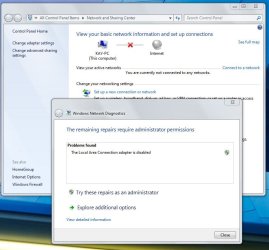
  • LAN disabled.JPG
    LAN disabled.JPG
    88.5 KB · Views: 86
  • LAN fixed.JPG
    LAN fixed.JPG
    74.7 KB · Views: 69

My Computer

Computer Manufacturer/Model Number
homemade
OS
W7 Pro 64
CPU
Intel i3 3220 @ 3.3 GHz
Motherboard
ASRock H77M
Memory
2x8GB DDR 3 1600 Kingston
Graphics Card(s)
onboard
Sound Card
onboard
Monitor(s) Displays
two 21" LCD
Hard Drives
128 GB Samsung 830
PSU
OCZ400MXSP
Cooling
Stock
Internet Speed
DSL
The problem may lay with Kaspersky Internet Security. I can't bakctrak if it started when I installed KIS 2010. but when I de-installed it (I only had the trial, and my license is good for KIS 2009 only) to install KIS 2009 the network would automatically work upon startup for the time when I rebootet after de-installing KIS 2010. Once I installed KIS 2009 it started to not automatically connect again.
I obvioulsy don't want to live without KIS and hope once W7 is official in October both Kaspersky and MS have resolved this.

I still would appreciate any ideas how to resolve it now. Everything else in my PC works perfectly with W7.

And no, I don't want to try every single newest leaked version of W7 to see if something newer than my RC 7100 works. I'm working with my PC and it took me long enough to get everything installed and working. The next time I plan do install the OS is when I get the real deal in October. :geek:
 

My Computer

Computer Manufacturer/Model Number
homemade
OS
W7 Pro 64
CPU
Intel i3 3220 @ 3.3 GHz
Motherboard
ASRock H77M
Memory
2x8GB DDR 3 1600 Kingston
Graphics Card(s)
onboard
Sound Card
onboard
Monitor(s) Displays
two 21" LCD
Hard Drives
128 GB Samsung 830
PSU
OCZ400MXSP
Cooling
Stock
Internet Speed
DSL
auto connect

I have RC 7100x64 connected (per cat cable) to a wireless router. W7 created a home network. Router is perfectly fine and my 2 laptops automatically login into the internet. In the beginning my despktop also jsut was able to be online after booting up.

At some point (I did all updates, installed all my software) the PC does not connect to the internet anymore. Tehonly way to get online is to:
- open Network Center
- leftclick "Connections: local area connection" --> disable
- go to trouble shoot problems
- then it finds " the local area network adapter is disabled"
- I click " fix it" and it will work.
I attached the screens

How can I make it connect automatically (as it did before)? I set all services I could think of to " automatic" (IP Helper etc.). From researching I read that XP had a similar problem with SP3. not sure if it is related, but coudl an update be at fault?
Everything is up to date, Kasperksy keeps viruses away, I did not do one of the registry-cleaner tools.

Since it worked at first, one of my isntallations or updates must have done it. I also did some of the "service optimizations" from here bu tundid all of them to resolve my problem.

One could say I should isntall a newer built, but first I just want to use it before I buy the real deal in October. Second, it used to work with RC 7100 and going through all the trouble reinstalling is a hassle.

Everything else works well.
Hey and nice troublshooting. I like BV myself but have had a couple of problems as well. I wondered if maybe it was a nic setting like wake on lan or a power config. Often it is just easier to re-install but do you have a backup to restore?

Hope this helps

Ken
 

My Computer

Computer Manufacturer/Model Number
HP Pavillion dv-7 1005 Tx
OS
Win 8 Release candidate 8400
CPU
[email protected]
Memory
4 gigs
Graphics Card(s)
Nvidia 9600M
Sound Card
HD built-in
Monitor(s) Displays
17" Wxga
Screen Resolution
1440x900
Cooling
none
Internet Speed
45Mb down 5Mb up
It worked in the beginning. Allthough I didn't pay attention then I think it started with isntalling Kaspersky Internet Security (KIS). So I think when I reinstall it it should have the same effect. In case it was casued by one of the W7 updates, I also would need to install them again. So it should still cause the problems. Since everything else works perfectly I didn't want to install everything before October. Especially since a simple de-installing of KIS seems to solve the problem (of course, that would open the floodgates to viruses and I rather deal with the network than with viruses).

I had tried some free antivirus software and Bit Defender trial, but they seem to be worthless or really difficult to handle (Bit Defender). I would never want to be without KIS! and I have a license of KIS for more than a year, so I want to use it.

Maybe my conclusions are wrong, but it seems a KIS-W7 issue that might resolve itself in October with the actual versions of the software. I do realize using RC is risky, especially with a highly integrated software as KIS.
 

My Computer

Computer Manufacturer/Model Number
homemade
OS
W7 Pro 64
CPU
Intel i3 3220 @ 3.3 GHz
Motherboard
ASRock H77M
Memory
2x8GB DDR 3 1600 Kingston
Graphics Card(s)
onboard
Sound Card
onboard
Monitor(s) Displays
two 21" LCD
Hard Drives
128 GB Samsung 830
PSU
OCZ400MXSP
Cooling
Stock
Internet Speed
DSL
After talking to Kaspersky Forum and support I came to the following answer:
- untill W7 is officially released there may be the one or other bug and Kaspersky (and other vendors as well) and MS likely won't fix it for the RC. It would be a waste of resources considering the beta-state of W7.
- once W7 is official (and the final version will have fewer bugs than the RC 7100 I'm using) it will be officially supported by Kaspersky and the problem likely will be gone
- My license is from KIS 6.0 times and officially I'm only eligible for upgrade to KIS 2009. However, by then Kaspersky support will give me a key that enables KIS 2010 in order to support W7 fully once it is released by MS.
- Kaspersky migth not have a final version yet since W7 still has chances to change. Allegedly Vista changed dramatically from RC to RTM. and Kaspersky (and other tools that are highly integrated in the OS) will otpimize their software to W7 once W7 is final

I think this is a fully correct way of handling the issue by Kaspersky and we all know that we take some risk by using a pre-release and I will just use my little startup workaround for the time being.

Considering the RC of W7 works better for me than Vista after SP1 I'm really looking forward to the RTM.
 

My Computer

Computer Manufacturer/Model Number
homemade
OS
W7 Pro 64
CPU
Intel i3 3220 @ 3.3 GHz
Motherboard
ASRock H77M
Memory
2x8GB DDR 3 1600 Kingston
Graphics Card(s)
onboard
Sound Card
onboard
Monitor(s) Displays
two 21" LCD
Hard Drives
128 GB Samsung 830
PSU
OCZ400MXSP
Cooling
Stock
Internet Speed
DSL
I'm not sure what fixed it, but now it seems to work and has been connecting to the internet properly the last couple of days. :geek:

I assume some W7 update fixed whatever didn't work. Or one of the Kaspersky updates (though I thought those only have virus descriptions...)
 

My Computer

Computer Manufacturer/Model Number
homemade
OS
W7 Pro 64
CPU
Intel i3 3220 @ 3.3 GHz
Motherboard
ASRock H77M
Memory
2x8GB DDR 3 1600 Kingston
Graphics Card(s)
onboard
Sound Card
onboard
Monitor(s) Displays
two 21" LCD
Hard Drives
128 GB Samsung 830
PSU
OCZ400MXSP
Cooling
Stock
Internet Speed
DSL
Back
Top