Hello everyone. Apologies if the title wasn't clear.
I bought a dell inspiron laptop recently and was having some trouble when I type. My hands tend to rest at times on the touchpad and every time i do, the single click tap takes me to where ever the mouse is located. Usually its in another section of the document that I am writing in, so that I start to type in the middle of a paragraph that I had already written.
In addition, I have installed asenother mou <-- see??? it did it again!
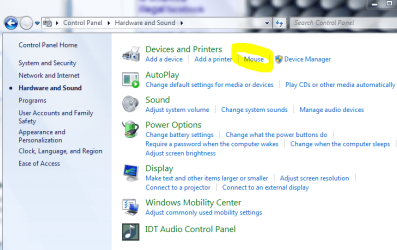
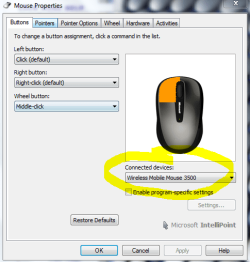
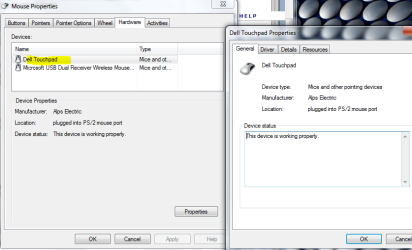
"In addition, I have installed another mouse driver for a mouse to use with the laptop, so I haven't been able to access any mouse settings other than the additional mouse settings. However, the touchpad still functions."
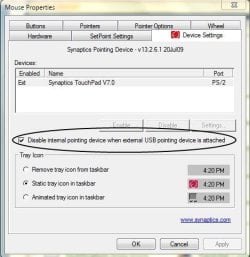
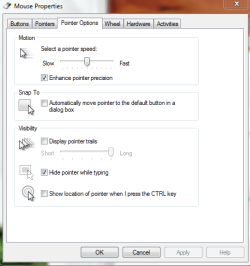
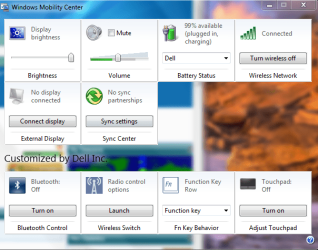
Is there a way to either disable the touchpad when a mouse is connected, or to change its settings while another mouse is connected?
I am afraid that if I uninstall the mouse driver and see about changing the touchpad settings (if possible), that installing the new mouse again would just take away any of those settings that I would change.
All suggestions welcome. If nothing is forthcoming I will attempt to uninstall the mouse driver and change the touchpad settings. I would prefer not to have to manually disable the touchpad
Thanks in advance!
I bought a dell inspiron laptop recently and was having some trouble when I type. My hands tend to rest at times on the touchpad and every time i do, the single click tap takes me to where ever the mouse is located. Usually its in another section of the document that I am writing in, so that I start to type in the middle of a paragraph that I had already written.
In addition, I have installed asenother mou <-- see??? it did it again!
"In addition, I have installed another mouse driver for a mouse to use with the laptop, so I haven't been able to access any mouse settings other than the additional mouse settings. However, the touchpad still functions."
Is there a way to either disable the touchpad when a mouse is connected, or to change its settings while another mouse is connected?
I am afraid that if I uninstall the mouse driver and see about changing the touchpad settings (if possible), that installing the new mouse again would just take away any of those settings that I would change.
All suggestions welcome. If nothing is forthcoming I will attempt to uninstall the mouse driver and change the touchpad settings. I would prefer not to have to manually disable the touchpad
Thanks in advance!
My Computer
At a glance
Microsoft Windows 8.1 Pro 64-bitIntel(R) Core(TM) i3-4130 CPU @ 3.40GHz8.00 GBNone
- Computer type
- PC/Desktop
- Computer Manufacturer/Model Number
- Custom Asus Build
- OS
- Microsoft Windows 8.1 Pro 64-bit
- CPU
- Intel(R) Core(TM) i3-4130 CPU @ 3.40GHz
- Motherboard
- B85M-E
- Memory
- 8.00 GB
- Graphics Card(s)
- None
- Sound Card
- Realtek High Definition Audio
- Monitor(s) Displays
- Asus 23.6" Monitor
- Screen Resolution
- 1920 x 1080 x 32 bits (4294967296 colors) @ 60 Hz
- Hard Drives
- INTEL SSDSC2BW180A4
Samsung SSD 840 PRO Series
- PSU
- Seasonic S12II-380Bronze
- Case
- Lian Li
- Cooling
- Fan, Passive
- Keyboard
- Logitech K120
- Mouse
- Microsoft Touch Mouse
- Internet Speed
- 4ms Ping, 19.0 Mbps Download, 19.0 Mbps Upload
- Antivirus
- Eset Endpoint
- Browser
- Internet Explorer, Chrome