Solved New sata secondary hardrive not showing up in Windows

vfourmax

New member
Local time
10:23 AM
Messages
6
Location
Central VA.
New member here, In the process of completing and setting up a new build. As recommended installed windows 7 prof on Samsung 830 256gb SSD with no problems. During installation was only hard drive hooked up.

Now I am trying to install a Seagate 320gb sata drive to use as a storage drive. The new drive shows up in the motherboard bios but I cannot figure out how to get to get the drive accessable in Windows.

This is a new drive that has never been used nor has it ever been formated. I am lost as to what I need to do to get the drive to a point that I can access and format it so I can impliment it into the system.

Windows installed smoothly on the SSD and all is working fine with the exception of my internet which after a call to my service provider it was determined that my router was to old to properly work with the new system and a new router is enroute at this point.

Can someone walk me through the correct procedure to get this drive online? Thanks in advance
 

My Computer My Computer

At a glance

Windows 7 64 bit profi5-2500kg skill rip jaws x 1600 2x4gbevga 570hd 2.5 gb x2 sli
Computer Manufacturer/Model Number
Homebuilt
OS
Windows 7 64 bit prof
CPU
i5-2500k
Motherboard
Asrock Fatil1ty prof gen3
Memory
g skill rip jaws x 1600 2x4gb
Graphics Card(s)
evga 570hd 2.5 gb x2 sli
Sound Card
onboard realtek
Monitor(s) Displays
Samsung s24a350h
Hard Drives
Samsung 830 256 gb ssd

Seagate 320 gb sata
PSU
Corsair tx850
Case
Coolermaster haf932
Cooling
system air, cpu cm212+
Keyboard
Logitek 110
Mouse
Logitek mx518
Internet Speed
dsl
In DIsk Management you'll see it on the drive map and may need to initialize it. Rightclick on the panel at left to see if Initialize Disk is available - if so select it.

If it's already listed in Disk Mgmt, you may need to only add a drive letter: Drive Letter - Add, Change, or Remove in Windows 7 - Windows 7 Forums


I cannot find the seagate drive showing up anywhere in Windows 7. This is my first experience with Windows 7 but I have gone in my computer and the only disc showing is the Samsung. Also in control panel under hardware and sound same not there.

I can go into the bios and the drive shows there. I am using eufi bios and achi settings for the disc. Maybe I am not looking in the right place or is it possible I need to use the windows install disc to format the new drive?

I do not want to just try that and take a chance on corrupting my install on the ssd as everything seems to be working smoothly and all other hardware is playing well together.

Suggestions?

After reading the motherboard manual for the umpteenth time I see where it says to install the sata driver to the harddrive. Would this need to be done for indivual drive? Basically if I were to unplug the SSD and leave the unformatted drive hooked up could I use the Windows installation disc to format the drive and stop the set up before it started installing windows?
 

My Computer My Computer

At a glance

Windows 7 64 bit profi5-2500kg skill rip jaws x 1600 2x4gbevga 570hd 2.5 gb x2 sli
Computer Manufacturer/Model Number
Homebuilt
OS
Windows 7 64 bit prof
CPU
i5-2500k
Motherboard
Asrock Fatil1ty prof gen3
Memory
g skill rip jaws x 1600 2x4gb
Graphics Card(s)
evga 570hd 2.5 gb x2 sli
Sound Card
onboard realtek
Monitor(s) Displays
Samsung s24a350h
Hard Drives
Samsung 830 256 gb ssd

Seagate 320 gb sata
PSU
Corsair tx850
Case
Coolermaster haf932
Cooling
system air, cpu cm212+
Keyboard
Logitek 110
Mouse
Logitek mx518
Internet Speed
dsl
Did you read what I wrote that you should look in Disk Mgmt? If you need to know how to access Disk Mgmt then ask back but don't just ignore the steps given.

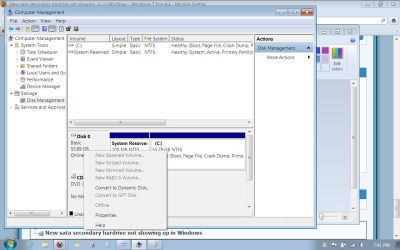
Type Disk Management in Start Search box, click on result, scroll down to find the drive on the map, rightclick the left hand panel next to it to Initialize if necessary. Otherwise rightclick to add a Drive letter.
 
Did you read what I wrote that you should look in Disk Mgmt? If you need to know how to access Disk Mgmt then ask back but don't just ignore the steps given.

Type Disk Management in Start Search box, click on result, scroll down to find the drive on the map, rightclick the left hand panel next to it to Initialize if necessary. Otherwise rightclick to add a Drive letter.

Thanks, did not know where to look. I followed your steps and the only thing showing is disc one in disc management.
 

My Computer My Computer

At a glance

Windows 7 64 bit profi5-2500kg skill rip jaws x 1600 2x4gbevga 570hd 2.5 gb x2 sli
Computer Manufacturer/Model Number
Homebuilt
OS
Windows 7 64 bit prof
CPU
i5-2500k
Motherboard
Asrock Fatil1ty prof gen3
Memory
g skill rip jaws x 1600 2x4gb
Graphics Card(s)
evga 570hd 2.5 gb x2 sli
Sound Card
onboard realtek
Monitor(s) Displays
Samsung s24a350h
Hard Drives
Samsung 830 256 gb ssd

Seagate 320 gb sata
PSU
Corsair tx850
Case
Coolermaster haf932
Cooling
system air, cpu cm212+
Keyboard
Logitek 110
Mouse
Logitek mx518
Internet Speed
dsl
It may not be in the listings yet. You may need to scroll down the drive map to see if it is cued and waiting for initialization. If so rightclick on the panel on the left side of the map.

If not install free Partition Wizard to Win7 now to see if it sees the HD, once you connect it and confirm again it registers in BIOS.

If you can see it then create a Primary Partition and give it a letter in PW.
 
It does say that I must initilize a disc before Logical Disc Manager can access it. How do I initilize the disc?

I will try to follow all steps as suggested. I do not consider myself to be savy as far as knowing what I need to do at all. I do appreciate the assistance.
 

My Computer My Computer

At a glance

Windows 7 64 bit profi5-2500kg skill rip jaws x 1600 2x4gbevga 570hd 2.5 gb x2 sli
Computer Manufacturer/Model Number
Homebuilt
OS
Windows 7 64 bit prof
CPU
i5-2500k
Motherboard
Asrock Fatil1ty prof gen3
Memory
g skill rip jaws x 1600 2x4gb
Graphics Card(s)
evga 570hd 2.5 gb x2 sli
Sound Card
onboard realtek
Monitor(s) Displays
Samsung s24a350h
Hard Drives
Samsung 830 256 gb ssd

Seagate 320 gb sata
PSU
Corsair tx850
Case
Coolermaster haf932
Cooling
system air, cpu cm212+
Keyboard
Logitek 110
Mouse
Logitek mx518
Internet Speed
dsl
Is there some reason you ignore the steps which are typed out for you?

I explained that you must scroll down to find the cued drive ready for initialization on the drive map, then right click on the panel to it's left to Initialize.

For example in the screenshot below you would rightclick on the box which says DIsk0 and get a menu similar to the one which has popped up but which offers Initialization:

Untitled.pngclick to enlarge
 
Greg puts in so much effort trying to help you and you are not reading his posts. That is not nice.

Your problem is a PC101 problem and if you follow Greg's guidance, it will be solved in no time.
 

My Computer My Computer

At a glance

Vista, Windows7, Mint Mate, Zorin, Windows 8from 1.6GHz Duo to i7
Computer Manufacturer/Model Number
HP, Dell, Gateway, Toshiba - 4 laptops and 2 desktops
OS
Vista, Windows7, Mint Mate, Zorin, Windows 8
CPU
from 1.6GHz Duo to i7
Monitor(s) Displays
2x HP w2207
Hard Drives
5x HDD, 7x SSD, 12x Externals
Keyboard
with trackball - no mices
Mouse
Trackball mice
Internet Speed
DSL 6000
Well got it recognized and formatted and now on line. Followed the instructions and still could get no results so I changed out to a new sata cable and then I could access the device in disc manager.

I do appreciate the help and I did try to follow the instructions as given from the beginning. But from my lack of knowledge I misunderstood where I was supposed to be looking.

I thought that device manager was where I was supposed to be initially, did not even know about typing in the search bar to bring up different menus. I have learned something that will help me as I try to get deeper into a computers operations.

I realize how easy it is when you know how to do something that when dealing with a totally inexperienced person that what seems to be so simple and straightfoward that it is easy to overlook the fact that something you take as being just known it is hard to remember that the person learning may not understand what you are telling them or in this case the correct application he should be accessing.

So basically instead of asking the new user whether "Is there some reason you ignore the steps that are typed out for you?" or have another member reply that "you are not reading his post. this is not nice." it would have been more helpful if you would have first posted that it sounded as if I was looking in the wrong place and gave the instructions as you did telling me how to locate the proper location.

I was not intentionally ignoring your instructions and did not realize or even have a clue that I was supposed to be looking for something else until you posted what I needed to do. If I had of known I was in the wrong place I would have ask you to help me find where I was supposed to be but not knowing when I thought I was in the right place it never occurred to ask about how to find something I did not know about or understand.

I do appreciate the help, honestly and because of your help I was able to resolve my problem. This board seems to be a wealth of information and people here that can solve about any problem imaginable.

I will say though as a new member and someone that definately does not know how to navigate potential problems that although I do thank you again for your assistance I will be hesitant to post or ask any future questions here to try to learn myself as in my first question ask on this board and not having what may for most be considered simple knowledge to the point of even asking the "correct" questions that I am ask the reason for ignoring the steps and told what I was doing is not nice.

I apologize for not knowing or having enough knowledge to realize I was not doing what I was told where I should have been following the steps. But assuming that an inexperienced user is intentionally not following the given steps and posting remarks such as those that were posted towards that user before determining that the steps are being ignored intentionally and not because of lack of knowledge is not perhaps the best way to make someone who is new and anxious to learn take advantage of the wealth of information and help available on this site.

I do thank you again for your assistance and my comments are made only as an observation from my own one time experience here. I do appreciate the help offered and I apologize that you felt I was not doing what I was told as I was following your instructions to the best of my knowledge at the time.
 

My Computer My Computer

At a glance

Windows 7 64 bit profi5-2500kg skill rip jaws x 1600 2x4gbevga 570hd 2.5 gb x2 sli
Computer Manufacturer/Model Number
Homebuilt
OS
Windows 7 64 bit prof
CPU
i5-2500k
Motherboard
Asrock Fatil1ty prof gen3
Memory
g skill rip jaws x 1600 2x4gb
Graphics Card(s)
evga 570hd 2.5 gb x2 sli
Sound Card
onboard realtek
Monitor(s) Displays
Samsung s24a350h
Hard Drives
Samsung 830 256 gb ssd

Seagate 320 gb sata
PSU
Corsair tx850
Case
Coolermaster haf932
Cooling
system air, cpu cm212+
Keyboard
Logitek 110
Mouse
Logitek mx518
Internet Speed
dsl
It seemed at the time you ignored the advice without asking a single question to get it done correctly. To the contrary you could have asked as many questions as needed and we would have answered every one without fault.

I realize now I might have been mistaken about this. I'm sorry if I was crabby with you but it is discouraging to type out steps complete with multiple links and screenshots and then have a reply that doesn't seem to acknowledge them.

Please feel free to come back any time you need help. We all have our good and bad days.

You did very well finding out the cable was bad!
 
Last edited:
Wow man. Greg is one of the most giving people on here. And understand, he does this for free. Please continue to post in the forums. Do not be deterred or offended. His instructions are always clear and concise. In the future, read them until you understand them. He understands(as well as others who give of themselves here) that there are people who lack any understanding of pcs or technology for that matter.
 

My Computer My Computer

At a glance

Windows 7 Home Premium x64Intel 2500k @4.5ghz 66deg max P95/IBT8 Gigs Patriot Viper 2 Extreme @1600EVGA GTX 580 3 GIG 35degrees idle
Computer Manufacturer/Model Number
Home Made
OS
Windows 7 Home Premium x64
CPU
Intel 2500k @4.5ghz 66deg max P95/IBT
Motherboard
Gigabyte Z68A-D3-B3
Memory
8 Gigs Patriot Viper 2 Extreme @1600
Graphics Card(s)
EVGA GTX 580 3 GIG 35degrees idle
Sound Card
Nvidia HD audio via HDMI to 7.1 Receiver
Monitor(s) Displays
32" Olevia hdtv
Screen Resolution
1080p
Hard Drives
64gig SSD(OS/Apps)
250gig (Files and Dox)
1tb (imaging and backup)
PSU
Corsair vx550w
Case
Thermaltake V3 black
Cooling
CM 212+(push n pull) 4 case fans
Keyboard
Logitech wireless Combo, G13
Mouse
G300
Internet Speed
40mps
Other Info
Two others up and running; C2D E5200/MSI G41M-P26/Corsair XMS3 8gb/GTS 250 1gb and C2D E8200/xFx 750sli/8gb Corsair Dominator/2x EVGA 550ti
Working on; i2600 Build...
HP DV6
@Work I use a Lenovo 5536B8U + Lenovo U300s
Bill, I second what Greg said since I was a bit rough on you too. My apologies. We are around here most of the time and sometimes it is a bit frustrating if we get little feedback from the person you are trying to help.
 

My Computer My Computer

At a glance

Vista, Windows7, Mint Mate, Zorin, Windows 8from 1.6GHz Duo to i7
Computer Manufacturer/Model Number
HP, Dell, Gateway, Toshiba - 4 laptops and 2 desktops
OS
Vista, Windows7, Mint Mate, Zorin, Windows 8
CPU
from 1.6GHz Duo to i7
Monitor(s) Displays
2x HP w2207
Hard Drives
5x HDD, 7x SSD, 12x Externals
Keyboard
with trackball - no mices
Mouse
Trackball mice
Internet Speed
DSL 6000
Back
Top