Solved Radeon 9600 driver on windows 7 can't work

themaker

New member
Local time
4:36 PM
Messages
22
Hello.

I've just installed windows 7 ultimate.I tried to install driver for ATI Radeon 9600 graphic card , but i can't find.I tried to download from official ati page , driver for vista , windows 7 but cannot work.

How can i install driver ?

Help , please.

Thanks and sorry for bad english.
 

My Computer My Computer

At a glance

Windows 7 Ultimate x86
Computer type
PC/Desktop
Computer Manufacturer/Model Number
Acer
OS
Windows 7 Ultimate x86
Hi themaker,Welcome to the forums down load and install the vista driver your card has now become "legacy"
this is taken from the AMD website

Note: AMD’s DirectX 9 ATI Radeon graphics accelerators are not officially supported under Windows 7. If the user chooses to, they can install the ATI Catalyst Windows Vista graphics driver under Windows 7. Please be aware that none of the new Windows 7 graphics driver (WDDM 1.1) features are supported (as the Windows Vista level graphics driver is limited to WDDM 1.0 level support). Using the ATI Catalyst Windows Vista driver under Windows 7 is not officially supported by AMD, and as such AMD will not provide any form of customer support for users running in this configuration
Any customers using a combination of a ATI Radeon™ HD 2000 Series, ATI Radeon™ HD 3000 Series, or ATI Radeon™ HD 4000 Series product with any of the legacy products listed above in a single PC system must use the ATI Catalyst 9.3 or earlier driver. All future ATI Catalyst™ releases made available past the ATI Catalyst™ 9.3 release will not include support for the legacy products listed above or any of the features associated with those legacy products.
AMD may periodically provide Windows XP and Windows Vista driver updates (for the products listed above) for critical fixes only. No new features will be provided in future driver updates. The Linux ATI Catalyst™ driver will only be supported in Linux distributions prior to February 2009 for the legacy products listed above :)

http://support.amd.com/us/gpudownlo...px?type=2.4.1&product=2.4.1.3.13&lang=English Sorry I forgot the driver link Do not download the full suite just download the WDM package :)
 
Last edited:

My Computer My Computer

At a glance

win 7 ultimate32bit, Win8.1pro wmc 32bitamd phenom x4 9600corsair twinxs 2x2gb2x nvidia 1gb 8500gt
Computer type
PC/Desktop
Computer Manufacturer/Model Number
self build
OS
win 7 ultimate32bit, Win8.1pro wmc 32bit
CPU
amd phenom x4 9600
Motherboard
asus m2n32-sli deluxe
Memory
corsair twinxs 2x2gb
Graphics Card(s)
2x nvidia 1gb 8500gt
Sound Card
onboard
Monitor(s) Displays
23" PB Viseo 233d
Screen Resolution
1920x1080
Hard Drives
maxtor sata 500gb
maxtor sata 320gb
fujitsu sata200gb
PSU
oryxx tornado 750w
Case
thermaltake xaser lll
Cooling
artic freezer64 pro + 7 case fans
Hi themaker,Welcome to the forums down load and install the vista driver your card has now become "legacy"
this is taken from the AMD website

Note: AMD’s DirectX 9 ATI Radeon graphics accelerators are not officially supported under Windows 7. If the user chooses to, they can install the ATI Catalyst Windows Vista graphics driver under Windows 7. Please be aware that none of the new Windows 7 graphics driver (WDDM 1.1) features are supported (as the Windows Vista level graphics driver is limited to WDDM 1.0 level support). Using the ATI Catalyst Windows Vista driver under Windows 7 is not officially supported by AMD, and as such AMD will not provide any form of customer support for users running in this configuration
Any customers using a combination of a ATI Radeon™ HD 2000 Series, ATI Radeon™ HD 3000 Series, or ATI Radeon™ HD 4000 Series product with any of the legacy products listed above in a single PC system must use the ATI Catalyst 9.3 or earlier driver. All future ATI Catalyst™ releases made available past the ATI Catalyst™ 9.3 release will not include support for the legacy products listed above or any of the features associated with those legacy products.
AMD may periodically provide Windows XP and Windows Vista driver updates (for the products listed above) for critical fixes only. No new features will be provided in future driver updates. The Linux ATI Catalyst™ driver will only be supported in Linux distributions prior to February 2009 for the legacy products listed above :)

ATI Catalyst Sorry I forgot the driver link Do not download the full suite just download the WDM package :)

Thank you thank you thank you :D

Are you sure this will work :) ?
 

My Computer My Computer

At a glance

Windows 7 Ultimate x86
Computer type
PC/Desktop
Computer Manufacturer/Model Number
Acer
OS
Windows 7 Ultimate x86
Hi themaker, hopefully yes ,Almost all vista drivers will work in Win7 especially when a product becomes "legacy" (which means the manufacturer will not release new drivers) :) If you do encounter any problems ,just hang around awhile and our resident graphic guru will find and reply to this post ;)
 

My Computer My Computer

At a glance

win 7 ultimate32bit, Win8.1pro wmc 32bitamd phenom x4 9600corsair twinxs 2x2gb2x nvidia 1gb 8500gt
Computer type
PC/Desktop
Computer Manufacturer/Model Number
self build
OS
win 7 ultimate32bit, Win8.1pro wmc 32bit
CPU
amd phenom x4 9600
Motherboard
asus m2n32-sli deluxe
Memory
corsair twinxs 2x2gb
Graphics Card(s)
2x nvidia 1gb 8500gt
Sound Card
onboard
Monitor(s) Displays
23" PB Viseo 233d
Screen Resolution
1920x1080
Hard Drives
maxtor sata 500gb
maxtor sata 320gb
fujitsu sata200gb
PSU
oryxx tornado 750w
Case
thermaltake xaser lll
Cooling
artic freezer64 pro + 7 case fans
Hi themaker, hopefully yes ,Almost all vista drivers will work in Win7 especially when a product becomes "legacy" (which means the manufacturer will not release new drivers) :) If you do encounter any problems ,just hang around awhile and our resident graphic guru will find and reply to this post ;)

I've installed vista driver , but nothing changed , is there any more steps to install driver ?

Thanks :)
 

My Computer My Computer

At a glance

Windows 7 Ultimate x86
Computer type
PC/Desktop
Computer Manufacturer/Model Number
Acer
OS
Windows 7 Ultimate x86
Hi themaker, hopefully yes ,Almost all vista drivers will work in Win7 especially when a product becomes "legacy" (which means the manufacturer will not release new drivers) :) If you do encounter any problems ,just hang around awhile and our resident graphic guru will find and reply to this post ;)

I've installed vista driver , but nothing changed , is there any more steps to install driver ?

Thanks :)
Hi themaker ,have you installed the driver in compat mode? http://www.sevenforums.com/tutorials/316-compatibility-mode.html When you say nothing has changed ,what do you mean? are you getting any image ? in device manager what does it say under display adaptors is your graphic card recognised ?:)
 

My Computer My Computer

At a glance

win 7 ultimate32bit, Win8.1pro wmc 32bitamd phenom x4 9600corsair twinxs 2x2gb2x nvidia 1gb 8500gt
Computer type
PC/Desktop
Computer Manufacturer/Model Number
self build
OS
win 7 ultimate32bit, Win8.1pro wmc 32bit
CPU
amd phenom x4 9600
Motherboard
asus m2n32-sli deluxe
Memory
corsair twinxs 2x2gb
Graphics Card(s)
2x nvidia 1gb 8500gt
Sound Card
onboard
Monitor(s) Displays
23" PB Viseo 233d
Screen Resolution
1920x1080
Hard Drives
maxtor sata 500gb
maxtor sata 320gb
fujitsu sata200gb
PSU
oryxx tornado 750w
Case
thermaltake xaser lll
Cooling
artic freezer64 pro + 7 case fans
Hi themaker, hopefully yes ,Almost all vista drivers will work in Win7 especially when a product becomes "legacy" (which means the manufacturer will not release new drivers) :) If you do encounter any problems ,just hang around awhile and our resident graphic guru will find and reply to this post ;)

I've installed vista driver , but nothing changed , is there any more steps to install driver ?

Thanks :)
Hi themaker ,have you installed the driver in compat mode? http://www.sevenforums.com/tutorials/316-compatibility-mode.html When you say nothing has changed ,what do you mean? are you getting any image ? in device manager what does it say under display adaptors is your graphic card recognised ?:)

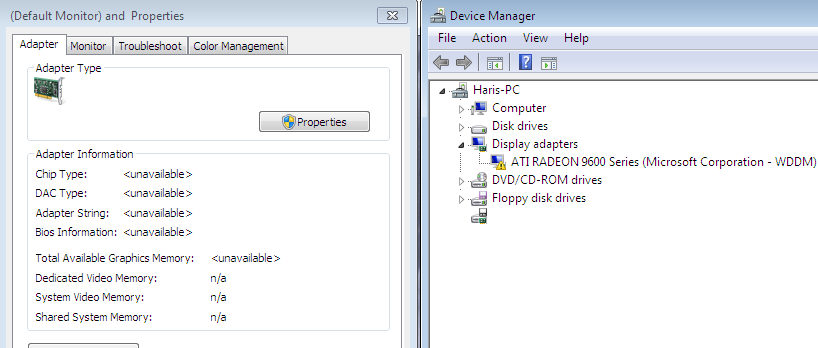
This is what i get
JzgQY.png
 

My Computer My Computer

At a glance

Windows 7 Ultimate x86
Computer type
PC/Desktop
Computer Manufacturer/Model Number
Acer
OS
Windows 7 Ultimate x86
OK themaker ,Right click on ati radeon etc in device manager and select "update driver" and select browse my computer and point towards where you downloaded and extracted the driver file too :)
 

My Computer My Computer

At a glance

win 7 ultimate32bit, Win8.1pro wmc 32bitamd phenom x4 9600corsair twinxs 2x2gb2x nvidia 1gb 8500gt
Computer type
PC/Desktop
Computer Manufacturer/Model Number
self build
OS
win 7 ultimate32bit, Win8.1pro wmc 32bit
CPU
amd phenom x4 9600
Motherboard
asus m2n32-sli deluxe
Memory
corsair twinxs 2x2gb
Graphics Card(s)
2x nvidia 1gb 8500gt
Sound Card
onboard
Monitor(s) Displays
23" PB Viseo 233d
Screen Resolution
1920x1080
Hard Drives
maxtor sata 500gb
maxtor sata 320gb
fujitsu sata200gb
PSU
oryxx tornado 750w
Case
thermaltake xaser lll
Cooling
artic freezer64 pro + 7 case fans
OK themaker ,Right click on ati radeon etc in device manager and select "update driver" and select browse my computer and point towards where you downloaded and extracted the driver file too :)


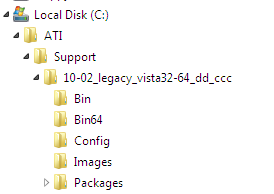
Thanks for your answers and sorry for bothering you , but is that somewhere here , i extracted that to here

R7pKk.png
 

My Computer My Computer

At a glance

Windows 7 Ultimate x86
Computer type
PC/Desktop
Computer Manufacturer/Model Number
Acer
OS
Windows 7 Ultimate x86
OK themaker ,Right click on ati radeon etc in device manager and select "update driver" and select browse my computer and point towards where you downloaded and extracted the driver file too :)


Thanks for your answers and sorry for bothering you , but is that somewhere here , i extracted that to here

R7pKk.png
Yes that will do, first try pointing to the whole folder, if that fails point to the "10-02 legacy "etc :)
 

My Computer My Computer

At a glance

win 7 ultimate32bit, Win8.1pro wmc 32bitamd phenom x4 9600corsair twinxs 2x2gb2x nvidia 1gb 8500gt
Computer type
PC/Desktop
Computer Manufacturer/Model Number
self build
OS
win 7 ultimate32bit, Win8.1pro wmc 32bit
CPU
amd phenom x4 9600
Motherboard
asus m2n32-sli deluxe
Memory
corsair twinxs 2x2gb
Graphics Card(s)
2x nvidia 1gb 8500gt
Sound Card
onboard
Monitor(s) Displays
23" PB Viseo 233d
Screen Resolution
1920x1080
Hard Drives
maxtor sata 500gb
maxtor sata 320gb
fujitsu sata200gb
PSU
oryxx tornado 750w
Case
thermaltake xaser lll
Cooling
artic freezer64 pro + 7 case fans
OK themaker ,Right click on ati radeon etc in device manager and select "update driver" and select browse my computer and point towards where you downloaded and extracted the driver file too :)


Thanks for your answers and sorry for bothering you , but is that somewhere here , i extracted that to here

R7pKk.png
Yes that will do, first try pointing to the whole folder, if that fails point to the "10-02 legacy "etc :)

I tried every folder , every subfolder but it can't :mad:

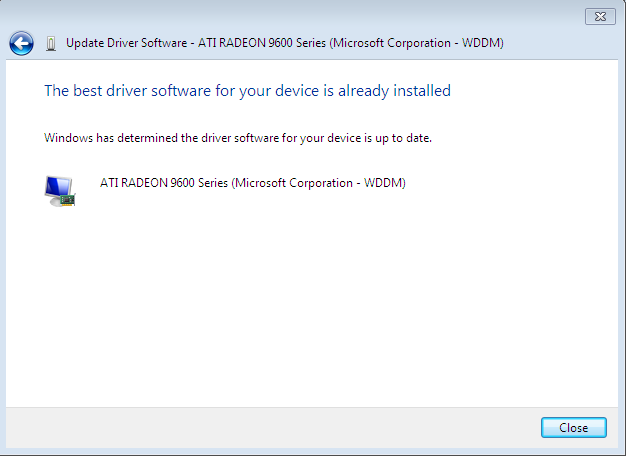
Everytime i get this message

z5gmX.png


Thank you for your patience :)
 

My Computer My Computer

At a glance

Windows 7 Ultimate x86
Computer type
PC/Desktop
Computer Manufacturer/Model Number
Acer
OS
Windows 7 Ultimate x86
OK themaker ,I'm going to ask for a more experienced person to help on this one , please wait a little while :)
 

My Computer My Computer

At a glance

win 7 ultimate32bit, Win8.1pro wmc 32bitamd phenom x4 9600corsair twinxs 2x2gb2x nvidia 1gb 8500gt
Computer type
PC/Desktop
Computer Manufacturer/Model Number
self build
OS
win 7 ultimate32bit, Win8.1pro wmc 32bit
CPU
amd phenom x4 9600
Motherboard
asus m2n32-sli deluxe
Memory
corsair twinxs 2x2gb
Graphics Card(s)
2x nvidia 1gb 8500gt
Sound Card
onboard
Monitor(s) Displays
23" PB Viseo 233d
Screen Resolution
1920x1080
Hard Drives
maxtor sata 500gb
maxtor sata 320gb
fujitsu sata200gb
PSU
oryxx tornado 750w
Case
thermaltake xaser lll
Cooling
artic freezer64 pro + 7 case fans
OK themaker ,I'm going to ask for a more experienced person to help on this one , please wait a little while :)


OK , thank you very much
 

My Computer My Computer

At a glance

Windows 7 Ultimate x86
Computer type
PC/Desktop
Computer Manufacturer/Model Number
Acer
OS
Windows 7 Ultimate x86
Themaker, you may try one thing.

Right click on the my computer icon , select "manage" in the context menu to open the computer management window.

In the window, click on "device manager" in the left pane, it will list all the devices attached in the right side pane. Expand "display adapter" , and find your graphics card listed there. Right click on your display card's name, and choose "update driver software" . In the resulting dialog, click on "search automatically for updated driver software" .... it will search in not only your computer, but also the internet locations for the appropriate software, and will install that.

Let us know what happened .
 

My Computer My Computer

At a glance

Microsoft Windows 10 Pro Insider Preview 64-bitIntel(R) Core(TM) i3-4130 CPU @ 3.40GHzCorsair Vengence 4GB x2 (8.00GB Dual-Channel ...2047MB GeForce GTS 450 (ZOTAC International)
Computer type
PC/Desktop
Computer Manufacturer/Model Number
Self Assembled
OS
Microsoft Windows 10 Pro Insider Preview 64-bit
CPU
Intel(R) Core(TM) i3-4130 CPU @ 3.40GHz
Motherboard
Gigabyte Technology Co., Ltd. B85M-D3H
Memory
Corsair Vengence 4GB x2 (8.00GB Dual-Channel DDR3 @ 798MHz)
Graphics Card(s)
2047MB GeForce GTS 450 (ZOTAC International)
Sound Card
Onboard (Realtek High Definition Audio)
Monitor(s) Displays
LG Flatron E2040T
Screen Resolution
1600x900
Hard Drives
Western Digital 1 TB
Seagate 500 GB
PSU
Corsair VS550
Case
Cooler Master K380
Cooling
Cooler Master Seidon 120V Plus
Keyboard
Logitech MK260r
Mouse
Logitech MK260r
Internet Speed
PMPL Broadband
Antivirus
Windows Defender + MBAM
Browser
Firefox
Other Info
Dell Studio 15" Laptop
Themaker, you may try one thing.

Right click on the my computer icon , select "manage" in the context menu to open the computer management window.

In the window, click on "device manager" in the left pane, it will list all the devices attached in the right side pane. Expand "display adapter" , and find your graphics card listed there. Right click on your display card's name, and choose "update driver software" . In the resulting dialog, click on "search automatically for updated driver software" .... it will search in not only your computer, but also the internet locations for the appropriate software, and will install that.

Let us know what happened .

yn0Fg.png

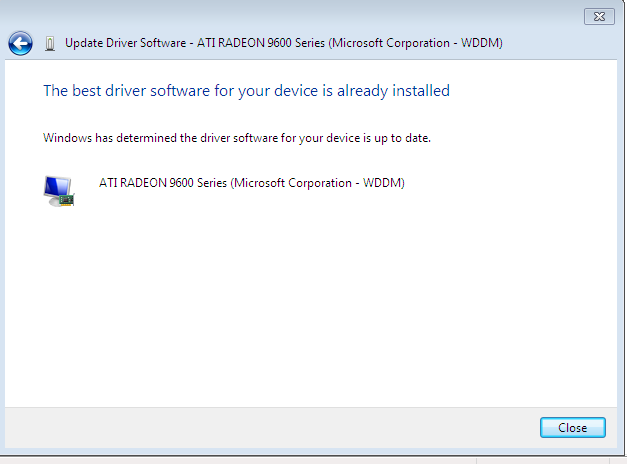
Same thing it says that driver is up to date ..
 

My Computer My Computer

At a glance

Windows 7 Ultimate x86
Computer type
PC/Desktop
Computer Manufacturer/Model Number
Acer
OS
Windows 7 Ultimate x86

My Computer My Computer

At a glance

win 7 ultimate32bit, Win8.1pro wmc 32bitamd phenom x4 9600corsair twinxs 2x2gb2x nvidia 1gb 8500gt
Computer type
PC/Desktop
Computer Manufacturer/Model Number
self build
OS
win 7 ultimate32bit, Win8.1pro wmc 32bit
CPU
amd phenom x4 9600
Motherboard
asus m2n32-sli deluxe
Memory
corsair twinxs 2x2gb
Graphics Card(s)
2x nvidia 1gb 8500gt
Sound Card
onboard
Monitor(s) Displays
23" PB Viseo 233d
Screen Resolution
1920x1080
Hard Drives
maxtor sata 500gb
maxtor sata 320gb
fujitsu sata200gb
PSU
oryxx tornado 750w
Case
thermaltake xaser lll
Cooling
artic freezer64 pro + 7 case fans
Hi themaker, Is the problem that you can not get aero to work? If so then I'm afraid it will not work on the graphic card you have ,Have you thought about investing a little cash and buying a better graphic card ? there are some good deals about at the moment as the electronics trade is going through a bit of a lull at the moment :)
 

My Computer My Computer

At a glance

win 7 ultimate32bit, Win8.1pro wmc 32bitamd phenom x4 9600corsair twinxs 2x2gb2x nvidia 1gb 8500gt
Computer type
PC/Desktop
Computer Manufacturer/Model Number
self build
OS
win 7 ultimate32bit, Win8.1pro wmc 32bit
CPU
amd phenom x4 9600
Motherboard
asus m2n32-sli deluxe
Memory
corsair twinxs 2x2gb
Graphics Card(s)
2x nvidia 1gb 8500gt
Sound Card
onboard
Monitor(s) Displays
23" PB Viseo 233d
Screen Resolution
1920x1080
Hard Drives
maxtor sata 500gb
maxtor sata 320gb
fujitsu sata200gb
PSU
oryxx tornado 750w
Case
thermaltake xaser lll
Cooling
artic freezer64 pro + 7 case fans
themaker what is the make and model of the motherboard (preferable), or the make and model of the computer?

From everything described so far it sounds like this is an AGP card, which if it is the drivers for it won't install without a working AGP driver (part of the chipset, not the video card driver).
 

My Computer My Computer

At a glance

Win 7 Ultimate x64FX-8350 @ 4.6 GHz so farADATA XPG V1 Series Black 8GB DDR3 1600Sapphire R9 270x Dual-X
Computer type
PC/Desktop
Computer Manufacturer/Model Number
Me
OS
Win 7 Ultimate x64
CPU
FX-8350 @ 4.6 GHz so far
Motherboard
Asus M5A97 EVO
Memory
ADATA XPG V1 Series Black 8GB DDR3 1600
Graphics Card(s)
Sapphire R9 270x Dual-X
Sound Card
Xonar DGX w/ Corsair Vengence 1300
Monitor(s) Displays
Acer S232HL Abid
Screen Resolution
1920x1080
Hard Drives
120 GB OCZ Vertex 3
500 GB Seagate 7200.12
PSU
Antec Earthwatts 650W Green
Case
Antec Three Hundred
Cooling
Cooler Master 212 EVO
Keyboard
Logitech G510
Mouse
Logitech G500s
Internet Speed
35000/3000
Hi themaker, Is the problem that you can not get aero to work? If so then I'm afraid it will not work on the graphic card you have ,Have you thought about investing a little cash and buying a better graphic card ? there are some good deals about at the moment as the electronics trade is going through a bit of a lull at the moment :)

Aero can't work :( . I don't know why it can't work if driver is "legacy" :S
 

My Computer My Computer

At a glance

Windows 7 Ultimate x86
Computer type
PC/Desktop
Computer Manufacturer/Model Number
Acer
OS
Windows 7 Ultimate x86
Hi themaker, Is the problem that you can not get aero to work? If so then I'm afraid it will not work on the graphic card you have ,Have you thought about investing a little cash and buying a better graphic card ? there are some good deals about at the moment as the electronics trade is going through a bit of a lull at the moment :)

Aero can't work :( . I don't know why it can't work if driver is "legacy" :S

Hi themaker Legacy means the card is old and no longer supported by the manufacturer Aero will not work in win7 with the card you have, I have the same problem on a Dell I5100 using the mobility radeon 7500 it just will not run Aero even using modded drivers, I am truly sorry about that :(
 

My Computer My Computer

At a glance

win 7 ultimate32bit, Win8.1pro wmc 32bitamd phenom x4 9600corsair twinxs 2x2gb2x nvidia 1gb 8500gt
Computer type
PC/Desktop
Computer Manufacturer/Model Number
self build
OS
win 7 ultimate32bit, Win8.1pro wmc 32bit
CPU
amd phenom x4 9600
Motherboard
asus m2n32-sli deluxe
Memory
corsair twinxs 2x2gb
Graphics Card(s)
2x nvidia 1gb 8500gt
Sound Card
onboard
Monitor(s) Displays
23" PB Viseo 233d
Screen Resolution
1920x1080
Hard Drives
maxtor sata 500gb
maxtor sata 320gb
fujitsu sata200gb
PSU
oryxx tornado 750w
Case
thermaltake xaser lll
Cooling
artic freezer64 pro + 7 case fans
Back
Top