Advice and direction on installing OS on new SSD with multiple HHD's

If I opt to use my SSD as the OS/boot drive is establishing a RAID necessary? I just want my SATA drives for data/game storage. Also, the SSD is 64Gig.

Hi Dave,

No, it is definately not neccessary to create a RAID drive if you install the OS to a SSD. The best possible setup is exactly what you are after:

1. Install OS to SSD (you can also install some applications to the SSD too - 64Gb is large enough)
2. Install data and other programs to HDD

Regards,
Golden
I thought programs were supposed to be installed on the same drive as the OS as they needed to make registry changes? No?
 

My Computer My Computer

At a glance

windows 7 pro 64 bit SP 1intel i7-4770K 3.50 GHz32.0 GB Patriot Ltd . Ed. DDR3 1866MHzGeForce GTX 660
Computer type
PC/Desktop
Computer Manufacturer/Model Number
custom build
OS
windows 7 pro 64 bit SP 1
CPU
intel i7-4770K 3.50 GHz
Motherboard
Asus Z87 Delux
Memory
32.0 GB Patriot Ltd . Ed. DDR3 1866MHz
Graphics Card(s)
GeForce GTX 660
Sound Card
integrated Realtek
Monitor(s) Displays
3 - Dell 20"
Screen Resolution
1600 X 1200
Hard Drives
1- Samsung 840 PRO Series 512 GB SSD, 1- Intel 510 series 120 GB SSD, 2- Seagate Hybrid SSD 250G,
PSU
Corsair HX750 Watt
Case
Corsair Obsidian 550D
Cooling
8 120mm case fans, Corsair H-90 Liquid CPU coller
Keyboard
Std. Microsoft
Mouse
Logitech
Internet Speed
33 Mb/s download, 4.75 Mb/s upload
Antivirus
MalwareBytes
Browser
Chrome, Ie-10
Hi rtmeek,

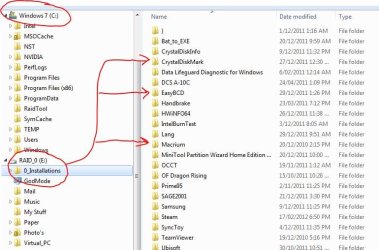
No, you can install to any installed disk on the computer, it doesn't have to be on the same drive as the OS. See image below.

The registry entry is made at the time of installation, effectively "telling" the OS where the newly installed program resides.

Regards,
Golden
 

Attachments

  • Capture.JPG
    Capture.JPG
    65.1 KB · Views: 14

My Computer My Computer

At a glance

Windows 10 Pro x64 ; Xubuntu x64Intel i7 860 @ 2.80 GHz O/C'ed to 4.0GHz16GB Corsair Vengance DDR3 @ 661 MHz Dual Cha...EVGA NVidia GTX 560 1024MB
Computer type
PC/Desktop
Computer Manufacturer/Model Number
Golden Mk. I.4
OS
Windows 10 Pro x64 ; Xubuntu x64
CPU
Intel i7 860 @ 2.80 GHz O/C'ed to 4.0GHz
Motherboard
Gigabyte P55A-UD3R Rev.1. Award BIOS F13
Memory
16GB Corsair Vengance DDR3 @ 661 MHz Dual Channel (9-9-9-24)
Graphics Card(s)
EVGA NVidia GTX 560 1024MB
Sound Card
Realtek Integrated
Monitor(s) Displays
Dual Samsung SyncMaster 2494HS
Screen Resolution
1920*1080 and 1920*1080
Hard Drives
1*Samsung 840 EVO 120GB SSD;
1*OCZ Vertex 2 60GB SSD;
2*Samsung F3 SpinPoint 1TB in RAID0;
1*Samsung F1 SpinPoint 1TB;
2*Western Digital 1TB External USB 3.0
1*Western Digital 500GB External USB 3.0
1*Seagate 500GB External USB 2.0
PSU
Thermaltake ToughPower QFan 750W
Case
Thermaltake Element S VK60001W2Z
Cooling
Corsair H60 Water Cooling, 2*230mm and 2*80mm case fans
Keyboard
Logitech G110
Mouse
Logitech MX518

My Computer My Computer

At a glance

Vista, Windows7, Mint Mate, Zorin, Windows 8from 1.6GHz Duo to i7
Computer Manufacturer/Model Number
HP, Dell, Gateway, Toshiba - 4 laptops and 2 desktops
OS
Vista, Windows7, Mint Mate, Zorin, Windows 8
CPU
from 1.6GHz Duo to i7
Monitor(s) Displays
2x HP w2207
Hard Drives
5x HDD, 7x SSD, 12x Externals
Keyboard
with trackball - no mices
Mouse
Trackball mice
Internet Speed
DSL 6000
If I opt to use my SSD as the OS/boot drive is establishing a RAID necessary? I just want my SATA drives for data/game storage. Also, the SSD is 64Gig.

Hi Dave,

No, it is definately not neccessary to create a RAID drive if you install the OS to a SSD. The best possible setup is exactly what you are after:

1. Install OS to SSD (you can also install some applications to the SSD too - 64Gb is large enough)
2. Install data and other programs to HDD

Regards,
Golden

Thanks, as to Program Files and Program Files (x86), can I clone these to to a HDD that will be installed after the SSD is setup as the OS drive and still use the programs in the directories or do I have to reinstall everything again? I know the registry won't particularly like it but could it work? Some of those programs I no longer have the original install programs for.
 

My Computer My Computer

At a glance

Windows 7 Home Premium (x64) (build 7600)2.00 gigahertz AMD Athlon 64 X2 Dual Core3328 Megabytes Usable Installed Memory 4x1024...NVIDIA GeForce 6800 GS/XT (Microsoft Corporat...
Computer Manufacturer/Model Number
home grown
OS
Windows 7 Home Premium (x64) (build 7600)
CPU
2.00 gigahertz AMD Athlon 64 X2 Dual Core
Motherboard
ASUSTeK Computer Inc. A8V Rev 1.xx FSB200 megahertz
Memory
3328 Megabytes Usable Installed Memory 4x1024 DIMM
Graphics Card(s)
NVIDIA GeForce 6800 GS/XT (Microsoft Corporation - WDDM) [Di
Sound Card
SB Audigy LS
Monitor(s) Displays
Samsung SyncMaster [Monitor] (18.5"vis, s/n H9LS521761, May
Hard Drives
1-500G IDE (C:), 2-SATA 1TB, 3-USB2 1TB
= 5501.11 Gigabytes Usable Hard Drive Capacity
Hi rtmeek,

No, you can install to any installed disk on the computer, it doesn't have to be on the same drive as the OS. See image below.

The registry entry is made at the time of installation, effectively "telling" the OS where the newly installed program resides.

Regards,
Golden

OK, then with what you are saying; I could put my OS on a clean C drive, load all my programs on a separate D drive, then make an image of C. Then if windows ever became corrupt and needed reinstalling, I could simply install the saved image of the OS with all the correct registry changes, not have to worry about the programs which are on D, and presto! i'm back in business? That sounds too simple.
 

My Computer My Computer

At a glance

windows 7 pro 64 bit SP 1intel i7-4770K 3.50 GHz32.0 GB Patriot Ltd . Ed. DDR3 1866MHzGeForce GTX 660
Computer type
PC/Desktop
Computer Manufacturer/Model Number
custom build
OS
windows 7 pro 64 bit SP 1
CPU
intel i7-4770K 3.50 GHz
Motherboard
Asus Z87 Delux
Memory
32.0 GB Patriot Ltd . Ed. DDR3 1866MHz
Graphics Card(s)
GeForce GTX 660
Sound Card
integrated Realtek
Monitor(s) Displays
3 - Dell 20"
Screen Resolution
1600 X 1200
Hard Drives
1- Samsung 840 PRO Series 512 GB SSD, 1- Intel 510 series 120 GB SSD, 2- Seagate Hybrid SSD 250G,
PSU
Corsair HX750 Watt
Case
Corsair Obsidian 550D
Cooling
8 120mm case fans, Corsair H-90 Liquid CPU coller
Keyboard
Std. Microsoft
Mouse
Logitech
Internet Speed
33 Mb/s download, 4.75 Mb/s upload
Antivirus
MalwareBytes
Browser
Chrome, Ie-10
Gregrocker,


In regards to the H drive, It was my main HD -C drive- before I installed my new Intel SSD using the tutorial to relocate the user folders. I marked it inactive but, for the time being, have just left it alone in case my new installs (or whatever) screwed up so I would have a 'good' drive with OS and data to fall back on; as I could't even pay a bill without my computer. Whenever I'm comfortable that all is good with the new new drive, etc. I was going to format it and use it for data, backups,etc. I could just unplug it. Whats's your advice?

Again, thanks for your help

Ted
When ready just delete H and repartition in Disk Mgmt. Partition or Volume - Delete
Partition or Volume - Create New

This should be sufficient however if it gives you any problem open an Elevated Command Prompt and run Diskpart Clean Command, after triple checking you are choosing the correct drive. This clears the boot sector so it can not conflict. Then you can repartition as desired in Disk Mgmt.
 
Hi rtmeek,

No, you can install to any installed disk on the computer, it doesn't have to be on the same drive as the OS. See image below.

The registry entry is made at the time of installation, effectively "telling" the OS where the newly installed program resides.

Regards,
Golden

OK, then with what you are saying; I could put my OS on a clean C drive, load all my programs on a separate D drive, then make an image of C. Then if windows ever became corrupt and needed reinstalling, I could simply install the saved image of the OS with all the correct registry changes, not have to worry about the programs which are on D, and presto! i'm back in business? That sounds too simple.
You got that right. Except I question the wisdom of installing programs on the HDD (unless those are very few very large programs). The main advantage of the SSD is that programs load very fast and if you put them on the HDD, you lose this advantage.
 

My Computer My Computer

At a glance

Vista, Windows7, Mint Mate, Zorin, Windows 8from 1.6GHz Duo to i7
Computer Manufacturer/Model Number
HP, Dell, Gateway, Toshiba - 4 laptops and 2 desktops
OS
Vista, Windows7, Mint Mate, Zorin, Windows 8
CPU
from 1.6GHz Duo to i7
Monitor(s) Displays
2x HP w2207
Hard Drives
5x HDD, 7x SSD, 12x Externals
Keyboard
with trackball - no mices
Mouse
Trackball mice
Internet Speed
DSL 6000
+1.

You want Programs with the OS as they write themselves into the registry which integrates them into the OS. Installing programs to a HD also partially defeats the speed advantage of the SSD.

Having the data on separate drive is the best way to have the latest data set when reimaging due to irreparable Win7. However it still needs to be backed up off the HD.

All of this can be accomplished by linking to libraries from the data drive, using the same User folders or your own filing system. This prevents Win7 backup imaging from including the data drive and avoids occasional permissioning issue. Library - Include a Folder - Windows 7 Forums
 
In other words, what you are saying is: It's best to install windows -user files and all- on C, then manually set up new folders on D, name them what you wish, then include the folder from C to the new folder on D so your data is now saved in C & D. Then if you ever reinstall the OS on C you can just copy the data from the D folders back to C? (whew). Right?
 

My Computer My Computer

At a glance

windows 7 pro 64 bit SP 1intel i7-4770K 3.50 GHz32.0 GB Patriot Ltd . Ed. DDR3 1866MHzGeForce GTX 660
Computer type
PC/Desktop
Computer Manufacturer/Model Number
custom build
OS
windows 7 pro 64 bit SP 1
CPU
intel i7-4770K 3.50 GHz
Motherboard
Asus Z87 Delux
Memory
32.0 GB Patriot Ltd . Ed. DDR3 1866MHz
Graphics Card(s)
GeForce GTX 660
Sound Card
integrated Realtek
Monitor(s) Displays
3 - Dell 20"
Screen Resolution
1600 X 1200
Hard Drives
1- Samsung 840 PRO Series 512 GB SSD, 1- Intel 510 series 120 GB SSD, 2- Seagate Hybrid SSD 250G,
PSU
Corsair HX750 Watt
Case
Corsair Obsidian 550D
Cooling
8 120mm case fans, Corsair H-90 Liquid CPU coller
Keyboard
Std. Microsoft
Mouse
Logitech
Internet Speed
33 Mb/s download, 4.75 Mb/s upload
Antivirus
MalwareBytes
Browser
Chrome, Ie-10
so your data is now saved in C & D. Then if you ever reinstall the OS on C you can just copy the data from the D folders back to C? (whew). Right?

I don't think so.

The idea is to save data to D.

Not to C.

And then back up the data on D to E, F, or wherever.
 

My Computer My Computer

At a glance

Windows 7 Home Premium SP1, 64-bitIntel Skylake i5-6600K, not overclocked8 GB HyperX DDR4-2666 (2 x 4 GB)none; graphics are integrated on CPU
Computer type
PC/Desktop
Computer Manufacturer/Model Number
Ignatz Special; 4 speed manual gearbox; factory air conditioning; one of one
OS
Windows 7 Home Premium SP1, 64-bit
CPU
Intel Skylake i5-6600K, not overclocked
Motherboard
AsRock Z170M Extreme 4, micro ATX
Memory
8 GB HyperX DDR4-2666 (2 x 4 GB)
Graphics Card(s)
none; graphics are integrated on CPU
Sound Card
onboard: Realtek ALC1150; external: USB Behringer UF0-202
Monitor(s) Displays
Dell S2340M 23 inch IPS
Screen Resolution
1600 x 900
Hard Drives
System: Crucial MX100 series SSD, 128 GB;
Data: Samsung Spinpoint 103SJ, 1 TB;
Backup: WD Caviar Green WD30EZRX-00D8PB0, 3 TB
PSU
Rosewill SilentNight 500 watt fanless, semi-modular
Case
Antec Solo II
Cooling
Noctua NH-U12S; Noctua F12 intake, Noctua S12A exhaust
Keyboard
Microsoft 200 6JH-00001 USB
Mouse
Dell or Microsoft optical wired; USB
Antivirus
Microsoft Security Essentials and Malwarebytes Premium
Browser
Pale Moon
Other Info
All fans PWM; speeds at idle: CPU circa 500 rpm; intake circa 600 rpm; exhaust circa 600 rpm; CPU temps 27 idle and 47 C load in a warm room (27 C/81 F) when running Intel Extreme Tuning Utility stress test.
In other words, what you are saying is: It's best to install windows -user files and all- on C, then manually set up new folders on D, name them what you wish, then include the folder from C to the new folder on D so your data is now saved in C & D. Then if you ever reinstall the OS on C you can just copy the data from the D folders back to C? (whew). Right?
No, no - as Ignatz says, your own data goes on D and the odd program folder goes on the default C folders.

And you INCLUDE the folders you defined in D into the corresponding libraries. There is no inclusion of folders into folders. But then all your user files go to D.

If you want to keep the default C folders all empty, right click on the library folders > Properties, highlight the D folder and click the "Set save Location' button. Then Apply. But then you get the system generated folders with your own folders. I personally do not like that.

And never move system files off the SSD. That is not productive.
 

My Computer My Computer

At a glance

Vista, Windows7, Mint Mate, Zorin, Windows 8from 1.6GHz Duo to i7
Computer Manufacturer/Model Number
HP, Dell, Gateway, Toshiba - 4 laptops and 2 desktops
OS
Vista, Windows7, Mint Mate, Zorin, Windows 8
CPU
from 1.6GHz Duo to i7
Monitor(s) Displays
2x HP w2207
Hard Drives
5x HDD, 7x SSD, 12x Externals
Keyboard
with trackball - no mices
Mouse
Trackball mice
Internet Speed
DSL 6000
I wonder how the other geeks here feel about moving User folders now that it's been a common recommended practice for several years. I have stopped doing so because of permissioning issue I got on my all-important Downloads folder while trying to run .exe's - a problem I couldn't fix except by moving Downloads back to C.

We also regularly hear from those unhappy because the data drive is forcibly included in Win7 backup imaging. We all know well the weaknesses of W7 backup imaging and many have abandoned it, but it still works well for others and may be a issue when they can't achieve a lean OS/Programs image sans data because they moved their User folders.

So I'm torn.
 
Well, with a 60GB SSD you have no option. The user data nust be moved to the HDD. But I never move the default location but INCLUDE new folders that I create on the data partitions. That works quite well for me.
 

My Computer My Computer

At a glance

Vista, Windows7, Mint Mate, Zorin, Windows 8from 1.6GHz Duo to i7
Computer Manufacturer/Model Number
HP, Dell, Gateway, Toshiba - 4 laptops and 2 desktops
OS
Vista, Windows7, Mint Mate, Zorin, Windows 8
CPU
from 1.6GHz Duo to i7
Monitor(s) Displays
2x HP w2207
Hard Drives
5x HDD, 7x SSD, 12x Externals
Keyboard
with trackball - no mices
Mouse
Trackball mice
Internet Speed
DSL 6000
Yes Greg, forgot that there was a tutorial for such a simple operation. LOL
 

My Computer My Computer

At a glance

Vista, Windows7, Mint Mate, Zorin, Windows 8from 1.6GHz Duo to i7
Computer Manufacturer/Model Number
HP, Dell, Gateway, Toshiba - 4 laptops and 2 desktops
OS
Vista, Windows7, Mint Mate, Zorin, Windows 8
CPU
from 1.6GHz Duo to i7
Monitor(s) Displays
2x HP w2207
Hard Drives
5x HDD, 7x SSD, 12x Externals
Keyboard
with trackball - no mices
Mouse
Trackball mice
Internet Speed
DSL 6000
But my problem is that I already have my user folders in D -not C- (where all data is being saved) and a Windows image insists I have to include both drives C & D; but I didn't want D to be on my image. I think Gregrocker is trying to explain the best way to accomplish that. I just need the info in a bit more basic language to completely understand what I am trying (or need) to do to accomplish it (I need it simple). My basic objective is to make an OS reinstall painless regardless of how many SSDs or HHDs it takes. But apparently Windows is written in a way that does not consider what people go through in a reinstall, or, that Windows may ever become corrupt, or that HDs may fail.
 

My Computer My Computer

At a glance

windows 7 pro 64 bit SP 1intel i7-4770K 3.50 GHz32.0 GB Patriot Ltd . Ed. DDR3 1866MHzGeForce GTX 660
Computer type
PC/Desktop
Computer Manufacturer/Model Number
custom build
OS
windows 7 pro 64 bit SP 1
CPU
intel i7-4770K 3.50 GHz
Motherboard
Asus Z87 Delux
Memory
32.0 GB Patriot Ltd . Ed. DDR3 1866MHz
Graphics Card(s)
GeForce GTX 660
Sound Card
integrated Realtek
Monitor(s) Displays
3 - Dell 20"
Screen Resolution
1600 X 1200
Hard Drives
1- Samsung 840 PRO Series 512 GB SSD, 1- Intel 510 series 120 GB SSD, 2- Seagate Hybrid SSD 250G,
PSU
Corsair HX750 Watt
Case
Corsair Obsidian 550D
Cooling
8 120mm case fans, Corsair H-90 Liquid CPU coller
Keyboard
Std. Microsoft
Mouse
Logitech
Internet Speed
33 Mb/s download, 4.75 Mb/s upload
Antivirus
MalwareBytes
Browser
Chrome, Ie-10
You can either:

Move your User folders back to C if you want to use Win7 backup imaging and not have D included in it: How to Restore the Default Location of Windows 7 User Folders. Then link data stored on D using libraries: Library - Include a Folder - Windows 7 Forums

Or you can use free Macrium Reflect to save a backup image for only C. Macrium - Image your system.

There are others such as Acronis premium app included free is you have a WD or Seagate HD in the mix, and Paragon 11. But Macrium is the freeware choice of most here.
 
If you stick with Windows imaging, you will be doomed anyhow. I would do the following:

1. Move the default locations of your folders back to C.

2. Create new folders for Documents, Music, etc. on D.

3. Move your data folders do those folders - no change of default locations. When you are done, the folders on C are empty.

4. Get the Paragon Migration Tool for $19.95. That will do all the work for you with 3 clicks. I have great fear that moving the system with an image will stretch your capabilities. I hope you don't mind me saying that.

5. Once you run on the SSD, go to your folders on D, right click on them and INCLUDE them into the corresponding library. --- All done.
 

My Computer My Computer

At a glance

Vista, Windows7, Mint Mate, Zorin, Windows 8from 1.6GHz Duo to i7
Computer Manufacturer/Model Number
HP, Dell, Gateway, Toshiba - 4 laptops and 2 desktops
OS
Vista, Windows7, Mint Mate, Zorin, Windows 8
CPU
from 1.6GHz Duo to i7
Monitor(s) Displays
2x HP w2207
Hard Drives
5x HDD, 7x SSD, 12x Externals
Keyboard
with trackball - no mices
Mouse
Trackball mice
Internet Speed
DSL 6000
You can either:

Move your User folders back to C if you want to use Win7 backup imaging and not have D included in it: How to Restore the Default Location of Windows 7 User Folders. Then link data stored on D using libraries: Library - Include a Folder - Windows 7 Forums

Or you can use free Macrium Reflect to save a backup image for only C. Macrium - Image your system.

There are others such as Acronis premium app included free is you have a WD or Seagate HD in the mix, and Paragon 11. But Macrium is the freeware choice of most here.

Gregrocker, In one of your earlier posts you let me know abut Windows backup not liking the user folder being on D; That an image would include both drives. So I made an image with Acronis of just dive C in case I needed a reinstall. but something in the back of my mind is telling me that senairo would fail in a reinstall as something in Windows would probably need something from the user files or programdata file in D to reinstall.

It just aggravates me that the tutorial and thread on this subject never mentioned this potential problem. I would never have relocated the files if I knew!

So, from all the back and forth, I'm going to put the user files back in C then link my data to D..........I'm sure I'll some more questions about that.

Thanks
Ted
 

My Computer My Computer

At a glance

windows 7 pro 64 bit SP 1intel i7-4770K 3.50 GHz32.0 GB Patriot Ltd . Ed. DDR3 1866MHzGeForce GTX 660
Computer type
PC/Desktop
Computer Manufacturer/Model Number
custom build
OS
windows 7 pro 64 bit SP 1
CPU
intel i7-4770K 3.50 GHz
Motherboard
Asus Z87 Delux
Memory
32.0 GB Patriot Ltd . Ed. DDR3 1866MHz
Graphics Card(s)
GeForce GTX 660
Sound Card
integrated Realtek
Monitor(s) Displays
3 - Dell 20"
Screen Resolution
1600 X 1200
Hard Drives
1- Samsung 840 PRO Series 512 GB SSD, 1- Intel 510 series 120 GB SSD, 2- Seagate Hybrid SSD 250G,
PSU
Corsair HX750 Watt
Case
Corsair Obsidian 550D
Cooling
8 120mm case fans, Corsair H-90 Liquid CPU coller
Keyboard
Std. Microsoft
Mouse
Logitech
Internet Speed
33 Mb/s download, 4.75 Mb/s upload
Antivirus
MalwareBytes
Browser
Chrome, Ie-10
If you stick with Windows imaging, you will be doomed anyhow. I would do the following:

1. Move the default locations of your folders back to C.

2. Create new folders for Documents, Music, etc. on D.

3. Move your data folders do those folders - no change of default locations. When you are done, the folders on C are empty.

4. Get the Paragon Migration Tool for $19.95. That will do all the work for you with 3 clicks.
PHP:
I have great fear that moving the system with an image will stretch your capabilities. I hope you don't mind me saying that.

5. Once you run on the SSD, go to your folders on D, right click on them and INCLUDE them into the corresponding library. --- All done.

Don't mind at all; the Windows software and how it works is something I readily admit that I'm no expert on...but I'm learning, and you guys on this forum are simply great in your advice. You know, my grand kids in 1st grade have laptops on their desk-they will be wizzes- When I was in college we used slide rules and a basic hand held calculator (that is now free) cost $600. BUTT, if you tell me what to do, I can do it -then I'll know. Thanks
 

My Computer My Computer

At a glance

windows 7 pro 64 bit SP 1intel i7-4770K 3.50 GHz32.0 GB Patriot Ltd . Ed. DDR3 1866MHzGeForce GTX 660
Computer type
PC/Desktop
Computer Manufacturer/Model Number
custom build
OS
windows 7 pro 64 bit SP 1
CPU
intel i7-4770K 3.50 GHz
Motherboard
Asus Z87 Delux
Memory
32.0 GB Patriot Ltd . Ed. DDR3 1866MHz
Graphics Card(s)
GeForce GTX 660
Sound Card
integrated Realtek
Monitor(s) Displays
3 - Dell 20"
Screen Resolution
1600 X 1200
Hard Drives
1- Samsung 840 PRO Series 512 GB SSD, 1- Intel 510 series 120 GB SSD, 2- Seagate Hybrid SSD 250G,
PSU
Corsair HX750 Watt
Case
Corsair Obsidian 550D
Cooling
8 120mm case fans, Corsair H-90 Liquid CPU coller
Keyboard
Std. Microsoft
Mouse
Logitech
Internet Speed
33 Mb/s download, 4.75 Mb/s upload
Antivirus
MalwareBytes
Browser
Chrome, Ie-10
Back
Top