Desktop now almost dead after cleaning interior after thermal events

sdraza1

New member
Member
Local time
2:02 PM
Messages
36
My computer used to shut down and a message used to be displayed that there was a thermal event. I opened the computer, remove the screws of the fan and cleaned the heat sink underneath it of dust which it had a lot( and of course other parts too). after that I put the fan back but I am not sure whether I put it in original upside down position or in wrong way, anyhow the wires connecting with the fan are now in between the fan and the heat sink but computer still continued to shut down suddenly off and on sometimes even before booting. I again opened the computer and this time even unscrewed the heat sink and cleaned it with air blow and a brush. After that computer has become like dead. When I turn it on a green light beneath the off on button lits but there is absolutely no sound which I used to hear when the computer used to boot. What should I do now? thanks
 

My Computer My Computer

At a glance

MS Windows 7 Home Premium 32-bit SP1Intel Pentium 4 519K Prescott 90nm Technology1.00 GB Dual-Channel DDR @ 106MHz (2.5-3-3-7)SyncMaster(1400x1050@60Hz)Intel(R)82915G/GV/9...
Computer Manufacturer/Model Number
Desktop
OS
MS Windows 7 Home Premium 32-bit SP1
CPU
Intel Pentium 4 519K Prescott 90nm Technology
Motherboard
Intel Corporation D915GAG 66 °C
Memory
1.00 GB Dual-Channel DDR @ 106MHz (2.5-3-3-7)
Graphics Card(s)
SyncMaster(1400x1050@60Hz)Intel(R)82915G/GV/910GLExpressChip
Sound Card
High Definition Audio Device / CM18738/C3DX PCI AUDIO DEVICE
Hard Drives
313GB Seagate ST3320613AS ATA Device (SATA)44 °C
It sounds like you didn't put something back together properly. If you're not too keen about computer hardware, it is best left for the professionals because you can really screw something up if not put back together correctly. Usually CPU heat sinks have four notches that push down and lock into place. You will hear a click when that happens. Also, if you separated the heat sink from the CPU, you will need to reapply thermal paste to the bottom of the heat sink - Newegg.com - Arctic Silver 5 Thermal Compound - Thermal Compound / Grease


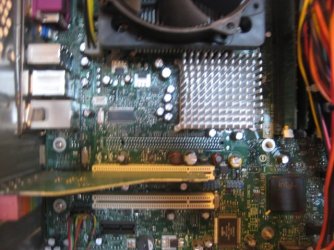
Can you take a picture of your motherboard and upload it here?
 

My Computer My Computer

At a glance

Windows 7 Home Premium 64bitIntel Core i5-2500 @ 3.8GHzG.SKILL Ripjaws Series 8GB (2 x 4GB) DDR3 1600NVIDIA GTX 550Ti
Computer Manufacturer/Model Number
Self Built
OS
Windows 7 Home Premium 64bit
CPU
Intel Core i5-2500 @ 3.8GHz
Motherboard
MSI P67A-GD65
Memory
G.SKILL Ripjaws Series 8GB (2 x 4GB) DDR3 1600
Graphics Card(s)
NVIDIA GTX 550Ti
Sound Card
On Board
Monitor(s) Displays
ASUS 23"
Hard Drives
OCZ Vertex 3 VTX3-25SAT3-60G
Keyboard
Wireless
Mouse
Wireless
It sounds like you didn't put something back together properly. If you're not too keen about computer hardware, it is best left for the professionals because you can really screw something up if not put back together correctly. Usually CPU heat sinks have four notches that push down and lock into place. You will hear a click when that happens. Also, if you separated the heat sink from the CPU, you will need to reapply thermal paste to the bottom of the heat sink - Newegg.com - Arctic Silver 5 Thermal Compound - Thermal Compound / Grease


Can you take a picture of your motherboard and upload it here?

Can I upload a picture here on Windows 7 forum?
 

My Computer My Computer

At a glance

MS Windows 7 Home Premium 32-bit SP1Intel Pentium 4 519K Prescott 90nm Technology1.00 GB Dual-Channel DDR @ 106MHz (2.5-3-3-7)SyncMaster(1400x1050@60Hz)Intel(R)82915G/GV/9...
Computer Manufacturer/Model Number
Desktop
OS
MS Windows 7 Home Premium 32-bit SP1
CPU
Intel Pentium 4 519K Prescott 90nm Technology
Motherboard
Intel Corporation D915GAG 66 °C
Memory
1.00 GB Dual-Channel DDR @ 106MHz (2.5-3-3-7)
Graphics Card(s)
SyncMaster(1400x1050@60Hz)Intel(R)82915G/GV/910GLExpressChip
Sound Card
High Definition Audio Device / CM18738/C3DX PCI AUDIO DEVICE
Hard Drives
313GB Seagate ST3320613AS ATA Device (SATA)44 °C

My Computer My Computer

At a glance

Windows 7 Ultimate SP1 - 64 BitIntel Core i5 2500k2x4GB DDR3 1333HzAti Radeon 6770
Computer type
PC/Desktop
Computer Manufacturer/Model Number
Novatech iRush Pro
OS
Windows 7 Ultimate SP1 - 64 Bit
CPU
Intel Core i5 2500k
Motherboard
Foxconn H67M-S/H67M-V/H67
Memory
2x4GB DDR3 1333Hz
Graphics Card(s)
Ati Radeon 6770
Sound Card
None
Monitor(s) Displays
Samsung S22B150
Screen Resolution
1920x1080
Hard Drives
2x500GB
PSU
500W
Cooling
Fan
Keyboard
HP KU0316
Mouse
Wireless Logitech M185
Internet Speed
20MB/s
Antivirus
Avast Free
Browser
Google Chrome
Other Info
Logitech M185 Mouse
KU-M316 Keyboard
It sounds like you didn't put something back together properly. If you're not too keen about computer hardware, it is best left for the professionals because you can really screw something up if not put back together correctly. Usually CPU heat sinks have four notches that push down and lock into place. You will hear a click when that happens. Also, if you separated the heat sink from the CPU, you will need to reapply thermal paste to the bottom of the heat sink - Newegg.com - Arctic Silver 5 Thermal Compound - Thermal Compound / Grease


Can you take a picture of your motherboard and upload it here?

Can I upload a picture here on Windows 7 forum?
Sorry I found out how to upload a photo.
 

My Computer My Computer

At a glance

MS Windows 7 Home Premium 32-bit SP1Intel Pentium 4 519K Prescott 90nm Technology1.00 GB Dual-Channel DDR @ 106MHz (2.5-3-3-7)SyncMaster(1400x1050@60Hz)Intel(R)82915G/GV/9...
Computer Manufacturer/Model Number
Desktop
OS
MS Windows 7 Home Premium 32-bit SP1
CPU
Intel Pentium 4 519K Prescott 90nm Technology
Motherboard
Intel Corporation D915GAG 66 °C
Memory
1.00 GB Dual-Channel DDR @ 106MHz (2.5-3-3-7)
Graphics Card(s)
SyncMaster(1400x1050@60Hz)Intel(R)82915G/GV/910GLExpressChip
Sound Card
High Definition Audio Device / CM18738/C3DX PCI AUDIO DEVICE
Hard Drives
313GB Seagate ST3320613AS ATA Device (SATA)44 °C
Also could be that you dislodged the processor from the socket.

I suggest you find someone who has done this kind of thing before and have the processor reseated and the heat sink refitted with new thermal paste.
If you are going to do it be sure to read the manual and be sure of what you are doing.
 

My Computer My Computer

At a glance

Windows 7 64 Bit Home Premium SP1i7-3820GSkill F3-14900CL9Q - 16GBEVGA GeForce GTX660 - Driver 352.86
Computer type
PC/Desktop
Computer Manufacturer/Model Number
Home Built - Jan 2013
OS
Windows 7 64 Bit Home Premium SP1
CPU
i7-3820
Motherboard
Asus P9X79-PRO - Bios 4608
Memory
GSkill F3-14900CL9Q - 16GB
Graphics Card(s)
EVGA GeForce GTX660 - Driver 352.86
Sound Card
On board Realtek ALC898
Monitor(s) Displays
Acer S271HL
Screen Resolution
1920 x 1080
Hard Drives
#1- Samsung 840 Pro Series
#2- Western Digital WD1002FAEX Sata3 Black
#3- Western Digital WD1002FAEX Sata3 Black
PSU
Corsair CMPSU-850TX-V2 - 850 watt (by Seasonic)
Case
Corsair Obsidian 550D
Cooling
Standard 3 120mm case fans, Cooler Master Hyper 212 EVO
Keyboard
MS KC-0405
Mouse
Intellimouse 5-button
Internet Speed
56 Mbits/Sec (on a good day)
Antivirus
Avast & Malwarebytes
Browser
Firefox
Other Info
Asus DVD - DRW-24B1ST 24X
My computer used to shut down and a message used to be displayed that there was a thermal event. I opened the computer, remove the screws of the fan and cleaned the heat sink underneath it of dust which it had a lot( and of course other parts too)

It reminds what we usually do. Before deciding to disassemble the heat sink, it was actually useful to observe first how the processor fan worked. Was it slower or even not running.
 

My Computers My Computers

  • At a glance

    Windows 11 PrereleaseCORE i5 1040016GBGTX 750Ti
    Computer type
    PC/Desktop
    Computer Manufacturer/Model Number
    MSI
    OS
    Windows 11 Prerelease
    CPU
    CORE i5 10400
    Motherboard
    MSI H510M Pro
    Memory
    16GB
    Graphics Card(s)
    GTX 750Ti
    Sound Card
    Realtek HD Integrated
    Monitor(s) Displays
    Samsung Curved 24"; Samsung TV 50"
    Screen Resolution
    1920 x 1080
    Hard Drives
    Vi-Gen NVMe 256GB
    WD 3 TB
    Seagate 2 TB
    Seagate 4TB
    PSU
    Power Striker
    Case
    VBR
    Cooling
    Conventional
    Keyboard
    Logitech Wireless
    Mouse
    Logitech Wireless
    Internet Speed
    2MBPs
  • At a glance

    BigSurCore i58 GB
    Computer type
    Laptop
    System Manufacturer/Model Number
    Apple MacBook
    OS
    BigSur
    CPU
    Core i5
    Memory
    8 GB
    Monitor(s) Displays
    13 "
    Screen Resolution
    1366 x 768
    Hard Drives
    SSD 256 GB
It sounds like you didn't put something back together properly. If you're not too keen about computer hardware, it is best left for the professionals because you can really screw something up if not put back together correctly. Usually CPU heat sinks have four notches that push down and lock into place. You will hear a click when that happens. Also, if you separated the heat sink from the CPU, you will need to reapply thermal paste to the bottom of the heat sink - Newegg.com - Arctic Silver 5 Thermal Compound - Thermal Compound / Grease


Can you take a picture of your motherboard and upload it here?
see the pictures please
 

Attachments

  • echo 011.jpg
    echo 011.jpg
    58.2 KB · Views: 9
  • echo 012.jpg
    echo 012.jpg
    65.5 KB · Views: 9

My Computer My Computer

At a glance

MS Windows 7 Home Premium 32-bit SP1Intel Pentium 4 519K Prescott 90nm Technology1.00 GB Dual-Channel DDR @ 106MHz (2.5-3-3-7)SyncMaster(1400x1050@60Hz)Intel(R)82915G/GV/9...
Computer Manufacturer/Model Number
Desktop
OS
MS Windows 7 Home Premium 32-bit SP1
CPU
Intel Pentium 4 519K Prescott 90nm Technology
Motherboard
Intel Corporation D915GAG 66 °C
Memory
1.00 GB Dual-Channel DDR @ 106MHz (2.5-3-3-7)
Graphics Card(s)
SyncMaster(1400x1050@60Hz)Intel(R)82915G/GV/910GLExpressChip
Sound Card
High Definition Audio Device / CM18738/C3DX PCI AUDIO DEVICE
Hard Drives
313GB Seagate ST3320613AS ATA Device (SATA)44 °C
Thought that would help me but it doesn't. I would continue with what was recommended in previous posts
 

My Computer My Computer

At a glance

Windows 7 Home Premium 64bitIntel Core i5-2500 @ 3.8GHzG.SKILL Ripjaws Series 8GB (2 x 4GB) DDR3 1600NVIDIA GTX 550Ti
Computer Manufacturer/Model Number
Self Built
OS
Windows 7 Home Premium 64bit
CPU
Intel Core i5-2500 @ 3.8GHz
Motherboard
MSI P67A-GD65
Memory
G.SKILL Ripjaws Series 8GB (2 x 4GB) DDR3 1600
Graphics Card(s)
NVIDIA GTX 550Ti
Sound Card
On Board
Monitor(s) Displays
ASUS 23"
Hard Drives
OCZ Vertex 3 VTX3-25SAT3-60G
Keyboard
Wireless
Mouse
Wireless
Back
Top