start menu search broken after windows updates

liquid98

New member
Local time
8:25 PM
Messages
5
please help me, I'm stuck on this problem:


After these updates:


Updates :
---------


KB:
2416472
2468871
2487367
2533523
2656351
2446708
2468871
2473228
2478663
2518870
2533523
2539636
2572078
2633870
2656351
Silverlight 4.1.10111.0
2584146
2585542
2588516
2603229
2618451
2619339
2620704
2620712
2631813
2633873
2633952
2640148
2641690
2644615
2645640
2647516
2654428
2656356
2660075

my search function in the start menu is broken.
So when I enter a search term in the "Search programs and files"
field nothing happens.

Also when i double click on explorer.exe, it gives me this error:
"This file does not have a program associated with it for performing
this action. Please install a program or, if one is already
installed, create an association in the Default Programs control
panel."


All userprofiles , also the newly generated ones, are affected by
this error.

I tried all kinds of registry fixes but nothing helps.
I'm pretty sure it has something to do with these updates
because when I restore my system to a point before these updates,
there are no errors. Then auto-update installs these updates and the
error comes up.

So the cause of this problem has to be one of the updates mentioned above.
At least I think... :rolleyes:

please help

liquid
 

My Computer

OS
Windows 7 home premiumm
Welcome to Windows Seven Forums.

The only practical solution I can think of other than a system restore is to go to your Control Panel and check the View Installed Updates list under Uninstall a Program.

You should be able to see the order they were installed by the date if nothing else, and then uninstall them one at a time, checking each time whether your Search function has returned to normal.

Make a note of which update is causing the problem, and then choose the Hide option when Windows Updates again offers the update in question.

Your problem is one of the reasons I always install updates one at a time. It is more time-consuming, but it does give you the chance to isolate any update that's giving you a problem.
 

My Computer

Computer Manufacturer/Model Number
HP Pavilion Elite 495UK
OS
Windows 7 Ultimate SP1 64-Bit
CPU
Intel Core i7 870 @ 2.93GHz
Motherboard
MSI 2A9C (CPU1)
Memory
8Gb Dual-Channel DDR3 @ 664MHz
Graphics Card(s)
nVidia GeForce GTX 460 1024MB dedicated RAM
Sound Card
Realtek HD Audio
Monitor(s) Displays
HP2310i
Screen Resolution
1920 x 1080
Hard Drives
1x1954GB Hitachi HDS22020ALA 330 (RAID), 1x1954GB Hitachi External for backup and storage
PSU
460W
Case
HP Elite
Cooling
Air cooled
Keyboard
Logitech K750 solar-powered keyboard
Mouse
Logitech Wireless M180 mouse
Internet Speed
2Mb
Other Info
Pure Avanti Flow Internet Radio with iPod Dock, 64Gb iPod, HP USB Speakers, Sony MDR-V500 Headphones, Sony Vaio F-Series Laptop
Ok,

Thanks for your help. Do I have to restart after each update turned off?
Iow are changes immediately noticeable?

There has to be some MS-person around who "KNOWS'' what update is causing
these problems, right?
 

My Computer

OS
Windows 7 home premiumm
A restart would be good after each one you uninstall.

Try a search after each restart and as soon as the Search function starts to work normally, you'll at least have isolated which update is giving you trouble.

I'm sorry I don't KNOW which update is causing the problem no more than any MS-person as you put it would KNOW which update is causing the problem. If they did, I'm sure Microsoft wouldn't be offering the update.

You might also want to download and run the System Updates Readiness Tool, which can solve problems with Windows Updates.

You haven't said whether you are using the 32-bit version of Windows or the 64-bit version so I'll give you the link for both versions of SURT.

32-bit version of SURT: http://www.microsoft.com/download/en/details.aspx?displaylang=en&id=3132

64-bit version of SURT: http://www.microsoft.com/download/en/details.aspx?displaylang=en&id=20858
 

My Computer

Computer Manufacturer/Model Number
HP Pavilion Elite 495UK
OS
Windows 7 Ultimate SP1 64-Bit
CPU
Intel Core i7 870 @ 2.93GHz
Motherboard
MSI 2A9C (CPU1)
Memory
8Gb Dual-Channel DDR3 @ 664MHz
Graphics Card(s)
nVidia GeForce GTX 460 1024MB dedicated RAM
Sound Card
Realtek HD Audio
Monitor(s) Displays
HP2310i
Screen Resolution
1920 x 1080
Hard Drives
1x1954GB Hitachi HDS22020ALA 330 (RAID), 1x1954GB Hitachi External for backup and storage
PSU
460W
Case
HP Elite
Cooling
Air cooled
Keyboard
Logitech K750 solar-powered keyboard
Mouse
Logitech Wireless M180 mouse
Internet Speed
2Mb
Other Info
Pure Avanti Flow Internet Radio with iPod Dock, 64Gb iPod, HP USB Speakers, Sony MDR-V500 Headphones, Sony Vaio F-Series Laptop
There has to be some MS-person around who "KNOWS'' what update is causing these problems, right?

Even if there was, without your system specifications for whatever hardware you're running, it'd be pretty difficult to speculate...

Please complete your system spec's and you might get additional support... :cool:
 

My Computer

Computer Manufacturer/Model Number
Custom built machine
OS
W7 x64
CPU
Intel Q9300 2.5Ghz Quad LGA775 (Would like Q9650)
Motherboard
Gigabyte GA-EP45T-UD3R (F6 Bios)
Memory
4Gb OCZ Gold 1,333Mhz
Graphics Card(s)
Palit HD4850 O/C Sonic 512Mb DDR3, Dual DViD's
Sound Card
Azalia to twin Samson 50w Studio Monitors
Monitor(s) Displays
Twin Dell (E-IPS) U2311H 23.6" Screens
Screen Resolution
1920 x 1080 @ 60Hz
Hard Drives
Crucial M4 SSD, archives on twin Western Digital Caviar Black WD2002FAEX, 2TB, 7200rpm HDD's, Samsung Ritemaster CD/DVD Burner...
PSU
OCZ 600w
Case
Lian-Li PC8 acoustifoamed' aluminium tower
Cooling
Scythe 140mm Zipang
Keyboard
Cherry PS/2 custom model
Mouse
Lenovo USB laser "Thinkpad" Mouse
Internet Speed
ADSL2+ @14Mbps downstream & Cat6 Gigabit Ethernet
Antivirus
NOD32
Browser
Opera
Other Info
Silicon Dust HD Homerun Dual FTA (Ethernet) TV Tuners, Dray Tek Vigor 2850Vn router and 8x HP Gigabit Switch. Lian-Li CR26 Card Reader, Canon MF4430 iSensys laser printer/scanner.
Thanx, I'll try that first then.
 

My Computer

OS
Windows 7 home premiumm
The only practical solution I can think of other than a system restore is to go to your Control Panel and check the View Installed Updates list under Uninstall a Program.

You should be able to see the order they were installed by the date if nothing else, and then uninstall them one at a time, checking each time whether your Search function has returned to normal.

Hi Liquid,

Andrews suggestion above, whilst time-consuming, is an excellent troubleshooter for this problem. Unfortunately there are far too many updates in there for us (volunteers here), let alone Microsoft, to be able to pinpoint the exact one causing the problems.

Regards,
Golden
 

My Computer

Computer type
PC/Desktop
Computer Manufacturer/Model Number
Golden Mk. I.4
OS
Windows 10 Pro x64 ; Xubuntu x64
CPU
Intel i7 860 @ 2.80 GHz O/C'ed to 4.0GHz
Motherboard
Gigabyte P55A-UD3R Rev.1. Award BIOS F13
Memory
16GB Corsair Vengance DDR3 @ 661 MHz Dual Channel (9-9-9-24)
Graphics Card(s)
EVGA NVidia GTX 560 1024MB
Sound Card
Realtek Integrated
Monitor(s) Displays
Dual Samsung SyncMaster 2494HS
Screen Resolution
1920*1080 and 1920*1080
Hard Drives
1*Samsung 840 EVO 120GB SSD;
1*OCZ Vertex 2 60GB SSD;
2*Samsung F3 SpinPoint 1TB in RAID0;
1*Samsung F1 SpinPoint 1TB;
2*Western Digital 1TB External USB 3.0
1*Western Digital 500GB External USB 3.0
1*Seagate 500GB External USB 2.0
PSU
Thermaltake ToughPower QFan 750W
Case
Thermaltake Element S VK60001W2Z
Cooling
Corsair H60 Water Cooling, 2*230mm and 2*80mm case fans
Keyboard
Logitech G110
Mouse
Logitech MX518
Yes I fully understand that,

And well I was just hoping for a known update to cause this problem...

seavixen32: It might be a good idea to roll back and work the other way round by
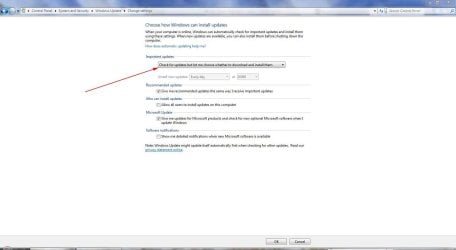
installing updates one by one. How do I install updates one by one?
 

My Computer

OS
Windows 7 home premiumm
Yes I fully understand that,

And well I was just hoping for a known update to cause this problem...

seavixen32: It might be a good idea to roll back and work the other way round by
installing updates one by one. How do I install updates one by one?

Go into Windows Updates and change your settings, as this screenshot shows.

Update.JPG
 

My Computer

Computer Manufacturer/Model Number
HP Pavilion Elite 495UK
OS
Windows 7 Ultimate SP1 64-Bit
CPU
Intel Core i7 870 @ 2.93GHz
Motherboard
MSI 2A9C (CPU1)
Memory
8Gb Dual-Channel DDR3 @ 664MHz
Graphics Card(s)
nVidia GeForce GTX 460 1024MB dedicated RAM
Sound Card
Realtek HD Audio
Monitor(s) Displays
HP2310i
Screen Resolution
1920 x 1080
Hard Drives
1x1954GB Hitachi HDS22020ALA 330 (RAID), 1x1954GB Hitachi External for backup and storage
PSU
460W
Case
HP Elite
Cooling
Air cooled
Keyboard
Logitech K750 solar-powered keyboard
Mouse
Logitech Wireless M180 mouse
Internet Speed
2Mb
Other Info
Pure Avanti Flow Internet Radio with iPod Dock, 64Gb iPod, HP USB Speakers, Sony MDR-V500 Headphones, Sony Vaio F-Series Laptop
You're very welcome.
 

My Computer

Computer Manufacturer/Model Number
HP Pavilion Elite 495UK
OS
Windows 7 Ultimate SP1 64-Bit
CPU
Intel Core i7 870 @ 2.93GHz
Motherboard
MSI 2A9C (CPU1)
Memory
8Gb Dual-Channel DDR3 @ 664MHz
Graphics Card(s)
nVidia GeForce GTX 460 1024MB dedicated RAM
Sound Card
Realtek HD Audio
Monitor(s) Displays
HP2310i
Screen Resolution
1920 x 1080
Hard Drives
1x1954GB Hitachi HDS22020ALA 330 (RAID), 1x1954GB Hitachi External for backup and storage
PSU
460W
Case
HP Elite
Cooling
Air cooled
Keyboard
Logitech K750 solar-powered keyboard
Mouse
Logitech Wireless M180 mouse
Internet Speed
2Mb
Other Info
Pure Avanti Flow Internet Radio with iPod Dock, 64Gb iPod, HP USB Speakers, Sony MDR-V500 Headphones, Sony Vaio F-Series Laptop
Default File Type Associations - Restore - Windows 7 Forums

http://www.sevenforums.com/tutorials/36098-search-options-change-restore.html

If these don't resolve your performance complaints, run SFC -SCANNOW Command
to check for damaged System files.

You can troubleshoot deeper via the logs and System Resources using these troubleshooting steps. I would also check for infection as given.

As far as whether someone so intimately familar with Updates issues might spot your problem, you may have to give it more time.

Meanwhile I would follow Andy's excellent suggestions to reset Updates and install in smaller groups so that you can restore if necessary and then isolate the single update responsible. MS provides Updates support via email on their WUD website.
 
Ok,

Thanks for your help. Do I have to restart after each update turned off?
Iow are changes immediately noticeable?

There has to be some MS-person around who "KNOWS'' what update is causing
these problems, right?

If you are not willing to go to the effort to track down the info then you should refrain from negative posts directed at someone who was trying to help......you COULD pay Microsoft to solve it for you.....A little more work on your part probably would identify the suspect update and yes this IS the process that most of us go through when attempting to identify issues, oh and by the way "GOOGLE" works for searching errors' also........
 

My Computer

Computer Manufacturer/Model Number
Systemax N2000 Gaming PC
OS
Windows 7 Ultimate x64
CPU
Q6600 @2.4ghz (G0 stepping)
Motherboard
XFX nforce 680i LT
Memory
8 gb OCZ vista essential sli PC-6400
Graphics Card(s)
Dual 9800gt in SLI mode
Sound Card
Integrated 8.1 High Definition Audio
Monitor(s) Displays
Dual Sceptre x246w 24 inch monitors
Screen Resolution
1920 x 1200 each monitor
Hard Drives
500 GB SATA II / 7500 rpm
PSU
Cooler Master Real Power Pro 1250W
Case
N2000 server tower
Cooling
Thermaltake Bigwater 760 is
Keyboard
MS Intelitype 6000 v2.0
Mouse
MS Intelipoint 6000
Internet Speed
Wi-power 1.5GB up / 512k down
Other Info
Windows 7 Ultimate x64, Windows 7 Pro x64, Windows Home Premium X86, Windows XP pro, Windows Home Server x86, Ubuntu 10.4 x86 and x64, Ubuntu server 10.4, SQL Server 2005, MySQL 5.0
Back
Top