Battery indicator not appearing in visible part of sys tray

diun

New member
Local time
4:47 PM
Messages
4
Until last week, the network, battery and sound icons appeared in the visible part of the system tray and the rest of the icons were hidden.
But now the battery indicator has gone to the hidden area I have no idea how it happened. Only the network and sound indicators are now visible. This is the case even when my laptop is running on battery. It's a headache coz I have to manually click on the arrow and check battery status each time.
Is it possible to bring back the battery indicator to the visible part of the system tray?

More info: Mine's a Windows 7 ultimate 64 bit machine and I don't have admin privileges.
 

My Computer My Computer

At a glance

windows 7 64bit
OS
windows 7 64bit
Welcome to the forums.

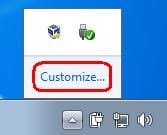
Are you able to see the "Customize..." option?
 

Attachments

  • bat.JPG
    bat.JPG
    3.8 KB · Views: 780

My Computer My Computer

At a glance

W7 Pro SP1 64biti78GBIntel HD Graphics
Computer type
Laptop
Computer Manufacturer/Model Number
Employer provided Dell Latitude
OS
W7 Pro SP1 64bit
CPU
i7
Memory
8GB
Graphics Card(s)
Intel HD Graphics
Hard Drives
crappy SSD
Antivirus
Employer mandated Symantec Endpoint Protection
Browser
Pale Moon 64bit, IE11 64bit & Chrome 64bit
Hello Diun, and welcome to Seven Forums.

Unless the administrator disabled the "Power" icon, you will be able to have it set to be displayed even as a standard user.

Do you have the Always show all icons and notifications on the taskbar box checked like below?

216d1232288682-notification-area-icons-hide-show-system-icons-notifications-customize-1.jpg
 

My Computer My Computer

At a glance

64-bit Windows 11 Pro for WorkstationsIntel i7-8700K OC'd to 5 GHz64 GB (4x16GB) G.SKILL TridentZ RGB DDR4 3600...ASUS ROG-STRIX-GTX1080TI-O11G-GAMING
Computer type
PC/Desktop
Computer Manufacturer/Model Number
Self built custom
OS
64-bit Windows 11 Pro for Workstations
CPU
Intel i7-8700K OC'd to 5 GHz
Motherboard
ASUS ROG Maximus XI Formula Z390
Memory
64 GB (4x16GB) G.SKILL TridentZ RGB DDR4 3600 MHz
Graphics Card(s)
ASUS ROG-STRIX-GTX1080TI-O11G-GAMING
Sound Card
Integrated
Monitor(s) Displays
2 x Samsung Odyssey G7 27"
Screen Resolution
2560x1440
Hard Drives
1TB Samsung 990 PRO M.2,
4TB Samsung 990 PRO PRO M.2,
TerraMaster F8 SSD Plus NAS
PSU
Seasonic Prime Titanium 850W
Case
Thermaltake Core P3
Cooling
Corsair Hydro H115i
Keyboard
Logitech wireless K800
Mouse
Logitech MX Master 4
Internet Speed
2 Gb/s Download and 100 Mb/s Upload
Antivirus
Malwarebyte Anti-Malware Premium
Browser
Google Chrome
Other Info
Logitech Z625 speaker system,
Logitech BRIO 4K Pro webcam,
HP Color LaserJet Pro MFP M477fdn,
APC SMART-UPS RT 1000 XL - SURT1000XLI,
Galaxy S23 Plus phone
Welcome to the forums.
Thanks! :)

Are you able to see the "Customize..." option?
Yes, I can see that option, but clicking on it does nothing. May be because I don't have admin rights? :S
Hi diun,
Try this.Click on the small " ^ " in the Tray bar. You should be able to see your hidden icons. Just point the cursor on the Icon you want and with the mouse(left-click) pressed, pull it to the Tray bar and leave.That's it! See the snapshots below: Click on each to view.
 

Attachments

  • _2012-02-27_11-29-38.png
    _2012-02-27_11-29-38.png
    4.5 KB · Views: 9
  • [#] Windows 7 Forums - Reply to Topic - Waterfox [#]_2012-02-27_11-30-38.png
    [#] Windows 7 Forums - Reply to Topic - Waterfox [#]_2012-02-27_11-30-38.png
    2.4 KB · Views: 777

My Computer My Computer

At a glance

MS Windows 7 Home Premium 64-bit SP1IntelCore [email protected]; Sandy Bridge 32nm Tech.4096Mb RAM; Single ChannelDDR3@665MHz; DRAM F...AMD Radeon HD 6630M; GPU:Whistler;BIOS Core&m...
Computer Manufacturer/Model Number
Sony Vaio C series VPCCB35FN laptop
OS
MS Windows 7 Home Premium 64-bit SP1
CPU
IntelCore [email protected]; Sandy Bridge 32nm Tech.
Motherboard
Sony Vaio Version:C609NJYJ
Memory
4096Mb RAM; Single ChannelDDR3@665MHz; DRAM Freq:662MHz
Graphics Card(s)
AMD Radeon HD 6630M; GPU:Whistler;BIOS Core&mem Clock:123.36
Sound Card
REALTEK High Definition Audio Device; INTEL Display Card
Monitor(s) Displays
Generic PnP Intel HD;Resolution:1920*1040 Pixels; BPP:32bits
Screen Resolution
Current Resolution:1920*1080 Pixels; Monitor Frequency:60Hz
Hard Drives
Internal HD:TOSHIBA MK5061GSY; Real Size:488 GB;NTFS; 3 Partitions; SATA; HEADS:16

External HDD: WD Elements 1023 PORTABLE; Estimated Size: 1TB; NTFS; 3 Partitions
Cooling
Lateral Exhaust with a Cooling Pad Placed Beneath.
Keyboard
Logitech Bluetooth+ Generic Integrated K-B
Mouse
Logitech Bluetooth
Internet Speed
2MBPS
Other Info
1)Trend Micro Titanium Maximum Security Suite Version:3
2)SAS-PRO

3)MBAM--PRO


4)WATERFOX+IE9 +WOT+LINKEXTEND+ DRWEBCUREIT LINK CHECKER

5)SPYWAREBLASTER

6) WINPATROL PLUS

7) SANDBOXIE and
8) A BIT OF COMMON SENSE.
Why don`t you have administrative privileges ?
 

My Computer My Computer

At a glance

Windows 10 Pro x64Intel Core i7 6700KGSkill TridentZ RGB 16GB 3600 16-16-16-36EVGA GTX 980 Ti SC x2
Computer type
PC/Desktop
Computer Manufacturer/Model Number
Skylake Special #666
OS
Windows 10 Pro x64
CPU
Intel Core i7 6700K
Motherboard
Asus Sabertooth Z170 Mark 1
Memory
GSkill TridentZ RGB 16GB 3600 16-16-16-36
Graphics Card(s)
EVGA GTX 980 Ti SC x2
Sound Card
Realtek High Definition
Monitor(s) Displays
AOC G2460PG
Screen Resolution
1920 x 1080 144Hz
Hard Drives
Samsung 860 Pro 256GB, Seagate Barracuda 4TB x2
PSU
EVGA 1000 P2, EVGA White Custom Braided Cables
Case
Corsair Vengeance C70 Gunmetal Black
Cooling
Corsair H100i v2, Corsair ML120 x2, Thermal Grizzly Kryonaut
Keyboard
Logitech G910 Orion Spectrum
Mouse
Logitech G700s
Internet Speed
Verizon Fios Quantum Gateway 75/75
Antivirus
Windows Defender, Malwarebytes Free 3.8.3
Browser
Chrome
Other Info
Corsair SP120 x4, LG Blu-ray Drive, Durabrand HT-395 100 Watt Dolby Digital Amp, Corsair H2100 Wireless 7.1 Headset
...clicking on it does nothing. May be because I don't have admin rights? :S
I created a standard user on a W7 computer to test this and that user was able to see/use the customize link. Maybe the whole control panel thing has been locked down in your computer.

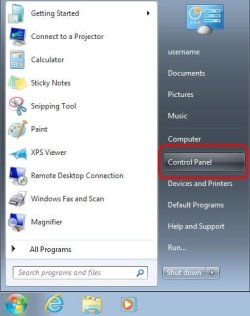
What happens when you click on Start > Control Panel?

CP.JPG
 

My Computer My Computer

At a glance

W7 Pro SP1 64biti78GBIntel HD Graphics
Computer type
Laptop
Computer Manufacturer/Model Number
Employer provided Dell Latitude
OS
W7 Pro SP1 64bit
CPU
i7
Memory
8GB
Graphics Card(s)
Intel HD Graphics
Hard Drives
crappy SSD
Antivirus
Employer mandated Symantec Endpoint Protection
Browser
Pale Moon 64bit, IE11 64bit & Chrome 64bit
Try this.Click on the small " ^ " in the Tray bar. You should be able to see your hidden icons. Just point the cursor on the Icon you want and with the mouse(left-click) pressed, pull it to the Tray bar and leave.That's it! See the snapshots below: Click on each to view.

It worked! Thanks a lot, Sreedhav, much appreciated!

To others who asked: this is my work laptop and they've blocked access to Control Panel, etc. I haven't used Windows before, so having difficulty finding my way through, especially coz most answers from google require me to use Control Panel.

Thanks.
 

My Computer My Computer

At a glance

windows 7 64bit
OS
windows 7 64bit
I created a standard user on a W7 computer to test this and that user was able to see/use the customize link. Maybe the whole control panel thing has been locked down in your computer.

What happens when you click on Start > Control Panel?

Thanks a lot for taking the trouble. Sadly, I don't have access to Control Panel. Clicking on it does nothing. Solved the problem thanks to Sreedhav.
 

My Computer My Computer

At a glance

windows 7 64bit
OS
windows 7 64bit
yep - sreedhav way is the best.

It appears that the computer that you are using is locked down a with a bit more than just standard user and admin levels; it appears to have some parental controls or group policies set. Thanks for posting back with your findings.
 

My Computer My Computer

At a glance

W7 Pro SP1 64biti78GBIntel HD Graphics
Computer type
Laptop
Computer Manufacturer/Model Number
Employer provided Dell Latitude
OS
W7 Pro SP1 64bit
CPU
i7
Memory
8GB
Graphics Card(s)
Intel HD Graphics
Hard Drives
crappy SSD
Antivirus
Employer mandated Symantec Endpoint Protection
Browser
Pale Moon 64bit, IE11 64bit & Chrome 64bit
Try this.Click on the small " ^ " in the Tray bar. You should be able to see your hidden icons. Just point the cursor on the Icon you want and with the mouse(left-click) pressed, pull it to the Tray bar and leave.That's it! See the snapshots below: Click on each to view.

It worked! Thanks a lot, Sreedhav, much appreciated!

To others who asked: this is my work laptop and they've blocked access to Control Panel, etc. I haven't used Windows before, so having difficulty finding my way through, especially coz most answers from google require me to use Control Panel.

Thanks.
Dear diun,,
Glad the tip worked!
 
Last edited by a moderator:

My Computer My Computer

At a glance

MS Windows 7 Home Premium 64-bit SP1IntelCore [email protected]; Sandy Bridge 32nm Tech.4096Mb RAM; Single ChannelDDR3@665MHz; DRAM F...AMD Radeon HD 6630M; GPU:Whistler;BIOS Core&m...
Computer Manufacturer/Model Number
Sony Vaio C series VPCCB35FN laptop
OS
MS Windows 7 Home Premium 64-bit SP1
CPU
IntelCore [email protected]; Sandy Bridge 32nm Tech.
Motherboard
Sony Vaio Version:C609NJYJ
Memory
4096Mb RAM; Single ChannelDDR3@665MHz; DRAM Freq:662MHz
Graphics Card(s)
AMD Radeon HD 6630M; GPU:Whistler;BIOS Core&mem Clock:123.36
Sound Card
REALTEK High Definition Audio Device; INTEL Display Card
Monitor(s) Displays
Generic PnP Intel HD;Resolution:1920*1040 Pixels; BPP:32bits
Screen Resolution
Current Resolution:1920*1080 Pixels; Monitor Frequency:60Hz
Hard Drives
Internal HD:TOSHIBA MK5061GSY; Real Size:488 GB;NTFS; 3 Partitions; SATA; HEADS:16

External HDD: WD Elements 1023 PORTABLE; Estimated Size: 1TB; NTFS; 3 Partitions
Cooling
Lateral Exhaust with a Cooling Pad Placed Beneath.
Keyboard
Logitech Bluetooth+ Generic Integrated K-B
Mouse
Logitech Bluetooth
Internet Speed
2MBPS
Other Info
1)Trend Micro Titanium Maximum Security Suite Version:3
2)SAS-PRO

3)MBAM--PRO


4)WATERFOX+IE9 +WOT+LINKEXTEND+ DRWEBCUREIT LINK CHECKER

5)SPYWAREBLASTER

6) WINPATROL PLUS

7) SANDBOXIE and
8) A BIT OF COMMON SENSE.
Back
Top