Solved Can access folders elsewhere w/W7; cant access W7 from elsewhere

jasong1968

New member
VIP
Local time
2:49 AM
Messages
107
Hi all.

Three computers on my network. W7 .100, Vista .101, and XP .102.

When I am on my W7 computer, I can access any shared folder on either the Vista and/or XP computers. I can not, however, access W7 shared folders from either the Vista nor XP computers. I can see the folders, but cant access them. I keep getting a box that pops up asking me for a username and password. My W7 does not have a username and pword, but of course, it has a computer name.

What should I do? Thanks!
 

My Computer My Computer

At a glance

Windows7 64
OS
Windows7 64
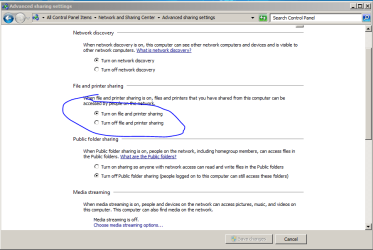
goto Control Panel\All Control Panel Items\Network and Sharing Center\Advanced sharing settings

see if folder sharing is enabled?
Capture.PNG

also turn off password protection:
Capture2.PNG
 

My Computer My Computer

At a glance

Windows 7 Enterprise x64 SP1 Version 6.1 Buil...x64bit AMD Turion(tm) X2 Ultra Dual-Core Mobi...4096 (2048 + 2048) MB, DDR2 RAM (800 MHz), ma...ATI Mobility Radeon™ HD 3650+HyperMemory™(512...
Computer Manufacturer/Model Number
Toshiba Satelite P300D 13J (Short model No: PSPDCE)
OS
Windows 7 Enterprise x64 SP1 Version 6.1 Build 7601
CPU
x64bit AMD Turion(tm) X2 Ultra Dual-Core Mobile ZM-82
Memory
4096 (2048 + 2048) MB, DDR2 RAM (800 MHz), max 8,192 MB
Graphics Card(s)
ATI Mobility Radeon™ HD 3650+HyperMemory™(512MB VRAM+2302MB)
Sound Card
Manufacturer: harman/kardon
Monitor(s) Displays
Generic PnP Monitor (MONITOR\LPLA101)
Screen Resolution
1440 x 900 (19" LCD)
Hard Drives
HDD1: TOSHIBA MK3252GSX ATA Device (IDE 320 GB 5,400 o/min) ,
HDD2: Msft Virtual Disk SCSI Disk Device (Virtual Hard Drive),
HDD3: TOSHIBA MK3263GSX USB Device (USB Mobile HDD) (TakeMS MemLine)
PSU
Batery: technology : lithium-ion
Cooling
integrated cooler + 3x external cooler
Keyboard
USB Logitech S520
Mouse
USB Logitech S520
Internet Speed
WAN: 7,2 Mbit/sec, WLAN: 54 Mbit/sec + Bluetooth®
Thanks for the reply.

Turn on file printer sharing is set to on

Turn on pword protected sharing is set to on

However, Turn on Netowrk Discovery is off, and I cant turn it on. Is that the problem?
 

My Computer My Computer

At a glance

Windows7 64
OS
Windows7 64
network discovery shall not be a problem since you can see win7 machine from other machines and vice versa.
turn off password protected sharing and see if that helps.

to turn on network discovery you must be loged in as administrator,
also settings for your adapter should have network discovery enabled.
Control Panel\Network and Internet\Network Connections >> right click on adapter >> properties and make sure last two checkBoxes are checked.
 

My Computer My Computer

At a glance

Windows 7 Enterprise x64 SP1 Version 6.1 Buil...x64bit AMD Turion(tm) X2 Ultra Dual-Core Mobi...4096 (2048 + 2048) MB, DDR2 RAM (800 MHz), ma...ATI Mobility Radeon™ HD 3650+HyperMemory™(512...
Computer Manufacturer/Model Number
Toshiba Satelite P300D 13J (Short model No: PSPDCE)
OS
Windows 7 Enterprise x64 SP1 Version 6.1 Build 7601
CPU
x64bit AMD Turion(tm) X2 Ultra Dual-Core Mobile ZM-82
Memory
4096 (2048 + 2048) MB, DDR2 RAM (800 MHz), max 8,192 MB
Graphics Card(s)
ATI Mobility Radeon™ HD 3650+HyperMemory™(512MB VRAM+2302MB)
Sound Card
Manufacturer: harman/kardon
Monitor(s) Displays
Generic PnP Monitor (MONITOR\LPLA101)
Screen Resolution
1440 x 900 (19" LCD)
Hard Drives
HDD1: TOSHIBA MK3252GSX ATA Device (IDE 320 GB 5,400 o/min) ,
HDD2: Msft Virtual Disk SCSI Disk Device (Virtual Hard Drive),
HDD3: TOSHIBA MK3263GSX USB Device (USB Mobile HDD) (TakeMS MemLine)
PSU
Batery: technology : lithium-ion
Cooling
integrated cooler + 3x external cooler
Keyboard
USB Logitech S520
Mouse
USB Logitech S520
Internet Speed
WAN: 7,2 Mbit/sec, WLAN: 54 Mbit/sec + Bluetooth®
also settings for your adapter should have network discovery enabled.
Control Panel\Network and Internet\Network Connections >> right click on adapter >> properties and make sure last two checkBoxes are checked.

You mean the Link Layer Topology boxes? Yes, those are checked.

Turned off pword protected sharing. Now, instead of that box asking for my username and pword, I get an 'Access Denied' error.

Here's the wierd thing:

In the Network and Sharing Center > Choose homegroup and sharing options page, 'printers' is checked, and everything else is unchecked. Well, I can access the printers folder from my Vista and XP computers. However, I can not check the other boxes (Pics, Docs, etc.). I can check them, but I cant save those changes. :confused:
 

My Computer My Computer

At a glance

Windows7 64
OS
Windows7 64
In the Network and Sharing Center > Choose homegroup and sharing options page, 'printers' is checked, and everything else is unchecked. Well, I can access the printers folder from my Vista and XP computers. However, I can not check the other boxes (Pics, Docs, etc.). I can check them, but I cant save those changes. :confused:

Well it looks you found a problem :)

turn pasword protected sharing back on.
Pics, Docs, etc. must be checked.
are you loged in as admin?
 

My Computer My Computer

At a glance

Windows 7 Enterprise x64 SP1 Version 6.1 Buil...x64bit AMD Turion(tm) X2 Ultra Dual-Core Mobi...4096 (2048 + 2048) MB, DDR2 RAM (800 MHz), ma...ATI Mobility Radeon™ HD 3650+HyperMemory™(512...
Computer Manufacturer/Model Number
Toshiba Satelite P300D 13J (Short model No: PSPDCE)
OS
Windows 7 Enterprise x64 SP1 Version 6.1 Build 7601
CPU
x64bit AMD Turion(tm) X2 Ultra Dual-Core Mobile ZM-82
Memory
4096 (2048 + 2048) MB, DDR2 RAM (800 MHz), max 8,192 MB
Graphics Card(s)
ATI Mobility Radeon™ HD 3650+HyperMemory™(512MB VRAM+2302MB)
Sound Card
Manufacturer: harman/kardon
Monitor(s) Displays
Generic PnP Monitor (MONITOR\LPLA101)
Screen Resolution
1440 x 900 (19" LCD)
Hard Drives
HDD1: TOSHIBA MK3252GSX ATA Device (IDE 320 GB 5,400 o/min) ,
HDD2: Msft Virtual Disk SCSI Disk Device (Virtual Hard Drive),
HDD3: TOSHIBA MK3263GSX USB Device (USB Mobile HDD) (TakeMS MemLine)
PSU
Batery: technology : lithium-ion
Cooling
integrated cooler + 3x external cooler
Keyboard
USB Logitech S520
Mouse
USB Logitech S520
Internet Speed
WAN: 7,2 Mbit/sec, WLAN: 54 Mbit/sec + Bluetooth®
"Pics, Docs, etc. must be checked."

Yeah - I figured as much.

Turning pword protected sharing back on does not allow me to check and save those boxes.

Am I logged in as admin? Umm, yeah, I dont see why I wouldnt be. I am the one who installed the OS, and am the only user.

--edit-- ok, forund this:

Open User Accounts by clicking the Start button
4f6cbd09-148c-4dd8-b1f2-48f232a2fd33_818.jpg
, clicking Control Panel, clicking User Accounts and Family Safety, clicking User Accounts, and then clicking Manage another account.
18abb370-ac1e-4b6b-b663-e028a75bf05b_48.jpg
If you're prompted for an administrator password or confirmation, type the password or provide confirmation.

Your account type is displayed below your user name.
If your account type is Administrator, then you are currently logged on as an administrator.

Ok, the acct type IS admin...
 

My Computer My Computer

At a glance

Windows7 64
OS
Windows7 64
I'm out of ideas.
how about leaving a homegroup in windows 7 and setting a homegroup back and then check all those boxes while in setup process.

EDIT:
just guessing,
is this option turned on?
Capture.PNG
 

My Computer My Computer

At a glance

Windows 7 Enterprise x64 SP1 Version 6.1 Buil...x64bit AMD Turion(tm) X2 Ultra Dual-Core Mobi...4096 (2048 + 2048) MB, DDR2 RAM (800 MHz), ma...ATI Mobility Radeon™ HD 3650+HyperMemory™(512...
Computer Manufacturer/Model Number
Toshiba Satelite P300D 13J (Short model No: PSPDCE)
OS
Windows 7 Enterprise x64 SP1 Version 6.1 Build 7601
CPU
x64bit AMD Turion(tm) X2 Ultra Dual-Core Mobile ZM-82
Memory
4096 (2048 + 2048) MB, DDR2 RAM (800 MHz), max 8,192 MB
Graphics Card(s)
ATI Mobility Radeon™ HD 3650+HyperMemory™(512MB VRAM+2302MB)
Sound Card
Manufacturer: harman/kardon
Monitor(s) Displays
Generic PnP Monitor (MONITOR\LPLA101)
Screen Resolution
1440 x 900 (19" LCD)
Hard Drives
HDD1: TOSHIBA MK3252GSX ATA Device (IDE 320 GB 5,400 o/min) ,
HDD2: Msft Virtual Disk SCSI Disk Device (Virtual Hard Drive),
HDD3: TOSHIBA MK3263GSX USB Device (USB Mobile HDD) (TakeMS MemLine)
PSU
Batery: technology : lithium-ion
Cooling
integrated cooler + 3x external cooler
Keyboard
USB Logitech S520
Mouse
USB Logitech S520
Internet Speed
WAN: 7,2 Mbit/sec, WLAN: 54 Mbit/sec + Bluetooth®
Yes, that option in your pic is checked.

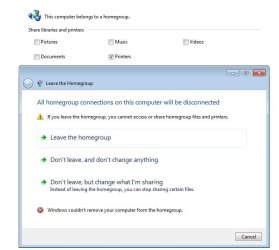
Cant leave the homegroup:

hgroup.jpg
 

My Computer My Computer

At a glance

Windows7 64
OS
Windows7 64

My Computer My Computer

At a glance

Windows 7 Enterprise x64 SP1 Version 6.1 Buil...x64bit AMD Turion(tm) X2 Ultra Dual-Core Mobi...4096 (2048 + 2048) MB, DDR2 RAM (800 MHz), ma...ATI Mobility Radeon™ HD 3650+HyperMemory™(512...
Computer Manufacturer/Model Number
Toshiba Satelite P300D 13J (Short model No: PSPDCE)
OS
Windows 7 Enterprise x64 SP1 Version 6.1 Build 7601
CPU
x64bit AMD Turion(tm) X2 Ultra Dual-Core Mobile ZM-82
Memory
4096 (2048 + 2048) MB, DDR2 RAM (800 MHz), max 8,192 MB
Graphics Card(s)
ATI Mobility Radeon™ HD 3650+HyperMemory™(512MB VRAM+2302MB)
Sound Card
Manufacturer: harman/kardon
Monitor(s) Displays
Generic PnP Monitor (MONITOR\LPLA101)
Screen Resolution
1440 x 900 (19" LCD)
Hard Drives
HDD1: TOSHIBA MK3252GSX ATA Device (IDE 320 GB 5,400 o/min) ,
HDD2: Msft Virtual Disk SCSI Disk Device (Virtual Hard Drive),
HDD3: TOSHIBA MK3263GSX USB Device (USB Mobile HDD) (TakeMS MemLine)
PSU
Batery: technology : lithium-ion
Cooling
integrated cooler + 3x external cooler
Keyboard
USB Logitech S520
Mouse
USB Logitech S520
Internet Speed
WAN: 7,2 Mbit/sec, WLAN: 54 Mbit/sec + Bluetooth®
Thanks for that link. Followed the instructions, and was able to leave the homegroup.

Now, I have joined a new homegroup, and I see pic, docs, etc all being shared.

Turned off pwrd protected sharing, and I can now see the folders that are being shared by my W7 computer, from my Vista and XP computers. But I am still getting an access denied error. What now?

But the printer folder is still available...
 

My Computer My Computer

At a glance

Windows7 64
OS
Windows7 64
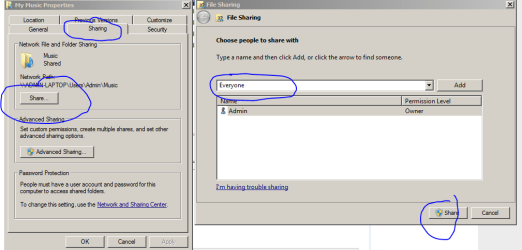
well now after all you can try this:
Capture2.PNG
it's right click on shared folder >> sharing tab >> share in new dialog choose everyone or add custom accounts to the list which may be able to acces the shared folder.

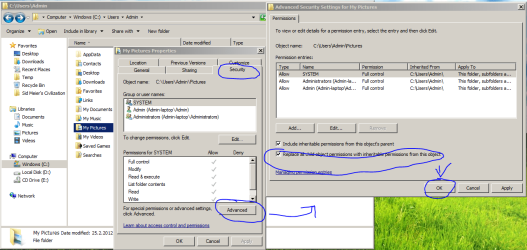
if that doesn't help try this:
Capture.PNG

do so for each shared folder on windows 7 machine.

right click on shared foder >> properties >> security >> advanced >> Click to select the Reset permissions on all Child objects and enable propagation of inheritable permissions check box.

click OK >> OK

see if that helps :p

this second options is from MS support site:
On the computer on which the inaccessible share is located, start Windows Explorer.
Open, and then right-click the shared resource's parent folder that is located directly in the root of the drive, and then click Properties. For example, if you have the following folder structure: C:\Multimedia\Music\Baroque, where the Baroque folder is the shared resource, click the Multimedia folder.
Click the Security tab, and then click Advanced.
Click to select the Reset permissions on all Child objects and enable propagation of inheritable permissions check box.
Under Permission Entries, click the user or the group which experiences the issue that is listed in the Symptoms section of this article, and then click View/Edit.
Click to select the check box that is located in the Allow column, to the right of the Traverse Folder / Execute File option. If the check box that is in the Deny column is selected, click to clear it.
Click OK three times.

"Access Denied" Error Message When Users Try to Access Shared Folders
 

My Computer My Computer

At a glance

Windows 7 Enterprise x64 SP1 Version 6.1 Buil...x64bit AMD Turion(tm) X2 Ultra Dual-Core Mobi...4096 (2048 + 2048) MB, DDR2 RAM (800 MHz), ma...ATI Mobility Radeon™ HD 3650+HyperMemory™(512...
Computer Manufacturer/Model Number
Toshiba Satelite P300D 13J (Short model No: PSPDCE)
OS
Windows 7 Enterprise x64 SP1 Version 6.1 Build 7601
CPU
x64bit AMD Turion(tm) X2 Ultra Dual-Core Mobile ZM-82
Memory
4096 (2048 + 2048) MB, DDR2 RAM (800 MHz), max 8,192 MB
Graphics Card(s)
ATI Mobility Radeon™ HD 3650+HyperMemory™(512MB VRAM+2302MB)
Sound Card
Manufacturer: harman/kardon
Monitor(s) Displays
Generic PnP Monitor (MONITOR\LPLA101)
Screen Resolution
1440 x 900 (19" LCD)
Hard Drives
HDD1: TOSHIBA MK3252GSX ATA Device (IDE 320 GB 5,400 o/min) ,
HDD2: Msft Virtual Disk SCSI Disk Device (Virtual Hard Drive),
HDD3: TOSHIBA MK3263GSX USB Device (USB Mobile HDD) (TakeMS MemLine)
PSU
Batery: technology : lithium-ion
Cooling
integrated cooler + 3x external cooler
Keyboard
USB Logitech S520
Mouse
USB Logitech S520
Internet Speed
WAN: 7,2 Mbit/sec, WLAN: 54 Mbit/sec + Bluetooth®
Oy. You know - this really should not be so difficult.

Your 1st pic:

The Share button on mine is greyed out. So I used 'Advanced Sharing'. I set 'allow' under permissions. Actually did that earlier today - didnt work.

So, your 2nd pic - doesn't exactly look like mine, so I went to the MS quote. Now, the folder I want to share is G:/Epic. So, according to the article, I have to change the permissions on the parent folder, G. Ariticle:

Click the Security tab, and then click Advanced.

Click to select the Reset permissions on all Child objects and enable propagation of inheritable permissions check box.

Ok, I dont have what MS is claiming. I dont quite understand why my computer is different, but.....

I go advanced, and then I have to click on "Change Permissions". Now I have Replace all Child permissions with inhertiable permissions from this object.

Is that the same thing? No idea. I checked it, and clicked ok. I got:

This will replace explicity defined permissions on all descendants of this object with inhertiable permissions from New Volume (G). Continue?

I clicked 'yes'. It did it's thing for a moment, and then it was done. Now, the article says:

Under Permission Entries, click the user or the group which experiences the issue...

Well, what am I clicking? I have:

Administrators
SYSTEM
Authenticated Users
Users (Comp name)

Which one do I use?
 

My Computer My Computer

At a glance

Windows7 64
OS
Windows7 64
Ok, I got it. Jeesus K-rist people should not have to go through all of this.

Hopefully this can help someone else in my boat.

Click start menu
Type in Folder Options
Click Folder Options (duh)
View Tab
Scroll to bottom, and check Use Sharing Wizard
<OK>
R-Click folder to be shared > Properties > Sharing tab
Do not use Advanced Sharing
Click Share
Choose who you want to allow to share this folder from the drop-down menu - 'Everyone' is what I selected
<Add>
This moves Everyone into the box below
Select Everyone, and change Permission level as needed
<Share>


And that is it.

Thank you very much ck for your time, patience and willingness to help - you are a scholar and a gentlemen.

Cheers.
 

My Computer My Computer

At a glance

Windows7 64
OS
Windows7 64
OK :D
I'm glad you finally fix that issuse.
kind regards!
 

My Computer My Computer

At a glance

Windows 7 Enterprise x64 SP1 Version 6.1 Buil...x64bit AMD Turion(tm) X2 Ultra Dual-Core Mobi...4096 (2048 + 2048) MB, DDR2 RAM (800 MHz), ma...ATI Mobility Radeon™ HD 3650+HyperMemory™(512...
Computer Manufacturer/Model Number
Toshiba Satelite P300D 13J (Short model No: PSPDCE)
OS
Windows 7 Enterprise x64 SP1 Version 6.1 Build 7601
CPU
x64bit AMD Turion(tm) X2 Ultra Dual-Core Mobile ZM-82
Memory
4096 (2048 + 2048) MB, DDR2 RAM (800 MHz), max 8,192 MB
Graphics Card(s)
ATI Mobility Radeon™ HD 3650+HyperMemory™(512MB VRAM+2302MB)
Sound Card
Manufacturer: harman/kardon
Monitor(s) Displays
Generic PnP Monitor (MONITOR\LPLA101)
Screen Resolution
1440 x 900 (19" LCD)
Hard Drives
HDD1: TOSHIBA MK3252GSX ATA Device (IDE 320 GB 5,400 o/min) ,
HDD2: Msft Virtual Disk SCSI Disk Device (Virtual Hard Drive),
HDD3: TOSHIBA MK3263GSX USB Device (USB Mobile HDD) (TakeMS MemLine)
PSU
Batery: technology : lithium-ion
Cooling
integrated cooler + 3x external cooler
Keyboard
USB Logitech S520
Mouse
USB Logitech S520
Internet Speed
WAN: 7,2 Mbit/sec, WLAN: 54 Mbit/sec + Bluetooth®
Back
Top