
Win 7 64bit, no network or internet

argh

New member
Hi, hopefully someone here can help me out with this problem, I've tried everything. I've scoured the web and tried everything people have suggested, nothing has worked. Thing is, I can't find anything concrete about whether or not this is a network card incompatibility issue as it seems some people have trouble, while others get online right off the bat without any problems.

I've got Windows 7 64 bit installed. I can't get on the network or the internet really. Bear with me as nothing has been 100% consistent in my troubleshooting.

Note that this is a wired machine I'm talking about, no wireless.

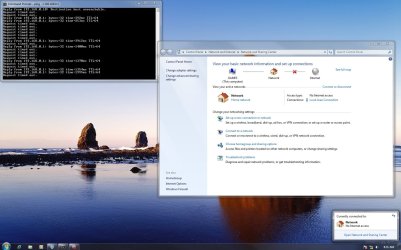
I've attached a screenshot of what I *typically* see. I'm saying typically because last night I was able to get to google.com briefly, but it took a good 10 minutes to load. Then internet was gone again.

The screenshot says I'm on the network, but I'm not really. My win 7 machine can't see my laptop and vice versa. The ping in the screenshot is a result of me trying to ping my router (192.168.0.1) from my win 7 box (192.168.0.10). Most of the packets don't make it at all, every now and then I get a REALLY slow response, and sometimes the ping actually says the response is coming from my win 7 box, not the router (note how some responses are from .0.1, while others are from .0.10). I'm not sure about this, but it also seems my successful responses are related to using ping -t, I *never* get anything but "timed out" using just ping.

I've got the win 7 box set up with a static IP, although I also tried doing it the dynamic way, made no difference at all.

I've tried every nic driver you can imagine. The card is the onboard nic on the Asus P5NSLI board - Marvell Yukon 88E8001/8003/8010. I don't know exactly which of those models is the exact one, but that's the driver I'm using under XP with no problems at all. I've tried the automatically detected drivers that come with win 7, as well as drivers for vista 64 and xp 64 installed in vista and xp mode. I've uninstalled drivers completely before installing different ones every time (with full shut downs between attempts). I'm currently running the windows 7 drivers directly from Marvell.

I've tried disabling and re-enabling devices on restart.

I've disabled IPv6, as well as the other 2 options that people in other threads suggest (sorry, I can't remember what they're called, I'm logged into XP right now to be able to type this up). I have it set to use IPv4.

I've even checked the registry and services to see if some services were running that were interfering. Found nothing.

No firewall or antivirus.

Also, the network and internet status indicator tends to bounce between no network/network, internet/no internet ... this obviously coincides with those times when my ping packets do in fact make it through to the router.

Anyone have any ideas? I know win 7 is in beta, but I'd really love to get this working if possible. Other than the networking issues, the OS is running beautifully. It's super fast, sound and video works without a problem, etc. It's literally just the nic issues that are getting in the way. I would think this is a driver issue, but I've tried literally every driver available for my card now.

Thanks in advance.
 

Attachments
  • screen.jpg
    screen.jpg
    440.7 KB · Views: 513

My Computer

Computer Manufacturer/Model Number
custom
OS
windows 7 64 bit
CPU
intel core 2 6600 2.4 GHz
Motherboard
Asus P5NSLI
Memory
4 GB
Graphics Card(s)
NVIDIA GeForce 8800 GTS 512
Sound Card
on board
networking

Hi, hopefully someone here can help me out with this problem, I've tried everything. I've scoured the web and tried everything people have suggested, nothing has worked. Thing is, I can't find anything concrete about whether or not this is a network card incompatibility issue as it seems some people have trouble, while others get online right off the bat without any problems.

I've got Windows 7 64 bit installed. I can't get on the network or the internet really. Bear with me as nothing has been 100% consistent in my troubleshooting.

Note that this is a wired machine I'm talking about, no wireless.

I've attached a screenshot of what I *typically* see. I'm saying typically because last night I was able to get to google.com briefly, but it took a good 10 minutes to load. Then internet was gone again.

The screenshot says I'm on the network, but I'm not really. My win 7 machine can't see my laptop and vice versa. The ping in the screenshot is a result of me trying to ping my router (192.168.0.1) from my win 7 box (192.168.0.10). Most of the packets don't make it at all, every now and then I get a REALLY slow response, and sometimes the ping actually says the response is coming from my win 7 box, not the router (note how some responses are from .0.1, while others are from .0.10). I'm not sure about this, but it also seems my successful responses are related to using ping -t, I *never* get anything but "timed out" using just ping.

I've got the win 7 box set up with a static IP, although I also tried doing it the dynamic way, made no difference at all.

I've tried every nic driver you can imagine. The card is the onboard nic on the Asus P5NSLI board - Marvell Yukon 88E8001/8003/8010. I don't know exactly which of those models is the exact one, but that's the driver I'm using under XP with no problems at all. I've tried the automatically detected drivers that come with win 7, as well as drivers for vista 64 and xp 64 installed in vista and xp mode. I've uninstalled drivers completely before installing different ones every time (with full shut downs between attempts). I'm currently running the windows 7 drivers directly from Marvell.

I've tried disabling and re-enabling devices on restart.

I've disabled IPv6, as well as the other 2 options that people in other threads suggest (sorry, I can't remember what they're called, I'm logged into XP right now to be able to type this up). I have it set to use IPv4.

I've even checked the registry and services to see if some services were running that were interfering. Found nothing.

No firewall or antivirus.

Also, the network and internet status indicator tends to bounce between no network/network, internet/no internet ... this obviously coincides with those times when my ping packets do in fact make it through to the router.

Anyone have any ideas? I know win 7 is in beta, but I'd really love to get this working if possible. Other than the networking issues, the OS is running beautifully. It's super fast, sound and video works without a problem, etc. It's literally just the nic issues that are getting in the way. I would think this is a driver issue, but I've tried literally every driver available for my card now.

Thanks in advance.

What build of win 7?
 

My Computer

Computer Manufacturer/Model Number
HP Pavillion dv-7 1005 Tx
OS
Win 8 Release candidate 8400
CPU
[email protected]
Memory
4 gigs
Graphics Card(s)
Nvidia 9600M
Sound Card
HD built-in
Monitor(s) Displays
17" Wxga
Screen Resolution
1440x900
Cooling
none
Internet Speed
45Mb down 5Mb up
Rc 7100
 

My Computer

Computer Manufacturer/Model Number
custom
OS
windows 7 64 bit
CPU
intel core 2 6600 2.4 GHz
Motherboard
Asus P5NSLI
Memory
4 GB
Graphics Card(s)
NVIDIA GeForce 8800 GTS 512
Sound Card
on board
OK, just tried 2 other cables that I know work, no change. I don't think that's the problem as even the original cable was pretty new, and all of them produce 0 problems when I'm booted into XP.
 

My Computer

Computer Manufacturer/Model Number
custom
OS
windows 7 64 bit
CPU
intel core 2 6600 2.4 GHz
Motherboard
Asus P5NSLI
Memory
4 GB
Graphics Card(s)
NVIDIA GeForce 8800 GTS 512
Sound Card
on board
You tried with the latest nForce drivers,

nForce Driver

No promises, but from what i can find elsewhere they should work with your 570i chipset.
 

My Computer

Computer type
PC/Desktop
Computer Manufacturer/Model Number
Me
OS
Win 7 Ultimate x64
CPU
FX-8350 @ 4.6 GHz so far
Motherboard
Asus M5A97 EVO
Memory
ADATA XPG V1 Series Black 8GB DDR3 1600
Graphics Card(s)
Sapphire R9 270x Dual-X
Sound Card
Xonar DGX w/ Corsair Vengence 1300
Monitor(s) Displays
Acer S232HL Abid
Screen Resolution
1920x1080
Hard Drives
120 GB OCZ Vertex 3
500 GB Seagate 7200.12
PSU
Antec Earthwatts 650W Green
Case
Antec Three Hundred
Cooling
Cooler Master 212 EVO
Keyboard
Logitech G510
Mouse
Logitech G500s
Internet Speed
35000/3000
bummer, still nothing. No change at all after installing the nforce drivers.
 

My Computer

Computer Manufacturer/Model Number
custom
OS
windows 7 64 bit
CPU
intel core 2 6600 2.4 GHz
Motherboard
Asus P5NSLI
Memory
4 GB
Graphics Card(s)
NVIDIA GeForce 8800 GTS 512
Sound Card
on board
You didn't happen to install the "Network Management Tools" from that driver set or a previous one did you? Easiest way to check is to go to Programs and Features, and select Nvidia Drivers. If it is showing there select to only uninstall it, and then see if connectivity improves.

In case you're wondering the "Network Management Tools" is Nvidia's firewall, that has been prblematic at best since it first came out.
 

My Computer

Computer type
PC/Desktop
Computer Manufacturer/Model Number
Me
OS
Win 7 Ultimate x64
CPU
FX-8350 @ 4.6 GHz so far
Motherboard
Asus M5A97 EVO
Memory
ADATA XPG V1 Series Black 8GB DDR3 1600
Graphics Card(s)
Sapphire R9 270x Dual-X
Sound Card
Xonar DGX w/ Corsair Vengence 1300
Monitor(s) Displays
Acer S232HL Abid
Screen Resolution
1920x1080
Hard Drives
120 GB OCZ Vertex 3
500 GB Seagate 7200.12
PSU
Antec Earthwatts 650W Green
Case
Antec Three Hundred
Cooling
Cooler Master 212 EVO
Keyboard
Logitech G510
Mouse
Logitech G500s
Internet Speed
35000/3000
Nope, didn't install it, and it doesn't show up in programs and features either.
 

My Computer

Computer Manufacturer/Model Number
custom
OS
windows 7 64 bit
CPU
intel core 2 6600 2.4 GHz
Motherboard
Asus P5NSLI
Memory
4 GB
Graphics Card(s)
NVIDIA GeForce 8800 GTS 512
Sound Card
on board
I noticed something else today. It didn't seem to be doing this yesterday, but now it keeps hanging my router, requiring a hard reboot of the router. Yesterday my laptop was fine being online all the time, now anytime I do anything on the win 7 box, I have to reboot the router or everything goes offline. Think this could be some kind of issue between an SMC 8014WG router and win 7?
 

My Computer

Computer Manufacturer/Model Number
custom
OS
windows 7 64 bit
CPU
intel core 2 6600 2.4 GHz
Motherboard
Asus P5NSLI
Memory
4 GB
Graphics Card(s)
NVIDIA GeForce 8800 GTS 512
Sound Card
on board
wan prob

I noticed something else today. It didn't seem to be doing this yesterday, but now it keeps hanging my router, requiring a hard reboot of the router. Yesterday my laptop was fine being online all the time, now anytime I do anything on the win 7 box, I have to reboot the router or everything goes offline. Think this could be some kind of issue between an SMC 8014WG router and win 7?

maybe router firmware. You have a cable modem? You know you can knock yourself out trying to diax this, but in the end if you clean installed a more recent build it might be worth the time and trouble.

Ken
 

My Computer

Computer Manufacturer/Model Number
HP Pavillion dv-7 1005 Tx
OS
Win 8 Release candidate 8400
CPU
[email protected]
Memory
4 gigs
Graphics Card(s)
Nvidia 9600M
Sound Card
HD built-in
Monitor(s) Displays
17" Wxga
Screen Resolution
1440x900
Cooling
none
Internet Speed
45Mb down 5Mb up
Nope, didn't install it, and it doesn't show up in programs and features either.

It doesn't show up as a separate entry, you have to select Nvidia Drivers from the list and then you will get this,

nvidiadrivers.png
 

My Computer

Computer type
PC/Desktop
Computer Manufacturer/Model Number
Me
OS
Win 7 Ultimate x64
CPU
FX-8350 @ 4.6 GHz so far
Motherboard
Asus M5A97 EVO
Memory
ADATA XPG V1 Series Black 8GB DDR3 1600
Graphics Card(s)
Sapphire R9 270x Dual-X
Sound Card
Xonar DGX w/ Corsair Vengence 1300
Monitor(s) Displays
Acer S232HL Abid
Screen Resolution
1920x1080
Hard Drives
120 GB OCZ Vertex 3
500 GB Seagate 7200.12
PSU
Antec Earthwatts 650W Green
Case
Antec Three Hundred
Cooling
Cooler Master 212 EVO
Keyboard
Logitech G510
Mouse
Logitech G500s
Internet Speed
35000/3000
Actually, yeah ... a clean reinstall might be in order. I just realized that *none* of the nvidia components installed, the programs and features doesn't list anything other than my nic driver. When I try to reinstall the nforce driver package, it says it's overwriting things, but there's otherwise no evidence of any of it anywhere on my system.

As for the most recent build, I'm under the impression this *is* the most recent build. I just downloaded it yesterday morning. I just checked the windows 7 download site, and the file number matches the one I have. I'll keep looking, but I can't find a more recent one so far. The ISO is 7100.0.090421-1700. If there's in fact a newer one, I can't find it ...
 

My Computer

Computer Manufacturer/Model Number
custom
OS
windows 7 64 bit
CPU
intel core 2 6600 2.4 GHz
Motherboard
Asus P5NSLI
Memory
4 GB
Graphics Card(s)
NVIDIA GeForce 8800 GTS 512
Sound Card
on board
win 64 build

Actually, yeah ... a clean reinstall might be in order. I just realized that *none* of the nvidia components installed, the programs and features doesn't list anything other than my nic driver. When I try to reinstall the nforce driver package, it says it's overwriting things, but there's otherwise no evidence of any of it anywhere on my system.

As for the most recent build, I'm under the impression this *is* the most recent build. I just downloaded it yesterday morning. I just checked the windows 7 download site, and the file number matches the one I have. I'll keep looking, but I can't find a more recent one so far. The ISO is 7100.0.090421-1700. If there's in fact a newer one, I can't find it ...

You might want to check the leak threads. The most current build and most assume the RTM build is 7600. Check out the threads. thats why i suggested a newer build. Im sure a lot of driver issues have been resolved.

Ken
 

My Computer

Computer Manufacturer/Model Number
HP Pavillion dv-7 1005 Tx
OS
Win 8 Release candidate 8400
CPU
[email protected]
Memory
4 gigs
Graphics Card(s)
Nvidia 9600M
Sound Card
HD built-in
Monitor(s) Displays
17" Wxga
Screen Resolution
1440x900
Cooling
none
Internet Speed
45Mb down 5Mb up
known issue

Hello,

I have also a P5NSLI mainboard and found out, this is a known problem with the onboard NIC. Is has something to do with (DMA?) adressing when having >= 4GB RAM. My workaround was to configure Windows 7 to only use 3 GB RAM. This can be done with the tool bcdedit to modify the boot settings. It's something like "bcdedit /set {current} removememory 1024" - this virtually "removes" 1 GB RAM - after that, my network connection worked (but 64 Bit now makes less sense, I know).
As second step, I'll try to "remove" only a small amount of RAM to nearly use all of my 4 GB...
 

My Computer

OS
XP
Hello,

I have also a P5NSLI mainboard and found out, this is a known problem with the onboard NIC. Is has something to do with (DMA?) adressing when having >= 4GB RAM. My workaround was to configure Windows 7 to only use 3 GB RAM. This can be done with the tool bcdedit to modify the boot settings. It's something like "bcdedit /set {current} removememory 1024" - this virtually "removes" 1 GB RAM - after that, my network connection worked (but 64 Bit now makes less sense, I know).
As second step, I'll try to "remove" only a small amount of RAM to nearly use all of my 4 GB...

I have this same motherboard and was experiencing the same issues. I finally gave up on 64-bit and have running the 32-bit RC for a while. After findng this thread I tried the BCDedit route. My network is perfect with "removememory 1024". I then tried removing 256mb and it was back to no network. I then increased the amount removed by 256mbs in succession until my network was working again. I ended up back at 1024. Seems it is not an issue of >=4GB of memory, but rather anything over 3GB. Again, this makes the 64-bit version of the OS pointless, at least for my uses.

I'm still running Win 7 RC Build 7100 though. Have you been able to find build 7600, or at least a later build than 7100?
 

My Computer

Computer Manufacturer/Model Number
Custom
OS
Duel boot- Vista 32-bit and Windows 7 Ultimate RC Build 7100
CPU
Intel Core 2 Duo 6400
Motherboard
ASUS P5NE-SLI
Memory
4GB
Graphics Card(s)
x2 nVIDIA 7950GT 512MB in SLI
Sound Card
onboard
Monitor(s) Displays
22" Acer X223W and LG 19" L1932TQ
Hard Drives
Seagate Barracuda 320GB (Vista) / Seagate Barracuda 500GB (Win 7 RC)
PSU
Antec 650w
Case
Thermaltake
Cooling
Stock
Hi there
some NIC cards are just NOT HARDWARE 64 bit compatable even though Windows driver says its working.

Typically some gigabit via velocity nic cards (usually motherboard integrated) don't work in 64 bit even though Windows X-64 seems to find drivers.

Just get a USB==>LAN adapter or a pci-express card.

I've got a laptop with this problem -- I use an Agere pci-express card to connect via LAN. A cheap USB==>LAN (costs around 3 - 5 USD) is also a good solution.

Wireless is usually fine.

Cheers
jimbo
 

My Computer

Computer type
PC/Desktop
Computer Manufacturer/Model Number
Custom built, several laptops HP/ASUS
OS
Linux CENTOS 7 / various Windows OS'es and servers
CPU
Intel i7 Intel i5
Memory
8GB, 16GB
Graphics Card(s)
On Motherboard
Sound Card
Realtek HD audio
Monitor(s) Displays
Apple Cinema display, Samsung LCD
Screen Resolution
1920 X 1080
Hard Drives
4 X 1TB SATA
Mouse
Toshiba wireless laser
Internet Speed
> 20MB up
USB network solution

Hi there
some NIC cards are just NOT HARDWARE 64 bit compatable even though Windows driver says its working.

Typically some gigabit via velocity nic cards (usually motherboard integrated) don't work in 64 bit even though Windows X-64 seems to find drivers.

Just get a USB==>LAN adapter or a pci-express card.

I've got a laptop with this problem -- I use an Agere pci-express card to connect via LAN. A cheap USB==>LAN (costs around 3 - 5 USD) is also a good solution.

Wireless is usually fine.

Cheers
jimbo

Thanks for the tip Jimbo. I had completely forgotten my cable gateway had a USB port. A quick swap of my USB cable from my printer, deleted the removememory value from the boot, and presto-fixo... I have network access and use of all my RAM. Granted I'm now limited to "only" 10mbs on USB, but rarely does my service exceed that anyway!
 

My Computer

Computer Manufacturer/Model Number
Custom
OS
Duel boot- Vista 32-bit and Windows 7 Ultimate RC Build 7100
CPU
Intel Core 2 Duo 6400
Motherboard
ASUS P5NE-SLI
Memory
4GB
Graphics Card(s)
x2 nVIDIA 7950GT 512MB in SLI
Sound Card
onboard
Monitor(s) Displays
22" Acer X223W and LG 19" L1932TQ
Hard Drives
Seagate Barracuda 320GB (Vista) / Seagate Barracuda 500GB (Win 7 RC)
PSU
Antec 650w
Case
Thermaltake
Cooling
Stock
Well, an additional NIC card could be a solution for me too.
Only to mention: I've tried the release version of Windows 7 (I'm MSDN subscriber) and network access with onboard NIC and more than 3 GB RAM still doesn't work on the P5NSLI.
 

My Computer

OS
XP
I've added an Intel Pro 1000 GT Desktop PCI NIC Adapter to the P5NSLI. The network problem still remains! Network is still working only with 3 GB RAM setting. :-(
 

My Computer

OS
XP
Back
Top