DVD ISO build Method by Microsoft

Hi @ all,

here is the official build way (by Microsoft) to create a bootable Windows 7 DVD.

I´m using build 7600.16385 64 Bit for this How To.

Extract the files to C:\7600.16385

Download and install WAIK from Microsoft:

Download details: Windows® AIK for Windows ® 7 RC

Open a cmd (Start > Run > cmd) and go into this folder:

cd C:\Program Files\Windows AIK\Tools\amd64

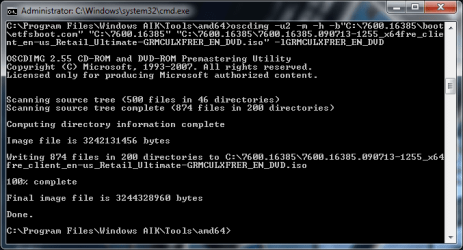
run this command, now:

oscdimg -u2 -m -h -b"C:\7600.16385\boot\etfsboot.com" "C:\7600.16385" "C:\7600.16385\7600.16385.090713-1255_x64fre_client_en-us_Retail_Ultimate-GRMCULXFRER_EN_DVD.iso" -lGRMCULXFRER_EN_DVD

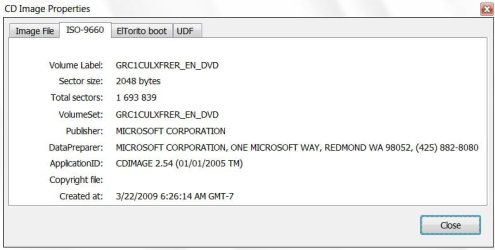
This will create a bootable "untouched" dvd iso like from microsoft. (see screenshot)

dvd1adso.png

dvd2ecpd.png
 

Attachments

  • dvd1.png
    dvd1.png
    88.1 KB · Views: 12
  • dvd2.png
    dvd2.png
    30.6 KB · Views: 13
Last edited by a moderator:
Hi Chris,

Nice tutorial.

MS use an app. called cdimage.exe.

ISO-4-2009-05-06_010835.jpg

In the tutorial , you are using oscdimg.exe - in terms of what you are doing here, it does the same job.

View attachment oscdimg.zip

It is probably easiest to put oscdimg in system 32 - so when you open a cmd prompt, you are right there.

oscdimg.exe -u2 -m -b[path to bootable image file] -h[path to windows files] [path and filename to create]

-u2 Creates UDF file system 1.02

-m Allows creation of image file larger than 700mb CD limit

-b Indicates the location of the boot image

-h Includes hidden files

-l Sets volume label of DVD, if you like. -l[Disc name or label]

-t Sets the date and time , if you like. -t[MM/DD/YYYY:HH:MM]


Note: Space before each command switch. No space between switch and path. Do not include the brackets in the path. If the path includes spaces, enclose it in "".
 
Last edited:

My Computers

System One System Two

  • Computer type
    PC/Desktop
    OS
    7 X64
    CPU
    i5 8400
    Motherboard
    gigabyte b365m ds3h
    Memory
    2x8gb 3200mhz
    Hard Drives
    various
    PSU
    pure power 11 400w cm
    Case
    Coolermaster
    Cooling
    cryorig m9i
  • Computer type
    PC/Desktop
    OS
    7x64
    CPU
    g5400
    Motherboard
    ga b365m ds3h
    Memory
    8gb ddr4 2400
    PSU
    xfx pro 450w
With cdimage.exe ver.2.52(108 KB):

-Place your folder Windows 7 in your C:\ drive.
-Place your cdimage.exe in your C:\ drive.
-Run Command Prompt "as Administrator".
-When Command Prompt appear, type "cd\” without the quotes to change to C drive.
Type (copy/paste this) the command cdimage -m -u2 -bC:\Windows 7\boot\etfsboot.com C:\Windows 7 C:\Windows 7.iso and you will see that it’s creating Windows 7 ISO image.
 

My Computer

OS
Windows 7
Hello,

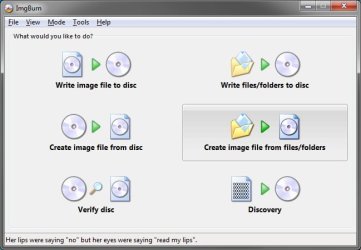
Couldn't you just use a program like ImgBurn to do the same thing much easier, or am I missing something again?

ImgBurn.jpg
 

My Computer

Computer type
PC/Desktop
Computer Manufacturer/Model Number
Self built custom
OS
64-bit Windows 11 Pro for Workstations
CPU
Intel i7-8700K OC'd to 5 GHz
Motherboard
ASUS ROG Maximus XI Formula Z390
Memory
64 GB (4x16GB) G.SKILL TridentZ RGB DDR4 3600 MHz
Graphics Card(s)
ASUS ROG-STRIX-GTX1080TI-O11G-GAMING
Sound Card
Integrated
Monitor(s) Displays
2 x Samsung Odyssey G7 27"
Screen Resolution
2560x1440
Hard Drives
1TB Samsung 990 PRO M.2,
4TB Samsung 990 PRO PRO M.2,
TerraMaster F8 SSD Plus NAS
PSU
Seasonic Prime Titanium 850W
Case
Thermaltake Core P3
Cooling
Corsair Hydro H115i
Keyboard
Logitech wireless K800
Mouse
Logitech MX Master 4
Internet Speed
2 Gb/s Download and 100 Mb/s Upload
Antivirus
Malwarebyte Anti-Malware Premium
Browser
Google Chrome
Other Info
Logitech Z625 speaker system,
Logitech BRIO 4K Pro webcam,
HP Color LaserJet Pro MFP M477fdn,
APC SMART-UPS RT 1000 XL - SURT1000XLI,
Galaxy S23 Plus phone
Hi Shawn,

The ETFSBOOT.COM program creates the CD boot sector.

Some 3rd party burning apps. do not seem keen to accept it as a valid boot image.

I haven't tried ImgBurn to do it - you may need a number of manual settings to get it work.

Give it a go if you have the time and see if you can get it to work.

To avoid using command line tools - the easiest is Vlite.

Just run as admin on the vlite.exe. Click Install Wimfltr>next.

Tick Bootable.iso>next. Browse to Windows Files>next. Select Create Image>next. Select a place to put the .iso>next. That's it.

To avoid any extra downloads , it's worth getting hold of vlite v1.1.6
 

My Computers

System One System Two

  • Computer type
    PC/Desktop
    OS
    7 X64
    CPU
    i5 8400
    Motherboard
    gigabyte b365m ds3h
    Memory
    2x8gb 3200mhz
    Hard Drives
    various
    PSU
    pure power 11 400w cm
    Case
    Coolermaster
    Cooling
    cryorig m9i
  • Computer type
    PC/Desktop
    OS
    7x64
    CPU
    g5400
    Motherboard
    ga b365m ds3h
    Memory
    8gb ddr4 2400
    PSU
    xfx pro 450w

My Computer

Computer Manufacturer/Model Number
Built Myself
OS
Windows 7 7600.16384 x64
CPU
Intel Core i7 OC'd to 3.20 GHz
Motherboard
Gigabyte
Memory
6GB GSkillz Triple Channel DDR3 OC'd to 1600 MHz
Graphics Card(s)
Nvidia GTX 280
Sound Card
X-Fi Platinum
Monitor(s) Displays
Dual 2001FWP
Screen Resolution
1680x1050 x 2
Hard Drives
System - Dual 150GB Raptors Raid0
Doc Storage - 1TB SATA 32MB cache Samsung
TV Recordings - 1TB SATA 32MB cache Samsung
PSU
Gigawatt Antec
Case
Antec 900
Keyboard
Saitek
Mouse
logitech MX 10000
Internet Speed
30 mb/s
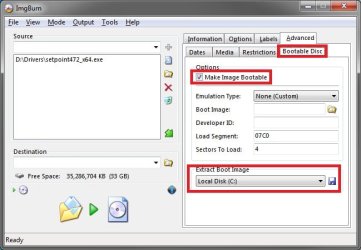
Ah, I see now. I haven't messed with it any in Windows 7, but ImgBurn does have an option to do something similiar to this that may work as well. :)

Bootable.jpg
 

My Computer

Computer type
PC/Desktop
Computer Manufacturer/Model Number
Self built custom
OS
64-bit Windows 11 Pro for Workstations
CPU
Intel i7-8700K OC'd to 5 GHz
Motherboard
ASUS ROG Maximus XI Formula Z390
Memory
64 GB (4x16GB) G.SKILL TridentZ RGB DDR4 3600 MHz
Graphics Card(s)
ASUS ROG-STRIX-GTX1080TI-O11G-GAMING
Sound Card
Integrated
Monitor(s) Displays
2 x Samsung Odyssey G7 27"
Screen Resolution
2560x1440
Hard Drives
1TB Samsung 990 PRO M.2,
4TB Samsung 990 PRO PRO M.2,
TerraMaster F8 SSD Plus NAS
PSU
Seasonic Prime Titanium 850W
Case
Thermaltake Core P3
Cooling
Corsair Hydro H115i
Keyboard
Logitech wireless K800
Mouse
Logitech MX Master 4
Internet Speed
2 Gb/s Download and 100 Mb/s Upload
Antivirus
Malwarebyte Anti-Malware Premium
Browser
Google Chrome
Other Info
Logitech Z625 speaker system,
Logitech BRIO 4K Pro webcam,
HP Color LaserJet Pro MFP M477fdn,
APC SMART-UPS RT 1000 XL - SURT1000XLI,
Galaxy S23 Plus phone
Haven't tried it - but you might get ImgBurn to work if you extract the boot image from a dvd and save it somewhere ( Build mode - at the bottom right).

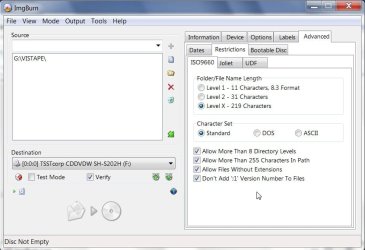
Then go to Advanced >ISO9660 and check the box about Don't add the ;1 Version number. ( Inexplicably, EFTFSBOOT.COM doesn't set the filename up in the expected ISO standard - that may overcome the problem).
 
Last edited:

My Computers

System One System Two

  • Computer type
    PC/Desktop
    OS
    7 X64
    CPU
    i5 8400
    Motherboard
    gigabyte b365m ds3h
    Memory
    2x8gb 3200mhz
    Hard Drives
    various
    PSU
    pure power 11 400w cm
    Case
    Coolermaster
    Cooling
    cryorig m9i
  • Computer type
    PC/Desktop
    OS
    7x64
    CPU
    g5400
    Motherboard
    ga b365m ds3h
    Memory
    8gb ddr4 2400
    PSU
    xfx pro 450w
I got it to work .

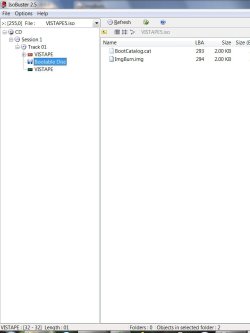
a) Either use ImgBurn to extract the bootimage from a bootable dvd. Imgburn labels it .ima.

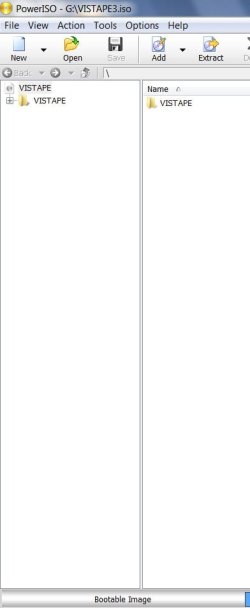
b) Or extract the boot image from an iso on the HD using PowerIso/Ultraiso, it will saved with .bif.

c) Or browse to etfsboot.com in the windows files - it is in the Boot folder.


img-1-2009-07-18_222943.jpg

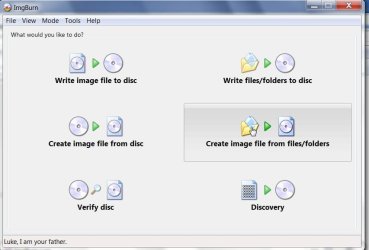
Under Mode tab, Select Build mode:

imgburn-12-2009-07-19_013022.jpg

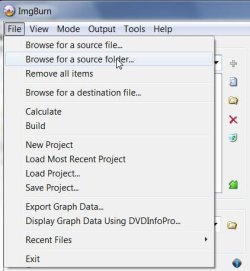
Select File >browse to the windows installation files folder ( I was using vista pe I wanted to make bootable)

imgburn-13-2009-07-19_013102.jpg

Follow these settings under Advanced> ISO9660 Tab:

IMG-2-2009-07-18_223116.jpg

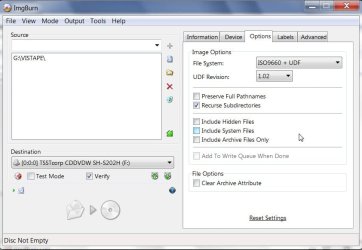
Follow these settings under the Options Tab:

IMG-3-2009-07-18_223147.jpg

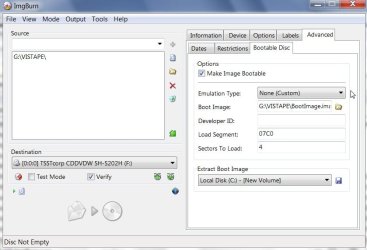
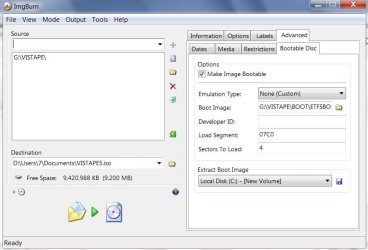
Follow these settings under Advanced> Bootable Disc Tab :

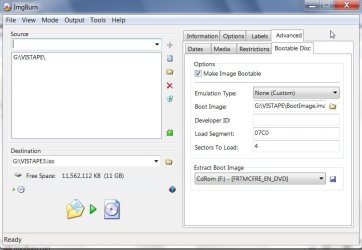
Browse to boot image - either the one you extracted from dvd or .iso

IMG-5-2009-07-18_223801.jpg

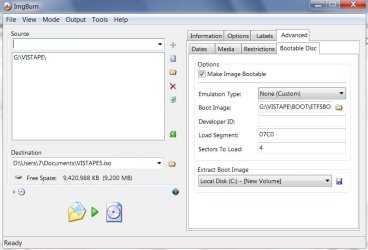
OR select etfsboot.com in the windows files Boot folder:

imgburn-10-2009-07-19_012850.jpg

Select Destination:

img-6-2009-07-18_224126.jpg

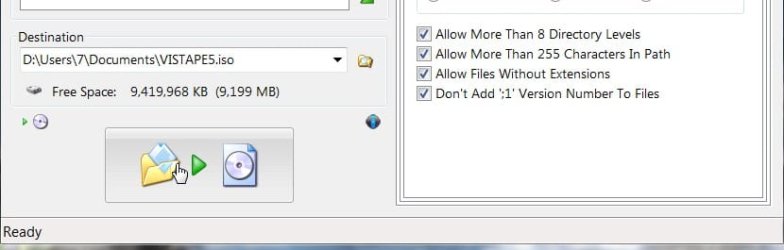
Click the Build button:

imgburn-14-2009-07-19_013337.jpg

There you have a bootable .iso :

imgburn-7-2009-07-18_224350.jpg
 
Last edited:

My Computers

System One System Two

  • Computer type
    PC/Desktop
    OS
    7 X64
    CPU
    i5 8400
    Motherboard
    gigabyte b365m ds3h
    Memory
    2x8gb 3200mhz
    Hard Drives
    various
    PSU
    pure power 11 400w cm
    Case
    Coolermaster
    Cooling
    cryorig m9i
  • Computer type
    PC/Desktop
    OS
    7x64
    CPU
    g5400
    Motherboard
    ga b365m ds3h
    Memory
    8gb ddr4 2400
    PSU
    xfx pro 450w
Very nice SIW2. :)
 

My Computer

Computer type
PC/Desktop
Computer Manufacturer/Model Number
Self built custom
OS
64-bit Windows 11 Pro for Workstations
CPU
Intel i7-8700K OC'd to 5 GHz
Motherboard
ASUS ROG Maximus XI Formula Z390
Memory
64 GB (4x16GB) G.SKILL TridentZ RGB DDR4 3600 MHz
Graphics Card(s)
ASUS ROG-STRIX-GTX1080TI-O11G-GAMING
Sound Card
Integrated
Monitor(s) Displays
2 x Samsung Odyssey G7 27"
Screen Resolution
2560x1440
Hard Drives
1TB Samsung 990 PRO M.2,
4TB Samsung 990 PRO PRO M.2,
TerraMaster F8 SSD Plus NAS
PSU
Seasonic Prime Titanium 850W
Case
Thermaltake Core P3
Cooling
Corsair Hydro H115i
Keyboard
Logitech wireless K800
Mouse
Logitech MX Master 4
Internet Speed
2 Gb/s Download and 100 Mb/s Upload
Antivirus
Malwarebyte Anti-Malware Premium
Browser
Google Chrome
Other Info
Logitech Z625 speaker system,
Logitech BRIO 4K Pro webcam,
HP Color LaserJet Pro MFP M477fdn,
APC SMART-UPS RT 1000 XL - SURT1000XLI,
Galaxy S23 Plus phone
LOL, just a bit. ;)
 

My Computer

Computer type
PC/Desktop
Computer Manufacturer/Model Number
Self built custom
OS
64-bit Windows 11 Pro for Workstations
CPU
Intel i7-8700K OC'd to 5 GHz
Motherboard
ASUS ROG Maximus XI Formula Z390
Memory
64 GB (4x16GB) G.SKILL TridentZ RGB DDR4 3600 MHz
Graphics Card(s)
ASUS ROG-STRIX-GTX1080TI-O11G-GAMING
Sound Card
Integrated
Monitor(s) Displays
2 x Samsung Odyssey G7 27"
Screen Resolution
2560x1440
Hard Drives
1TB Samsung 990 PRO M.2,
4TB Samsung 990 PRO PRO M.2,
TerraMaster F8 SSD Plus NAS
PSU
Seasonic Prime Titanium 850W
Case
Thermaltake Core P3
Cooling
Corsair Hydro H115i
Keyboard
Logitech wireless K800
Mouse
Logitech MX Master 4
Internet Speed
2 Gb/s Download and 100 Mb/s Upload
Antivirus
Malwarebyte Anti-Malware Premium
Browser
Google Chrome
Other Info
Logitech Z625 speaker system,
Logitech BRIO 4K Pro webcam,
HP Color LaserJet Pro MFP M477fdn,
APC SMART-UPS RT 1000 XL - SURT1000XLI,
Galaxy S23 Plus phone
Thanks Shawn and Shark,

There are a couple of big differences :

1. You don't need the paid version of PowerIso ( well worth it imo), or UltraIso, etc - whose main purpose is to edit existing iso files in an automated process.

Img Burn is free.:D

2. You don't need to have a dvd or iso already - you can select ETFSBOOT.COM as the bootimage - that is already in the windows installation files..:D

imgburn-10-2009-07-19_012850.jpg

imgburn11-2009-07-19_012813.jpg

3. You do need to set it up manually as described. If you attempt it with many 3rd party burning apps. - it won't work. Ashampoo Burning Studio warned the bootimg needed to be made into the iso file system - which gave a clue as to what the problem may be. Fortunately ImgBurn allows a great deal of manual configuration.

4. However, if you have an .iso already, ImgBurn can also be used as a free alternative to the method in

http://www.sevenforums.com/tutorials/16917-bootable-iso-create-older-iso.html

I have updated my earlier post to clarify that.

Shawn: Couldn't you just use a program like ImgBurn to do the same thing much easier, or am I missing something again?

While it can be done with ImgBurn using just the Windows installation files - I'm not sure it is easier than using cdimage.exe, or oscdimg.exe.

I have updated my original oscdimg post to the minimum command/switches needed , and listed others as optional.

Hope it makes sense.:)

Shawn - I'm glad you brought it up - I had never really looked at ImgBurn before.:D
 
Last edited:

My Computers

System One System Two

  • Computer type
    PC/Desktop
    OS
    7 X64
    CPU
    i5 8400
    Motherboard
    gigabyte b365m ds3h
    Memory
    2x8gb 3200mhz
    Hard Drives
    various
    PSU
    pure power 11 400w cm
    Case
    Coolermaster
    Cooling
    cryorig m9i
  • Computer type
    PC/Desktop
    OS
    7x64
    CPU
    g5400
    Motherboard
    ga b365m ds3h
    Memory
    8gb ddr4 2400
    PSU
    xfx pro 450w
Good job, after playing with it, I did see the part to make the disk bootable in IMGBurn
 

My Computer

Computer Manufacturer/Model Number
Built Myself
OS
Windows 7 7600.16384 x64
CPU
Intel Core i7 OC'd to 3.20 GHz
Motherboard
Gigabyte
Memory
6GB GSkillz Triple Channel DDR3 OC'd to 1600 MHz
Graphics Card(s)
Nvidia GTX 280
Sound Card
X-Fi Platinum
Monitor(s) Displays
Dual 2001FWP
Screen Resolution
1680x1050 x 2
Hard Drives
System - Dual 150GB Raptors Raid0
Doc Storage - 1TB SATA 32MB cache Samsung
TV Recordings - 1TB SATA 32MB cache Samsung
PSU
Gigawatt Antec
Case
Antec 900
Keyboard
Saitek
Mouse
logitech MX 10000
Internet Speed
30 mb/s
Back
Top