How to get a SendTo 'Subfolders' to open?

endeavor

New member
Guru
VIP
Local time
3:13 PM
Messages
313
In Windows 7, when you create a 'Subfolder' within the 'SendTo' folder, and put program shortcuts into it, that subfolder when you navigate toward it via the right-click SendTo, that subfolder does not nest open like it did on WXP's SendTo menu.

Q: Why would one want to have a subfolder in SendTo?
A: ...Simply for organization of like items convenience; to create a nested organized set of SendTo items within their Own Subfolder off of 7's "...AppData\Roaming\Microsoft\Windows\SendTo" folder

We know many have complained about this ever since Windows 7 came out, and my question is did anyone ever find a way to male it work yet?

The answer is not the common shell:sendto advice, and if you're thinking it is, please re-read the question, we are talking about a Subfolder within the SendTo folder, TY.
 
Last edited:

My Computer My Computer

At a glance

Vista/Win7/8/10/11 (x86/x64)i7
Computer type
PC/Desktop
Computer Manufacturer/Model Number
..all towers built from scratch
OS
Vista/Win7/8/10/11 (x86/x64)
CPU
i7
Start and type shell:sendto. then hit Enter.
 

My Computer My Computer

At a glance

Vista, Windows7, Mint Mate, Zorin, Windows 8from 1.6GHz Duo to i7
Computer Manufacturer/Model Number
HP, Dell, Gateway, Toshiba - 4 laptops and 2 desktops
OS
Vista, Windows7, Mint Mate, Zorin, Windows 8
CPU
from 1.6GHz Duo to i7
Monitor(s) Displays
2x HP w2207
Hard Drives
5x HDD, 7x SSD, 12x Externals
Keyboard
with trackball - no mices
Mouse
Trackball mice
Internet Speed
DSL 6000

My Computer My Computer

At a glance

64-bit Windows 11 Pro for WorkstationsIntel i7-8700K OC'd to 5 GHz64 GB (4x16GB) G.SKILL TridentZ RGB DDR4 3600...ASUS ROG-STRIX-GTX1080TI-O11G-GAMING
Computer type
PC/Desktop
Computer Manufacturer/Model Number
Self built custom
OS
64-bit Windows 11 Pro for Workstations
CPU
Intel i7-8700K OC'd to 5 GHz
Motherboard
ASUS ROG Maximus XI Formula Z390
Memory
64 GB (4x16GB) G.SKILL TridentZ RGB DDR4 3600 MHz
Graphics Card(s)
ASUS ROG-STRIX-GTX1080TI-O11G-GAMING
Sound Card
Integrated
Monitor(s) Displays
2 x Samsung Odyssey G7 27"
Screen Resolution
2560x1440
Hard Drives
1TB Samsung 990 PRO M.2,
4TB Samsung 990 PRO PRO M.2,
TerraMaster F8 SSD Plus NAS
PSU
Seasonic Prime Titanium 850W
Case
Thermaltake Core P3
Cooling
Corsair Hydro H115i
Keyboard
Logitech wireless K800
Mouse
Logitech MX Master 4
Internet Speed
2 Gb/s Download and 100 Mb/s Upload
Antivirus
Malwarebyte Anti-Malware Premium
Browser
Google Chrome
Other Info
Logitech Z625 speaker system,
Logitech BRIO 4K Pro webcam,
HP Color LaserJet Pro MFP M477fdn,
APC SMART-UPS RT 1000 XL - SURT1000XLI,
Galaxy S23 Plus phone

Hi Brink,

I've already had been there and read that before I posted though. That dosen't cover my particular question though but thank you.

I don't think there is a resolve for my question.

Also just a fyi for others, the answer is not the common shell:sendto advice either, we are talking about a Subfolder within the SendTo folder; currently if you place a subfolder within SendTo, it will not nest auto-open via approaching it via the right-click menu... try it. That's been broken ever since WXP, but XP works very well doing it that way.
TY
 

My Computer My Computer

At a glance

Vista/Win7/8/10/11 (x86/x64)i7
Computer type
PC/Desktop
Computer Manufacturer/Model Number
..all towers built from scratch
OS
Vista/Win7/8/10/11 (x86/x64)
CPU
i7

My Computer My Computer

At a glance

64-bit Windows 11 Pro for WorkstationsIntel i7-8700K OC'd to 5 GHz64 GB (4x16GB) G.SKILL TridentZ RGB DDR4 3600...ASUS ROG-STRIX-GTX1080TI-O11G-GAMING
Computer type
PC/Desktop
Computer Manufacturer/Model Number
Self built custom
OS
64-bit Windows 11 Pro for Workstations
CPU
Intel i7-8700K OC'd to 5 GHz
Motherboard
ASUS ROG Maximus XI Formula Z390
Memory
64 GB (4x16GB) G.SKILL TridentZ RGB DDR4 3600 MHz
Graphics Card(s)
ASUS ROG-STRIX-GTX1080TI-O11G-GAMING
Sound Card
Integrated
Monitor(s) Displays
2 x Samsung Odyssey G7 27"
Screen Resolution
2560x1440
Hard Drives
1TB Samsung 990 PRO M.2,
4TB Samsung 990 PRO PRO M.2,
TerraMaster F8 SSD Plus NAS
PSU
Seasonic Prime Titanium 850W
Case
Thermaltake Core P3
Cooling
Corsair Hydro H115i
Keyboard
Logitech wireless K800
Mouse
Logitech MX Master 4
Internet Speed
2 Gb/s Download and 100 Mb/s Upload
Antivirus
Malwarebyte Anti-Malware Premium
Browser
Google Chrome
Other Info
Logitech Z625 speaker system,
Logitech BRIO 4K Pro webcam,
HP Color LaserJet Pro MFP M477fdn,
APC SMART-UPS RT 1000 XL - SURT1000XLI,
Galaxy S23 Plus phone
Hi Brink,

Thank you, I had already been there as well (before I posted) but that's not it either. Before I posted you can bet I scoured the web.
I don't think that it can be done for Windows 7 yet, it seems Explorer does not expand any folder put under the shell:sendto folder like it did with WXP/98

Maybe it's my wording not explaining it correctly though, and I apologize if I didn't.
It's hard to explain in wording so that everyone can understand my point though,
and so to try and make it more clear...

Here is a Screenshot that is self-explanatory, I hope!


jr64ox.jpg
 
Last edited:

My Computer My Computer

At a glance

Vista/Win7/8/10/11 (x86/x64)i7
Computer type
PC/Desktop
Computer Manufacturer/Model Number
..all towers built from scratch
OS
Vista/Win7/8/10/11 (x86/x64)
CPU
i7
I'm afraid that I do not know of a way to have cascading folders with more than one menu level like that. :(
 

My Computer My Computer

At a glance

64-bit Windows 11 Pro for WorkstationsIntel i7-8700K OC'd to 5 GHz64 GB (4x16GB) G.SKILL TridentZ RGB DDR4 3600...ASUS ROG-STRIX-GTX1080TI-O11G-GAMING
Computer type
PC/Desktop
Computer Manufacturer/Model Number
Self built custom
OS
64-bit Windows 11 Pro for Workstations
CPU
Intel i7-8700K OC'd to 5 GHz
Motherboard
ASUS ROG Maximus XI Formula Z390
Memory
64 GB (4x16GB) G.SKILL TridentZ RGB DDR4 3600 MHz
Graphics Card(s)
ASUS ROG-STRIX-GTX1080TI-O11G-GAMING
Sound Card
Integrated
Monitor(s) Displays
2 x Samsung Odyssey G7 27"
Screen Resolution
2560x1440
Hard Drives
1TB Samsung 990 PRO M.2,
4TB Samsung 990 PRO PRO M.2,
TerraMaster F8 SSD Plus NAS
PSU
Seasonic Prime Titanium 850W
Case
Thermaltake Core P3
Cooling
Corsair Hydro H115i
Keyboard
Logitech wireless K800
Mouse
Logitech MX Master 4
Internet Speed
2 Gb/s Download and 100 Mb/s Upload
Antivirus
Malwarebyte Anti-Malware Premium
Browser
Google Chrome
Other Info
Logitech Z625 speaker system,
Logitech BRIO 4K Pro webcam,
HP Color LaserJet Pro MFP M477fdn,
APC SMART-UPS RT 1000 XL - SURT1000XLI,
Galaxy S23 Plus phone
I figured that since WXP does it, that we could get 7 to do it as well... ...but that's not proving to be so easy.
 

My Computer My Computer

At a glance

Vista/Win7/8/10/11 (x86/x64)i7
Computer type
PC/Desktop
Computer Manufacturer/Model Number
..all towers built from scratch
OS
Vista/Win7/8/10/11 (x86/x64)
CPU
i7
Is Players a Folder or a link to a folder?

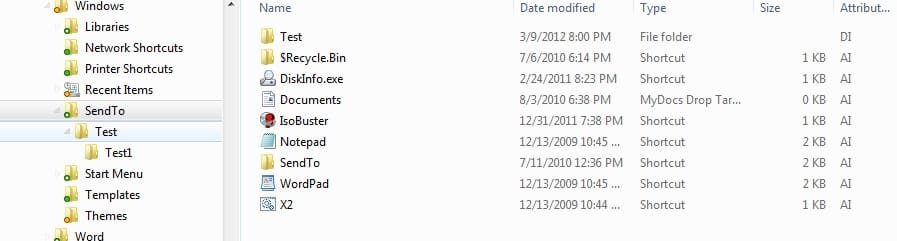
I just tried this. I created a Test folder in SendTo. Opened it then created a Test1 folder. When I look at it via shell:sendto this is what I see:

SendTo nested folders.jpg

So nesting does display for me if they are real folders and not links.
 

My Computer My Computer

At a glance

Windows 10 Pro X64Intel Quad Core i7-4770 @ 3.4Ghz16.0GB PC3-12800 DDR3 SDRAM 1600 MHzIntel Integrated HD Graphics
Computer type
PC/Desktop
Computer Manufacturer/Model Number
Lenovo IdeaCenter 450
OS
Windows 10 Pro X64
CPU
Intel Quad Core i7-4770 @ 3.4Ghz
Memory
16.0GB PC3-12800 DDR3 SDRAM 1600 MHz
Graphics Card(s)
Intel Integrated HD Graphics
Sound Card
Realtek HD Audio
Monitor(s) Displays
HP 22" LCD
Screen Resolution
1680 x 1050
Hard Drives
250GB Samsung EVO SATA-3 SSD
2TB Seagate ST2000DM001 SATA-2
1.5TB Seagate ST3150041AS SATA
Keyboard
Dell USB
Mouse
Lenovo USB
Internet Speed
Cable via Road Runner 3MB Upload, 30MB Download
Antivirus
Windows Defender, MBAM Pro, MBAE
Browser
Seamonkey
Other Info
UEFI/GPT
PLDS DVD-RW DH16AERSH
Is Players a Folder or a link to a folder?

I just tried this. I created a Test folder in SendTo. Opened it then created a Test1 folder. When I look at it via shell:sendto this is what I see:

So nesting does display for me if they are real folders and not links.

Yes but Ztrucker you are accessing the Folder from within the Navigation Pane!
We were talking about from within the SendTo menu itself.

Remember the SendTo 'menu' always let subfolders cascade open on 98/XP; 7 will not let you do that anymore.

I've changed my screenshot above to make it more clear
 

My Computer My Computer

At a glance

Vista/Win7/8/10/11 (x86/x64)i7
Computer type
PC/Desktop
Computer Manufacturer/Model Number
..all towers built from scratch
OS
Vista/Win7/8/10/11 (x86/x64)
CPU
i7
Ah okay, sorry.
 

My Computer My Computer

At a glance

Windows 10 Pro X64Intel Quad Core i7-4770 @ 3.4Ghz16.0GB PC3-12800 DDR3 SDRAM 1600 MHzIntel Integrated HD Graphics
Computer type
PC/Desktop
Computer Manufacturer/Model Number
Lenovo IdeaCenter 450
OS
Windows 10 Pro X64
CPU
Intel Quad Core i7-4770 @ 3.4Ghz
Memory
16.0GB PC3-12800 DDR3 SDRAM 1600 MHz
Graphics Card(s)
Intel Integrated HD Graphics
Sound Card
Realtek HD Audio
Monitor(s) Displays
HP 22" LCD
Screen Resolution
1680 x 1050
Hard Drives
250GB Samsung EVO SATA-3 SSD
2TB Seagate ST2000DM001 SATA-2
1.5TB Seagate ST3150041AS SATA
Keyboard
Dell USB
Mouse
Lenovo USB
Internet Speed
Cable via Road Runner 3MB Upload, 30MB Download
Antivirus
Windows Defender, MBAM Pro, MBAE
Browser
Seamonkey
Other Info
UEFI/GPT
PLDS DVD-RW DH16AERSH
Hi again,

You see it's because when you have Lots of items in the Menu of the SendTo, it's nice to have them organized in the right groups, and so since I had so many players it made sense to keep that group in it's own subfolder, and same was true for other groups.

But now on Windows 7 since they all have to go together in the Same folder the list can get quite big, and it would be convenient if I could organize them in the sequence that made sense, and since the sendto Menu is code set sorted by Name (that I know of you can't change its 'Menu' sort settings?) ...iow, for instance if I could I would toggle the creation dates of all the listings, that way I could do it in a way that I could line them all up in the order I wanted to have them displayed, well that would be one way, but since we can't, the only other thing I can think of to control the listing order is using the the alphabet, and that does let me choose where each listing will end up, for instance something like this...


a. Desktop
b. Compressed Zip
c. Notepad
d. WordPad
e. etc
f. etc
g. etc
h. etc
i. etc
j. mplayer1
k. mplayer2
l. mplayer3
n. mplayer4
o. mplayer5
p. mplayer6
q. mplayer7
r app 1
s. etc
t. etc
etc...

..you get the picture right...

...now, I wish there was a better way since it looks a little funky to have the a, b, c, d's seen there like that, but that's the only way I can think of at this point, unless one of you gents/ladies have a better idea to control all the listings positions? ...if not then the a, b, c's will have to do I guess

TY
 
Last edited:

My Computer My Computer

At a glance

Vista/Win7/8/10/11 (x86/x64)i7
Computer type
PC/Desktop
Computer Manufacturer/Model Number
..all towers built from scratch
OS
Vista/Win7/8/10/11 (x86/x64)
CPU
i7
*bump*

Did anyone find a solution to this? The lack of sub-folders is a real pain.

-fm
 

My Computer My Computer

At a glance

Windows 7 Ultimate x64
OS
Windows 7 Ultimate x64
*bump*

Did anyone find a solution to this? The lack of sub-folders is a real pain.

-fm

Well no not really, but, the best thing that I've done to get around it, for me anyway, and I must say I've gotten quite use to it by now and don't think twice about it anymore, is I put all the items in the parent sendto folder in a particular order so that they present in the Group Order that I want, iow, to have my players together, editors together, etc... this way when I right click to Send To, the items I want are grouped together for the same or similar actions of thought process.

I did it similar to what I posted above 6 months ago but without the distracting a, b, c, stuff, and instead besides using the stock default order of the items spelling which just so happened many of them fell into the right group order just doing that, and the ones that didn't, then I used a combination of periods . & commas , and then lastly z, each preceeding my items names with these particulars give me the specific sort order prefecernce I wanted (while also the . & , are less visually distracting than the a ,b, c, way) I also removed anything I won't use so that I can keep the menu to only what I use.

I could post a screenshot if you needed to see what I mean

Anyway this was the best that I could come up with for now, and as I said I don't even think twice about it anymore; however of course the best way was with all the MS Pre-7 OS's which let us use subfolders in that Send To parent.


.
 
Last edited:

My Computer My Computer

At a glance

Vista/Win7/8/10/11 (x86/x64)i7
Computer type
PC/Desktop
Computer Manufacturer/Model Number
..all towers built from scratch
OS
Vista/Win7/8/10/11 (x86/x64)
CPU
i7

My Computer My Computer

At a glance

64-bit Windows 11 Pro for WorkstationsIntel i7-8700K OC'd to 5 GHz64 GB (4x16GB) G.SKILL TridentZ RGB DDR4 3600...ASUS ROG-STRIX-GTX1080TI-O11G-GAMING
Computer type
PC/Desktop
Computer Manufacturer/Model Number
Self built custom
OS
64-bit Windows 11 Pro for Workstations
CPU
Intel i7-8700K OC'd to 5 GHz
Motherboard
ASUS ROG Maximus XI Formula Z390
Memory
64 GB (4x16GB) G.SKILL TridentZ RGB DDR4 3600 MHz
Graphics Card(s)
ASUS ROG-STRIX-GTX1080TI-O11G-GAMING
Sound Card
Integrated
Monitor(s) Displays
2 x Samsung Odyssey G7 27"
Screen Resolution
2560x1440
Hard Drives
1TB Samsung 990 PRO M.2,
4TB Samsung 990 PRO PRO M.2,
TerraMaster F8 SSD Plus NAS
PSU
Seasonic Prime Titanium 850W
Case
Thermaltake Core P3
Cooling
Corsair Hydro H115i
Keyboard
Logitech wireless K800
Mouse
Logitech MX Master 4
Internet Speed
2 Gb/s Download and 100 Mb/s Upload
Antivirus
Malwarebyte Anti-Malware Premium
Browser
Google Chrome
Other Info
Logitech Z625 speaker system,
Logitech BRIO 4K Pro webcam,
HP Color LaserJet Pro MFP M477fdn,
APC SMART-UPS RT 1000 XL - SURT1000XLI,
Galaxy S23 Plus phone
Yeah..i know (you could do that in XP aswell) - Thats why sendto turned surprisingly useful in the first place..
But now, in Win7 i dont use it as much because of the mising feature of hierarchical folders)

I don't get these things...
 

My Computer My Computer

At a glance

Windows 7 Ultimate x64t
OS
Windows 7 Ultimate x64t
Back
Top