Cloning HDDs - the right way to do it?

usta

New member
Member
Local time
6:28 PM
Messages
56
I've cloned my HDD using Norton Ghost 15 (following its user guide), but there were issues in starting Win7. Here is the setup:

Original disk partitions (Win7):
1) OEM Partition
2) RECOVERY (Active, System, Primary)
3) OS (Primary)
4) DATA (Logical Drive)


Destination disk partitions (Win7):
1) RECOVERY (Active, System, Primary) - I cloned this partition as step 1, by selecting in Ghost the options "Set drive Active (for booting OS), Copy MBR, Primary Partition, Drive letter - None".

2) OS (Primary, Boot, Page file, Crash Dump) - I cloned this partition as step 2, and didn't select any options as in step 1, except indicating that this is a Primary partition.

3) I left DATA partition un-cloned, since the original disk serves me now as an external HDD.


Win7 couldn't boot, so I placed Win7 recovery CD and selected the "repair" option. After that Win7 booted without any issues.

I still ask myself the question - What did I do wrong in this disk cloning process that prevented Win7 from booting right away?
 

My Computer My Computer

OS
Windows 7 Professional x64
CPU
Core i5 520M
Graphics Card(s)
ATI HD 5650
Hi,

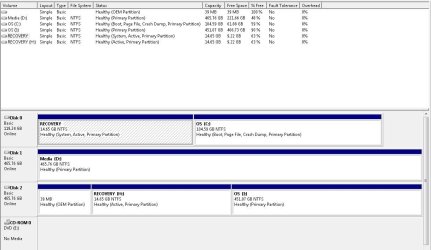
Can you paste an image of your Disk Management?

Regards,
Golden
 

My Computer My Computer

Computer type
PC/Desktop
Computer Manufacturer/Model Number
Golden Mk. I.4
OS
Windows 10 Pro x64 ; Xubuntu x64
CPU
Intel i7 860 @ 2.80 GHz O/C'ed to 4.0GHz
Motherboard
Gigabyte P55A-UD3R Rev.1. Award BIOS F13
Memory
16GB Corsair Vengance DDR3 @ 661 MHz Dual Channel (9-9-9-24)
Graphics Card(s)
EVGA NVidia GTX 560 1024MB
Sound Card
Realtek Integrated
Monitor(s) Displays
Dual Samsung SyncMaster 2494HS
Screen Resolution
1920*1080 and 1920*1080
Hard Drives
1*Samsung 840 EVO 120GB SSD;
1*OCZ Vertex 2 60GB SSD;
2*Samsung F3 SpinPoint 1TB in RAID0;
1*Samsung F1 SpinPoint 1TB;
2*Western Digital 1TB External USB 3.0
1*Western Digital 500GB External USB 3.0
1*Seagate 500GB External USB 2.0
PSU
Thermaltake ToughPower QFan 750W
Case
Thermaltake Element S VK60001W2Z
Cooling
Corsair H60 Water Cooling, 2*230mm and 2*80mm case fans
Keyboard
Logitech G110
Mouse
Logitech MX518
Sure. Below is the screenshot. Ignore Disk1 Media D: (that's my second internal HDD).

The changes I've made since the cloning process:
1) connect the old disk as an external drive (Disk2).
2) Delete DATA partition on the old disk and add the un-allocated space to OS (I:).


Diskmgmt.JPG
 

My Computer My Computer

OS
Windows 7 Professional x64
CPU
Core i5 520M
Graphics Card(s)
ATI HD 5650
I've cloned my HDD using Norton Ghost 15 (following its user guide), but there were issues in starting Win7. Here is the setup:

Original disk partitions (Win7):
1) OEM Partition
2) RECOVERY (Active, System, Primary)
3) OS (Primary)
4) DATA (Logical Drive)


Destination disk partitions (Win7):
1) RECOVERY (Active, System, Primary) - I cloned this partition as step 1, by selecting in Ghost the options "Set drive Active (for booting OS), Copy MBR, Primary Partition, Drive letter - None".

2) OS (Primary, Boot, Page file, Crash Dump) - I cloned this partition as step 2, and didn't select any options as in step 1, except indicating that this is a Primary partition.

3) I left DATA partition un-cloned, since the original disk serves me now as an external HDD.


Win7 couldn't boot, so I placed Win7 recovery CD and selected the "repair" option. After that Win7 booted without any issues.

I still ask myself the question - What did I do wrong in this disk cloning process that prevented Win7 from booting right away?

Your boot menu points to operating systems on your harddisk(s). So for example:
VISTA: device partition=c
WIN7: device partition=e

But in bootmenu it's actually stored as "Disk signature"-"start sector of partition"
So if you change start sector of partition it's another partition. You used another disk with another disk siganture, so it's another partition.

Bootmenu points to something which isn't there anymore!!
-----------------------------
Same happens in win7 itself. win7 can't find C->but it automatically creates it because it knows what partition it's on (assuming old C disk is not attached). All other partitions are not found as well. So it assigns default drive letters to them. So if you have a second partition called Q (you did change that manually) it is called D now.
------------------------------
All restore points are invalid as well now, check your system restore settings and disable system restore on "ghost drives"
 

My Computer My Computer

Computer type
Laptop
Computer Manufacturer/Model Number
ACER ASPIRE 5742G
OS
Microsoft Windows 7 Home Premium 64-bits 7601 Multiprocessor Free Service Pack 1
CPU
Intel(R) Core(TM) i3 CPU M 370 @ 2.40GHz
Motherboard
Acer Aspire 5742G
Memory
4,00 GB
Graphics Card(s)
ATI Mobility Radeon HD 5400 Series
Sound Card
(1) AMD High Definition Audio Device (2) Realtek High Defi
Screen Resolution
1366 x 768 x 32 bits (4294967296 colors) @ 60 Hz
Hard Drives
WDC WD5000BEVT-22ZAT0
please post output of disk management. And check if all drive letters are good!
 

My Computer My Computer

Computer type
Laptop
Computer Manufacturer/Model Number
ACER ASPIRE 5742G
OS
Microsoft Windows 7 Home Premium 64-bits 7601 Multiprocessor Free Service Pack 1
CPU
Intel(R) Core(TM) i3 CPU M 370 @ 2.40GHz
Motherboard
Acer Aspire 5742G
Memory
4,00 GB
Graphics Card(s)
ATI Mobility Radeon HD 5400 Series
Sound Card
(1) AMD High Definition Audio Device (2) Realtek High Defi
Screen Resolution
1366 x 768 x 32 bits (4294967296 colors) @ 60 Hz
Hard Drives
WDC WD5000BEVT-22ZAT0
@Kaktussoft,

Thanks for reply. I've already posted a screenshot of disk management on post #3. This is the situation after the cloning and replacing disks, whereby the source disk is now an external HDD (Disk2).

So, if I understand you correctly, Windows was confused about the boot disk, since the drive letter assigned to the cloned OS was no longer "C:", but "H:". Hmm, I couldn't change that since there already was a boot partition with a C: drive in the source disk.
The cloning process was like this: source disk in the notebook as internal disk, destination disk connected to notebook via SATA-USB cable. Disk Management window could see them both.

I would assume that after cloning, windows automatically assigns drive C: to boot disk.
 

My Computer My Computer

OS
Windows 7 Professional x64
CPU
Core i5 520M
Graphics Card(s)
ATI HD 5650
does recovery partition still work?
 

My Computer My Computer

Computer type
Laptop
Computer Manufacturer/Model Number
ACER ASPIRE 5742G
OS
Microsoft Windows 7 Home Premium 64-bits 7601 Multiprocessor Free Service Pack 1
CPU
Intel(R) Core(TM) i3 CPU M 370 @ 2.40GHz
Motherboard
Acer Aspire 5742G
Memory
4,00 GB
Graphics Card(s)
ATI Mobility Radeon HD 5400 Series
Sound Card
(1) AMD High Definition Audio Device (2) Realtek High Defi
Screen Resolution
1366 x 768 x 32 bits (4294967296 colors) @ 60 Hz
Hard Drives
WDC WD5000BEVT-22ZAT0
I think so. I can see it in disk management, and the recovery program (Dell Datasafe) goes as far as to the point of being ready to restore the factory image.

In fact, everything works fine. I just wonder what could I have done to prevent the initial boot error in Win7, when the newly cloned disk was placed in notebook.
 

My Computer My Computer

OS
Windows 7 Professional x64
CPU
Core i5 520M
Graphics Card(s)
ATI HD 5650
It sometimes happens after cloning: The MBR needs repair or boot files rewritten using
Startup Repair - Run 3 Separate Times.

I'd use Acronis premium apps Boot Disk which come free when any WD or Seagate HD are in the mix. If none, I'd use Macrium Reflect. Anything Norton is IMO bloatware.
 
Last edited:
Yes, I've happily used Acronis or Reflect in the past, but this time Ghost v15 was delivered with the new disk (by Samsung), so I thought to give it a try.

I think next time I'll go back to Acronis/Reflect...:)
 

My Computer My Computer

OS
Windows 7 Professional x64
CPU
Core i5 520M
Graphics Card(s)
ATI HD 5650
I think so. I can see it in disk management, and the recovery program (Dell Datasafe) goes as far as to the point of being ready to restore the factory image.

In fact, everything works fine. I just wonder what could I have done to prevent the initial boot error in Win7, when the newly cloned disk was placed in notebook.
It ALWAYS happens if you modify the starting sector of OS partition. Or you modify disk signature of disk (all disks have a unique disk signature). This because the bootmenu entry points to those values. If you display bcd output using bcdedit it's automatically translated to drive letter or harddisknummer/partitionnumber if drive letter is unknown. But if it's pointing to old none existing partition it's listed as "unknown".

How to use Boot Configuration Data Store Editor (BCDEdit) to manage BCD stores
 

My Computer My Computer

Computer type
Laptop
Computer Manufacturer/Model Number
ACER ASPIRE 5742G
OS
Microsoft Windows 7 Home Premium 64-bits 7601 Multiprocessor Free Service Pack 1
CPU
Intel(R) Core(TM) i3 CPU M 370 @ 2.40GHz
Motherboard
Acer Aspire 5742G
Memory
4,00 GB
Graphics Card(s)
ATI Mobility Radeon HD 5400 Series
Sound Card
(1) AMD High Definition Audio Device (2) Realtek High Defi
Screen Resolution
1366 x 768 x 32 bits (4294967296 colors) @ 60 Hz
Hard Drives
WDC WD5000BEVT-22ZAT0
The correct way to clone hdds is doing it outside the operating system, use clonezilla or acronis or whatever you want, but always perform that operation outside windows.
 

My Computer My Computer

Computer type
PC/Desktop
OS
Microsoft Windows 10 Professional / Windows 7 Professional
CPU
Intel i5-3570
Motherboard
Lenovo Mahobay
Memory
16GB DDR3
Graphics Card(s)
AMD Radeon HD 7850 2GB
Sound Card
(1) Realtek HD Audio (2) AMD HD Audio
Monitor(s) Displays
LG LS192WS
Screen Resolution
1440 x 900 @ 32bit color
Hard Drives
(1) SUV300S37A/120G (2) ST3500413AS SATA Disk Device AHCI mode enabled.
PSU
Corsair HX620
Case
Thermaltake V4 Black Edition
Cooling
Cooler Master Hyper 212 + Artic Silver 5 on CPU/GPU
Keyboard
Dell SK-8115
Mouse
Razer Copperhead with MAPED mat (awesome!)
Internet Speed
100 Mbps up/down
Browser
Chrome
Back
Top