Imaging with free Macrium

   Information

This tutorial shows imaging with free Macrium Version 5.0. If you are still using Macrium Version 4.2, go to this Vimeo site where the tutorial of that version is stored.

The Video does not show the recovery part because I have no setup to screen capture it. But Keith (Kado) made this excellent recovery tutorial with text (but no sound) that he captured from a virtual partition.


   Warning


Note that the external disk to which you image must be formatted in NTFS. A disk that is formatted in Fat32 will accept an image, but the recovery programs cannot restore that image. You can, however, mount (open) a Fat32 image as VHD.


   Note
The production of the WinPE recovery CD (which is highly recommended) may take up to 3 hours because Macrium needs to download the 1.7GB WAIK (Windows Application Installation Kit). For your convenience I have uploaded a ready made .iso of the WinPE recovery disc. That can be downloaded in appr. 8 minutes which clearly beats the WAIK download. Once you downloaded and unzipped the folder, you can burn it directly to a CD with e.g. ImgBurn.

Here is the link to my Skydrive site.

Here is an alternate link from FileSwap (courtesy of Gary - Britton30)

I draw your attention to the fact that this WinPE CD can also be used to make images. That may be convenient in case you do not want to install Macrium on your PC.


This video tutorial explains the full cycle of the imaging process which is:

· Initial setups
· Image definition
· Image scheduling
· Image production

The imaging program that was used for this tutorial is free Macrium. But the basic principles are the same for other imaging programs although the user interface will be different.

This video runs for appr. 7 minutes.
There is a related thread on the Vista forum which gives a brief introduction to Macrium followed by a discussion.
You can download the free Macrium edition from here.

Note: If you have a problem with the loudness of the sound output of the video, check the "Loudness Equalization" box in your Playback device. It is under the 'Enhancements' tab.


Last edited by a moderator:
If you did not check the box to delete the WAIK it should have been installed to the C: drive in Program Files and can be reused.
 

My Computer My Computer

Computer type
Laptop
Computer Manufacturer/Model Number
Hewlett-Packard/G62-107SA Notebook
OS
Microsoft Windows 7 Home Premium 64-bit Service Pack 1
CPU
Intel(R) Core(TM) i3 CPU M 330 @ 2.13GHz
Motherboard
Hewlett-Packard 1425
Memory
8 GB DDR3
Graphics Card(s)
Intel(R) HD Graphics
Sound Card
Realtek High Definition Audio
Monitor(s) Displays
Builtin
Screen Resolution
1366 x 768 x 32 bits (4294967296 colors) @ 60 Hz
Hard Drives
250 GB SATA Hard Disk Drive 7200 rpm
2TB Seagate GoFlex USB 2 Drive
1TB Iomega Prestige USB 2 Drive
1.5TB Iomega Prestige USB 2 Drive (Samsung)
2TB WD MyBook Live NAS.
Mouse
Logitech Anywhere MX
Internet Speed
152 Mbs download 10 Mbs upload
Antivirus
Norton 360
Browser
Chrome
If you did not check the box to delete the WAIK it should have been installed to the C: drive in Program Files and can be reused.

Ok I get it. That is there in program files (Windows AIK) and when there is an update its those files that are updated. The initial 1.7gig download can now be stored offline (externally) in-case of a reinstall of WAIK. Am I right

Danny
 

My Computer My Computer

Computer Manufacturer/Model Number
acer aspire 5935g
OS
Windows 7 Home Premium x64 SP1
CPU
intel(R)core(TM)2 duo CPU T6600 @ 2.20GHz
Motherboard
intel gm45/gm47 revision 07
Memory
3 gb ddr3
Graphics Card(s)
ati radeon hd4570/512mb
Monitor(s) Displays
lop156wh2-tle1 15.3 flat
Screen Resolution
1366x768
Hard Drives
OCZ-Agility3 60gig ssd
320gig external hdd
500gig external hdd
Mouse
Optical
Internet Speed
30Mbps Down/30Mbps Up
Yes Danny.
 

My Computer My Computer

Computer type
Laptop
Computer Manufacturer/Model Number
Hewlett-Packard/G62-107SA Notebook
OS
Microsoft Windows 7 Home Premium 64-bit Service Pack 1
CPU
Intel(R) Core(TM) i3 CPU M 330 @ 2.13GHz
Motherboard
Hewlett-Packard 1425
Memory
8 GB DDR3
Graphics Card(s)
Intel(R) HD Graphics
Sound Card
Realtek High Definition Audio
Monitor(s) Displays
Builtin
Screen Resolution
1366 x 768 x 32 bits (4294967296 colors) @ 60 Hz
Hard Drives
250 GB SATA Hard Disk Drive 7200 rpm
2TB Seagate GoFlex USB 2 Drive
1TB Iomega Prestige USB 2 Drive
1.5TB Iomega Prestige USB 2 Drive (Samsung)
2TB WD MyBook Live NAS.
Mouse
Logitech Anywhere MX
Internet Speed
152 Mbs download 10 Mbs upload
Antivirus
Norton 360
Browser
Chrome
Have a look in your C:\Program files (not Program files x86) whether the 'Windows AIK' is still there.
 

My Computer My Computer

Computer Manufacturer/Model Number
HP, Dell, Gateway, Toshiba - 4 laptops and 2 desktops
OS
Vista, Windows7, Mint Mate, Zorin, Windows 8
CPU
from 1.6GHz Duo to i7
Monitor(s) Displays
2x HP w2207
Hard Drives
5x HDD, 7x SSD, 12x Externals
Keyboard
with trackball - no mices
Mouse
Trackball mice
Internet Speed
DSL 6000
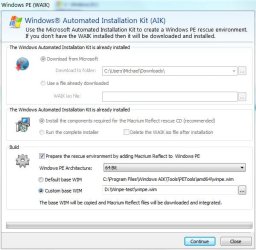
Once WAIK is downloaded you will be presented with this screen when creating a rescue pe disk.
Macrium pe.JPG
Note: I am running a 64 bit OS
Down the bottom you will see the location of the default winpe.wim.
I am actually using a custom winpe.wim in an other location. The custom winpe.wim was made by moving the default to this other location and then I used the DISM command to add my USB3 drivers. So I update my custom winpe.wim.

What I don't know is what Macrium does to determine you have already downloaded WAIK and therefore have a winpe.wim. It may not need all of the WAIK but I want to keep it anyway.
 

My Computer My Computer

Computer type
PC/Desktop
Computer Manufacturer/Model Number
Own build
OS
Windows 7x64 Home Premium SP1
CPU
Intel i7 2600k
Motherboard
ASUS P8Z68 Deluxe
Memory
G.Skill Ripjaws (DDR3-1600) 2x4GB
Graphics Card(s)
Nvidia GeForce GTS 450; Intel HD Graphics 3000(GT2+)
Monitor(s) Displays
Dell Ultrasharp IPS panel U2311H, Samsung SyncMaster P2350
Screen Resolution
1920x1080
Hard Drives
Samsung 850 Pro SSD 256GB, Samsung SSD 840 120GB, Seagates 1TB Barracuda ST31000528AS x2
PSU
Seasonic M12II 520W
Case
Lian Li Lancool PC-K60
Cooling
Case: 1x120mm, 3x140mm CPU: Hyper 212+
Keyboard
Logitech MK520 (wireless)
Mouse
Logitech MK520
Internet Speed
6-7 Mbps
Antivirus
Norton Security Premium, Malwarebytes on 2 (MSE on 3rd PC)
Browser
FireFox
Other Info
Audio: Logitech Z523 2.1
Ok thankyou all I think Iv'e got it now. Was just trying to make sure I fully understood what was actually been updated. I presume the 1.7gig WAIK ISO is good for life and doesn't need to be replaced/updated then.

Thankyou all
 

My Computer My Computer

Computer Manufacturer/Model Number
acer aspire 5935g
OS
Windows 7 Home Premium x64 SP1
CPU
intel(R)core(TM)2 duo CPU T6600 @ 2.20GHz
Motherboard
intel gm45/gm47 revision 07
Memory
3 gb ddr3
Graphics Card(s)
ati radeon hd4570/512mb
Monitor(s) Displays
lop156wh2-tle1 15.3 flat
Screen Resolution
1366x768
Hard Drives
OCZ-Agility3 60gig ssd
320gig external hdd
500gig external hdd
Mouse
Optical
Internet Speed
30Mbps Down/30Mbps Up
You might better using the SP1 WAIK update.

The winpe.wim's in that have better support for afd.

Alternatively, use winre.wim off your own hard drive. No need for a large download - and you will have windows system recovery options included.

I am not sure why macrium doesn't check to see if you are running 7 - then use the winre.wim you already have . ( Those using macrium on XP will still have to d/l waik , of course).

I did a very simple app which does exactly that - and throws in a couple of other useful free apps. as well.


On a related note,

I was looking at a way of building a proper full scale pe using only what is already on your HD.

It works well for those who had sp1 pre installed.

Sadly, it doesn't work for those who got sp1 via windows update.:(
 

My Computers My Computers

System One System Two

  • Computer type
    PC/Desktop
    OS
    7 X64
    CPU
    i5 8400
    Motherboard
    gigabyte b365m ds3h
    Memory
    2x8gb 3200mhz
    Hard Drives
    various
    PSU
    pure power 11 400w cm
    Case
    Coolermaster
    Cooling
    cryorig m9i
  • Computer type
    PC/Desktop
    OS
    7x64
    CPU
    g5400
    Motherboard
    ga b365m ds3h
    Memory
    8gb ddr4 2400
    PSU
    xfx pro 450w
hi everyone, my name is kungfupanda from indonesia.... :beer:


I read the pageone tutorial.... saw both the video...., but there are some things im still not clear... :hammer:


If I would like to make a partition backup/recovery, e.g. recover C only, or D only, etc, how can i do that...?


how to do the backup, and how to do the recovery...?


also on macrium there are 2 options... clone this disk and image this disk... so... image this disk means... imaging the entire disk... is it...?


what does clone this disk means...? is it like cloning to different computer/hdd like acronis...?


again, thank you :beer:
 

My Computer My Computer

Computer type
Laptop
Computer Manufacturer/Model Number
Asus K43S
OS
windows 7 home premium 64bit
CPU
Intel Core i3-2330m
Memory
6 Gib 10600 DDR3 RAM
Graphics Card(s)
Radeon 6730
Monitor(s) Displays
Generic PnP Monitor
Hard Drives
Intel SSD 330 Series 120 Gb
Seagate Momentus 750 Gb
Internet Speed
Slow, lol
Antivirus
KIS 2013
Cloning is making an exact copy of a disk or partition on another disk. Imaging just creates a file that you can restore from. You would use cloning if you want to "copy" your system onto a new disk and use imaging for backup and restore.
 

My Computer My Computer

Computer type
Laptop
Computer Manufacturer/Model Number
Hewlett-Packard/G62-107SA Notebook
OS
Microsoft Windows 7 Home Premium 64-bit Service Pack 1
CPU
Intel(R) Core(TM) i3 CPU M 330 @ 2.13GHz
Motherboard
Hewlett-Packard 1425
Memory
8 GB DDR3
Graphics Card(s)
Intel(R) HD Graphics
Sound Card
Realtek High Definition Audio
Monitor(s) Displays
Builtin
Screen Resolution
1366 x 768 x 32 bits (4294967296 colors) @ 60 Hz
Hard Drives
250 GB SATA Hard Disk Drive 7200 rpm
2TB Seagate GoFlex USB 2 Drive
1TB Iomega Prestige USB 2 Drive
1.5TB Iomega Prestige USB 2 Drive (Samsung)
2TB WD MyBook Live NAS.
Mouse
Logitech Anywhere MX
Internet Speed
152 Mbs download 10 Mbs upload
Antivirus
Norton 360
Browser
Chrome
may i ask how to do partition recovery (e.g. D recovery only or E recovery only) using macrium...?


i saw the video on page one... but i still don't understand... :(
 

My Computer My Computer

Computer type
Laptop
Computer Manufacturer/Model Number
Asus K43S
OS
windows 7 home premium 64bit
CPU
Intel Core i3-2330m
Memory
6 Gib 10600 DDR3 RAM
Graphics Card(s)
Radeon 6730
Monitor(s) Displays
Generic PnP Monitor
Hard Drives
Intel SSD 330 Series 120 Gb
Seagate Momentus 750 Gb
Internet Speed
Slow, lol
Antivirus
KIS 2013
1. you need an image that contains these partitions either by themselves or as part of an image with other partitions.
2. When you select the image in the restore screen you make sure the partition you wish to restore is checked and the others are unchecked. This is using the PE recovery disk. I have never done it with the Linux disk so I don't know what the procedure is there.

You might like to browse through the tutorials in the Macrium knowledgebase. They are for the Standard Macrium so some of the features you see may be missing but they are worth a look. Macrium KB
 

My Computer My Computer

Computer type
Laptop
Computer Manufacturer/Model Number
Hewlett-Packard/G62-107SA Notebook
OS
Microsoft Windows 7 Home Premium 64-bit Service Pack 1
CPU
Intel(R) Core(TM) i3 CPU M 330 @ 2.13GHz
Motherboard
Hewlett-Packard 1425
Memory
8 GB DDR3
Graphics Card(s)
Intel(R) HD Graphics
Sound Card
Realtek High Definition Audio
Monitor(s) Displays
Builtin
Screen Resolution
1366 x 768 x 32 bits (4294967296 colors) @ 60 Hz
Hard Drives
250 GB SATA Hard Disk Drive 7200 rpm
2TB Seagate GoFlex USB 2 Drive
1TB Iomega Prestige USB 2 Drive
1.5TB Iomega Prestige USB 2 Drive (Samsung)
2TB WD MyBook Live NAS.
Mouse
Logitech Anywhere MX
Internet Speed
152 Mbs download 10 Mbs upload
Antivirus
Norton 360
Browser
Chrome
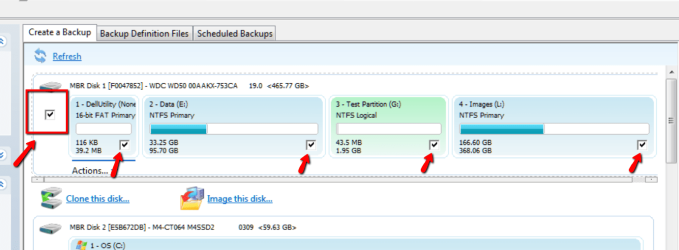
If you want to image only one or two partitions, make sure only those partitions are checked (see checkmarks to which the red arrows point). If you have several partitions on the disk, you can uncheck all with the checkmark in the red box in front and then check the one partition you want to image.

For the recovery you need to burn the recovery disc. I suggest you burn the WinPE disc because it gives you more options than the Linux disc. You can also use it to make images.
 

Attachments

  • 2012-03-12_1228.png
    2012-03-12_1228.png
    45.9 KB · Views: 146

My Computer My Computer

Computer Manufacturer/Model Number
HP, Dell, Gateway, Toshiba - 4 laptops and 2 desktops
OS
Vista, Windows7, Mint Mate, Zorin, Windows 8
CPU
from 1.6GHz Duo to i7
Monitor(s) Displays
2x HP w2207
Hard Drives
5x HDD, 7x SSD, 12x Externals
Keyboard
with trackball - no mices
Mouse
Trackball mice
Internet Speed
DSL 6000
The WinPE version Boot Recovery option works very well, had to use it today on a laptop that wouldn't respond to any of the several other boot repair methods tried.
 

My Computer My Computer

Computer type
PC/Desktop
Computer Manufacturer/Model Number
76~2.0
OS
Windows 7 Ult x64 - SP1/ Windows 8 Pro x64
CPU
Intel Core i5-3570K 4.6GHz
Motherboard
Gigabyte GA-Z77X UD3H, f18
Memory
8GB (2X4GB) DDR3 1600 Corsair Vengeance CL8 1.5v
Graphics Card(s)
Sapphire HD 7770 Vapor-X OC 1GB DDR5
Sound Card
Onboard VIA VT2021
Monitor(s) Displays
22" LCD Dell
Screen Resolution
1680x1050
Hard Drives
Samsung 840Pro 128GB SSD,
Seagate Barracuda 500GB SATA2 7200rpm 32MB cache, Seagate Barracuda 1TB SATA2 7200rpm 32MB cache,
PSU
Corsair HX650W
Case
Cooler Master Storm Scout
Cooling
Corsair H80 2x12cm Noctua NF P12 , 2x14cm case fans
Keyboard
Logitech Wave
Mouse
CM Sentinel
Internet Speed
Dismal
Antivirus
Avast
Browser
Opera Next
Other Info
Haswell laptop: HP Envy 17t-j, i7-4700MQ, GeForce 740M 2GB DDR3, 17.3" Full HD 1920x1080, 16GB RAM, Samsung 840 Pro 128GB, 1TB Hitachi 7200 HDD,
Desktop: eSATA ports,
External eSATA Seagate 500GB SATA2 7200rpm,
External WD USB 500GB
If you want to image only one or two partitions, make sure only those partitions are checked (see checkmarks to which the red arrows point). If you have several partitions on the disk, you can uncheck all with the checkmark in the red box in front and then check the one partition you want to image.

For the recovery you need to burn the recovery disc. I suggest you burn the WinPE disc because it gives you more options than the Linux disc. You can also use it to make images.

1. you need an image that contains these partitions either by themselves or as part of an image with other partitions.
2. When you select the image in the restore screen you make sure the partition you wish to restore is checked and the others are unchecked. This is using the PE recovery disk. I have never done it with the Linux disk so I don't know what the procedure is there.

You might like to browse through the tutorials in the Macrium knowledgebase. They are for the Standard Macrium so some of the features you see may be missing but they are worth a look. Macrium KB


thank you for both suggestions...


i'd like to another question, when i restore the image, for example if i only restore the C image file to the C drive, or the D to the D drive, will the other partition stays as it is untouched...?


thank you... :beer:
 

My Computer My Computer

Computer type
Laptop
Computer Manufacturer/Model Number
Asus K43S
OS
windows 7 home premium 64bit
CPU
Intel Core i3-2330m
Memory
6 Gib 10600 DDR3 RAM
Graphics Card(s)
Radeon 6730
Monitor(s) Displays
Generic PnP Monitor
Hard Drives
Intel SSD 330 Series 120 Gb
Seagate Momentus 750 Gb
Internet Speed
Slow, lol
Antivirus
KIS 2013
yes - each partition by itself. But you must not mix partitions during the imaging process. Then it is too easy to make a mistake. I always image each partition by itself and into it's own folder. Then I do not get mixed up with the XMLs and it is practically impossible to make a mistake during the recovery.
 

My Computer My Computer

Computer Manufacturer/Model Number
HP, Dell, Gateway, Toshiba - 4 laptops and 2 desktops
OS
Vista, Windows7, Mint Mate, Zorin, Windows 8
CPU
from 1.6GHz Duo to i7
Monitor(s) Displays
2x HP w2207
Hard Drives
5x HDD, 7x SSD, 12x Externals
Keyboard
with trackball - no mices
Mouse
Trackball mice
Internet Speed
DSL 6000
yes - each partition by itself. But you must not mix partitions during the imaging process. Then it is too easy to make a mistake. I always image each partition by itself and into it's own folder. Then I do not get mixed up with the XMLs and it is practically impossible to make a mistake during the recovery.


hi whs... +1 and thank you for your answers and images...


i'd like to ask, when i do partition image backup (with the scheduled xml file for example) is it full partition backup or incremental backup from the last time i used it...? im using macrium reflect free


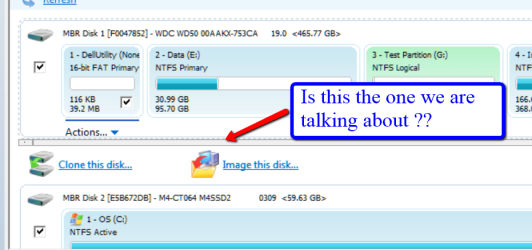
also, another dumb question, when i want to do imaging backup to external HDD, which "image this disk" icon should i click?


the one under C D E F partition


or the one under External HDD disk drive...?


thank you.... :cheers:
 

My Computer My Computer

Computer type
Laptop
Computer Manufacturer/Model Number
Asus K43S
OS
windows 7 home premium 64bit
CPU
Intel Core i3-2330m
Memory
6 Gib 10600 DDR3 RAM
Graphics Card(s)
Radeon 6730
Monitor(s) Displays
Generic PnP Monitor
Hard Drives
Intel SSD 330 Series 120 Gb
Seagate Momentus 750 Gb
Internet Speed
Slow, lol
Antivirus
KIS 2013
1. Free Macrium always makes full images - which I prefer because they are reliable and easy to manage.In Macrium Pro you can use incrementals (sucks) and differentials (better).

when i want to do imaging backup to external HDD, which "image this disk" icon should i click?
2. This question I do not understand. Can you post a picture of what you are looking at with an explanation on the picture
 

Attachments

  • 2012-03-13_0154.png
    2012-03-13_0154.png
    33.3 KB · Views: 135

My Computer My Computer

Computer Manufacturer/Model Number
HP, Dell, Gateway, Toshiba - 4 laptops and 2 desktops
OS
Vista, Windows7, Mint Mate, Zorin, Windows 8
CPU
from 1.6GHz Duo to i7
Monitor(s) Displays
2x HP w2207
Hard Drives
5x HDD, 7x SSD, 12x Externals
Keyboard
with trackball - no mices
Mouse
Trackball mice
Internet Speed
DSL 6000
I tried with my usb drive.It came as follows.I couldnot take screen shots so i'm explaining the steps dat came in the blue screen wizard.Pls help me.
Wen i opened ithe rescue.iso during booting from pendrive,a window opened As
1.Restore Wizard V5.0.4286.
2.Press next to continue.I pressed next,den
3.It said to locate the image.It showed two portions.In upper portion i selected the C drive image file wich i had stored in another drive.In the lower portion it showed my C drive(type:NTFS) and the disk space as 29.491GB.
4.Next
5.Select partition in lower section
6.I selected C(type:Primary)
7.Next
8.Choose the target disk(Select a disk to be used as the restore target)
9.Next
10.Select the drive from the following to start restoring.
But i could not see any drive there.It was fully white with no drive to select in it.Den wen i pressed next it said Please select the drive to restore or Select the target drive.But i did not find any drive in it.It was totally blank white screen.Pls help me wat to do.I'm not understanding y its not showing my C drive in it.
 

My Computer My Computer

Computer Manufacturer/Model Number
Compaq Presario CQ50-130US
OS
Windows 7 professional 32-bit
CPU
Intel(R) Pentium(R)Dual CPU [email protected] 2.00Ghz
Memory
2.00 GB
Monitor(s) Displays
Generic PnP Monitor
Screen Resolution
1280x800
Internet Speed
Lan
Hi Kumuranil. It looks like for some reason the recovery disk has not located your C drive.

1. Can you remember if it was shown in the tree when you looked for an image?
2. What type of disk is it and is it damaged?
3. Sometimes it helps if you shutdown your PC completely and leave it for a while before rebooting to the USB.
4. If none of that works and you have a running windows system it would be better to create the WinPE recovery disk although that will involve a 1.7GB download of the WAIK. It is a much more capable recovery environment.
 

My Computer My Computer

Computer type
Laptop
Computer Manufacturer/Model Number
Hewlett-Packard/G62-107SA Notebook
OS
Microsoft Windows 7 Home Premium 64-bit Service Pack 1
CPU
Intel(R) Core(TM) i3 CPU M 330 @ 2.13GHz
Motherboard
Hewlett-Packard 1425
Memory
8 GB DDR3
Graphics Card(s)
Intel(R) HD Graphics
Sound Card
Realtek High Definition Audio
Monitor(s) Displays
Builtin
Screen Resolution
1366 x 768 x 32 bits (4294967296 colors) @ 60 Hz
Hard Drives
250 GB SATA Hard Disk Drive 7200 rpm
2TB Seagate GoFlex USB 2 Drive
1TB Iomega Prestige USB 2 Drive
1.5TB Iomega Prestige USB 2 Drive (Samsung)
2TB WD MyBook Live NAS.
Mouse
Logitech Anywhere MX
Internet Speed
152 Mbs download 10 Mbs upload
Antivirus
Norton 360
Browser
Chrome
Keith is right. Go with the WinPE recovery disc. It is a little lengthy to create but it is worth it.
 

My Computer My Computer

Computer Manufacturer/Model Number
HP, Dell, Gateway, Toshiba - 4 laptops and 2 desktops
OS
Vista, Windows7, Mint Mate, Zorin, Windows 8
CPU
from 1.6GHz Duo to i7
Monitor(s) Displays
2x HP w2207
Hard Drives
5x HDD, 7x SSD, 12x Externals
Keyboard
with trackball - no mices
Mouse
Trackball mice
Internet Speed
DSL 6000
Back
Top